


1. Introduction: The Context of UML
To effectively use modern modeling tools, one must understand the foundation upon which they are built. The Unified Modeling Language (UML) was developed to provide a standard, general-purpose modeling language for software-intensive systems. It evolved from a period of fragmented methods into a globally recognized standard.
1.1 Historical Context
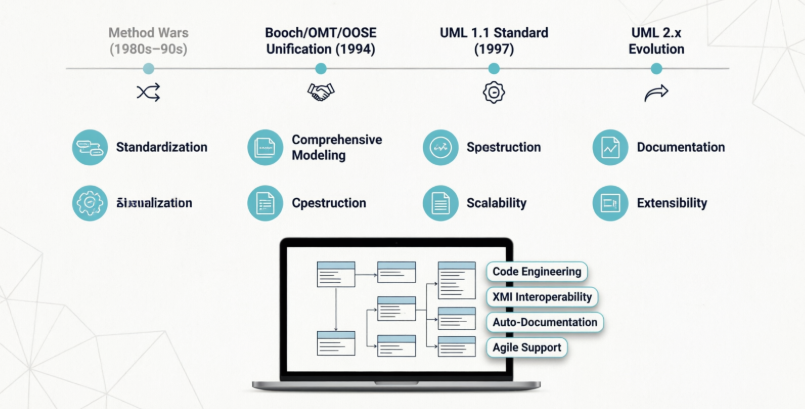
The origins of UML trace back to the “method wars” of the late 1980s and early 1990s. During this time, object-oriented modeling methods grew from fewer than 10 to more than 50. Three methods emerged as most prominent:
-
The Booch Method: Strong in design and construction.
-
OMT (James Rumbaugh): Best for analysis and data-intensive systems.
-
OOSE (Ivar Jacobson): Focused on use cases and requirements.
The unification effort began officially in October 1994 when Rumbaugh joined Grady Booch at Rational Software Corporation. A draft of the “Unified Method” (version 0.8) was released in 1995. Jacobson shortly joined to integrate OOSE. UML 0.9 was released in June 1996. To ensure industry-wide acceptance, a consortium including Microsoft, IBM, Hewlett-Packard, and Oracle was formed.
UML 1.0 was submitted to the Object Management Group (OMG) in early 1997, and UML 1.1 was officially adopted as a standard on November 14, 1997. The OMG subsequently managed maintenance, leading to UML 2, which enhanced precision and scalability.
1.2 Primary Goals of UML
When utilizing tools like Visual Paradigm, it is essential to keep the designers’ core goals in mind:
-
Standardization: Unifying best practices to end user confusion.
-
Comprehensive Modeling: Applicable from concept to executable artifact across diverse domains.
-
Four Key Functions: Visualizing, specifying, constructing, and documenting.
-
Scalability: Addressing complex, mission-critical systems.
-
Usability: Usable by humans and machines.
-
Tool Interoperability: Enabling exchange of model information.
-
Process Independence: Independent of any specific software development life cycle.
-
Extensibility: Tailorable via stereotypes, tagged values, and constraints.
2. Visual Paradigm: The Tooling Solution
Visual Paradigm (VP) is a leading Computer-Aided Software Engineering (CASE) tool that embodies the goals of UML. It provides an integrated environment to visualize, specify, construct, and document software artifacts. This guide details how to leverage Visual Paradigm to fulfill the primary goals of UML.
3. Aligning Visual Paradigm with UML Goals
Visual Paradigm is not just a drawing tool; it is a modeling engine designed to meet the specific objectives laid out during UML’s creation.
| UML Goal | Visual Paradigm Feature |
|---|---|
| Standardization | Enforces UML 2.x syntax rules; prevents invalid connections between elements. |
| Visualization | Intuitive drag-and-drop diagram editors for all 14 UML diagram types. |
| Construction | Code Engineering: Generate code from models and reverse-engineer code into models. |
| Documentation | Auto-generates HTML, PDF, and Word documentation directly from the model. |
| Interoperability | Supports XMI (XML Metadata Interchange) for exchanging models with other tools (e.g., Enterprise Architect, Rational Rose). |
| Extensibility | Supports UML Profiles, allowing users to create custom stereotypes and tagged values. |
| Scalability | Model management features allow splitting large systems into modules/packages. |
| Process Independence | Supports Agile, Waterfall, and RUP; includes process guidance tools but does not enforce one. |
4. Getting Started with Visual Paradigm
4.1 Installation and Setup
-
Download: Obtain the installer from the Visual Paradigm website. Choose between the Community Edition (free for non-commercial use) or Enterprise Edition (for full feature access).
-
Install: Run the installer. VP runs on Windows, macOS, and Linux (Java-based).
-
License: Activate the license key or select the Community Edition option upon first launch.
4.2 Creating a New Project
-
Launch Visual Paradigm.
-
Select Project > New.
-
Choose a template (e.g., “Blank” or “Agile Development”) or start from scratch.
-
Save the project file (
.vpp). This file contains the model repository, not just the diagrams.
5. Core Modeling Capabilities
5.1 Visualizing the System (Diagrams)
To fulfill the goal of Visualization, VP provides a palette of diagrams.
-
Creating a Diagram: Right-click in the Project Tree > Add Diagram. Select the type (e.g., Use Case, Class, Sequence).
-
Key Diagrams:
-
Use Case Diagram: Capture requirements (reflecting Jacobson’s OOSE influence).
-
Class Diagram: Define static structure and data (reflecting OMT/Booch influence).
-
Sequence/Communication Diagram: Model dynamic interactions.
-
Activity Diagram: Model workflows and business processes.
-
State Machine Diagram: Model object lifecycles.
-
5.2 Specifying and Documenting
UML aims to be usable by humans. VP enhances this through:
-
Element Descriptions: Double-click any element to add detailed descriptions, constraints, and tagged values.
-
Model Documentation: Go to Tools > Doc. Composer. You can create dynamic documentation that updates as the model changes. This addresses the goal of Documenting artifacts.
5.3 Constructing the System (Code Engineering)
To meet the goal of Construction, VP bridges the gap between models and code.
-
Forward Engineering: Design a Class Diagram, right-click the package, and select Generate Code. VP supports Java, C#, C++, Python, and more.
-
Reverse Engineering: Import existing source code. VP will generate the corresponding UML class diagrams automatically.
-
Round-Trip Engineering: Synchronize changes between code and model. If you change the code, update the model, and vice versa.
6. Advanced Tooling and Interoperability
6.1 Tool Interoperability (XMI)
As stated in UML’s history, a consortium was formed to ensure industry acceptance. A key part of this is Tool Interoperability.
-
Exporting: Go to Project > Export > XMI. This allows you to share your model with stakeholders using different tools.
-
Importing: You can import XMI files from other UML tools to continue work or perform audits.
6.2 Extensibility (Profiles and Stereotypes)
UML includes extension mechanisms because no single language covers every domain.
-
Managing Profiles: In VP, go to Tools > Profile Transactor.
-
Applying Stereotypes: Right-click an element > Open Specification > Stereotypes. You can apply standard stereotypes (e.g.,
<<entity>>,<<controller>>) or custom ones defined for your specific domain (e.g., Banking or Aerospace).
6.3 Scalability and Collaboration
For mission-critical systems, models can become large.
-
Model Modules: Split a large
.vppfile into smaller module files to improve performance. -
Version Control: VP integrates with Git, SVN, and Mercurial. This allows teams to collaborate on the same model without overwriting each other’s work, ensuring the language remains usable by teams, not just individuals.
7. Best Practices for UML Modeling in Visual Paradigm
To honor the Process Independence and Standardization goals of UML while using VP:
-
Don’t Over-Model: UML is a language, not the product. Model only what is necessary to communicate design or requirements.
-
Use Packages: Organize diagrams into logical packages (e.g., “Security,” “Database,” “UI”) to maintain Scalability.
-
Leverage Constraints: Use OCL (Object Constraint Language) or simple notes in VP to specify rules that graphics cannot convey.
-
Maintain Consistency: Use VP’s Model Checker (Tools > Model Checker) to ensure your diagrams adhere to UML 2.x standards.
-
Iterate: UML works best with iterative processes. Use VP to refine diagrams as requirements evolve, rather than trying to perfect them in one pass.
8. Conclusion
The history of UML is a story of unification—bringing together the Booch method, OMT, and OOSE to end the “method wars.” Its primary goals focus on standardization, visualization, construction, and documentation.
Visual Paradigm serves as a modern realization of these goals. By providing robust support for UML 2.x, code engineering, XMI interoperability, and extensibility, it allows developers to move from fragmented sketches to a standardized, executable blueprint. Whether for a small web service or a large-scale aerospace system, using Visual Paradigm in alignment with UML’s core principles ensures that your system’s architecture is clear, communicable, and robust.




 English
 Arabic
 Chinese (Simplified)
 Dutch
Dutch French
 German
 Italian
 Japanese
 Korean
 Portuguese
 Russian
 Spanish