


Note: The source material provided did not contain embedded images. This guide is formatted to accommodate visual elements where they would typically appear in UML documentation.
Introduction to UML Extension Mechanisms
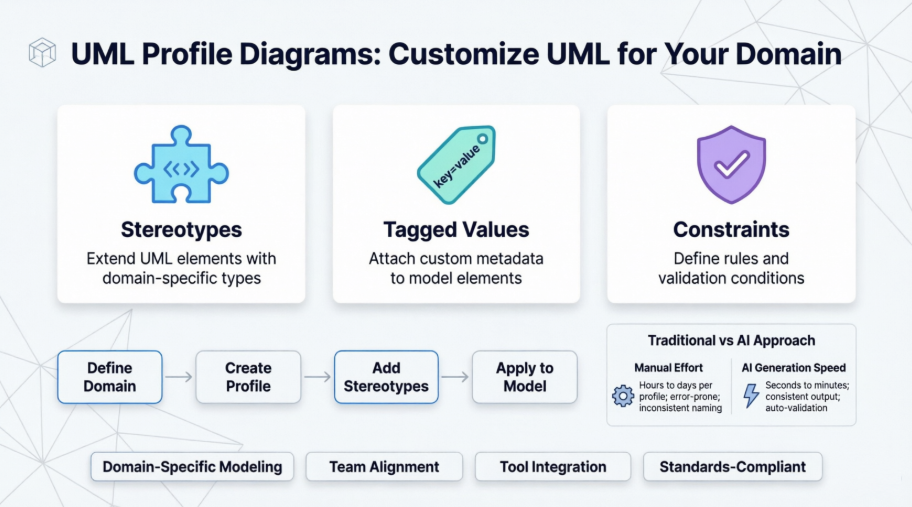
UML provides three primary extension mechanisms—stereotypes, tagged values, and constraints—that allow modelers to tailor the language to specific domains, platforms, or project needs without modifying the core UML metamodel. These mechanisms function by adding “metadata” to standard UML elements to change their meaning, add new properties, or enforce specific rules.
This extensibility is crucial for:
-
Adapting UML to specific programming platforms (e.g., .NET, J2EE, Spring)
-
Supporting domain-specific modeling (e.g., healthcare, finance, IoT)
-
Integrating with back-end tools like code generators, documentation systems, or project management platforms
-
Maintaining model consistency across large, distributed teams
The Three Primary Extension Mechanisms
2.1 Stereotypes: Extending UML Vocabulary
Stereotypes extend the vocabulary of UML by allowing you to create new kinds of building blocks derived from existing ones.
How They Work
-
A stereotype acts as a “metatype” or virtual class in the UML metamodel
-
It defines a variation of an existing element that has the same structure but different intent, meaning, or usage
-
Example: Model an “exception” by applying a stereotype to a standard class, marking it as a first-class citizen with specific behavior
Notation & Visual Representation
-
Stereotypes are rendered by placing the name enclosed in guillemets (« ») above or before the element name
-
Example:
«External User»,«RestController»,«Entity» -
Icons: To provide clearer visual cues, you can define a unique icon for a stereotype. This icon can either:
-
Be displayed alongside the element’s name, OR
-
Replace the standard UML symbol entirely (e.g., using a picture of a computer instead of a generic node symbol)
-
Practical Applications
class UserService {
  «RestController»
  +getUser(id: String): User
  +createUser(userData: Map): Response
}

class DatabaseException {
  «Exception»
  +errorCode: Integer
  +retryable: Boolean
}
2.2 Tagged Values: Extending Element Properties
Tagged values extend the properties of a UML element, allowing you to add new information to its specification.
How They Work
-
A tagged value is a tag-value pair of strings (metadata) attached to an element
-
While attributes describe data held by object instances, tagged values describe properties of the model element itself
-
Common uses: version tracking, author attribution, development status, security classification, deployment targets
Relationship to Stereotypes
-
In standard UML 2.0+, tagged values are technically attributes of a stereotype
-
When you apply a stereotype, you provide values for its “tags”
-
Example: A
«Microservice»stereotype might have tags like{deploymentTarget="Kubernetes", scalingPolicy="auto"}
Notation
-
Typically rendered as a string enclosed in braces
{}containing the tag name, equals sign, and value -
Example:
{author = "Joe", version = 1.1, lastReviewed = "2024-03-15"}
Practical Applications
class PaymentProcessor {
  «SecureComponent»
  {encryptionLevel = "AES-256", compliance = "PCI-DSS", owner = "Security Team"}
  +processPayment(amount: Decimal): TransactionResult
}
2.3 Constraints: Extending Semantic Rules
While stereotypes and tagged values add new types and properties, constraints extend the semantics of a building block.
How They Work
-
Constraints are Boolean expressions that define new rules or modify existing ones for an element
-
They ensure the model remains well-formed according to specific project requirements
-
Can be written in:
-
Natural language (for human readability)
-
OCL (Object Constraint Language) for formal, tool-processable rules
-
Custom expression languages supported by modeling tools
-
Notation
-
Enclosed in braces
{}and often prefixed withinv:for invariants -
Example:
{inv: self.balance >= 0}or{value must be positive}
Practical Applications
class BankAccount {
  +accountNumber: String
  +balance: Decimal
  {inv: balance >= overdraftLimit}
  {inv: accountNumber.matches("[A-Z]{2}[0-9]{10}")}

  +withdraw(amount: Decimal): Boolean
  {pre: amount > 0 and amount <= balance + overdraftLimit}
  {post: balance = balance@pre - amount}
}
The Role of Profiles in Organizing Extensions
Extensions are typically organized and packaged into Profiles. A Profile is a restricted form of a metamodel used to adapt UML for a specific purpose.
Key Characteristics of Profiles
-
Purpose-Built: Adapt UML for particular programming platforms (.NET, J2EE), domains (healthcare, automotive), or methodologies (Agile, SAFe)
-
Reusable: Once defined, a profile can be applied to multiple packages or projects
-
Encapsulated: Groups related stereotypes, tagged values, and constraints into a single, manageable unit
-
Versionable: Profiles can evolve independently of the models that use them
Applying a Profile
@profile CloudInfrastructureProfile
package CloudArchitecture {
  /* All elements in this package can now use:
   * - «VirtualMachine», «LoadBalancer», «AutoScalingGroup» stereotypes
   * - Tags like {region="us-west-2", instanceType="t3.medium"}
   * - Constraints like {inv: minInstances <= maxInstances}
   */
}
Benefits of Using Profiles
-
Consistency: Ensures all team members use extensions uniformly
-
Tool Support: Modeling tools can provide specialized palettes, validators, and code generators
-
Documentation: Profiles serve as living documentation of domain-specific modeling conventions
-
Interoperability: Facilitates model exchange between teams using the same profile
Visual Paradigm Support for UML Extensions
Visual Paradigm provides deep integration for UML extension mechanisms, often exceeding standard UML requirements for better flexibility and productivity.
4.1 Customization and Management Features
Independent Tagged Values
-
Unlike strict UML 2.0, Visual Paradigm allows you to add tagged values directly to any element (like BPMN tasks or ERD entities) without needing to apply a stereotype first
-
This provides greater flexibility for lightweight metadata annotation
Profile Diagrams
-
Visually manage extensions using Profile Diagrams
-
Define collections of related stereotypes and their tag definitions in a dedicated diagram type
-
Drag-and-drop interface for creating and organizing profile elements
Default Tagged Values
-
Configure default tags for specific element types
-
Example: Every new Class automatically includes
{securityLevel: "internal", owner: "team-name"} -
Reduces repetitive manual entry and enforces organizational standards
4.2 Practical Implementation Tips
Flexible Data Types for Tags
-
Tags in Visual Paradigm aren’t limited to strings. You can define them as:
-
Booleans:
{isDeprecated: true} -
Integers/Decimals:
{maxRetries: 3},{timeoutSeconds: 30.5} -
Dates:
{reviewDate: "2024-12-31"} -
Enumerations:
{environment: ["dev", "staging", "prod"]} -
Element References:
{dependsOn: [AuthenticationService, LoggingService]}
-
Batch Editing via Model Grids
-
Add tagged value columns to model grids
-
Edit metadata for dozens of elements simultaneously in a spreadsheet-like interface
-
Ideal for bulk updates during refactoring or compliance audits
AI-Assisted Precision
-
The Visual Paradigm AI ecosystem can help:
-
Suggest appropriate stereotypes based on element context
-
Validate constraint expressions for syntax and logical consistency
-
Auto-generate profile documentation from existing model annotations
-
Identify inconsistencies in tagged value usage across large projects
-
Workflow Integration
-
Export tagged values to external tools via:
-
CSV/Excel reports for project management
-
JSON/XML for CI/CD pipeline integration
-
Custom scripts via Visual Paradigm’s API
-
-
Generate platform-specific code scaffolding from stereotype annotations
-
Produce compliance reports by querying constraint satisfaction across models
Best Practices and Domain-Specific Applications
General Best Practices
-
Document Your Profile: Maintain a companion document explaining each stereotype, tag, and constraint
-
Version Control Profiles: Treat profile definitions as code—store in Git, review changes, tag releases
-
Start Small: Begin with 3-5 high-value stereotypes before expanding your profile
-
Validate Early: Use tool-supported validation to catch constraint violations during modeling, not just at generation time
-
Balance Flexibility and Rigor: Over-constraining can stifle creativity; under-constraining reduces model value
Domain-Specific Examples
Healthcare Domain Profile
«ClinicalDataElement» {
  hipaaCompliant: Boolean = true,
  dataSensitivity: ["PHI", "PII", "public"],
  retentionPeriod: Integer // in years
}

{inv: dataSensitivity = "PHI" implies encryptionRequired = true}
{inv: retentionPeriod >= 6 when dataSensitivity = "PHI"}
Cloud Infrastructure Profile
«AutoScalingGroup» {
  minInstances: Integer = 2,
  maxInstances: Integer = 10,
  scalingMetric: ["CPU", "Memory", "RequestCount"],
  cooldownSeconds: Integer = 300
}

{inv: minInstances <= maxInstances}
{inv: cooldownSeconds >= 60 and cooldownSeconds <= 3600}
Microservices Architecture Profile
«BoundedContext» {
  domain: String,
  teamOwner: String,
  apiVersion: String,
  deploymentStrategy: ["blue-green", "canary", "rolling"]
}

«SagaParticipant» {
  compensatingAction: String,
  timeoutSeconds: Integer = 30
}
When to Use Each Mechanism
| Mechanism | Best For | Avoid When |
|---|---|---|
| Stereotypes | Creating new domain concepts, changing visual representation, enabling tool-specific behaviors | You only need to add simple metadata without changing element semantics |
| Tagged Values | Adding metadata for documentation, code generation, or project management | The property fundamentally changes the element’s meaning (use a stereotype instead) |
| Constraints | Enforcing business rules, validation logic, or architectural policies | The rule is too complex for OCL or requires runtime evaluation (handle in code) |
- Reference
- UML Extensibility Mechanism Guide: Comprehensive overview of UML extension mechanisms including stereotypes, tagged values, and constraints with Visual Paradigm implementation examples.
- UML Profile Diagram Tutorial: Introduction to UML profile diagrams and how they package stereotypes, tagged values, and constraints for domain-specific modeling.
- Understanding UML Stereotypes: Detailed explanation of stereotype notation, usage, and visual representation in UML diagrams.
- Working with Tagged Values in Visual Paradigm: Step-by-step guide to adding, configuring, and managing tagged values for UML elements in Visual Paradigm.
- What is a Profile Diagram?: Explanation of profile diagrams as a tool for defining and organizing UML extensions for specific platforms or domains.
- Stereotype Management in Visual Paradigm: Documentation on creating, applying, and customizing stereotypes within Visual Paradigm’s modeling environment.
- How to Use Stereotypes and Tagged Values: Practical tutorial demonstrating the application of stereotypes and tagged values to extend UML models for specific project needs.
- UML Practical Guide: Profiles and Extensions: Practical guidance on using profile diagrams to create and visualize tagged values of stereotypes in real-world modeling scenarios.
- Configuring Stereotypes with Profile Diagrams: Tutorial on visually managing UML extensions using profile diagrams to define collections of related stereotypes and tag definitions.
- Defining Custom Model Element Properties: PDF guide on adding custom properties and tagged values to model elements without requiring stereotype application.
- Configuring Stereotype Properties and Data Types: Advanced configuration options for stereotype tagged values, including support for Booleans, Integers, Dates, and element references.
- Adding New Properties to Model Elements: Instructions for extending model elements with custom properties and metadata for enhanced model documentation and tool integration.
- Understanding Tagged Values in Profiles: PDF documentation explaining the relationship between stereotypes and tagged values in UML 2.0+ and how they function within profile definitions.


 English
 Arabic
 Chinese (Simplified)
 Dutch
Dutch French
 German
 Italian
 Japanese
 Korean
 Portuguese
 Russian
 Spanish