


Introduction to UML Associations
In UML (Unified Modeling Language), both aggregation and composition are specialized types of associations that represent “whole-part” relationships. While they share conceptual similarities, they differ significantly in the strength of their connection and how they manage object lifetimes.
Understanding these distinctions is critical for:
-
Designing robust object-oriented systems
-
Communicating architectural intent clearly
-
Ensuring proper resource management and memory handling
-
Creating accurate, maintainable UML diagrams
Aggregation (Simple Aggregation)
Nature of Relationship
Often called “simple aggregation,” this represents a “has-a” relationship where one class serves as the “whole” and others function as its “parts.” This relationship is primarily conceptual and does not inherently alter navigation semantics or object lifetimes.
Key Characteristics
| Aspect | Description |
|---|---|
| Ownership | Weak; the whole does not exclusively own its parts |
| Part Sharing | A part may be shared by multiple aggregate objects simultaneously |
| Lifetime Dependency | Parts can exist independently; destroying the whole does not destroy its parts |
| Use Case Example | A University has Professors – professors can exist without the university, and may work at multiple institutions |
UML Notation
┌─────────────────┐       ◇────────┌─────────────────┐
│    Whole        │───────◊        │      Part       │
│   (Aggregate)   │   open diamond │   (Component)   │
└─────────────────┘                └─────────────────┘
-
Rendered as a plain association line with an open (hollow) diamond at the “whole” end
-
Multiplicity at either end can be flexible (e.g.,
1,*,0..*)
Code Example (Java)
public class University {
    private List<Professor> professors; // Aggregation: professors exist independently

    public void addProfessor(Professor p) {
        professors.add(p); // Professor may belong to multiple universities
    }
}

public class Professor {
    // Professor can exist without any University instance
    private String name;
    private String department;
}
Composition (Composite Aggregation)
Nature of Relationship
Composition represents a stronger form of aggregation characterized by strong ownership and exclusive containment. It models scenarios where parts are integral to the whole and cannot meaningfully exist without it.
Key Characteristics
| Aspect | Description |
|---|---|
| Ownership | Strong; exclusive ownership by exactly one composite |
| Part Sharing | A part belongs to exactly one composite at a time |
| Lifetime Dependency | Parts have coincident lifetimes with the whole; destruction of the whole cascades to its parts |
| Use Case Example | A House has Rooms – rooms cannot exist independently of the house; demolishing the house destroys its rooms |
UML Notation
┌─────────────────┐       ◆────────┌─────────────────┐
│    Whole        │───────◆        │      Part       │
│   (Composite)   │  filled diamond│   (Component)   │
└─────────────────┘                └─────────────────┘
-
Rendered as a plain association with a filled (black) diamond at the “whole” end
-
Alternative notation: Parts may be graphically nested within the composite symbol
-
Multiplicity at the composite end is restricted to
1or0..1
Implementation Note
Class attributes are essentially shorthand notation for composition. When you declare:
public class House {
    private Room livingRoom; // Implicit composition
}
This represents a compositional relationship where livingRoom is owned exclusively by House.
Code Example (Java)
public class House {
    private List<Room> rooms; // Composition: rooms are owned exclusively

    public House() {
        rooms = new ArrayList<>();
        rooms.add(new Room("Living Room")); // House creates its parts
    }

    // When House is garbage collected, its Rooms become unreachable
}

public class Room {
    private String name;
    // Room has no meaningful existence outside a House context
}
Key Differences Summary
| Feature | Aggregation | Composition |
|---|---|---|
| Ownership Strength | Weak; “Has-a” relationship | Strong; exclusive ownership |
| Part Sharing | A part can be shared by multiple wholes | A part belongs to exactly one whole |
| Lifetime Management | Independent; lifetimes are decoupled | Coincident; parts live and die with the whole |
| UML Notation | Open diamond (◇) at whole end | Filled diamond (◆) at whole end |
| Multiplicity Constraint | Flexible (*, 0..*, etc.) at whole end |
Restricted to 0..1 or 1 at whole end |
| Creation Responsibility | Parts may be created externally | Composite is responsible for part creation |
| Destruction Responsibility | Parts survive whole’s destruction | Whole must destroy its parts upon deletion |
| Design Intent | Loose coupling, flexible architecture | Strong encapsulation, cohesive units |
Decision Flowchart: Aggregation vs. Composition
Does the part have meaning outside the whole?
├─ YES → Consider Aggregation
└─ NO → Does the whole exclusively own the part?
    ├─ YES → Use Composition
    └─ NO → Use Aggregation or plain Association
Visual Paradigm UML Modeling Tool Support
Visual Paradigm provides a comprehensive, professional-grade modeling environment that fully supports the UML 2.x standard, now augmented by an AI-powered ecosystem for automated diagram generation and architectural analysis.
Standard UML Diagram Support
The platform supports all 14 standard UML diagrams, bridging the gap between requirements and implementation:
| Diagram Type | Primary Use Case |
|---|---|
| Class Diagram | Model system structure, classes, attributes, operations |
| Use Case Diagram | Capture functional requirements and actor interactions |
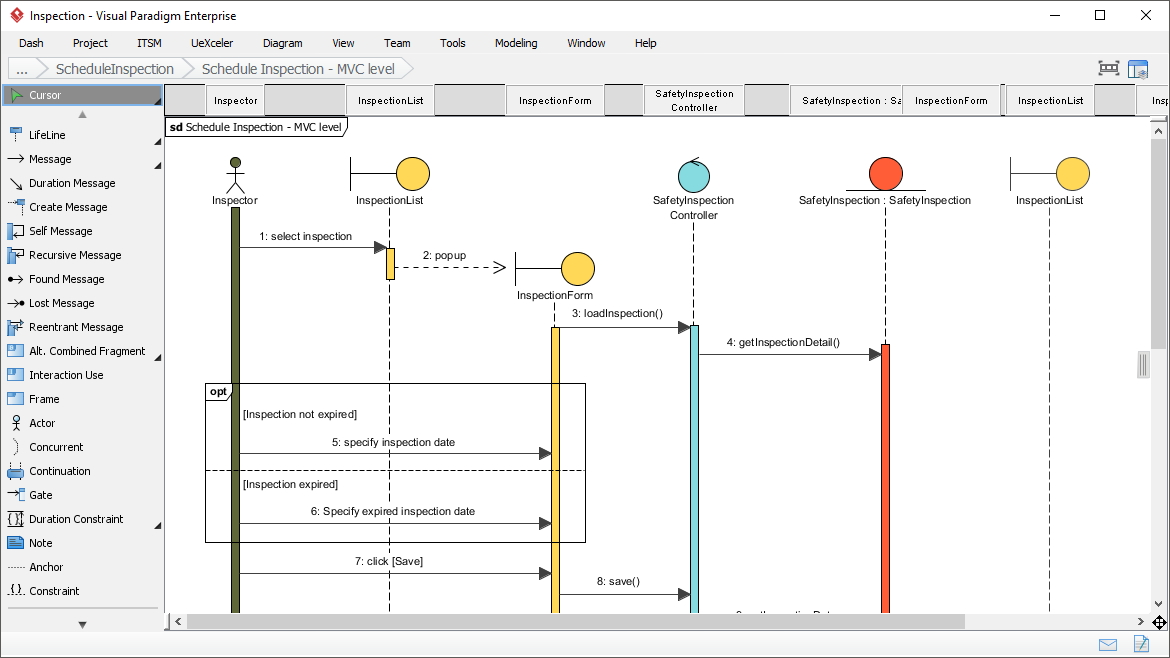
| Sequence Diagram | Visualize object interactions over time via message passing |
| Activity Diagram | Model workflow and control flow using flowchart notation |
| State Machine Diagram | Design event-driven behavior and state transitions |
| Component Diagram | Show modular decomposition and component dependencies |
| Deployment Diagram | Map software artifacts to hardware infrastructure |
| Package Diagram | Organize large models into manageable namespaces |
| Object Diagram | Display instance-level snapshots of class structures |
| Composite Structure Diagram | Reveal internal structure of classifiers and collaborations |
| Timing Diagram | Model time-constrained behavior in real-time systems |
| Interaction Overview Diagram | Combine multiple interactions into high-level workflows |
| Communication Diagram | Emphasize object links and message sequences |
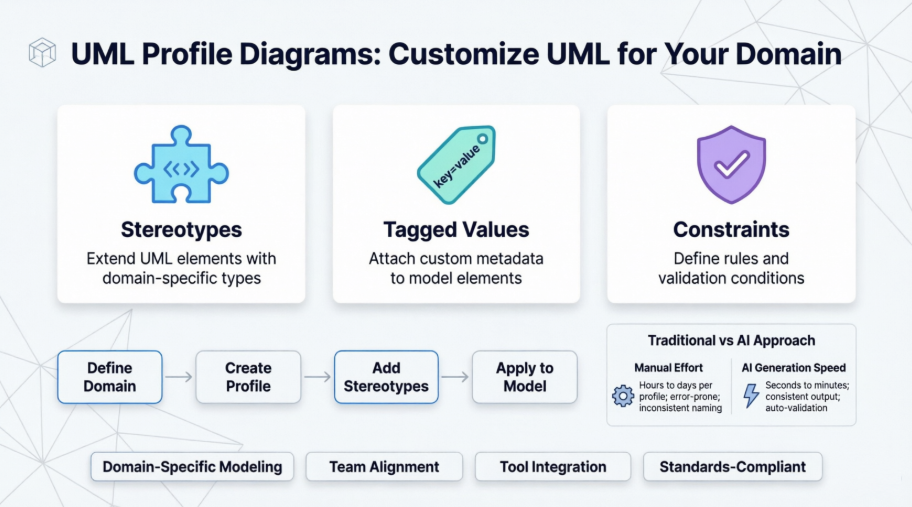
| Profile Diagram | Define custom stereotypes and extensions to UML |
Advanced Engineering Capabilities
🔁 Code Engineering
-
Bidirectional Round-Trip Engineering: Generate source code (Java, C++, PHP, Python, C#, etc.) from diagrams or reverse-engineer existing code into UML models
-
Instant Reverse: Parse compiled binaries, DLLs, or source files to reconstruct class diagrams
-
Language Support: Java, C/C++, C#, VB.NET, PHP, Python, Ruby, Ada, Objective-C, XML/XSD
🗄️ Database Design Integration
-
Synchronize Class diagrams with Entity Relationship Diagrams (ERD)
-
Generate Hibernate ORM mapping tiers for seamless application development
-
Forward/reverse engineer database schemas from physical data models
-
Support for conceptual, logical, and physical data modeling layers
🔗 IDE Integration
Operate directly within popular development environments:
-
Eclipse
-
IntelliJ IDEA
-
NetBeans
-
Visual Studio
-
Android Studio
🔍 Traceability & Model Linking
-
Model Transitor: Link model elements across different diagram types for end-to-end traceability
-
Sub-diagram Support: Create multi-level elaborations with nested diagram contexts
-
Reference Management: Embed internal/external resource links directly in model elements
👥 Team Collaboration
-
Concurrent editing with real-time synchronization
-
Automatic version control with branching, tagging, and rollback capabilities
-
Conflict resolution tools for merge scenarios
-
PostMania: Cloud-based commenting and review platform for stakeholder feedback
AI-Powered Modeling Features
The integrated AI engine acts as a “creative co-pilot,” transforming text-based requirements into actionable designs and accelerating the modeling workflow.
🤖 Instant Diagram Generation
Use natural language prompts to instantly create professional diagrams:
Prompt: "Create a class diagram for an e-commerce system with Customer, Order, Product, and Payment classes"
→ AI generates: Complete class diagram with attributes, operations, and relationships
Supported Diagram Types for AI Generation:
-
Class Diagrams
-
Sequence Diagrams
-
State Machine Diagrams
-
Use Case Diagrams
-
Requirement Diagrams
-
Object Diagrams
-
Component Diagrams
-
Activity Diagrams
💬 Conversational Editing
Modify existing models via the AI Chatbot with intuitive commands:
• "Add a PaymentGateway class with process() and validate() methods"
• "Refactor Student into a superclass with GraduateStudent and UndergraduateStudent subclasses"
• "Change the association between Order and Product to composition"
• "Add a sequence diagram showing the checkout process"
🔍 Architectural Analysis & Critique
The AI performs intelligent quality assessments:
-
Design Flaw Detection: Identify tight coupling, circular dependencies, or violation of SOLID principles
-
Pattern Suggestions: Recommend appropriate design patterns (Singleton, Factory, Observer, Strategy)
-
Complexity Metrics: Generate reports on cyclomatic complexity, cohesion, and coupling scores
-
Refactoring Guidance: Propose structural improvements with before/after visualizations
❓ “Ask Your Diagram” Knowledge Querying
Query your visual models as an interactive knowledge base:
• "What are the main use cases for the Admin actor?"
• "Generate a summary of the payment processing workflow"
• "List all classes that depend on the DatabaseConnection interface"
• "Create a project proposal document based on this model"
🎨 Design Pattern Mastery
Instruct the AI to automatically apply complex architectural patterns:
Prompt: "Apply the Repository pattern to the User management module"
→ AI generates: Repository interface, concrete implementation, and dependency injection setup

Prompt: "Refactor this tight coupling using the Observer pattern"
→ AI generates: Subject/Observer interfaces, registration methods, and notification logic
🌐 Cloud Integration & Accessibility
-
VP Online: Browser-based modeling with AI capabilities accessible anywhere
-
Desktop Integration: AI Chatbot embedded directly in Visual Paradigm desktop application
-
Cross-Platform Sync: Models and AI interactions synchronized across devices
Best Practices & Implementation Tips
When to Use Aggregation
✅ Use aggregation when:
-
Parts have independent business meaning and lifecycle
-
Components are shared across multiple aggregates
-
You need flexible, loosely-coupled architecture
-
Parts may be added/removed dynamically at runtime
❌ Avoid aggregation when:
-
Parts cannot meaningfully exist without the whole
-
Exclusive ownership is a business requirement
-
You need strong encapsulation guarantees
When to Use Composition
✅ Use composition when:
-
Parts are integral to the whole’s identity
-
Exclusive ownership is enforced by business rules
-
You want automatic resource cleanup via cascading destruction
-
Modeling value objects or internal implementation details
❌ Avoid composition when:
-
Parts need to be shared or transferred between wholes
-
Independent testing or mocking of parts is required
-
Runtime flexibility in part management is essential
Modeling Guidelines in Visual Paradigm
-
Start with Requirements: Use AI prompt: “Generate a class diagram showing aggregation vs composition for a library system”
-
Validate Multiplicities: Ensure composition ends use
1or0..1multiplicity -
Document Intent: Add notes explaining lifetime management decisions
-
Leverage AI Analysis: Run “Check for composition/aggregation consistency” to validate model integrity
-
Generate Documentation: Use “Ask Your Diagram” to auto-generate design rationale reports
Common Pitfalls to Avoid
| Pitfall | Solution |
|---|---|
| Using composition for shareable parts | Switch to aggregation; model sharing explicitly |
| Forgetting cascading destruction logic | Implement explicit cleanup in composite destructor |
| Overusing composition, creating tight coupling | Evaluate if aggregation or plain association suffices |
| Ignoring multiplicity constraints | Validate composition ends have 0..1 or 1 cardinality |
| Confusing UML notation (open vs. filled diamond) | Use Visual Paradigm’s palette with visual previews |
References
- Visual Paradigm: Smarter Diagrams. Powered by AI.: Visual Paradigm is a comprehensive platform for visual modeling, code engineering, agile management, and enterprise architecture, now augmented with generative AI capabilities for instant diagram generation and intelligent analysis.
- UML Tool – Visual Paradigm: Professional UML modeling software supporting all 14 standard UML diagrams with bidirectional code engineering, database synchronization, and IDE integration for streamlined software development.
- UML Tool Features – Visual Paradigm: Detailed overview of UML modeling capabilities including class, sequence, use case, and activity diagrams with advanced features like model transitor, traceability linking, and team collaboration tools.
- UML Modeling User Guide – Visual Paradigm: Comprehensive documentation for UML modeling in Visual Paradigm, covering diagram creation, notation guidelines, and best practices for all UML 2.x diagram types.
- UML Solution – Visual Paradigm (CN): Chinese-language resource detailing UML tool capabilities, use cases, and implementation strategies for enterprise software modeling projects.
- Visual Paradigm Editions Comparison: Feature comparison across Visual Paradigm product editions (Community, Standard, Professional, Enterprise) to help select the appropriate licensing tier for your modeling needs.
- UML Tool Solution Overview – Visual Paradigm: Additional Chinese-language documentation on UML modeling workflows, integration options, and enterprise deployment scenarios.
- Visual Paradigm AI Chatbot: Cloud-based AI assistant for visual modeling that transforms natural language prompts into UML diagrams and supports conversational model refinement.
- Guide to AI-Powered UML Diagram Generation: Step-by-step tutorial for using Visual Paradigm’s AI engine to generate, edit, and analyze UML diagrams through natural language interaction.
- AI Chatbot Features – Visual Paradigm: Overview of AI Chatbot capabilities including instant diagram generation, conversational editing, architectural analysis, and documentation generation from visual models.
- AI Diagram Generation – Visual Paradigm: Dedicated page explaining text-to-diagram AI functionality, supported diagram types, and use cases for accelerating modeling workflows.
- Visual Paradigm AI Demo – YouTube: Video demonstration showcasing AI-powered UML modeling features, including prompt-based diagram creation and conversational refinement workflows.
- UML Class Diagram Guide with AI – Visual Paradigm Chat: Definitive guide to modeling system structure using AI-assisted class diagrams, covering best practices, patterns, and advanced techniques.
- AI-Assisted UML Class Diagram Generator: Dedicated AI tool interface for generating class diagrams from textual descriptions with intelligent relationship inference and pattern application.
- UML Component Diagram with AI – Visual Paradigm Chat: Resource for creating component diagrams using AI assistance, including modular architecture design and dependency visualization techniques.
💡 Pro Tip: When modeling aggregation vs. composition in Visual Paradigm, use the AI Chatbot prompt: “Review my class diagram and suggest where composition should replace aggregation based on lifetime dependency rules” to leverage intelligent architectural guidance.


 English
 Arabic
 Chinese (Simplified)
 Dutch
Dutch French
 German
 Italian
 Japanese
 Korean
 Portuguese
 Russian
 Spanish