


Enterprise architecture is often perceived as a complex web of diagrams, models, and specifications. While the ambition is to create a clear picture of an organization, the reality can become overwhelming without structure. This is where ArchiMate Viewpoints come into play. They provide the necessary framework to present architecture information in a way that specific stakeholders can understand and use.
For beginners, the distinction between the model, the view, and the viewpoint can seem subtle yet critical. Understanding these concepts allows architects to communicate effectively without cluttering the message with irrelevant technical details. This guide breaks down the essentials of ArchiMate Viewpoints, offering practical advice on how to define, design, and deploy them within an architecture practice.
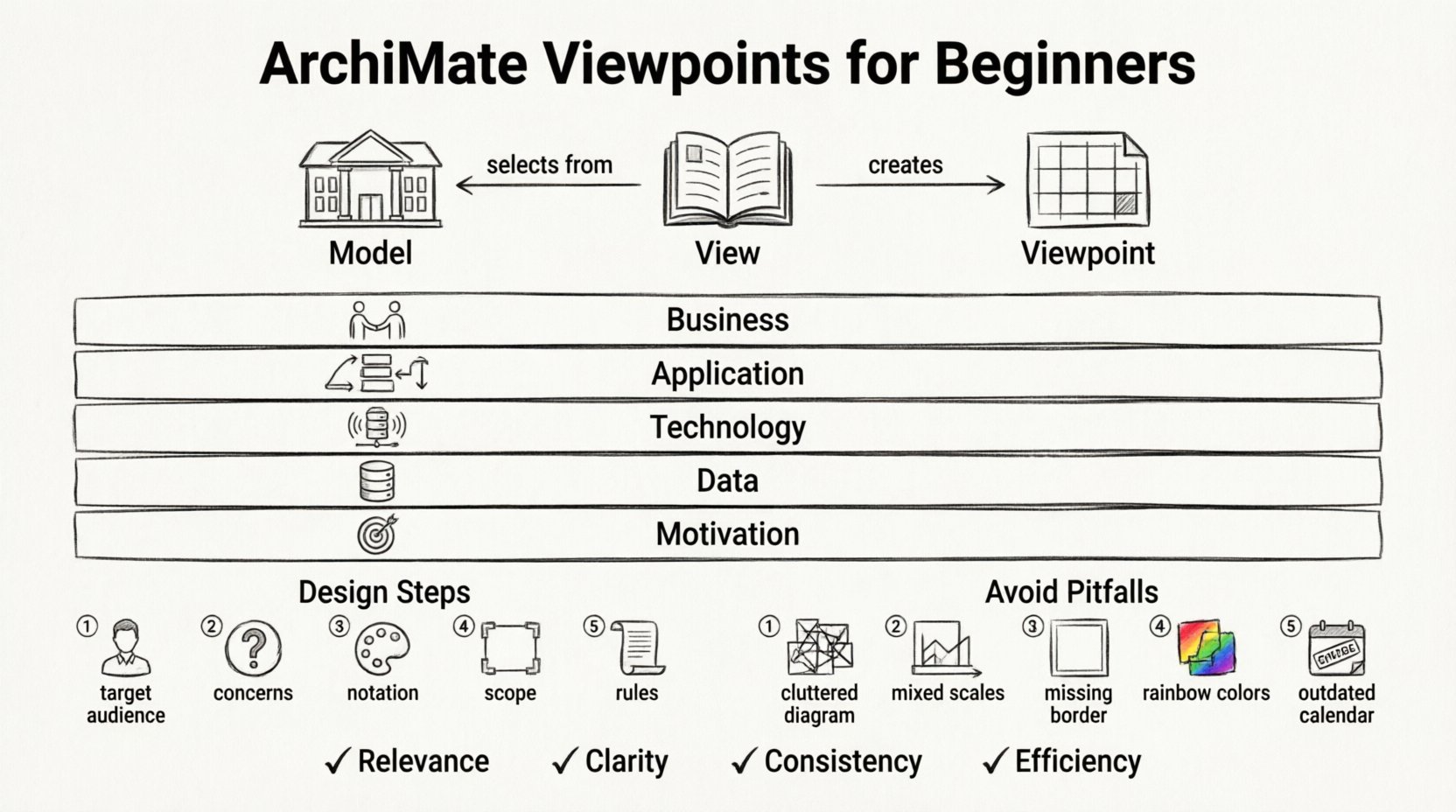
Understanding the Core Concepts 🧩
Before diving into the mechanics of creating a viewpoint, it is essential to clarify the terminology. These three terms form the foundation of any architecture description.
1. The Architecture Model
The architecture model is the comprehensive repository of all architectural knowledge. It contains every element, relationship, and principle defined within the scope of the project or organization. Think of it as the entire library of books. It is the single source of truth, often too large and detailed for any single person to review in its entirety.
2. The View
A view is a specific representation of the model tailored for a particular audience. It is a selection of elements from the model, presented using specific notation and layout. If the model is the library, a view is a specific book or chapter borrowed by a reader. A view answers the question: What does this person need to see right now?
3. The Viewpoint
The viewpoint defines how the view is constructed. It specifies the concerns that need to be addressed, the notation to be used, and the rules for selecting elements. It is the template or pattern used to generate the view. If the view is a book, the viewpoint is the writing style and the table of contents.
- Model: The complete data set.
- View: The specific output for a user.
- Viewpoint: The rule set for creating the output.
Why Viewpoints Matter in Architecture 📋
Without viewpoints, architecture descriptions tend to become generic or overly technical. Stakeholders at different levels of an organization have different concerns. A business executive is interested in value streams and capabilities, while an IT manager cares about infrastructure and application interfaces.
Viewpoints solve this mismatch. They ensure that the information presented aligns with the audience’s specific needs. By using viewpoints, you achieve the following:
- Relevance: Stakeholders see only what matters to them.
- Clarity: Unnecessary technical details are filtered out.
- Consistency: All views follow the same design principles and standards.
- Efficiency: Time is not wasted generating diagrams that no one will read.
When you establish a set of standard viewpoints, you create a predictable environment. Stakeholders know what to expect when they request an architecture review. This predictability builds trust and facilitates better decision-making processes.
Aligning Viewpoints with ArchiMate Layers 🏗️
ArchiMate is structured around several layers. Each layer represents a specific domain of the enterprise. Viewpoints are often designed to focus on one or more of these layers, or the relationships between them.
1. Business Layer
This layer focuses on the core business elements. A viewpoint here might highlight:
- Business processes and activities.
- Business roles and actors.
- Business services and applications.
2. Application Layer
This layer deals with the software systems. A viewpoint here focuses on:
- Application components and interfaces.
- Data objects managed by the software.
- Interactions between applications.
3. Technology Layer
This layer covers the physical infrastructure. Elements include:
- Hardware nodes and devices.
- Network connections.
- System software.
4. Data Layer
Data objects represent information used by the business. Viewpoints here clarify:
- Information flows.
- Storage requirements.
- Data ownership.
5. Motivation Layer
This layer explains why changes are happening. It includes:
- Goals and drivers.
- Principles and requirements.
- Deliverables and outcomes.
By mapping viewpoints to these layers, you ensure that the scope of the diagram is clear. You avoid mixing concerns, such as showing hardware details on a strategic business roadmap.
Designing Your First Viewpoint 🛠️
Creating a viewpoint is a deliberate process. It requires analysis of the audience and the information required. Follow these steps to design an effective viewpoint.
Step 1: Identify the Audience
Who will be looking at this diagram? Is it a C-level executive, a development team, or an external auditor? The audience determines the level of abstraction.
- Executives: High-level, strategic, focusing on value and goals.
- Developers: Detailed, technical, focusing on interfaces and data.
- Managers: Process-oriented, focusing on roles and workflows.
Step 2: Define the Concerns
What questions must this diagram answer? For example, a migration viewpoint answers: What is the current state, and what is the target state? A business capability viewpoint answers: Which capabilities do we have, and which are missing?
Step 3: Select the Notation
Decide on the visual style. Will you use standard ArchiMate symbols? Will you use color coding to indicate status? Will you include specific stereotypes? Consistency in notation helps stakeholders recognize the meaning of symbols quickly.
Step 4: Determine Scope
What is included in the view? What is explicitly excluded? Defining scope prevents the diagram from becoming cluttered. If a diagram is too large, it fails to communicate. It is better to have multiple small views than one giant map.
Step 5: Document the Rules
Write down the guidelines for this viewpoint. This document should be accessible to all architects. It ensures that when you are away, someone else can create a view that matches your standard.
Common Viewpoint Types and Usage 📊
Not all viewpoints are created equal. Below is a table summarizing common types and their primary focus. This structure helps in selecting the right tool for the job.
| Viewpoint Type | Primary Audience | Focus Area | Key Elements |
|---|---|---|---|
| Business Process | Process Owners | Operational Workflow | Activities, Roles, Objects |
| Application Portfolio | IT Managers | Software Landscape | Applications, Interfaces, Data |
| Infrastructure | System Administrators | Hardware & Network | Nodes, Devices, Connections |
| Strategy & Goals | Executive Leadership | Direction & Vision | Goals, Principles, Drivers |
| Migration | Project Managers | Change Implementation | Current State, Target State, Transitions |
Deep Dive: The Business Process Viewpoint
This is one of the most frequently used viewpoints. It maps the flow of work across the organization. When designing this:
- Start with the high-level process.
- Drill down only if the audience requires detail.
- Ensure roles are clearly assigned to activities.
- Indicate handoffs between departments clearly.
Deep Dive: The Application Interaction Viewpoint
Used to understand how systems talk to each other. This is critical for integration planning. Key considerations include:
- Identify all interfaces between applications.
- Specify the protocol or data format if relevant.
- Highlight dependencies that could cause risk.
- Use distinct colors for different integration patterns.
Common Pitfalls to Avoid ⚠️
Even experienced practitioners can stumble when designing viewpoints. Being aware of common mistakes helps you maintain quality.
1. The “Kitchen Sink” Syndrome
Trying to include every possible element in one diagram. This overwhelms the viewer. If a stakeholder needs to understand the technology stack, do not force them to analyze the business strategy on the same page.
2. Inconsistent Abstraction
Showing high-level business roles alongside low-level database tables. This confuses the reader about the level of detail. Maintain a consistent level of granularity within a single view.
3. Ignoring the Context
Creating a view without explaining its boundaries. A viewer might assume the diagram represents the entire enterprise when it only covers one department. Always define the scope in the title or description.
4. Overusing Color and Shapes
While visual appeal is good, too many colors make a diagram look like a paint bucket exercise. Use color to convey specific meaning, such as status (Red = Critical, Green = Operational) or ownership.
5. Failing to Update
Viewpoints are templates, but the data inside them changes. If the underlying model changes, the views must be updated. An outdated view is worse than no view at all.
Best Practices for Maintenance 🔄
Once a viewpoint system is established, it requires governance. This ensures that the architecture description remains a living asset rather than a static document.
1. Establish Naming Conventions
Give your views and viewpoints clear, consistent names. A naming convention like [Audience]-[Layer]-[Topic] helps users find what they need quickly. For example, Exec-Business-Strategy.
2. Version Control
Track changes to your viewpoints. If you change a standard, document why. This helps new architects understand the evolution of the practice.
3. Regular Reviews
Review your viewpoint library annually. Are there viewpoints that are never used? Are there new concerns that need a new template? Prune the list to keep it relevant.
4. Training
Ensure all architects understand how to use the viewpoints. A standard is useless if the team does not know how to apply it. Conduct workshops or create internal documentation.
5. Automation
Where possible, use tools to generate views from the model. This reduces manual effort and ensures the view is always synchronized with the source data. However, do not rely solely on automation; human review is still necessary for context.
Integrating Viewpoints into Communication 🗣️
Architecture is not just about diagrams; it is about communication. Viewpoints serve as the bridge between technical complexity and business understanding.
- Presentations: Use specific viewpoints to tailor slides for different meetings.
- Reports: Extract data from views to create summary reports.
- Workshops: Use high-level viewpoints to facilitate discussions about change.
- Documentation: Reference specific viewpoints in formal architecture documents.
When presenting, explain the viewpoint being used. Tell the audience: “This diagram shows the application layer from the perspective of the integration team.” This sets expectations and focuses attention.
Handling Complexity with Layers 🧱
Complexity is inherent in enterprise architecture. Viewpoints help manage this complexity by slicing the problem.
Consider the concept of vertical slicing versus horizontal slicing.
- Vertical Slicing: Focuses on a specific business capability across all layers (e.g., The “Order Processing” capability from business down to technology).
- Horizontal Slicing: Focuses on a specific layer across the whole enterprise (e.g., All Business Processes).
Both approaches have merit. Vertical slicing is excellent for understanding end-to-end processes. Horizontal slicing is excellent for understanding the state of a specific domain. Your viewpoint library should support both approaches.
Ensuring Semantic Consistency 📝
For viewpoints to be effective, the underlying terminology must be consistent. If one view calls a system an “Application” and another calls it a “Software Component,” confusion arises.
To ensure consistency:
- Use a standard glossary.
- Enforce naming conventions for elements.
- Define relationships clearly (e.g., use “serves” vs “uses” correctly).
- Review models for semantic drift over time.
This discipline ensures that when a stakeholder reads a view, the meaning of the symbols and terms is unambiguous.
Conclusion and Next Steps 🏁
Mastering ArchiMate Viewpoints is a journey of refinement. It starts with understanding the difference between the model, the view, and the viewpoint. It continues through the careful design of templates that serve specific audiences. It ends with the disciplined maintenance of these assets over time.
By focusing on the needs of your stakeholders and adhering to clear design principles, you can transform architecture from a confusing maze into a clear map. Start small. Define one or two key viewpoints for your current project. Gather feedback. Iterate. Over time, you will build a robust library that supports your organization’s growth.
The goal is not to create the most complex diagram possible. The goal is to create the clearest communication possible. Viewpoints are the tools that make this achievable.
As you move forward, keep these principles in mind:
- Always know your audience.
- Filter out noise to reveal signal.
- Maintain consistency in notation and terminology.
- Keep your views up to date.
With practice, the creation of effective architecture views becomes second nature. You will find that the structure provided by ArchiMate Viewpoints makes the complex manageable and the abstract concrete.

 English
 Arabic
 Chinese (Simplified)
 Dutch
Dutch French
 German
 Italian
 Japanese
 Korean
 Portuguese
 Russian
 Spanish