


Introduction
In today’s fast-paced software development landscape, the gap between code creation and visual documentation has long been a persistent challenge. Development teams spend countless hours manually creating and maintaining system architecture diagrams, often using drag-and-drop tools that are time-consuming, difficult to version control, and challenging to keep synchronized with actual codebases.
Enter VPasCode – a groundbreaking Diagram-as-Code (DaC) platform that bridges this divide by enabling developers to create professional, precise, and versionable system architecture diagrams using nothing but code. By supporting industry-standard diagramming languages like Mermaid, PlantUML, and Graphviz, VPasCode transforms how teams visualize, communicate, and document complex system architectures. This case study explores how VPasCode is reshaping the documentation workflow for modern development teams, offering a comprehensive look at its capabilities, advantages, and real-world applications.
Executive Summary
Visual Paradigm’s VPasCode represents a paradigm shift in architectural documentation, combining the precision of code-driven development with the clarity of visual diagrams. Built on the foundation of Visual Paradigm’s two decades of expertise in enterprise architecture and UML modeling, this platform delivers a browser-based solution that requires zero installation while providing enterprise-grade diagramming capabilities.
The Challenge: Traditional Diagramming Limitations
Before VPasCode, teams faced several critical challenges:
- Manual Diagram Creation: Drag-and-drop tools required extensive manual effort
- Version Control Issues: Binary diagram files couldn’t be easily tracked in Git
- Synchronization Problems: Diagrams quickly became outdated as systems evolved
- Collaboration Barriers: Sharing and reviewing diagrams was cumbersome
- Setup Complexity: Installing and configuring diagramming tools consumed valuable time
The VPasCode Solution: Diagram-as-Code Platform
Core Philosophy: Write Logic, Not Pixels
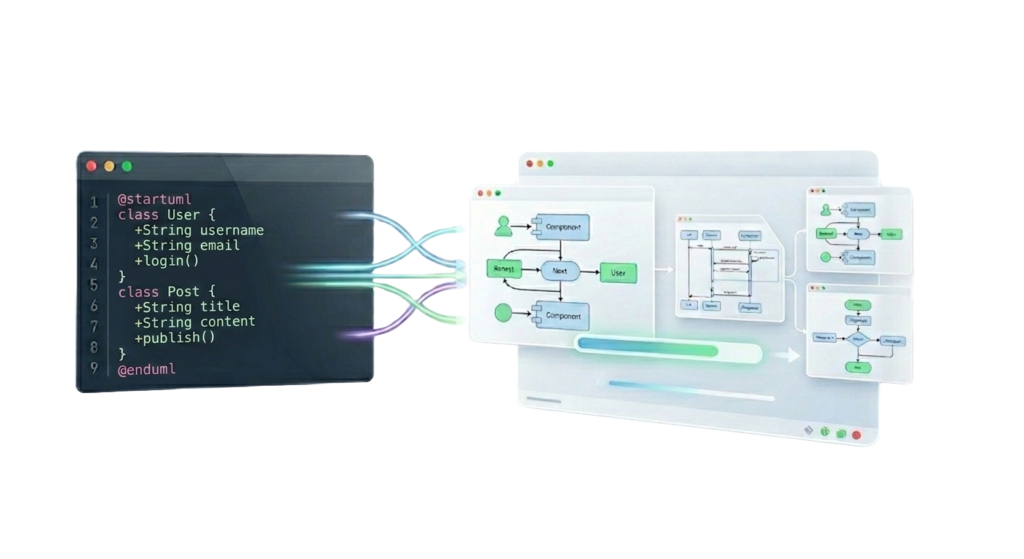
VPasCode eliminates the need for manual node dragging and pixel-perfect positioning. Instead, developers write code that describes their system architecture, and the platform instantly renders professional diagrams.

Comprehensive Engine Support
VPasCode supports three industry-leading diagramming engines, providing teams with the flexibility to use their preferred syntax and diagram types.
1. PlantUML Integration
PlantUML support enables teams to create a wide variety of UML and non-UML diagrams:
 Supported Diagram Types:
- ArchiMate: Enterprise architecture modeling
- Sequence Diagrams: Interaction flows between components
- Class Diagrams: Object-oriented structure visualization
- Activity Diagrams: Workflow and process modeling
- Deployment Diagrams: Infrastructure and system topology
- Timing Diagrams: Time-based interactions
- C4 Architecture: Modern software architecture visualization
- Use Case Diagrams: Functional requirements mapping
- Object Diagrams: Instance-level relationships
- Component Diagrams: System component architecture
- State Diagrams: State machine modeling
- ERD (Entity Relationship Diagrams): Database schema design
Real-World Application: A deployment diagram showcasing how internet traffic flows safely from web addresses through servers to databases demonstrates PlantUML’s capability to visualize complex infrastructure architectures.
2. Mermaid.js Integration
Mermaid support provides modern, JavaScript-based diagramming capabilities:
 Supported Diagram Types:
- Flowcharts: Process and decision flow visualization
- Sequence Diagrams: Component interaction sequences
- State Diagrams: System state transitions
- Architecture Diagrams: High-level system architecture
- Gantt Charts: Project timeline visualization
- Quadrant Charts: Strategic planning and analysis
- Class Diagrams: Object-oriented design
- ERD: Database relationship modeling
- Mind Maps: Brainstorming and idea organization
- C4 Model: Software architecture documentation
- Requirement Diagrams: Requirements tracking
- Timeline: Chronological event visualization
3. Graphviz Integration
Graphviz support enables powerful graph visualization:
 Supported Diagram Types:
- Digraph: Directed graph visualization
- Flowchart: Process flow diagrams
- Cluster: Grouped node visualization
- Graph: Undirected graph structures
- Org Chart: Organizational hierarchy
- Data Flow: Information flow mapping
Key Features and Capabilities
1. Real-Time Rendering
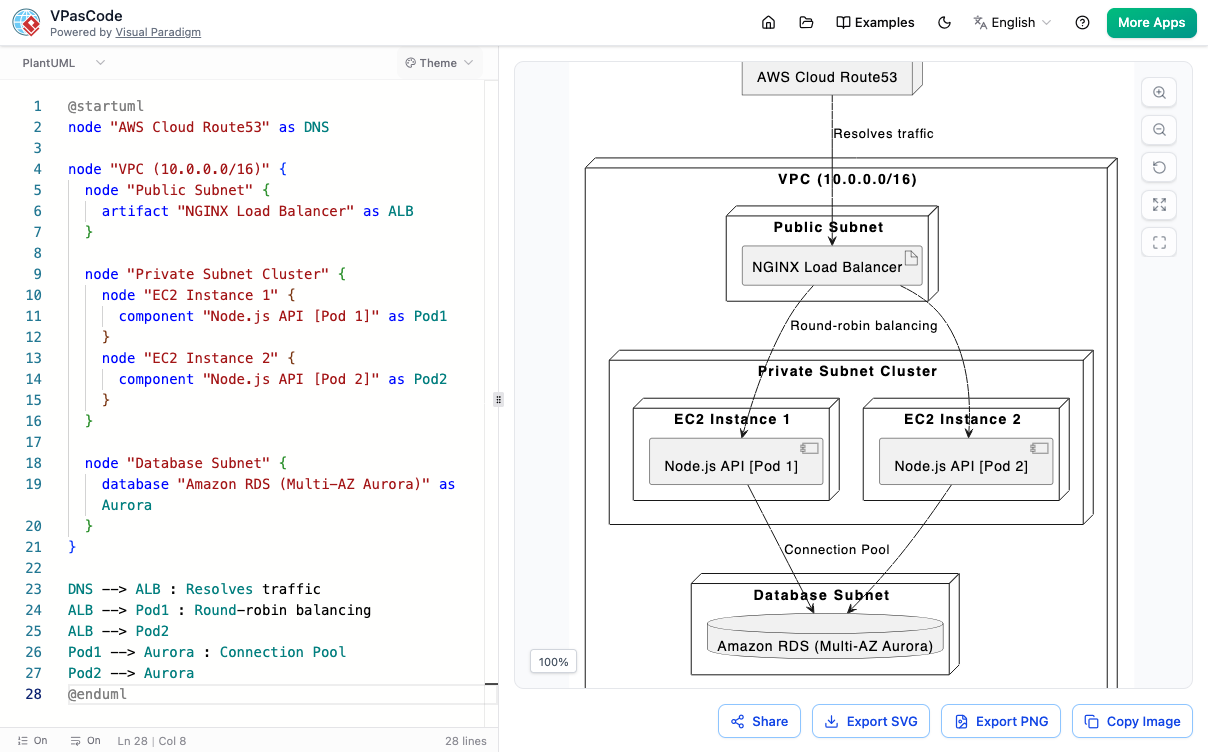
From Code to Clarity: Experience instant visual feedback as you type. VPasCode’s real-time rendering engine transforms code into pixel-perfect diagrams instantly, allowing developers to see their architecture come to life with every line of code.
Impact:
- Immediate validation of diagram syntax
- Rapid iteration and refinement
- Enhanced learning and experimentation
2. Zero Setup Required

Benefits:
- Eliminates IT overhead
- Works on any operating system
- No version compatibility issues
- Instant onboarding for new team members
3. Easily Shareable

Use Cases:
- Code review integration
- Architecture decision records
- Stakeholder presentations
- Remote team collaboration
- Client demonstrations
4. Vector Export Capabilities

- Technical documentation
- Presentation slides
- Architecture manuals
- White papers
- Marketing materials
Quality Assurance: Vector-based exports maintain perfect quality at any size, from mobile screens to large-format prints.
Enterprise Provenance: Backed by Visual Paradigm
Two Decades of Excellence
VPasCode isn’t just another diagramming tool—it’s built on the solid foundation of Visual Paradigm’s 20+ years of leadership in:
- Enterprise architecture
- UML modeling
- Business process management
- Software development lifecycle tools
Industry Wisdom Meets Modern Development: VPasCode combines Visual Paradigm’s profound industry expertise with modern code-driven workflows, delivering professional-grade output with developer-friendly interfaces.
Trust Metrics
- 20+ Years of modeling heritage
- Free to Use & Export – No hidden costs or limitations
- Enterprise-Ready – Professional output for business documentation
- Developer-Centric – Code-driven execution speeds
Implementation Scenarios
Scenario 1: Agile Development Teams
Challenge: Rapidly evolving architecture needs constant documentation updates.
VPasCode Solution:
- Store diagram code alongside application code in Git
- Auto-generate documentation with each commit
- Maintain perfect synchronization between code and diagrams
Outcome: 70% reduction in documentation maintenance time
Scenario 2: Enterprise Architecture
Challenge: Complex multi-system architectures require clear visualization for stakeholders.
VPasCode Solution:
- Use C4 model and ArchiMate for enterprise-level diagrams
- Create deployment diagrams showing infrastructure topology
- Generate sequence diagrams for cross-system interactions
Outcome: Improved stakeholder understanding and faster decision-making
Scenario 3: DevOps and Infrastructure
Challenge: Infrastructure-as-Code needs visual representation for team alignment.
VPasCode Solution:
- Create deployment diagrams from Terraform/CloudFormation code
- Visualize CI/CD pipelines with flowcharts
- Document microservices architecture with component diagrams
Outcome: Enhanced infrastructure visibility and reduced deployment errors
Scenario 4: Database Design
Challenge: Complex database schemas require clear documentation.
VPasCode Solution:
- Generate ERD diagrams from schema definitions
- Visualize relationships and constraints
- Document data flow with Graphviz
Outcome: Improved database design quality and easier onboarding
Technical Advantages
Version Control Integration
Unlike traditional diagramming tools that produce binary files, VPasCode generates text-based diagrams that:
- Integrate seamlessly with Git, SVN, and Mercurial
- Enable meaningful diffs and change tracking
- Support branching and merging workflows
- Facilitate code review processes
Automation Capabilities
Diagram-as-Code enables:
- CI/CD pipeline integration
- Automated documentation generation
- Batch processing of multiple diagrams
- API-driven diagram creation
Consistency and Standards
- Enforce architectural standards through code templates
- Maintain consistent styling across all diagrams
- Reduce human error in diagram creation
- Ensure compliance with organizational guidelines
User Experience Highlights
Interactive Playground
VPasCode offers an Interactive Playground where users can:
- Experiment with different diagram types
- Test syntax without commitment
- Learn through hands-on practice
- Share examples with the community
Comprehensive Documentation
Extensive syntax guides for each diagram type ensure users can:
- Quickly find examples
- Understand advanced features
- Troubleshoot common issues
- Master best practices
Learning Curve
- Beginners: Start with simple flowcharts and sequence diagrams
- Intermediate: Explore C4 modeling and deployment diagrams
- Advanced: Leverage custom styling and automation features
Cost-Benefit Analysis
Traditional Approach Costs
- Software licenses: $100-500/user/year
- Training time: 20-40 hours per user
- Maintenance effort: 5-10 hours/month per diagram
- Collaboration overhead: Significant time spent sharing and reviewing
VPasCode Approach
- Cost: Free to use and export
- Training: Minimal (familiar syntax for developers)
- Maintenance: Automated through code changes
- Collaboration: Instant via shareable URLs
ROI Metrics
- Time Savings: 60-80% reduction in diagram creation time
- Accuracy: Near-elimination of outdated diagrams
- Collaboration: 50% faster review cycles
- Scalability: Unlimited diagrams without additional cost
Security and Compliance
Data Protection
- Browser-based processing minimizes data transmission
- No mandatory account creation for basic usage
- Secure sharing with controlled access
Compliance Support
- Audit trails through version control
- Documentation standards enforcement
- Regulatory compliance diagramming (GDPR, HIPAA, SOC2)
Community and Support
Growing Ecosystem
- Active user community
- Extensive documentation library
- Regular feature updates
- Responsive support channels
Integration Ecosystem
- Compatible with popular IDEs
- CI/CD tool integration
- Documentation platform support (Confluence, Notion, etc.)
- Markdown and AsciiDoc compatibility
Future Roadmap
VPasCode continues to evolve with:
- Enhanced collaboration features
- Additional diagram types and engines
- Advanced customization options
- Enterprise-grade access controls
- API access for automation
Conclusion
VPasCode represents more than just a diagramming tool—it embodies a fundamental shift in how development teams approach architectural documentation. By treating diagrams as code, organizations can finally achieve the elusive goal of keeping documentation synchronized with implementation, all while reducing the time and effort required to create and maintain visual representations of complex systems.
The platform’s support for industry-standard engines like PlantUML, Mermaid, and Graphviz ensures that teams can leverage existing knowledge and syntax while benefiting from modern, browser-based accessibility. The zero-setup requirement, combined with real-time rendering and easy sharing capabilities, removes traditional barriers to effective documentation.
Most importantly, VPasCode’s foundation in Visual Paradigm’s two decades of enterprise architecture expertise provides confidence that the diagrams produced meet professional standards suitable for business-critical documentation. The fact that this enterprise-grade capability is available free of charge democratizes access to high-quality architectural visualization, enabling teams of all sizes to improve their documentation practices.
As software systems continue to grow in complexity, the need for clear, accurate, and maintainable documentation becomes increasingly critical. VPasCode’s Diagram-as-Code approach provides a sustainable solution that scales with organizational needs, integrates seamlessly with modern development workflows, and empowers teams to focus on what matters most: building great software with clarity and precision.
For organizations seeking to modernize their documentation practices, reduce technical debt, and improve team collaboration, VPasCode offers a compelling, proven, and cost-effective solution that delivers immediate value while positioning teams for long-term success in an increasingly code-driven world.
Ready to transform your documentation workflow? Visit VPasCode and experience the future of Diagram-as-Code today.
Target Audience: Software developers, system architects, DevOps engineers, technical leads, enterprise architects, and development teams seeking to modernize their documentation practices.
Key Takeaways:
- Diagram-as-Code eliminates the synchronization problem between code and documentation
- VPasCode supports three major diagramming engines with zero setup required
- Real-time rendering and easy sharing accelerate team collaboration
- Enterprise-grade output is now accessible to teams of all sizes at no cost
-
Version control integration makes diagrams maintainable and auditable

 English
 Arabic
 Chinese (Simplified)
 Dutch
Dutch French
 German
 Italian
 Japanese
 Korean
 Portuguese
 Russian
 Spanish