


Introduction
In the complex landscape of modern enterprise software, the ability to clearly map out business processes is no longer a “nice-to-have”—it is a critical necessity. For years, business analysts and developers have often spoken different languages. Analysts focus on workflow efficiency and stakeholder needs, while developers prioritize system architecture and code logic. This disconnect frequently leads to misaligned expectations, scope creep, and inefficient implementations.
Enter Visual Paradigm, a tool that promises to bridge this divide by offering a fully comprehensive, standards-compliant BPMN 2.0 modeling platform. But does it live up to the hype? In this review, we dive deep into Visual Paradigm’s capabilities, exploring how its blend of traditional diagramming precision with advanced AI automation and simulation tools can transform the way teams optimize operational workflows. Whether you are a seasoned business analyst or a technical developer, this guide will help you understand if Visual Paradigm is the right fit for your process modeling needs.
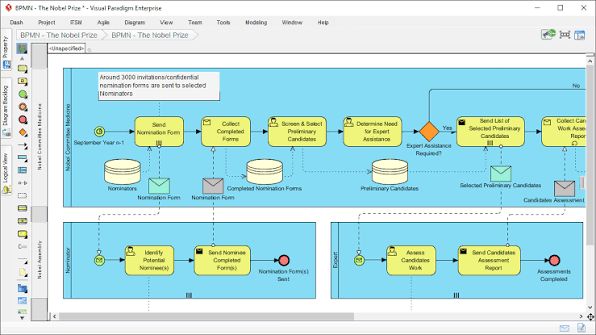
Core Diagramming Features: Precision Meets Intelligence
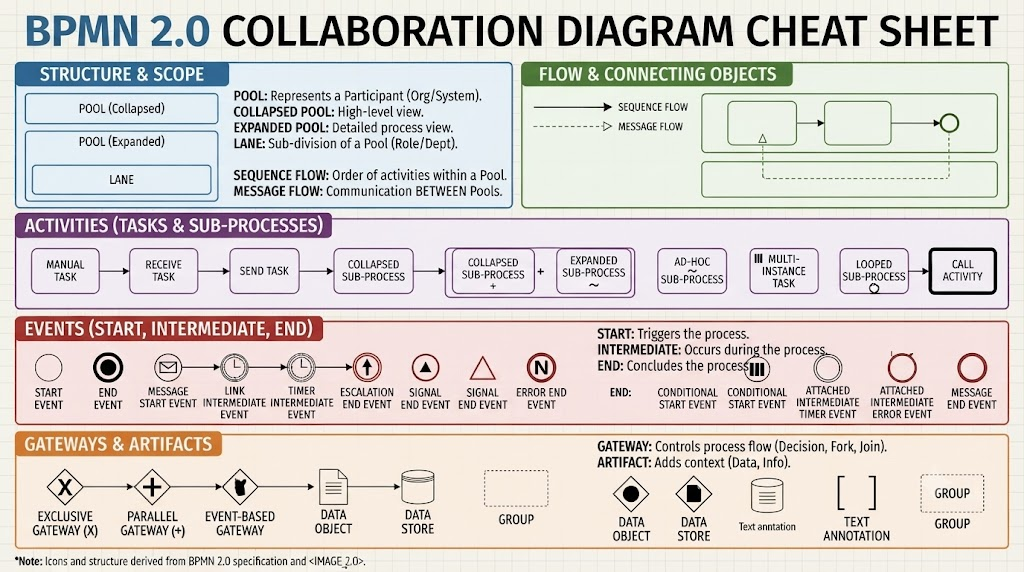
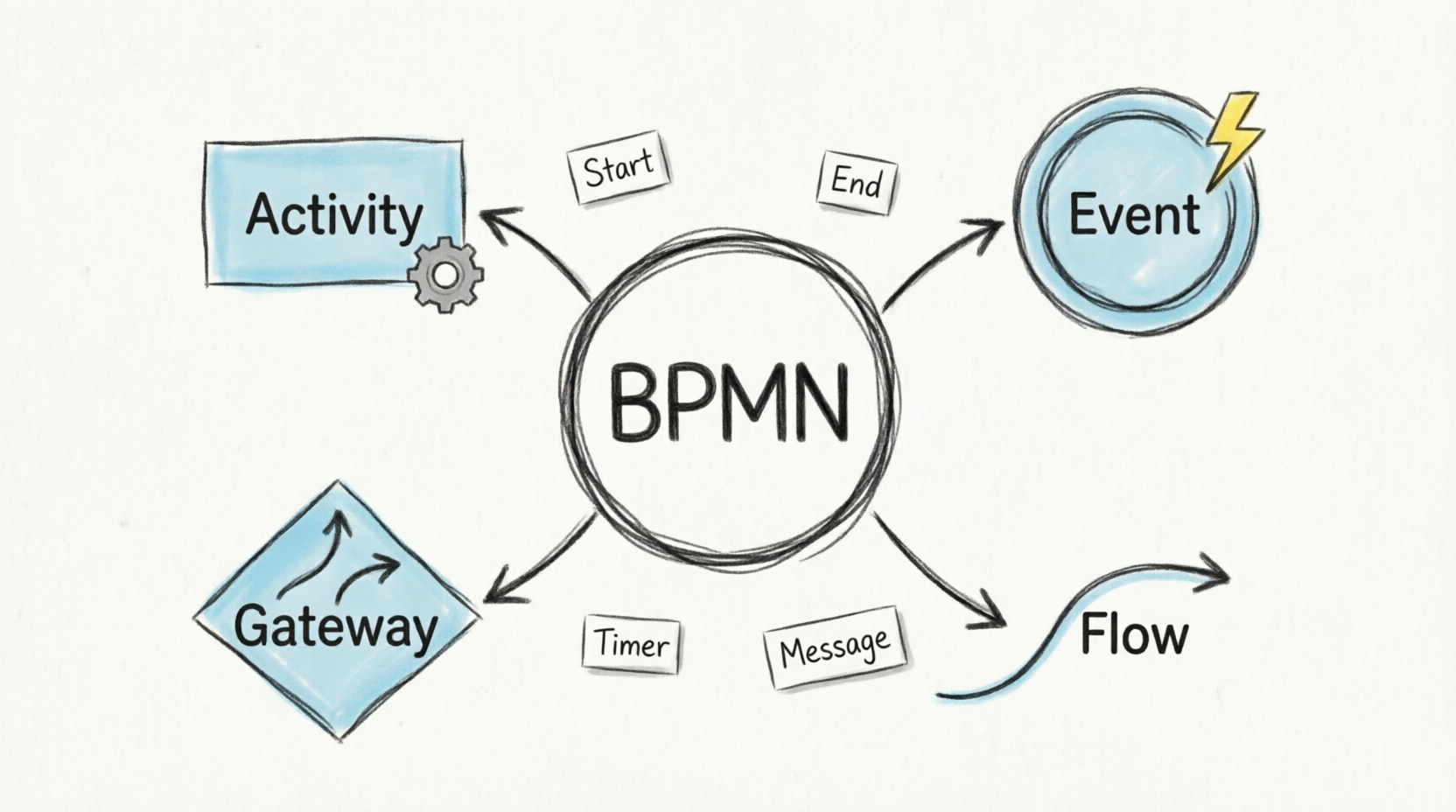
At the heart of any BPMN tool is its ability to create accurate, readable diagrams. Visual Paradigm excels here by supporting the complete set of BPMN 2.0 notations. From various event types to specialized tasks like Service, User, Manual, and Script tasks, the platform ensures that every nuance of your business process can be captured. Gateways, data objects, and artifacts are all readily available, allowing for granular control over your models.
AI-Powered Diagram Generation
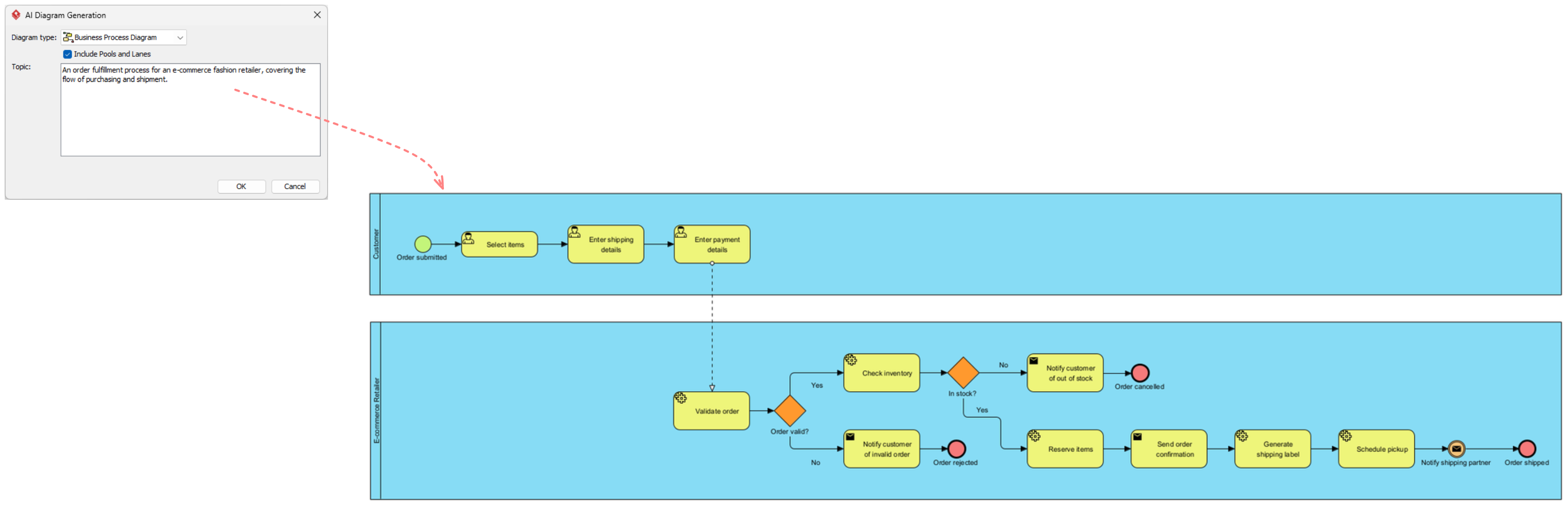
One of the most standout features is the AI BPMN Diagram Generator. Instead of manually dragging and dropping shapes, users can input plain-English narratives describing their processes. The AI then translates these narratives into fully interactive, standard-compliant BPMN 2.0 layouts. This feature significantly reduces the initial setup time and lowers the barrier to entry for those less familiar with strict BPMN syntax.
Smart Modeling Capabilities
Visual Paradigm moves beyond static shapes by treating elements as reusable model components. This resource-centric approach ensures consistency across large projects. Additionally, the tool employs smart connection rules that dynamically validate flow structures, preventing invalid sequence or message paths before they become problematic.
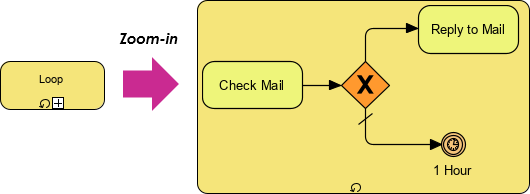
For complex processes, the flexible swimlane editing simplifies the partitioning of responsibilities using interactive horizontal or vertical pools and lanes. Furthermore, the process drill-down feature allows sub-processes to collapse or expand, keeping master views clean while enabling deep dives into nested complexities when needed.
Analysis and Simulation Tools: From Static Maps to Dynamic Insights
Creating a diagram is only half the battle; understanding how that process performs in reality is where true value lies. Visual Paradigm offers robust analysis and simulation tools that turn static maps into dynamic insights.
Process Simulation and Animation
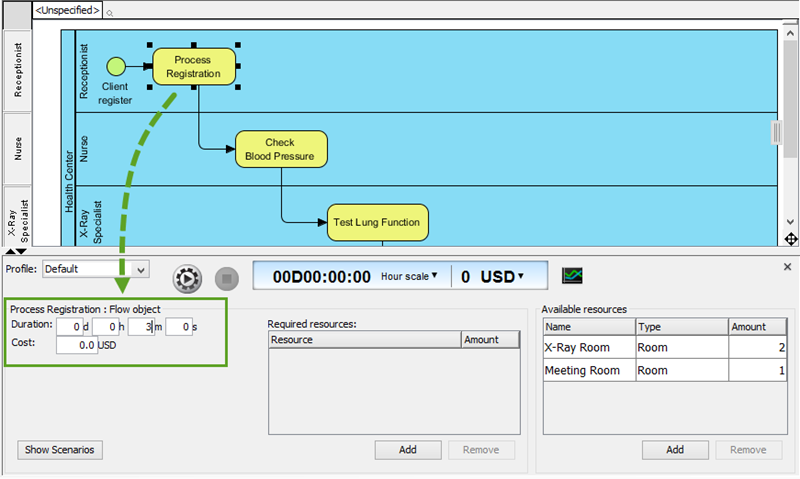
The Process Simulation feature evaluates workflow paths to calculate key metrics such as operating costs, resource bottlenecks, and total cycle times. This data-driven approach allows teams to identify inefficiencies before implementation. Complementing this is Process Animation, which visually replays alternative process choices and token paths. This is particularly useful for demonstrating logic to non-technical stakeholders who may struggle to interpret static diagrams.
Gap Analysis and Matrix Transformation
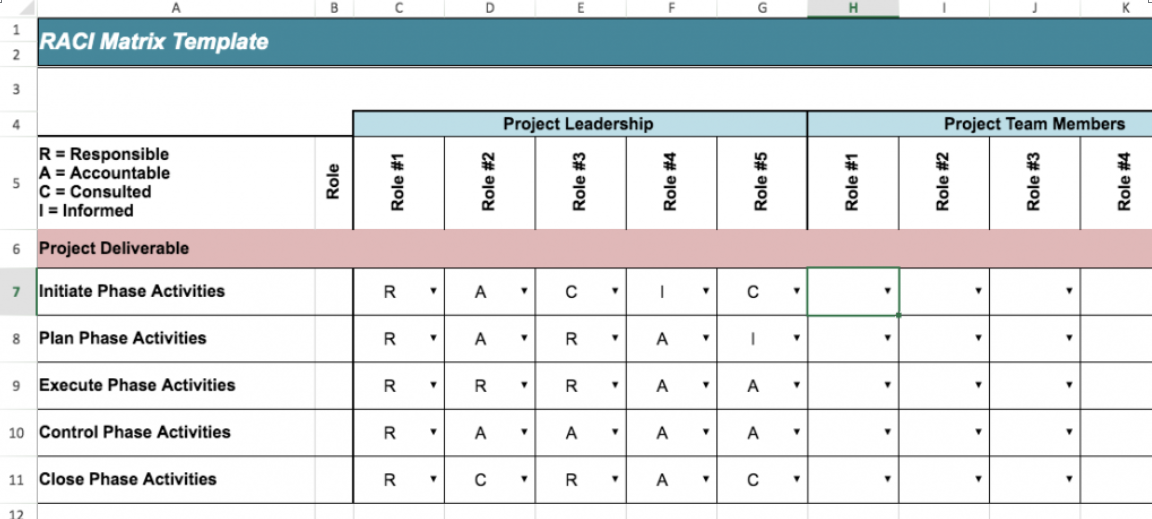
To guide continuous improvement, the tool supports As-Is and To-Be Gap Analysis. This feature explicitly maps current business baselines against prospective future-state workflows, making it easier to visualize and plan transformations. Additionally, the Matrix Transformation capability automatically converts functional BPMN data structures into actionable RACI (Responsible, Accountable, Consulted, Informed) or CRUD (Create, Read, Update, Delete) matrices, bridging the gap between process modeling and role definition.
Introduction
In the complex landscape of modern enterprise software, the ability to clearly map out business processes is no longer a “nice-to-have”—it is a critical necessity. For years, business analysts and developers have often spoken different languages. Analysts focus on workflow efficiency and stakeholder needs, while developers prioritize system architecture and code logic. This disconnect frequently leads to misaligned expectations, scope creep, and inefficient implementations.
Enter Visual Paradigm, a tool that promises to bridge this divide by offering a fully comprehensive, standards-compliant BPMN 2.0 modeling platform. But does it live up to the hype? In this review, we dive deep into Visual Paradigm’s capabilities, exploring how its blend of traditional diagramming precision with advanced AI automation and simulation tools can transform the way teams optimize operational workflows. Whether you are a seasoned business analyst or a technical developer, this guide will help you understand if Visual Paradigm is the right fit for your process modeling needs.
Core Diagramming Features: Precision Meets Intelligence
At the heart of any BPMN tool is its ability to create accurate, readable diagrams. Visual Paradigm excels here by supporting the complete set of BPMN 2.0 notations. From various event types to specialized tasks like Service, User, Manual, and Script tasks, the platform ensures that every nuance of your business process can be captured. Gateways, data objects, and artifacts are all readily available, allowing for granular control over your models.
AI-Powered Diagram Generation
One of the most standout features is the AI BPMN Diagram Generator. Instead of manually dragging and dropping shapes, users can input plain-English narratives describing their processes. The AI then translates these narratives into fully interactive, standard-compliant BPMN 2.0 layouts. This feature significantly reduces the initial setup time and lowers the barrier to entry for those less familiar with strict BPMN syntax.
Smart Modeling Capabilities
Visual Paradigm moves beyond static shapes by treating elements as reusable model components. This resource-centric approach ensures consistency across large projects. Additionally, the tool employs smart connection rules that dynamically validate flow structures, preventing invalid sequence or message paths before they become problematic.
For complex processes, the flexible swimlane editing simplifies the partitioning of responsibilities using interactive horizontal or vertical pools and lanes. Furthermore, the process drill-down feature allows sub-processes to collapse or expand, keeping master views clean while enabling deep dives into nested complexities when needed.
Analysis and Simulation Tools: From Static Maps to Dynamic Insights
Creating a diagram is only half the battle; understanding how that process performs in reality is where true value lies. Visual Paradigm offers robust analysis and simulation tools that turn static maps into dynamic insights.
Process Simulation and Animation
The Process Simulation feature evaluates workflow paths to calculate key metrics such as operating costs, resource bottlenecks, and total cycle times. This data-driven approach allows teams to identify inefficiencies before implementation. Complementing this is Process Animation, which visually replays alternative process choices and token paths. This is particularly useful for demonstrating logic to non-technical stakeholders who may struggle to interpret static diagrams.
Gap Analysis and Matrix Transformation
To guide continuous improvement, the tool supports As-Is and To-Be Gap Analysis. This feature explicitly maps current business baselines against prospective future-state workflows, making it easier to visualize and plan transformations. Additionally, the Matrix Transformation capability automatically converts functional BPMN data structures into actionable RACI (Responsible, Accountable, Consulted, Informed) or CRUD (Create, Read, Update, Delete) matrices, bridging the gap between process modeling and role definition.
Collaboration and Framework Alignment: Working Together Seamlessly
In today’s distributed work environments, collaboration is key. Visual Paradigm addresses this with features designed to keep teams synchronized and aligned.
Version Control and Co-Editing
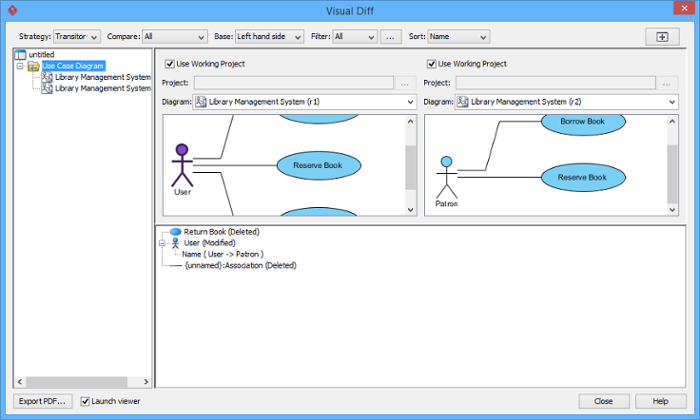
The Version Comparison (Visual-Diff) tool tracks operational revisions by visually comparing different versions of a workflow side by side. This makes it easy to spot changes and understand the evolution of a process. For real-time collaboration, Team Co-Editing manages live, simultaneous modification updates and revision synchronization across distributed engineering teams, ensuring everyone is working from the same source of truth.
Agile Integration
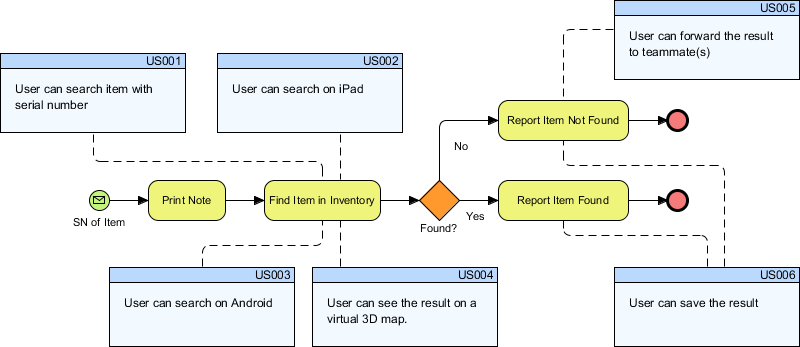
For teams following Agile methodologies, Visual Paradigm offers seamless integration by synchronizing specific workflow components straight into user stories and agile software development backlogs. This ensures that process models are not just documentation artifacts but living parts of the development lifecycle.
Conclusion
Visual Paradigm stands out as a powerful contender in the BPMN modeling space. Its strength lies not just in its comprehensive support for BPMN 2.0 standards, but in its ability to enhance the modeling experience through AI automation, dynamic simulation, and robust collaboration tools. By bridging the gap between business analysis and technical execution, it enables teams to create more accurate, efficient, and actionable process models.
Whether you are looking to streamline existing workflows, design new processes, or improve cross-functional collaboration, Visual Paradigm offers a versatile suite of features that cater to both business analysts and developers. While the choice between Community, Professional, and Enterprise editions will depend on your specific needs and scale, the core capabilities provide a solid foundation for any organization serious about process optimization.
Reference
- Visual Paradigm Features: BPMN Diagram and Tools: Overview of core BPMN diagramming features, AI generator, and collaboration tools.
- Business Process Modeling Solution: Details on smart connection rules, process drill-down, and team co-editing capabilities.
- From Narrative to Diagram: How Visual Paradigm’s AI BPMN Generator Transforms Process Modeling Workflows: Explanation of the AI-powered feature that converts plain-English text into BPMN diagrams.
- BPMN Made Easy: Guide on simplifying BPMN modeling and matrix transformation features.
- BPMN Tutorial 1: Comprehensive tutorial covering full BPMN 2.0 notations including events, tasks, and gateways.
- BPMN Tutorial 1 (PDF Format): PDF version of the comprehensive BPMN notation tutorial.
- BPMN Activity Types Explained: Detailed explanation of specialized task types such as Service, User, Manual, and Script tasks.
- Visual Paradigm BPMN Tutorial Video: Video demonstration of resource-centric modeling, swimlane editing, and process drill-down features.
- Unlock the Power of SysML Modeling with Visual Paradigm: Guide discussing resource-centric modeling principles applicable to BPMN.
- BPMN Swimlane Tutorial: Tutorial focused on flexible swimlane editing and partitioning processes.
- Visual Paradigm Features: BPMN Diagram and Tools: Additional details on process drill-down and nesting complex diagrams.
- Visual Paradigm: The Ultimate All-in-One Software for Software Development: Blog post highlighting the all-in-one nature of the tool, including BPMN capabilities.
- Business Process Modeling Guide: Guide covering process simulation, animation, and gap analysis tools.
- Visual Paradigm Features: BPMN Diagram and Tools: Information on matrix transformation features for RACI and CRUD matrices.
- BIMP BPMN Simulator: External reference related to BPMN simulation concepts.
- Compare Database Schemas Visually: Tutorial on visual comparison techniques, relevant to version diff features.
- Unleash the Power of Visual Paradigm: Your Ultimate REST API Design and Documentation Solution: Guide discussing integration capabilities, including agile backlog synchronization.
- Introduction of Visual Paradigm: Visual Paradigm Editions: PDF document detailing the differences between Community, Professional, and Enterprise editions.
Collaboration and Framework Alignment: Working Together Seamlessly
In today’s distributed work environments, collaboration is key. Visual Paradigm addresses this with features designed to keep teams synchronized and aligned.
Version Control and Co-Editing
The Version Comparison (Visual-Diff) tool tracks operational revisions by visually comparing different versions of a workflow side by side. This makes it easy to spot changes and understand the evolution of a process. For real-time collaboration, Team Co-Editing manages live, simultaneous modification updates and revision synchronization across distributed engineering teams, ensuring everyone is working from the same source of truth.

Agile Integration
For teams following Agile methodologies, Visual Paradigm offers seamless integration by synchronizing specific workflow components straight into user stories and agile software development backlogs. This ensures that process models are not just documentation artifacts but living parts of the development lifecycle.

Conclusion
Visual Paradigm stands out as a powerful contender in the BPMN modeling space. Its strength lies not just in its comprehensive support for BPMN 2.0 standards, but in its ability to enhance the modeling experience through AI automation, dynamic simulation, and robust collaboration tools. By bridging the gap between business analysis and technical execution, it enables teams to create more accurate, efficient, and actionable process models.
Whether you are looking to streamline existing workflows, design new processes, or improve cross-functional collaboration, Visual Paradigm offers a versatile suite of features that cater to both business analysts and developers. While the choice between Community, Professional, and Enterprise editions will depend on your specific needs and scale, the core capabilities provide a solid foundation for any organization serious about process optimization.
Reference
- Visual Paradigm Features: BPMN Diagram and Tools: Overview of core BPMN diagramming features, AI generator, and collaboration tools.
- Business Process Modeling Solution: Details on smart connection rules, process drill-down, and team co-editing capabilities.
- From Narrative to Diagram: How Visual Paradigm’s AI BPMN Generator Transforms Process Modeling Workflows: Explanation of the AI-powered feature that converts plain-English text into BPMN diagrams.
- BPMN Made Easy: Guide on simplifying BPMN modeling and matrix transformation features.
- BPMN Tutorial 1: Comprehensive tutorial covering full BPMN 2.0 notations including events, tasks, and gateways.
- BPMN Tutorial 1 (PDF Format): PDF version of the comprehensive BPMN notation tutorial.
- BPMN Activity Types Explained: Detailed explanation of specialized task types such as Service, User, Manual, and Script tasks.
- Visual Paradigm BPMN Tutorial Video: Video demonstration of resource-centric modeling, swimlane editing, and process drill-down features.
- Unlock the Power of SysML Modeling with Visual Paradigm: Guide discussing resource-centric modeling principles applicable to BPMN.
- BPMN Swimlane Tutorial: Tutorial focused on flexible swimlane editing and partitioning processes.
- Visual Paradigm Features: BPMN Diagram and Tools: Additional details on process drill-down and nesting complex diagrams.
- Visual Paradigm: The Ultimate All-in-One Software for Software Development: Blog post highlighting the all-in-one nature of the tool, including BPMN capabilities.
- Business Process Modeling Guide: Guide covering process simulation, animation, and gap analysis tools.
- Visual Paradigm Features: BPMN Diagram and Tools: Information on matrix transformation features for RACI and CRUD matrices.
- BIMP BPMN Simulator: External reference related to BPMN simulation concepts.
- Compare Database Schemas Visually: Tutorial on visual comparison techniques, relevant to version diff features.
- Unleash the Power of Visual Paradigm: Your Ultimate REST API Design and Documentation Solution: Guide discussing integration capabilities, including agile backlog synchronization.
- Introduction of Visual Paradigm: Visual Paradigm Editions: PDF document detailing the differences between Community, Professional, and Enterprise editions.




 English
 Arabic
 Chinese (Simplified)
 Dutch
Dutch French
 German
 Italian
 Japanese
 Korean
 Portuguese
 Russian
 Spanish