


Introduction
In today’s fast-paced business environment, clarity is king. Whether you are a business analyst trying to streamline operations, a developer needing to understand workflow logic, or a stakeholder looking to approve a new initiative, the ability to visualize processes is critical. For years, organizations struggled with inconsistent diagrams and ambiguous flowcharts that meant different things to different people.
Enter Business Process Model and Notation (BPMN). Developed initially by the Business Process Management Initiative in 2000 and maintained by the Object Management Group (OMG) since 2004, BPMN has become the global standard for business process modeling. Its primary goal is elegant in its simplicity: provide a notation that is intuitive enough for business users to understand, yet robust enough to handle complex technical semantics.
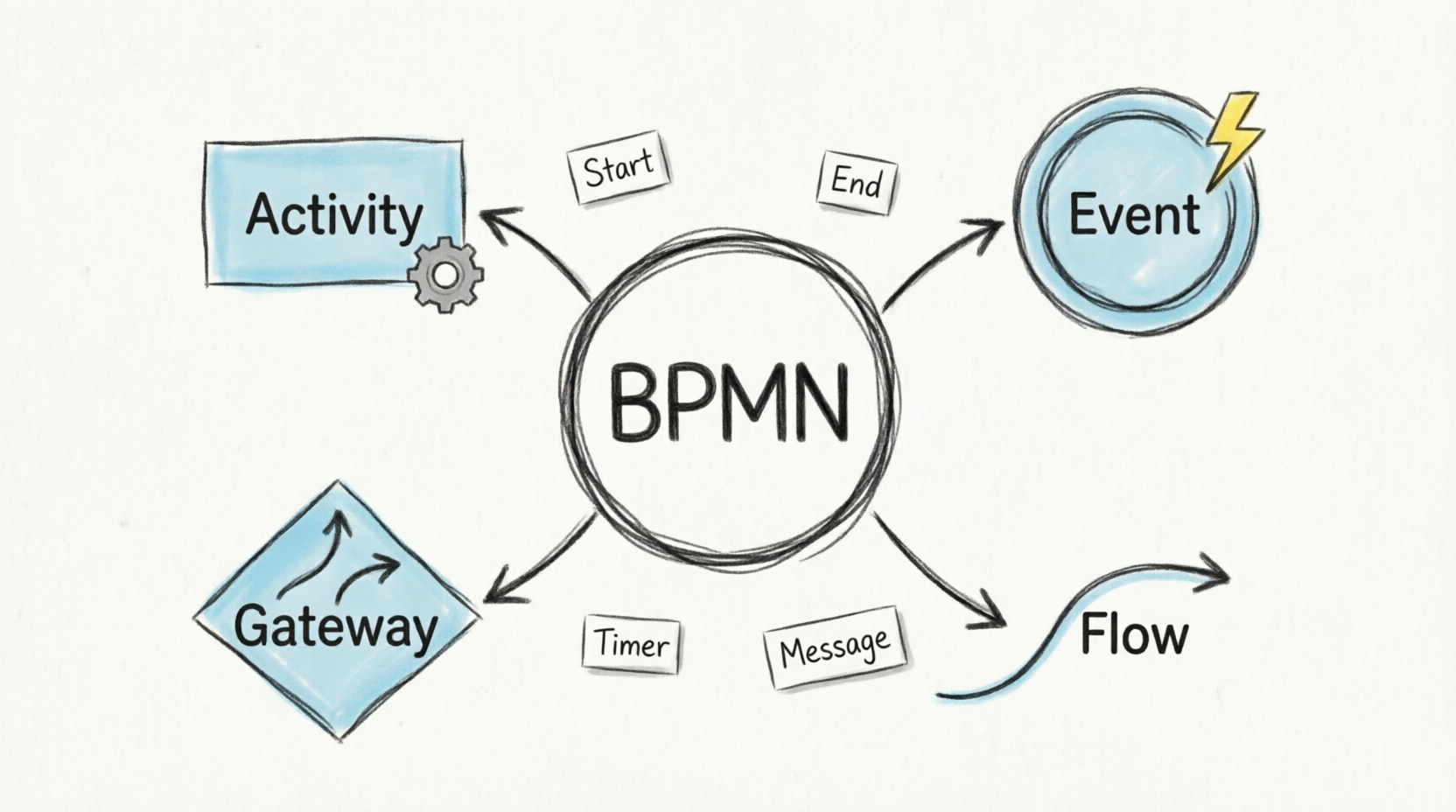
As a long-time user of various modeling tools, I have found that understanding the theory of BPMN is only half the battle; having the right tool to implement it is the other half. In this guide, we will break down the core elements of BPMN and explore how Visual Paradigm serves as a comprehensive solution for turning these theoretical models into actionable business intelligence.
The Building Blocks of BPMN
The power of BPMN lies in its standardized visual language. By using specific shapes and icons, BPMN ensures that a diagram created in San Francisco can be understood perfectly by a team in London or Tokyo. While it shares similarities with traditional flowcharts, BPMN goes further by representing business-specific actions, such as inter-departmental messaging and issue escalation.
Here are the four fundamental elements you need to know:
| Element | Symbol | Description |
|---|---|---|
| Activity |  |
An activity is a work that is performed within a business process. |
| Event |  |
An event is something that happens during the course of a process. |
| Gateway |  |
A gateway is used to control the divergence, and convergence of sequence flows in a process. |
| Flow |  |
Two major flow elements are core to BPM:· A sequence flow is used to show the order that activities will be performed in a process.· A message flow is used to show the flow of messages between two participants of a process. |
Deep Dive: Understanding Events
If activities are the “work” being done, events are the “triggers” that make the work happen. An event represents something that occurs during the course of a process. Visually, events are always expressed as circles, distinguishing them from the rectangular activities.
Events are categorized by when they occur in the lifecycle of the process:
-
Start Events: These occur at the beginning of the process. Every process must start with an event. They are depicted with a thin narrow line.
-
Intermediate Events: These occur in the middle of the process, between activities. They are depicted with a thin double line.
-
End Events: These occur at the conclusion of the process. Every process must have at least one end event. They are depicted with a thick single line.

To see how these come together, consider this simple example of a BPMN diagram:

Advanced Event Concepts: Boundary, Interrupting, and Catching/Throwing
As you move from basic to advanced process modeling, you will encounter more nuanced event types. Understanding these is crucial for modeling real-world scenarios where exceptions and parallel tasks occur.
Boundary Events
A boundary event is attached to the border of an activity (or subprocess). It represents something that can happen while that task is being performed. For example, a “Timer” boundary event might trigger if a task takes too long.
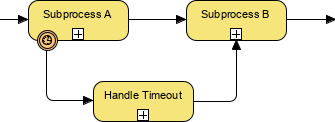
Interrupting vs. Non-Interrupting Events
Introduced in BPMN 2.0, this distinction determines how the process reacts when an event is triggered:
-
Interrupting Event (Solid Line): This is the most common type. When triggered, the current task stops immediately, and the flow of control moves to the new path defined by the event.
-
Non-Interrupting Event (Dashed Line): This allows the original task to continue while simultaneously starting a new parallel path. For instance, a non-interrupting timer might send a reminder email after 24 hours, but the original task continues until completion.
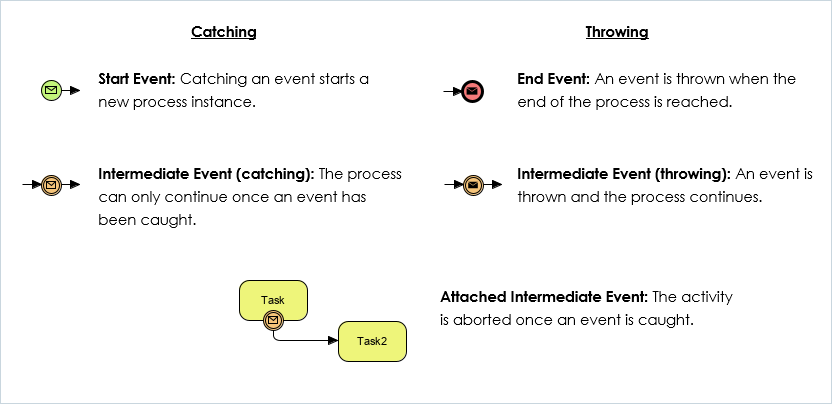
Catching vs. Throwing Events
This concept defines the direction of the trigger:
-
Catching Events: These wait for a trigger to activate. Think of them as “listening” for something to happen (e.g., waiting for a customer reply).
-
Throwing Events: These generate a trigger. They actively send a signal or message to another part of the process or another pool.
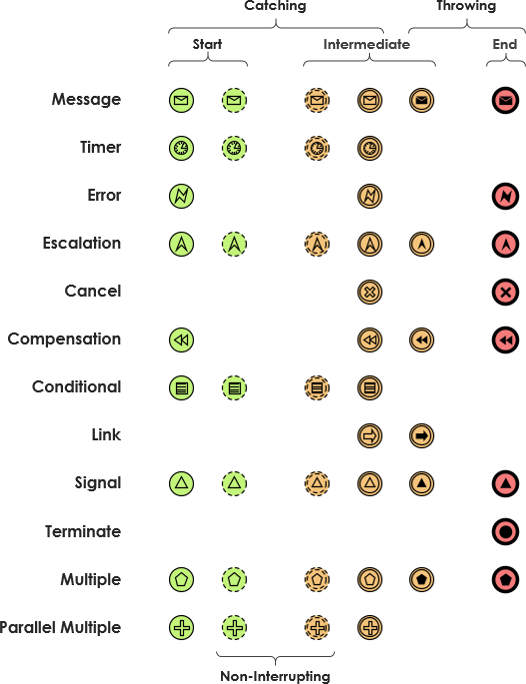
Summary of Event Markers
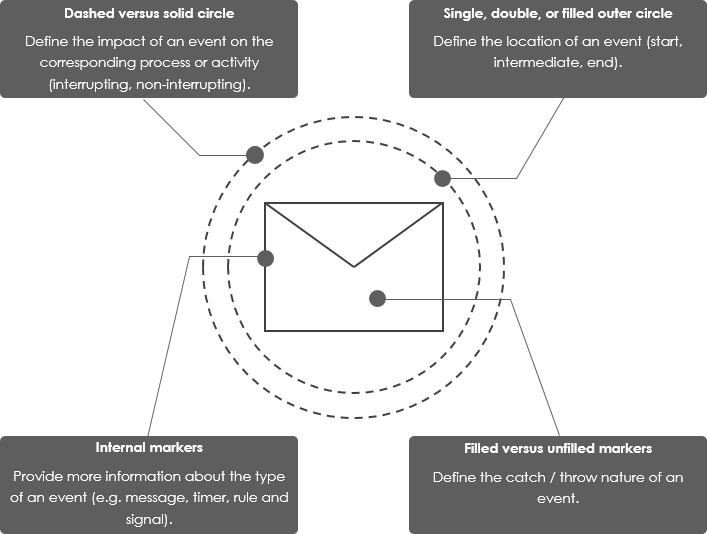
BPMN 2.0 supports over 60 different types of events. To keep them distinct, BPMN uses a combination of border styles and internal markers:
-
Outer Border:
-
Single Thin Circle: Start Event.
-
Double Circle: Intermediate Event.
-
Thick/Filled Outer Circle: End Event.
-
-
Line Style:
-
Solid Line: Interrupting event (stops current activity).
-
Dashed Line: Non-interrupting event (parallel activity).
-
-
Internal Marker:
-
Unfilled Marker: Catching event (waiting for trigger).
-
Filled Marker: Throwing event (generating trigger).
-
Tool Review: Why Visual Paradigm?
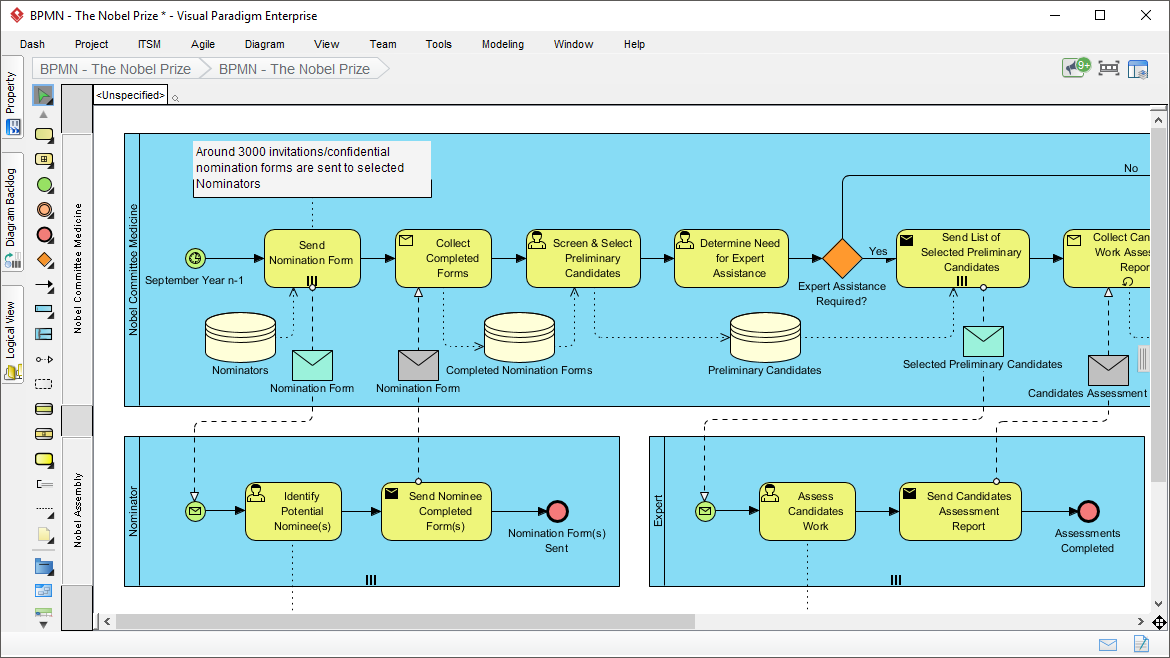
Understanding the syntax of BPMN is essential, but manually drawing these diagrams can be tedious and error-prone. This is where a robust tool like Visual Paradigm comes in. Operating a business without documented processes is akin to flying blind; Visual Paradigm provides the instruments and navigation needed for smooth operations.
From my experience, Visual Paradigm streamlines the entire lifecycle of business process modeling, from initial discovery and mapping to simulation and animation. It helps teams align operations with business strategy, improve communication, increase consistency, and ultimately gain a competitive advantage.
Key Features That Stand Out
Visual Paradigm isn’t just a drawing tool; it’s an intelligent modeling platform. Here are some features that make it stand out:
-
Intuitive Validation: The software uses powerful connection rules to ensure your diagrams are logically valid as you build them.
-
Flexible Editing: Pools and lanes can be easily updated, making it simple to reorganize responsibilities across departments.
-
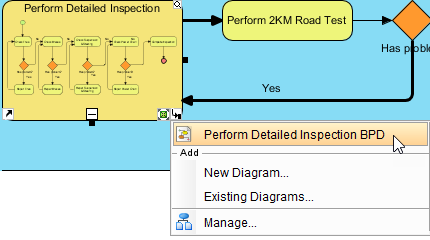
Drill-Down Capability: You can collapse complex subprocesses to keep high-level views clean, then drill down into details when needed.
-
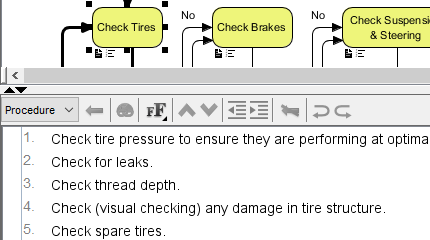
Integration: Map your BPMN processes directly to other standards, sub-diagrams, use cases, or even user stories.
Advanced Capabilities for Power Users
For those looking to go beyond static diagrams, Visual Paradigm offers advanced analytical features:
-
Gap Analysis: Automatically transform “as-is” processes to “to-be” models to identify improvements.
-
Chart Transformation: Convert BPMN diagrams into RACI or CRUD charts for better role clarification.
-
Simulation and Animation: Visualize different paths in your process to evaluate costs and identify bottlenecks before implementation.
-
Agile Integration: Seamlessly transform business processes into user stories and backlog items for Agile development teams.
Collaboration and Reporting
One of the strongest aspects of Visual Paradigm is its support for teamwork. With features like PostMania, remote teams can comment, annotate, and discuss diagrams in real-time over the cloud. Additionally, the built-in report designer allows you to generate professional documentation automatically, ensuring that your stakeholders always have access to the latest process definitions.
Trust and Accessibility
Visual Paradigm is cross-platform, supporting Windows, Unix, and Mac OS. It is trusted by millions of users, including government units, Fortune 500 companies, and universities. The platform offers various editions suitable for different stakeholders, ensuring that there are no application silos when transferring work between business analysts and IT teams. Plus, licensed desktop users often receive access to Visual Paradigm Online for free, enhancing flexibility.

Conclusion
Business Process Modeling is no longer just a nice-to-have; it is a necessity for any organization aiming for efficiency and clarity. BPMN provides the universal language needed to bridge the gap between business goals and technical execution. However, the complexity of BPMN’s 60+ event types and strict syntax rules can be daunting without the right support.
Tools like Visual Paradigm democratize this process, offering an intuitive interface that handles the heavy lifting of validation and formatting. By leveraging such tools, organizations can move from chaotic, undocumented workflows to streamlined, simulated, and optimized processes. Whether you are looking to improve operational efficiencies or align your team with strategic goals, mastering BPMN with the right software is a step toward true competitive advantage.
References
- BPMN Symbol – Activity: Visual representation of a task or work performed within a business process.
- BPMN Symbol – Start Event: Visual representation of an event that triggers the start of a process.
- BPMN Symbol – Gateway: Visual representation of a control point for diverging or converging sequence flows.
- BPMN Symbol – Flow: Visual representation of sequence and message flows between process participants.
- BPMN Event Types: Illustration distinguishing between Start, Intermediate, and End events in BPMN.
- Simple BPMN Diagram Example: A basic example diagram showing how BPMN elements connect in a real process.
- BPMN Intermediate Event: Illustration of a boundary event attached to a subprocess.
- BPMN Catch vs Throw Event: Visual comparison of catching (waiting) and throwing (triggering) events.
- BPMN Events and Markers: Comprehensive chart showing various event types and their corresponding markers.
- BPMN Events Detail: Detailed view of interrupting vs non-interrupting and catching vs throwing event styles.
- BPMN Business Process Modeling Software: Overview of Visual Paradigm’s capabilities in streamlining business process modeling.
- Sub-Business Process Diagram: Example of a sub-process diagram within the Visual Paradigm tool.
- Working Procedure: Illustration of a working procedure modeled in Visual Paradigm.
- Visual Paradigm Customers: Logos of enterprises and organizations that trust and use Visual Paradigm.




 English
 Arabic
 Chinese (Simplified)
 Dutch
Dutch French
 German
 Italian
 Japanese
 Korean
 Portuguese
 Russian
 Spanish