


Introduction
The tension between agile delivery speed and architectural documentation has been a central challenge in software development. For years, UML and BPMN carried a reputation for being “waterfall-ish”—heavy, time-consuming, and prone to becoming obsolete the moment code was written . This disconnect led to architectural drift, knowledge silos, and documentation that teams simply abandoned by sprint three.
AI changes this paradigm entirely. By combining natural language processing with visual modeling standards, AI-powered tools eliminate the manual overhead that once made UML and BPMN feel incompatible with agile sprints . The result? Diagrams become “living documents”—assets that evolve with your codebase, not artifacts that gather digital dust.
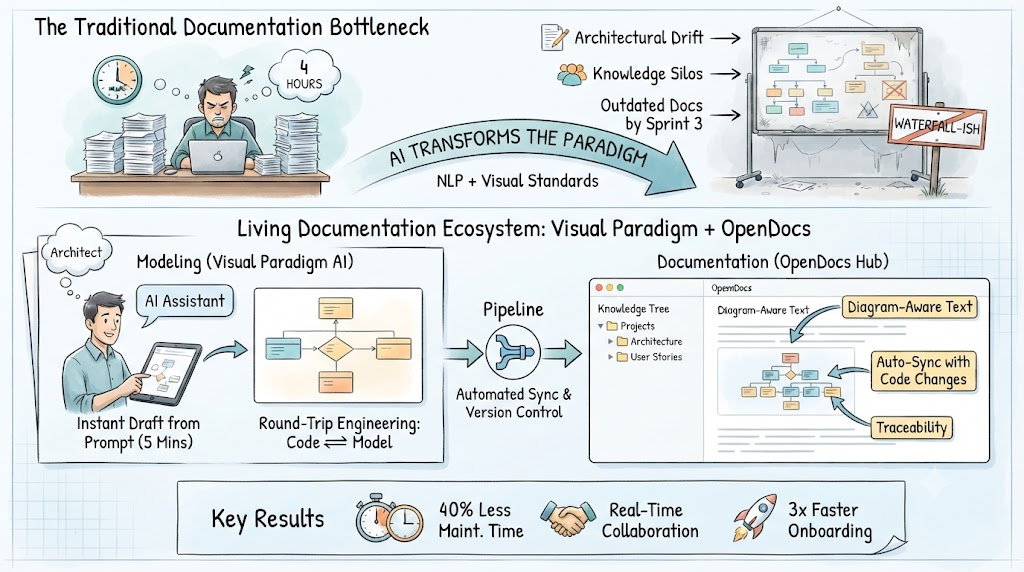
This guide explores how to transform your modeling practice using Visual Paradigm’s AI ecosystem and OpenDocs’ living documentation platform. You’ll learn practical workflows, battle-tested tips, and see real examples of agile teams making this shift.
Part 1: The Core Concepts
What Makes a Diagram “Living”?
A living document is one that:
-
Auto-syncs with code changes through reverse engineering
-
Remains editable and interactive, not a static snapshot
-
Maintains traceability between requirements, models, and implementation
-
Serves as a single source of truth accessible to all stakeholders
Traditional documentation platforms treat diagrams as static images—snapshots that quickly become obsolete as systems evolve . Living documentation treats them as versioned assets that maintain a connection to their source models.
The AI Advantage for Agile Modeling
AI transforms modeling from a “drawing chore” to an articulation exercise:
| Traditional Modeling | AI-Powered Modeling |
|---|---|
| Hours of manual shape-dragging | Seconds from natural language prompt |
| Diagrams outdated by sprint 2 | Auto-sync with every code commit |
| Blank-canvas paralysis | Instant draft to refine |
| One-way: diagram → code | Round-trip: code ⟷ diagram |
Research shows that LLMs can efficiently translate natural language process descriptions into formal system models (BPMN, UML class diagrams, sequence diagrams) with mostly correct outcomes requiring only minor revisions . The speed with which AI generates these artifacts suggests significant positive impact on efficiency, accuracy, and scalability of system design .
Agile vs. Scrum vs. Modeling: Clarifying the Layers
-
Agile Process (The Philosophy): A broad mindset emphasizing iterative development, customer collaboration, and responding to change .
-
Scrum (The Framework): A specific lightweight framework implementing Agile principles through defined roles, artifacts, and events .
-
Modeling (The Tool): Visual representations that, when AI-powered, support Agile principles rather than contradict them.
Analogy: Agile is “eating healthy,” Scrum is a specific diet plan, and AI-powered modeling is the meal-prep service that makes eating healthy actually practical.
Part 2: The Tool Stack
Visual Paradigm: The Integrated Modeling Platform
Visual Paradigm (VP) positions itself as a complete platform bridging agile management and rigorous system modeling . Key components include:
VP AI Assistant
-
Generate UML diagrams, ERDs, and flowcharts from text prompts
-
Summarize complex diagrams into plain English for stakeholders
-
Available at chat.visual-paradigm.com or embedded in the desktop app
Diagram Generation Capabilities
-
Supports UML 2.5 (class, sequence, use case, activity, state machine)
-
Enterprise architecture (ArchiMate viewpoints)
-
BPMN for process modeling
-
SysML, ERD, C4 models, mind maps, and strategic tools (SWOT, PESTLE)
Round-Trip Engineering
-
Bi-directional code engineering for Java, C#, Python, and more
-
Change the UML → code skeleton updates
-
Change the code → UML reflects it
Agile Project Management Integration
-
Built-in Agile boards (Scrum/Kanban), backlog management, sprint tracking
-
Link user stories directly to corresponding UML diagrams
OpenDocs: The Living Documentation Hub
OpenDocs is an AI-powered, web-based knowledge management platform that unifies technical documentation with visual modeling . It solves the core problem of documentation drift by treating diagrams as live, interactive elements.
Key Capabilities:
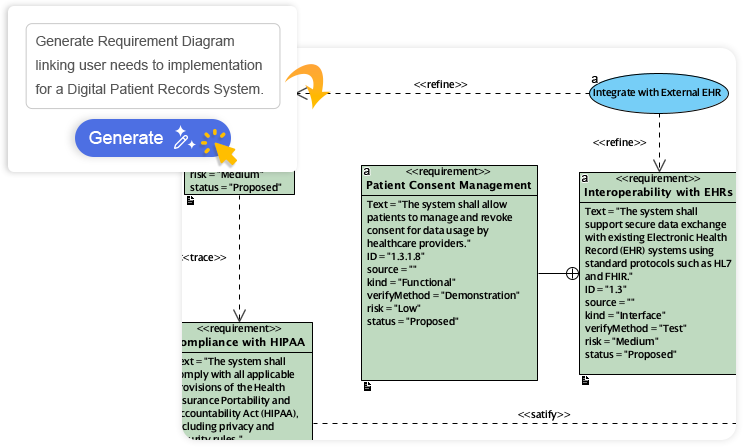
Diagram-Aware Text
Unlike Confluence or Google Docs where images are static snapshots, embedded visuals in OpenDocs remain live vectors. Users can click elements inside documents to open the source model and update it .
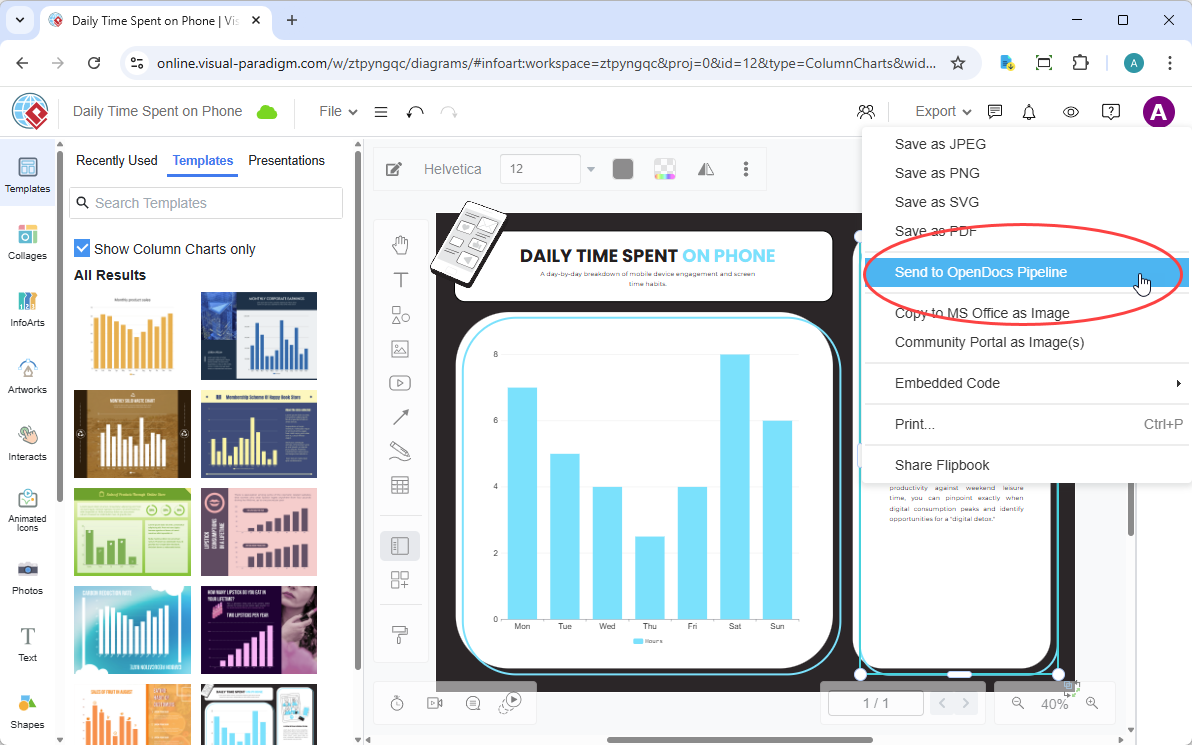
The Pipeline Bridge
This acts as the secure central transit hub, automatically handling background asset tracking, version control, and change management. Every diagram maintains its connection to its source model, enabling automatic synchronization .
Tree-Structured Spaces
Documentation organizes using a deep, hierarchical nested folder-tree structure, mirroring the logical organization of complex systems .
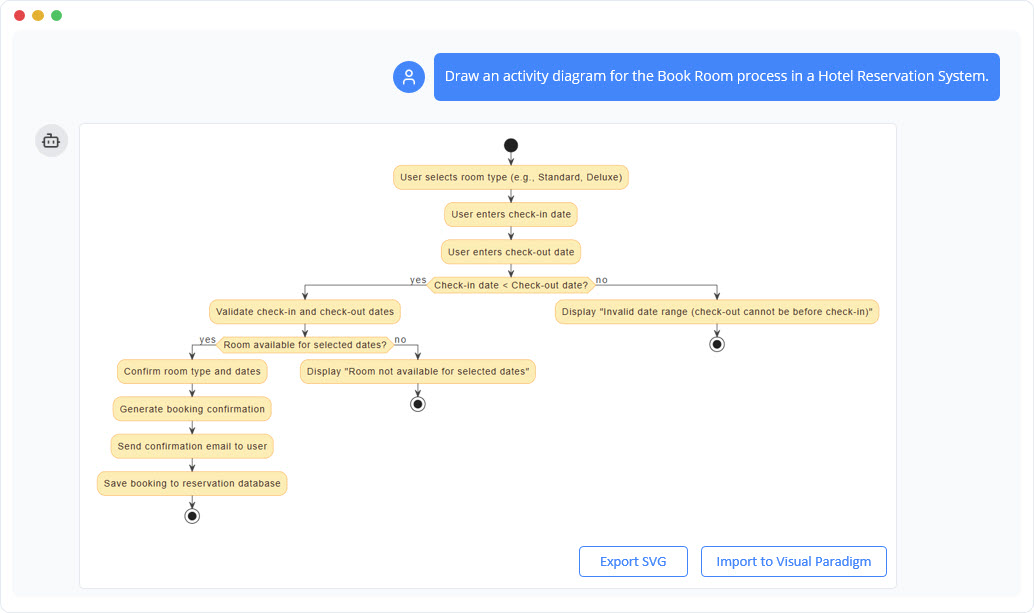
AI Chatbots & Generators
Natural language prompts instantly generate complex process diagrams or structural views right inside the workspace . The integrated editor supports flowcharts, process maps, UML, activity diagrams, network diagrams, mind maps, and custom visual models .
Automated Synchronization & Revisions
When a source diagram changes, an indicator appears in the document’s Pipeline panel. Users selectively review revisions and swap elements with one click .
Model-to-Text AI Generation
The AI analyzes structural diagram flows and automatically generates corresponding descriptive textual narratives, keeping documentation synchronized both ways .
Part 3: Implementation Workflow
Sprint 0: Foundation Setup
Step 1: Initialize Your Knowledge Tree
Create your root structure in OpenDocs, mirroring your Jira or Linear project organization :
📁 Project Alpha (Root)
├── 📄 Product Vision & OKRs
├── 📁 Architecture
│   ├── 📄 System Context Diagram
│   ├── 📄 Microservices Map
│   └── 📄 Data Flow (Live DFD)
├── 📁 User Stories
│   ├── 📄 Epic: User Authentication
│   └── 📄 Acceptance Criteria Templates
├── 📁 Sprint Artifacts
│   ├── 📄 Sprint 12 Retrospective
│   └── 📄 Definition of Done Checklist
└── 📁 Stakeholder Comms
    ├── 📄 Executive Summary (Read-Only)
    └── 📄 Release Notes Archive
Pro Tip: Mirror your existing project management structure to reduce cognitive load when switching between task management and documentation .
Step 2: Connect Your Pipeline
In OpenDocs: Navigate to Settings → Pipeline Integration
-
Authenticate with your Visual Paradigm account
-
Enable auto-sync for diagrams created in:
-
Visual Paradigm Desktop (for complex SysML/UML)
-
Visual Paradigm Online (for quick flowcharts)
-
AI Chatbot (for rapid prototyping)
-
Team Insight: “We set up webhook notifications so when a diagram updates in Pipeline, the relevant OpenDocs page gets a subtle ‘Updated’ badge. No more ‘is this the latest version?’ Slack threads.” — Sarah, Scrum Master
Sprint 1: Rapid Diagram Generation
Step 3: AI-Powered Prototyping
The fastest route from idea to visual representation: describe it in plain English.
Example Prompt (Effective):
“Create a BPMN diagram for user onboarding:
Email verification (parallel gateway: skip if SSO)
Profile setup (mandatory fields: name, role)
Welcome email trigger
Include error paths for invalid email and timeout.”
Example Prompt (Vague—Avoid):
“Make an onboarding diagram”
The AI Chatbot serves as the primary entry point, transforming natural language into fully structured, editable diagrams in seconds . Key capabilities include:
-
Instant diagram generation from plain English
-
Conversational refinement with follow-up commands
-
Educational mode for learning modeling concepts
-
Export directly to Visual Paradigm desktop projects for advanced editing
Time Savings: Teams report cutting diagram creation time from 45 minutes to under 5 minutes . The AI gets ~80% there; teams spend the rest refining edge cases .
Step 4: Context Prompting for Better Results
Instead of throwing disconnected prompts at the AI, practice “context engineering”—crafting a rich context that makes the model aware of your domain, style, and standards .
Context Prompting Framework:
-
Gather inputs: Interview notes, process documents as a single source of truth
-
Design detailed instruction set: Specify modeling conventions, swim lanes, readability requirements
-
Feed the AI: Provide document context + structured prompt together
-
Review and refine: Validate business logic, add missing edge cases
Real-World Example: A practitioner needed to document a complex cross-departmental BPMN diagram. Using context prompting with interview notes and process documents, they went from hours of manual work to minutes—producing a structured BPMN diagram with all swim lanes properly aligned to BPMN standards .
Sprint 2: Integration into Agile Workflow
Step 5: Embed Live Diagrams in User Stories
Instead of attaching static screenshots to Jira tickets:
-
Create or update your diagram in Visual Paradigm
-
Right-click → Export → Send to OpenDocs Pipeline
-
In your OpenDocs user story page:
## Technical Implementation
{{pipeline:diagram-id-12345}}

> 💡 This diagram auto-updates when the source model changes.
> Last synced: {{auto-timestamp}}
Agile Win: During sprint planning, discuss architecture with live visuals reflecting the current state—not a screenshot from three sprints ago .
Step 6: Round-Trip Engineering for Code Alignment
Use Visual Paradigm’s bi-directional code engineering to maintain synchronization:
-
Generate code skeletons from refined UML diagrams
-
Implement business logic and write unit tests
-
Commit code changes to Git
-
AI detects code changes and auto-updates UML diagrams
-
OpenDocs Pipeline flags sync changes for documentation
Example Scenario: A developer adds a new validateToken() method to the AuthService class in Java. Visual Paradigm’s AI detects this commit and automatically adds the corresponding method and relationship to the Class Diagram .
Sprint 3: Collaboration & Sharing
Step 7: Share with Stakeholders
For demo day or executive updates:
-
Click Share on your OpenDocs page
-
Choose sharing mode:
-
🔗 Live Link: Stakeholders see real-time updates (great for product owners)
-
📸 Static Snapshot: Freeze a version for compliance/audit trails
-
-
Add clear description: “Sprint 12 Demo – Payment Flow v2.3”
-
Copy link or embed code
Step 8: Use Share History for Audit & Cleanup
Access via Share → Browse Share History :
| Share Description | Type | Created | Status | Action |
|---|---|---|---|---|
| Sprint 10 Demo – Auth Flow | Live | Mar 15 | ✅ Active | [Copy Link] |
| Q1 Architecture Review | Static | Feb 28 | ⚠️ Outdated | [Archive] |
| Investor Deck – System Overview | Live | Jan 10 | ✅ Active | [Embed Code] |
Retrospective Insight: “We now review Share History during our monthly ‘tech debt’ sprint. Archiving old links reduced confusion by 70%.” — Priya, Product Owner
Part 4: Advanced Patterns
Agentic Orchestration with BPMN
AI agents introduce non-deterministic behavior that requires careful orchestration. BPMN provides essential patterns for safe AI integration :
Pattern 1: Auditability Through Visualization
Add an ad-hoc sub-process to your BPMN model—a symbol allowing unstructured, non-deterministic segments . Every action the AI takes is visualized in the model, creating clear audit trails both as event logs and superimposed on the diagram itself.
Pattern 2: Compensation for AI Mistakes
BPMN’s compensation events enable automatic undoing of AI actions when mistakes are detected . If a flawed decision is discovered, the compensation event checks what actions have been taken and reverses them (e.g., canceling a reservation made in error).
Pattern 3: Human-in-the-Loop Oversight
Three levels of human integration:
-
Proactive: AI can trigger “Doctor’s Opinion Needed” events when more context is required
-
Reactive: Escalation events notify humans when AI makes wrong choices
-
Retroactive: Event-based gateways allow humans to reverse AI decisions even long after they were made
Pattern 4: Guardrails with DMN
BPMN’s sister standard DMN (Decision Model and Notation) lets you define business rules that act as guardrails . If an AI decision breaks these rules, an Error event is triggered before any action is taken, ensuring auditable compliance.
Model-Driven Agile with BPMN and UML
Example Workflow:
-
Product Owner writes a user story
-
AI generates a draft Activity Diagram from the story
-
Team refines the diagram during backlog refinement
-
Visual Paradigm automatically generates boilerplate code and Jira sub-tasks from diagram nodes
Part 5: Tips and Tricks (Battle-Tested)
AI Prompt Engineering for Diagrams
Effective Prompt Structure:
“Generate a sequence diagram for: User clicks ‘Checkout’ → System validates cart → Payment gateway processes → Order confirmation email sent. Include error handling for payment failure.”
Save Your Best Prompts: Create an OpenDocs page called “AI Diagram Templates” for team reuse .
Knowledge Tree Organization
By Feature (Recommended for product teams):
📁 Authentication
├── 📄 User Story: SSO Integration
├── 📄 Sequence Diagram (Live)
└── 📄 API Contract (OpenAPI embed)
By Component (Recommended for platform teams):
📁 Payment Service
├── 📄 Architecture Decision Record
├── 📄 Data Model (ERD)
└── 📄 Deployment Diagram
By Sprint (Recommended for fast-moving startups):
📁 Sprint 12
├── 📄 Goals & Scope
├── 📄 Demo Script
└── 📄 Retrospective Actions
Pipeline Power Moves
-
Batch Export: Select multiple diagrams in Visual Paradigm Desktop → Right-click → Send to Pipeline (saves 15+ clicks)
-
Comment Tags: Use
#sprint12or#auth-epicin Pipeline comments for easy filtering in OpenDocs -
Fallback Strategy: Always export a static PNG backup when sharing externally—some stakeholders prefer attachments over links
Continuous Documentation Practices
| Practice | How-To | Agile Benefit |
|---|---|---|
| Doc-as-Code | Store OpenDocs export configs in your repo; treat docs like source code | Enables PR reviews for documentation changes |
| Sprint-End Doc Sync | Block 30 mins in sprint retro to update diagrams/specs | Prevents documentation debt accumulation |
| Definition of Done + Docs | Add “Diagram embedded in OpenDocs” to your DoD checklist | Ensures docs evolve with features |
Common Watch-Outs (Lessons Learned)
-
Naming Conventions Matter: Start with a naming convention for Pipeline artifacts early. “Diagram_v2_final_revised” becomes painful at scale .
-
Add “Last Updated” Notes: Live diagrams are powerful, but stakeholders need to know if they’re seeing real-time data .
-
Validate AI Outputs: AI-generated diagrams are great starters, but always validate business logic. Teams have caught missing error states that AI omitted .
Part 6: Measuring Success
Track these metrics in your sprint reviews :
| Metric | Baseline | After OpenDocs | How to Measure |
|---|---|---|---|
| Time to update architecture docs | 4 hrs/sprint | 45 mins/sprint | Calendar blocking logs |
| Stakeholder clarification requests | 12/week | 3/week | Slack/Email tag analysis |
| New hire onboarding time | 3 weeks | 1.5 weeks | HR feedback surveys |
| Documentation-related bugs | 5/sprint | 1/sprint | Jira label: “doc-mismatch” |
Real-World Results:
-
40% less time spent on documentation maintenance
-
3x faster onboarding for new team members
Conclusion
The perceived dichotomy between agile delivery speed and architectural rigor is a thing of the past. AI-powered UML and BPMN modeling, particularly within an integrated ecosystem like Visual Paradigm and OpenDocs, eliminates the historical friction of traditional diagramming .
By embracing this AI-driven, model-centric approach, your team can:
-
Practice “just-enough” modeling aligned with agile principles
-
Maintain living documentation through intelligent round-trip engineering
-
Ensure real-time collaboration between product owners, architects, and developers
-
Make your entire agile delivery pipeline smarter, more transparent, and highly resilient to change
As one agile team put it: “In agile, documentation isn’t a phase—it’s a continuous conversation. OpenDocs gives us the tools to make that conversation visual, intelligent, and always in sync.”
Next Sprint Action Items
-
Today: Create your root Knowledge Tree structure in OpenDocs (30 mins)
-
This Sprint: Embed one live diagram in an active user story
-
Next Retro: Share one win and one friction point with the team
-
Monthly: Review Share History and archive outdated links
Reference
-
Visual Paradigm AI Chatbot: The primary entry point for Visual Paradigm’s AI ecosystem, this chatbot transforms natural language descriptions into fully structured, editable diagrams in seconds. It supports a wide range of diagram types including UML, BPMN, ArchiMate, SysML, and C4 models, enabling conversational refinement and instant diagram generation without manual drawing.
-
Visual Paradigm Desktop: The flagship professional modeling tool that blends AI speed with enterprise-grade editing capabilities. It features an embedded AI Diagram Generator accessible via Tools > AI Diagram Generation, allowing users to generate fully editable, native diagrams from text descriptions. The desktop environment supports offline refinement, code engineering, version control, and advanced project management for complex enterprise projects.
-
AI Diagram Generation Guide: A comprehensive tutorial covering the step-by-step process of generating diagrams with AI in Visual Paradigm. The guide explains how to launch the AI Diagram Generator, select target diagram types, enter system descriptions, and review generated diagrams. It emphasizes that AI-generated structures typically account for 80% of the effort, with users supplying the remaining 20% of refinement and detail.
-
Use Case Modeling Studio Documentation: Detailed documentation on Visual Paradigm’s AI-Powered Use Case Modeling Studio, including the Scope Description form that captures system name, purpose, and audience. The AI refines rough input into polished scope statements, providing a “north star” for the project. This documentation also covers AI-powered generation of use case specifications with preconditions, postconditions, main flows, alternative flows, and exception flows.
Additional Valuable Resources from the Guide’s Context:
-
AI VPP Chatbot: An intelligent project chatbot that analyzes uploaded Visual Paradigm Project (.vpp) files. It automatically indexes diagrams and model structures, allowing users to ask natural language questions about their projects, list use cases, review flow of events, and get deep project insights instantly. Available for users with Visual Paradigm Online Combo Edition or Visual Paradigm Desktop Professional Edition and higher.
-
AI Class Diagram Generator Guide: A specialized guide demonstrating how to generate UML class diagrams using AI across all four Visual Paradigm platforms—VP Desktop, OpenDocs, AI Visual Modeling Chatbot, and Web Apps. It covers generating class diagrams from text prompts (e.g., “a library management app with Book, Member, Loan, and Fine classes”) and includes step-by-step instructions for both the AI Diagram Generator and the AI Chatbot workflows.
-
Conversational Refinement Guide: A practical guide demonstrating how to iteratively refine models through natural language dialogue. Examples include adding application components (e.g., “Add an ‘Application Component’ called ‘Payment Gateway’”), updating business processes, establishing multi-layer relationships, and switching viewpoints. The AI maintains strict adherence to modeling specifications while making immediate visual updates.
-
AI Chatbot Case Study: A real-world case study showing the AI chatbot in action for an ATM cash withdrawal sequence diagram. The case study demonstrates instant diagram generation, on-demand documentation (generating a complete explanatory article from the diagram), and iterative editing, with users reporting up to 90% time savings in diagramming workflows.
-
Software Design Document (SDD) Generation Guide: Documentation on Visual Paradigm’s automated SDD reporting feature, which compiles all project artifacts—scope definitions, use case diagrams, detailed specifications, behavioral models, structural models, and test cases—into professionally formatted PDF or Markdown documents with a single click.
-
Hands-on Use Case Modeling Guide: A practical tutorial covering AI-powered use case diagram generation and manual diagram creation. It includes step-by-step instructions for generating use case diagrams from text descriptions, creating system boundaries, adding actors, modeling include and extend relationships, and documenting detailed flow of events with main success scenarios and alternative flows.
-
Multi-Layer Model Generation Guide: A hands-on guide for generating multi-layer ArchiMate models from a single topic description. Examples include Telecom 5G Network Rollout, Retail E-commerce Transformation, Digital Banking Transformation, and Healthcare Information Exchange Platform. The AI reduces manual setup time by 80-90%, allowing architects to focus on strategy and validation.
-
AI Chatbot as Architectural Co-pilot: An overview of the AI Chatbot’s role in enterprise architecture, covering instant multi-layer generation, conversational model refinement, on-demand viewpoint switching, intelligent impact analysis, and automated documentation generation. The chatbot supports all 26 official ArchiMate viewpoints and ensures strict adherence to the ArchiMate 3.2 specification.
Related posts:
 Visual Paradigm Online PowerPoint Web Viewer: Convert PPT to HTML5 with Animations & Transitions
 Complete Guide to Visual Paradigm Online Office Suite
 VPasCode Feature Review Guide: The Ultimate Diagram-as-Code Solution for Modern Teams
Mastering Business Process Modeling: A Practical Guide to BPMN 2.0
VPasCode Feature Review Guide: The Ultimate Diagram-as-Code Solution for Modern Teams
Mastering Business Process Modeling: A Practical Guide to BPMN 2.0

 English
 Arabic
 Chinese (Simplified)
 Dutch
Dutch French
 German
 Italian
 Japanese
 Korean
 Portuguese
 Russian
 Spanish