


Introduction
In the world of Business Process Management (BPM), clarity is currency. Whether you are a business analyst mapping out a new customer onboarding flow, a software architect designing microservice interactions, or a project manager aligning cross-functional teams, the way you visualize a process dictates how well it is understood and executed.
The Business Process Model and Notation (BPMN) 2.0 standard provides a universal language for this visualization. However, a common pitfall for beginners is treating all BPMN diagrams as interchangeable. They are not. BPMN 2.0 defines three distinct diagram types—Orchestration, Collaboration, and Choreography—each serving a unique architectural purpose. Confusing them can lead to unexecutable workflows, ambiguous integration contracts, or models that fail to capture critical inter-organizational dependencies.
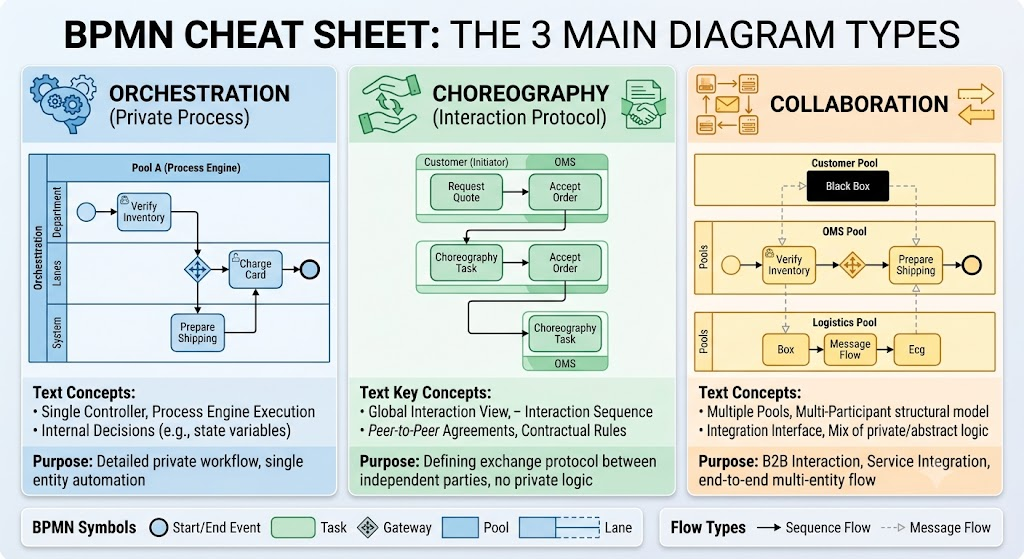
This guide demystifies these three core BPMN 2.0 model types. Using realistic examples from order fulfillment and logistics, we will explore when to use each diagram type, the strict syntax rules that govern them, and how modern AI-powered tooling like Visual Paradigm can accelerate your modeling journey. By the end, you will possess a clear mental framework for selecting the right diagram for any business scenario.
1. The Three Pillars of BPMN 2.0 Modeling
Before diving into mechanics, it is essential to understand the fundamental perspective each diagram offers. Think of these as different camera lenses for viewing business processes.
Orchestration: The Internal Controller
-
Perspective: “How do we execute this process internally?”
-
Analogy: A conductor leading an orchestra. There is one central point of control directing every instrument (task).
-
Key Characteristic: Single Pool, high internal visibility, executable logic.
Collaboration: The Cross-Boundary Handshake
-
Perspective: “How do independent entities exchange information?”
-
Analogy: A diplomatic summit between two nations. Each nation has its own internal agenda (hidden or visible), but the focus here is strictly on the treaties and messages exchanged at the border.
-
Key Characteristic: Multiple Pools, explicit Message Flows, mixed visibility (White-Box/Black-Box).
💃 Choreography: The Interaction Contract
-
Perspective: “What is the agreed-upon sequence of interactions?”
-
Analogy: A dance routine score. It doesn’t matter how each dancer practices privately; what matters is the precise timing of who moves when relative to their partner.
-
Key Characteristic: No pools, participant bands within tasks, implicit message flows, protocol-focused.
2. Deep Dive with Realistic Examples
Let’s ground these concepts in a familiar domain: E-Commerce Order Fulfillment.
A. Orchestration Diagram (Process Model)
Scenario: Documenting the internal workflow of the Order Management System (OMS) after a customer places an order.
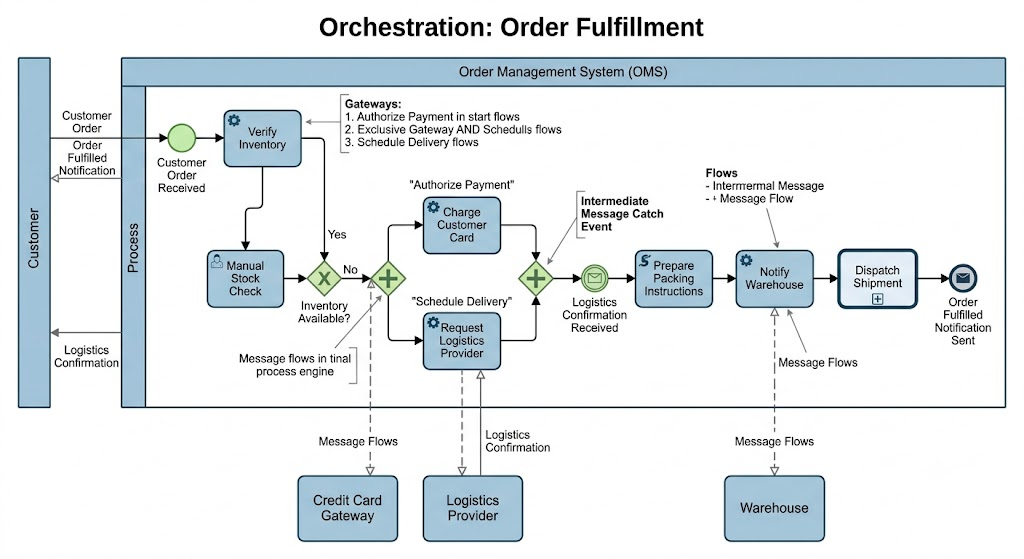
What You See:
-
Single Pool: “Order Management System (OMS)”
-
Start Event: “Customer Order Received”
-
Service Task: “Verify Inventory” (calls internal database)
-
Exclusive Gateway: “Inventory Available?” (evaluates internal variable
stockCount)-
Yes Path: → “Charge Customer Card” → “Prepare Packing Instructions”
-
No Path: → “Manual Stock Check” (User Task)
-
-
Parallel Gateway: Splits flow to simultaneously “Charge Customer Card” AND “Request Logistics Provider”
-
End Event: “Order Fulfilled Notification Sent”
Why Orchestration?
You need to define executable logic. The process engine must know exactly which service to call, how to evaluate the inventory gateway, and how to handle the parallel payment/logistics split. This is a white-box view optimized for automation.
⚠️ Critical Rule: Sequence Flows ($\longrightarrow$) never leave this pool. If the OMS needs to talk to an external Credit Card Gateway, that interaction is represented by a Message Flow crossing the pool boundary—but the internal decision logic stays inside.
B. Collaboration Diagram
Scenario: Mapping the end-to-end interaction between the Customer, OMS, Warehouse, Logistics Provider, and Credit Card Gateway
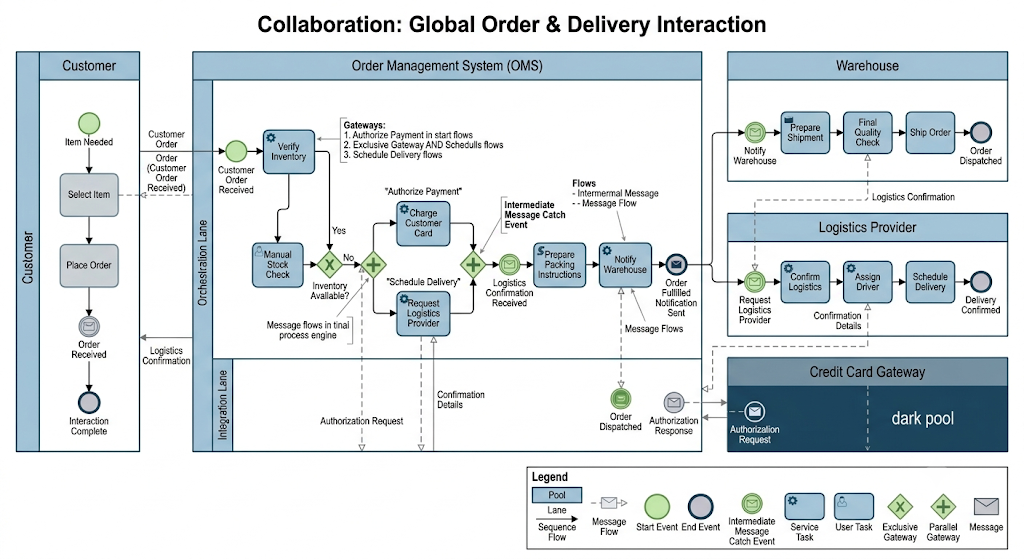
What You See:
-
Pool 1 (Customer): [Select Item] → [Place Order] → [Order Received]
-
Pool 2 (OMS): Contains the full orchestration from Example A (White-Box)
-
Pool 3 (Warehouse): [Notify Warehouse] → [Prepare Shipment] → [Final Quality Check] → [Ship Order]
-
Pool 4 (Logistics Provider): [Confirm Logistics] → [Assign Driver] → [Schedule Delivery]
-
Pool 5 (Credit Card Gateway): Black-Box pool (only shows message endpoints)
-
Message Flows: Connect pools explicitly:
-
Customer → OMS: “Customer Order”
-
OMS → Credit Card Gateway: “Authorization Request”
-
Credit Card Gateway → OMS: “Authorization Response”
-
OMS → Warehouse: “Notify Warehouse”
-
Warehouse → OMS: “Logistics Confirmation”
-
Why Collaboration?
You are defining system integration architecture. Stakeholders need to see responsibility boundaries: Who sends what? Who receives what? What happens if the Credit Card Gateway is down? The black-box representation of external systems acknowledges that you don’t control their internals—you only care about the contract.
⚠️ Critical Rule: Sequence Flows stay inside pools. Message Flows only connect different pools. Never draw a Sequence Flow from the Customer pool directly to the Warehouse pool—they don’t share a process context.
C. Choreography Diagram
Scenario: Defining the B2B interaction protocol between the OMS and Logistics Provider for delivery scheduling, independent of either party’s internal implementation
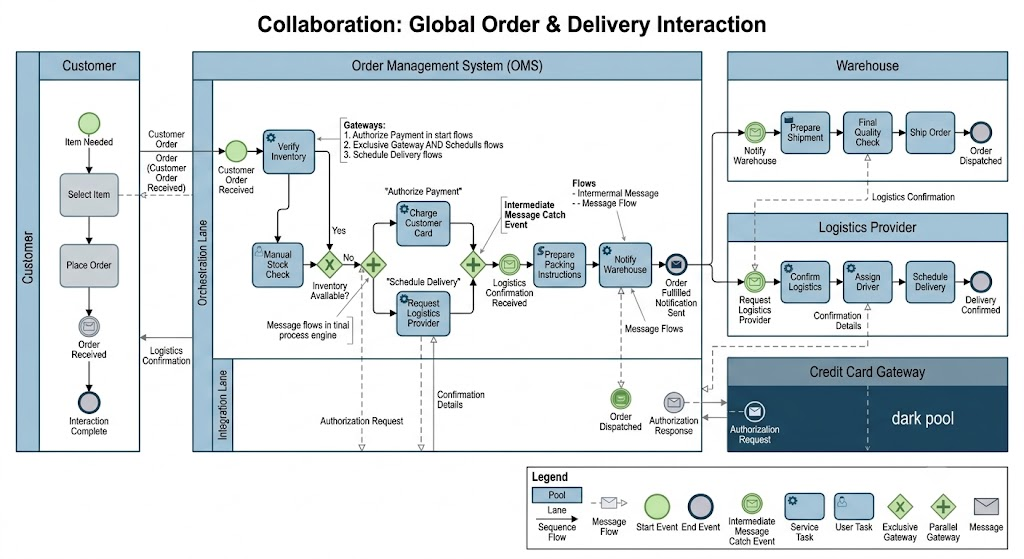
What You See:
-
No Pools. Instead, a linear sequence of Choreography Tasks:
-
Task 1: Top Band = “OMS” (Initiator) | Center = “Request Delivery Schedule” | Bottom Band = “Logistics Provider” (Receiver)
-
Task 2: Top Band = “Logistics Provider” (Initiator) | Center = “Confirm Delivery Slot” | Bottom Band = “OMS” (Receiver)
-
Task 3: Top Band = “OMS” (Initiator) | Center = “Send Packing Manifest” | Bottom Band = “Logistics Provider” (Receiver)
-
-
Sequence Flows ($\longrightarrow$): Connect choreography tasks, representing the order of interactions, not internal execution.
-
Gateway (+): After Task 2, an Exclusive Gateway splits based on whether confirmation was received:
-
Confirmed: → Task 3
-
Rejected: → Alternate Task: “Negotiate Alternative Slot”
-
Why Choreography?
You are creating a protocol contract. The Logistics Provider might implement their side using SAP, while the OMS uses a custom Node.js service. Neither cares about the other’s internals—only the sequence and content of messages. This diagram serves as the binding agreement for API specifications, EDI standards, or legal compliance frameworks.
⚠️ Critical Rule: Message flows are implicit inside choreography tasks. You never draw dashed message lines in a choreography diagram. The participant bands are the message flow.
3. Structural Constraints & Syntax Rules Cheat Sheet
Adhering to BPMN 2.0 syntax isn’t pedantry—it’s what makes models interoperable and executable. Here are the non-negotiable rules:
| Constraint | Orchestration | Collaboration | Choreography |
|---|---|---|---|
| Sequence Flow Scope | Within single pool only | Within individual pools only | Between choreography tasks only |
| Message Flow Scope | Only to/from abstract external shapes | Only between distinct pools | Never used (implicit in tasks) |
| Gateway Evaluation | Internal data variables (inventory > 0) |
Internal data OR message outcomes | Message content / interaction outcome |
| Participant Representation | Lanes within a pool | Separate pools | Bands inside choreography tasks |
| Internal Logic Visibility | Full (White-Box) | Optional per pool (White/Black-Box) | None (Interaction-only) |
| Executable By | Process Engine (Camunda, jBPM) | Integration middleware / ESB | Protocol validators / Contract testers |
Gateway Semantics Across Types
-
Orchestration Gateways evaluate state: “Is
paymentStatus == 'AUTHORIZED'?” -
Collaboration Gateways evaluate message outcomes: “Did the Credit Card Gateway return HTTP 200?”
-
Choreography Gateways evaluate interaction results: “Was the delivery slot confirmed?” Crucially, the participant making the gateway decision must have been involved in the immediately preceding choreography task. Otherwise, you create a race condition where a participant decides based on information they never received.
4. Selection Matrix: Choosing the Right Diagram
Use this decision framework when starting any BPMN modeling effort:
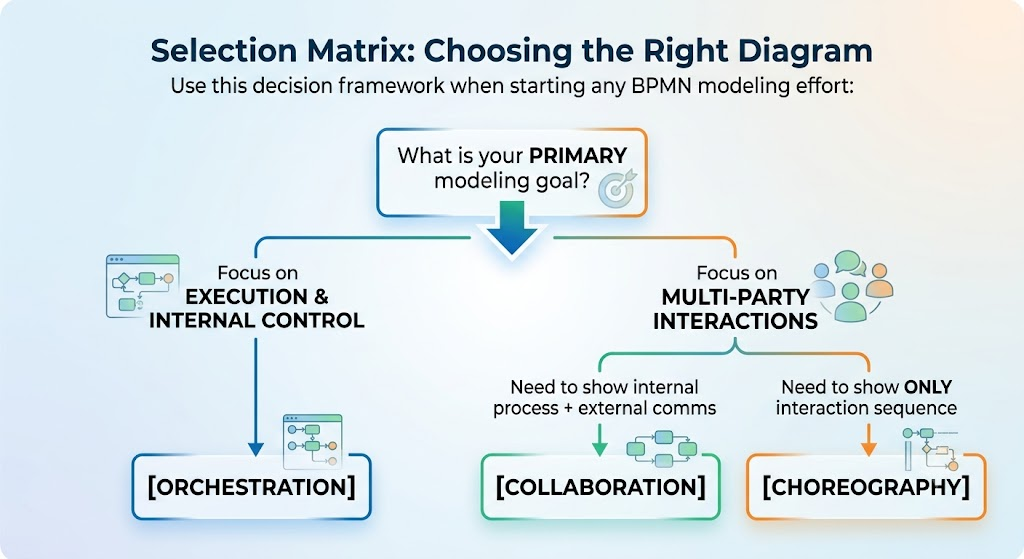
When to Choose Orchestration ✅
-
Building executable workflow code or microservice sagas
-
Documenting departmental SOPs with decision logic
-
Defining user task assignments and SLAs
-
Creating process documentation for audit/compliance within a single organization
When to Choose Collaboration ✅
-
Designing system integration architectures (APIs, EDI, webhooks)
-
Mapping B2B transaction flows with clear responsibility boundaries
-
Showing how independent orchestrations trigger each other
-
Onboarding new vendors/partners with visual interface contracts
When to Choose Choreography ✅
-
Defining industry-standard B2B interaction protocols (e.g., RosettaNet, ebXML)
-
Creating REST/gRPC interaction sequence specifications
-
Formalizing legal/compliance agreements where internal implementations are proprietary
-
Validating distributed consensus patterns across independent enterprises
5. Recommended Tooling: Visual Paradigm & AI Features
While many BPMN tools exist, Visual Paradigm stands out for beginners and professionals alike due to its comprehensive BPMN 2.0 support and integrated AI capabilities.
Why Visual Paradigm?
-
Full BPMN 2.0 Compliance: Supports all three diagram types with proper syntax validation. The tool won’t let you accidentally draw a Sequence Flow between pools in a Collaboration diagram.
-
AI-Powered Process Mining: Upload event logs or process transcripts, and VP’s AI suggests optimal diagram structures, identifies bottlenecks, and recommends gateway placements.
-
Smart Layout & Auto-Arrange: AI-assisted layout engines automatically organize complex collaboration diagrams with multiple pools, reducing manual formatting time by up to 70%.
-
Model Transformation: Seamlessly convert between diagram types. Start with a Choreography to define the protocol, then auto-generate skeleton Collaboration diagrams with pre-configured message flows.
-
Real-Time Collaboration: Cloud-based workspace allows business analysts, architects, and developers to co-edit diagrams with version control and comment threads.
-
Code Generation: Export Orchestration diagrams directly to Camunda BPMN XML, jBPM, or even generate boilerplate microservice code from Service Tasks.
Getting Started Tips for Beginners
-
Start with Templates: VP includes pre-built templates for all three diagram types. Don’t start from a blank canvas.
-
Use the Syntax Checker: Enable real-time validation. Red underlines indicate BPMN violations before you export.
-
Leverage AI Suggestions: When stuck on gateway placement or task sequencing, use the “AI Assist” panel to get context-aware recommendations.
-
Practice with the Order Fulfillment Examples: Recreate the three diagrams from this guide in VP. Muscle memory builds faster with realistic scenarios.
Conclusion
Mastering BPMN 2.0 isn’t about memorizing symbols—it’s about developing architectural intuition. Orchestration, Collaboration, and Choreography are not competing approaches; they are complementary lenses that, when applied correctly, create a complete picture of how business value flows through your organization and beyond.
-
Use Orchestration to build what runs.
-
Use Collaboration to define what connects.
-
Use Choreography to specify what agrees.
As enterprise architectures grow more distributed and AI-driven automation becomes ubiquitous, the ability to model processes with precision and clarity becomes a strategic differentiator. Tools like Visual Paradigm, enhanced with AI capabilities, lower the barrier to entry while enforcing the rigor that professional-grade process modeling demands.
Your next step? Pick a real process in your organization, identify which lens applies, and start modeling. The diagram you create today could be the foundation of tomorrow’s automated, integrated, and compliant business operation.
Related posts:
 Mastering Repetition in BPMN: A Practical Guide to Loops and Multi-Instance Activities
 AI-Powered Modeling in Agile: How BPMN and UML Are Making a Comeback
 Step-by-Step Guide: Mapping Employee Onboarding Workflows with AI
 🛒 From Cart to Confirmation: A Beginner’s Complete Guide to BPMN Using Visual Paradigm Online’s Free Web-Shop Workflow

 English
 Arabic
 Chinese (Simplified)
 Dutch
Dutch French
 German
 Italian
 Japanese
 Korean
 Portuguese
 Russian
 Spanish