


BPMN Diagram Examples for Common Business Processes
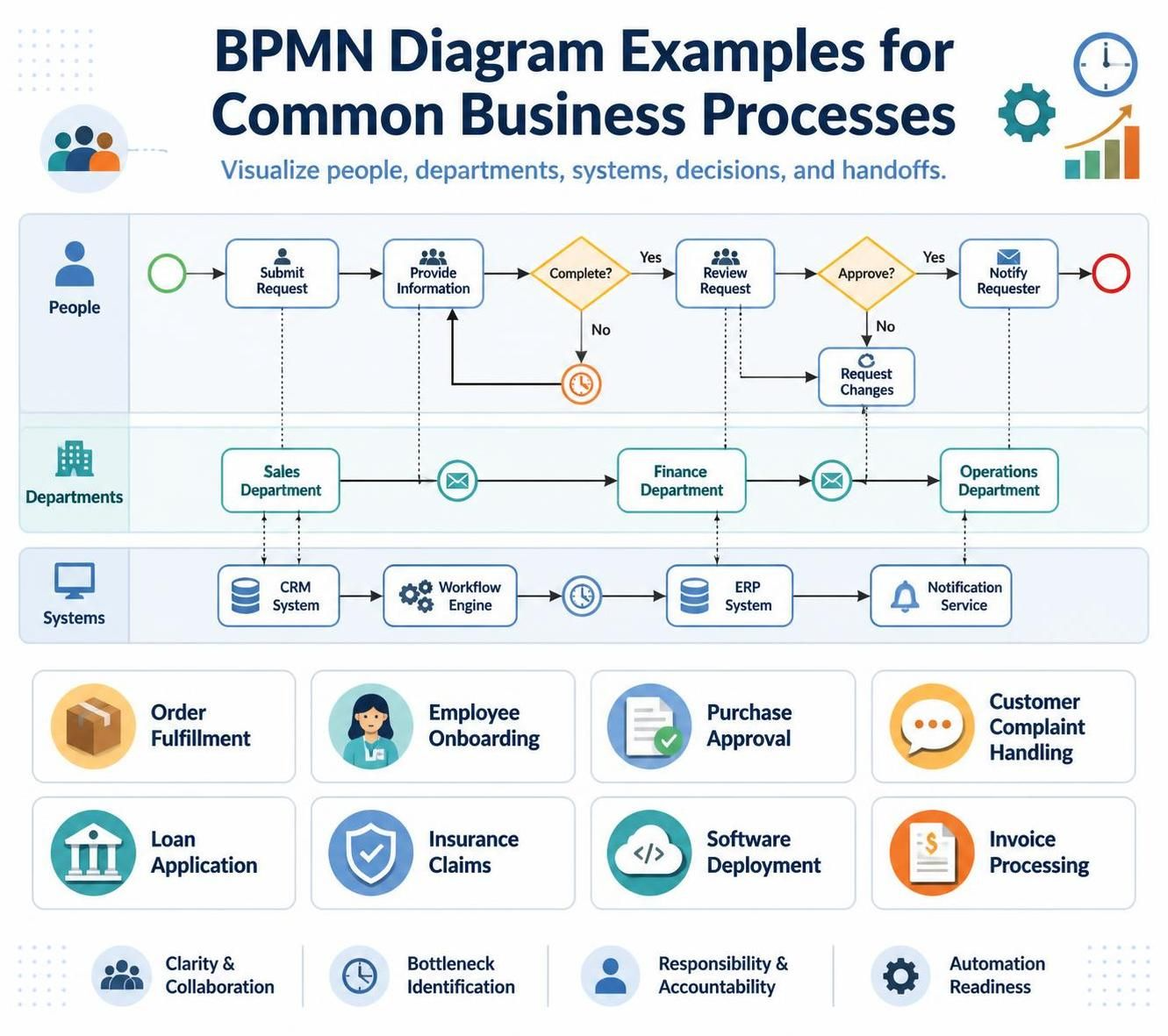
Business processes often involve multiple people, departments, systems, decisions, and handoffs. BPMN provides a consistent way to represent that complexity visually.
A well-designed BPMN diagram can help teams understand how work is performed, identify delays, clarify responsibilities, and prepare a process for automation. This article presents practical BPMN examples for common business processes, including order fulfillment, employee onboarding, purchase approval, customer complaint handling, loan applications, insurance claims, software deployment, and invoice processing.
How to Read the Examples
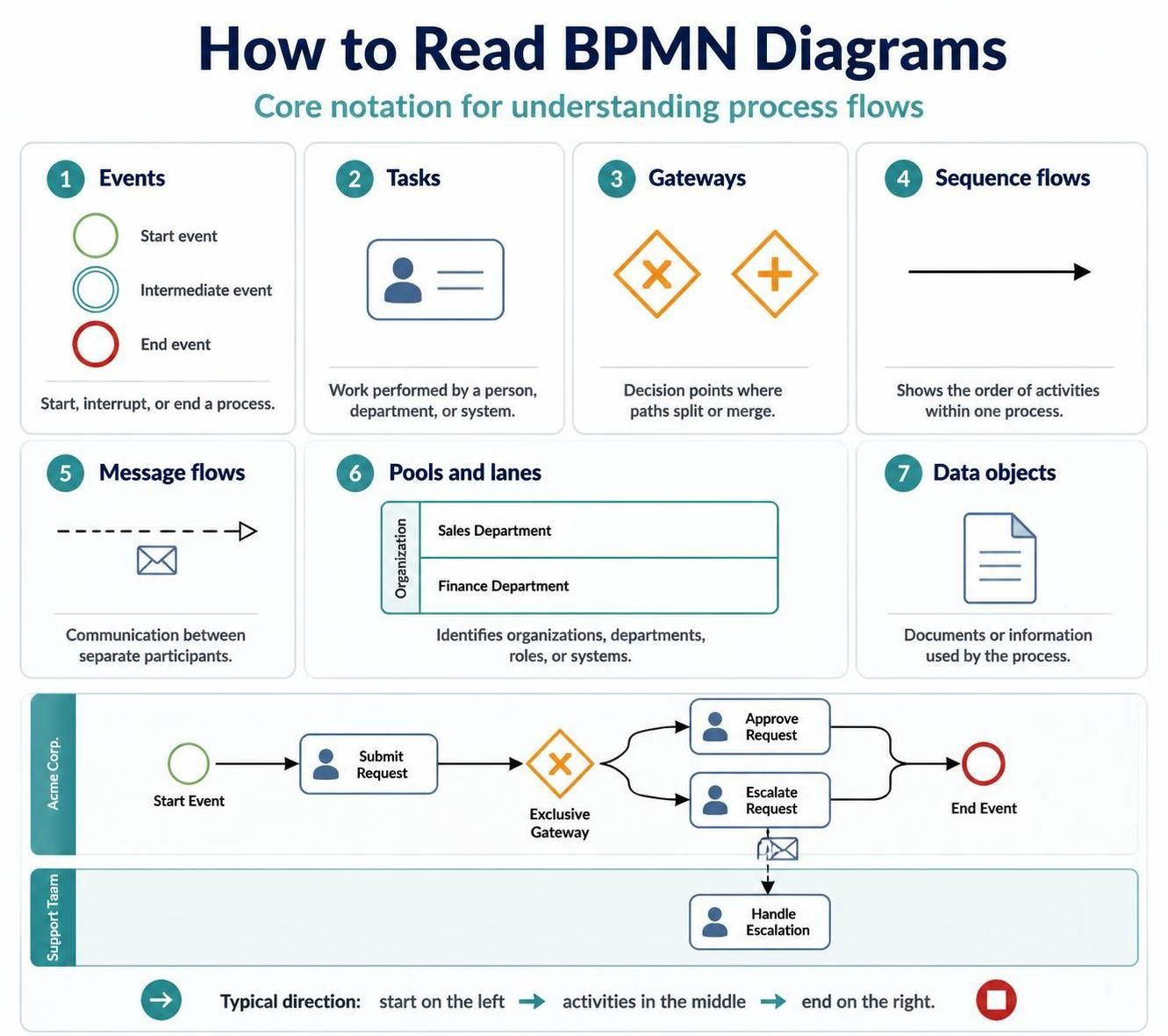
The examples use the main BPMN elements:
-
Events: Something that starts, interrupts, or ends a process.
-
Tasks: Work performed by a person, department, or system.
-
Gateways: Decision points or places where paths split and merge.
-
Sequence flows: Show the order of activities within a process.
-
Message flows: Show communication between separate participants.
-
Pools and lanes: Identify organizations, departments, roles, or systems.
-
Data objects: Represent documents or information used by the process.
In most cases, the process flows from left to right. Start events appear on the left, activities in the middle, and end events on the right.
Example 1: Order Fulfillment
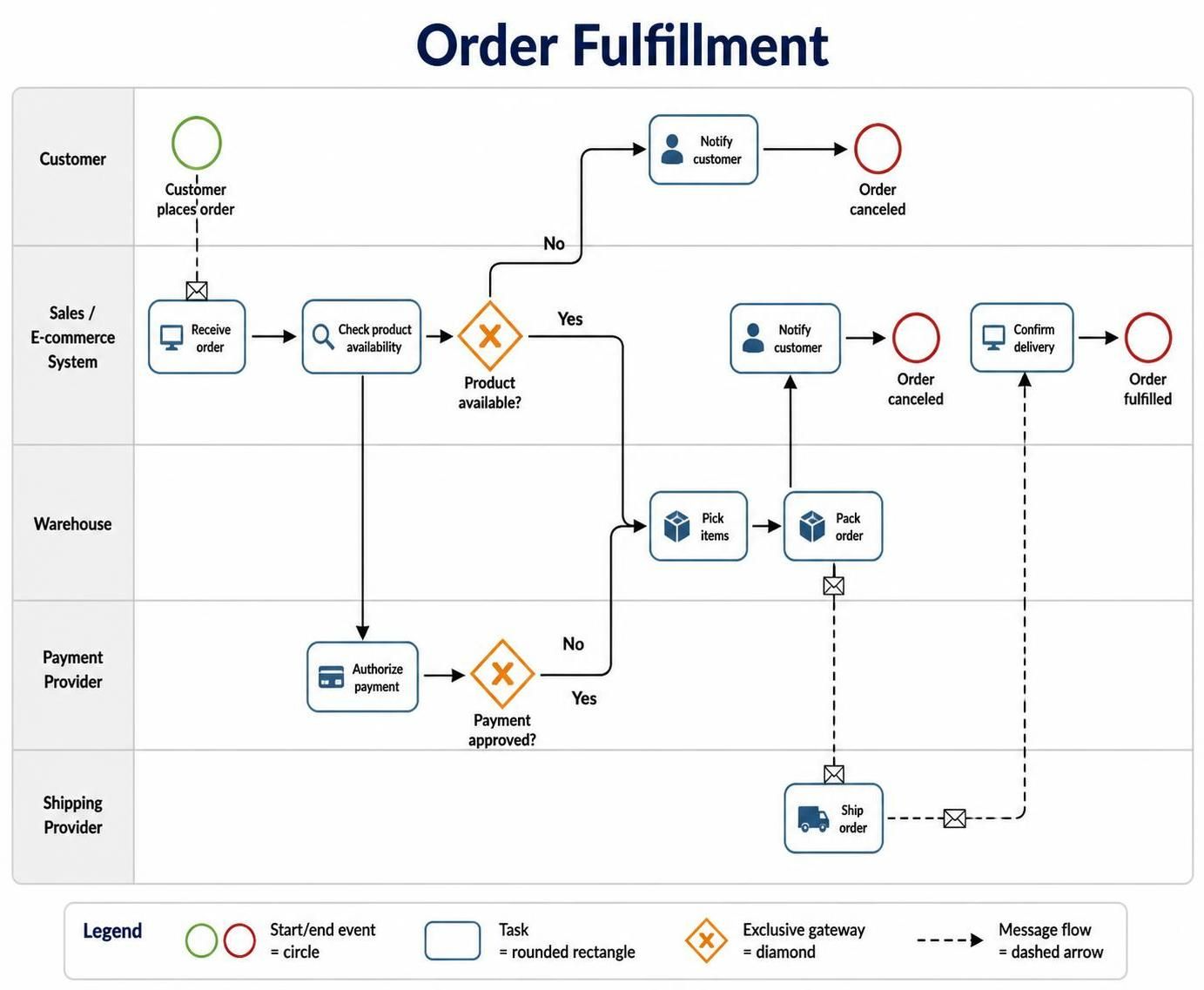
An order fulfillment process begins when a customer submits an order and ends when the order is delivered or canceled.
Participants
-
Customer
-
Sales or e-commerce system
-
Warehouse
-
Payment provider
-
Shipping provider
Process flow
BPMN modeling notes
The “Is the product available?” question can be represented with an exclusive gateway because only one path is followed: the product is either available or unavailable.
A second exclusive gateway can evaluate whether payment was approved. If payment fails, the process may end with a distinct “Order canceled” end event. If payment succeeds, the warehouse can prepare and ship the order.
The customer, company, payment provider, and shipping provider may be modeled as separate pools when they represent independent participants. Message flows can then show interactions such as:
-
Order submitted
-
Payment authorization request
-
Shipping confirmation
-
Delivery notification
Useful improvements
A more detailed model could include:
-
A timer event for payment expiration
-
An intermediate message event for shipment tracking
-
An error boundary event for payment-system failures
-
An escalation path when an item is backordered
-
A compensation activity for refunding a canceled order
Example 2: Employee Onboarding
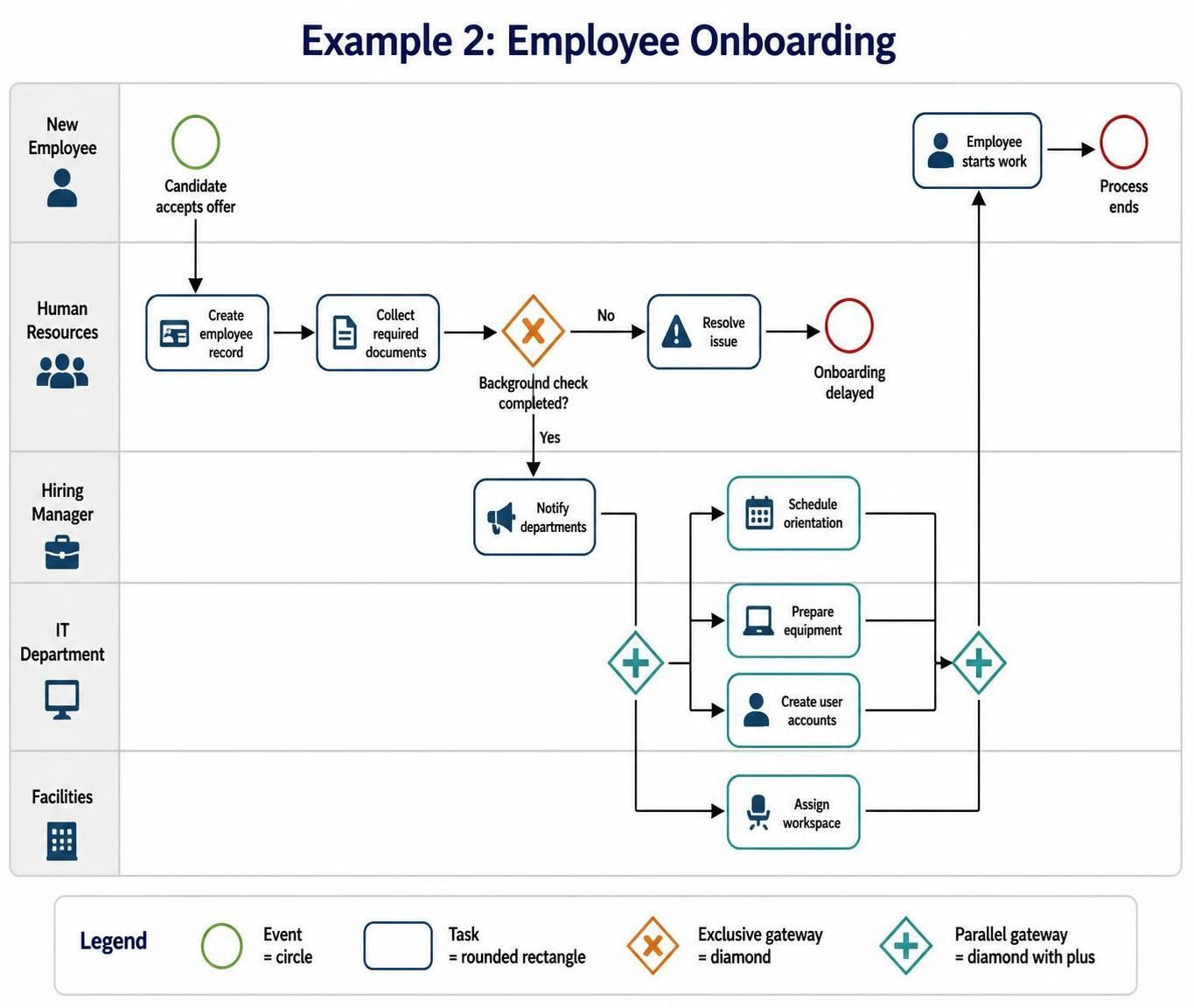
Employee onboarding coordinates activities among human resources, the hiring manager, IT, facilities, and the new employee.
Participants
-
Human resources
-
Hiring manager
-
IT department
-
Facilities
-
New employee
Process flow
BPMN modeling notes
This process is well suited to a pool containing lanes for HR, IT, facilities, the hiring manager, and the employee.
Activities such as “Create user accounts,” “Send welcome email,” or “Create employee record” may be modeled as service tasks when they are performed automatically by software.
Activities such as “Conduct orientation” or “Review team responsibilities” are usually user tasks because they require human participation.
If several onboarding activities can occur at the same time, a parallel gateway can split the process:
-
IT prepares equipment.
-
Facilities prepares the workspace.
-
HR completes payroll setup.
-
The manager prepares the first-week schedule.
A second parallel gateway can synchronize these paths before the employee begins work.
Useful improvements
The model can include a timer event that sends a reminder if required documents have not been submitted within a defined period. A boundary error event could handle a failed background check, while an escalation event could notify HR management when onboarding is delayed.
Example 3: Purchase Approval
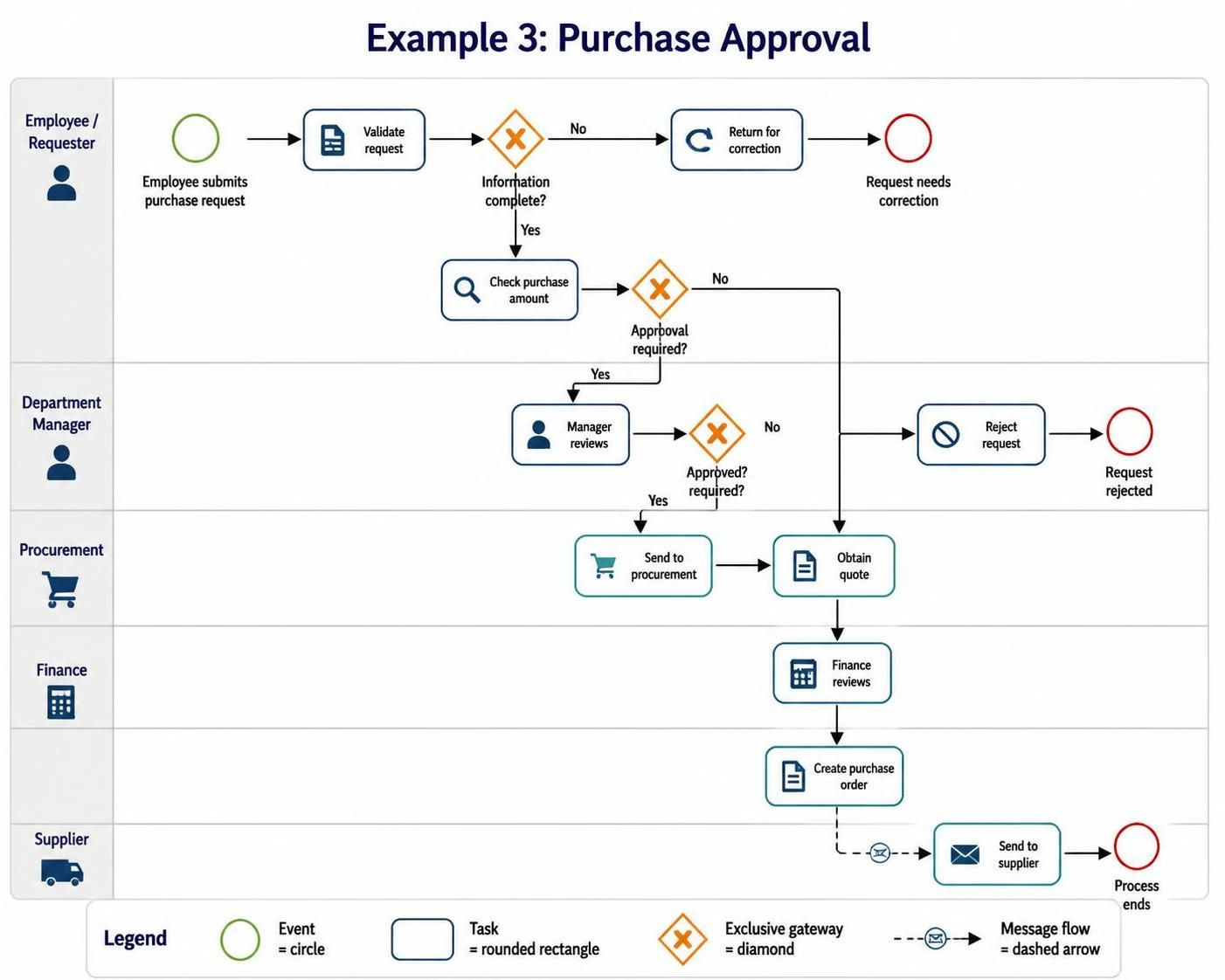
A purchase approval process controls how employees request goods or services and how managers authorize spending.
Participants
-
Employee or requester
-
Department manager
-
Procurement
-
Finance
-
Supplier
Process flow
BPMN modeling notes
The purchase amount can determine which approval path is required. For example:
-
Small purchases may require no additional approval.
-
Medium purchases may require department-manager approval.
-
Large purchases may require manager and finance approval.
An inclusive gateway may be appropriate when more than one approval can be required depending on the request. For example, a purchase may require both legal and finance review.
A parallel gateway is useful when procurement and finance can review the request simultaneously. The paths should be synchronized before the purchase order is issued.
Common decision conditions
Gateway conditions should be explicit, such as:
-
Amount <= $500 -
Amount > $500 and Amount <= $5,000 -
Amount > $5,000 -
Budget available = Yes -
Preferred supplier = Yes
Clear conditions make the process easier to understand and implement in a workflow system.
Example 4: Customer Complaint Handling
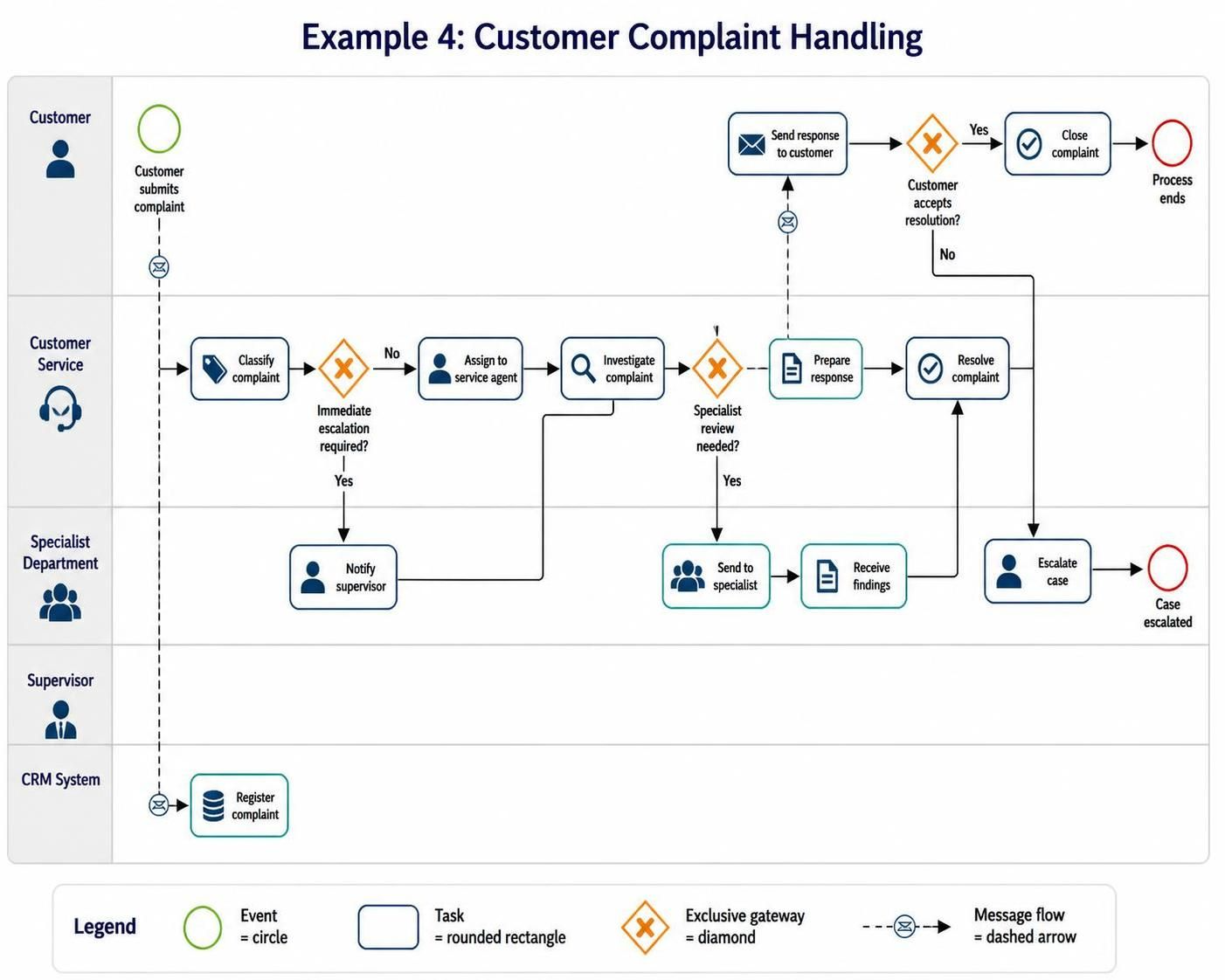
Customer complaint handling usually includes intake, classification, investigation, resolution, and follow-up.
Participants
-
Customer
-
Customer service
-
Specialist department
-
Supervisor
-
Customer relationship management system
Process flow
BPMN modeling notes
A message start event can represent the arrival of a complaint by email, phone, web form, or chat.
A boundary timer event can be attached to “Investigate complaint” to represent a service-level deadline. If the investigation exceeds the deadline, the process can send an escalation notification.
A non-interrupting escalation event may be appropriate when management should be informed but the original investigation should continue.
Useful data objects
The diagram may associate the process with:
-
Complaint form
-
Customer account record
-
Investigation report
-
Resolution proposal
-
Customer response
-
Service-level agreement
These data objects document the information used by the process without changing its sequence flow.
Example 5: Loan Application
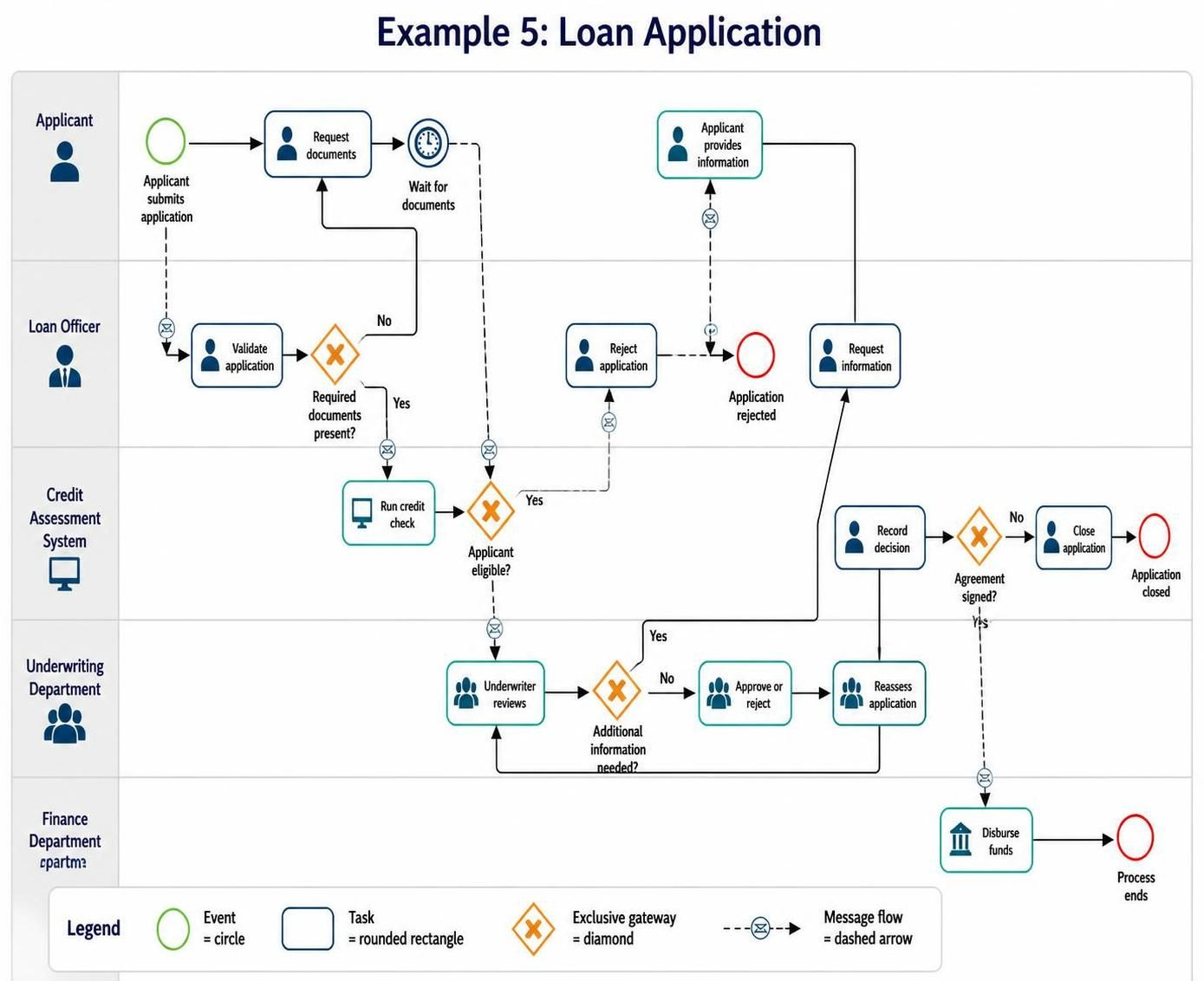
Loan processing involves document collection, eligibility checks, risk assessment, approval, and disbursement.
Participants
-
Applicant
-
Loan officer
-
Credit assessment system
-
Underwriting department
-
Finance department
Process flow
BPMN modeling notes
An event-based gateway may be useful after an application is submitted if the process must wait for one of several events:
-
Required documents received
-
Applicant withdraws application
-
Review deadline expires
-
External credit report received
Unlike a regular data-based gateway, an event-based gateway routes the process according to whichever event occurs first.
A timer event can automatically close an application if the applicant does not provide missing information within a specified period.
Handling exceptions
Possible exception paths include:
-
Credit-check system unavailable
-
Documents cannot be verified
-
Applicant withdraws the application
-
Fraud risk detected
-
Approval expires before signing
Each outcome should have a clear end event, such as “Application rejected,” “Application withdrawn,” or “Loan funded.”
Example 6: Insurance Claims
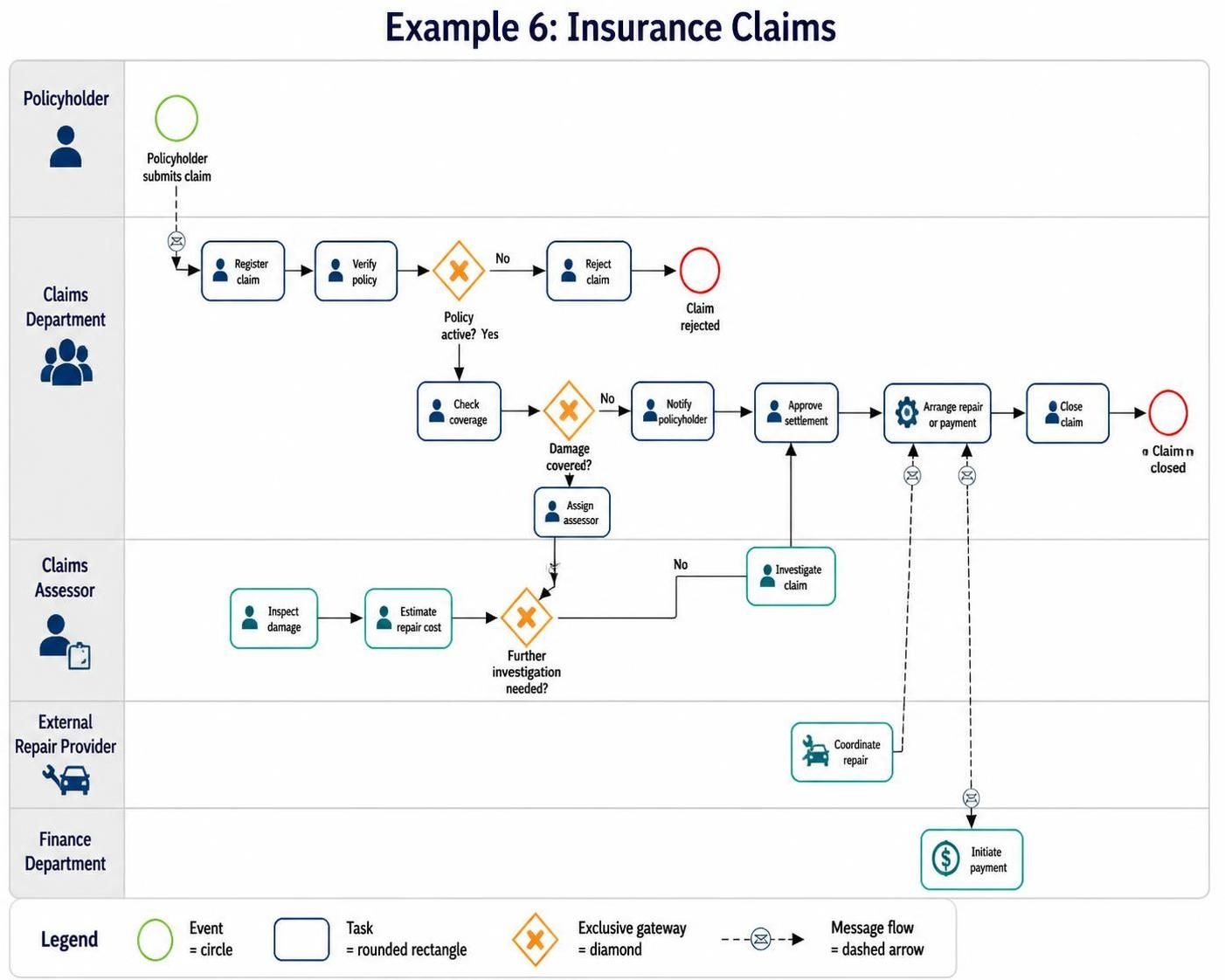
Insurance claims typically pass through intake, coverage validation, investigation, assessment, decision, and payment.
Participants
-
Policyholder
-
Claims department
-
Claims assessor
-
External repair provider
-
Finance department
Process flow
BPMN modeling notes
The policyholder and insurance company can be modeled as separate pools. Message flows may represent:
-
Claim submission
-
Request for additional evidence
-
Coverage decision
-
Settlement offer
-
Payment confirmation
The claim itself may be represented by a data object connected to activities such as “Verify policy,” “Inspect damage,” and “Approve settlement.”
A compensation activity can be used if a completed action must be reversed. For example, if a repair order has been issued but the claim is later invalidated, the process may need to cancel the repair arrangement.
Example 7: Software Deployment
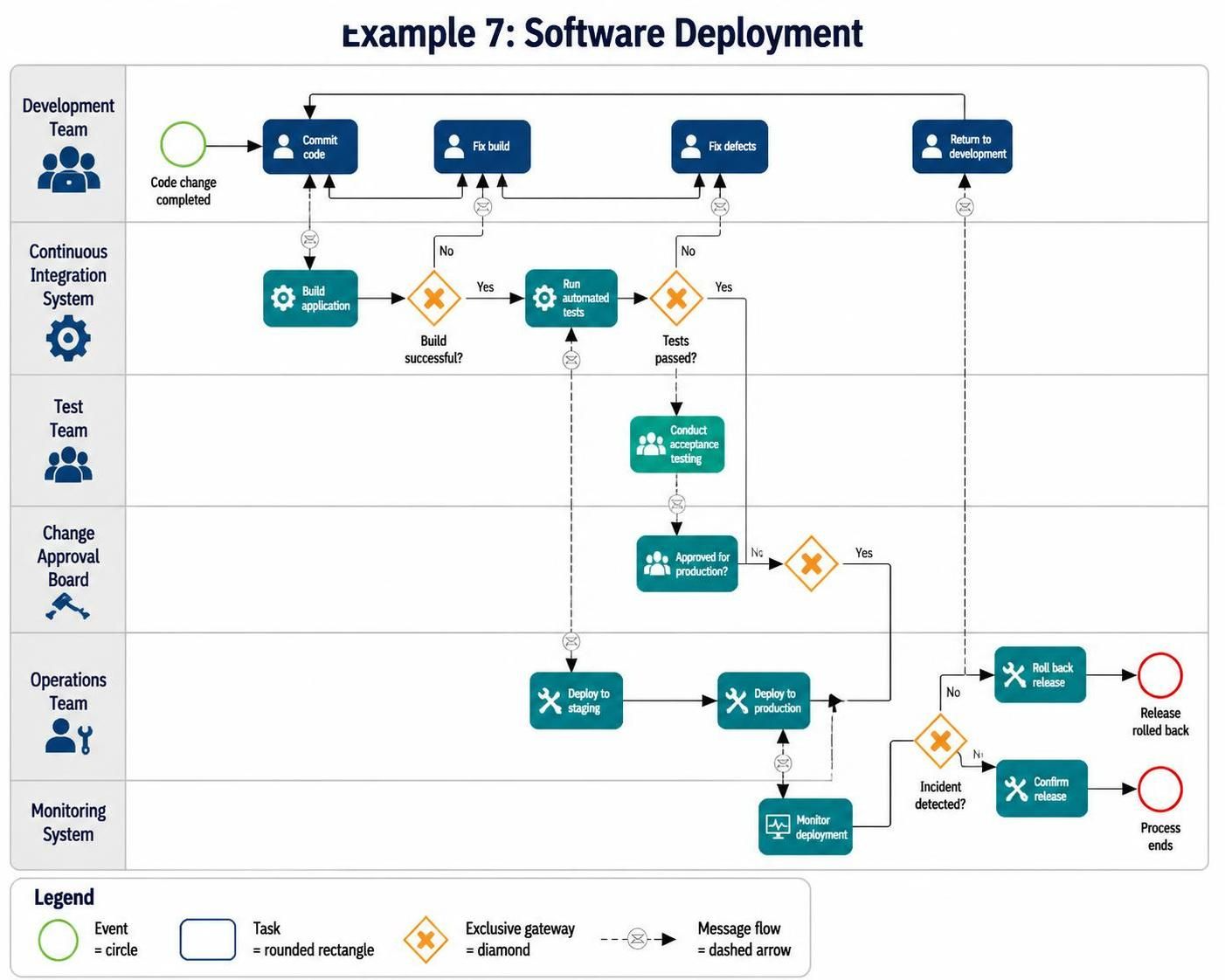
Software deployment combines development, testing, approval, release, and monitoring activities.
Participants
-
Development team
-
Continuous integration system
-
Test team
-
Change approval board
-
Operations team
-
Monitoring system
Process flow
BPMN modeling notes
Automated build, test, and deployment steps can be represented as service tasks. Human approvals are generally user tasks.
A boundary error event may be attached to the production deployment task to represent deployment failure. A boundary escalation event may notify the operations team if monitoring detects a serious incident.
A compensation activity can represent rollback. However, rollback behavior should be modeled carefully because it may involve restoring a previous application version, reversing database changes, or disabling a feature flag.
Parallel activities
After deployment, several monitoring activities may run simultaneously:
-
Application health monitoring
-
Security monitoring
-
Performance monitoring
-
Business transaction monitoring
A parallel gateway can synchronize these checks before the release is formally closed.
Example 8: Invoice Processing
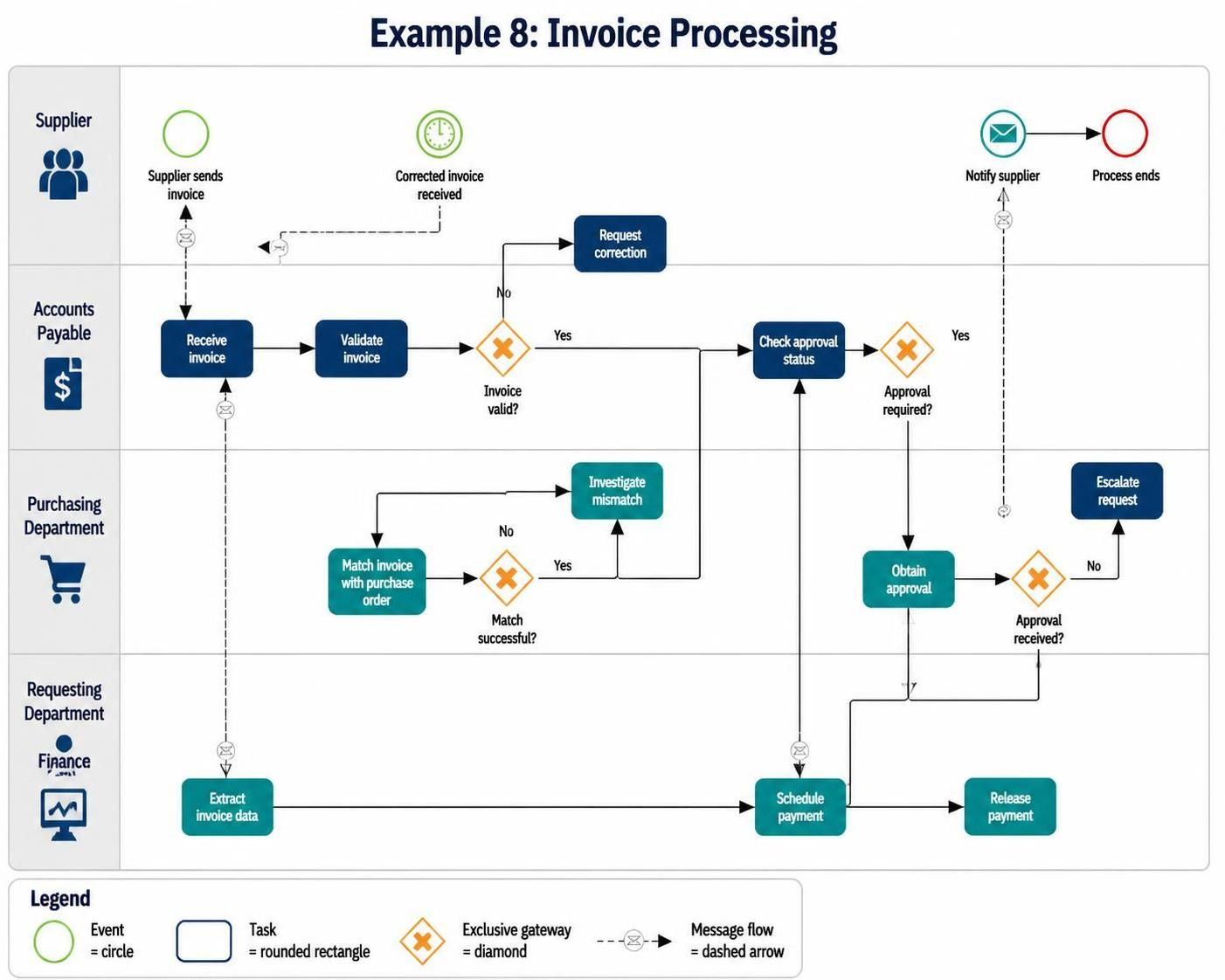
Invoice processing is a common accounts-payable process that includes receipt, validation, approval, matching, and payment.
Participants
-
Supplier
-
Accounts payable
-
Purchasing department
-
Requesting department
-
Finance system
Process flow
BPMN modeling notes
A parallel gateway can model three-way matching between:
-
Purchase order
-
Goods receipt
-
Supplier invoice
All three pieces of information may need to be available before payment is released.
An intermediate timer event can wait until the scheduled payment date. An error boundary event can handle a rejected payment or invalid bank information.
Comparing the Examples
| Process | Main participants | Common gateways or events | Typical exception |
|---|---|---|---|
| Order fulfillment | Customer, warehouse, payment provider, shipping provider | Exclusive gateways, message events, timer events | Payment failure or stock shortage |
| Employee onboarding | HR, IT, facilities, manager, employee | Parallel gateways, timer events | Missing documents or delayed equipment |
| Purchase approval | Requester, manager, procurement, finance | Exclusive, inclusive, and parallel gateways | Rejected request or unavailable budget |
| Complaint handling | Customer service, specialist, supervisor | Escalation and timer events | Missed service-level deadline |
| Loan application | Applicant, lender, credit system, underwriter | Event-based and exclusive gateways | Missing documents or failed verification |
| Insurance claims | Policyholder, claims team, assessor, finance | Exclusive gateways, compensation | Coverage dispute or incomplete evidence |
| Software deployment | Developers, CI system, testing, operations | Parallel gateways, error events | Failed deployment or production incident |
| Invoice processing | Supplier, accounts payable, purchasing, finance | Parallel and exclusive gateways | Mismatched invoice or rejected payment |
Modeling Tips for Business Process Examples
Start with the process boundary
Decide where the process begins and ends. For example, an order fulfillment process might begin when an order is submitted and end when delivery is confirmed. It should not also include product design, marketing, or long-term customer support unless those activities are part of the same process scope.
Identify participants before drawing activities
List the people, departments, organizations, and systems involved. This makes it easier to decide whether to use separate pools or lanes.
Use a separate pool when the participant represents an independent organization or collaboration participant. Use lanes when the participant is a role, department, or responsibility within the same organization.
Use explicit gateway conditions
Instead of labeling a gateway “Decision,” use conditions such as:
-
Payment approved -
Stock available -
Amount exceeds approval limit -
Documents complete -
Customer accepts resolution
Explicit conditions make diagrams easier to review and translate into workflow rules.
Distinguish normal and exceptional paths
The main flow should show the normal way work proceeds. Error handling, escalations, timeouts, and compensation paths should be included when they are important to the process but should not overwhelm the primary diagram.
For complex processes, place detailed exception handling in a separate sub-process.
Give different outcomes different end events
A process ending in approval, rejection, cancellation, timeout, or failure should use clearly named end events. This makes the model more useful for reporting and automation.
Examples include:
-
Order fulfilled
-
Order canceled
-
Application approved
-
Application rejected
-
Complaint resolved
-
Claim escalated
-
Deployment rolled back
Tooling: Visual Paradigm BPMN Online Free Tool and AI-Assisted Features
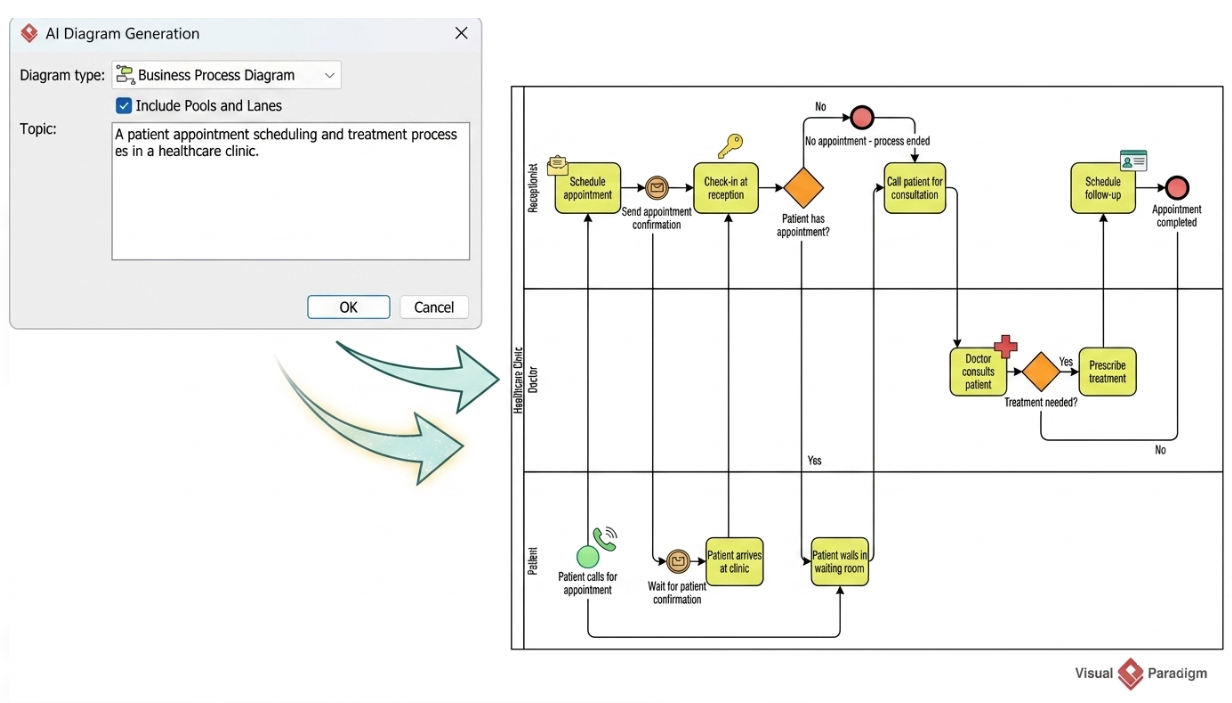
Creating BPMN diagrams does not require starting with a blank canvas or installing a desktop application. Visual Paradigm Online provides browser-based diagramming capabilities that can be used to create and share visual models, including BPMN diagrams. The platform also promotes AI-assisted modeling features that can turn natural-language descriptions into visual diagrams or help users refine their modeling work.
Using the BPMN Online Free Tool
A practical workflow is:
-
Open the BPMN diagram editor.
-
Select a BPMN template or start with a blank diagram.
-
Add pools and lanes for participants and responsibilities.
-
Place a start event and define the process trigger.
-
Add tasks in the order they occur.
-
Insert gateways where business decisions are made.
-
Connect activities with sequence flows.
-
Add message flows between independent participants.
-
Add data objects, annotations, and groups where useful.
-
Review the diagram with process owners.
-
Export or share the completed model.
For example, you could create an order fulfillment diagram by describing the process as:
A customer submits an order. The system checks inventory and payment. If the item is unavailable, notify the customer. If payment fails, cancel the order. Otherwise, the warehouse picks and packs the item, the shipping provider delivers it, and the system confirms delivery.
The resulting diagram should be treated as a starting point. Review each event, task, gateway condition, participant, and exception path to ensure that the model accurately reflects the real process.
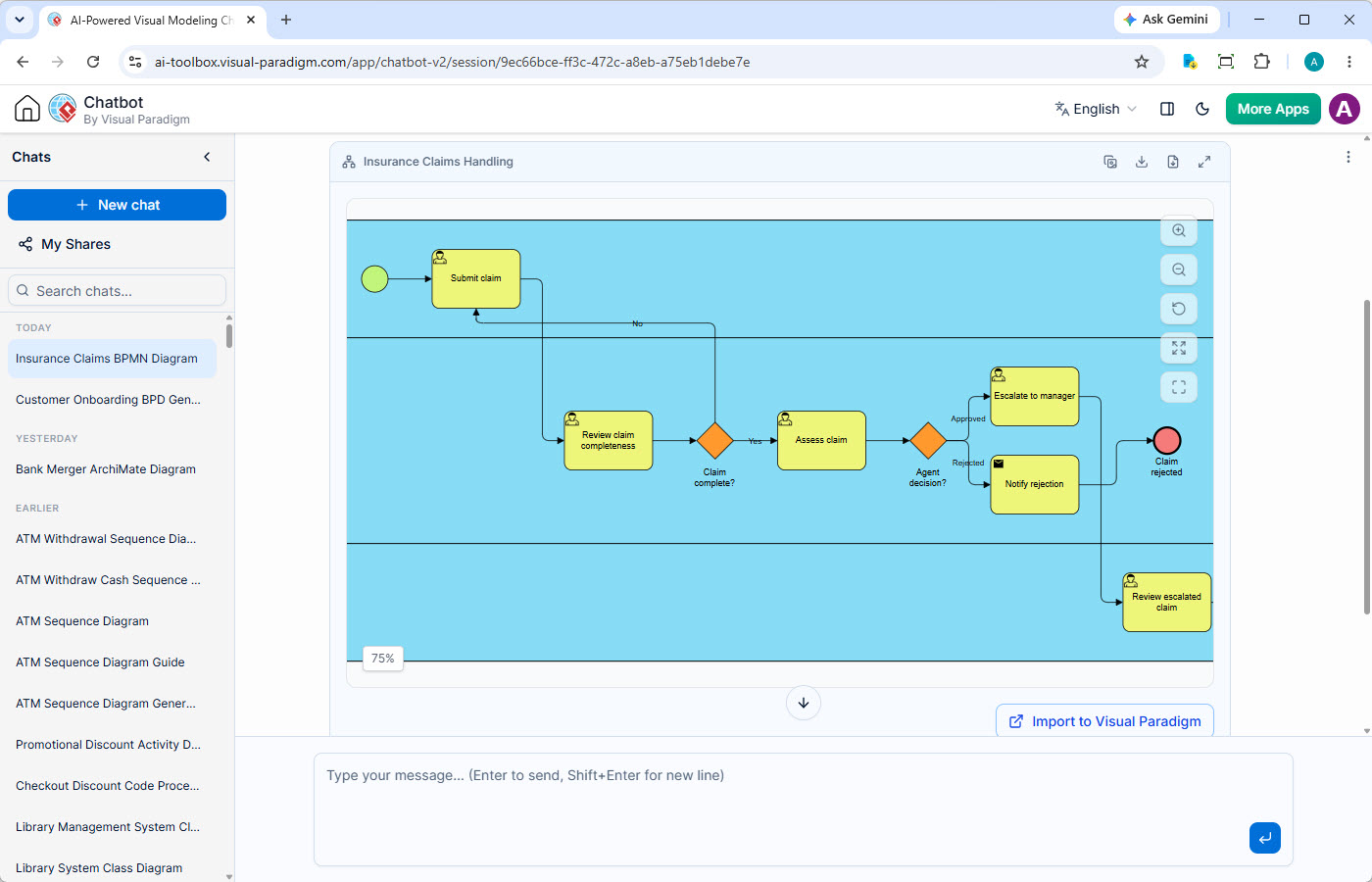
AI-assisted modeling
AI features can be useful for:
-
Turning a written process description into a first-draft diagram
-
Suggesting activities and decision points
-
Helping identify missing participants
-
Generating alternative process paths
-
Explaining BPMN symbols
-
Refining task names
-
Documenting the purpose of process steps
-
Producing related visual models from requirements
Visual Paradigm describes its AI capabilities as supporting natural-language, text-to-diagram generation and broader AI-assisted visual modeling.
AI assistance is most effective when the input describes:
-
The process trigger
-
The main participants
-
The activities in sequence
-
Decision conditions
-
Possible exceptions
-
The desired end states
A vague prompt such as “Create a loan process” may produce a generic result. A more useful prompt specifies the process logic:
Model a loan application process involving an applicant, loan officer, credit-check system, and underwriter. Begin when the applicant submits an application. Validate required documents, run a credit check, reject incomplete applications, request additional information when necessary, and end with either loan approval and fund disbursement or application rejection.
Review AI-generated diagrams carefully
AI-generated models can omit important business rules or misunderstand organizational boundaries. Before using an AI-assisted diagram for implementation, check that:
-
Every process has a clear start event.
-
Each normal path reaches an end event.
-
Gateway conditions are mutually appropriate.
-
Sequence flows do not cross participant boundaries incorrectly.
-
Message flows are used only between separate pools.
-
Activities are assigned to the correct role or system.
-
Exception paths reflect actual operating procedures.
-
Sensitive business information has not been included unnecessarily.
-
The final diagram conforms to the organization’s BPMN conventions.
AI can accelerate diagram creation, but process owners remain responsible for validating the model.
Final Takeaway
BPMN examples are most useful when they connect notation to real business situations. Order fulfillment demonstrates inventory and payment decisions. Employee onboarding highlights responsibilities and parallel work. Purchase approval shows authorization rules. Complaint handling illustrates escalation and deadlines. Loan and insurance processes demonstrate document-driven decisions, while software deployment and invoice processing show how human and automated tasks can work together.
The goal is not to draw every possible detail in one diagram. The goal is to create a model that clearly communicates how work begins, who performs each activity, how decisions are made, what information is exchanged, and how the process ends.
Related posts:
 Mastering Repetition in BPMN: A Practical Guide to Loops and Multi-Instance Activities
 AI-Powered Modeling in Agile: How BPMN and UML Are Making a Comeback
 Step-by-Step Guide: Mapping Employee Onboarding Workflows with AI
 🛒 From Cart to Confirmation: A Beginner’s Complete Guide to BPMN Using Visual Paradigm Online’s Free Web-Shop Workflow

 English
 Arabic
 Chinese (Simplified)
 Dutch
Dutch French
 German
 Italian
 Japanese
 Korean
 Portuguese
 Russian
 Spanish