


In the modern era of software engineering, knowledge often becomes fragmented across disparate tools—requirements live in Word documents, diagrams reside in Visio or local installations, and collaboration happens on Slack or Teams. This fragmentation creates a “knowledge silo” problem where the truth about a system is difficult to maintain.
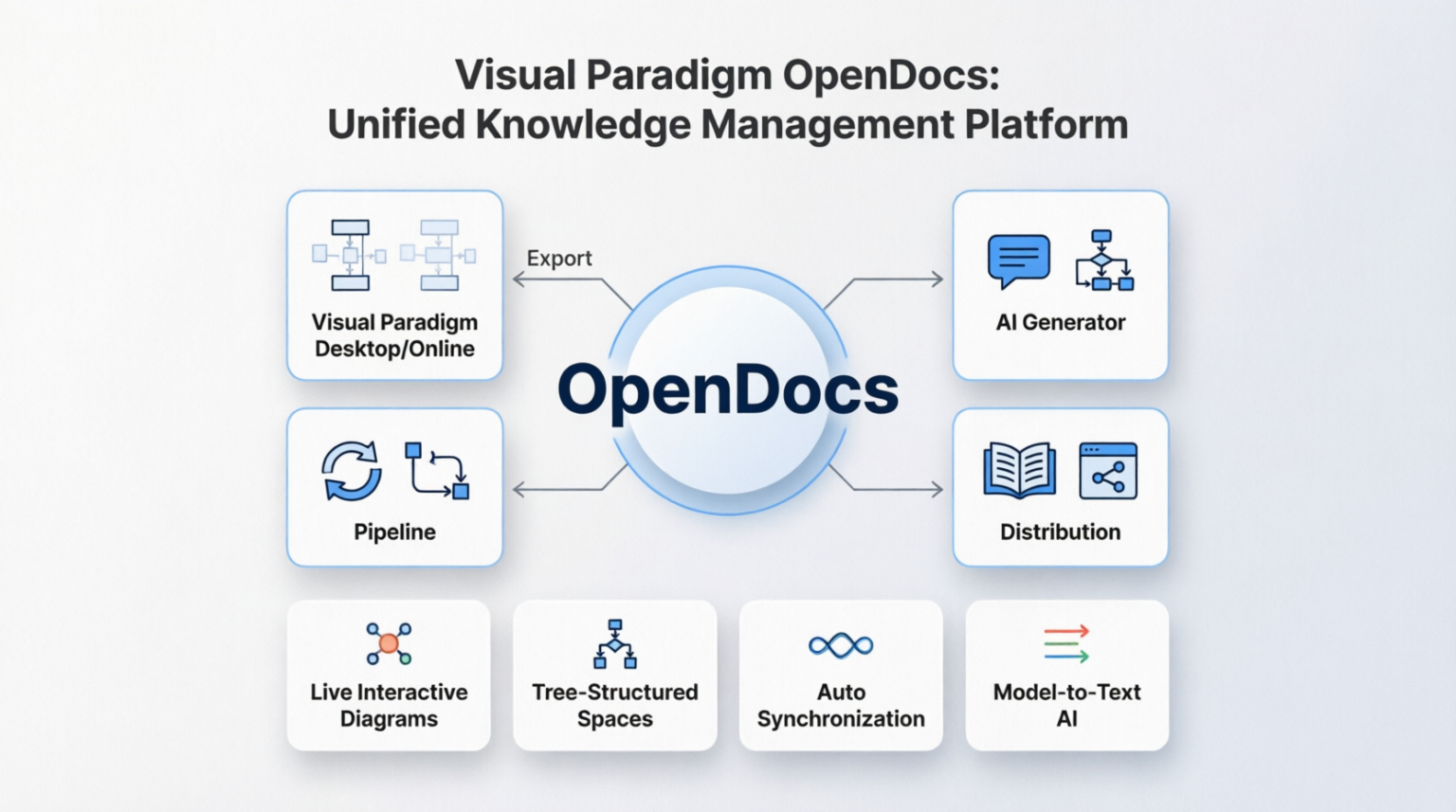
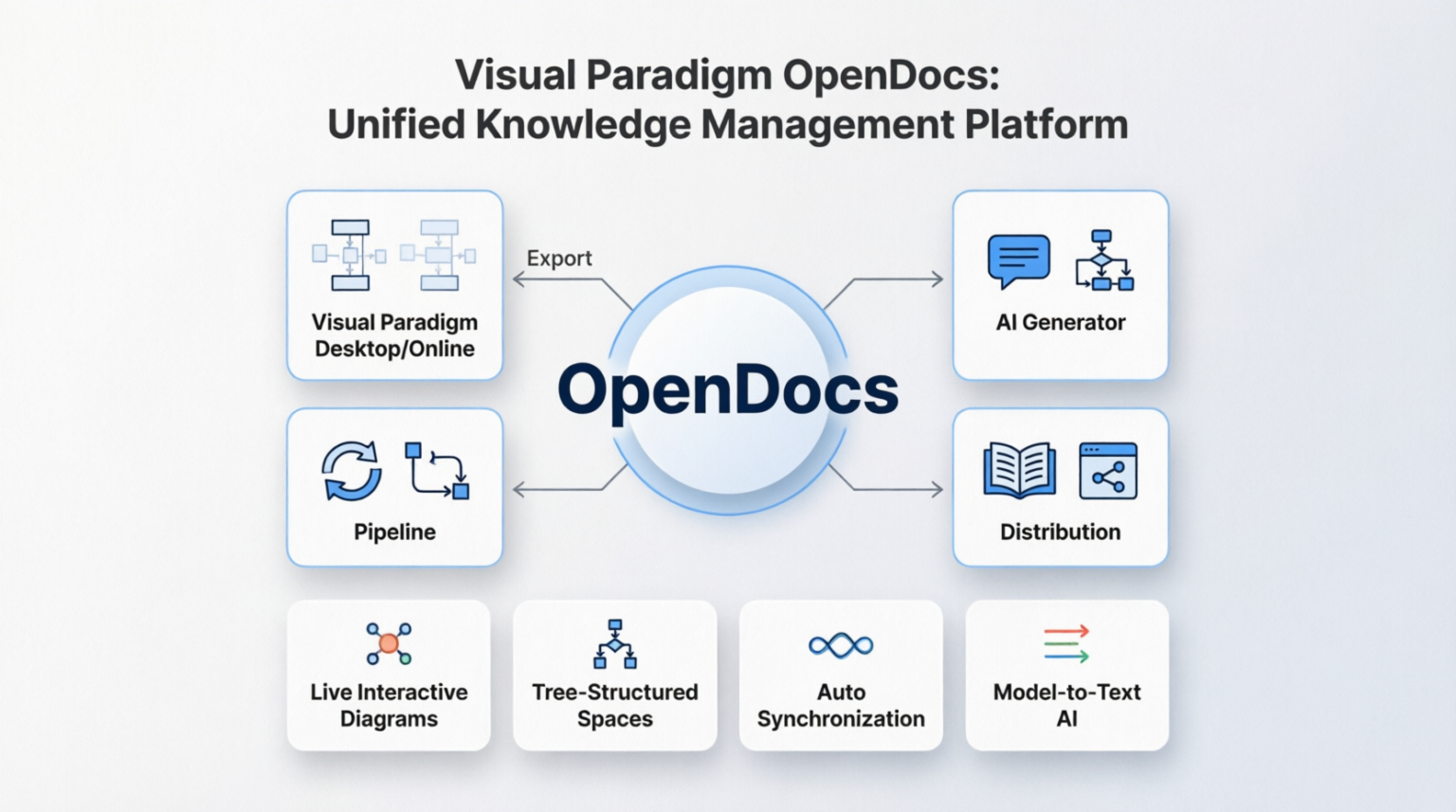
Visual Paradigm OpenDocs addresses this challenge by introducing a Unified Knowledge Management Platform. As illustrated in the architecture diagram, OpenDocs acts as a central hub designed to synchronize, generate, and distribute system knowledge seamlessly. This tutorial breaks down the architectural components shown in the diagram and explains how they function together to streamline the engineering lifecycle.
1. The Core Hub: OpenDocs
At the center of the architecture is the OpenDocs engine. Think of this not just as a database, but as the “single source of truth.” It is the central repository that manages the metadata, logic, and visual representations of your software architecture. All other components in the ecosystem connect back to this core to ensure consistency.
2. The Input/Output Cycle: Desktop/Online and AI
The architecture features a robust bidirectional flow between the user interface and the core knowledge base.
Visual Paradigm Desktop/Online
The diagram indicates an Export and bidirectional link to Visual Paradigm Desktop/Online. This represents the traditional modeling workflow where engineers use the rich graphical interface to drag-and-drop UML, BPMN, or SysML elements. OpenDocs ensures that these visual changes are instantly persisted to the central model, allowing for version control and team collaboration.
AI Generator
On the right side of the hub, we see the AI Generator. This component represents the shift from “model-first” to “text-first” workflows. Instead of manually drawing boxes, an architect can provide a natural language prompt. The AI Generator interprets this text and automatically creates the corresponding UML diagrams, pushing the generated artifacts into the OpenDocs core.
3. The Workflow Engine: Pipeline and Distribution
Once the model exists in the core, it must be moved through the organization. The diagram highlights two critical functional blocks:
- Pipeline: This component represents the automation workflow (CI/CD integration). It allows the modeling data to be automatically processed, validated, and transformed. For example, a pipeline might automatically check if a new architecture diagram violates specific design rules before it is merged.
- Distribution: This refers to the output mechanisms. The knowledge doesn’t just stay in the model; it must be distributed. This could involve exporting static PDFs, generating interactive HTML reports, or pushing data to external documentation systems.
4. The Supporting Features
The bottom row of the diagram details the specific capabilities that empower the core architecture:
Live Interactive Diagrams
These are not static images. OpenDocs renders diagrams that can be interacted with directly in a web browser. Stakeholders can click through the system logic without needing the Visual Paradigm software installed.
Tree-Structured Spaces
To manage complexity, OpenDocs uses a tree structure. This allows users to organize their knowledge base hierarchically (e.g., Project > Module > Class), providing a clear navigation path through large-scale systems.
Auto Synchronization
This feature ensures that if a model is updated in the Desktop application, the Online version (and the Live Interactive Diagrams) updates immediately. It eliminates the “version mismatch” error common in manual workflows.
Model-to-Text AI
While the AI Generator creates visuals from text, the Model-to-Text AI does the reverse. It reads the diagram and automatically writes technical documentation, requirements lists, or code comments, ensuring that the documentation is always in sync with the implementation.
Summary
Visual Paradigm OpenDocs transforms the static nature of traditional modeling into a dynamic, AI-driven ecosystem. By centralizing knowledge and integrating AI generation with automated pipelines, it allows engineering teams to focus on architectural logic rather than the mechanics of documentation maintenance.

 English
 Arabic
 Chinese (Simplified)
 Dutch
Dutch French
 German
 Italian
 Japanese
 Korean
 Portuguese
 Russian
 Spanish