


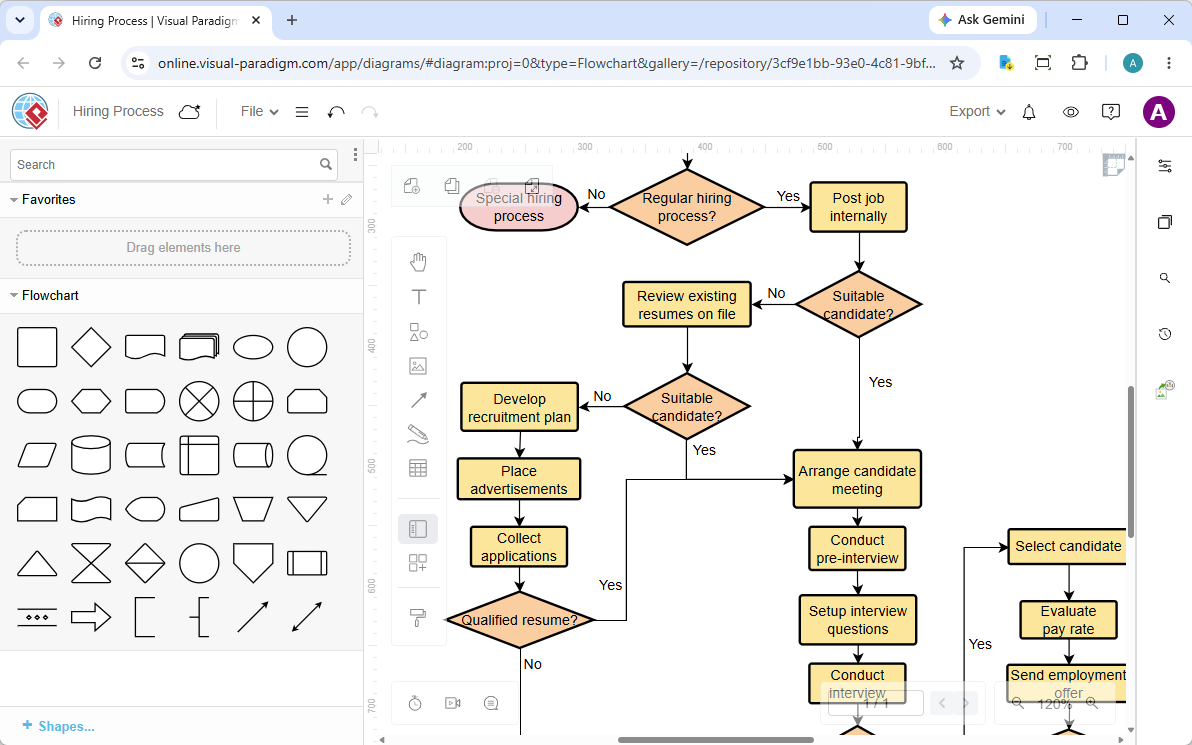
In the realm of business process management, clarity is currency. One of the most effective ways to visualize complex workflows is through flowchart modeling. The image provided illustrates a classic Hiring Process diagram created within the Visual Paradigm environment. This tutorial will deconstruct the architecture of this specific flowchart, explaining the logic, the symbols used, and how to translate a real-world HR requirement into a technical diagram.
1. Understanding the Architecture of the Diagram
The diagram shown is a Control Flow chart. Unlike a Data Flow Diagram (DFD) which tracks the movement of data, a flowchart tracks the movement of control and decision-making within a process. It answers the question: “What happens next?” based on specific conditions.
The structure is hierarchical, starting from a specific trigger and branching out based on binary decisions (Yes/No). Let’s break down the specific logic flow presented in the screenshot:
The Entry Point: The “Start” Node
The process begins at the top right with a Terminator symbol (the pink oval) labeled Special hiring process. This is the entry point. In modeling terms, this node signifies the initiation of a specific workflow. It is distinct from the standard flow because it implies a deviation from the norm or a specific category of hiring.
The Primary Decision: Regular vs. Special
The first major branching point is the orange diamond labeled Regular hiring process?. This is a Decision Node. It forces the system to choose a path:
- Path A (Yes): The flow moves to the standard recruitment cycle, starting with “Post job internally.”
- Path B (No): The flow loops back to the start node, suggesting that if the process isn’t “regular,” it reverts to the “Special hiring process” logic or terminates that specific branch.
2. Deconstructing the Standard Recruitment Cycle
When the decision is “Yes,” the diagram enters the main body of the workflow. This section represents the Standard Hiring Protocol. It follows a logical sequence: Preparation → Sourcing → Screening → Selection.
Phase 1: Internal Sourcing & Planning
The process kicks off with Post job internally. This is a Process Node (rectangle). Immediately following this is a decision point: Suitable candidate?. If the internal pool yields a suitable candidate, the flow proceeds to the meeting phase. If not, it moves to Review existing resumes on file, and then to Develop recruitment plan.
Phase 2: External Recruitment
If the internal review fails, the system enters the external recruitment loop. The decision Suitable candidate? (after reviewing resumes) directs the flow to Place advertisements. This node triggers the next step: Collect applications.
Phase 3: Screening & Selection
Once applications are collected, the diagram presents a critical filter: Qualified resume?. This is a Gatekeeper Node.
- If No: The candidate is rejected, and the flow ends.
- If Yes: The candidate proceeds to the interview phase, specifically Arrange candidate meeting.
3. The Interview & Offer Sequence
The lower right section of the diagram details the Selection Logic. This is a linear sequence of events that leads to the final outcome.
- Arrange candidate meeting: The logistical setup for the interview.
- Conduct pre-interview: An initial screening or administrative step.
- Setup interview questions: Preparation for the core assessment.
- Conduct interview: The primary evaluation.
- Select candidate: A decision point where the candidate is chosen.
- Evaluate pay rate: Determining the compensation package.
- Send employment offer: The final action node.
This sequence demonstrates a Sequential Process, where one step must be completed before the next begins. There are no loops here, indicating a linear progression towards the final goal.
4. Symbol Semantics in Visual Paradigm
To effectively model this in Visual Paradigm Online (VP Online), it is crucial to understand the standard UML and BPMN symbols used in the screenshot:
- Oval (Terminator): Used for Start and End points. In the diagram, “Special hiring process” acts as a start node.
- Rhombus (Diamond/Decision): Represents a condition where the flow splits into multiple paths (e.g., Yes/No). The color orange typically indicates a standard decision node in many VP themes.
- Rectangle (Process): The most common shape, representing an action or operation (e.g., “Place advertisements”). The yellow fill suggests a standard activity.
- Arrow (Flow Line): Indicates the direction of the process. The lines connecting the shapes dictate the sequence of execution.
Conclusion
This Hiring Process diagram serves as a robust example of how to translate a human resource requirement into a structured, executable logic model. By separating the “Regular” and “Special” paths and defining clear decision gates, the diagram reduces ambiguity. Whether you are using the web-based tools or the desktop application, the core principle remains the same: define the start, map the decisions, and sequence the actions.

 English
 Arabic
 Chinese (Simplified)
 Dutch
Dutch French
 German
 Italian
 Japanese
 Korean
 Portuguese
 Russian
 Spanish