


In the world of software engineering and system analysis, the ability to communicate complex processes clearly is paramount. Different stakeholders often prefer different modeling languages. Developers might love the lightweight syntax of Mermaid for quick documentation, while business analysts require the rigor of UML Activity Diagrams for formal specifications. Historically, translating between these two formats required manual redrawing, a tedious process prone to human error.
However, modern tools like VPasCode have revolutionized this workflow. By leveraging AI capabilities, you can instantly transform a procedural flowchart into a structured UML diagram. This tutorial explores the technical architecture behind this conversion, how the specific syntax translates, and how to use the “AI Modify” feature to bridge the gap between casual diagramming and formal engineering.
The Architecture of Diagram-as-Code
VPasCode operates on the “Diagram-as-Code” principle, treating visual models as text files. This allows for version control, diffing, and—crucially for this tutorial—programmatic translation. The system architecture relies on a dual-engine approach:
- The Parser Engine: This component reads the input code (in this case, Mermaid flowchart syntax) and builds an Abstract Syntax Tree (AST). It understands the relationships between nodes (A, B, C) and the edges (arrows).
- The AI Semantic Layer: Instead of a simple text replacement, the AI analyzes the intent of the nodes. It recognizes that a box labeled “Claim Valid?” in a flowchart is semantically equivalent to a Decision Node in UML.
- The Generator Engine: This module outputs the new format (UML Activity Diagram syntax), ensuring all constraints and stereotypes are correctly applied.
Step-by-Step: The Conversion Workflow
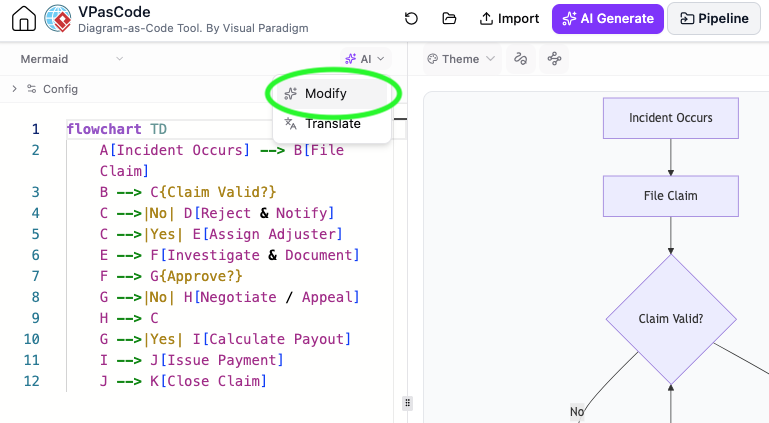
Let’s walk through the process shown in the provided screenshot, where a claims processing flowchart is converted into a formal activity diagram.
1. The Source: Mermaid Flowchart
The process begins with a standard flowchart defined in Mermaid. In this example, we are mapping an incident claim process. The syntax uses directional arrows (-->) to define the flow and special characters to define decision points.
flowchart TD
A[Incident Occurs] --> B[File Claim]
B --> C{Claim Valid?}
C -->|No| D[Reject & Notify]
C -->|Yes| E[Assign Adjuster]
E --> F[Investigate & Document]
F --> G{Approve?}
G -->|No| H[Negotiate / Appeal]
H --> C
G -->|Yes| I[Calculate Payout]
I --> J[Issue Payment]
J --> K[Close Claim]
Key Technical Details:
flowchart TD: Declares the chart type and direction (Top-Down).C{Claim Valid?}: The curly braces{}designate a decision node (diamond shape) in Mermaid.|No|and|Yes|: These labels define the conditional branches leaving the decision node.
2. The Trigger: AI Modify
The core of the modern workflow is the AI Modify interface. As shown in the screenshot, the user selects the diagram and invokes the AI assistant. The system does not require a complex re-write of the code; it simply requires a natural language intent.
The Prompt:
"Convert this flowchart into a UML Activity Diagram"Why this works: The AI understands the specific constraints of UML. It knows that UML Activity Diagrams require specific “Action Nodes” (rectangles with rounded corners) and “Control Flow” (solid lines with open arrowheads), distinct from the generic arrows used in flowcharts.
3. The Result: UML Activity Diagram
The output is a formal UML diagram. Notice how the logic remains identical, but the visual representation changes to adhere to the UML standard.
@startuml
start
:Incident Occurs;
:File Claim;
if (Claim Valid?) then (No)
  :Reject & Notify;
else (Yes)
  :Assign Adjuster;
  :Investigate & Document;
  if (Approve?) then (No)
    :Negotiate / Appeal;
    if (Claim Valid?) then (No)
      :Reject & Notify;
    else (Yes)
      :Assign Adjuster;
    endif
  else (Yes)
    :Calculate Payout;
    :Issue Payment;
    :Close Claim;
  endif
endif
stop
@enduml
Translation Logic:
- Flow to Control Flow: The Mermaid arrows are converted to standard UML Control Flow.
- Decision Logic: The Mermaid diamond is expanded into a UML “if-else” fork-join structure.
- Looping: The Mermaid loop
H --> C(Negotiate back to Claim Valid?) is represented in UML as a control flow returning to the decision node, creating a valid cycle.
Understanding the Modeling Concepts
Why do we bother converting a simple flowchart to a UML diagram? The answer lies in the strictness of the modeling language.
1. Semantics of the Diamond
In a standard flowchart, a diamond is a generic decision. In UML Activity Diagrams, a decision node is strictly defined as a point where a single input flow splits into multiple mutually exclusive output flows. The AI ensures that the resulting diagram strictly adheres to this constraint.
2. Action Nodes
UML requires that the activities (the work being done) be represented as “Action Nodes.” While a flowchart might just have text in a box, UML implies specific behaviors. The conversion process ensures that the diagram is not just a picture, but a valid executable model that could theoretically be used for model-driven development.
Conclusion
The ability to convert diagram types instantly using AI tools like VPasCode represents a significant leap forward in technical documentation. It removes the friction of learning multiple syntaxes for different stakeholders. Whether you start with a quick Mermaid flowchart for your team or need a formal UML diagram for your architecture review, the underlying logic remains the same—only the representation changes.

 English
 Arabic
 Chinese (Simplified)
 Dutch
Dutch French
 German
 Italian
 Japanese
 Korean
 Portuguese
 Russian
 Spanish