


In modern software architecture, the ability to communicate complex system structures is just as critical as writing the code itself. The C4 model (Context, Container, Component, Code) provides a standardized hierarchy for visualizing software systems, allowing architects to drill down from high-level business goals to specific implementation details. In this tutorial, we will dissect a C4 Container Diagram designed for an Enterprise E-Commerce Platform, demonstrating how to use VPasCode to define, render, and version-control these critical architectural blueprints.
Understanding the C4 Container Level
The “Container” level of the C4 model represents the highest-level runtime units of a system. Unlike a Component diagram (which focuses on internal code structure) or a System Context diagram (which focuses on external actors), a Container diagram answers the question: “What are the distinct, deployable units that make up this system?”
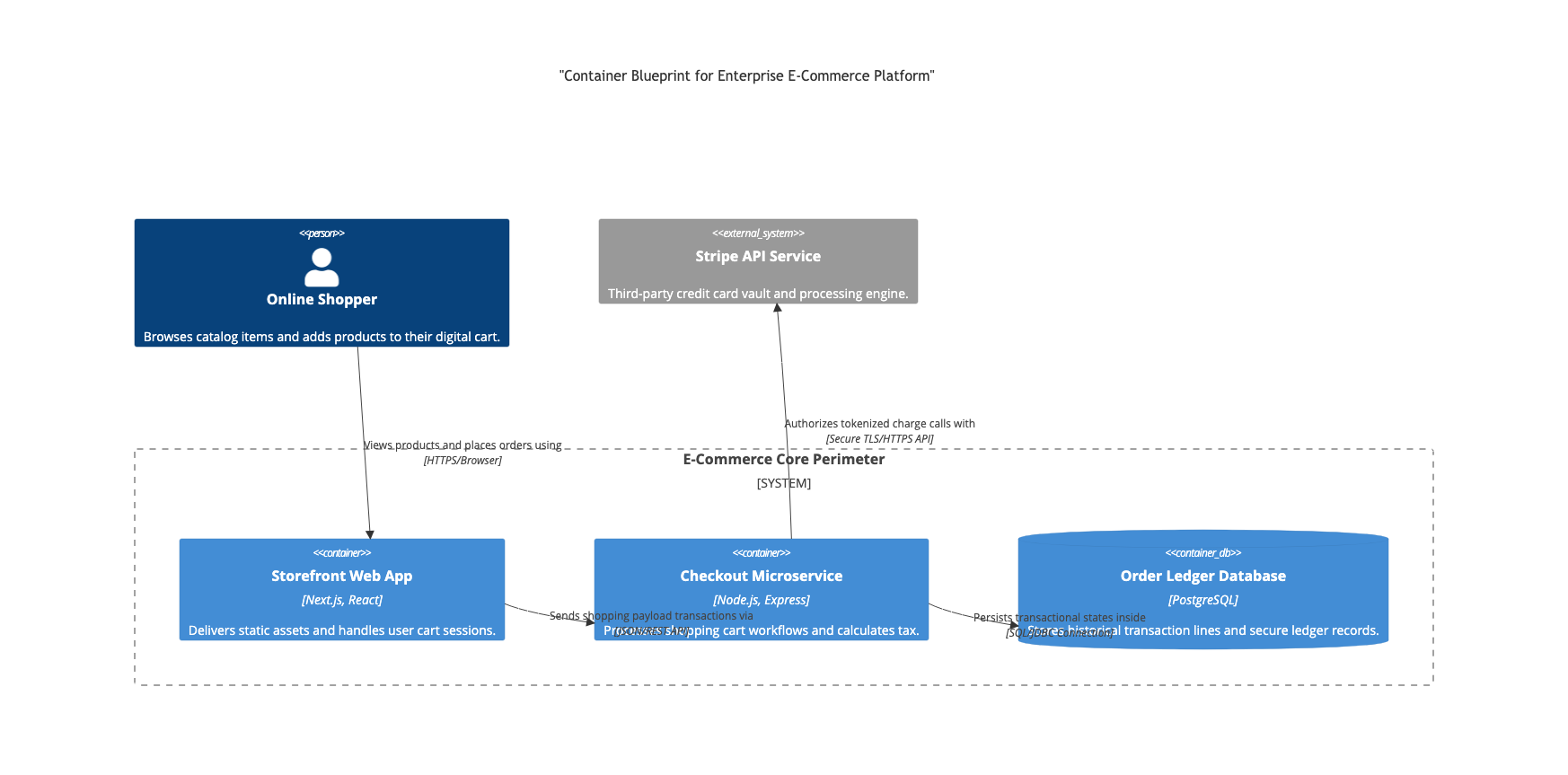
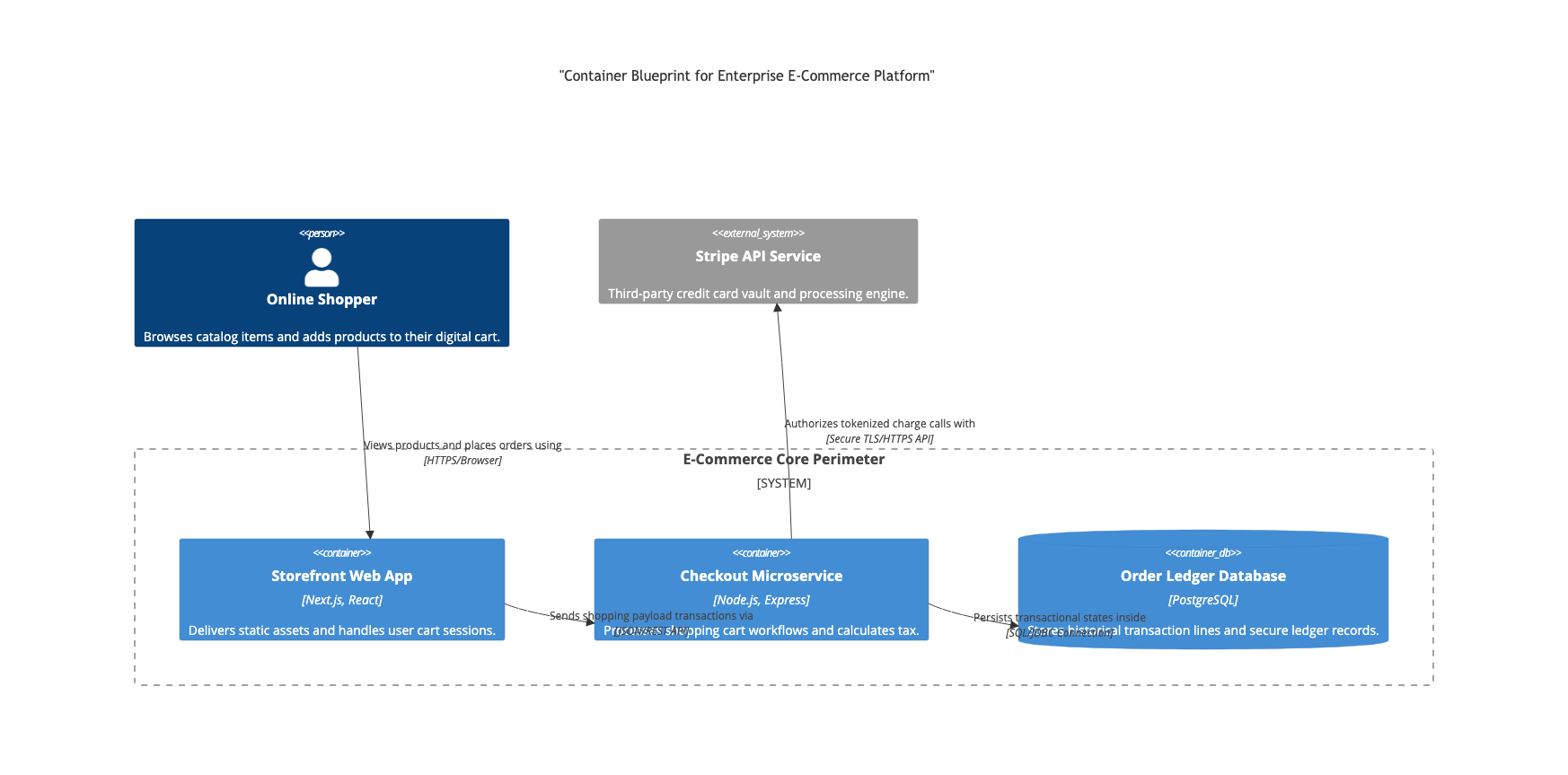
Containers are often synonymous with technologies like Web Applications, Microservices, or Databases. In the diagram below, we see the E-Commerce Core Perimeter defined as a single System, which is then decomposed into three distinct containers:
- Storefront Web App: The user interface layer handling static assets and cart sessions.
- Checkout Microservice: The backend logic processing workflows and tax calculations.
- Order Ledger Database: The persistence layer for transactional data.
Visualizing the Architecture with VPasCode
VPasCode allows us to define these architectural relationships using structured text. By combining PlantUML syntax with VPasCode’s specific extensions, we can create a diagram that is both human-readable and machine-parsable.
Let’s analyze the specific elements of our E-Commerce blueprint:
1. Defining Actors and External Systems
Every system exists in an ecosystem. We define the Online Shopper as a Person actor and the Stripe API Service as an External System. These are the boundary conditions of our application.
2. Grouping into a System Perimeter
We encapsulate our core logic within a dashed box labeled E-Commerce Core Perimeter. In the code, this is achieved using a SystemBoundary. This visual cue tells the viewer that the contained elements are part of the same logical domain, even if they are physically distributed across different servers.
3. Specifying Technology Stacks
One of the key features of this diagram is the inclusion of specific technology stacks in brackets. For example, [Next.js, React] and [Node.js, Express]. This transforms the diagram from a generic shape chart into a specific technical specification document.
The Architecture Blueprint (Source Code)
Below is the complete VPasCode (PlantUML) source code that generates the diagram shown above. You can copy this directly into a .puml file or the VPasCode editor to render it.
@startuml
title "Container Blueprint for Enterprise E-Commerce Platform"

' Define the Actor
Person(OnlineShopper, "Online Shopper", "Browses catalog items and adds products to their digital cart.")

' Define External Systems
ExternalSystem(StripeAPI, "Stripe API Service", "Third-party credit card vault and processing engine.")

' Define the System Boundary (The Core Perimeter)
SystemBoundary(ECommerceCore, "E-Commerce Core Perimeter") {

  ' Define the Storefront Container
  Container(Storefront, "Storefront Web App", "Next.js, React", "Delivers static assets and handles user cart sessions.")

  ' Define the Checkout Microservice
  Container(Checkout, "Checkout Microservice", "Node.js, Express", "Processes shopping cart workflows and calculates tax.")

  ' Define the Database Container
  ContainerDb(OrderDB, "Order Ledger Database", "PostgreSQL", "Stores historical transaction lines and secure ledger records.")
}

' Define Relationships

' User interacts with the Storefront
OnlineShopper -> Storefront : Views products and places orders using [HTTPS/Browser]

' Storefront talks to Checkout
Storefront -> Checkout : Sends shipping payload transactions via [Shipping API]

' Checkout talks to the Database
Checkout -> OrderDB : Persists transactional states inside [SQL Queries]

' Checkout talks to External Payment Provider
Checkout -> StripeAPI : Authorizes tokenized charge calls with [Secure TLS/HTTPS API]

' Add styling for better readability
skinparam packageStyle rectangle
skinparam shadowing false
skinparam monochrome false
@enduml
Breaking Down the Syntax
PersonandExternalSystemare top-level entities that sit outside the system boundary.SystemBoundarycreates the dashed box grouping the internal logic.ContainerandContainerDbdefine the specific runtime units. The third argument specifies the technology (e.g., “PostgreSQL”), and the fourth argument provides a description.->denotes a directed flow of data. The text after the colon describes the protocol or mechanism (e.g., “HTTPS/Browser”).
Why “Diagram as Code” Matters
By using VPasCode to manage this architecture, you gain several advantages over traditional drag-and-drop tools:
- Version Control: This diagram is now a text file. You can track changes to the architecture in Git alongside your application code. You can see exactly when the
Checkout Microservicewas refactored or when the database was swapped. - CI/CD Integration: You can automate the validation of your architecture. If a developer tries to commit code that doesn’t match the defined container boundaries, your pipeline can flag it.
- Consistency: The syntax ensures that every diagram in your organization adheres to the same C4 standards, making it easier for new team members to onboard.
By mastering this level of abstraction, you move beyond simple flowcharts and start building a comprehensive, living map of your enterprise’s software ecosystem.

 English
 Arabic
 Chinese (Simplified)
 Dutch
Dutch French
 German
 Italian
 Japanese
 Korean
 Portuguese
 Russian
 Spanish