


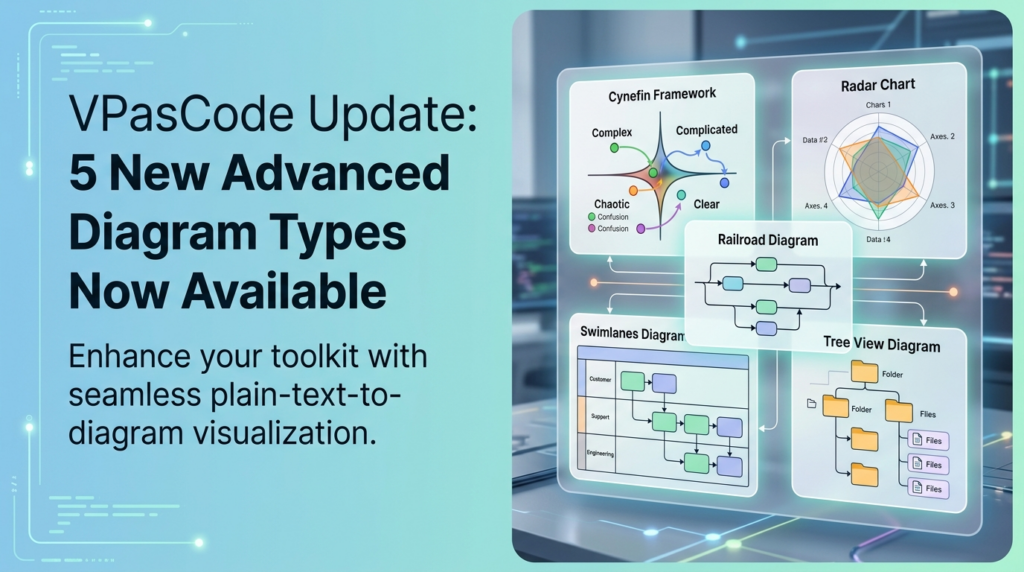
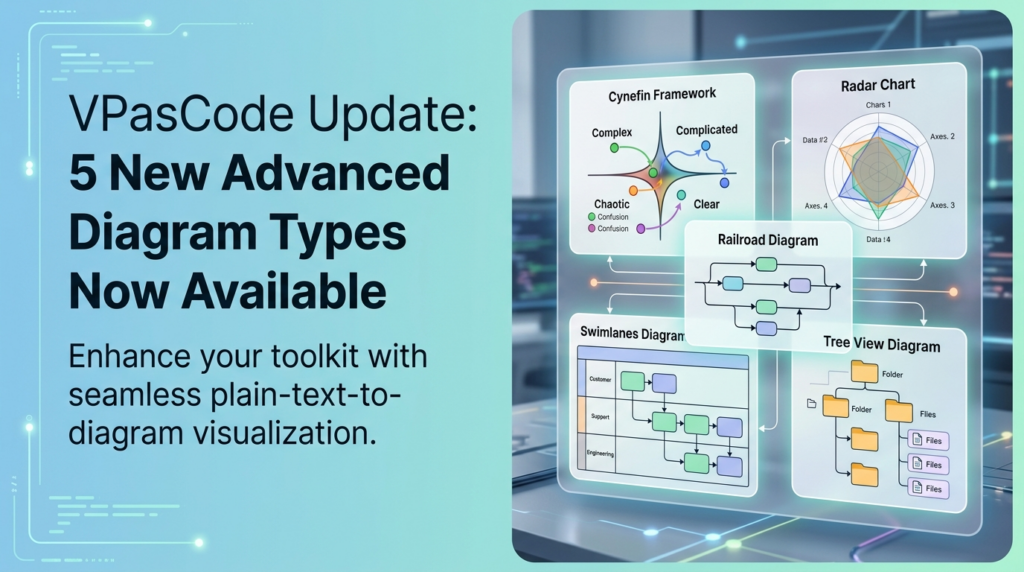
Visual Paradigm’s VPasCode has revolutionized the way technical professionals approach system modeling by bridging the gap between plain text conceptualization and high-fidelity visual architecture. The recent update introducing five advanced diagram types marks a significant leap in capabilities, allowing users to deconstruct complex business strategies and technical workflows directly from text inputs.
This tutorial explores the architectural significance of these five new visualization types, explaining when and why to use them, and providing the specific syntax structures required to render them effectively.
1. The Cynefin Framework: Strategic Decision Architecture
The Cynefin Framework is not merely a chart; it is a cognitive model used for sense-making in complex environments. It helps leaders and architects categorize problems into five domains—Clear, Complicated, Complex, Chaotic, and Confusion—based on the relationship between cause and effect.
Modeling Concept
In a software architecture context, you might use this to map your project’s risks. For example, a bug in a known library is a “Complicated” problem (requires analysis), while a sudden market shift requiring a pivot in the entire product strategy is “Complex” (requires experimentation).
VPasCode Syntax Implementation
To render a Cynefin framework in VPasCode, you must define the distinct zones and the relationships between the “Cause” (the problem) and the “Effect” (the solution). The syntax typically relies on defining the central node and the surrounding quadrants.
Diagram: Cynefin
Title: Project Risk Assessment

Zone: Clear
  - Rules are known
  - Cause and effect are obvious

Zone: Complicated
  - Expert analysis required
  - Multiple right answers

Zone: Complex
  - Cause and effect only clear in retrospect
  - Emergent patterns required

Zone: Chaotic
  - Act first, then Sense, then Respond
  - No right answers yet

Zone: Confusion
  - Where do we stand?
  - Don't know which domain we are in
2. Radar Chart: Multi-Dimensional Metric Analysis
A Radar Chart (or Spider Chart) is essential for comparing multiple quantitative variables across different categories. In technical modeling, this is often used for performance benchmarking, skill gap analysis, or comparing the feature set of competing systems.
Modeling Concept
Imagine you are comparing two microservice architectures. You need to evaluate them based on Latency, Throughput, Reliability, Scalability, and Cost. A standard bar chart makes this difficult; a Radar Chart allows you to see the “shape” of performance at a glance.
VPasCode Syntax Implementation
The syntax requires defining the axes (the dimensions) and the data points for each series (the systems being compared). The tool automatically scales the axes relative to one another.
Diagram: Radar
Title: Microservice Architecture Comparison

Axes: Latency, Throughput, Reliability, Scalability, Cost
Data:
  System A: 80, 90, 70, 60, 50
  System B: 60, 70, 95, 80, 75
  System C: 90, 60, 80, 90, 40
3. Railroad Diagram: Syntax and Grammar Visualization
Railroad Diagrams (also known as Syntax Diagrams) are the industry standard for visualizing the grammatical rules of programming languages or data formats. They look like railway tracks, where the path represents valid sequences of tokens.
Modeling Concept
This is critical for defining APIs or custom query languages. Instead of reading a confusing list of regex rules, a developer can trace the “track” to see exactly which commands are valid and in what order.
VPasCode Syntax Implementation
VPasCode supports a high-level abstraction for railroad diagrams. You define the entry point, the loops (optional elements), and the branching paths (choices).
Diagram: Railroad
Title: Custom API Request Syntax

Start:
  [GET] OR [POST]

  Path:
    /api/v1/

  Resource:
    Users OR Orders OR Products

  Query:
    (optional) ?key=value

  End:
    [END]
4. Swimlanes Diagram: Operational Workflow Mapping
Swimlanes Diagrams are the gold standard for process modeling. They organize workflow steps into horizontal or vertical “lanes,” where each lane represents a specific actor, department, or system component. This eliminates ambiguity about “who does what.”
Modeling Concept
In a software deployment pipeline, you would have lanes for “Developer,” “CI/CD Server,” “QA Team,” and “Production Server.” The arrows crossing the lanes represent the hand-off of data or control between these distinct entities.
VPasCode Syntax Implementation
The syntax requires defining the lanes explicitly. Steps are then assigned to these lanes. The engine automatically aligns the steps horizontally or vertically to maintain the flow.
Diagram: Swimlanes
Title: Order Processing Workflow

Lanes: Customer, Support, Engineering

Customer:
  1. Place Order
  2. Wait for Confirmation

Support:
  3. Verify Payment

Engineering:
  4. Fulfill Order
  5. Ship Product
  6. Send Tracking
5. Tree View Diagram: Hierarchical Structure & Architecture
The Tree View Diagram is the most fundamental way to represent hierarchical data. It is indispensable for mapping file systems, organizational charts, database schemas (tables and columns), or site maps.
Modeling Concept
When documenting a new cloud infrastructure, a Tree View is perfect for showing the hierarchy: Project > VPC > Subnets > Instances > Security Groups. It provides a crisp, nested layout that is easy to scan.
VPasCode Syntax Implementation
This syntax uses indentation to denote nesting levels. VPasCode renders the parent nodes as containers for the child nodes, creating a clean visual hierarchy.
Diagram: Tree View
Title: Cloud Infrastructure Hierarchy

Root: Project Alpha
  Subnet: Public
    Instance: Web-Server-01
      Security Group: Allow-HTTP
      Security Group: Allow-SSH
    Instance: Web-Server-02
      Security Group: Allow-HTTP
      Security Group: Allow-SSH
  Subnet: Private
    Instance: DB-Server-01
      Security Group: Allow-MySQL
Conclusion: The Power of Text-to-Diagram
By integrating these five diagram types into VPasCode, Visual Paradigm has provided a unified environment for modeling. Whether you are analyzing the strategic domain of a problem (Cynefin), comparing technical metrics (Radar), defining syntax (Railroad), mapping processes (Swimlanes), or structuring data (Tree View), the transition from text to diagram is now seamless.
Adopting these workflows allows teams to maintain documentation in plain text (version control friendly) while generating instant, high-quality visualizations for stakeholder communication.

 English
 Arabic
 Chinese (Simplified)
 Dutch
Dutch French
 German
 Italian
 Japanese
 Korean
 Portuguese
 Russian
 Spanish