


In the realm of software architecture and system design, communicating complex logic is just as critical as writing the code itself. Visual Paradigm’s VPasCode feature revolutionizes this process by bridging the gap between natural language descriptions and formal diagrammatic syntax. This tutorial explores the system architecture behind VPasCode, focusing on how AI-assisted generation and editable code streams facilitate the creation of professional Sequence Diagrams.
The Architecture of VPasCode
VPasCode operates on a “Text-to-Diagram” architecture. Instead of requiring users to manually drag and drop elements onto a canvas or write verbose, error-prone code from scratch, the system utilizes a generative AI model. This model interprets natural language prompts and translates them into the specific code language required by the diagramming engine.
The workflow is designed to be iterative. It allows users to:
- Generate a diagram based on a prompt.
- Review the underlying code for accuracy.
- Manually adjust syntax or request AI modifications.
- Insert the final, editable result into documentation.
Use Cases for AI-Assisted Modeling
The VPasCode engine is particularly useful when you encounter specific modeling challenges. Based on system capabilities, AI assistance is ideal for the following scenarios:
1. Overcoming Syntax Barriers
Often, you may know exactly what you want to communicate—such as a specific interaction flow between a User and a Database—but lack knowledge of the required syntax. VPasCode allows you to describe the scenario in plain English, and it generates the correct code structure.
2. Rapid Prototyping
For creating initial drafts quickly, the AI can generate a base diagram in seconds. This serves as a strong foundation that you can then refine manually or ask the AI to modify further.
3. Dynamic Modifications
The system excels when you need to add or remove specific elements. Whether you need to add a new step, insert a component, define a relationship, or create a branching logic, the AI can update the code to reflect these changes.
4. Simplification and Refinement
Complex diagrams can become cluttered. VPasCode can help simplify a complex diagram or correct syntax errors that might have been introduced manually.
5. Internationalization
For global teams, translating diagram labels is a common requirement. AI assistance can automate the translation of labels to ensure consistency across different languages.
Understanding Sequence Diagrams
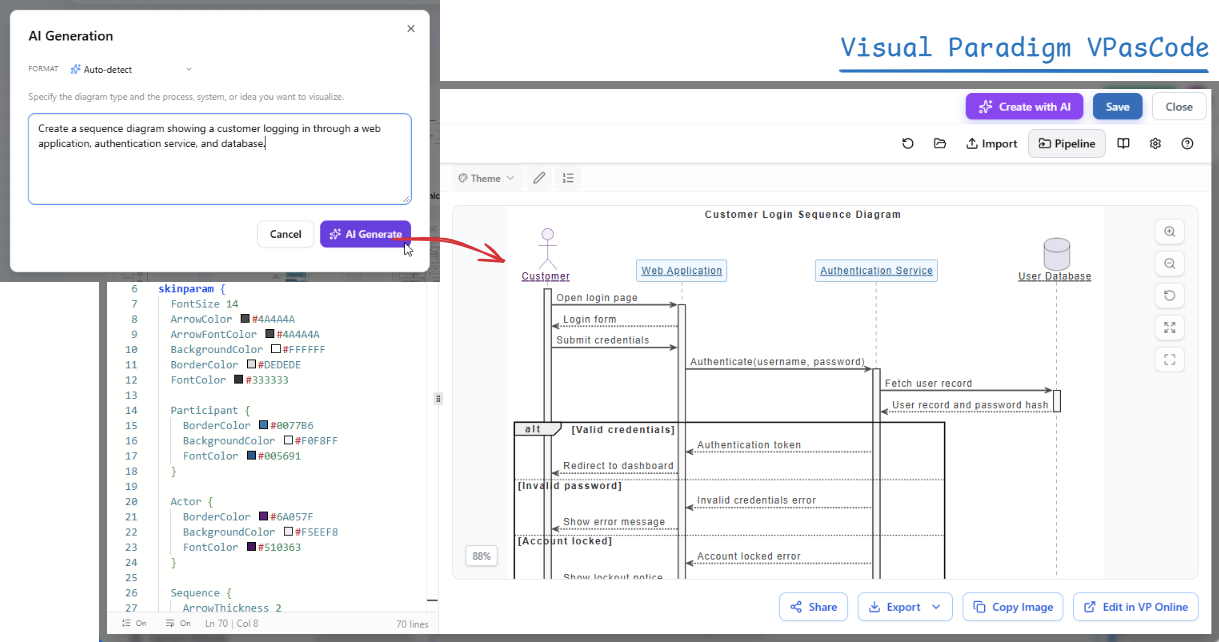
The image provided in the context demonstrates a Sequence Diagram. This is a type of interaction diagram that shows how objects operate with each other and in what order.
Key concepts in the generated diagram include:
- Actors (Lifelines): Represented by stick figures (e.g.,
Customer), these are the external entities initiating or participating in the interaction. - Objects/Components: Represented by boxes (e.g.,
Web Application,Authentication Service), these are the internal system parts handling the logic. - Messages: Arrows pointing between lifelines representing data or control flow (e.g.,
Open login page,Authenticate). - Activation Bars: The vertical rectangles on the lifelines indicating when an object is actively performing a task.
- Combined Fragments (alt): The
altblock represents an alternative fragment, showing different paths based on conditions (e.g.,[Valid credentials]vs.[Invalid password]).
Step-by-Step: Inserting an Editable Diagram
One of the most powerful features of VPasCode is that the generated diagrams remain fully editable. You are not locked into a static image; you can treat the generated result as a starting point. Here is how to integrate this into your OpenDocs documentation:
- Open Visual Paradigm OpenDocs: Navigate to your project environment.
- Create or Open a Page: Select the document page where the diagram belongs.
- Enter Edit Mode: Click Edit at the top-right corner of the page to enable the editor.
- Invoke AI Generation: Locate the “AI Generation” panel. Enter your requirement, such as “Create a sequence diagram showing a customer logging in through a web application, authentication service, and database”.
- Review and Adjust Code: The system will generate code. You can review this code directly. As seen in the image, the code includes styling parameters (like
skinparam) and structural definitions. You can modify these lines to tweak colors, fonts, or layout. - Insert into Document: Once the diagram renders correctly in the preview pane, the code is inserted into the page.
Deep Dive: The Code Behind the Diagram
Let’s analyze the code snippet shown in the image to understand how the visual representation is constructed programmatically.
skinparam {
    FontSize 14
    ArrowColor #44444A
    ArrowFontColor #44444A
    BackgroundColor #FFFFFF
    BorderColor #DEDEDE
    FontColor #333333
}

Participant {
    BorderColor #007786
    BackgroundColor #F0F8FF
    FontColor #005691
}

Actor {
    BorderColor #6A057F
    BackgroundColor #F5EEF8
    FontColor #510363
}

Sequence {
    ArrowThickness 2
}

actor "Customer" as User
participant "Web Application" as App
participant "Authentication Service" as Auth
database "User Database" as DB

User -> App : Open login page
App -> User : Login form
User -> App : Submit credentials
App -> Auth : Authenticate(username, password)
Auth -> DB : Fetch user record
DB -> Auth : User record and password hash
Auth -> App : Authentication token

alt [Valid credentials]
    App -> User : Redirect to dashboard
else [Invalid password]
    Auth -> App : Invalid credentials error
    App -> User : Show error message
else [Account locked]
    App -> User : Show lockout notice
    Auth -> App : Account locked error
end
In this code block, the skinparam section defines global styles for the diagram, such as font size and arrow colors. The Participant and Actor blocks define specific styling for those types of elements, ensuring visual consistency. The actual logic is defined at the bottom using the alt block to handle the conditional logic of the login process.
Conclusion
Visual Paradigm VPasCode transforms the modeling experience from a manual, syntax-heavy task into a dynamic, conversational workflow. By allowing users to generate, review, and edit diagram code directly, it empowers teams to maintain high-quality documentation that stays synchronized with their evolving system architecture.

 English
 Arabic
 Chinese (Simplified)
 Dutch
Dutch French
 German
 Italian
 Japanese
 Korean
 Portuguese
 Russian
 Spanish