


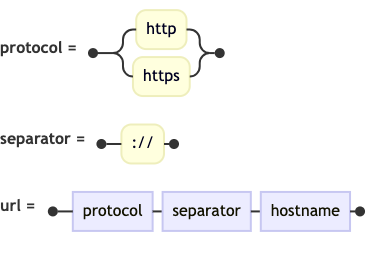
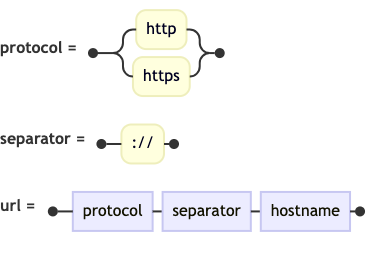
In the world of software development, understanding the precise rules of a language is critical. Whether you are building a compiler, writing a parser, or documenting an API, the clarity of your syntax definition determines the reliability of your system. Railroad Diagrams (also known as syntax diagrams or Bachus-Naur Form diagrams) serve as a visual bridge between abstract grammar rules and concrete code examples. They illustrate the valid paths a parser can take, making complex logic instantly digestible for developers.
This tutorial explores how to leverage VPasCode to generate high-quality railroad diagrams using the railroad-ebnf-beta syntax, focusing on the verification of HTTP URL structures.
Understanding the Core Concept: Railroad Diagrams
A railroad diagram represents a grammar rule as a horizontal line with “tracks” branching off it. Each node on the diagram represents a token or a sub-rule. The path flows from left to right, showing the sequence of elements required to form a valid statement.
Unlike static images, these diagrams are often generated from code, ensuring that the documentation stays in sync with the actual implementation rules. VPasCode allows you to define these rules using a syntax similar to Extended Backus-Naur Form (EBNF), rendering them into interactive diagrams.
Deconstructing the HTTP URL Syntax
To demonstrate the power of this tooling, let’s break down the anatomy of a web address (URL) into its constituent parts. A standard URL consists of a protocol, a separator, and a hostname. We can model this hierarchy using the VPasCode Mermaid integration.
1. Defining the Protocol
Every URL begins with a protocol scheme. In modern web standards, this is almost exclusively either http or https. In a railroad diagram, this is represented as an optional branch (an “OR” condition).
2. The Separator
Once the protocol is chosen, it must be followed by a standard separator to distinguish the protocol from the rest of the address. For web protocols, this is the colon-slash-slash sequence ://.
3. The Complete URL Structure
The final rule combines the protocol and the separator with the hostname to form the complete valid path. In VPasCode, we can define these rules sequentially and link them together.
Implementing the Diagram in VPasCode
Below is the complete source code used to generate the HTTP URL protocol rule diagram. This snippet demonstrates how to use the railroad-ebnf-beta syntax within the Mermaid language definition supported by VPasCode.
railroad-ebnf-beta
    title "HTTP URL Protocol Rule"

    protocol = "http" | "https" ;
    separator = "://" ;
    url = protocol , separator , hostname ;
Code Breakdown:
- railroad-ebnf-beta: This specifies the diagram type, ensuring the renderer knows to treat the input as a railroad syntax diagram.
- protocol = “http” | “https” ;: This defines the
protocolnon-terminal. The pipe character|indicates an exclusive choice between the string “http” and “https”. - separator = “://” ;: This defines a literal string token that must appear exactly as written.
- url = protocol , separator , hostname ;: This defines the composite rule. The comma
,acts as a sequence operator, enforcing that the protocol comes first, followed immediately by the separator, and then the hostname.
Visualizing the Logic
When you render the code above, the resulting diagram creates a visual “track.” If you were to trace the path from left to right:
- You start at the entry point.
- You encounter a branch. You can choose either the
httptrack or thehttpstrack. - Both tracks converge back into the main line.
- The path continues to the
://node. - Finally, the path leads to the
hostnamenode, completing the syntax.
This visual flow makes it immediately obvious to a new developer that ftp://example.com would be invalid under this specific rule set, while https://example.com is valid.
Best Practices for Structural Coding
To maximize the effectiveness of your VPasCode diagrams, keep the following principles in mind:
- Modularize Your Rules: Do not try to draw the entire language in one massive diagram. Break complex syntax down into smaller, reusable non-terminals (like
protocolandseparator) and reference them in the main rules. - Use Clear Terminal Strings: When defining strings (like
://), ensure they match the case sensitivity of your target language exactly. The diagram will reflect the strictness of the parser. - Iterate with VPasCode: Use the “Edit Mermaid in VPasCode” functionality to rapidly prototype. You can adjust the layout or rules and see the diagram update instantly without needing to compile code.
By mastering these structural coding rules, you transform abstract grammar into intuitive visual documentation, significantly reducing ambiguity in your development projects.

 English
 Arabic
 Chinese (Simplified)
 Dutch
Dutch French
 German
 Italian
 Japanese
 Korean
 Portuguese
 Russian
 Spanish