


In modern software architecture and system design, the separation of concerns is critical. Just as we separate business logic from user interfaces, we must separate the definition of a system’s structure from the documentation of its purpose. This tutorial explores the integrated ecosystem of VPasCode and OpenDocs, a powerful combination that allows developers and architects to transition seamlessly from text-based diagramming to professional documentation.
Understanding the System Architecture
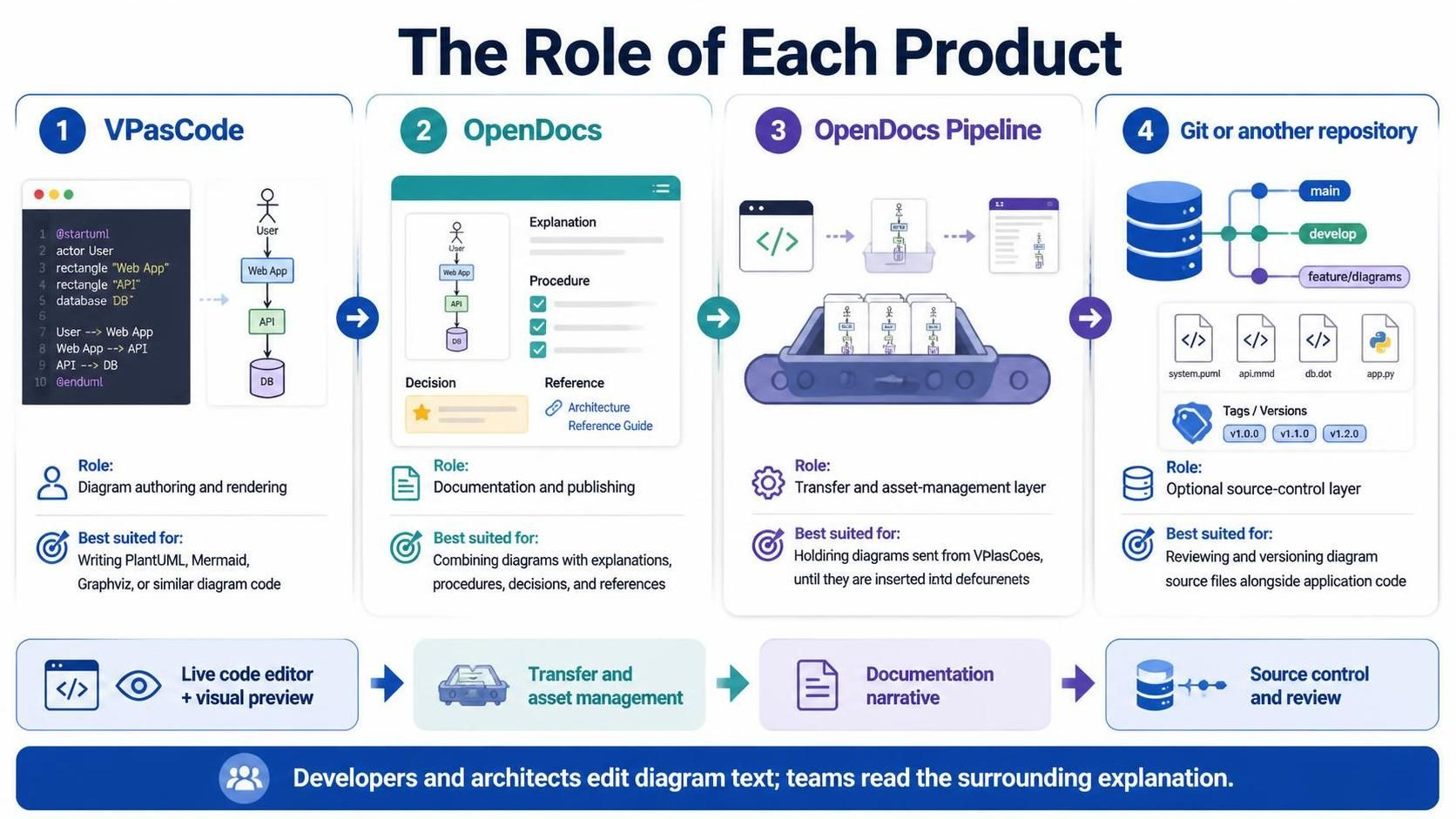
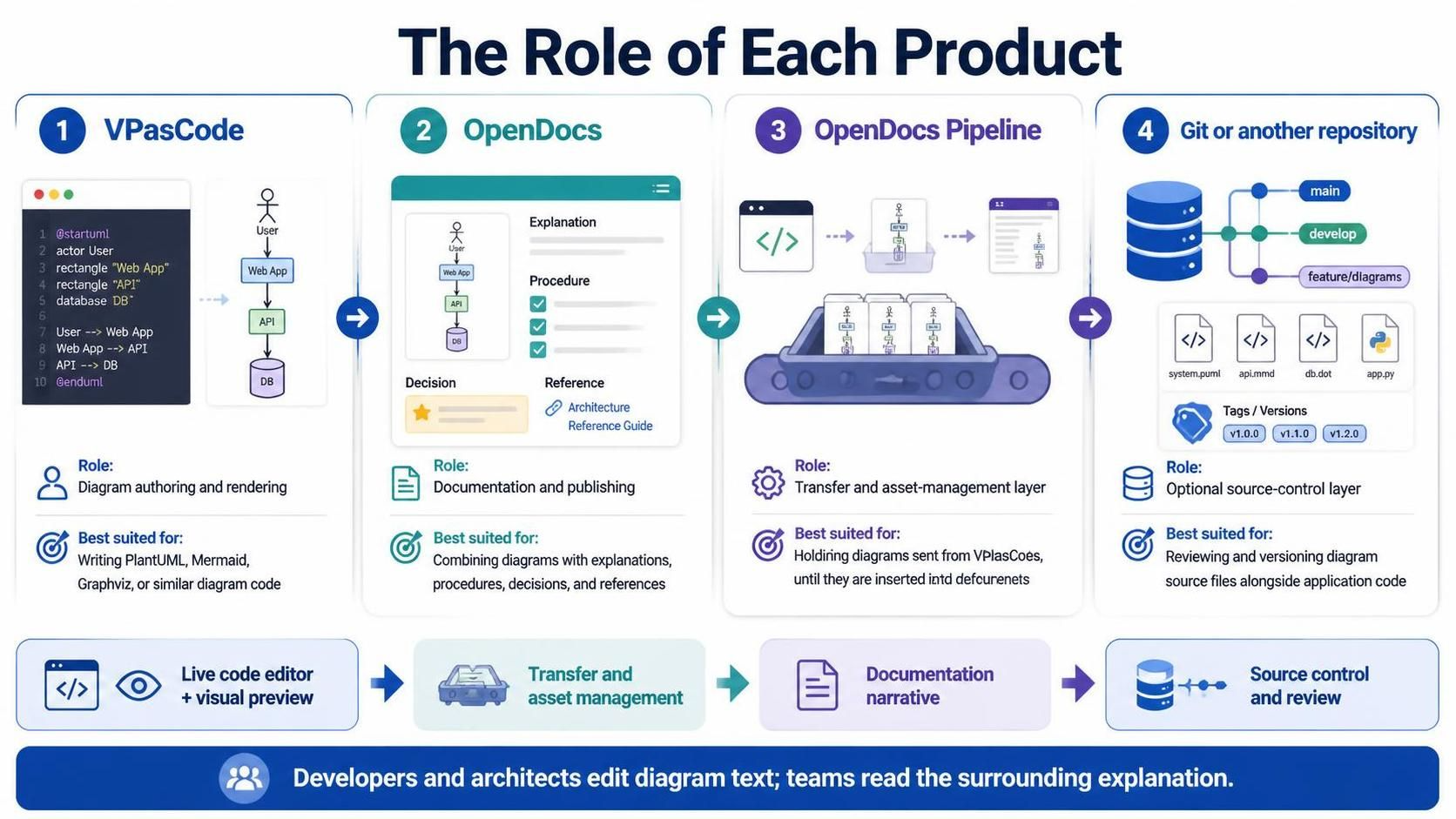
The workflow described in the system architecture diagram is designed to handle the lifecycle of a diagram, from its initial creation to its final publication and versioning. This process involves four distinct components, each serving a specific function in the documentation pipeline.
1. VPasCode: The Authoring Engine
The journey begins with VPasCode. This tool acts as the primary engine for diagram authoring and rendering. It is specifically designed for users who prefer editing text rather than manually dragging and dropping shapes on a canvas. VPasCode provides a live code editor with visual preview capabilities, supporting syntax for PlantUML, Mermaid, and Graphviz.
When a developer writes code, VPasCode interprets these definitions and renders them into a visual format instantly. This approach ensures that the diagram definition remains the source of truth, making it easier to maintain consistency across large projects.
2. OpenDocs: The Documentation Narrative
While VPasCode handles the visual representation, OpenDocs takes over the responsibility of documentation and publishing. It provides the surrounding narrative that explains the diagram. In a professional context, a diagram is rarely self-explanatory; it requires context regarding:
- Explanation: What does the diagram mean?
- Procedures: How is the system operated?
- Decisions: Why was a specific architectural choice made?
- References: Which standards or teams own this component?
OpenDocs allows users to combine these textual elements with the visual diagrams created in VPasCode, resulting in comprehensive documentation pages.
3. OpenDocs Pipeline: The Asset Management Layer
Connecting the authoring environment to the documentation environment is the OpenDocs Pipeline. This layer acts as a transfer mechanism, holding diagrams sent from VPasCode until they are successfully inserted into documents. It serves as the asset-management layer, ensuring that the correct versions of diagram assets are available for the documentation team.
Note: Access to the Pipeline feature may depend on specific Visual Paradigm editions, such as the Online Combo or Desktop Professional.
4. Git or Repository: Source Control
Finally, the architecture integrates with a Git repository or similar version control system. This optional but highly recommended layer allows teams to review and version diagram source files alongside application code. By treating diagrams as code, teams can utilize standard version control workflows (like branches and pull requests) to manage changes to their system architecture.
Step-by-Step Workflow Guide
To effectively utilize this integrated system, follow the logical flow outlined below:
- Define the Diagram: Use VPasCode to write the diagram definition. Start with a clear structure using standard syntax (e.g., PlantUML). The live preview feature allows you to verify the visual output immediately.
- Commit to Version Control: Save your diagram code into a Git repository. This ensures that your diagram history is tracked and can be reviewed by peers alongside your application code.
- Transfer via Pipeline: Utilize the OpenDocs Pipeline to move the diagram assets from your source control or VPasCode instance into the documentation workspace. This step acts as the bridge between the “coding” phase and the “writing” phase.
- Compose Documentation: Open OpenDocs to the target page. Insert the diagram asset into the document and write the accompanying narrative, procedures, and decisions.
- Publish: Finalize the document, which now serves as the authoritative reference for the system architecture.
Prerequisites for Implementation
Before attempting to implement this workflow, ensure you have the following requirements met:
- Access to VPasCode: Required for authoring the diagram code.
- Access to an OpenDocs workspace: Required for publishing the final documentation.
- A Diagram Definition: Prepare a definition using PlantUML, Mermaid, Graphviz, or a supported format.
- An OpenDocs Page: Identify the specific page where the diagram will be embedded.
- Licensing: Ensure you have the appropriate Visual Paradigm edition access if the Pipeline feature is required.
Practical Example: Integrating a System Diagram
Let’s look at a practical example of how a diagram is defined in VPasCode and subsequently integrated. The following snippet demonstrates a standard PlantUML definition for a system involving a User, a Web App, an API, and a Database.
@startuml
actor User
rectangle "Web App"
rectangle "API"
database DB

User --> Web App
Web App --> API
API --> DB
@enduml
In the workflow, this code is written in VPasCode. Once rendered, it is sent via the Pipeline to OpenDocs, where it is placed within a document that explains the data flow from the User to the Database.
Conclusion
The integration of VPasCode and OpenDocs represents a shift towards “Diagram as Code.” By leveraging the strengths of a text-based editor (VPasCode) for precision and a rich documentation platform (OpenDocs) for narrative, development teams can maintain a high degree of architectural clarity. This workflow ensures that diagrams are not just static images, but living documents that evolve alongside the software they describe.

 English
 Arabic
 Chinese (Simplified)
 Dutch
 French
 German
 Italian
 Japanese
 Korean
 Portuguese
 Russian
 Spanish