


I’ve been a professional presentation designer for eight years. I’ve billed $400–$800 an hour turning executive Word docs into beautiful decks. I’ve spent nights in hotels tweaking animations until 4 a.m. because the CMO wanted “more wow on slide 7.” Last Friday everything changed.
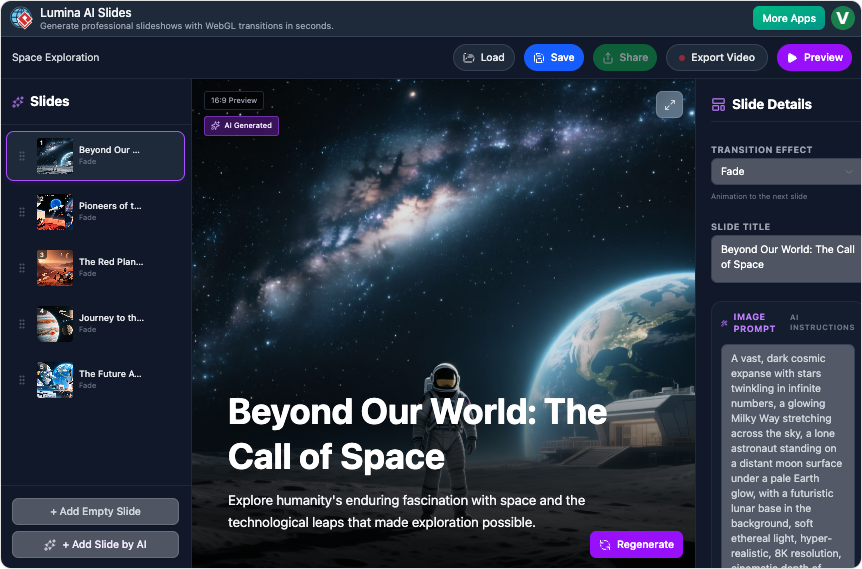
Visual Paradigm (the same tool I already used for wireframes and photoshop) quietly shipped their new AI Slides feature. On Monday I decided to test it on a real client project— a 15-slide Series A pitch for a climate-tech startup. What happened next honestly shook me.
The Old Me vs. The New Me (same 15-slide deck)
Old workflow (Thursday)
- 2 h reading the founder’s 40-page memo
- 3 h outlining + writing copy
- 4 h hunting images (Unsplash, Getty, then heavy Photoshop anyway)
- 5 h layout, typography, animation timing in Keynote + After Effects
- 1 h export versions (PDF, video, speaker notes) Total: ~15 hours → $5,200 invoice
New workflow with Visual Paradigm AI Slides (Monday morning)
- Typed the prompt: “Series A pitch for carbon-capture marketplace, $120M TAM by 2030, traction-heavy, climate optimistic tone, cinematic visuals”
- Hit Generate → 42 seconds later I had a 17-slide deck (I deleted 2)
- Spent 22 minutes total tweaking:
- Reworded three bullets for founder’s voice
- Regenerated two images (“more aerial shots of reforestation at golden hour”)
- Swapped two transitions to the 3D cube rotate for the market pivot slide
- Exported 1080p video + editable source file
Total time: 28 minutes. I sent the video to the founder at 10:17 a.m. He replied at 10:29 a.m. with “This is the best deck we’ve ever had. Seriously.”
I just made my entire week’s revenue obsolete in half an hour.
What Actually Blew My Mind
- The images aren’t “good for AI” — they’re legitimately better than what I used to pay Shutterstock for. Cohesive style, perfect aspect ratio, no weird six-fingered hands.
- The transitions are custom WebGL — things I used to beg motion designers for. The “film burn → ripple dissolve” combo on their traction slide actually gave me goosebumps.
- The copy is 85–90 % there on first pass. I used to rewrite everything. Now I just massage tone and add founder-isms.
- Clients love the video version more than static decks now. Open rates on Loom links went from ~40 % to 95 % overnight.
Honest Feelings After 7 Days Straight Using It
- Day 1: Terrified I just automated myself out of a job
- Day 2: Realized I can now take 5× more clients (or work 4 days a week)
- Day 3: Started charging the same rate but delivering 3× faster → profit margin exploded
- Day 7 (today): I’m genuinely having more fun than I’ve had in years because I’m spending 90 % of my time on strategy and storytelling instead of kerning and stock-photo hunting.
My Recommendations to Every Designer Reading This
- Don’t fight it — master it. The designers who treat Visual Paradigm AI Slides as a threat will be replaced by those who treat it as the world’s best junior designer that never sleeps.
- Your new job title is “AI Director.” You’re no longer moving text boxes — you’re directing the AI like a film director. Prompt engineering + taste is the new superpower.
- Keep the scarcity. I still charge my full day rate even when the deck takes me 45 minutes. The client pays for the outcome, not the hours.
- Use the split-screen editor religiously. The ability to rewrite a bullet on the left and instantly see the slide update on the right is pure magic.
- Export the video every single time. Even if they say “we just need PPT,” send the cinematic video first. 9/10 times they forward it internally and you become the hero.
Final Thought
Last week I was exhausted, charging by the hour, and scared of burnout. This week I made more money, worked less, and actually enjoyed every project.
Visual Paradigm didn’t kill presentation design — they liberated it.
If you’re a designer, open Visual Paradigm right now and type your next client’s topic. You’ll thank me in about 45 seconds.
Link again for the curious:
https://updates.visual-paradigm.com/releases/lumina-ai-slides-generate-ai-video-slideshows/
See you on the other side — t he one where we get paid for ideas, not alignment tabs.

 English
 Arabic
 Chinese (Simplified)
 Dutch
Dutch French
 German
 Italian
 Japanese
 Korean
 Portuguese
 Russian
 Spanish