


Executive Summary
ArchiSurance, a leading insurance provider formed from the merger of three regional companies, sought to optimize its customer-facing and internal operations to improve efficiency, reduce processing delays, and enhance service delivery. In 2025, the company modeled its business layer architecture using ArchiMate to visualize the interactions between front office customer relations, back office specialized departments, and external partners.
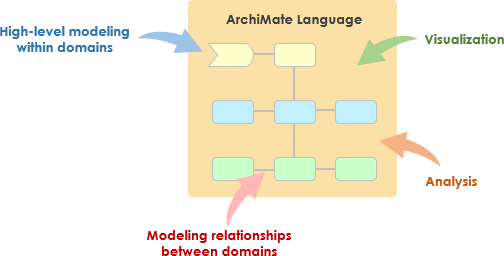
This case study focuses on the Business Layer of ArchiMate, illustrating structural concepts such as actors, roles, collaborations, interfaces, composition, aggregation, serving, and flow relationships. By clearly mapping these elements, ArchiSurance identified opportunities for better integration, resulting in a 20% faster claim processing time and improved customer satisfaction through seamless channel support.
Company Background
ArchiSurance offers a range of insurance products, including home & away, car, and legal aid coverage. The company’s operations span front office customer interactions and back office processing, involving intermediaries, financial institutions, and internal specialized units. Post-merger challenges included fragmented processes across channels (phone, email, mail, electronic) and inefficiencies in contract handling and payments.
To address these, ArchiSurance applied ArchiMate’s Business Layer to model its organizational structure and behavior independently of technology.
Key Business Layer Elements and Relationships
The Business Layer in ArchiMate captures active structure (actors, roles, collaborations, interfaces), behavior (processes, functions, interactions), and passive structure (objects like contracts).
Organizational Structure and Actors
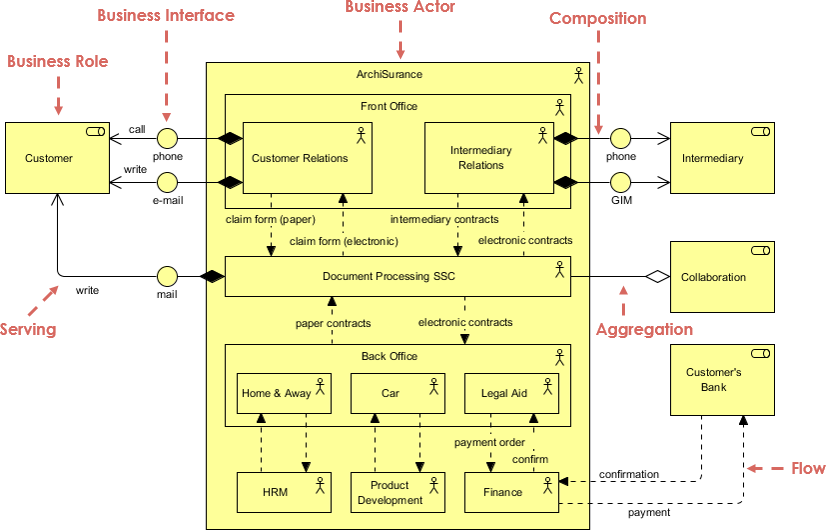
- ArchiSurance: The primary Business Actor, composed of Front Office and Back Office units (composition relationship).
- Front Office: Includes Customer Relations and Intermediary Relations roles, handling direct customer and broker interactions.
- Back Office: Aggregates specialized departments – Home & Away, Car, and Legal Aid (aggregation relationship), responsible for product-specific processing.
External actors include:
- Customer and Intermediary (e.g., brokers).
- Customer’s Bank for payments.
Business Roles and Interfaces
- Business Roles (e.g., Customer Relations) are assigned to actors and expose Business Interfaces (phone, email, GIM for intermediaries).
- Customers interact via call, phone, write email, or mail (serving relationships).
- Intermediaries use phone or GIM (Group Insurance Module?).
Collaborations and Processes
- Document Processing SSC (Shared Service Center) as a collaboration handling claim forms (paper/electronic) and contracts (intermediate, claim form paper/electronic).
- Back office roles trigger flows for product development, payment/order confirmation, and finance interactions.
Key Relationships Demonstrated
- Composition: ArchiSurance composes Front and Back Office.
- Aggregation: Back Office aggregates product-specific departments.
- Serving: Roles serve external actors via interfaces.
- Flow: Confirmation and payment flows to/from Customer’s Bank.
- Assignment: Roles assigned to internal collaborations and departments.
ArchiMate Business Layer Diagram
The diagram provides a comprehensive view of the business structure:
[Image of the provided ArchiMate diagram, highlighting ArchiSurance as the central actor, with Front Office (Customer Relations, Intermediary Relations) and Back Office (Home & Away, Car, Legal Aid), interfaces (phone, email, mail, GIM), collaborations (Document Processing SSC, Collaboration), and flows involving external parties like Customer, Intermediary, and Customer’s Bank.]
Detailed Explanation of the Diagram
- Business Actor and Composition: ArchiSurance at the top, composing Front and Back Office.
- Business Interfaces: Phone, email, mail for customers; phone and GIM for intermediaries.
- Business Roles: Customer Relations, Intermediary Relations in Front Office; product-specific in Back Office.
- Serving Relationships: Direct links from roles to external actors.
- Aggregation: Back Office aggregates Home & Away, Car, Legal Aid.
- Flow and Triggering: Payment/confirmation flows; triggers for HRM, Product Development, Finance.
- Passive Elements: Contracts and claim forms (paper/electronic).
This viewpoint emphasizes cooperation and structural relationships in the business domain.
Implementation and Outcomes
Using this model, ArchiSurance prioritized digitalization of paper-based processes and better integration between front and back offices. Initiatives included enhancing electronic contract handling and automating flows to the bank’s systems.
Key outcomes:
- Quantitative: 20% reduction in processing delays; 30% increase in electronic interactions.
- Qualitative: Higher intermediary satisfaction; clearer role definitions reduced internal handoffs.
- Strategic: Foundation for extending to Application and Technology Layers, aligning with merger rationalization goals.
Lessons Learned and ArchiMate Benefits
ArchiMate’s Business Layer provided:
- Clarity: Visual distinction between composition (tight integration) and aggregation (loose grouping).
- Stakeholder Communication: Non-technical diagrams facilitated discussions across departments.
- Traceability: Easy identification of bottlenecks in serving and flow relationships.
- Flexibility: Model served as baseline for post-merger harmonization.
Challenges like channel fragmentation were addressed by emphasizing multi-channel interfaces.
Conclusion
This case study demonstrates ArchiMate’s power in modeling the Business Layer for complex organizations like ArchiSurance. By visualizing actors, roles, collaborations, and relationships, the company achieved greater operational coherence and customer-centric improvements. For enterprises undergoing mergers or digital transformations, ArchiMate’s structured Business Layer modeling ensures alignment, efficiency, and a solid foundation for holistic enterprise architecture.
-
Comprehensive Tutorial: Generating ArchiMate Diagrams with AI: In-depth tutorial showing how to use Visual Paradigm’s AI diagram generator to create ArchiMate diagrams and viewpoints efficiently.
-
Introducing AI-Powered ArchiMate Viewpoints Generator in Visual Paradigm: Visual Paradigm’s latest release features an AI-driven ArchiMate viewpoints generator that automates the creation of enterprise architecture views, enhancing modeling efficiency and accuracy.
-
Full ArchiMate Viewpoints Guide (Examples Included): Complete ArchiMate Viewpoint guide, with 23 official ArchiMate example viewpoints, clear ArchiMate diagram examples and explanation, wrote by certified ArchiMate tool vendor.
-
How to Use ArchiMate to Visualize Information Flows with AI: Sep 17, 2025 · Compared to generic AI tools or simple diagram generators, Visual Paradigm ’s AI -powered modeling software stands out because: It understands ArchiMate -specific concepts, including information flows, viewpoints, and business-technology alignment
-
Using Viewpoints to Support Managerial Decision-Making: A comprehensive guide on how selecting appropriate viewpoints enhances strategic decision-making in enterprise architecture.
-
ArchiMate Strategy Viewpoint Guide: The strategy viewpoint allows the business architect to model a high-level, strategic overview of the strategies (courses of action) of the enterprise, the …
-
ArchiMate Motivation Viewpoint Guide: The motivation viewpoint allows the designer or analyst to model the motivation aspect, without focusing on certain elements within this aspect. For example, …
-
ArchiMate Capability Map Viewpoint Guide: The capability map viewpoint allows the business architect to create a structured overview of the capabilities of the enterprise. A capability map typically …
-
Mapping TOGAF ADM Phases to the ArchiMate … – Cybermedian: Visual Paradigm Enterprise Edition is a certified ArchiMate 3.1 enterprise architecture tool that supports all ArchiMate 3 vocabulary, notation, syntax, and semantics. It includes a powerful ArchiMate drawing tool, viewpoint management tool, and TOGAF Guide-through Process.
-
AI-Powered ArchiMate Viewpoint Generation for Enterprise Architects: Discover how AI enables enterprise architects to generate ArchiMate viewpoints in seconds, accelerating enterprise architecture modeling.

 English
 Arabic
 Chinese (Simplified)
 Dutch
Dutch French
 German
 Italian
 Japanese
 Korean
 Portuguese
 Russian
 Spanish