


Transform simple diagrams into detailed, multi-layered architectural blueprints.

The AI Sequence Diagram Refinement Tool is designed to transform simple sequence diagram code into a detailed, layered representation of your system’s architecture. Its core purpose is to help you move from a high-level design to an actionable, implementation-ready blueprint.
Purpose and Benefits
This powerful app is an essential part of your design workflow, helping you to automatically enrich your initial architectural diagrams. It helps you:
-
Increase Precision: Turn a basic sequence of interactions into a detailed, multi-layer diagram.
-
Ensure Architectural Compliance: Visualize how your design adheres to an MVC (Model-View-Controller) pattern.
-
Improve Communication: Provide a clear and unambiguous visual blueprint for developers and stakeholders.
-
Save Time: Dramatically reduce the time spent manually detailing complex sequence diagrams.
How It Works: From Simple Code to Detailed Design
The AI Sequence Diagram Refinement Tool simplifies the process of creating a complex sequence diagram into a straightforward workflow.
Select Tools > Apps from the main menu. Locate the “Sequence Diagram Refinement Tool” app and click Start Now to begin.
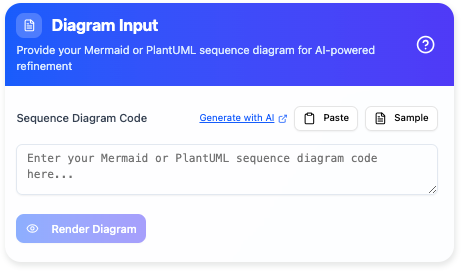
Step 1: Input Your Simple Code
Start by providing a simple, natural language prompt or a basic diagram code snippet that outlines the high-level interactions of a use case. For example, you might input a prompt like “a user logs into the system.”
Step 2: Let AI Refine Your Diagram
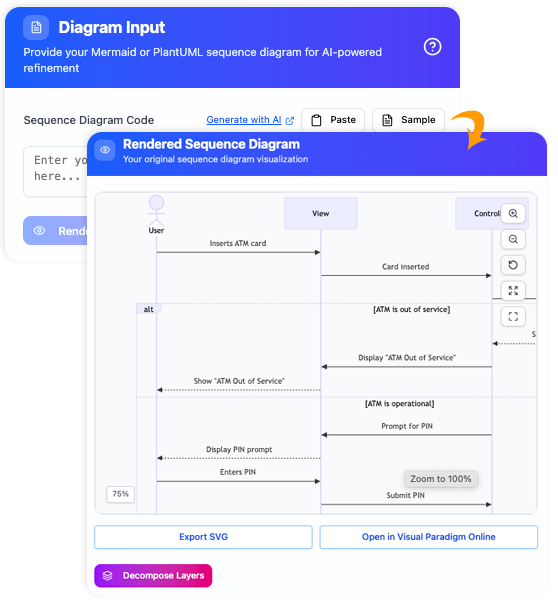
The AI engine will take your simple input and expand it, intelligently identifying key architectural components (e.g., View, Controller, Model) and the detailed message flows between them. It will automatically generate a new, more comprehensive diagram.
Step 3: Export and Collaborate
Once the AI has refined your diagram, you can seamlessly integrate it into your workflow. The tool allows you to:
-
Edit in Visual Paradigm Online: Immediately open the diagram in our web-based editor for further manual refinement.
-
Export to SVG: Save a high-quality vector image for use in presentations, documentation, and other reports.
Key Output: A Foundational Document
The primary output of this tool is a professional, multi-layered sequence diagram that is ready for use in your project. It provides:
-
A Detailed Diagram: A full-featured sequence diagram with all major architectural components.
-
Clear Message Flows: Precise and well-defined interactions between objects.
-
Architectural Clarity: A diagram that clearly separates the concerns of the View, Controller, and Model.
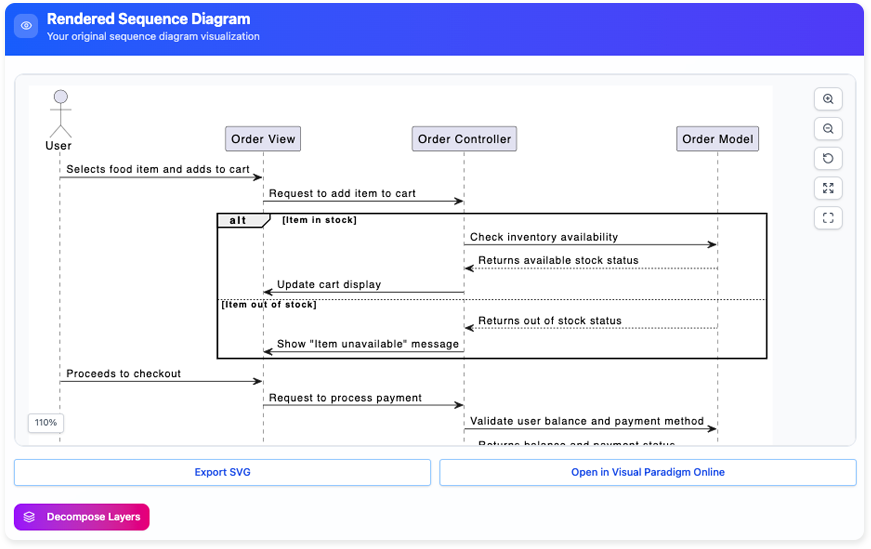
The AI Sequence Diagram Refinement Tool ensures your design work is not only fast but also thorough, providing the detailed blueprints you need for successful implementation.
Generate UML Sequence Diagrams Instantly with AI!
-
Posted on December 16, 2025
-
/Under AI, AI Image Translator, UML
-
/With 0 Comments
Generate UML Sequence Diagrams Instantly with AI!
Discover the power of instant diagram generation using the Visual Paradigm AI chatbot.
Our recent product demo showed just how easy it is to create complex models quickly. We used the chatbot to generate a UML sequence diagram illustrating the normal scenario for washing clothes by a washing machine.
The key benefit is iterative refinement: initial generation looks good, but you can request more details. During the demonstration, we asked the chatbot to add the water supply and then specifically requested it to add the flow to the water supply to request water, resulting in a diagram that “looks good”.
Once satisfied, the integration is seamless! Simply press the “import to visual paradigm button” to import the generated diagram directly into your Visual Paradigm project. This allows you to perform further editing on the diagram right away.
Stop drawing and start generating! Watch the demo to see how Visual Paradigm’s AI can help you instantly create accurate UML sequence diagrams.
Key AI Sequence Diagram Features
-
Generate-from-Text Engine: Converts plain text prompts (e.g., “Create a sequence diagram for a user logging into a website”) into structured UML sequence diagrams with actors, actions, and temporal flows.
-
AI Refinement Tool: Transforms simple, high-level diagrams into detailed, multi-layered representations. It can automatically decompose a basic flow into specific architectural layers like MVC (Model-View-Controller).
-
Conversational Editing: Allows users to refine generated diagrams using natural language commands, such as “Add a payment gateway” or “Rename User to Customer”.
-
Automatic Layout & Formatting: The AI engine ensures diagrams are clean and readable by automatically handling spacing, alignment, and the arrangement of lifelines and messages.
-
Intelligent Design Feedback: The AI acts as a “design partner,” capable of analyzing diagrams to identify bottlenecks or suggesting transitions from synchronous to asynchronous calls for better performance.
-
Code-to-Diagram Support: Supports importing and refining diagrams based on PlantUML or Mermaid code, which the AI then expands into detailed models. [1, 2, 5, 6, 7, 8, 9, 10, 11]
Advanced Modeling Capabilities
Beyond AI generation, Visual Paradigm integrates these diagrams into its professional suite: [12, 13]
-
Standard Compliance: Generates diagrams that adhere to UML 2.x standards, including complex fragments like
alt,loop,opt, andbreak. -
Seamless Integration: AI-generated diagrams can be exported to SVG or JSON, or opened directly in the Visual Paradigm Online or Desktop editor for further manual refinement.
-
Cross-Diagram Synchronization: Users can synchronize sequence diagrams with communication diagrams to maintain consistency across different model views. [3, 9, 14, 15, 16, 17]
Would you like to see a specific prompt example to generate a sequence diagram for your project?
- References
- AI Diagram Generation Features: Overview of Visual Paradigm’s AI-powered diagram generation capabilities, including instant creation from natural language prompts.
- AI Sequence Diagram Refinement Tool: Dedicated feature page for the AI-powered tool that transforms simple diagrams into detailed, multi-layered architectural blueprints.
- AI-Powered Sequence Diagram Refinement Article: In-depth article exploring how AI enhances sequence diagram refinement for better architectural modeling.
- E-learning Course Content Example with AI Sequence Diagram Refinement: Practical case study demonstrating the refinement tool applied to e-learning course content design.
- Comprehensive Review of Visual Paradigm’s AI Diagram Generation Features: Third-party review analyzing the strengths and capabilities of Visual Paradigm’s AI diagram tools.
- Visual Paradigm AI Chatbot: Interactive AI chatbot interface for generating and refining UML diagrams through natural language conversation.
- Sequence Diagram Refinement Tool Page: Dedicated tool page with access to the AI sequence diagram refinement functionality.
- AI Chatbot Features: Feature overview of the conversational AI assistant for diagram generation and editing.
- UML Sequence Diagram: A Definitive Guide to Modeling Interactions with AI: Comprehensive documentation on creating and refining UML sequence diagrams using AI assistance.
- AI Sequence Diagram Example: Software Update Download and Install: Practical example demonstrating AI-generated sequence diagrams for a software update workflow.
- PlantUML Sequence Diagram Builder: Tool for importing and enhancing PlantUML code into detailed, editable sequence diagrams.
- AI Composite Structure Diagram Generator Guide: Guide for using AI to generate UML composite structure diagrams across Desktop, Chat, and OpenDocs platforms.
- Case Study: AI-Powered Modeling for Online Shopping System UML Diagram: End-to-end case study showing how AI builds complete UML models for e-commerce systems through conversation.
- What is a Sequence Diagram? UML Guide: Foundational guide explaining sequence diagram concepts, notation, and best practices in UML.
- Click Start AI Technical Support: Technical support documentation for getting started with Visual Paradigm’s AI features.
- UML Sequence Diagram Tool Solution: Professional solution page for Visual Paradigm’s dedicated UML sequence diagram modeling tool.
- Forum: Sequential Diagram to Collaborative Diagram: Community forum discussion on synchronizing sequence diagrams with communication/collaboration diagrams.
- Visual Paradigm combines deep AI understanding with professional modeling tools to make architectural design accessible, fast, and precise. Whether you’re starting from a simple prompt or refining existing diagrams, the AI Sequence Diagram Refinement Tool helps you bridge the gap between concept and implementation-ready blueprints.

 English
 Arabic
 Chinese (Simplified)
 Dutch
Dutch French
 German
 Italian
 Japanese
 Korean
 Portuguese
 Russian
 Spanish