


Overview
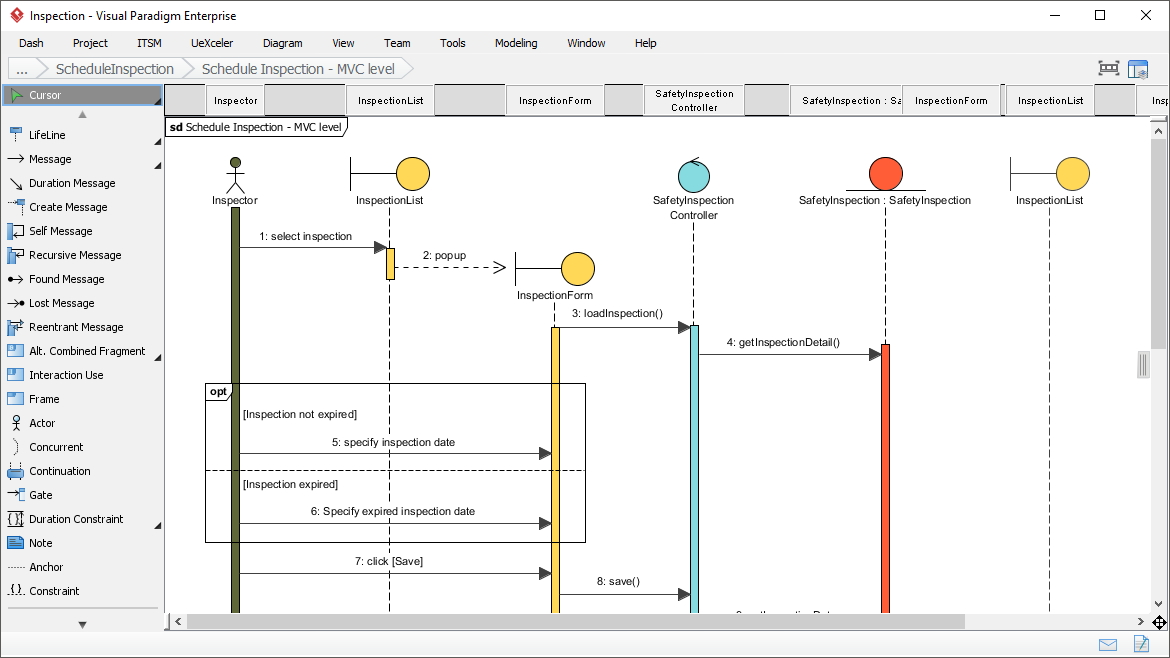
Finding a Sequence Diagram software? Try Visual Paradigm, an easy-to-use UML diagrammer that features a large variety of diagrams such as UML, BPMN, DFD, ERD, ArchiMate and more. Its intuitive diagram editor makes creating and communicating Sequence Diagrams fast and simple.
Your Challenges
When working with sequence diagrams, professionals often face these common hurdles:
-
Model Integration: Some sequence diagrams are created to visualize interactions that satisfy a use case or support a class. You need a way to associate behavioral models with other models such as use cases, classes, etc.
-
Ease of Use: Many UML tools on the market are complex and hard to learn. You need an intuitive, easy-to-use sequence diagram solution.
-
Team Collaboration: You work with others in designing software and need a team solution that supports versioning and allows collaborative, concurrent work.
-
Code Visualization: You want to visualize code logic with sequence diagrams, but drawing them manually is time-consuming.
-
Cross-Platform Needs: Part of your team works on Windows, while others use Linux and Mac. You need a cross-platform modeling solution.
Our Solution
🎯 Sequence Diagram Tool
-
UML Compatibility: Visual Paradigm supports UML 2.0 diagrams and notations, ensuring industry-standard compliance.
-
Cross-Platform Support: As a cross-platform UML modeler, you can create Sequence Diagrams on Windows, Linux, and Mac OS.
-
Comprehensive Diagramming: Beyond Sequence Diagrams, the UML editor allows you to create other UML diagrams as well as standards like BPMN, DFD, ERD, and ArchiMate—all in a single visual modeling solution.
-
Flexible Modeling: Create sequence diagrams as independent design artifacts, or as sub-diagrams of use cases, classes, and other model elements for detailed visualization.
✨ Intuitive and Powerful UML Editor
-
Drag-and-Drop Simplicity: Our intuitive UML diagram editor allows you to construct sequence diagrams entirely with drag and drop. Whether creating messages or repositioning elements, just drag and drop.
-
Smart Space Management: Need to add messages in the middle of your flow? The sweeper and magnet features help you add and remove space with a simple sweep.
-
Precision Alignment: The alignment tool ensures your diagrams look professional by keeping shapes and messages at precise locations.
-
Auto-Resizing Activation Bars: Activation bars automatically resize based on your gestures—no manual touch-ups needed.
🛠️ Many Supporting Features
-
Report Creation: Easily construct UML reports or any kind of documentation with our drag-and-drop Doc. Composer. Export reports to Word, PDF, or web page (HTML) formats.
-
Image Exporting: Export your designs to a wide variety of image formats to communicate with stakeholders easily.
-
Code Engineering: Generate sequence diagrams directly from source code! Visual Paradigm supports reverse engineering of sequence diagrams from Java.
👥 Strong Team Collaboration Support
-
Online Publishing: Publish your sequence diagrams online so approved team members can view designs anytime, from anywhere.
-
Commenting Tool: Allow team members to not only view designs but leave comments directly on the diagram.
-
Version Control: Built-in versioning system keeps revisions for all design changes.
-
Visual Comparison: Compare different phases of sequence diagrams with the built-in visual comparison tool. Review commit logs to understand change rationale, and revert or roll back changes when needed.
-
Branch and Merge: The branch and merge mechanism makes it simple to make independent, isolated changes.
-
Smart Conflict Resolution: Team members can work concurrently on the same design. Our collaboration engine features smart conflict resolution that detects conflicts and assists in resolving them.
🔑 Key AI Sequence Diagram Features
Visual Paradigm offers advanced AI-driven features for sequence diagrams, primarily focusing on instant generation from natural language and architectural refinement. These tools aim to bridge the gap between high-level requirements and detailed, implementation-ready architectural blueprints.
-
Generate-from-Text Engine: Converts plain text prompts (e.g., “Create a sequence diagram for a user logging into a website”) into structured UML sequence diagrams with actors, actions, and temporal flows.
-
AI Refinement Tool: Transforms simple, high-level diagrams into detailed, multi-layered representations. Automatically decomposes basic flows into specific architectural layers like MVC (Model-View-Controller).
-
Conversational Editing: Refine generated diagrams using natural language commands, such as “Add a payment gateway” or “Rename User to Customer”.
-
Automatic Layout & Formatting: The AI engine ensures diagrams are clean and readable by automatically handling spacing, alignment, and arrangement of lifelines and messages.
-
Intelligent Design Feedback: The AI acts as a “design partner,” analyzing diagrams to identify bottlenecks or suggesting transitions from synchronous to asynchronous calls for better performance.
-
Code-to-Diagram Support: Import and refine diagrams based on PlantUML or Mermaid code, which the AI then expands into detailed models.
🚀 Advanced Modeling Capabilities
Beyond AI generation, Visual Paradigm integrates these diagrams into its professional suite:
-
Standard Compliance: Generates diagrams that adhere to UML 2.x standards, including complex fragments like
alt,loop,opt, andbreak. -
Seamless Integration: AI-generated diagrams can be exported to SVG or JSON, or opened directly in Visual Paradigm Online or the Desktop editor for further manual refinement.
-
Cross-Diagram Synchronization: Synchronize sequence diagrams with communication diagrams to maintain consistency across different model views.
- 📚 Reference List
- AI Diagram Generation Features: Explore Visual Paradigm’s AI-powered tools for instantly generating diagrams from natural language prompts.
- AI Sequence Diagram Refinement Tool: Learn how to transform high-level sequence diagrams into detailed architectural blueprints using AI refinement.
- AI-Powered Sequence Diagram Refinement Article: A deep dive into how AI enhances sequence diagram modeling for complex systems.
- E-Learning Course Content with AI Sequence Diagrams: Practical example of using AI sequence diagram tools for educational content creation.
- Comprehensive Review: Visual Paradigm’s AI Diagram Features: Third-party review covering the strengths and capabilities of Visual Paradigm’s AI diagram generation.
- Visual Paradigm Chat AI Platform: Access the conversational AI interface for generating and refining diagrams through natural language.
- Sequence Diagram Refinement Tool Documentation: Official documentation for the AI-powered sequence diagram refinement functionality.
- AI Chatbot for Diagram Assistance: Discover how the integrated AI chatbot helps users create and modify diagrams through conversation.
- UML Sequence Diagram: AI Modeling Guide: Comprehensive guide to modeling interactions with AI assistance in UML sequence diagrams.
- AI Sequence Diagram Example: Software Update Flow: Step-by-step example of generating a sequence diagram for a software update process using AI.
- PlantUML Sequence Diagram Builder: Import and enhance PlantUML code with Visual Paradigm’s advanced editing and AI capabilities.
- AI Composite Structure Diagram Generator: Generate UML Composite Structure Diagrams instantly with AI across Desktop, Chat, and OpenDocs platforms.
- Case Study: AI-Powered Online Shopping System Modeling: Real-world case study demonstrating how Visual Paradigm’s AI builds complete UML models through conversation.
- What is a Sequence Diagram? UML Guide: Foundational guide explaining sequence diagrams, their purpose, and core UML notation.
- Click Start AI: Getting Started Guide: Technical support resource for initiating AI features within Visual Paradigm.
- UML Sequence Diagram Tool Solution Page: Official solution page detailing Visual Paradigm’s sequence diagram capabilities for professional modeling.
- Synchronizing Sequential and Collaborative Diagrams: Community forum discussion on synchronizing sequence diagrams with communication diagrams for model consistency.
-
💡 Ready to get started? Download Visual Paradigm Free today and experience the power of AI-enhanced sequence diagram modeling!

 English
 Arabic
 Chinese (Simplified)
 Dutch
Dutch French
 German
 Italian
 Japanese
 Korean
 Portuguese
 Russian
 Spanish