


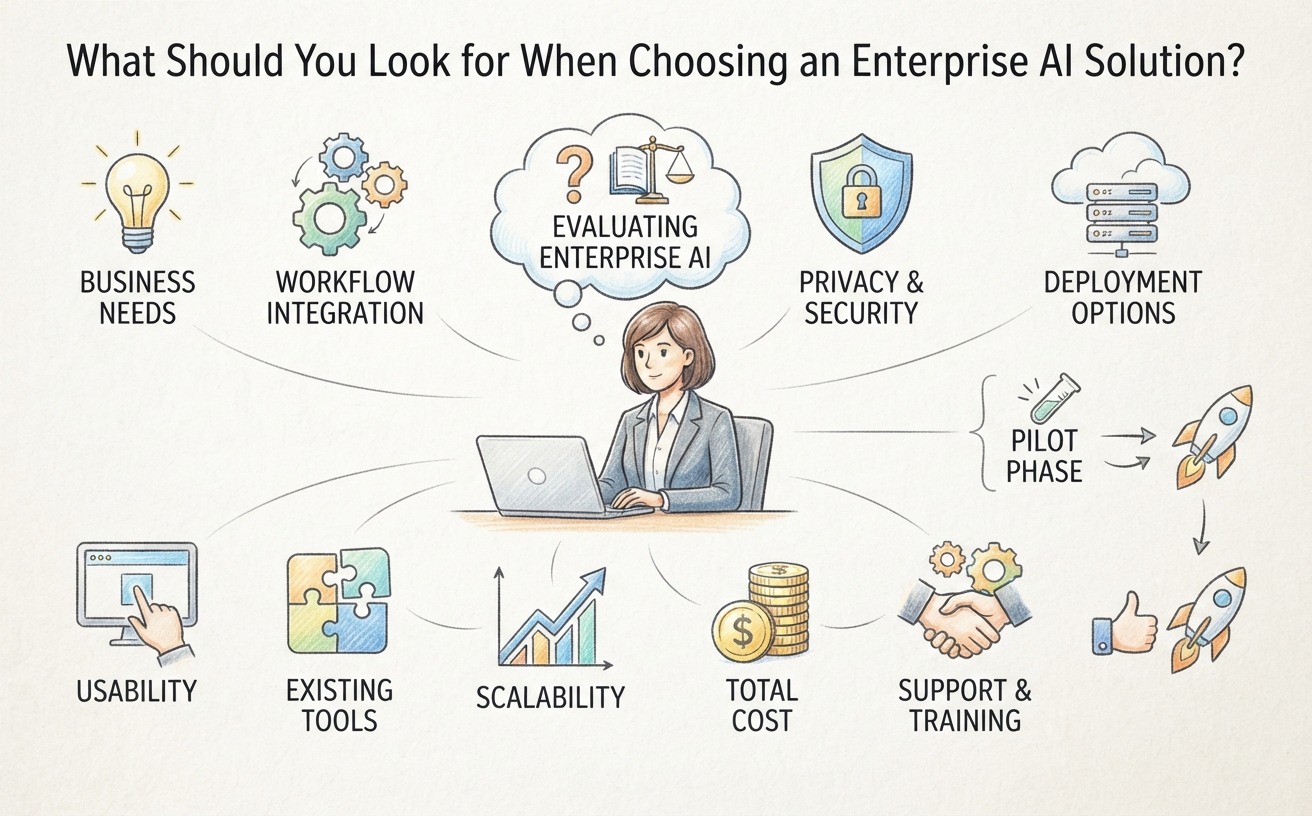
Choosing an enterprise AI solution is not simply a matter of finding the most powerful AI model or the platform with the longest feature list. A solution may offer impressive capabilities but still fail to deliver value if it does not address the organization’s actual needs, fit existing workflows, or help employees use information more effectively.
For businesses considering AI adoption, the more important question is: Will this solution help our people do meaningful work better, more efficiently, or more consistently?
Answering that question requires looking beyond the technology itself. This guide outlines ten practical factors to consider when evaluating an enterprise AI solution, helping organizations make a decision based on business value rather than product claims alone.
1. Start with Clear Business Needs
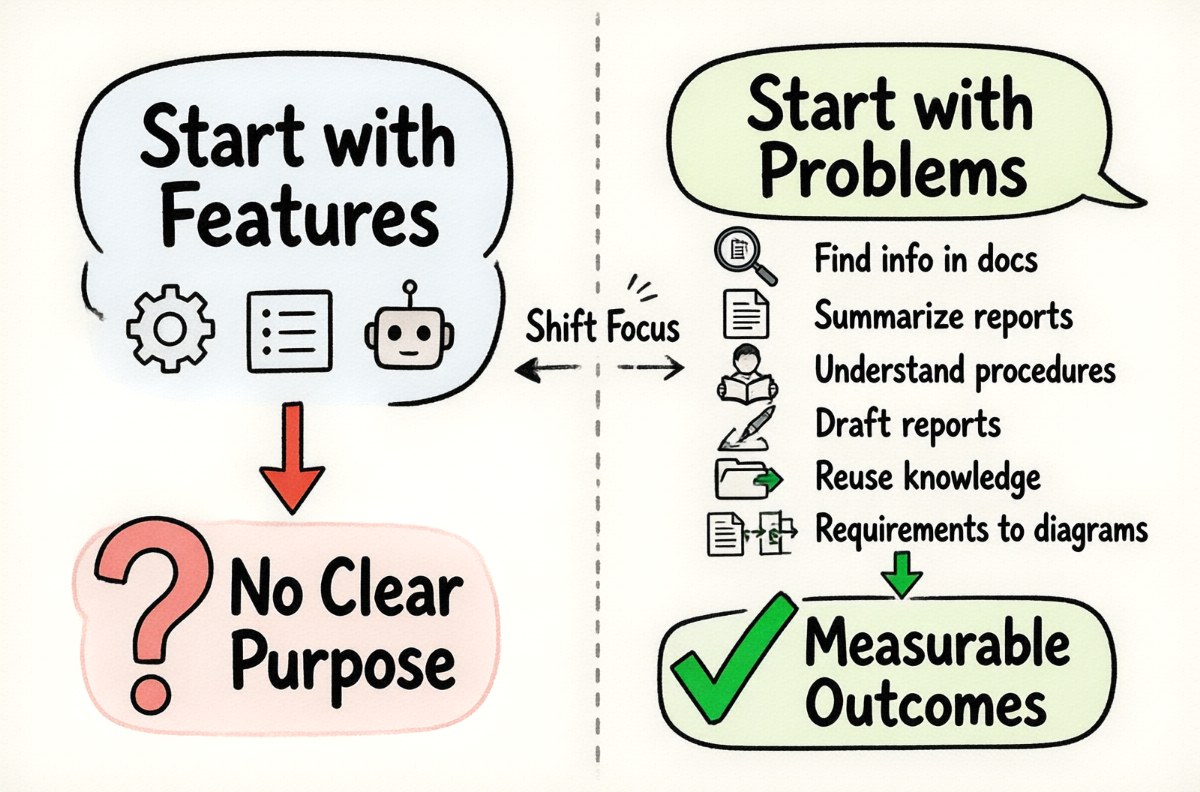
Before comparing AI platforms, identify the problems you want to solve. Starting with a product demonstration or a list of AI features can lead to adopting technology without a clear purpose.
Consider where employees currently spend too much time, where information is difficult to find, and which tasks involve repetitive work that could benefit from AI assistance.
Common business needs include:
- Finding information across large collections of company documents.
- Summarizing reports, meeting notes, and lengthy correspondence.
- Helping employees understand internal procedures and guidelines.
- Preparing drafts of reports, proposals, and other business documents.
- Making project knowledge easier to retrieve and reuse.
- Turning written requirements into structured specifications or diagrams.
Try to describe each need in terms of the people affected and the outcome you want to improve. For example, instead of saying that your company needs an AI chatbot, define the problem as reducing the time employees spend searching for approved internal procedures.
A clearly defined problem makes it easier to evaluate whether a solution is suitable and whether its benefits can be measured.
2. Check Whether It Supports Your Actual Workflows
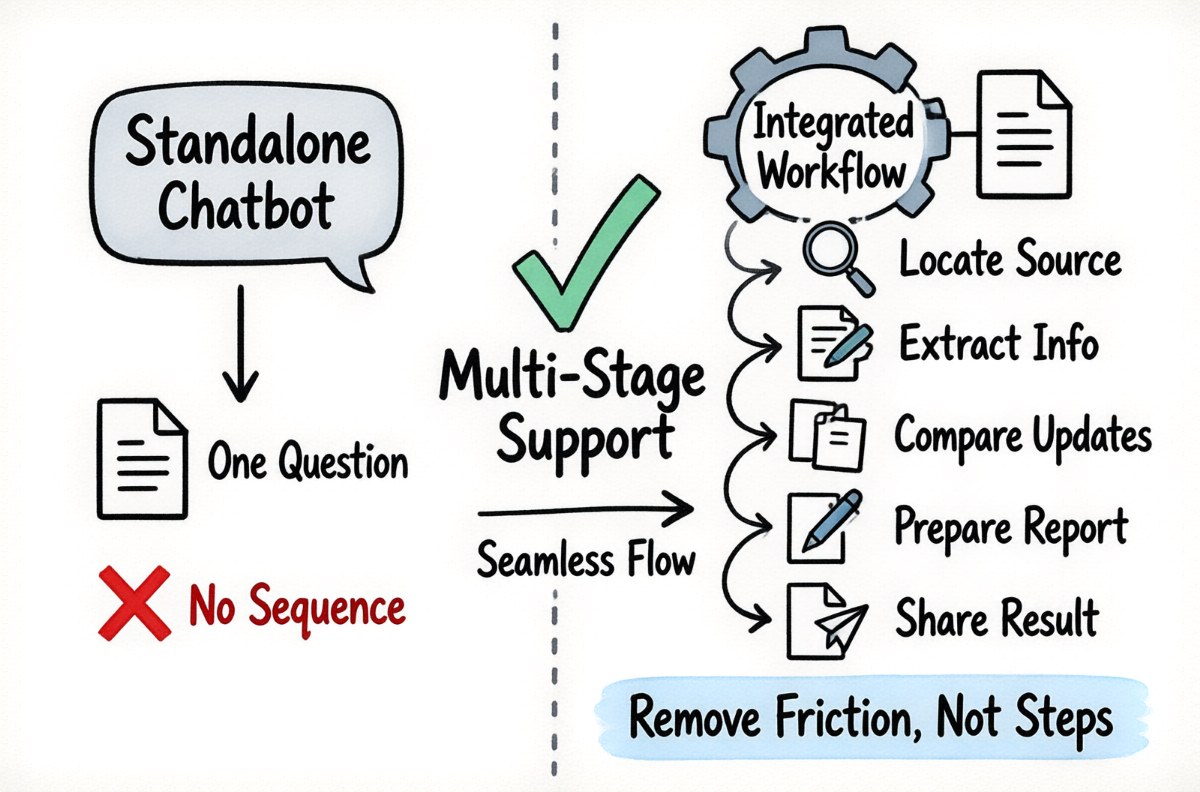
An enterprise AI solution should fit into the way people work. A standalone chatbot may be useful for occasional questions, but it may not be sufficient when employees need to complete a sequence of related tasks.
Consider a typical reporting workflow. Employees may need to locate source documents, extract relevant information, compare updates, prepare a report, and share the result with colleagues. An AI solution that only answers questions addresses one part of this process. A more integrated solution may help with several stages.
When evaluating a platform, ask:
- Can employees use it for the tasks they perform regularly?
- Does it support more than general question-and-answer interactions?
- Can it help create useful outputs, such as reports, summaries, specifications, or diagrams?
- Can it fit into existing processes without creating unnecessary extra steps?
- Can employees move from finding information to acting on it?
The goal is not to automate every activity. It is to identify where AI can remove friction and help employees complete work more effectively.
3. Evaluate How It Uses Your Company’s Knowledge
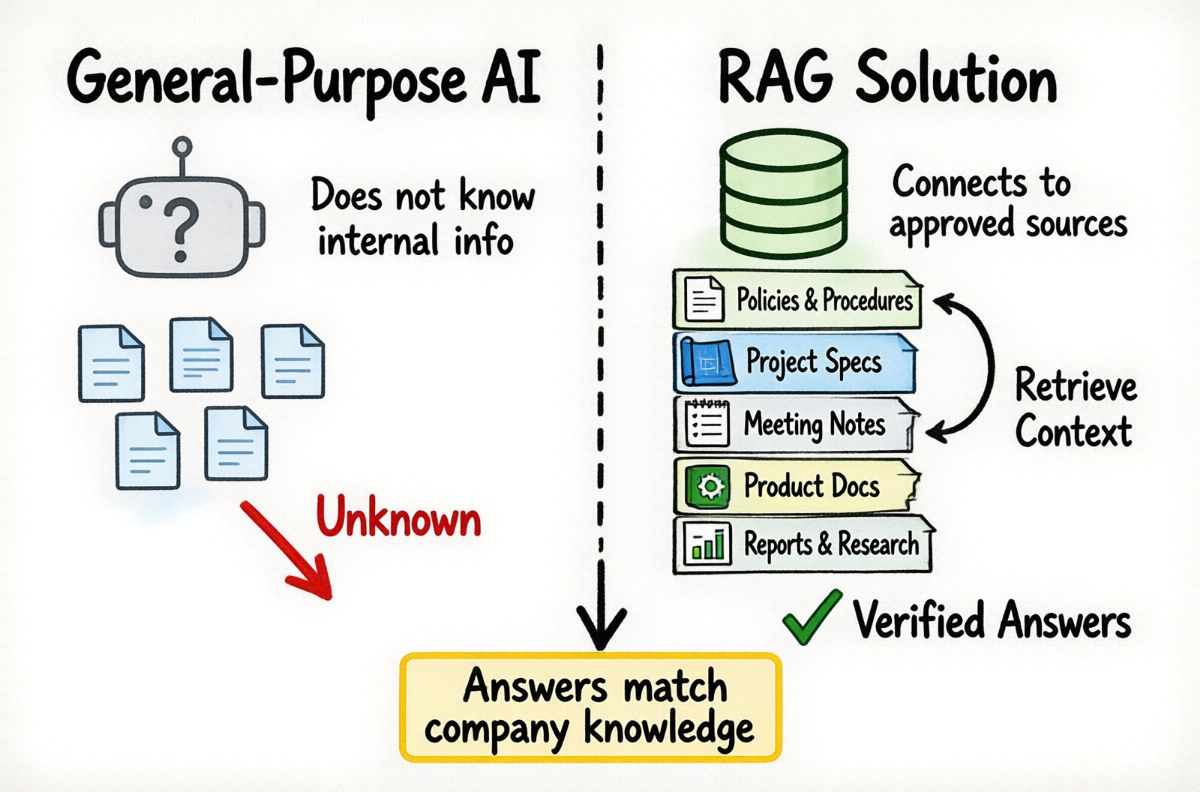
General-purpose AI models have broad language capabilities, but they do not automatically know your company’s internal information. They may not know the latest procedures, product details, project decisions, or organizational terminology.
For many business applications, the ability to connect AI with approved company knowledge is therefore essential.
Look for solutions that can work with relevant internal sources, such as:
- Policies, procedures, and employee guidelines.
- Project documents and technical specifications.
- Meeting notes and decision records.
- Product documentation and internal reference materials.
- Reports, research, and operational knowledge.
Also examine how the platform handles this information. Can employees select relevant knowledge sources? Can the system retrieve useful passages when answering questions? Can information be updated as documents change? Are access permissions respected?
Some solutions use retrieval-augmented generation (RAG) to retrieve relevant information and provide it to an AI model as context. This can make answers more relevant to the organization’s own knowledge without necessarily training the underlying model on those documents.
However, connecting documents does not automatically guarantee accurate answers. The quality of the source material, retrieval configuration, permissions, and model all matter. Employees should be able to verify important information against the original sources where appropriate.
4. Consider Data Privacy, Security, and Governance
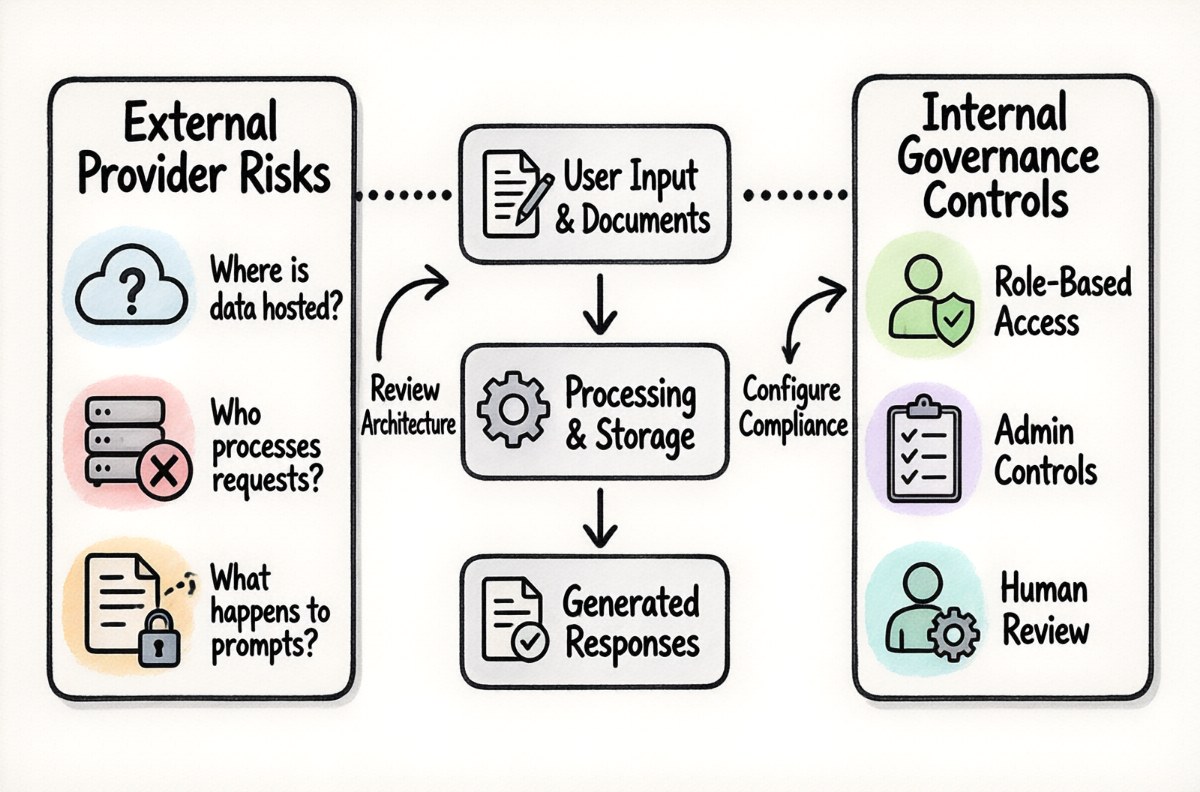
Employees may use AI to work with internal documents, customer information, project records, and other business data. Before adopting a solution, understand how that information is processed, stored, accessed, and protected.
Important questions include:
- Where is the AI application hosted?
- Are requests processed by an external AI provider or by infrastructure controlled by the organization?
- What happens to prompts, uploaded documents, and generated responses?
- Can access be restricted according to user roles or information permissions?
- What administrative controls are available?
- Can the deployment be configured to meet the organization’s security and compliance requirements?
Do not assume that a product is secure simply because it is described as private or enterprise-grade. Review the actual deployment architecture, provider terms, access controls, data-handling arrangements, and responsibilities of each party.
Governance is equally important. Organizations should establish guidelines for acceptable AI use, human review, sensitive information, and the types of decisions that must remain under human control.
5. Look at Deployment Options and Infrastructure Requirements
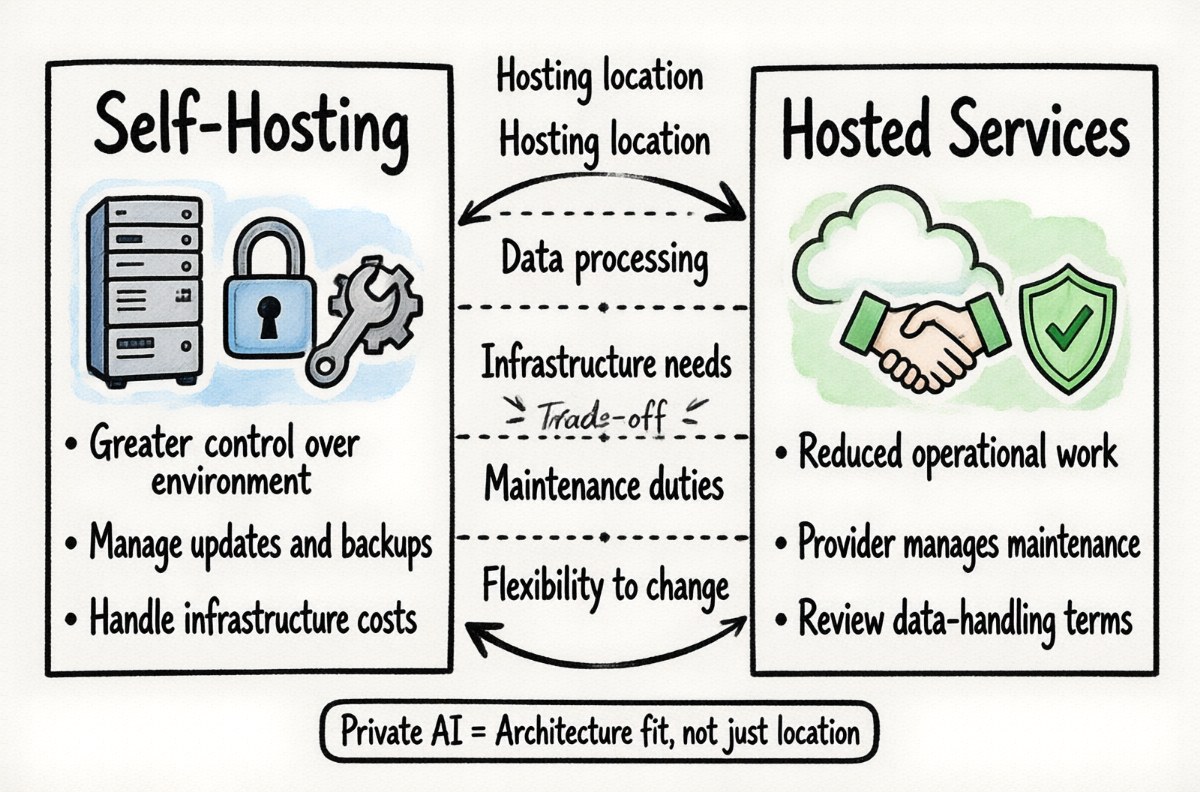
Enterprise AI solutions can use different deployment approaches. Some rely on hosted AI services, while others support models running on infrastructure managed by the organization or a dedicated hosting environment.
The right approach depends on the organization’s technical capabilities, data requirements, budget, expected usage, and operational preferences.
When comparing deployment options, consider:
- Hosting: Where will the application and AI model run?
- Data processing: Which systems receive prompts, documents, and other contextual information?
- Infrastructure: What computing resources are required?
- Maintenance: Who manages updates, monitoring, backups, and troubleshooting?
- Flexibility: Can the organization change models or deployment configurations as its needs evolve?
Self-hosting may provide greater control over the environment, but it also introduces infrastructure and maintenance responsibilities. Using a hosted provider may reduce operational work, but the organization must understand the provider’s data-handling terms and service arrangements.
Private AI does not necessarily mean that every model must run on a physical server inside the company. The important consideration is whether the overall architecture and configuration meet the organization’s requirements.
6. Make Sure Employees Can Use It Easily
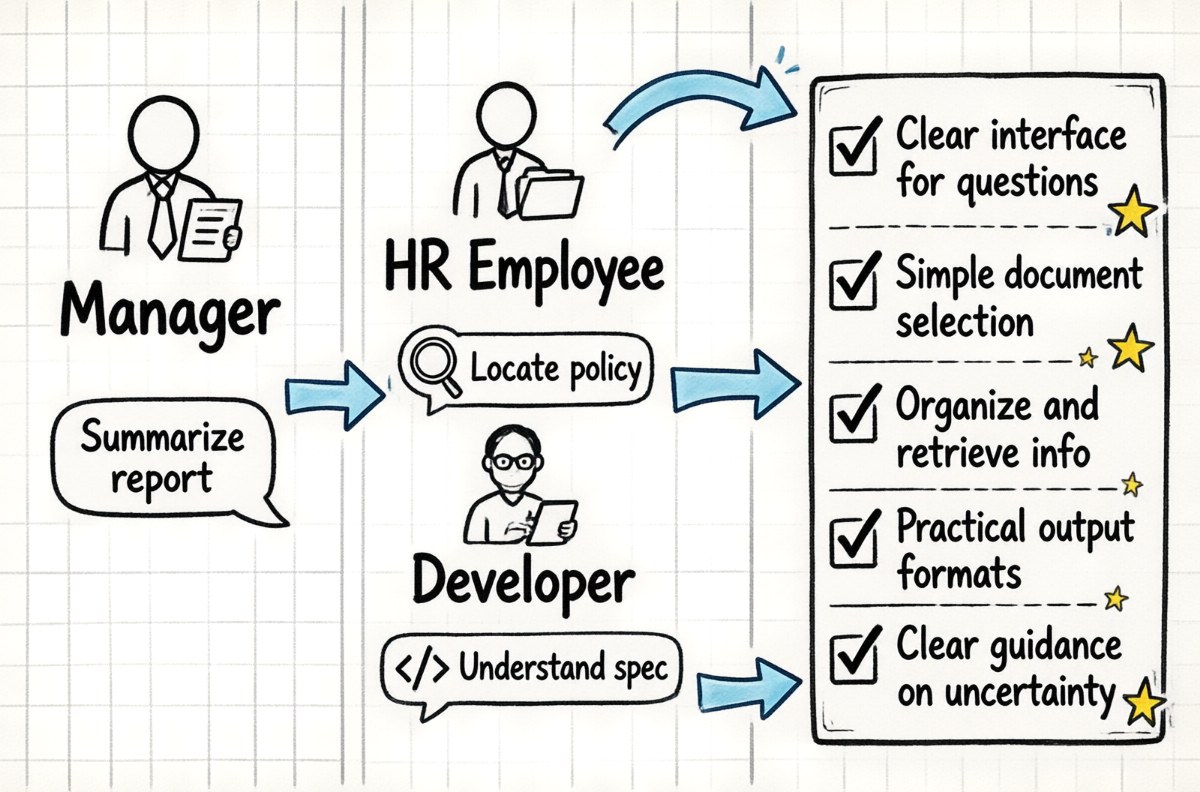
Even a technically capable AI platform can struggle to deliver value if employees find it confusing or inconvenient. Ease of use is not a minor consideration; it directly affects adoption.
Evaluate the experience from the perspective of different users. A manager may want to summarize a report, an HR employee may need to locate a policy, and a developer may want to understand a technical specification. Each person should be able to approach the system without needing specialist AI knowledge.
Look for features such as:
- A clear interface for asking questions and giving instructions.
- Simple ways to select or provide relevant documents.
- Useful ways to organize and retrieve information.
- Practical output formats that employees can review and reuse.
- Clear guidance when the system cannot answer a question confidently.
It is also worth testing the platform with employees who have different levels of technical experience. Their feedback may reveal usability problems that are not obvious during a vendor presentation.
7. Check Integration with Existing Tools
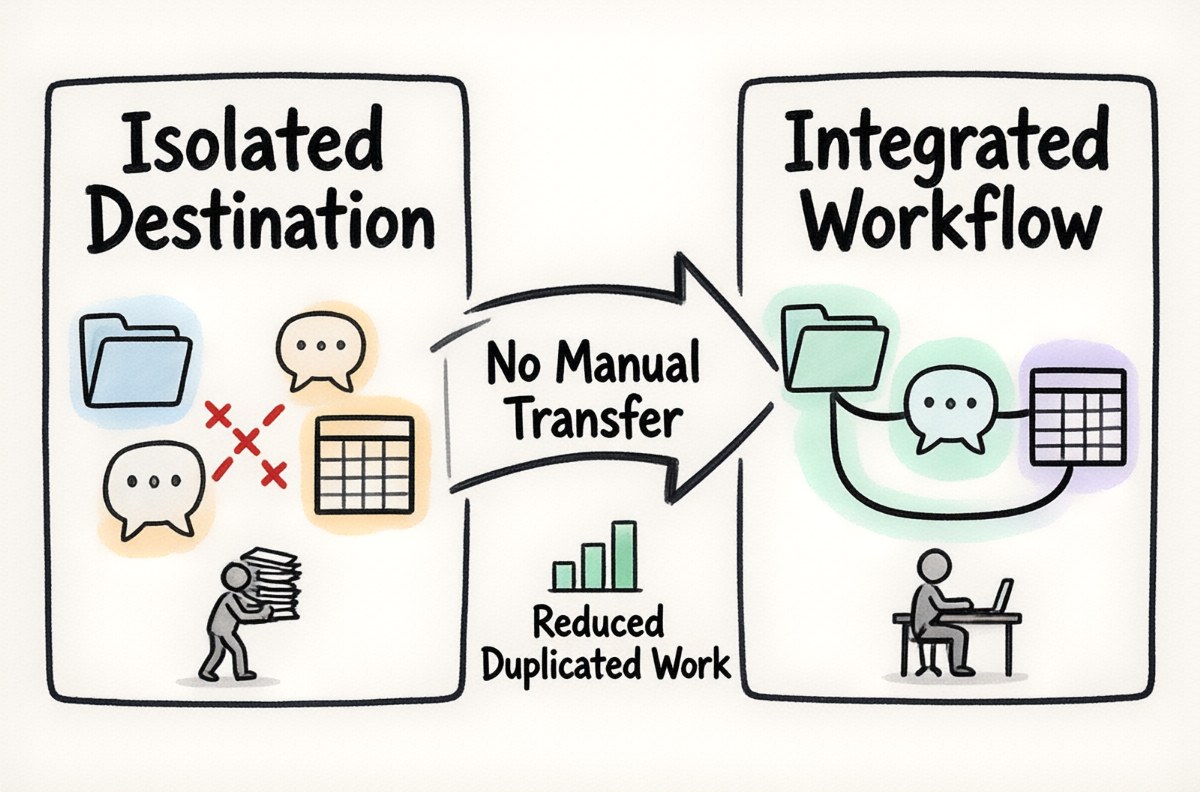
AI should complement the organization’s working environment rather than create another isolated destination for information and tasks.
Consider the systems employees already use to store documents, manage projects, communicate, prepare reports, and maintain business records. Determine whether the AI solution can connect with the relevant tools or whether information must be transferred manually.
Integration can improve the user experience by reducing duplicated work and making relevant information available where it is needed.
However, more integrations are not automatically better. Focus on the connections that support your defined business workflows. Also check whether integrations are included, require additional configuration, or depend on third-party services.
8. Assess Scalability and Administrative Control
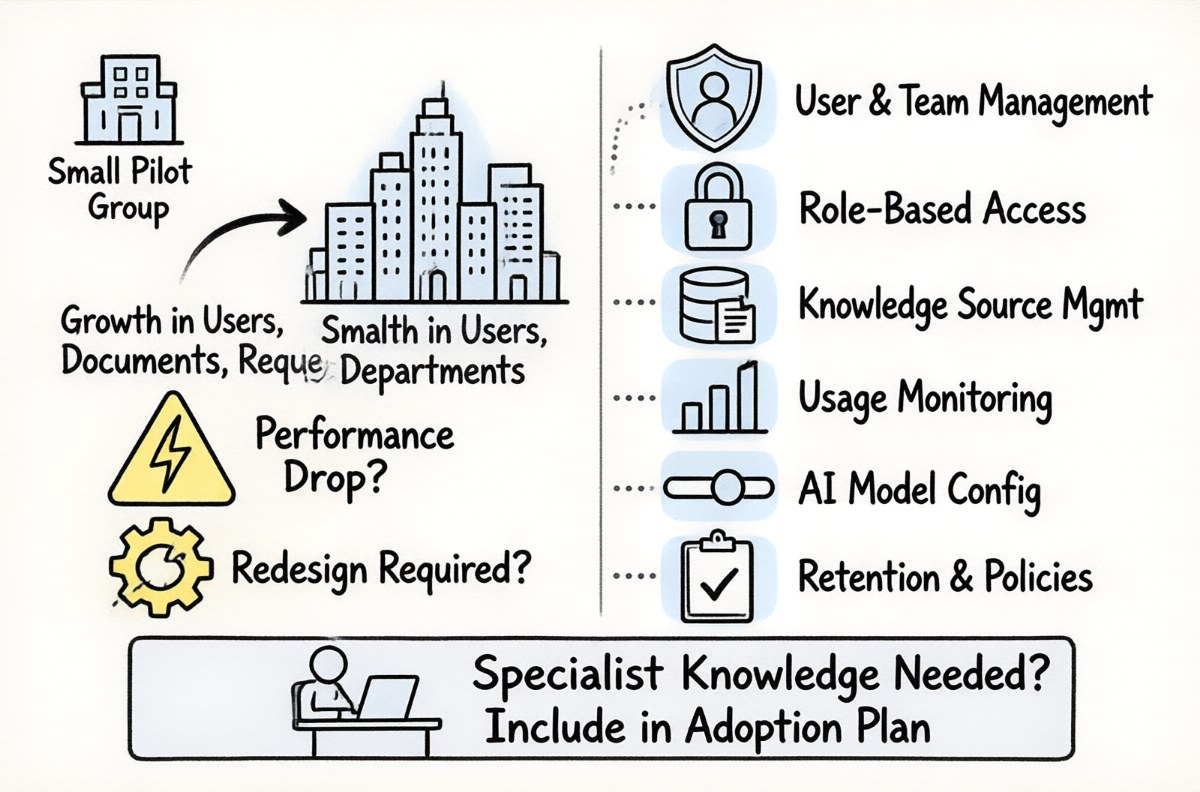
A solution that works for a small pilot group may need additional capabilities when introduced across multiple departments or locations.
Consider how the platform will handle growth in users, documents, requests, and workloads. Ask whether performance can be maintained as usage increases and whether the deployment can be expanded without a complete redesign.
Administrative capabilities also matter. Depending on the organization, useful controls may include:
- User and team management.
- Role-based access and permissions.
- Management of knowledge sources and content.
- Usage monitoring and reporting.
- Configuration of AI models and application settings.
- Policies for retention, review, and responsible use.
Think about the people who will administer the solution. If routine management requires extensive specialist knowledge, include that effort in the adoption and operating plan.
9. Understand the Total Cost of Ownership
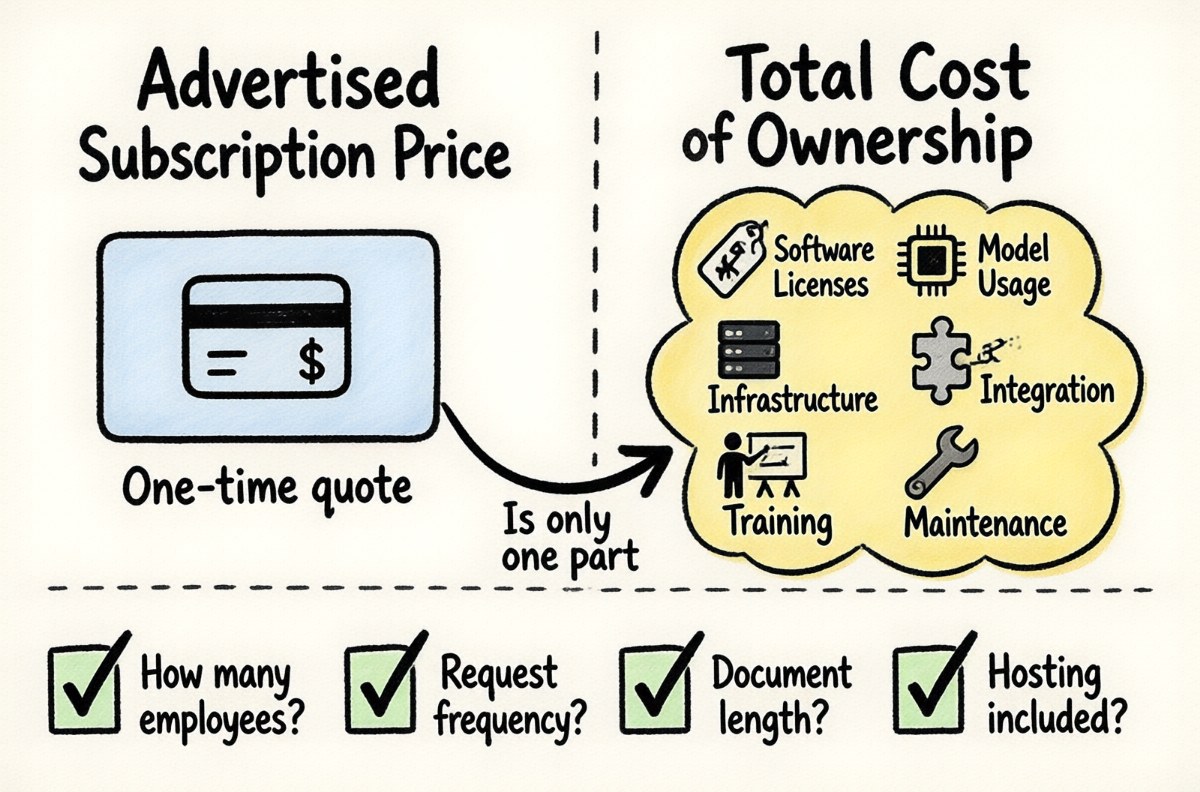
The advertised subscription price is only one part of the cost of an enterprise AI solution. The total cost of ownership may include software licenses, model usage, infrastructure, implementation, integration, training, maintenance, and ongoing support.
For a realistic comparison, estimate costs over a period that reflects how the organization intends to use the solution.
For example, consider:
- How many employees will use the system?
- How frequently will they make requests?
- Will they process short questions or lengthy documents?
- Are AI model usage and hosting included in the quoted price?
- Are implementation and integration services charged separately?
- What training and support will be required?
- Who will maintain the solution after deployment?
A lower initial price may not represent the best value if the solution requires significant customization or ongoing administration. Conversely, a more comprehensive platform may offer better value if it replaces several disconnected tools or supports multiple important workflows.
Compare the expected business benefits with the full cost, rather than choosing solely on the basis of the cheapest subscription.
10. Evaluate Implementation, Training, and Ongoing Support
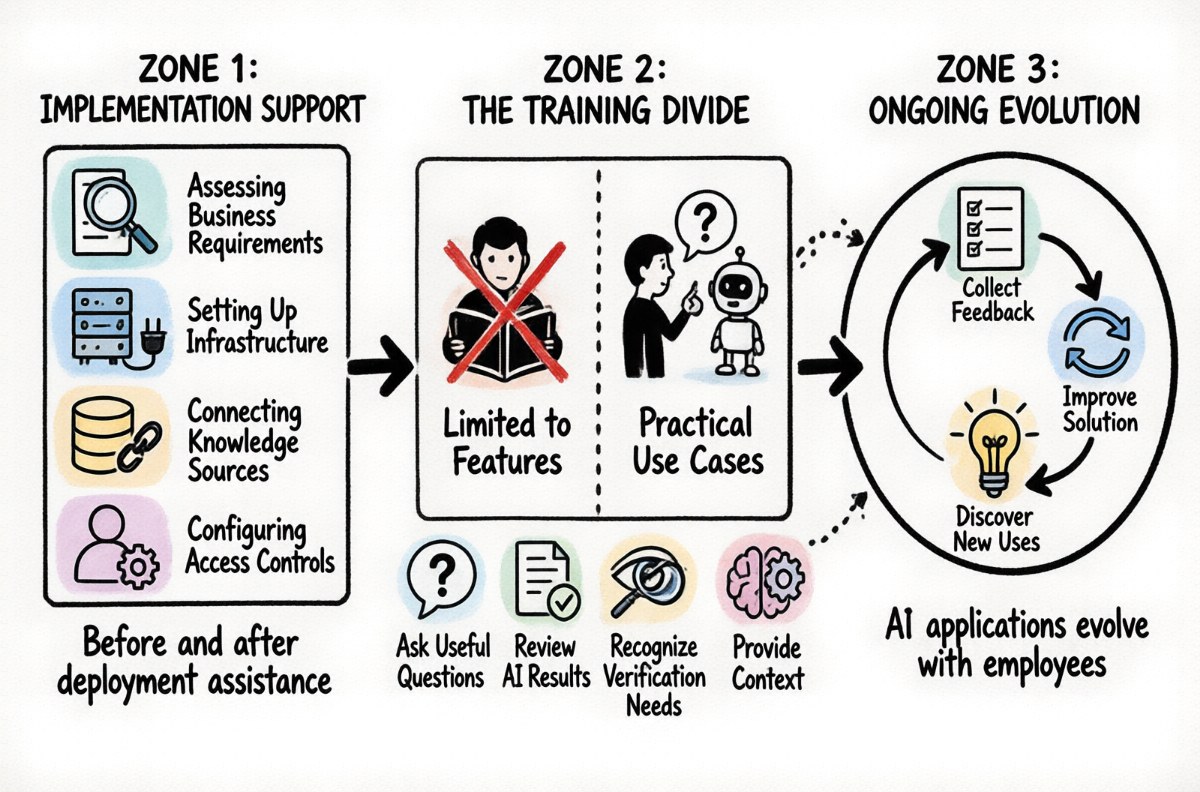
Buying an AI platform does not automatically result in successful adoption. Employees need to understand how to use it, administrators need to know how to manage it, and the organization needs a plan for handling issues and improvements.
Find out what assistance is available before and after deployment.
Useful implementation support may include:
- Assessing business requirements and selecting an appropriate configuration.
- Setting up the software, infrastructure, and AI connections.
- Connecting relevant company knowledge sources.
- Configuring user access and administrative controls.
- Training employees on practical use cases.
- Providing technical guidance and ongoing support.
Training should be practical rather than limited to explaining product features. Employees should learn how to ask useful questions, provide context, review AI-generated results, and recognize situations where human verification is necessary.
It is also important to establish a process for collecting feedback and improving the solution after launch. The most useful AI applications often evolve as employees discover new ways to apply them.
Run a Pilot Before Making a Full Commitment
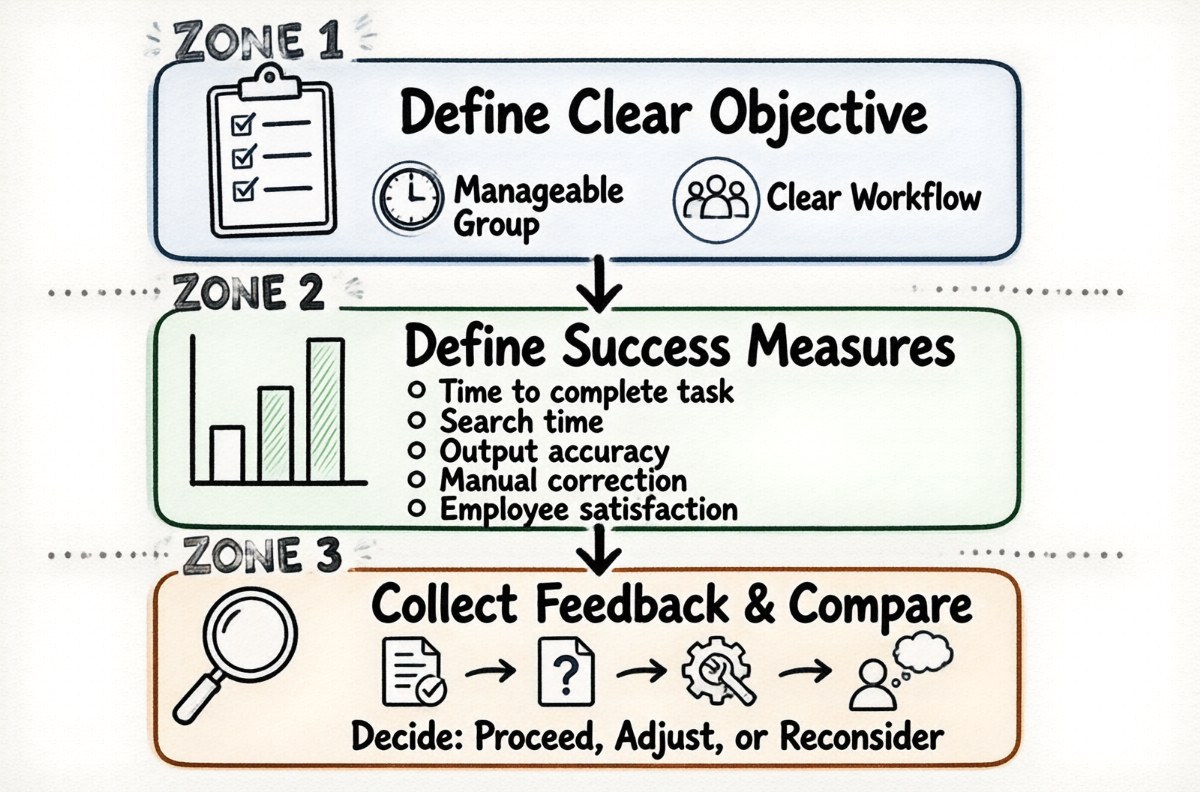
After narrowing down the options, test the shortlisted solutions with a realistic business scenario. A pilot helps reveal how a platform performs under actual working conditions rather than relying entirely on demonstrations or feature descriptions.
Choose a workflow with a clear objective and a manageable group of participants. For example, a department could test whether an AI assistant makes internal policy information easier to find, or whether it reduces the time required to prepare project summaries.
Define success measures before the pilot begins. Depending on the use case, these might include:
- Time required to complete a task.
- Time spent searching for information.
- Accuracy and usefulness of generated outputs.
- Amount of manual correction required.
- Employee satisfaction and adoption.
- Overall operating cost.
Collect feedback from participants and compare the results with the original process. Also record problems, such as missing information, confusing answers, access difficulties, or workflow interruptions.
A pilot should help the organization decide whether to proceed, adjust the configuration, explore another solution, or reconsider the original use case.
Look Beyond the AI Model
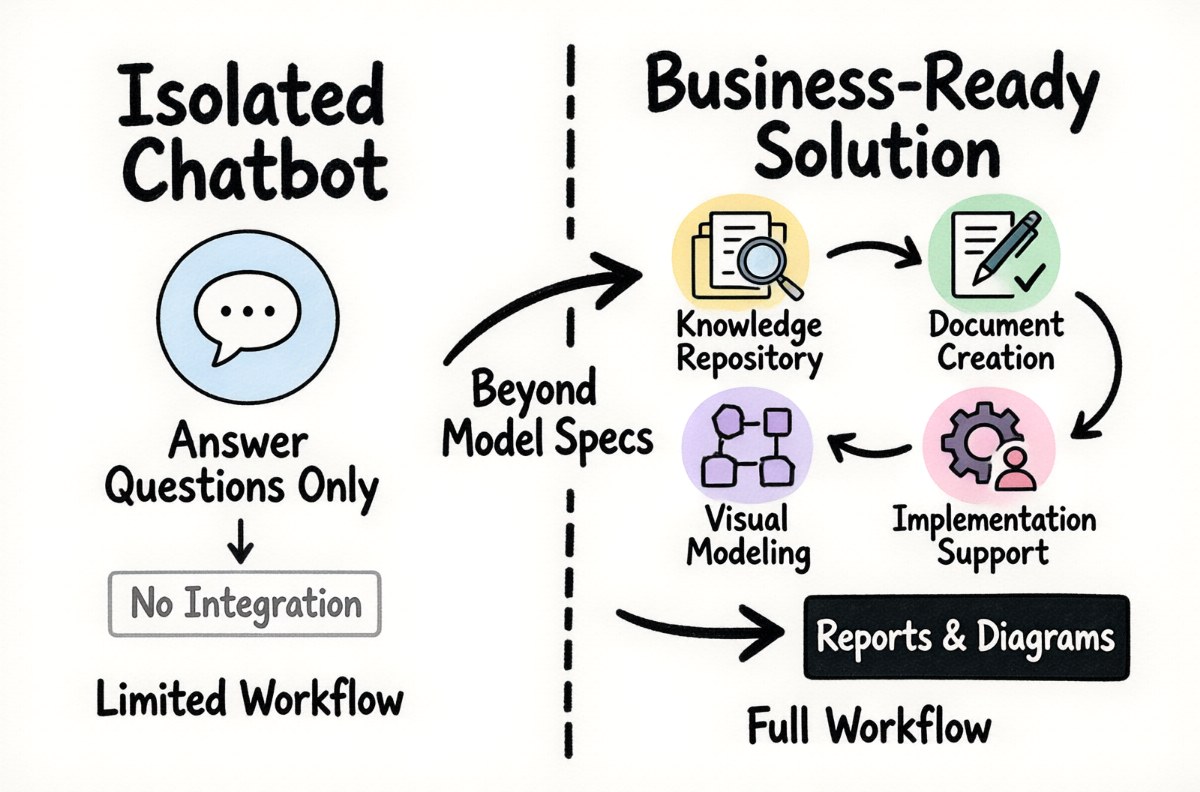
When comparing enterprise AI products, it is easy to focus on model names, benchmark scores, and technical specifications. These details can be useful, but they do not tell the whole story.
A business-ready solution needs to connect AI capabilities with the organization’s information, people, and working processes. It may combine an AI assistant with a knowledge repository, document creation tools, visual modeling capabilities, and implementation services.
For example, a company may want employees to collect and organize internal knowledge, ask questions about that information, and turn the results into reports, specifications, or diagrams. A solution that supports this broader workflow may be more useful than a chatbot that only handles isolated questions.
Visual Paradigm’s Private AI for Enterprise Knowledge offering illustrates this broader approach, combining knowledge management, AI-assisted information access, documentation, diagramming, and implementation support. Organizations evaluating this type of solution should still assess its capabilities against their own requirements and deployment constraints.
Conclusion
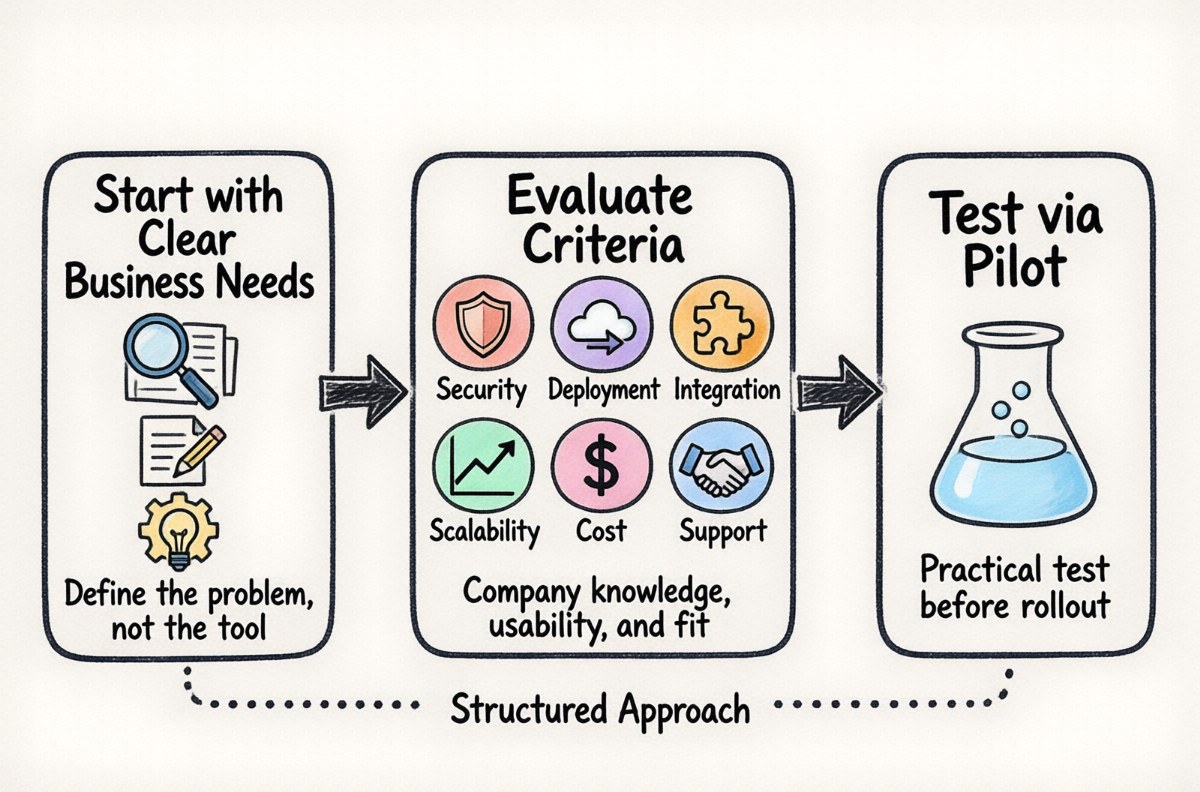
Choosing an enterprise AI solution is a business decision as much as a technology decision. The best option is not necessarily the one with the largest model, the most features, or the lowest subscription price. It is the one that addresses real organizational needs and can be adopted, managed, and improved over time.
Start by identifying the work you want to improve. Then evaluate how each solution handles company knowledge, security, deployment, usability, integration, scalability, cost, and ongoing support. Finally, test the leading options through a practical pilot before committing to a wider rollout.
By taking this structured approach, businesses can move beyond experimenting with AI and make more informed decisions about solutions that support everyday work.

 English
 Arabic
 Chinese (Simplified)
 Dutch
 French
 German
 Italian
 Japanese
 Korean
 Portuguese
 Russian
 Spanish