


Introduction
Visual Paradigm Community Edition stands as the premier FREE Sequence Diagram Tool in the market, providing powerful UML modeling capabilities for non-commercial use since 2004.

Visual Paradigm Community Edition Overview
Visual Paradigm Community Edition was launched in 2004 to provide a free UML software for sole non-commercial purposes. It supports users who are:
-
Making their first steps in UML modeling
-
Needing a free and cross-platform UML modelling software for personal use
-
Applying UML on student projects
Key Features:
-
Free for all non-commercial purposes
-
Supports all 13 UML 2.x diagrams
-
Includes ERD diagram support
-
Cross-platform compatibility
-
Over 1 Million installations globally and growing

Understanding Sequence Diagrams
What is a Sequence Diagram?
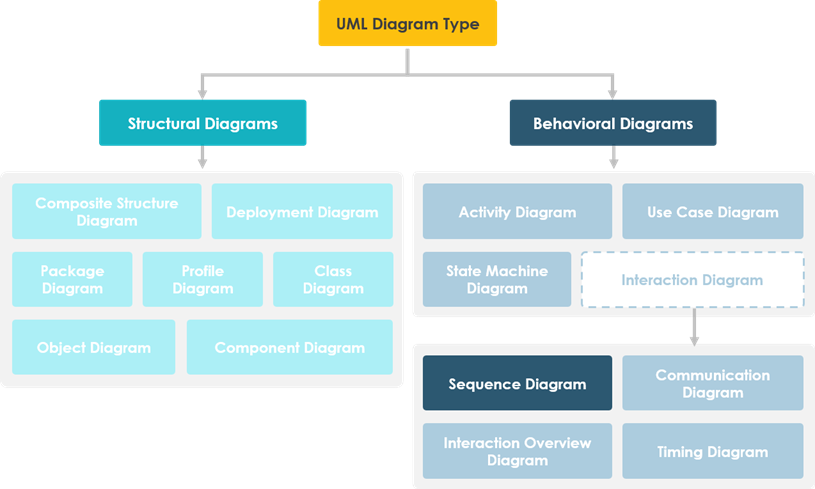
A Sequence Diagram is a model describing how groups of objects collaborate in some behavior over time, capturing the behavior of a single use case. It illustrates:
-
Objects and the messages passed between them for a particular use case
-
How groups of objects collaborate in behavior over time
-
The behavior of a single use case
-
Message sequences between objects
Sequence Diagrams are interaction diagrams that detail how operations are carried out. They model important runtime interactions between the parts that make up the system.
Applications of Sequence Diagrams
Modeling General Interaction
Sequence diagrams serve multiple modeling purposes:
-
High-Level System Interaction
-
Model high-level interaction between active objects in a system
-
Capture interactions between user and system
-
Model interactions between system and other systems
-
Model interactions between subsystems (system sequence diagrams)
-
-
Use Case Realization
-
Model interaction between object instances within a collaboration that realizes a use case
-
Model interaction between objects within a collaboration that realizes an operation
-
-
Interaction Types
-
Model generic interactions (showing all possible paths through the interaction)
-
Model specific instances of interaction (showing just one path)
-
Capture interactions in collaborations realizing use cases or operations
-
Practical Example: Hotel System
Understanding Sequence Diagram Structure
A Sequence Diagram is an interaction diagram that details:
-
How operations are carried out
-
What messages are sent and when
-
Time-organized interactions (time progresses as you go down the page)
-
Objects listed from left to right according to their participation in the message sequence
Hotel Reservation Example
Below is a sequence diagram for making a hotel reservation. The object initiating the sequence of messages is a Reservation window.
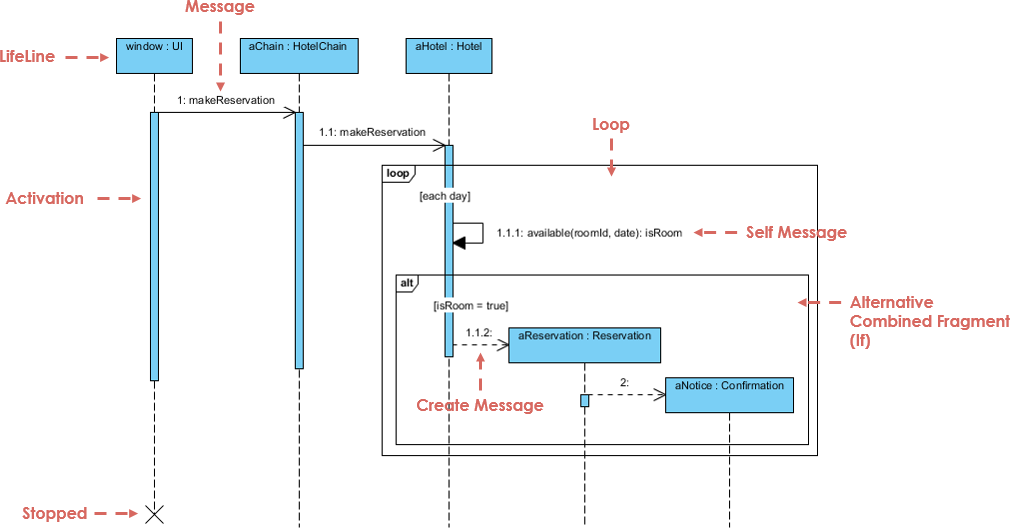
Important Note: Class and object diagrams are static model views, while interaction diagrams are dynamic. They describe how objects collaborate.
Modeling Use Case Scenarios with Sequence Diagrams
Understanding Scenarios
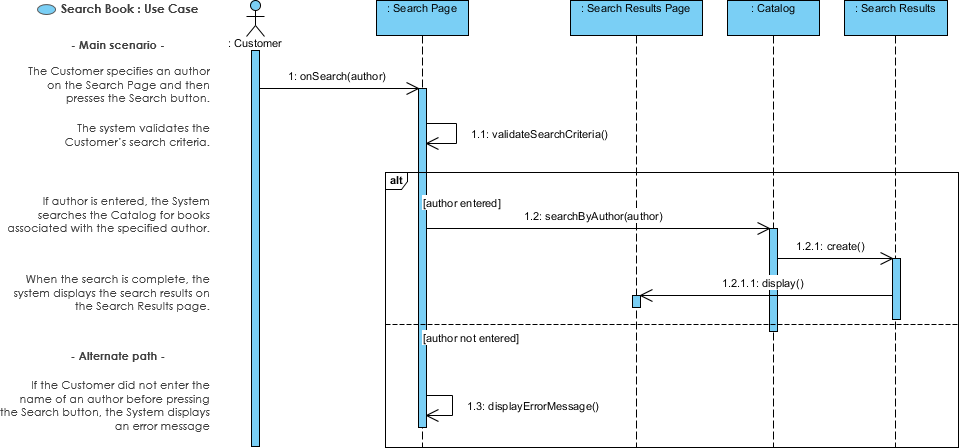
A scenario is one path or flow through a use case that describes a sequence of events occurring during one particular execution of a system. Sequence diagrams are used to:
-
Assist in elaborating use cases
-
Emphasize message exchange
-
Depict various scenarios of a use case
-
Represent message exchange within each business use case
Note: The level of detail for sequence diagrams within use cases is generally higher than for sequence diagrams spanning multiple use cases.
Use Case vs Scenarios
| Use Case | Scenario |
|---|---|
| Collection of interactions between external actors and a system | One path or flow through a use case |
| Specification of a sequence of actions, including variants | Describes events during one particular execution |
| Includes primary scenario (main course) and secondary scenarios (alternatives) | Often represented by a sequence diagram |
In UML, a use case is defined as:
“The specification of a sequence of actions, including variants, that a system (or entity) can perform, interacting with actors of the system.”
Representing Use Case Scenarios
User requirements are captured as use cases that are refined into scenarios. Each scenario represents a specific path through the use case and is often visualized using sequence diagrams.
Sequence Diagrams: Model Before Code
Why Use Sequence Diagrams Instead of Coding Directly?
Even though sequence diagrams can be close to the code level, they offer distinct advantages:
-
Abstraction Level
-
A good sequence diagram operates above the level of real code
-
Provides clearer architectural understanding
-
-
Language Neutrality
-
Sequence diagrams are programming language independent
-
Can be understood by developers regardless of their coding language
-
-
Accessibility
-
Non-coders can create and understand sequence diagrams
-
Facilitates communication between technical and non-technical stakeholders
-
-
Collaboration
-
Easier to create sequence diagrams as a team
-
Promotes shared understanding before implementation
-
-
Versatility
-
Can be used for testing purposes
-
Useful for UX Wireframing
-
Getting Started
Download Visual Paradigm Community Edition
Visual Paradigm Community has been free for all sorts of non-commercial use since 2004, and continues to be free now and forever!
Download Visual Paradigm Community
Visual Paradigm Product Suite
Beyond the free Community Edition, Visual Paradigm offers several professional editions for different needs:
Visual Paradigm Enterprise
End-to-End Enterprise Architecture tool suite that supports:
-
TOGAF
-
ArchiMate
-
PMBOK process map
-
And more enterprise architecture frameworks
Visual Paradigm Professional
Agile development tools featuring:
-
User story map and sprint planning
-
Customer Journey Map
-
Wide range of project management diagrams
Visual Paradigm Standard
Essential development tools including:
-
Modeling (UML, BPMN, ERD, DFD, etc.)
-
Wireframing
-
Code engineering tools
-
Database engineering tools
Visual Paradigm Modeler
Award-winning modeling software featuring:
-
UML, BPMN, ERD, DFD and more
-
Makes modeling easy and fast
Industry Trust and Adoption
Visual Paradigm is trusted by over 230,000 people in companies ranging from:
-
Small businesses
-
Fortune 500 companies
-
Universities
-
Government units
This widespread adoption demonstrates the reliability and effectiveness of Visual Paradigm’s modeling tools across diverse sectors and organization sizes.
Conclusion
Visual Paradigm Community Edition provides an exceptional free solution for UML modeling, particularly for sequence diagrams. Whether you’re a student learning UML, a professional modeling system interactions, or a team collaborating on software design, Visual Paradigm offers the tools you need.
With comprehensive support for all 13 UML 2.x diagrams, cross-platform compatibility, and a proven track record since 2004, Visual Paradigm Community Edition remains the #1 choice for free sequence diagram modeling.
References
- Visual Paradigm Community Download: Download the free Visual Paradigm Community Edition for non-commercial UML modeling
- UX Design and Wireframe Tools: Visual Paradigm’s UX wireframing and design capabilities for user experience modeling
- Visual Paradigm Enterprise: End-to-end enterprise architecture tool suite supporting TOGAF, ArchiMate, and PMBOK
- Visual Paradigm Professional: Agile development tools with user story mapping, sprint planning, and customer journey maps
- Visual Paradigm Standard: Essential modeling tools for UML, BPMN, ERD, DFD with code and database engineering
- Visual Paradigm Modeler: Award-winning modeling software for UML, BPMN, ERD, and DFD diagrams

 English
 Arabic
 Chinese (Simplified)
 Dutch
Dutch French
 German
 Italian
 Japanese
 Korean
 Portuguese
 Russian
 Spanish