


In the age of digital-first storytelling, static PDFs are no longer enough. To captivate audiences, brands, educators, and creatives need content that moves, engages, and delivers impact — not just information.
Enter Fliplify, the revolutionary no-code, drag-and-drop flipbook maker built into Visual Paradigm Online. With its intuitive interface, rich animation library, and seamless integration with professional design tools, Fliplify empowers anyone — from beginners to seasoned pros — to create polished, animated digital publications that feel like high-end magazines, fashion lookbooks, product catalogs, or creative portfolios — all without writing a single line of code.
Whether you’re launching a seasonal fashion collection, showcasing a photography portfolio, or presenting a dynamic business report, Fliplify transforms your static documents into immersive, interactive experiences that command attention.
🎯 Why Fliplify Is a Game-Changer for Digital Publishing
Fliplify isn’t just another flipbook tool. It’s a complete digital storytelling platform designed for speed, creativity, and professional results — even if you’ve never touched design software before.
Here’s what sets it apart:
-
✅ Zero coding required – No scripts, no plugins, no technical barriers.
-
✅ Fully visual, drag-and-drop editor – Intuitive layout control with real-time previews.
-
✅ Pre-built templates & animated assets – Jumpstart your project with professionally styled designs.
-
✅ Rich animation library – From subtle fade-ins to dramatic meteor entries and motion paths.
-
✅ 3D animated characters & icons – Powered by AniFuzion integration, adding life and personality to your content.
-
✅ Smart timeline control – Fine-tune animation sequences with precision — no complexity, just pro results.
💡 Perfect for: Fashion & beauty lookbooks, product catalogs, creative portfolios, educational materials, investor reports, event programs, and digital marketing campaigns.
🛠️ Step-by-Step: How to Build a Professional Animated Flipbook (In Minutes)
Step 1: Get Started — Create Your Flipbook
Head to https://www.fliplify.com or access Fliplify directly from Visual Paradigm Online.
Click Create New Flipbook and choose your path:
-
Start with a template (ideal for speed and polish — search “fashion,” “lookbook,” “catalog,” or “portfolio”).
-
Upload a PDF, PPT, or image file for instant conversion.
-
Build from scratch for full creative freedom.
✅ Pro Tip: Use a fashion lookbook template to jumpstart your project — it’s pre-designed with balanced layouts, stylish typography, and built-in animation cues.
Step 2: Customize Your Design — Drag, Drop, Replace
The editor is designed for instant productivity:
-
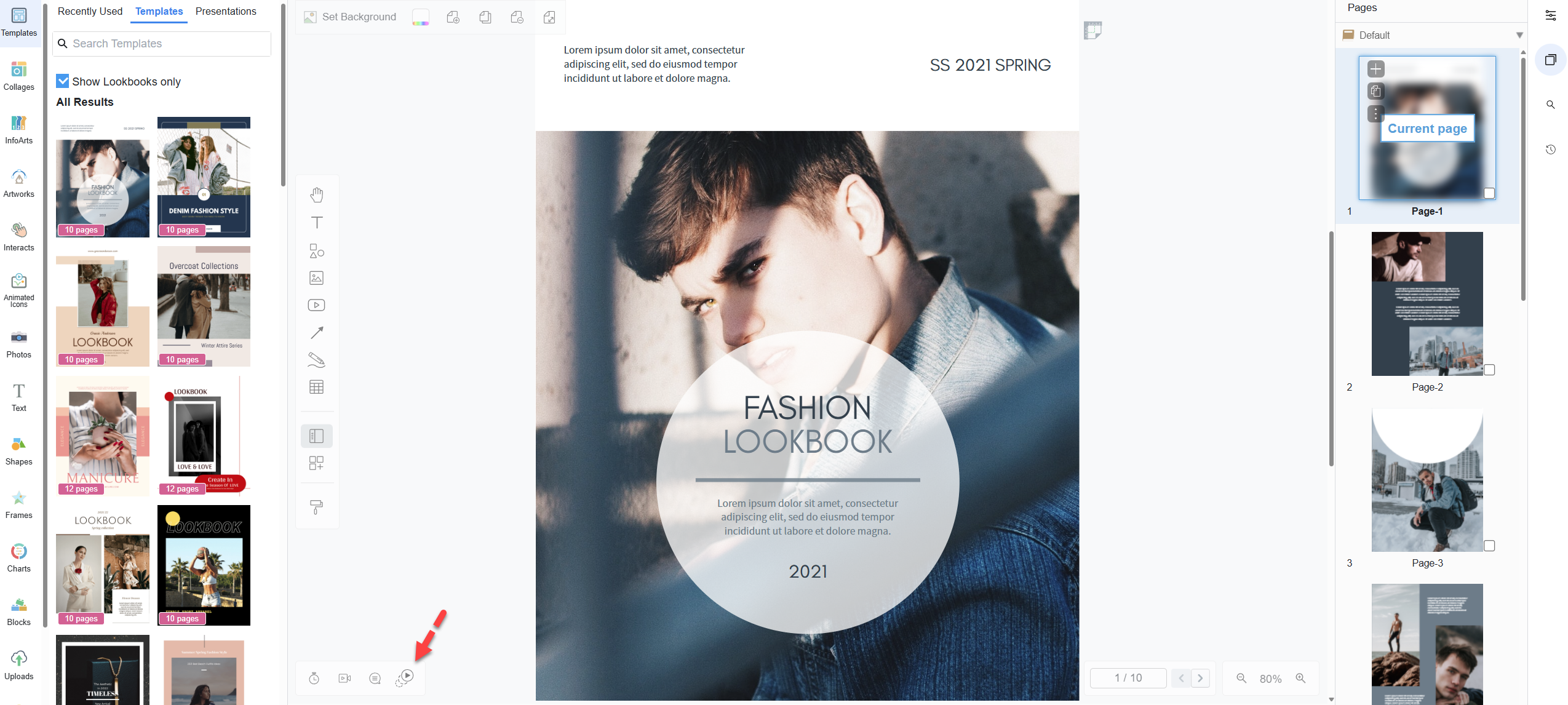
Left Sidebar: Browse templates, assets, and animation effects.
-
Canvas (Center): Your live workspace — drag and drop your photos, text, shapes, or graphics.
-
Right Panel: Manage pages — add, reorder, duplicate, or delete them.
-
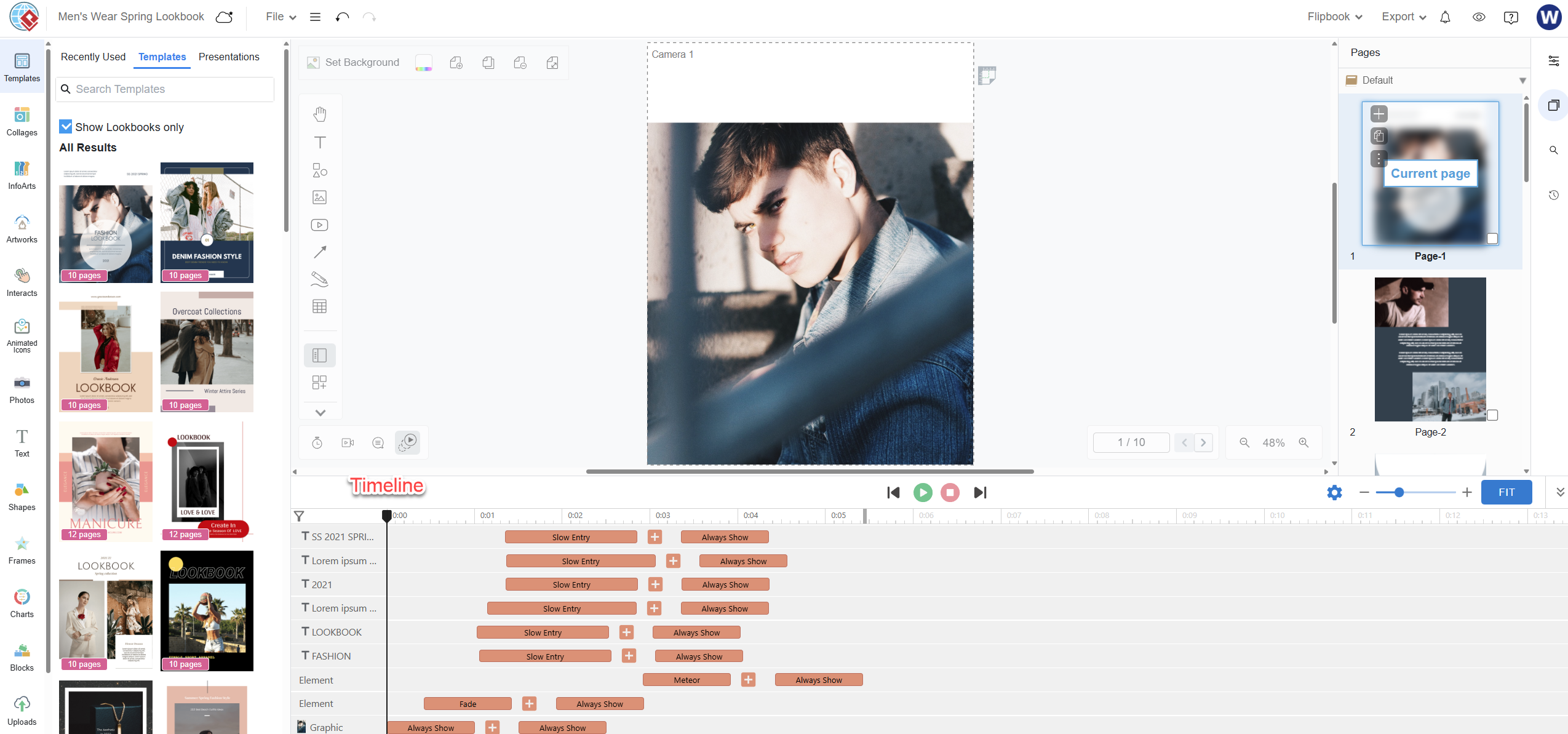
Bottom Timeline: The secret weapon for pro-level polish.
Replace placeholder content with your own:
-
Upload high-res images from your device.
-
Edit text with customizable fonts, colors, and styles.
-
Adjust backgrounds, frames, and layout grids.
📸 Use high-quality visuals — sharp, well-lit photos make a huge difference in perceived quality.
Step 3: Add Animations — Make It Come Alive
This is where Fliplify truly shines.
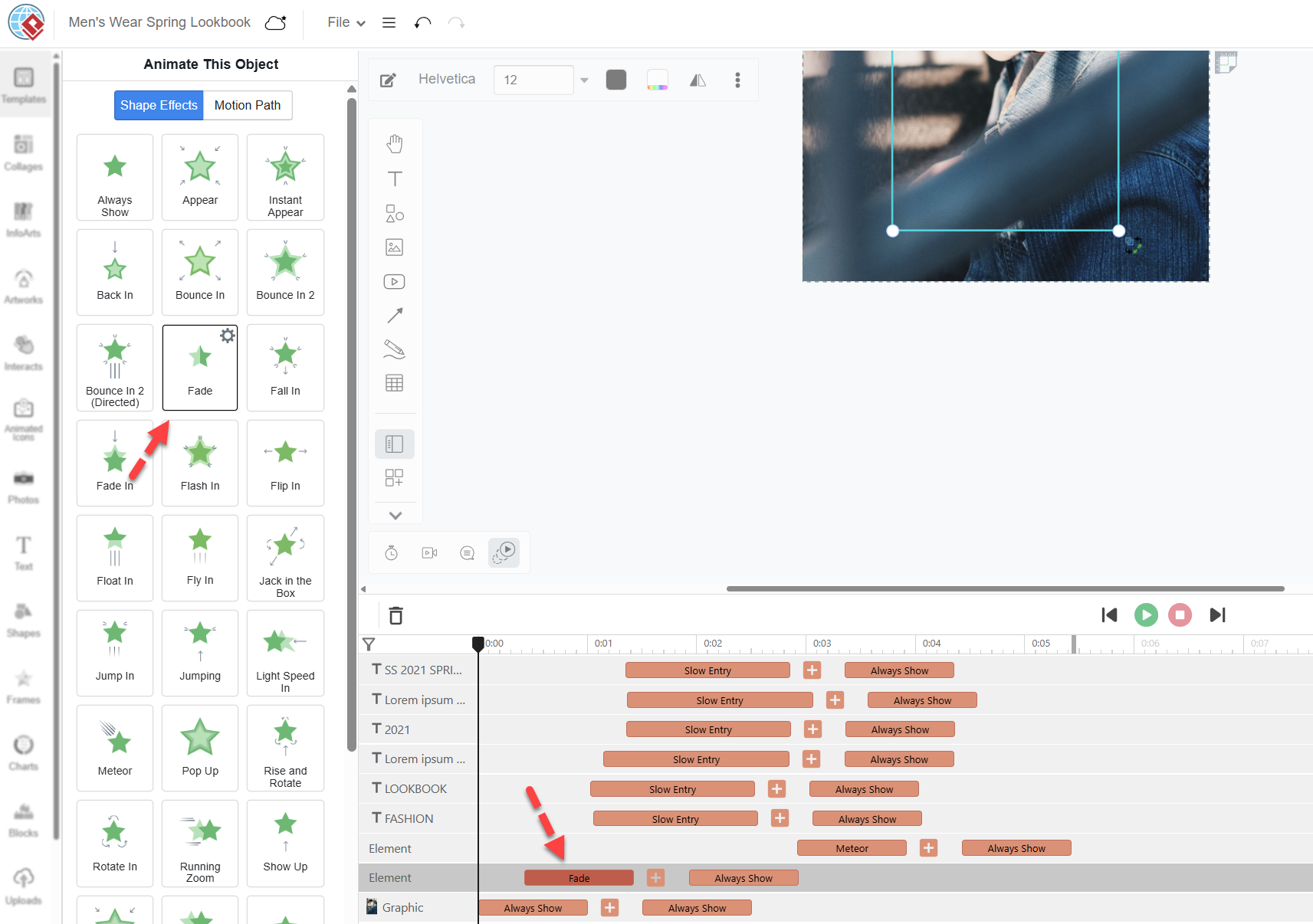
Select any element on the canvas — a headline, product image, or logo — and apply animations with one click.
Choose from three powerful animation categories:
| Category | Effect Examples | Best For |
|---|---|---|
| Entry | Fade In, Bounce In, Fly In, Meteor, Slow Entry | Introducing key elements |
| Emphasis | Pulse, Float, Always Show, Shake | Highlighting products or calls-to-action |
| Exit | Slide Out, Fade Out | Clean transitions between scenes |
🎨 Pro Touch: Combine multiple effects on a single object (e.g., Slow Entry + Meteor for a dramatic product reveal).
✨ Add 3D Characters & Animated Icons (AniFuzion Integration)
Bring your content to life with over 200 animated 3D avatars and icons from AniFuzion:
-
Use a model waving at the viewer.
-
Add a character pointing to a featured product.
-
Include playful figures that react to page turns.
These aren’t just decorations — they’re storytelling tools that guide attention and add emotional resonance.
🌟 Ideal for fashion, beauty, or creative industries — your lookbook doesn’t just show clothes; it tells a story.
Step 4: Master the Timeline — Polish Like a Pro
The bottom timeline is the heart of Fliplify’s power.
Each animation effect appears as a bar. You can:
-
Drag bars to adjust timing (start delay, duration).
-
Stack effects in sequence (e.g., text fades in → image explodes in → logo stays visible).
-
Add multiple effects per element using the + icon.
-
Preview the full animation sequence with the play button (▶).
🎯 Pro Tips for Professional Results:
-
Keep animation durations between 0.5–2 seconds for elegance.
-
Use consistent animation styles across pages (e.g., all “Slow Entry” for a cohesive flow).
-
Add motion paths for dynamic movement (e.g., text sliding in from the side).
-
Embed videos or GIFs to boost engagement (great for product demos or behind-the-scenes reels).
Step 5: Preview, Publish, and Track Success
Before sharing, test your flipbook in full:
-
Use the preview controls to navigate pages with realistic flipping.
-
Zoom in/out, check responsiveness on mobile and desktop.
-
Confirm animations trigger smoothly on page load.
When ready, publish with one click:
-
Share a public URL (perfect for social media, websites, or email).
-
Embed in websites or LMS platforms with a simple code snippet.
-
Download for self-hosting (available on higher-tier plans).
-
Enable analytics to track:
-
Page views
-
Average time spent
-
Click-throughs on links
-
Geographic reader insights
-
🔍 Turn engagement into ROI: Use data to refine future campaigns and prove the impact of your digital content.
🌟 Pro Tips to Elevate Your Flipbook from Good to Exceptional
Even as a beginner, you can create a high-end, magazine-quality flipbook with these strategies:
-
Start with a template — It’s pre-styled and balanced. Just swap content and add subtle animations.
-
Use animation strategically — Don’t animate everything. Focus on key visuals (products, headlines, CTAs).
-
Maintain visual consistency — Match animation timing and style across pages for a professional rhythm.
-
Leverage 3D characters — Use them to narrate, guide, or celebrate — they add personality and memorability.
-
Optimize for mobile — Test on phones and tablets. Smooth, fast animations perform best on smaller screens.
-
Upgrade for more power — Paid plans unlock:
-
Unlimited 3D characters
-
No Fliplify branding
-
Advanced timeline controls
-
Self-hosting for full data control
-
Higher export limits
-
🏆 Real-World Impact: Why Professionals Love Fliplify
“We went from a basic PDF catalog to a dynamic, animated lookbook in under 30 minutes. Our bounce rate dropped by 60%, and engagement skyrocketed.”
— Fashion Brand Marketing Lead
“My students actually ask to read the digital textbook now. The animations make learning feel like play.”
— High School Educator, STEM Program
“I used Fliplify to turn my photography portfolio into a cinematic flipbook. Clients were blown away — and I landed three new commissions.”
— Freelance Photographer
🚀 Ready to Create Your First Animated Flipbook?
Don’t wait. Transform your static content into a captivating digital experience — in minutes, with zero technical skills.
👉 Start for free today at https://www.fliplify.com
Try a fashion lookbook template, experiment with the timeline, and watch your design come alive.
💬 Need help? Share your project goal (e.g., “I’m creating a spring fashion lookbook with model animations”), and I’ll recommend the perfect templates, effects, and layout strategy.
📌 Final Word: The Future of Digital Publishing Is Interactive
Fliplify isn’t just a tool — it’s a creative revolution for digital content. It removes the barriers between idea and execution, letting you focus on storytelling, not technical hurdles.
Whether you’re a marketer, educator, designer, or entrepreneur, Fliplify turns your vision into a stunning, interactive experience — one page flip at a time
Fliplify: Articles and resources
- Visual Paradigm Flipbook Maker – Create Interactive Digital Flipbooks: This powerful online tool allows users to convert static documents into interactive, visually engaging flipbooks featuring realistic page-flipping effects.
- Create Your Flipbook with Visual Paradigm – Step-by-Step Guide: A detailed technical walkthrough designed to help users quickly transform PDFs and other documents into professional-grade digital content using the online platform.
- Visual Paradigm’s AI-Powered Flipbook Generator: A Comprehensive Guide: This guide explores how to create stunning, interactive digital books in minutes using generative AI, requiring no prior design or writing expertise.
- Why Visual Paradigm Online’s Flipbook Maker Stands Out: An analysis of the unique features that make the Fliplify tool ideal for creating interactive reports and high-impact KPI presentations.
- Comprehensive Tutorial: Convert a PDF to a Wonderful Flipbook in a Few Clicks: A practical tutorial that demonstrates how to utilize the online flipbook converter to turn static PDF files into immersive digital experiences.
- Creating Animation Flipbooks with AniFuzion & Fliplify: This resource explains the integration between AniFuzion (animation) and Fliplify, allowing users to embed dynamic animated content within their digital books.
- Unveiling the Pinnacle of Flipbook Software: Visual Paradigm: An article highlighting how Visual Paradigm supports corporate branding within flipbooks, ensuring a consistent and professional representation of logos and colors.
- Flipbook Maker: A Game-Changer for Interactive Content: An insightful post exploring how flipbook technology transforms traditional documentation into immersive storytelling experiences that increase audience engagement.
- AI-Powered Flipbook Maker (Lite) – Visual Paradigm: This feature enables the effortless creation of illustrated e-books, using AI to generate content and images within a sleek, intuitive writing environment.
- Transform Your Digital Publishing with Fliplify by Visual Paradigm: An exploration of how Fliplify acts as a game-changer for digital publishing, offering over 70 page-transition effects to captivate readers.

 English
 Arabic
 Chinese (Simplified)
 Dutch
Dutch French
 German
 Italian
 Japanese
 Korean
 Portuguese
 Russian
 Spanish