


Introduction
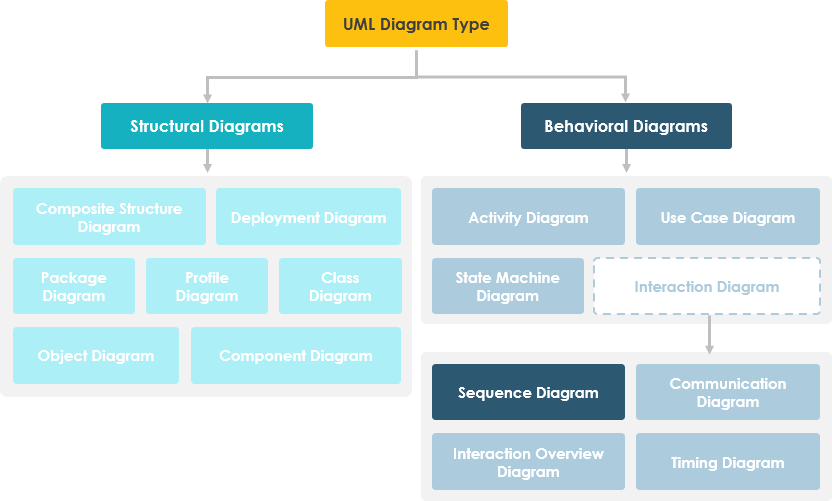
UML Sequence Diagrams are interaction diagrams that detail how operations are carried out. They capture the interaction between objects in the context of a collaboration. Sequence Diagrams are time-focused and they show the order of the interaction visually by using the vertical axis of the diagram to represent time, what messages are sent and when.
What is a Sequence Diagram?
A sequence diagram, also known as a sequential diagram, is a UML interaction diagram. It shows the dynamic collaboration between multiple objects by describing the temporal order in which messages are sent between them.
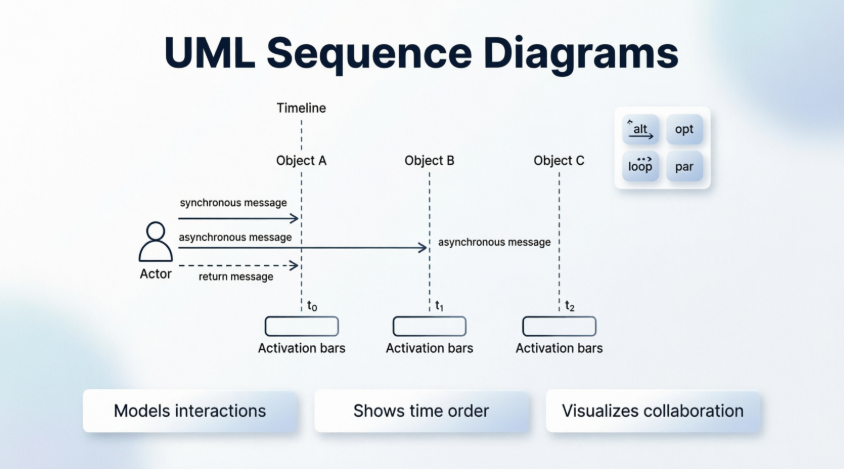
In UML, an object in a sequence diagram is drawn as a rectangle containing the name of the object, underlined. An object can be named in one of three ways:
-
The object name
-
The object name and its class
-
Just the class name (anonymous object)
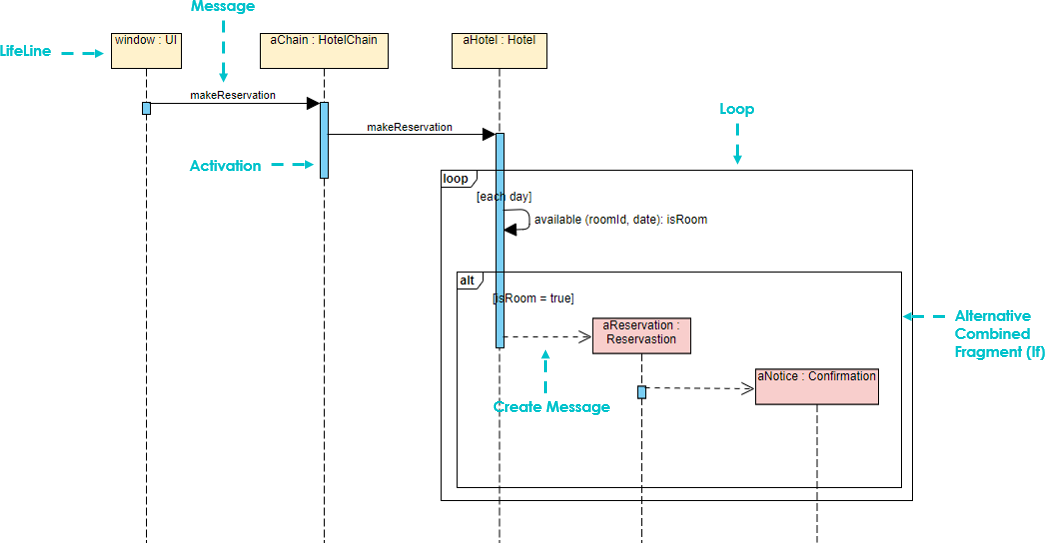
The Objects of Sequence Diagram
-
Show the order of interactions between objects: Model the interaction behavior as message passing, and show the interaction between objects dynamically by describing how messages are sent and received between them.
-
Temporal emphasis: Compared with other UML diagrams, a sequence diagram places more emphasis on the chronological order of interaction behavior.
-
Concurrency visualization: It can visually describe the process of concurrency.
The Elements of Sequence Diagram
-
Actor: System actors, which can be people, machines, other systems, subsystems; used to represent in the temporal sequence diagram.
-
Object: There are three ways of naming objects:
-
Named object with class: Includes the object name and class name, for example:
object: class -
Anonymous object: Shows only the class name, for example:
:course -
Named object only: Shows only the object name but not the class name, for example:
lecturer
All three naming methods are available; choose the one that is easiest for people who read the diagram to understand.
-
-
Order of objects:
-
The left and right order of the objects is not important
-
Place objects with frequent interactions as close together as possible
-
Place the object that initializes the whole interaction activity at the leftmost end
-
Lifeline
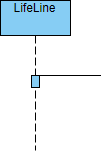
A dashed line extending down from the object icon in the sequence diagram, indicating how long the object has existed.
Focus of Control (Activation)
Also known as the activation period, this is the symbol for the time period during which the object will perform the corresponding operation. It can be interpreted as a pair of brackets { } in C semantics; represented by a small rectangle. It represents the period during which an element is performing an operation. The top and the bottom of the rectangle are aligned with the initiation and the completion time respectively.
Messages
Messages are generally classified into three types:
-
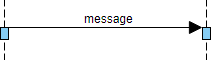
Synchronous Message: The sender of a message passes control to the receiver of the message, then stops the activity and waits for the receiver of the message to give up or return control, which is used to indicate synchronization.
-
Asynchronous Message: The sender of a message passes the signal to the receiver of the message via the message and then continues its activity without waiting for the receiver to return the message or control. The receiver and sender of an asynchronous message are working concurrently.
-
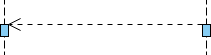
Return Message: Indicates a return from a procedure call.
Creation and Destruction Messages
Participants do not necessarily live for the entire duration of a sequence diagram’s interaction. Participants can be created and destroyed according to the messages that are being passed.
-
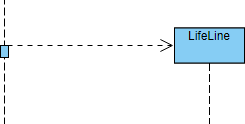
Constructor Message: Creates its receiver. The sender that already exists at the start of the interaction are placed at the top of the diagram. Targets that are created during the interaction by a constructor call are automatically placed further down the diagram.
-
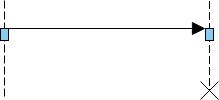
Destructor Message: Destroys its receiver. There are other ways to indicate that a target is destroyed during an interaction. Only when a target’s destruction is set to ‘after destructor’ do you have to use a destructor.
Non-Instantaneous Messages
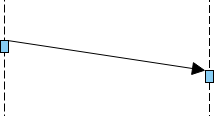
Messages are often considered to be instantaneous, thus, the time it takes to arrive at the receiver is negligible. The messages are drawn as a horizontal arrow. To indicate that it takes a certain while before the receiver actually receives a message, a slanted arrow is used.
Combination Fragments
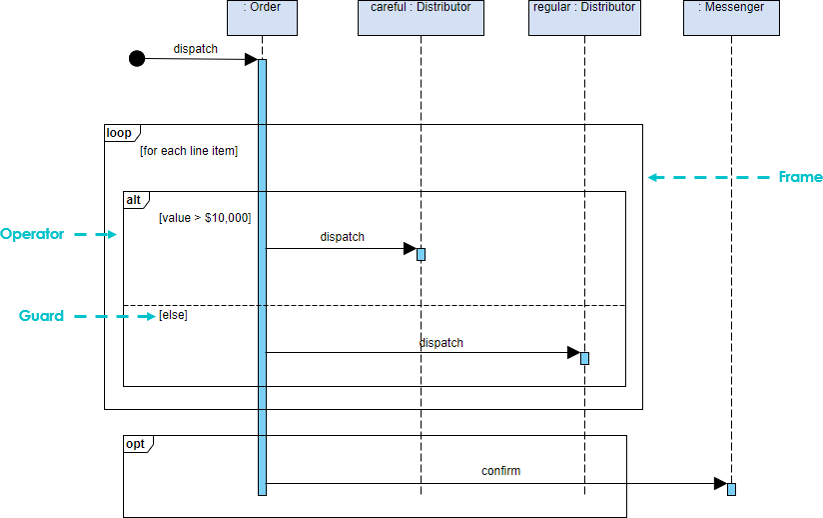
A sequence fragment is represented as a box called a combined fragment, which encloses a part of the interaction in the sequence graph. The fragment operator (in the upper left corner) indicates the type of the fragment.
Interactive fragments allow you to group related messages in a sequence diagram. Various predefined fragment types are available, allowing you to specify alternate results, parallel messages, or loops.
The fragments in the sequence diagram are rectangular frames drawn over a portion of the diagram. They represent the conditional structure that affects the flow of messages. These frames are called combined fragments in the UML specification, and the containers are called interaction operands. Frames are labeled in the upper left corner. This label is referred to as the interaction operator in UML.
Example – Placing an Order Scenario
A ship member who wants to place an order online. The ordered items will be sent to the member by courier or regular mail, depending on her membership status (VIP, regular member). If the member selects the notification option in the order, the store will send a confirmation notification to the member.
Another Example: Place Order
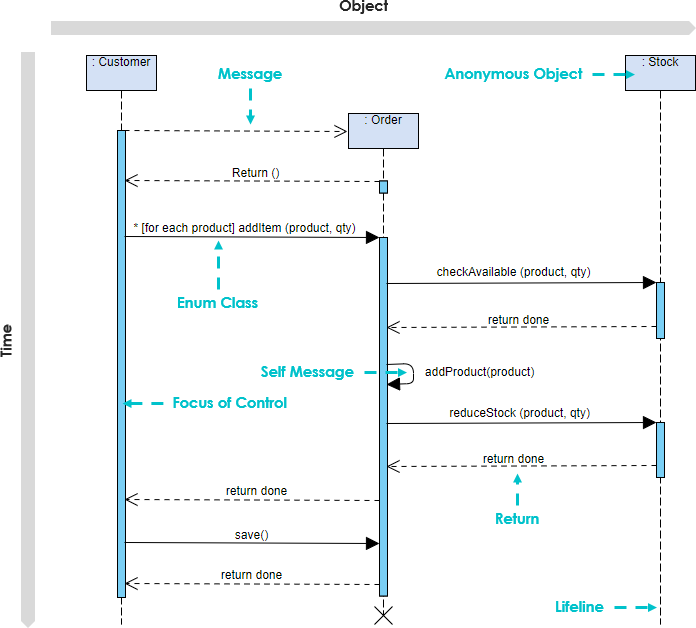
A sequence diagram is a two-dimensional diagram with the horizontal axis representing objects and the vertical axis representing time, where messages are passed horizontally between objects and arranged vertically in chronological order. The example shows a Sequence diagram with three participating objects: Customer, Order, and the Stock.
-
Step 1 and 2: Customer creates an order.
-
Step 3: Customer adds items to the order.
-
Step 4, 5: Each item is checked for availability in inventory.
-
Step 6, 7, 8: If the product is available, it is added to the order.
-
Step 9: Return
-
Step 10, 11: Save and destroy order
Commonly Used Combination Fragments
Fragment types include ref, assert, loop, break, alt, opt and neg, ref, sd.
| Operator | Meaning |
|---|---|
| alt | Alternative multiple fragments: only the one whose condition is true will execute. |
| opt | Optional: the fragment executes only if the supplied condition is true. Equivalent to an alt only with one trace. |
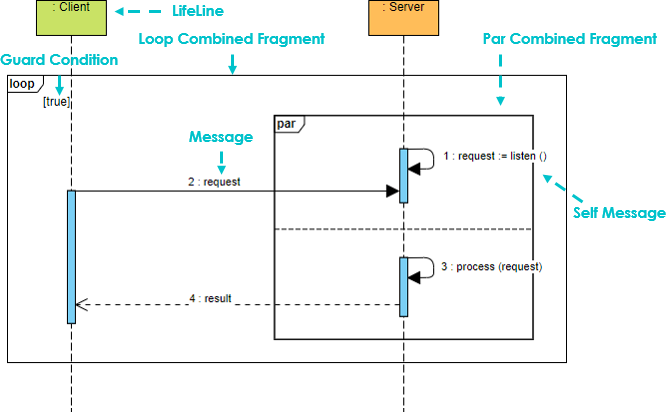
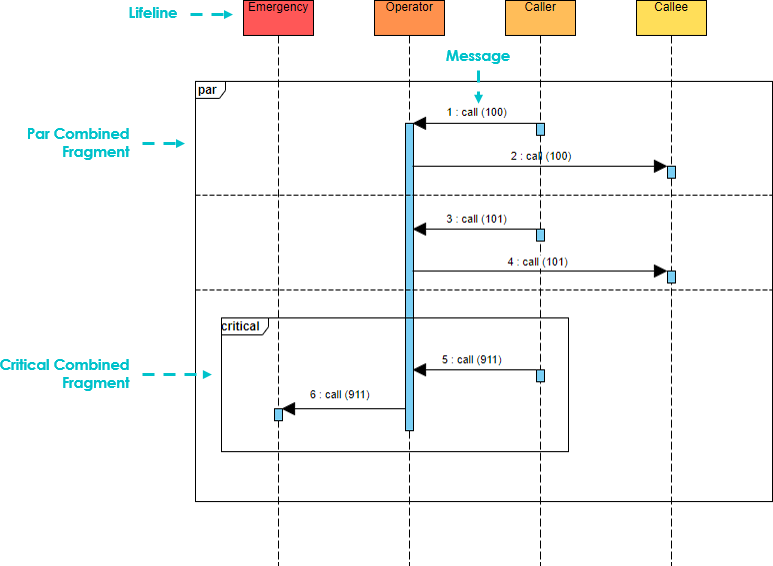
| par | Parallel: each fragment is run in parallel. |
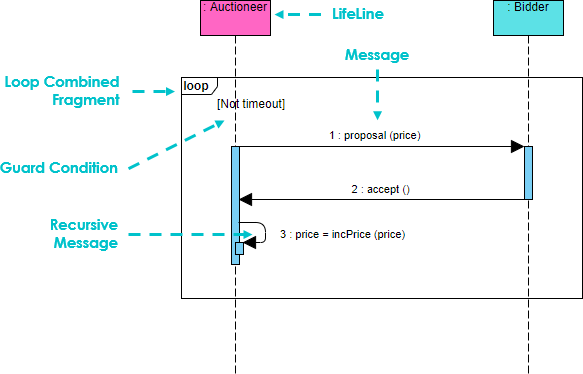
| loop | Loop: the fragment may execute multiple times, and the guard indicates the basis of iteration. |
| critical | Critical region: the fragment can have only one thread executing it at once. |
| neg | Negative: the fragment shows an invalid interaction. |
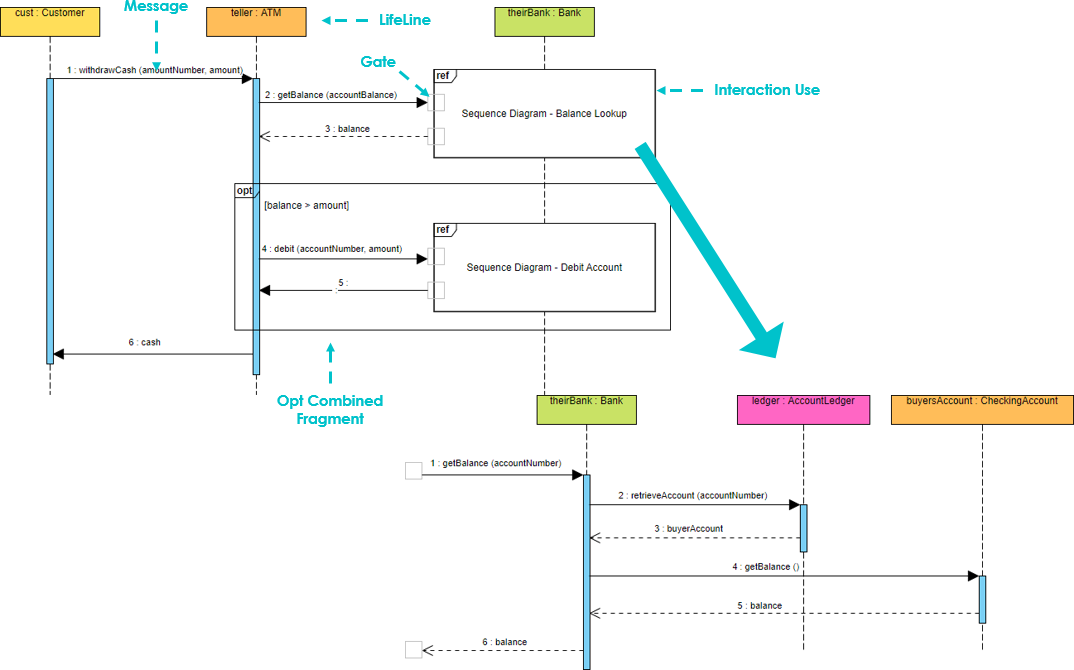
| ref | Reference: refers to an interaction defined on another diagram. The frame is drawn to cover the lifelines involved in the interaction. You can define parameters and a return value. |
| sd | Sequence diagram: used to surround an entire sequence diagram. |
Important Notes:
-
It is possible to combine frames in order to capture, e.g., loops or branches.
-
Combined fragment keywords: alt, opt, break, par, seq, strict, neg, critical, ignore, consider, assert and loop.
-
Constraints are usually used to show timing constraints on messages. They can apply to the timing of one message or intervals between messages.
Examples of Combined Fragments
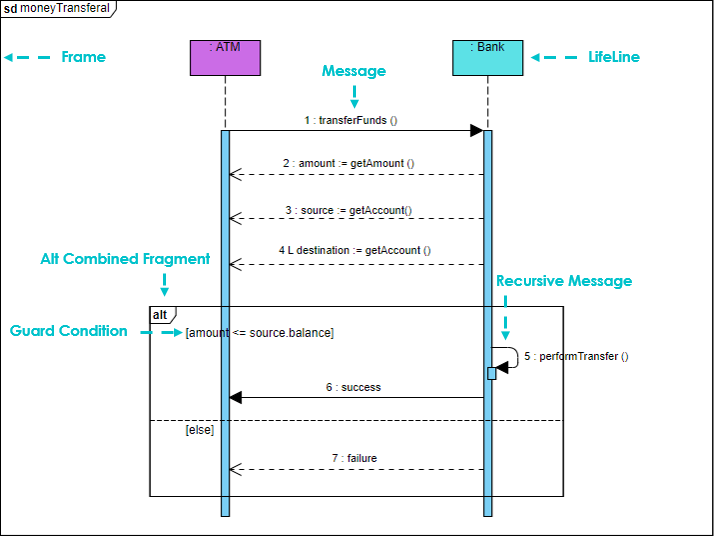
1. Choice (Alt)
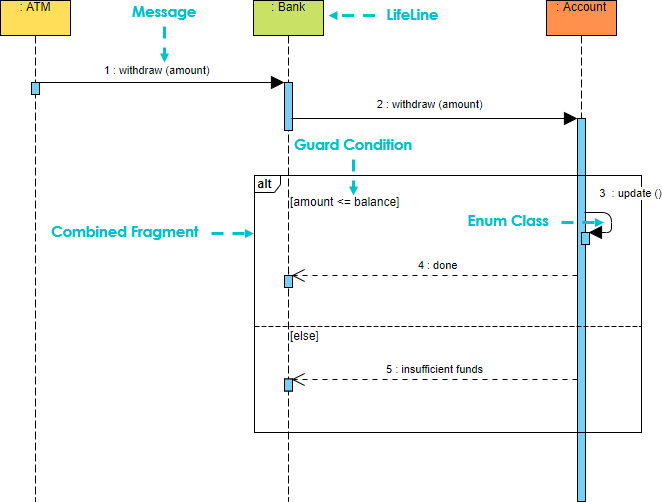
An alternative fragment provides several guarded alternative fragments (separated by interaction operands), i.e. used to specify mutually exclusive choices between two or more message sequences, equivalent to the classic if..else…
2. Option (Opt)
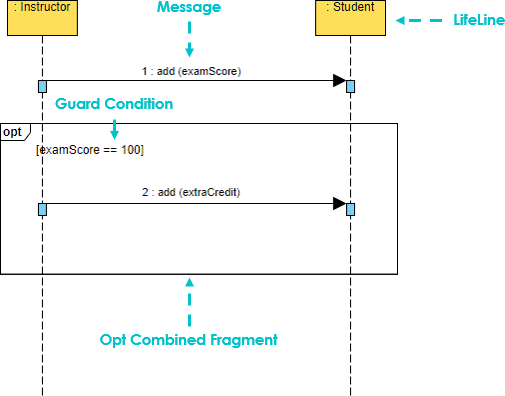
Contains a sequence of possible occurrences or non-occurrence which means that an optional fragment is only executed if some guard condition is true:
3. Loop (Loop)
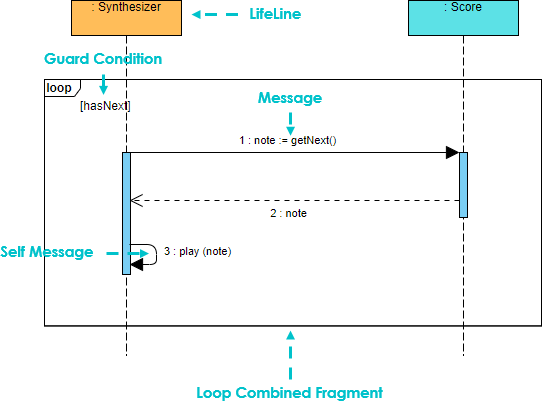
A loop allows a fragment to be repeated until some guard condition becomes false:
4. Break
A break allows an enclosing loop to be escaped when some guard becomes true:
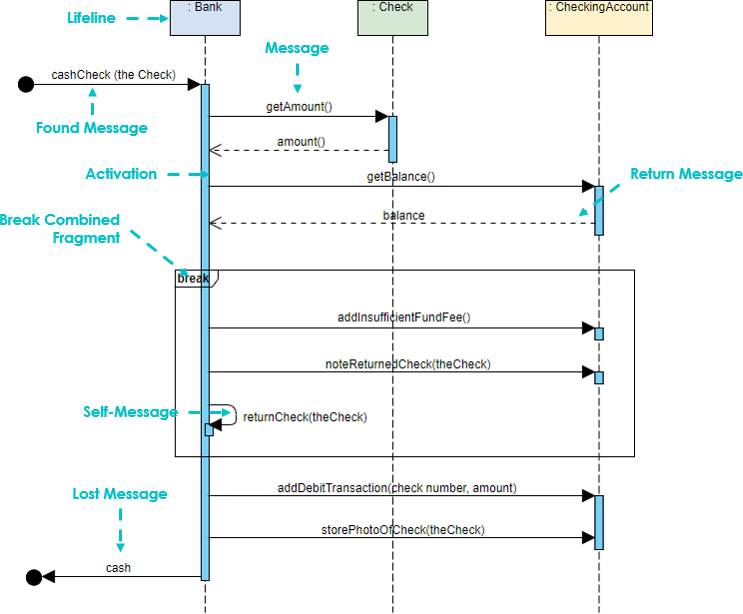
Breaks are most commonly used to model exception handling. This sequence diagram example uses a break combination fragment because it treats the balance < amount condition as an exception instead of as an alternative flow. To read this example, we start at the top left corner of the sequence and read down. When the sequence gets to the return value “balance,” it checks to see if the balance is less than the amount. If the balance is not less than the amount, the next message sent is the addDebitTransaction message, and the sequence continues as normal.
5. Parallel
A parallel fragment allows multiple interactions to run in parallel:
Frames
A frame provides a way to encapsulate a sequence diagram.
Reference (Ref)
A frame can be referenced in another sequence diagram:
Protocols
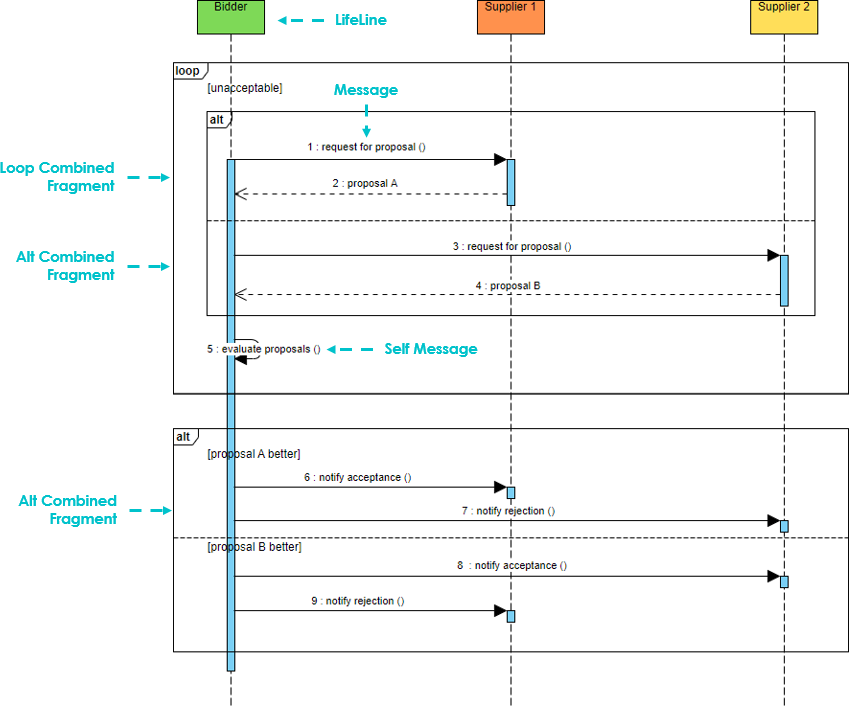
Collaborations
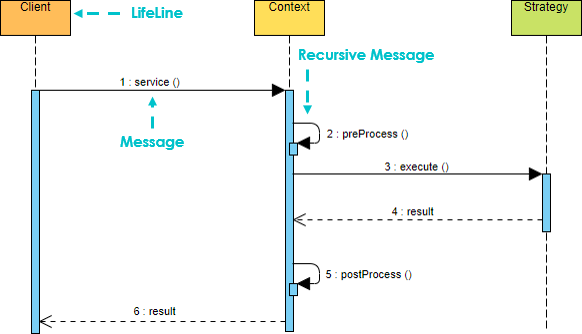
Scenarios
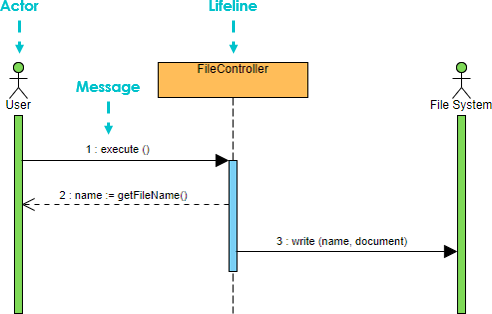
Signals and Receptions
An auctioneer broadcasts a proposed price for an item to a crowded room of anxious bidders. When a bidder hears the proposal he decides to accept the price or not.
In an automated auction, how will the auctioneer broadcast the proposal? An object may have designated operations that should automatically be called if certain types of broadcast signals are received. These methods are called receptions. Signals are a special kind of class. The name of the reception usually matches the name of the signal. Receptions are shown in a separate compartment:
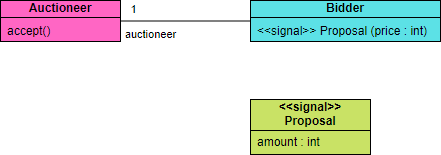
In a sequence diagram we can represent a signal as an asynchronous signal, and the reception as a reception invocation:
Critical
Other Fragment Types
-
Strict
-
Assert
-
Consider
-
Ignore
-
Region
-
Neg
Sequence Diagram Notation Summary
| Notation Description | Visual Representation |
|---|---|
Actor
Note that:
|
 |
Lifeline
|
 |
Activations
|
|
Call Message
|
 |
Return Message
|
 |
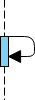
Self Message
|
 |
Recursive Message
|
 |
Create Message
|
 |
Destroy Message
|
 |
Duration Message
|
 |
| Note A note (comment) gives the ability to attach various remarks to elements. A comment carries no semantic force, but may contain information that is useful to a modeler. |
AI-Powered Sequence Diagram Generation
Visual Paradigm offers robust AI-powered support for UML Sequence Diagrams, focusing on transforming natural language descriptions into detailed, architecturally sound interaction models. Its tools allow you to bypass manual drawing, moving directly from a text-based scenario to a professional diagram in seconds.
Core AI Sequence Diagram Features
-
Natural Language Generation: You can type a simple prompt like “a user logs into a website,” and the AI automatically identifies participants (lifelines), message flows, and activation sequences.
-
Complex Logic Automation: The AI intelligently handles advanced UML notation such as alternative fragments (alt), option fragments (opt), and loops based on your textual description of conditional logic.
-
AI Refinement Tool: This specialized app converts simple interaction code or high-level prompts into detailed MVC (Model-View-Controller) blueprints. It automatically decomposes a scenario into appropriate architectural layers like View, Controller, and Model components.
-
Conversational Editing: Through the Visual Paradigm AI Chatbot, you can refine diagrams iteratively using commands like “Add a reset state” or “Rename User to Customer”.
-
Intelligent Design Analysis: You can ask the AI to critique your diagram, such as identifying synchronous calls that should be asynchronous to improve system performance.
Ecosystem & Integration
-
Multi-Platform Access: Generate diagrams using the AI Chatbot or Visual Paradigm Online, then import them into the Visual Paradigm Desktop app for advanced modeling and code engineering.
-
Automated Documentation: The AI can generate project summaries, detailed behavior models, and MVC architecture documentation directly from your sequence diagrams.
-
Inter-Model Synergy: Visual Paradigm’s AI can bridge different diagram types, such as converting a high-level Use Case into a detailed Activity or Sequence Diagram with guided step decomposition.
- References
- UML Sequence Diagram: A Definitive Guide to Modeling Interactions with AI: Comprehensive guide on using AI to model UML sequence diagrams and interactions
- How to Turn Requirements into Diagrams with an AI Chatbot: Learn how to transform textual requirements into visual diagrams using AI chatbot technology
- Free AI Sequence Diagram Refinement Tool: Access Visual Paradigm’s AI-powered tool for refining and enhancing sequence diagrams
- AI Sequence Diagram Refinement Tool – Visual Paradigm: Professional features for AI-assisted sequence diagram creation and refinement
- Visual Paradigm AI Chatbot: Interactive AI chatbot for creating and editing UML diagrams through natural language
- AI Chatbot Features – Visual Paradigm: Overview of AI chatbot capabilities for diagram generation and modeling
- Visual Paradigm AI Sequence Diagram Tutorial: Video tutorial demonstrating AI-powered sequence diagram creation
- Comprehensive Review: Visual Paradigm’s AI Diagram Generation Features: In-depth review of Visual Paradigm’s AI-powered diagram generation capabilities
- Visual Paradigm AI Features Demo: Demonstration video of AI features in Visual Paradigm
- Visual Paradigm AI Tutorial: Tutorial showcasing AI capabilities in Visual Paradigm
- How Visual Paradigm’s AI-Powered Ecosystem Transforms UML Development: Analysis of how AI transforms UML development workflows in Visual Paradigm

 English
 Arabic
 Chinese (Simplified)
 Dutch
Dutch French
 German
 Italian
 Japanese
 Korean
 Portuguese
 Russian
 Spanish