


Introduction
In modern software development, a use case diagram is just the beginning. While UML notation provides a valuable visual overview of system interactions, it’s the detailed textual specification that truly drives development, testing, and stakeholder alignment. This case study explores how teams can evolve from high-level use case diagrams to comprehensive, actionable specifications—using the classic “ATM Withdraw Cash” scenario as our running example.
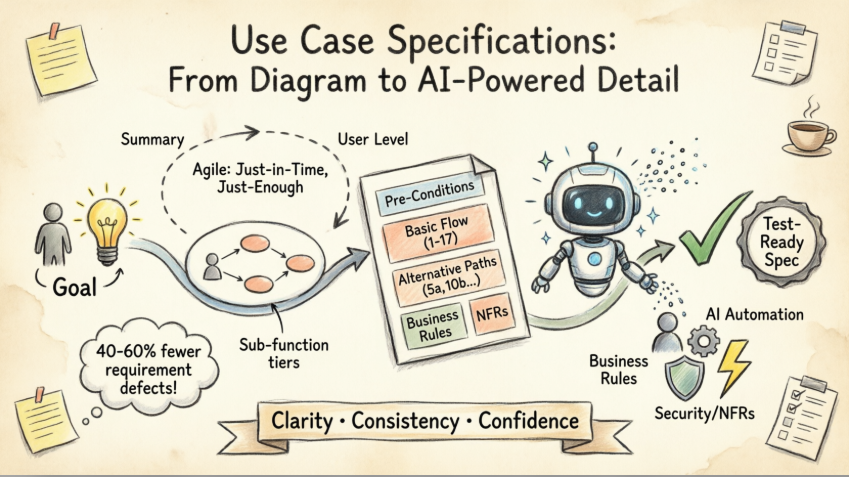
We’ll review Visual Paradigm’s AI-enhanced approach to use case specification, evaluating how its tools address common pain points in requirements engineering: inconsistency, incomplete flows, and the time-intensive nature of documentation. Whether you’re working in Agile, Waterfall, or a hybrid methodology, this product-focused review demonstrates how structured templates combined with AI automation can transform your requirements process from a bottleneck into a competitive advantage.
Case Study Background: The ATM Withdrawal System
Project Context: A regional bank is modernizing its ATM network. The development team needs to specify the “Withdraw Cash” functionality with enough detail to guide developers, inform QA test cases, and satisfy compliance auditors.
Stakeholders:
-
Primary Actor: Bank Customer
-
Secondary Actor: Banking System
-
Business Owners, Compliance Team, Development Team, QA Engineers
Challenge: Move from a simple use case diagram to a living specification that accommodates multiple payment paths, exception handling, business rules, and non-functional requirements—all while maintaining traceability and team collaboration.
The Challenge: Why Diagrams Alone Aren’t Enough
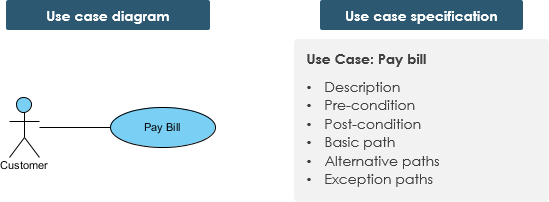
A use case diagram provides excellent high-level orientation, but lacks the granularity needed for implementation. Consider the “Customer pays bill” example:
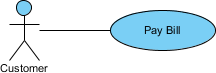
The diagram shows the goal, but not:
-
What happens when a credit card is declined?
-
How many PIN retries are allowed?
-
What business rules govern withdrawal limits?
-
What are the security requirements for PIN entry?
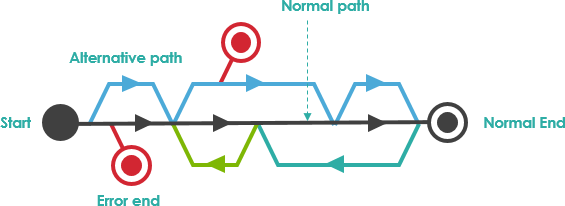
Key Insight: A use case has:
-
Only one goal
-
A single starting point
-
A single ending point
-
Multiple paths for getting from start to finish (including exceptional flows)
Solution Approach: Iterative, Just-in-Time Specification
The Agile Use Case Philosophy: Just-in-Time and Just-Enough
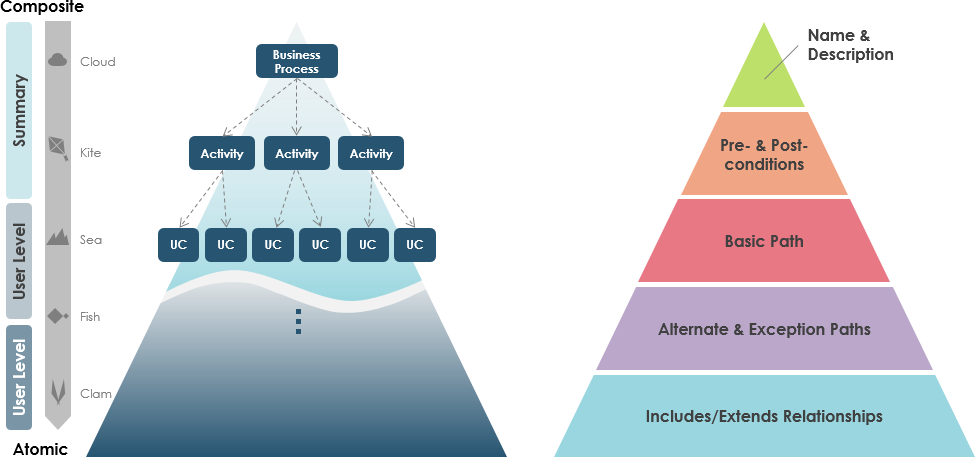
Not all use cases require the same level of detail. Visual Paradigm supports three specification levels:
| Level | Purpose | Example |
|---|---|---|
| Summary | High-level overviews for roadmap planning | “Customer manages account via ATM” |
| User Level | Task-focused descriptions for core workflows | “Withdraw Cash” – the main work users perform |
| Sub-function | Detailed steps supporting core use cases | “Validate PIN”, “Dispense Cash” |
Product Feature Highlight: Teams can start with Summary-level specs and progressively elaborate User-Level cases as sprints demand—aligning perfectly with Agile’s iterative delivery model.
Product Feature Review: Visual Paradigm’s AI Ecosystem for Use Cases
🤖 Multi-Platform AI Support
| Platform | Capability | Value Proposition |
|---|---|---|
| VP Desktop | Generate structured specs linked to UML diagrams | Maintain traceability between visual models and textual requirements |
| AI Chatbot | Narrate requirements → receive drafted specifications | Accelerate initial documentation; reduce writer’s block |
| OpenDocs | Collaborative specification pages with pre/post-conditions | Enable real-time team review and version control |
🛠️ Specialized Specification Apps
| Tool | Function | Best For |
|---|---|---|
| 📝 Description Generator | Transforms problem statements into Markdown specs with flows, pre/post-conditions | Rapid prototyping of new features |
| 🏗️ Modeling Studio | AI-guided workspace from system scope to detailed descriptions | Teams new to use case modeling |
| 🔄 Text-to-Behavior Bridge | Converts textual flows into Activity Diagrams | Validating logic completeness; developer handoff |
| 🚀 Development Assistant | Generates Gherkin scenarios, prioritization, full specs | BDD teams; test automation setup |
| 📑 Spec Report Generator | Auto-produces structured Markdown from visual models | Audit documentation; stakeholder reporting |
Reviewer’s Take: The AI tools don’t replace analyst judgment—they augment it. By automating repetitive structuring tasks (numbering steps, formatting alternatives, linking business rules), analysts can focus on what the system should do rather than how to document it.
Practical Example: ATM “Withdraw Cash” Use Case Specification
Below is a professional-grade specification generated using Visual Paradigm’s template system. Note how each section serves a distinct stakeholder need.
Use Case vs. Use Case Specification
| Use Case Specification | Details |
|---|---|
| Use Case Name | Withdraw Cash |
| Actor(s) | Customer (primary), Banking System (secondary) |
| Summary Description | Allows any bank customer to withdraw cash from their bank account via ATM. |
| Priority | Must Have |
| Status | Medium Level of Details |
| Pre-Condition | • Customer has a valid bank card • ATM is online and operational |
| Post-Condition(s) | • Customer receives cash (and optionally receipt) • Bank debits account and logs transaction |
| Basic Path |
|
| Alternative Paths |
|
| Business Rules |
|
| Non-Functional Requirements |
|
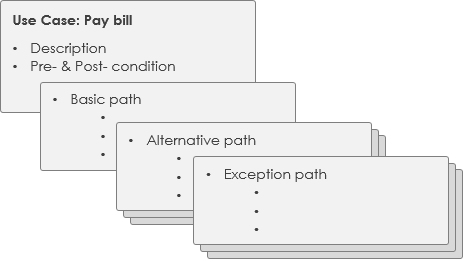
Reviewer’s Insight: This specification exemplifies “just enough” detail. The Basic Path covers the happy flow; Alternative Paths address real-world exceptions; Business Rules and NFRs provide guardrails for developers and testers. Crucially, each element is traceable—enabling impact analysis when requirements change.
Key Takeaways for Practitioners
-
Start Visual, Then Elaborate: Use diagrams for alignment, but invest in textual specs for execution.
-
Adopt a Flexible Template: Customize sections (e.g., add “Compliance Notes” for regulated industries) but maintain consistency across use cases.
-
Leverage AI for Scale, Not Replacement: Let AI draft boilerplate; apply human expertise to edge cases and business logic.
-
Design for Multiple Audiences: Developers need step-by-step flows; QA needs testable conditions; auditors need rule traceability.
-
Iterate Specifications Like Code: Treat use case docs as living artifacts—version, review, and refine them alongside development.
Conclusion
The journey from a simple use case diagram to a production-ready specification is where many teams stumble. Visual Paradigm’s AI-enhanced ecosystem addresses this gap not by replacing human analysis, but by amplifying it—automating structure, suggesting completeness checks, and maintaining traceability across artifacts.
Our ATM “Withdraw Cash” case study demonstrates that a well-specified use case does more than describe functionality: it becomes a shared contract between business, development, and QA. By adopting an iterative, just-in-time approach to specification—and leveraging tools that reduce documentation overhead—teams can deliver higher-quality software with greater confidence.
In an era where requirements volatility is the only constant, the ability to rapidly evolve use case specifications isn’t just convenient—it’s strategic. Tools that blend visual modeling, structured templates, and AI assistance position teams to respond to change without sacrificing rigor. That’s not just better documentation; it’s better software delivery.
References
- What Is a Use Case Diagram? – A Complete Guide to UML Modeling: This article provides an in-depth explanation of use case diagrams, including their components, purpose, and best practices for requirements modeling. It serves as a foundational resource for understanding how to model system functions and actor interactions.
- AI-Powered Use Case Description Generator: This tool utilizes AI-driven automation to generate detailed use case descriptions directly from user input. It is designed to significantly accelerate the documentation phase of software requirements gathering.
- Documenting Use Cases in Visual Paradigm: User Guide: This official guide provides comprehensive documentation on use case creation, featuring templates and best practices. It focuses on helping teams precisely define system behavior through structured text and diagrams.
- Producing Use Case Descriptions in Visual Paradigm: This practical resource offers step-by-step instructions for building detailed use case descriptions within the software environment. It details the use of built-in tools and templates to ensure consistent requirement specifications.
- Step-by-Step Use Case Diagram Tutorial – From Beginner to Pro: A complete tutorial that covers foundational to advanced techniques for creating effective diagrams. It guides users through the entire process of modeling user goals and system requirements.
- AI-Powered Use Case Diagram Refinement Tool: This resource highlights a smart AI feature that optimizes existing use case diagrams to ensure they are complete and clear. It assists developers by identifying missing actors and refining the overall diagram structure.
- All You Need to Know About Use Case Modeling: This article offers a comprehensive overview of use case modeling principles and their specific applications in system design. It emphasizes the importance of requirements analysis for successful software engineering projects.
- Revolutionizing Use Case Elaboration with Visual Paradigm AI: This guide explores how AI-driven tools enhance the modeling process by automating elaboration and documentation. It focuses on improving system design clarity and team productivity.
- Use Case Diagram Gallery – Templates & Examples: Access a curated collection of real-world use case diagrams for inspiration and rapid prototyping. This gallery provides examples of how to capture requirements across various industries.
- Mastering Use Case Scenario Documentation in Visual Paradigm: This article provides a practical guide to documenting use case scenarios using advanced software features. It focuses on mapping normal, exception, and alternative paths to ensure thorough system testing and validation.

 English
 Arabic
 Chinese (Simplified)
 Dutch
Dutch French
 German
 Italian
 Japanese
 Korean
 Portuguese
 Russian
 Spanish