


Introduction
In today’s competitive digital ecosystem, content is only as valuable as its ability to engage, convert, and inform business decisions. Simply publishing a PDF or document online is no longer sufficient—you need to understand how your audience interacts with your content, where they drop off, and what drives them to take action.
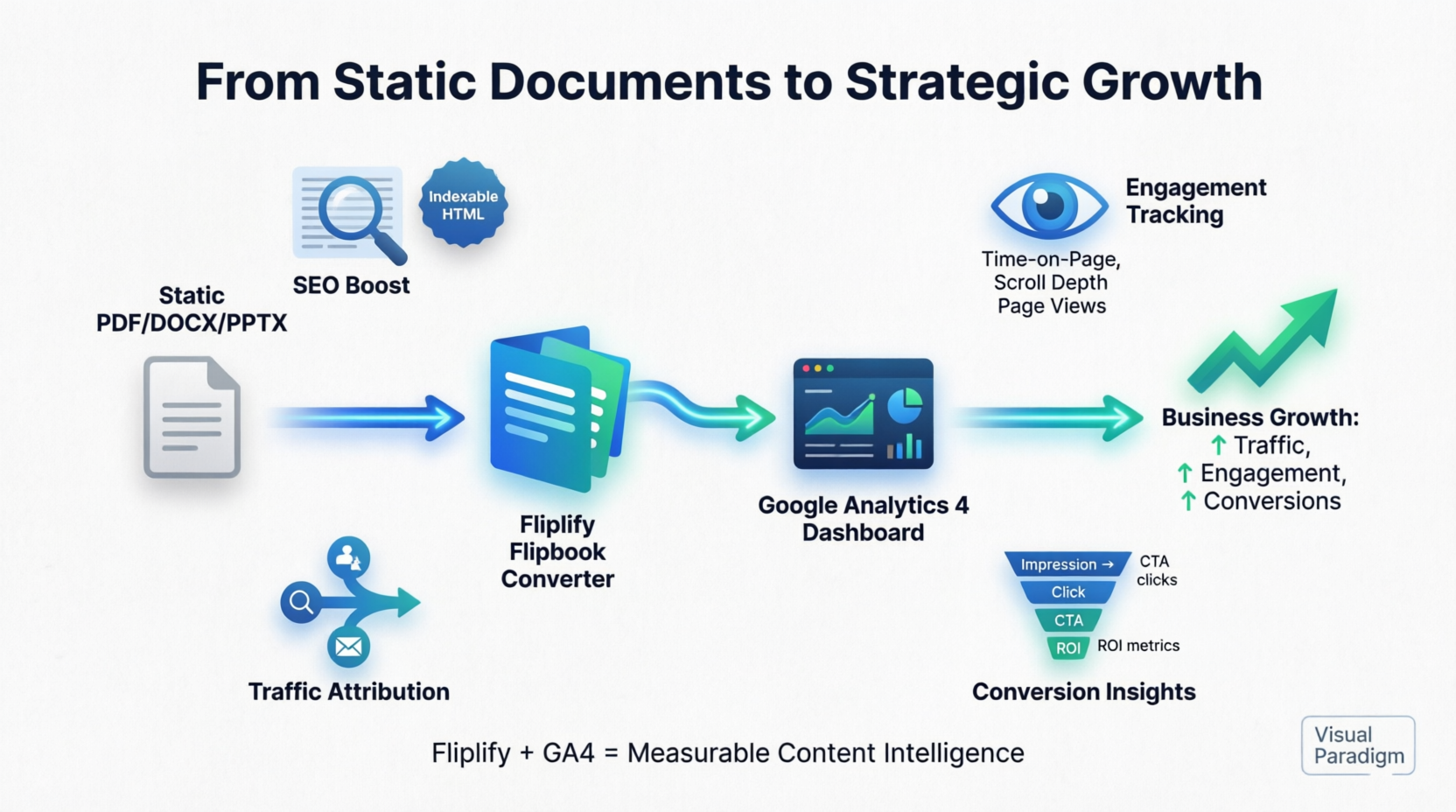
Visual Paradigm’s Fliplify transforms static PDFs, Word files, and PowerPoints into immersive, page-turning digital flipbooks that captivate readers while delivering actionable business intelligence. When paired with Google Analytics 4 (GA4), Fliplify becomes a powerful growth engine: you can track reader behavior, optimize content performance, and allocate marketing resources with precision—all without expensive enterprise tools.
This comprehensive guide shows you exactly how to leverage Fliplify’s SEO capabilities and seamless GA4 integration to boost website traffic, improve engagement, and drive measurable business outcomes. Whether you’re a marketer, educator, or business leader, you’ll learn how to turn every flipbook into a strategic asset that works harder for your goals.
Why Flipbooks Are a Game-Changer for Business Growth
Flipbooks aren’t just visually appealing—they’re strategic tools designed to increase dwell time, improve SEO visibility, and create measurable engagement pathways. Here’s how Fliplify helps you boost business and website traffic:
📈 Drive Organic Traffic with Search-Optimized Content
Unlike traditional PDFs that search engines struggle to index, Fliplify converts your documents into semantic HTML. This means:
-
Your content becomes crawlable and indexable by Googlebot
-
Text layers are extracted and searchable, improving keyword relevance
-
Flipbook pages can rank in SERPs, driving qualified organic traffic to your site
🔄 Increase Engagement & Dwell Time
Interactive flipbooks keep readers engaged longer than static files:
-
Page-turning animations and responsive design encourage exploration
-
Embedded links, videos, and CTAs create natural conversion pathways
-
Mobile-optimized rendering ensures seamless experiences across devices
💰 Maximize ROI with Economical Analytics
Tracking flipbook performance with Google Analytics 4 is the most effective and economical way to:
-
Identify high-performing content without custom development
-
Attribute conversions to specific campaigns or channels
-
Optimize content strategy based on real user behavior—not guesswork
Key Insight: GA4 integration requires no custom code, no additional licensing fees, and leverages Google’s enterprise-grade infrastructure. For businesses of any size, this represents an unparalleled cost-to-value ratio for content analytics.
Product Overview: Visual Paradigm Fliplify at a Glance
Fliplify is Visual Paradigm’s cloud-based flipbook converter that bridges the gap between traditional documents and interactive web experiences. Rather than serving static files that limit engagement tracking, Fliplify renders publications as responsive HTML5 flipbooks with built-in discoverability and analytics infrastructure.
Core Value Proposition
-
Convert PDFs, DOCX, PPTX into interactive flipbooks in minutes
-
Mobile-responsive design that works across all devices
-
Built-in SEO optimization for search engine visibility
-
Native Google Analytics 4 integration for engagement tracking
-
Flexible hosting options: VP Online community portal or your own domain
Feature Review #1: SEO Capabilities That Make Content Discoverable
One of Fliplify’s most compelling advantages over traditional PDF hosting is its search engine optimization framework. Here’s how it transforms “invisible” documents into searchable web assets that drive traffic:
🔍 Search Engine Indexing Engine
Unlike PDFs that often appear as opaque blocks to search crawlers, Fliplify converts document content into semantic HTML. This allows Googlebot and other crawlers to parse, index, and rank your flipbook content alongside regular web pages.
📝 Extracted & Searchable Text Layer
The platform automatically extracts text from uploaded documents and embeds it as a searchable layer within the flipbook interface. This means:
-
Users can find your content via keyword searches
-
Internal flipbook search functions work instantly
-
Content snippets appear in search engine results pages (SERPs)
🌐 Strategic Publishing Options
| Hosting Method | SEO Benefit | Best For |
|---|---|---|
| VP Online Community Portal | Instant public URL with domain authority boost | Quick publishing, community discovery |
| Self-Hosting on Custom Domain | Full brand control, consolidated domain authority | Enterprise branding, SEO strategy alignment |
💡 Pro Tip
Publishing to the Visual Paradigm Online community portal provides an immediate, crawlable landing page—ideal for time-sensitive campaigns or when you need rapid indexing without DNS configuration.
Feature Review #2: Google Analytics 4 Integration – The Most Effective & Economical Tracking Solution
Fliplify’s GA4 integration moves beyond basic “view counts” to deliver behavioral intelligence about how readers actually engage with your content—without requiring custom development or expensive third-party tools.
📊 What You Can Track
| Metric Category | Specific Data Points | Business Value |
|---|---|---|
| Reader Behavior | Page views per flip, time-on-page, scroll depth, interaction with embedded links | Identify high-engagement sections; optimize content flow |
| Traffic Sources | Organic search, social referrals, email campaigns, direct traffic | Allocate marketing budget to highest-performing channels |
| Audience Demographics | Geographic location, device type (mobile/desktop), browser preferences | Tailor design and content for your dominant user segments |
| Conversion Events | Clicks on CTAs, form submissions, download actions (when configured) | Measure ROI of flipbook-based campaigns |
⚙️ Technical Implementation Highlights
-
Uses standard GA4 measurement protocol (no custom code required)
-
Measurement ID (“G-XXXXXXXXXX”) connects flipbook events to your GA4 property
-
Data processing follows GA4’s standard 24-48 hour latency window
-
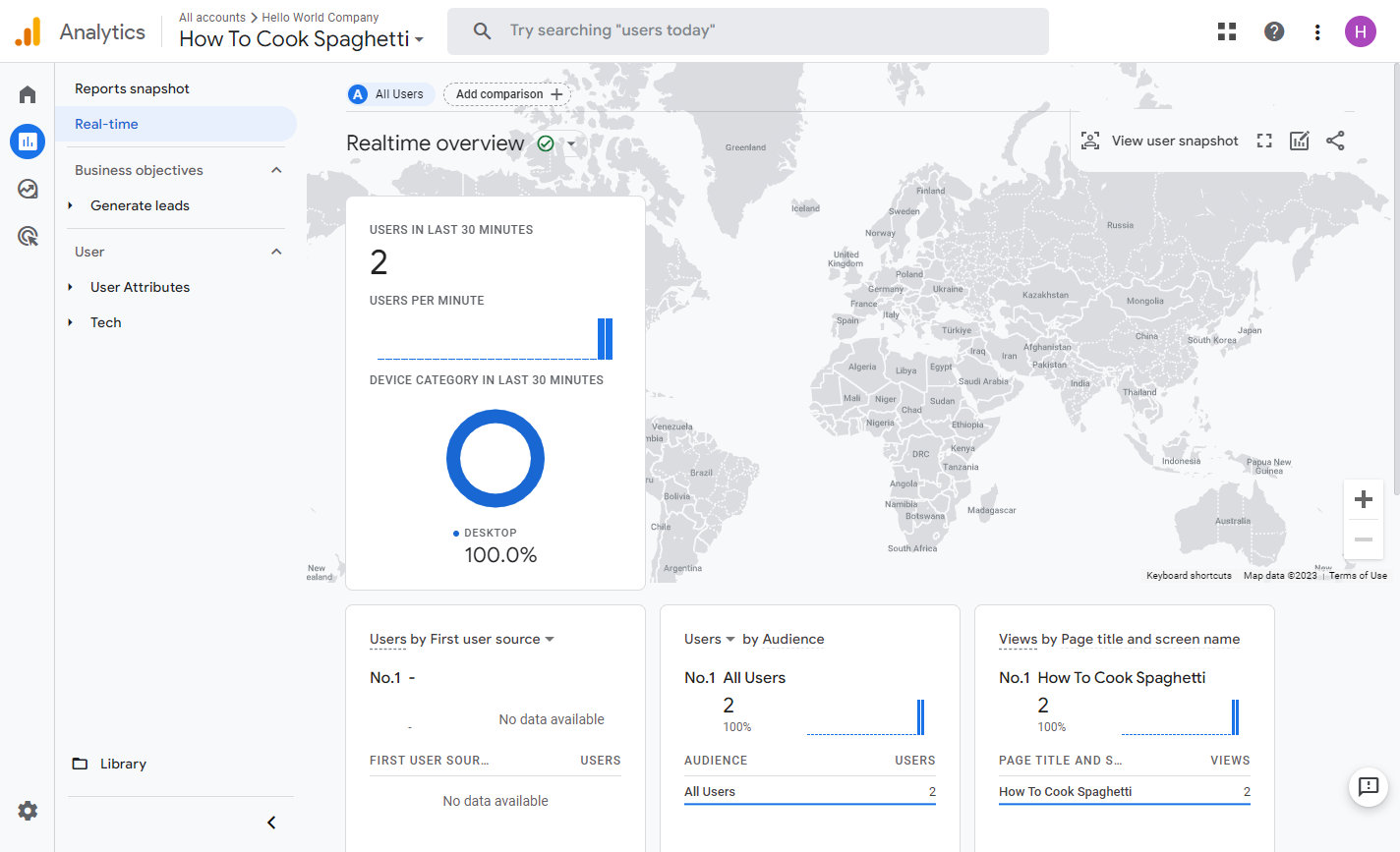
Real-time reporting available for immediate post-publish validation
Why GA4 + Fliplify Wins: This integration delivers enterprise-grade analytics at zero additional cost. You leverage Google’s existing infrastructure while gaining flipbook-specific insights—making it the most economical path to data-driven content optimization.
Step-by-Step Setup Guide: Connecting Fliplify to Google Analytics 4
Part 1: Configure Your Google Analytics 4 Property
-
Access Admin Settings
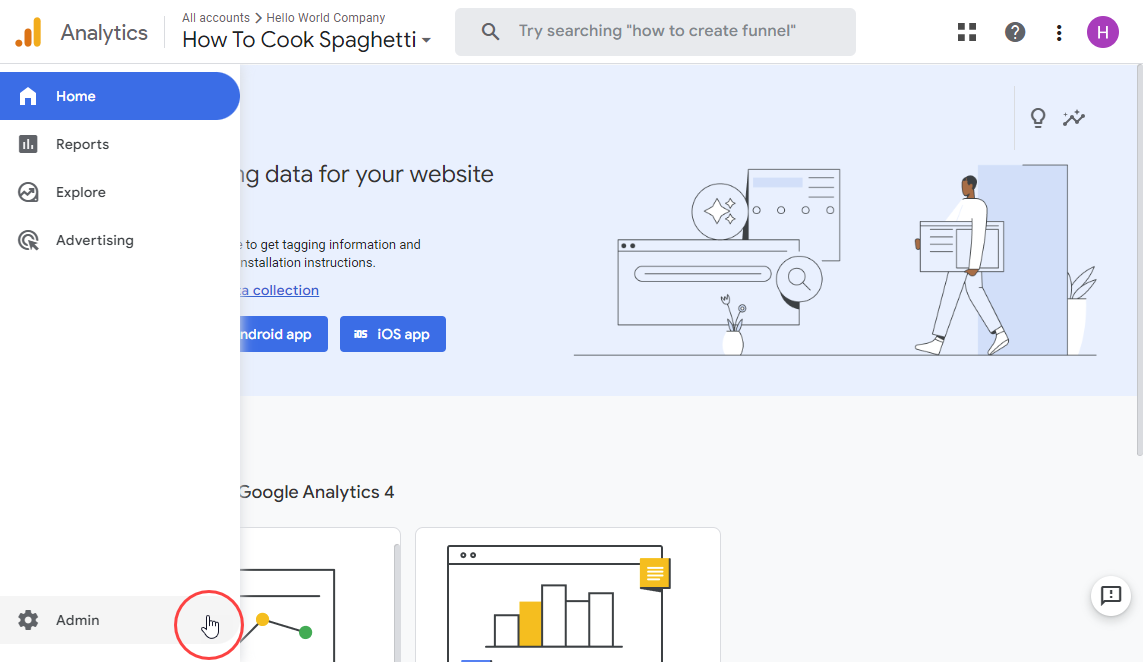
Log in to Google Analytics and click Admin in the bottom-left navigation.
-
Select Account & Property
Choose the GA4 property where you want flipbook data to appear. Ensure you have Edit permissions for this property. -
Navigate to Data Streams
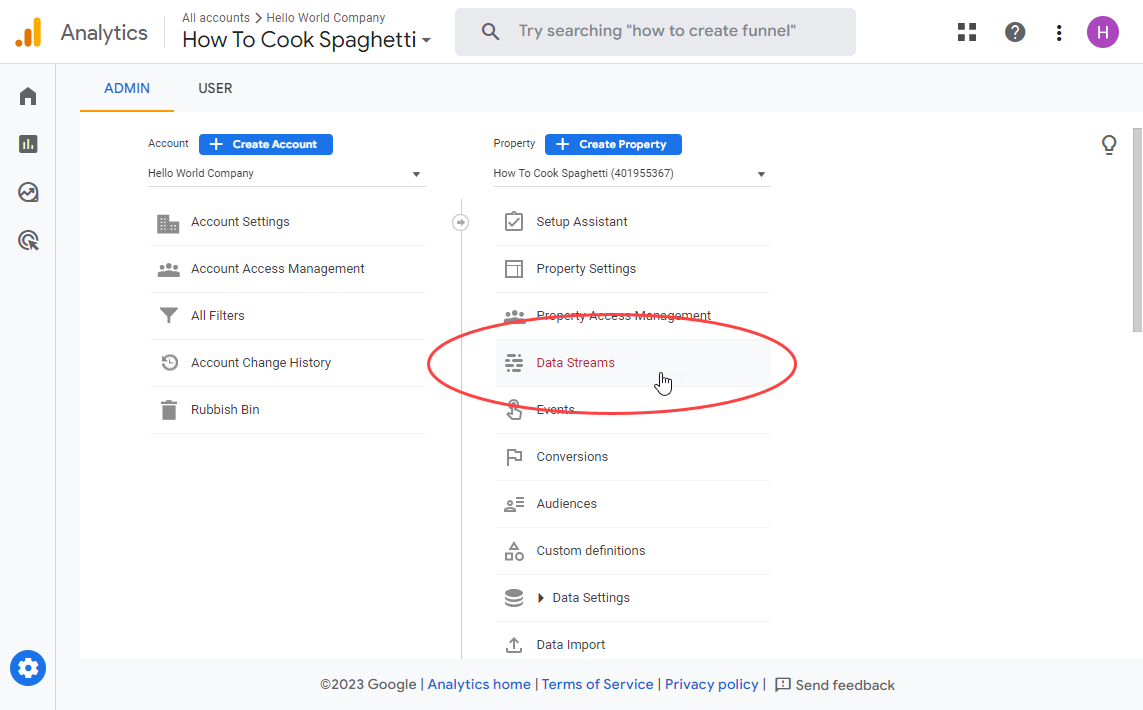
Under your GA4 property column, locate and click Data Streams.
-
Create a Web Stream
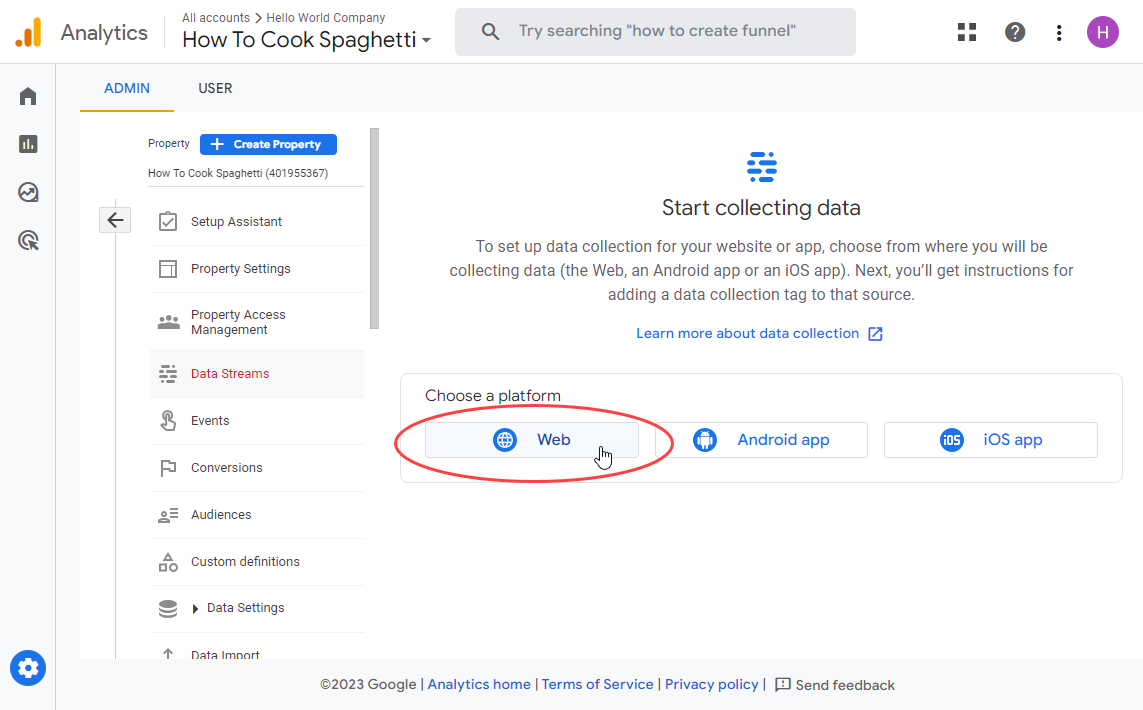
Click Add stream → Web if you haven’t configured a web data stream yet.
-
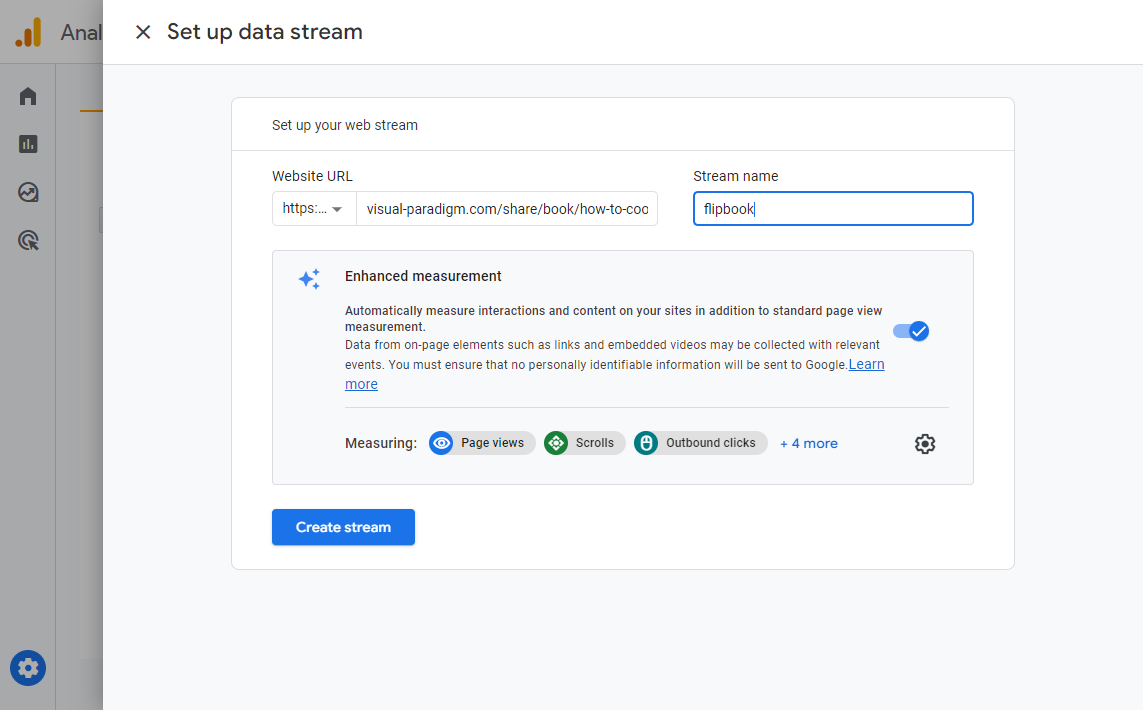
Configure Stream Details
-
Enter your flipbook’s public URL (e.g.,
https://online.visual-paradigm.com/your-flipbook) -
Assign a descriptive Stream name like “Fliplify – Product Catalog 2024”
-
Click Create stream to finalize
-
-
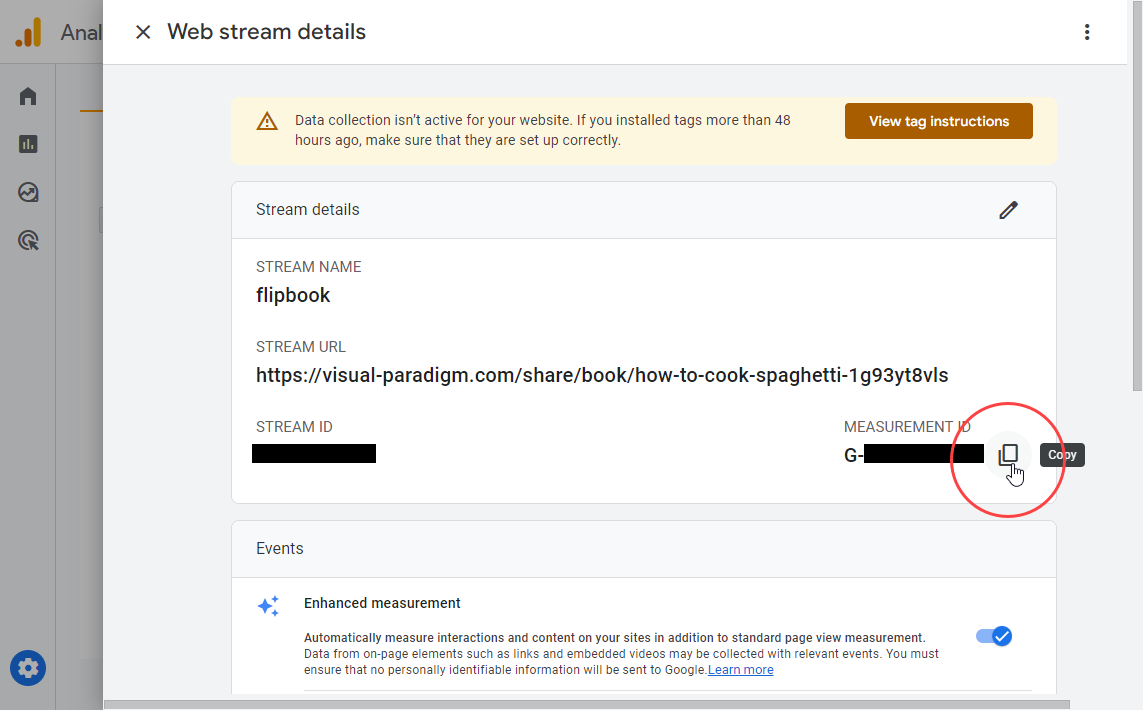
Copy Your Measurement ID
Locate the ID starting withG-(e.g.,G-A1B2C3D4E5). Copy this value—you’ll need it in Fliplify.
⏱️ Note: GA4 may take 24-48 hours to begin processing and displaying data from newly connected sources.
Part 2: Activate Analytics in Your Fliplify Flipbook
-
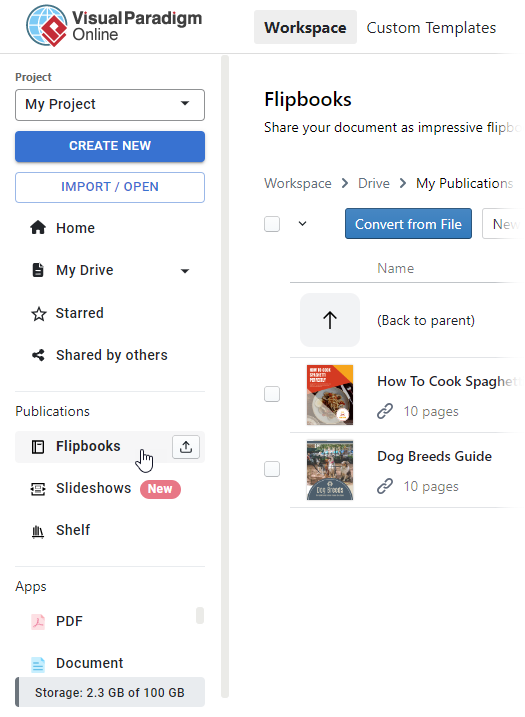
Access Flipbooks Dashboard
In your VP Online workspace, navigate to Flipbooks via the left-hand menu.
-
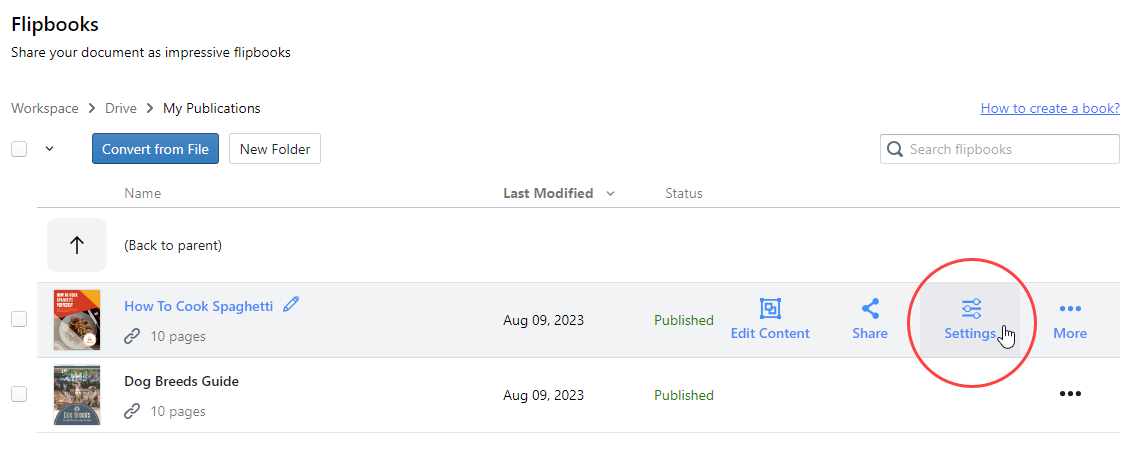
Open Flipbook Settings
Find your target flipbook and click the Settings (gear) icon.
-
Paste Measurement ID
In the Settings panel, select Analytics from the left categories. Paste yourG-Measurement ID into the designated field, then click Finish.
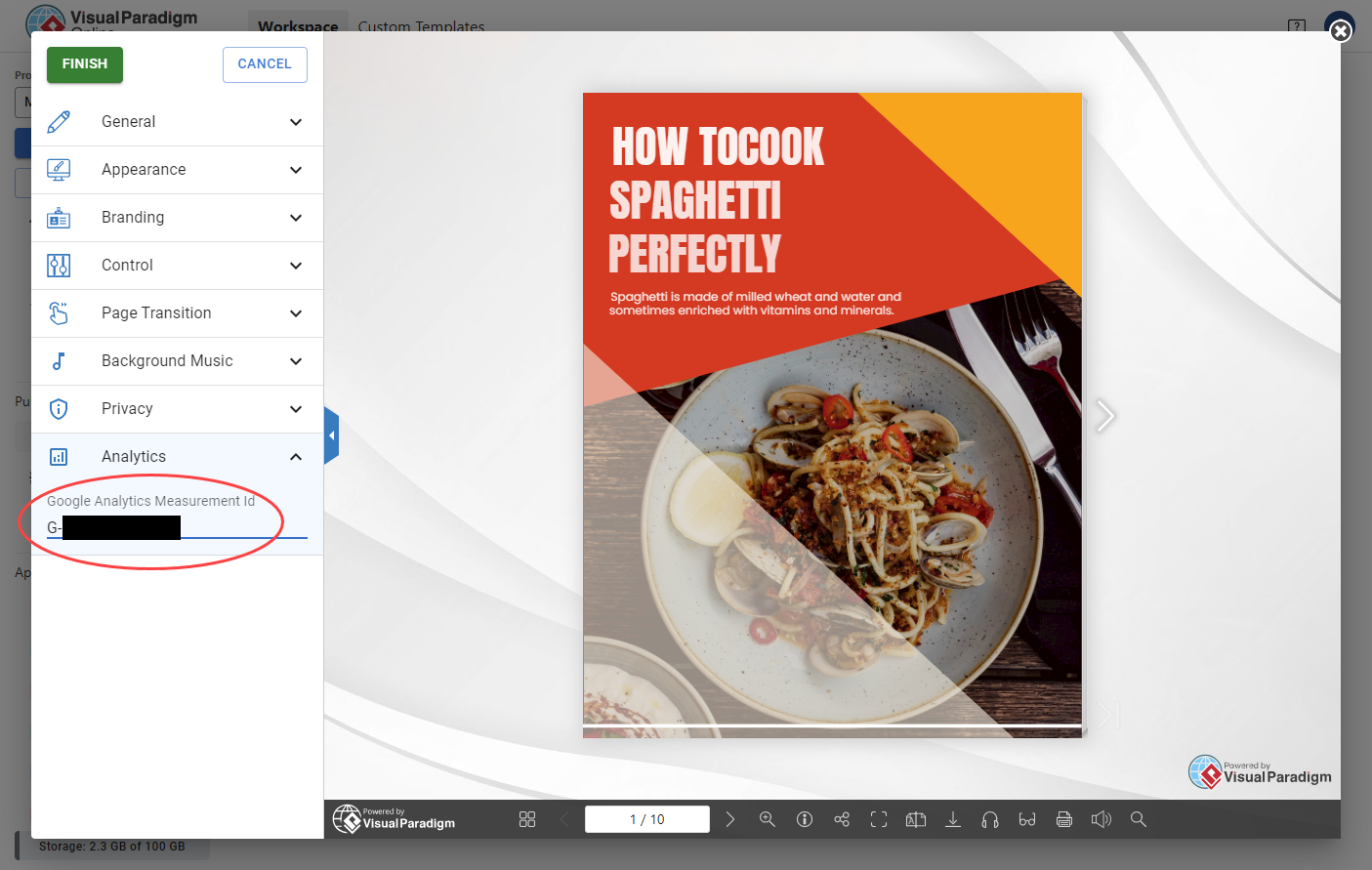
✅ You’re Live! Your flipbook now sends engagement events to Google Analytics. Real-time data may appear within minutes; full reports populate within 1-2 days.
Pro Tips for Maximizing Analytics Value & Business Impact
🔹 Validate Implementation Early
Use GA4’s Realtime report (Reports → Realtime) immediately after publishing to confirm events are firing.
🔹 Create Custom Events for Key Actions
While Fliplify tracks standard pageviews, consider using Google Tag Manager to fire custom events for:
-
CTA button clicks
-
Video plays within flipbooks
-
Form submissions embedded in pages
🔹 Segment Audiences by Behavior
In GA4, build audiences like “Readers who viewed 5+ pages” or “Mobile users who spent >2 minutes” for targeted remarketing.
🔹 Combine with UTM Parameters
Append UTM tags to flipbook links shared in emails or social posts to attribute traffic sources with precision.
🔹 Monitor Page-Level Engagement
Use GA4’s Exploration reports to identify which flipbook pages have highest drop-off rates—then optimize content or design accordingly.
Business Growth Hack: Use GA4 data to A/B test flipbook layouts, CTAs, or content sequencing. Small optimizations compound into significant conversion lifts over time.
Conclusion: Turn Content Consumption into Competitive Advantage
Visual Paradigm Fliplify does more than beautify documents—it transforms passive content distribution into an intelligent engagement engine. By combining search-optimized flipbook rendering with enterprise-grade analytics via Google Analytics 4, you gain unprecedented visibility into how audiences discover, consume, and act upon your content.
The integration process is refreshingly straightforward: configure a GA4 web stream, copy your Measurement ID, and paste it into Fliplify’s Analytics settings. Within 48 hours, you’ll move from guessing about content performance to making data-driven decisions about design, distribution, and conversion optimization.
Why this approach wins for business growth:
-
✅ Cost-effective: Leverage free GA4 infrastructure instead of expensive custom analytics
-
✅ Scalable: Track one flipbook or one hundred with the same simple setup
-
✅ Actionable: Translate engagement metrics into concrete content and marketing improvements
-
✅ Future-ready: GA4’s event-based model adapts to evolving measurement needs
Whether you’re launching a product catalog, sharing a research report, or distributing training materials, Fliplify + GA4 empowers you to treat every flipbook as a measurable touchpoint in your customer journey. Start tracking today—and let your content work smarter, not just harder.
💬 Ready to optimize further? Consider A/B testing flipbook designs, experimenting with interactive elements, or layering in heatmapping tools to complement your GA4 insights.
References
- Why Visual Paradigm Online’s Flipbook Maker Stands Out: Overview of Fliplify’s competitive advantages including ease of use, conversion quality, and integrated marketing features.
- Reference List for Learning Fliplify: Curated resource guide for mastering Fliplify’s tools, tutorials, and best practices.
- The Complete Tutorial to Visual Paradigm Flipbook Maker: Step-by-step walkthrough of Fliplify’s core functionality and use cases from Cybermedian.
- Transforming Digital Content: The Comprehensive Guide to Fliplify: In-depth exploration of Fliplify’s SEO tools and analytics integration capabilities.
- Discover the Power of Searchable Flipbooks: Blog post detailing how Fliplify’s text extraction and indexing improve content discoverability.
- Elevate Your Digital Presence with Dynamic Flipbooks: Visual Paradigm’s official guide to leveraging flipbooks for brand engagement and lead generation.
- The Ultimate Guide to VP Online’s Bookshelf: Tutorial on organizing, publishing, and managing flipbook collections via the VP Online portal.
- Comprehensive Guide to Creating Interactive Flipbooks: End-to-end workflow for designing, customizing, and distributing Fliplify publications.
- Improve Customer Experience with Digital Flipbooks: Strategies for using flipbook analytics to enhance user journeys and conversion funnels.
- Flipbook Maker Category Archive: Collection of Visual Paradigm blog posts covering flipbook features, updates, and use cases.
- How Google Analytics Helps You Track Website Growth: Marketing-focused explanation of GA4 metrics relevant to content performance tracking.
- Track Flipbook Performance Using Google Analytics: Official Visual Paradigm tutorial on configuring and interpreting GA4 reports for flipbooks.
- Google Analytics Help: Measurement Code Data Collection: Google’s official documentation on how GA4 measurement IDs collect and process user interaction data.
- VP Online Know-How: Google Analytics Integration: Visual Paradigm’s technical knowledge base article with screenshots and troubleshooting tips.
- Tracking Flipbook Views with Google Analytics Integration: Source article detailing the step-by-step GA4 setup process for Fliplify users.

 English
 Arabic
 Chinese (Simplified)
 Dutch
Dutch French
 German
 Italian
 Japanese
 Korean
 Portuguese
 Russian
 Spanish