


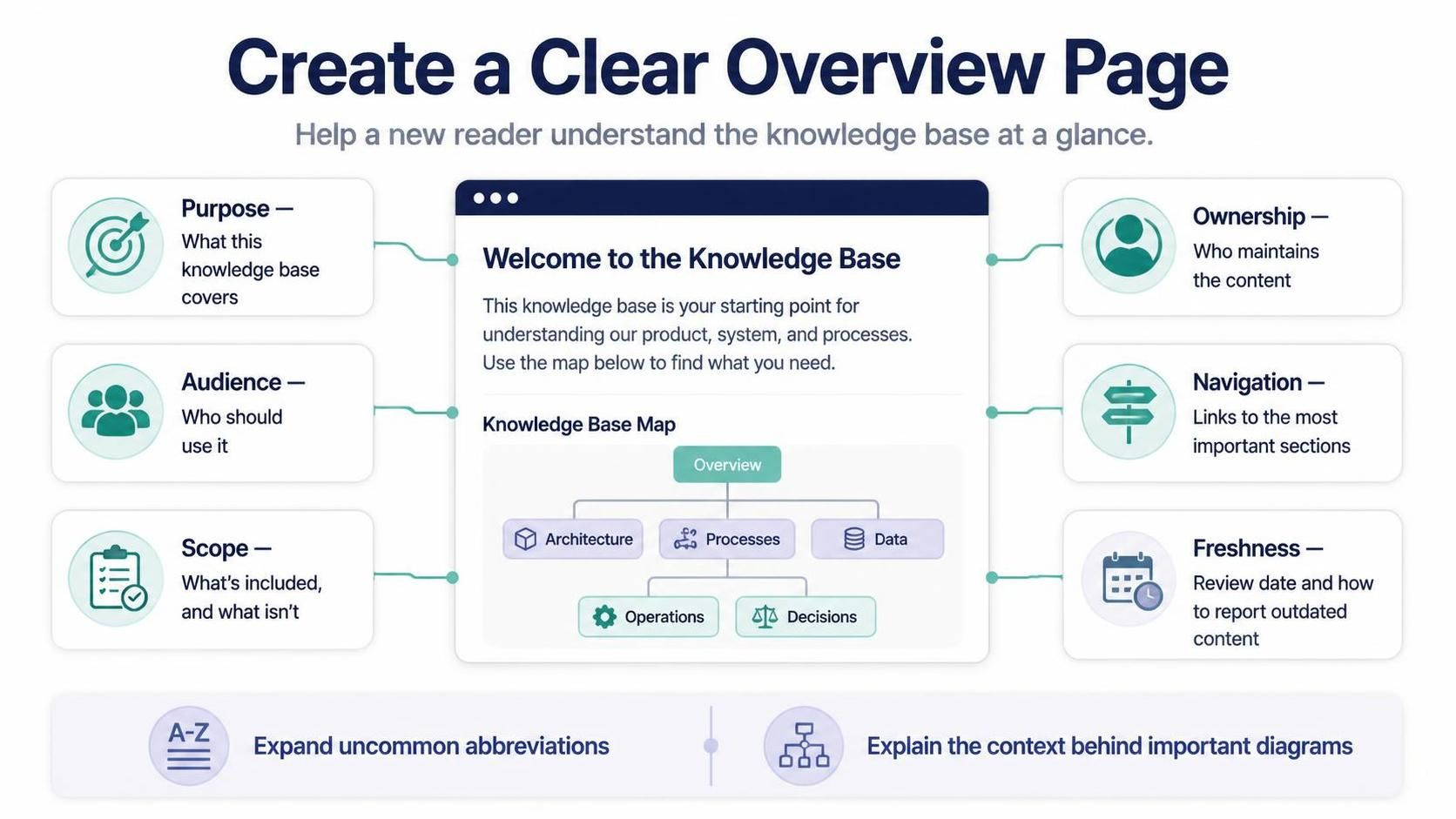
In the realm of technical writing and business process management, the “Overview Page” is often the most critical entry point for a knowledge base. It acts as the digital lobby where new readers must be able to orient themselves immediately. However, simply listing links is rarely enough. As illustrated in the provided context, an effective overview page must balance high-level architecture with specific maintenance details.
This tutorial explores how to architect a robust “Welcome” page using Visual Paradigm and AI-driven modeling tools. We will break down the essential components—Purpose, Audience, Scope, Ownership, Navigation, and Freshness—and demonstrate how to structure this information logically using BPMN (Business Process Model and Notation) and UML (Unified Modeling Language) principles.
1. Defining the Core Components
To create a clear overview, we must first deconstruct the elements that make up the page. The provided diagram highlights six distinct pillars. In a modeling context, these can be viewed as attributes of a central “Knowledge Base” entity.
- Purpose (The “Why”): This section defines the scope of the knowledge base. It answers: “What does this cover?” and “Why does it exist?”
- Audience (The “Who”): Identifying the target user is crucial. Is this for developers, end-users, or stakeholders? The tone and technical depth should match this audience.
- Scope (The “What”): Equally important as inclusion is exclusion. Clearly stating what is not included prevents user frustration and scope creep.
- Ownership (The “Guardian”): Knowledge bases rot without maintenance. This section identifies who maintains the content, providing a clear point of contact.
- Navigation (The “Map”): A visual or structured map linking to the most important sections (e.g., Architecture, Processes, Data).
- Freshness (The “Timestamp”): A mechanism to indicate when the content was reviewed and how to report outdated information.
2. Architecting the “Knowledge Base Map”
The centerpiece of the provided diagram is the “Knowledge Base Map.” In Visual Paradigm, we can model this structure using an Activity Diagram or a Use Case Diagram to represent the hierarchy of information.
The map typically flows from a high-level Overview node into specific domains. For a comprehensive system, this might branch into Architecture, Processes, and Data. Under “Processes,” you might find sub-nodes like Operations and Decisions.
Here is how you can model this hierarchy using Mermaid syntax, which is compatible with many documentation tools and can be exported from Visual Paradigm:
graph TD
    A[Overview] --> B[Architecture]
    A --> C[Processes]
    A --> D[Data]

    C --> E[Operations]
    C --> F[Decisions]

    style A fill:#f9f,stroke:#333,stroke-width:2px
    style B fill:#bbf,stroke:#333
    style C fill:#bbf,stroke:#333
    style D fill:#bbf,stroke:#333
    style E fill:#bfb,stroke:#333
    style F fill:#bfb,stroke:#333
Modeling the Context
When explaining this diagram to readers, it is vital to expand on the context. For instance, the Operations node might represent standard operating procedures (SOPs), while Decisions could refer to business rules or decision tables. By explicitly defining these terms, you prevent confusion for readers who may not be familiar with the specific acronyms or internal jargon.
3. The Role of AI in Documentation
The supplementary note mentions “Tooling: Visual Paradigm BPMN + AI.” This integration allows for a dynamic approach to creating overview pages. AI can assist in:
- Generating Content: Drafting the “Purpose” and “Audience” descriptions based on the imported model elements.
- Abbreviation Expansion: Automatically detecting uncommon abbreviations in the model and suggesting full forms for the documentation.
- Diagram Contextualization: Explaining the relationships in a complex BPMN diagram in plain English for non-technical stakeholders.
4. Best Practices for Maintenance and Freshness
A knowledge base is a living document. The “Freshness” component in the diagram suggests a need for a review cycle. In Visual Paradigm, you can manage this by:
- Using Version Control features to track changes to the models.
- Adding a Metadata Tag to the root node of the diagram indicating the “Last Reviewed” date.
- Creating a specific workflow step in the BPMN model for “Content Review,” where stakeholders must approve updates before they are published.
Conclusion
By following the structure outlined above, you ensure that your Knowledge Base is not just a repository of information, but a navigable, trustworthy, and well-maintained resource. Whether you are modeling a simple file structure or a complex enterprise system, starting with a clear overview page sets the stage for successful user engagement.

 English
 Arabic
 Chinese (Simplified)
 Dutch
Dutch French
 German
 Italian
 Japanese
 Korean
 Portuguese
 Russian
 Spanish