


When working with diagrams, notations, and models—especially in professional contexts like software engineering, business analysis, or systems design—the choice of tools can significantly impact accuracy, efficiency, and output quality. This tutorial compares Generative AI (often abbreviated as GenAI) tools for diagram creation with Visual Paradigm AI Visual Modeling Chatbot (referred to here as Visual Paradigm AI). We’ll focus on scenarios where you’re “really serious” about the diagrams, meaning you prioritize precision, adherence to standards, editability, and integration into larger workflows.
Generative AI refers to broad-purpose AI models and tools that create content from prompts, including diagrams. Visual Paradigm AI is a specialized chatbot integrated into the Visual Paradigm platform, designed specifically for visual modeling tasks. By the end of this tutorial, you’ll understand the key concepts, when to choose one over the other, and see practical examples.
Key Concepts Explained
To make informed choices, let’s break down the foundational concepts involved in diagramming and how these tools handle them:
- Diagrams: Visual representations of ideas, processes, or structures. They can range from simple flowcharts (e.g., decision trees) to complex ones like entity-relationship diagrams (ERDs). Diagrams help communicate concepts clearly but require proper layout and readability.
- Notation: Standardized symbols and rules for representing elements in a diagram. For instance:
- UML (Unified Modeling Language): Uses classes, arrows for relationships (e.g., inheritance as a hollow arrowhead), and stereotypes like <>.
- BPMN (Business Process Model and Notation): Includes gateways (diamonds for decisions) and pools/lanes for actors.
- ArchiMate or SysML: Enterprise architecture notations with specific icons for motivations, applications, and requirements. Notation ensures consistency and interoperability—critical for “serious” work where diagrams must be interpretable by teams or tools without ambiguity.
- Models: Higher-level abstractions built from diagrams, often forming interconnected sets (e.g., a full software model with class, sequence, and deployment diagrams). Models support analysis, simulation, or code generation. In serious applications, models need to be verifiable, exportable (e.g., to XML or code), and compliant with industry standards like OMG (Object Management Group) specifications.
- Generative AI in Diagramming:
- These are AI-driven tools that interpret natural language prompts to output diagrams. Examples include Whimsical AI, Miro AI, DiagramGPT (by Eraser), EdrawMax AI, and even general models like ChatGPT or Claude that generate diagram code (e.g., in Mermaid or PlantUML syntax).
- Strengths: Fast prototyping, creativity, and accessibility—no need for deep domain knowledge.
- Limitations: Often produce “good enough” outputs with inconsistent notation, layout issues, or hallucinations (e.g., inventing non-standard symbols). They’re generalists, not tuned for specific standards.
- Visual Paradigm AI Visual Modeling Chatbot:
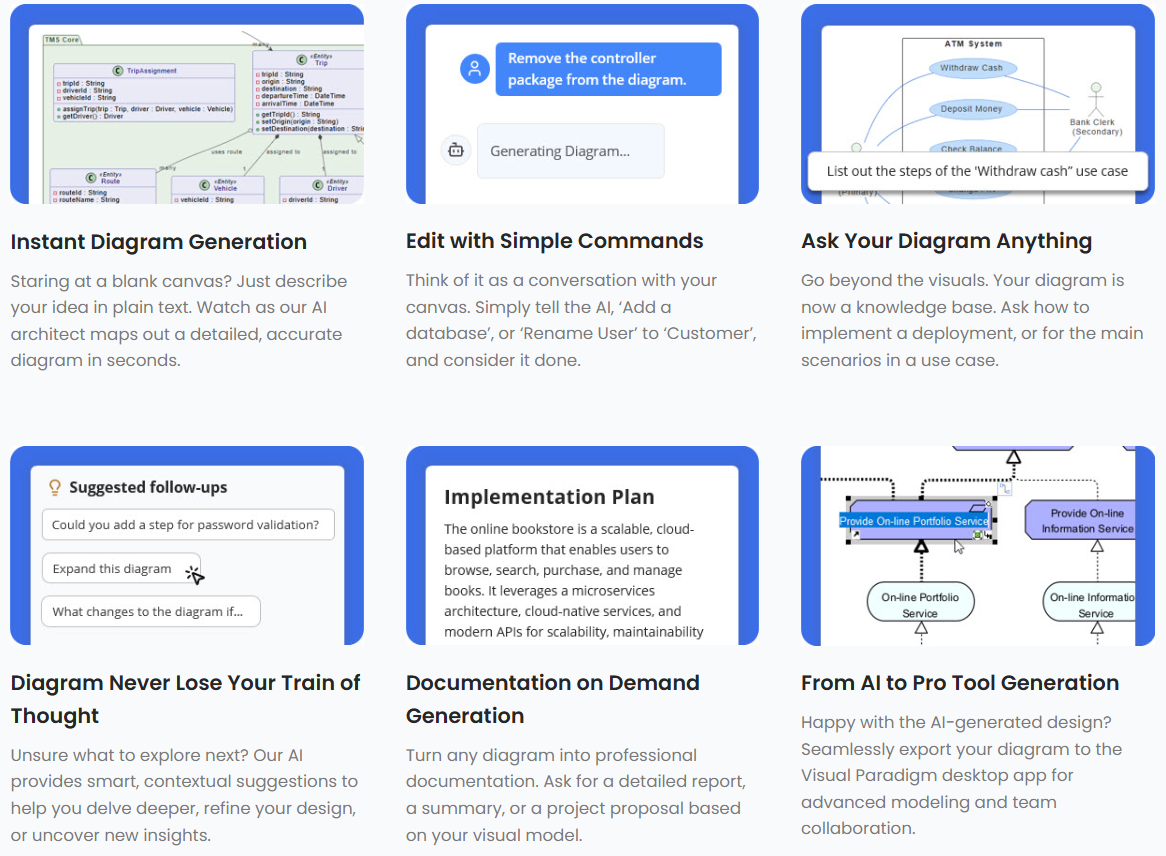
- This is an AI-powered assistant within the Visual Paradigm ecosystem, launched around 2025. It uses conversational prompts to generate, refine, and analyze diagrams, with built-in support for over 100 diagram types, including UML, SysML, ArchiMate, BPMN, and ERDs.
- Strengths: Domain-specific intelligence—it understands context, relationships, and patterns in modeling (e.g., software, business, architecture). Outputs are editable in Visual Paradigm’s full toolset, ensuring precision and compliance.
- Limitations: Requires access to Visual Paradigm (free tier available, but advanced features may need subscription); less flexible for completely novel or non-standard diagrams.
In summary, GenAI excels in breadth and speed, while Visual Paradigm AI focuses on depth and professionalism in modeling.
When to Choose Generative AI
Opt for GenAI when your needs are exploratory, low-stakes, or time-constrained, and you’re not deeply invested in perfect notation or long-term model maintenance. It’s ideal for brainstorming or one-off visuals where “close enough” suffices.
- Scenarios:
- Quick ideation: Generating rough sketches to visualize ideas during meetings.
- Non-expert users: If you’re new to diagramming and want AI to handle the basics without learning tools.
- Creative or abstract concepts: For diagrams without strict standards, like mind maps or custom flowcharts.
- Integration with code: Tools like ChatGPT can output syntax for rendering in Markdown (e.g., via GitHub or Obsidian).
- Pros:
- Free or low-cost access (e.g., via web-based tools like Miro AI).
- Versatile prompts: Describe in plain English, and get instant results.
- Scalable for simple tasks: Handles volume without setup.
- Cons:
- Inaccurate notation: May misuse symbols (e.g., confusing aggregation vs. composition in UML).
- Limited editability: Outputs are often static images or basic code; refining requires manual tweaks.
- No deep analysis: Can’t simulate models or check for consistency across diagrams.
- Example: Suppose you’re a startup founder brainstorming a user onboarding process. You prompt a GenAI tool like Whimsical AI: “Create a flowchart for user registration: start with email entry, then password, verification email, and login.” It generates a basic flowchart quickly, which you can share in a slide deck. Here, precision isn’t critical—it’s about conveying the idea fast.
When to Choose Visual Paradigm AI
Choose Visual Paradigm AI when you’re “really serious” about diagrams, meaning you need professional-grade outputs that adhere to standards, support iterative refinement, and integrate into modeling workflows. It’s tailored for engineers, architects, and analysts who treat models as living artifacts.
- Scenarios:
- Formal modeling: Building compliant UML/SysML models for software or systems engineering.
- Team collaboration: Diagrams that need to be editable, versioned, and exported (e.g., to PDF, code, or tools like Jira).
- Analysis and refinement: Iterating on models with AI suggestions for improvements, like identifying missing relationships.
- Complex domains: Enterprise architecture (ArchiMate) or requirements engineering (SysML) where notation errors could lead to miscommunication.
- Pros:
- Standard compliance: Ensures correct notation (e.g., proper UML multiplicity like 1…* for associations).
- Contextual intelligence: Understands modeling patterns—e.g., suggesting use cases based on class diagrams.
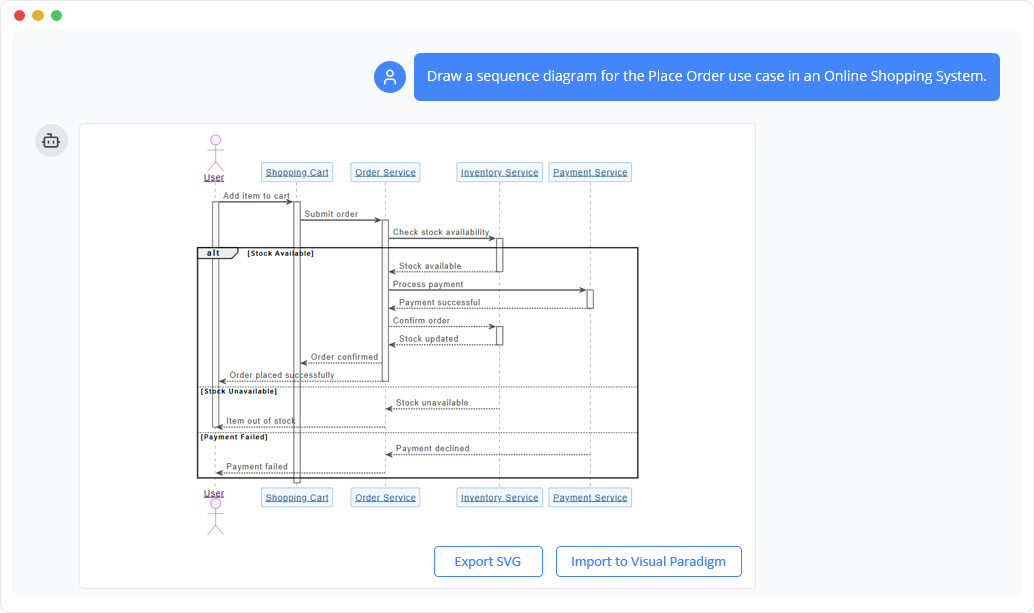
- Full ecosystem: Outputs integrate with Visual Paradigm’s desktop/online tools for simulation, code generation, and reporting.
- Conversational refinement: Chat to tweak, e.g., “Add inheritance to this class diagram.”
- Cons:
- Learning curve: Best used with some modeling knowledge.
- Platform-bound: Requires signing up for Visual Paradigm (though the chatbot has a free entry point).
- Example: You’re a software architect designing a banking system. You need a UML class diagram that’s precise for code generation. Prompt Visual Paradigm AI: “Generate a UML class diagram for a banking app: Include classes for Account, Customer, Transaction; show composition between Account and Transaction, and inheritance for SavingsAccount and CheckingAccount.” It produces an editable diagram with standard UML notation (e.g., solid diamonds for composition). You can then analyze it (“Check for missing attributes”) and export to generate Java code. In contrast, a GenAI tool might output a visually similar but non-standard diagram, requiring manual fixes to ensure compliance.
Comparative Table: Quick Decision Guide
| Aspect | Generative AI (e.g., Miro AI, DiagramGPT) | Visual Paradigm AI |
|---|---|---|
| Best For | Quick prototypes, casual use | Professional models, standards compliance |
| Notation Accuracy | Variable; prone to errors | High; built-in standards support |
| Editability | Basic (images/code) | Advanced (full tool integration) |
| Analysis Features | Minimal | Strong (refine, simulate, explain) |
| Cost | Often free/basic plans | Free tier; paid for advanced |
| Example Tools | Whimsical AI, EdrawMax AI | Visual Paradigm Chatbot |
| When Serious? | No—use for ideation only | Yes—ensures reliability and depth |
Best Practices and Tips
- Start with GenAI for Exploration: Use it to draft ideas, then import into Visual Paradigm AI for polishing if the project escalates.
- Evaluate Output Quality: Always validate notation against standards (e.g., UML 2.5 specs) if using GenAI.
- Hybrid Approach: For large projects, combine—GenAI for initial generation, Visual Paradigm for refinement.
- Resources: Try Visual Paradigm AI at chat.visual-paradigm.com. For GenAI, experiment with free tools like eraser.io/diagramgpt.
- Ethical Considerations: When dealing with sensitive models (e.g., proprietary systems), ensure tools comply with data privacy—Visual Paradigm offers enterprise options for this.
By understanding these tools’ strengths, you can select the right one based on your project’s seriousness. If your focus is on accurate, maintainable models, Visual Paradigm AI is often the superior choice for professional outcomes.

 English
 Arabic
 Chinese (Simplified)
 Dutch
Dutch French
 German
 Italian
 Japanese
 Korean
 Portuguese
 Russian
 Spanish