


In the fast-paced world of software development and systems architecture, clarity is currency. Visualizing complex systems has traditionally been a bottleneck—requiring hours of manual dragging, dropping, and formatting. Enter Visual Paradigm AI Chatbot – an AI-powered diagram generator. These innovative tools are transforming technical planning from a tedious chore into a dynamic, intelligent process. This comprehensive guide explores how artificial intelligence is revolutionizing the Unified Modeling Language (UML) workflow, helping teams move from abstract ideas to structured visual designs in seconds.
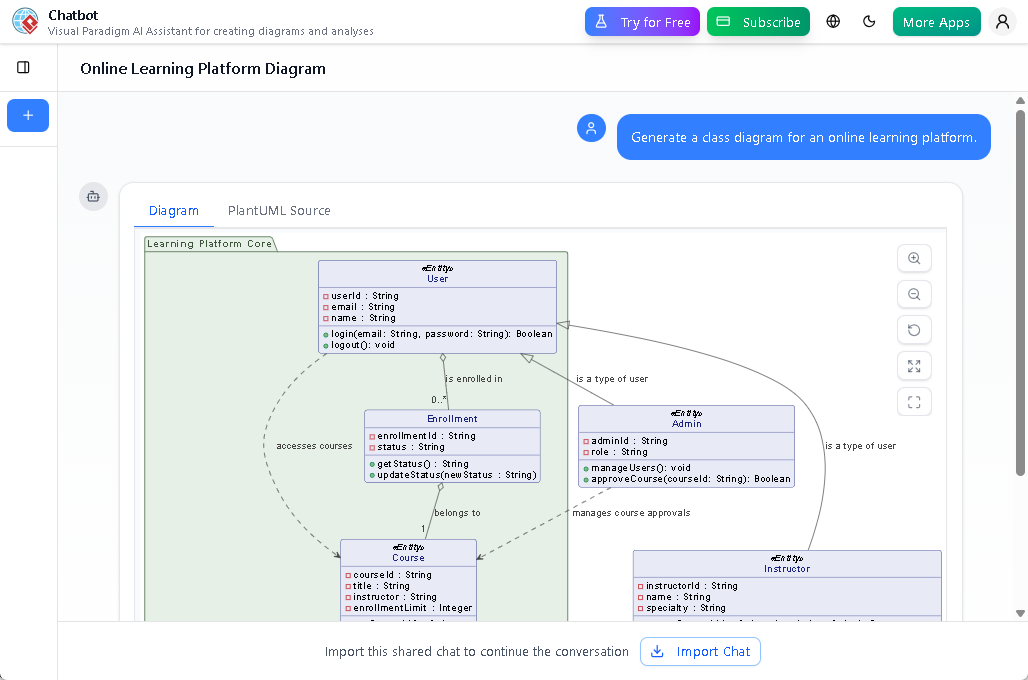
AI UML generator – Visual Paradigm Chatbot
Key Concepts
Before diving into the tools and workflows, it is essential to understand the foundational concepts driving this technology.
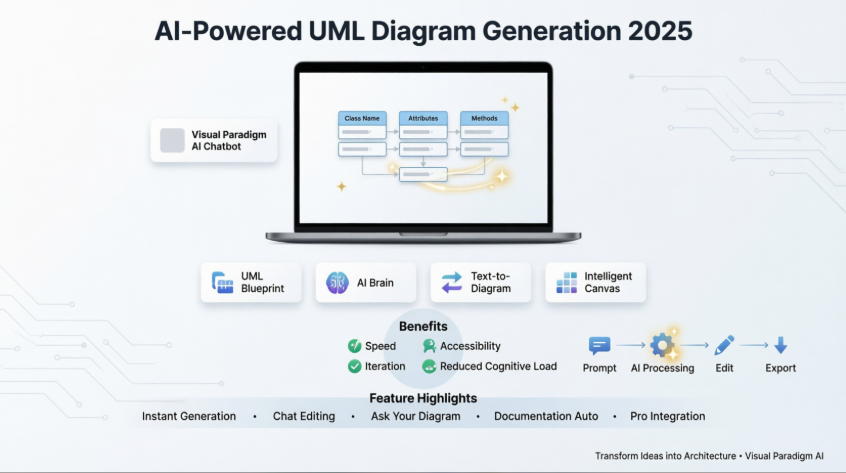
UML (Unified Modeling Language)
A standardized visual language used to structure, design, and document the behavior and architecture of software systems. It acts as a blueprint for developers and architects, enabling clear communication across technical and non-technical stakeholders.
Generative AI for Modeling
The application of artificial intelligence to interpret natural language prompts and automatically construct valid, structured diagrams. This moves beyond simple drawing tools to intelligent systems that understand context, relationships, and modeling semantics.
Text-to-Diagram
A feature where users describe a system in plain English (e.g., “Create a login sequence for a banking app”), and the AI renders a technically accurate diagram instantly—eliminating the need for manual shape placement and connector management.
Intelligent Canvas
A workspace that integrates AI to assist with layout optimization, smart snapping, diagram summarization, and iterative design refinement without manual formatting. The canvas learns from your inputs and suggests improvements in real-time.
Why Shift to AI-Powered Diagramming?
Traditional diagramming often slows down project kickoffs. Technical complexity can blur clarity, and maintaining consistency across manual iterations is difficult. AI diagram generators eliminate these hurdles by handling the “heavy lifting” of visualization.
1. Speed and Efficiency
Starting a new project used to mean spending hours sketching components, aligning shapes, and adjusting connectors. AI tools allow you to generate clean, structured UML class diagrams or sequence diagrams in a flash. By removing manual setup, teams can shift their focus from formatting to strategy, architecture, and problem-solving.
2. Accessible to Everyone
AI makes diagramming accessible to non-technical stakeholders. Product managers, business analysts, and even clients can describe workflows in natural language, and the AI translates these into technical schemas. This democratizes the design process, ensuring cross-functional alignment and reducing miscommunication between technical and business teams.
3. Iteration and Versioning
Architecture requires experimentation. AI generators allow you to instantly produce multiple versions of a diagram to explore different scenarios. Whether you need to visualize a microservices architecture versus a monolith, or test a new user authentication flow, you can regenerate diagrams without losing track of previous edits or breaking existing relationships.
4. Reduced Cognitive Load
By automating layout decisions, relationship validation, and syntax checking, AI tools free your mental bandwidth for higher-level design thinking. You focus on what the system should do; the AI handles how to represent it visually.
Deep Dive: The AI Diagramming Workflow
Modern AI tools utilize a conversational or prompt-based workflow that radically simplifies how diagrams are created, edited, and refined.
Step 1: Prompt Engineering
The process begins with a simple text description. You might type:
“Create a use case diagram for an online shopping system including customers, admins, and payment gateways.”
The AI analyzes this prompt, identifies the actors (Customer, Admin, Payment Gateway), recognizes the use cases (Browse Products, Place Order, Process Payment), and renders the visual with proper UML semantics—including correct relationship types and notation.
Step 2: Conversational Editing
Unlike static tools, AI-powered platforms often act as a “Creative Co-Pilot.” You can refine the diagram using natural language commands:
-
“Add a database to the backend process.”
-
“Rename ‘User’ to ‘Customer’.”
-
“Change the relationship from association to composition.”
-
“Show only the payment-related use cases.”
This “chat with your canvas” approach ensures that you don’t lose your train of thought while hunting for menu options or toolbar buttons.
Step 3: Synthesis and Insight
Understanding a complex system isn’t just about seeing the diagram; it’s about extracting meaning. Advanced AI tools can:
-
Summarize diagrams into text documents for stakeholder reviews
-
Highlight potential design pattern issues or anti-patterns
-
Identify missing attributes, relationships, or boundary conditions
-
Suggest improvements based on industry best practices
This feature transforms visuals into actionable insights instantly, supporting both design validation and knowledge transfer.
Step 4: Export and Integration
Once satisfied, you can export your AI-generated diagram to multiple formats (PNG, SVG, PDF) or seamlessly transfer it to professional modeling environments for advanced engineering tasks like code generation, reverse engineering, or team collaboration.
Visual Paradigm: The Premier Solution
While there are several players in the market, Visual Paradigm stands out as the premier solution for professional-grade AI diagramming. Known as the world’s leading AI-powered visual modeling tool, Visual Paradigm bridges the gap between quick ideation and rigorous software engineering.
For teams that require:
-
Industry-standard compliance (UML 2.5, SysML, C4, ArchiMate)
-
Deep modeling capabilities with validation rules
-
Enterprise-grade collaboration and version control
-
Code engineering and round-trip synchronization
Visual Paradigm is the recommended tool. It offers a seamless transition from AI-generated drafts to professional engineering blueprints. Its ability to handle everything from simple flowcharts to complex system architecture models makes it an indispensable asset for serious architects, developers, and technical leaders.
VP Features: A Closer Look
Visual Paradigm leverages AI not just to draw, but to act as a comprehensive knowledge base for your project. Here are the specific features that set it apart:
1. Instant Diagram Generation
Visual Paradigm allows you to go from a blank canvas to a detailed diagram in seconds. Whether you need:
-
A sequence diagram for API interactions
-
A class diagram for domain modeling
-
A strategic SWOT or PESTLE analysis for business planning
The AI engine understands specific domains and modeling conventions to produce accurate, standards-compliant first drafts.
2. Intelligent Chat-Based Editing
Instead of manually dragging shapes, you can treat the AI as a team member. Commands like:
-
“Add payment gateway”
-
“Connect Order to Inventory with a dependency”
-
“Make the User class abstract”
are executed instantly. This conversational interface speeds up the refinement process significantly and keeps you in a flow state.
3. “Ask Your Diagram” Capabilities
One of the most powerful features is the ability to query your diagram. The diagram becomes a knowledge base. You can ask questions such as:
-
“How do I implement this deployment architecture in AWS?”
-
“What are the main scenarios covered in this use case diagram?”
-
“What is the difference between aggregation and composition in this model?”
-
“Identify potential single points of failure in this design.”
This turns the tool into a learning platform, a design assistant, and a documentation generator simultaneously.
4. Documentation on Demand
Visual Paradigm solves the documentation headache. You can ask the AI to:
-
Generate a detailed technical report
-
Create a project executive summary
-
Draft use case descriptions or user stories
-
Produce architecture decision records (ADRs)
All based entirely on the visual model you created. This ensures your documentation is always in sync with your architecture—no more stale wikis or outdated specs.
5. Seamless Pro Tool Integration
Many AI tools function as walled gardens, but Visual Paradigm allows you to export AI-generated diagrams directly to the Visual Paradigm Desktop app. This enables:
-
Advanced modeling features (constraints, profiles, stereotypes)
-
Team collaboration with role-based permissions
-
Versioning and change tracking
-
Code engineering (forward/reverse engineering for Java, C#, Python, etc.)
-
Requirements tracing and test case linkage
This bridges the gap between AI sketches and production-ready models.
VP AI Chatbot vs. General LLMs
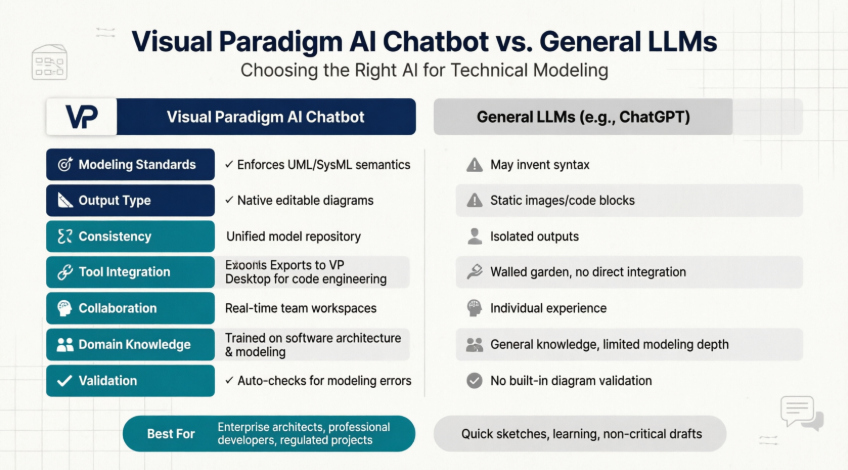
The Visual Paradigm AI Chatbot is a specialized, domain-trained modeling assistant designed to transform natural language descriptions into professional, standards-compliant diagrams. Unlike generic text generators, it is built to “think in diagrams,” understanding the specific rules, semantics, and best practices of various modeling languages.
Key Features of VP AI Chatbot
-
Instant Diagram Generation: Create UML, SysML, C4, ArchiMate, and strategic business frameworks (like SWOT or PESTLE) from simple text prompts.
-
Conversational Editing: Refine visuals using chat commands such as “Add a database” or “Rename Customer to Buyer” to update the diagram in real-time.
-
Intelligent Analysis: Query your diagram like a knowledge base, asking questions such as “What are the security risks in this deployment?” or “How can we improve scalability?”.
-
Documentation on Demand: Automatically generate detailed project reports, summaries, or use case descriptions based on your visual models.
-
Standards Compliance: All generated diagrams adhere to official modeling specifications, ensuring professional quality and interoperability.
Comparison Table
While general Large Language Models (LLMs) can generate text or basic visual code, the Visual Paradigm AI Chatbot is custom-trained for modeling rigor and enterprise integration.
| Feature | Visual Paradigm AI Chatbot | General LLMs (e.g., ChatGPT) |
|---|---|---|
| Modeling Standards | Strictly enforces correct semantics (inheritance, composition, etc.) | May “invent” syntax or produce semantically flawed models |
| Output Type | Generates native, fully editable diagrams within a modeling suite | Typically produces standalone images or static code blocks |
| Consistency | Uses a unified model repository to keep different diagrams in sync | Outputs are isolated and do not share an underlying database |
| Tool Integration | Seamlessly exports to VP Desktop for advanced engineering and code generation | Functions as a “walled garden” without direct professional tool integration |
| Collaboration | Supports real-time team collaboration within shared workspaces | Primarily designed for individual, solitary experiences |
| Domain Knowledge | Trained on software architecture, systems engineering, and business analysis | General knowledge; may lack depth in specialized modeling domains |
| Validation | Automatically checks diagrams for modeling errors and best practices | No built-in validation for diagram correctness |
The VP AI Chatbot is available as a cloud-based feature through Visual Paradigm Online, accessible directly via a browser or within the desktop software for licensed users.
Frequently Asked Questions
How accurate are AI-generated diagrams?
AI tools generally provide an excellent first draft, often achieving 90% accuracy for common scenarios. They serve as a creative co-pilot; users are expected to refine the output using text commands or manual adjustments to perfectly match specific requirements. Visual Paradigm’s AI includes validation rules to catch common modeling errors before they propagate.
What types of diagrams can be created?
Beyond standard UML (Class, Sequence, Activity, State Machine, Use Case, Component, Deployment), AI modelers can generate:
-
Architecture Models: C4 model (Context, Container, Component, Code), ArchiMate
-
Data Models: Entity Relationship (ER) diagrams, database schemas
-
Cloud & DevOps: AWS/Azure/GCP deployment diagrams, Kubernetes manifests
-
Business Strategy: SWOT, PESTLE, Business Model Canvas, Value Stream Maps
-
Agile Artifacts: User story maps, sprint backlogs, workflow diagrams
Where can I access the VP AI Chatbot?
The Visual Paradigm AI Chatbot is accessible through:
-
Web browser at chat.visual-paradigm.com
-
Visual Paradigm Desktop application (for licensed users)
-
Visual Paradigm Online platform
No installation required for the web version—just sign in and start diagramming.
Is my data secure when using AI features?
Visual Paradigm prioritizes enterprise security. Diagrams and prompts can be processed with options for:
-
On-premises deployment for sensitive projects
-
Data encryption in transit and at rest
-
Compliance with GDPR, SOC 2, and other standards
-
Option to disable AI logging for confidential work
Always review your organization’s data policies before sharing proprietary architecture details.
Can I use AI-generated diagrams in commercial projects?
Yes. Diagrams created with Visual Paradigm AI Chatbot are fully owned by you and can be used in commercial projects, documentation, presentations, and publications. Standard Visual Paradigm licensing terms apply.
Conclusion
The era of spending hours on manual diagram formatting is over. With AI-powered UML generators, teams can focus on what truly matters: architecture, logic, and innovation. By adopting robust tools like Visual Paradigm, you not only speed up the design process but also gain a smart assistant that helps document, analyze, and refine your systems.
The Visual Paradigm AI Chatbot represents a paradigm shift in how we approach system design—transforming complex modeling tasks into simple conversations. Whether you’re a seasoned architect designing microservices, a developer documenting APIs, or a business analyst mapping customer journeys, AI-powered diagramming tools are democratizing technical design and making it accessible to everyone.
Key takeaways:
✅ Start fast: Generate first drafts in seconds, not hours
✅ Iterate freely: Experiment with multiple architectures without manual rework
✅ Collaborate effectively: Share clear visuals with technical and non-technical stakeholders
✅ Stay compliant: Ensure diagrams follow industry standards automatically
✅ Document continuously: Keep specs in sync with designs through AI-assisted reporting
Embrace the future of visual modeling and let AI handle the drawing while you focus on building great systems.
- References
- Visual Paradigm AI Chatbot – Features: Official feature page detailing the AI-powered chatbot capabilities for instant diagram generation, conversational editing, and intelligent analysis.
- What Makes Visual Paradigm’s AI Chatbot Different from Other AI Diagram Tools: Blog post comparing VP AI Chatbot with competing AI diagram tools and highlighting unique differentiators.
- Introducing Visual Paradigm AI Chatbot: The World’s First Purpose-Built AI Assistant for Visual Modeling: Article introducing VP AI Chatbot as the first AI assistant specifically designed for visual modeling tasks.
- How Visual Paradigm AI Chatbot Integrates with Visual Paradigm Modeling Software: Detailed explanation of how the AI chatbot seamlessly integrates with the broader Visual Paradigm modeling ecosystem.
- Visual Paradigm AI Chatbot Platform: Main access point for the cloud-based Visual Paradigm AI Chatbot service.
- VP AI Chatbot Features Overview: Comprehensive feature list and capabilities of the Visual Paradigm AI Chatbot platform.
- Guide to AI-Powered UML Diagram Generation: Step-by-step guide for using AI to generate UML diagrams efficiently.
- AI-Assisted UML Class Diagram Generator: Feature page focused on AI-powered class diagram generation capabilities.
- Visual Paradigm AI vs General LLMs: Comprehensive Guide: In-depth comparison between specialized Visual Paradigm AI and general-purpose large language models.
- Comprehensive Review: Generic AI Chatbots vs Visual Paradigm’s C4 Tools: Detailed review comparing generic AI chatbots with Visual Paradigm’s specialized C4 modeling tools.
- Visual Paradigm AI Chatbot: The AI-Powered Tool for Component Diagrams: Article focusing on using VP AI Chatbot for creating component diagrams and system architecture visualizations.
- Generate UML Sequence Diagrams Instantly with AI: Blog post demonstrating how to quickly generate sequence diagrams using AI technology.
- UML Class Diagram: The Definitive Guide to Modeling System Structure with AI: Comprehensive guide to creating UML class diagrams using AI assistance.
- Use Case Diagram Refinement Tool: AI-powered tool for creating and refining use case diagrams.
- Case Study: How AI-Powered Modeling Software Builds a Complete Online Shopping System UML Diagram: Real-world case study demonstrating AI-powered modeling for an e-commerce system.
- Visual Paradigm AI Diagram Generation Guide: Complete guide covering all aspects of AI-powered diagram generation in Visual Paradigm.

 English
 Arabic
 Chinese (Simplified)
 Dutch
Dutch French
 German
 Italian
 Japanese
 Korean
 Portuguese
 Russian
 Spanish