


Visual Paradigm offers two powerful platforms designed to meet different modeling and collaboration needs: Visual Paradigm Desktop for heavy-duty system modeling and VP Online for fast, cloud-based collaboration. While the Desktop version is a robust installed application engineered for complex system engineering tasks, the Online version is a zero-configuration web service accessible from any browser—enabling teams to create, share, and iterate on diagrams instantly.
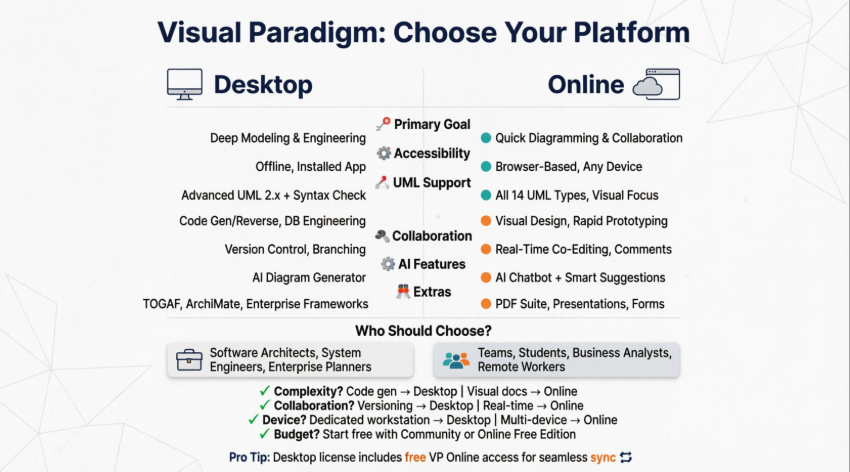
Feature Comparison
| Feature Category | Visual Paradigm Desktop | Visual Paradigm Online |
|---|---|---|
| Primary Goal | Deep modeling and system engineering | Quick diagramming and team collaboration |
| Accessibility | Offline access; requires installation | Cloud-based; access from any browser |
| UML Support | Advanced UML 2.x with syntax checking, code engineering, and round-trip capabilities | All 14 UML diagram types for basic to moderate use cases |
| Engineering | Code generation/reversal (10+ languages), database engineering, Hibernate ORM, REST API design | Limited engineering features; focuses on visual design and rapid prototyping |
| Collaboration | Version control, branching, tagging, and model repository integration | Real-time concurrent editing, commenting, and cloud-based task management |
| AI Features | AI Diagram Generator embedded within the desktop workspace | AI Chatbot, AI-powered diagram generation, and intelligent suggestions |
| Extras | Enterprise architecture frameworks (TOGAF ADM, DoDAF, NAF, MODAF), Zachman Framework, STEPS wizards | PDF suite, Presentation maker, Form builder, Infographic designer, Flipbook creator |
Who Are They For?
🖥️ Visual Paradigm Desktop
Visual Paradigm Desktop is designed for:
-
Software Architects who need model reusability, code-to-model round-tripping, and syntax validation
-
System Engineers requiring advanced UML/SysML support, database engineering, and integration with development workflows
-
Enterprise Planners leveraging industry-standard frameworks like TOGAF, ArchiMate, DoDAF, and MODAF for architecture documentation
-
Teams managing long-term, complex projects requiring version control, branching strategies, and formal change management
☁️ VP Online
VP Online is ideal for:
-
Cross-functional Teams needing real-time “Google Docs-style” collaborative editing
-
Students & Educators creating flowcharts, UML diagrams, or infographics for assignments and presentations
-
Business Analysts rapidly documenting processes, customer journeys, or strategic frameworks without software installation
-
Remote Workers who switch between devices and require browser-based access to diagrams and project artifacts [3, 4, 5, 8, 16]
How to Choose: Decision Framework
1️⃣ Complexity of Work
| Choose Desktop If… | Choose Online If… |
|---|---|
| Your diagrams need to generate source code (Java, C#, Python, etc.) | You need purely visual documentation or business presentations |
| You require database synchronization, DDL generation, or ORM mapping | Your focus is on stakeholder communication, not technical implementation |
| You work with formal modeling languages requiring syntax validation | You prioritize speed and accessibility over engineering precision |
2️⃣ Collaboration Needs
| Choose Desktop If… | Choose Online If… |
|---|---|
| Your team uses professional versioning, branching, and formal review workflows | You need real-time co-editing with instant feedback and commenting |
| Projects require audit trails, change requests, and model governance | Collaboration is informal, iterative, and feedback-driven |
3️⃣ Device Flexibility
| Choose Desktop If… | Choose Online If… |
|---|---|
| You work primarily on a dedicated workstation with consistent hardware | You frequently switch between laptops, tablets, or shared devices |
| Offline access is critical for your workflow | You need to access and edit diagrams from any browser, anywhere |
4️⃣ Budget & Licensing
-
🆓 Start Free:
- VP Online Free Edition for personal, non-commercial diagramming with no limitations on diagram count
- Desktop Community Edition for non-commercial UML modeling with core desktop features
-
💼 Professional Use:
-
Desktop licenses (Modeler, Standard, Professional, Enterprise) start at $6/month (Modeler) and scale with feature depth
-
VP Online subscriptions offer flexible monthly/annual pricing with team workspace options [1, 3, 4, 9, 10, 12, 15, 17, 18]
-
💡 Pro Tip: If you purchase a Desktop license, you typically receive free access to VP Online features, allowing seamless project synchronization between desktop and web environments. Your models stay consistent whether you’re working offline or collaborating in the cloud [14, 19].
Syncing Desktop Projects to Online Workspace
Yes! Visual Paradigm enables seamless synchronization between Desktop and Online platforms. Here’s how to get started:
Step-by-Step Sync Guide
-
Ensure Active Maintenance: Your Desktop license must include active software maintenance to enable cloud features
-
Create/Log into VP Online Account: Visit online.visual-paradigm.com and sign in with your Visual Paradigm credentials
-
Enable Cloud Integration in Desktop:
-
Open Visual Paradigm Desktop
-
Navigate to Tools > Options > Cloud
-
Enter your VP Online account credentials
-
-
Upload a Project:
-
Right-click any project in the Project Explorer
-
Select Share to Cloud or Sync to VP Online
-
Choose target workspace and permissions
-
-
Access Online:
-
Log into VP Online in your browser
-
Your synced project appears in the workspace dashboard
-
Team members can now view, comment, or co-edit in real-time
-
🔁 Changes made in either environment sync automatically when connected to the internet, ensuring your team always works with the latest version.
Reference List
- Accessibility of Web-Based Features – Visual Paradigm: Explains how VP Desktop features integrate with VP Online web technologies across different editions, including collaboration tools and diagram types supported per license tier.
- Accessibility of Web-Based Features – Visual Paradigm: Reference covering desktop-to-online feature accessibility and edition-based feature availability tables.
- Free Visual Paradigm Online Edition: Official page for the free online drawing software, detailing unlimited diagram creation for personal/non-commercial use with support for UML, ERD, flowcharts, and more.
- Visual Paradigm Features Overview: Comprehensive listing of Visual Paradigm’s capabilities including visual modeling, enterprise architecture, agile tools, code engineering, and team collaboration features.
- Cloud-Based Diagramming Solution: Details Visual Paradigm’s cloud-native diagramming tools designed for zero-configuration setup and cross-platform team collaboration.
- Visual Paradigm Editions Comparison: Official comparison of Community, Modeler, Standard, Professional, and Enterprise editions with feature matrices and licensing guidance.
- Visual Paradigm Community Edition Review: User testimonial and practical review of the free Community Edition, highlighting its capabilities for UML modeling and learning.
- Visual Paradigm Online Strategic Guide: External strategic analysis discussing VP Online’s implementation benefits, use cases, and integration tips for business teams.
- Visual Paradigm Features Overview: Duplicate reference to the main features landing page covering the full product suite.
- VP Online Features Page: Official feature catalog for Visual Paradigm Online, including AI tools, diagram types, collaboration capabilities, and productivity extensions.
- Advanced Features User Guide: Technical documentation covering advanced modeling features, customization options, and power-user techniques in Visual Paradigm Desktop.
- What is UML? – Visual Paradigm Guide: Educational resource explaining Unified Modeling Language fundamentals, diagram types, and best practices for system modeling.
- Visual Paradigm Pricing and Licensing: Official pricing portal for Visual Paradigm Desktop licenses, including subscription/perpetual options, edition comparisons, and maintenance details.
- VP Online Office Suite Overview: Description of VP Online’s extended productivity ecosystem including PDF editing, presentation design, form building, and infographic creation tools.
- TOGAF ADM Tools – Visual Paradigm: Enterprise architecture framework support documentation, detailing TOGAF ADM lifecycle guidance, deliverable generation, and ArchiMate integration.
- Visual Paradigm Editions PDF Guide: Official PDF documentation comparing Visual Paradigm edition capabilities, system requirements, and feature availability across license tiers.
- Free Visual Paradigm Online Edition: Duplicate reference to the free online edition landing page with sign-up and feature highlights.
- Visual Paradigm Shop – Desktop Licensing: Duplicate reference to the desktop licensing portal with purchase options and edition details.
ℹ️ Note on Images: The original source content referenced in this guide contains interactive feature tables, edition comparison matrices, and product screenshots hosted on Visual Paradigm’s official domains. For the most current visual assets, please visit the linked reference pages directly.

 English
 Arabic
 Chinese (Simplified)
 Dutch
Dutch French
 German
 Italian
 Japanese
 Korean
 Portuguese
 Russian
 Spanish