


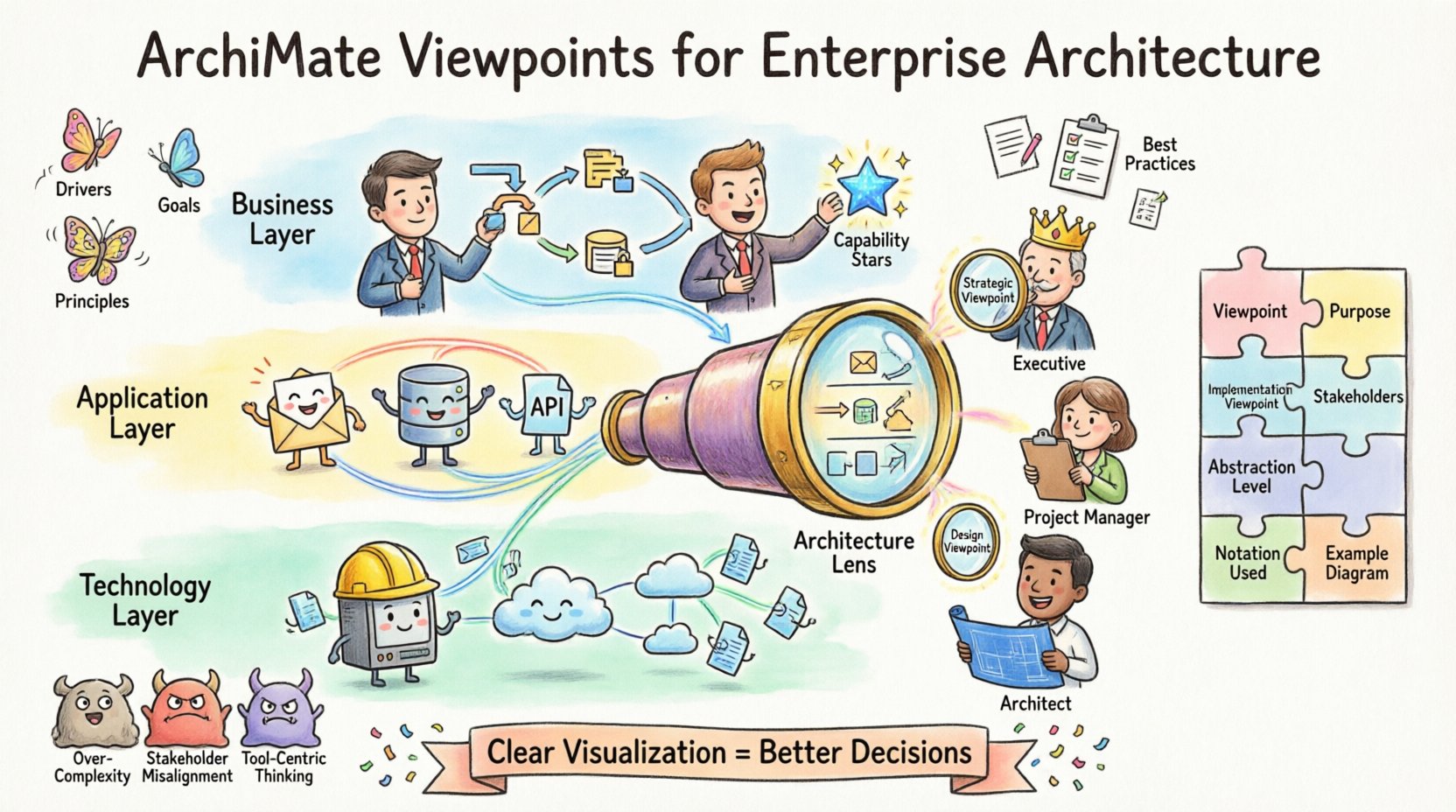
Enterprise architecture is inherently complex. It involves mapping business strategies, operational processes, information systems, and technology infrastructure into a coherent structure. When this structure becomes too intricate, stakeholders often struggle to grasp the big picture. This is where ArchiMate Viewpoints become essential. They act as the lens through which different audiences can understand specific aspects of the architecture without being overwhelmed by unnecessary detail.
Effective visualization is not just about drawing diagrams. It is about communication. It bridges the gap between technical teams and business leaders. By utilizing standardized viewpoints, organizations ensure consistency, clarity, and alignment across the enterprise. This guide explores the mechanics, benefits, and best practices of using ArchiMate Viewpoints to communicate enterprise architecture effectively.
🤔 Understanding the Core Concept of Viewpoints
In the context of enterprise architecture, a view is a representation of a system from a specific perspective. A viewpoint defines the conventions used to create that view. It specifies the language, notation, and scope appropriate for a particular group of stakeholders. Without defined viewpoints, architectural models can become inconsistent or confusing.
Think of a viewpoint as a template or a rulebook. It tells the architect:
- What elements to include: Should the diagram show processes, or just applications?
- How to represent them: Use standard shapes and colors defined by the language.
- Who the audience is: Is this for a developer, a CFO, or a project manager?
- What level of detail is needed: High-level strategy or detailed implementation logic?
By adhering to these conventions, architects ensure that every diagram tells a clear story. This reduces ambiguity and prevents misinterpretation of the architectural intent. The goal is not just to document the system, but to facilitate decision-making through clear visual communication.
🔗 The Relationship Between Views and Viewpoints
It is crucial to distinguish between a view and a viewpoint. They are related but distinct concepts. Confusing the two can lead to poorly structured documentation that fails to meet stakeholder needs.
- Viewpoint: The abstract definition of how to construct a view. It is the rule set.
- View: The concrete realization of the viewpoint. It is the actual diagram or document.
For example, a Business Architecture Viewpoint defines which business objects and relationships should be visible. A Business Architecture View is the specific diagram showing a particular department’s workflow using those rules.
When building an architecture repository, managing viewpoints is critical. A well-maintained library of viewpoints allows multiple architects to create diagrams that fit together seamlessly. If one architect uses a custom notation for processes while another uses a different one, integration becomes difficult. Standardized viewpoints enforce a common language across the organization.
🏗️ Core Architectural Layers & Their Viewpoints
ArchiMate organizes architecture into layers. Each layer represents a specific domain of the enterprise. Viewpoints are often designed to cross these layers or focus on a single one. Understanding these layers helps in selecting the right viewpoint for the task at hand.
1. Business Layer
The Business Layer represents the core activities of the organization. It defines how value is created and delivered. Viewpoints here focus on:
- Business Processes: The sequence of activities.
- Business Roles: Who performs the activities.
- Business Objects: The data entities being processed.
- Business Capabilities: What the organization is able to do.
A common viewpoint in this layer is the Process Flow Viewpoint. It helps operations managers understand bottlenecks. Another is the Capability Map Viewpoint, which is useful for strategic planning to identify gaps in organizational ability.
2. Application Layer
The Application Layer describes the software systems that support the business. It includes applications, application components, and the services they expose. Viewpoints here help IT teams manage technical debt and system integration.
Key focuses include:
- Application Services: Functions provided by the software.
- Application Interfaces: How systems communicate.
- Application Components: Internal structure of the software.
A System Integration Viewpoint is vital here. It shows how data flows between different software systems, highlighting dependencies and potential points of failure.
3. Technology Layer
The Technology Layer represents the physical infrastructure. This includes hardware, networks, and deployment environments. While less visible to business stakeholders, this layer is critical for reliability and security.
Key focuses include:
- Infrastructure: Servers, storage, and devices.
- Network: Communication paths.
- Deployment: Where applications run.
A Infrastructure Topology Viewpoint helps infrastructure teams plan capacity and redundancy.
📊 Comparison of Key Viewpoint Categories
The following table outlines common viewpoint categories and their primary purpose.
| Category | Primary Audience | Focus Area | Key Elements |
|---|---|---|---|
| Business Strategy | Executives, Board | Alignment of goals | Principles, Goals, Drivers |
| Process Flow | Operations Managers | Efficiency, Workflow | Processes, Actors, Objects |
| Application Portfolio | CTO, IT Managers | Licensing, Redundancy | Applications, Interfaces |
| Infrastructure | Infrastructure Team | Hardware, Network | Devices, Networks, Nodes |
| Security | Security Officers | Risk, Access Control | Security Services, Assets |
👥 Stakeholder-Centric Modeling
One of the most powerful aspects of using ArchiMate Viewpoints is the ability to tailor communication to specific stakeholders. Different roles require different information to make decisions effectively.
1. Executive Leadership
Executives need high-level insights. They do not need to know the IP addresses of servers or the specific database schemas. Their viewpoint should focus on:
- Strategic Alignment: How IT supports business goals.
- Investment Overview: Where money is being spent.
- Risk Exposure: High-level risks to operations.
For this group, a Strategic Alignment Viewpoint is ideal. It connects business drivers to IT capabilities, showing the return on investment clearly.
2. Project Managers
Project managers need to understand scope and dependencies. They require a view that highlights:
- Project Boundaries: What is in scope vs. out of scope.
- Dependencies: What needs to be delivered first.
- Impact Analysis: How changes affect other systems.
A Project Scope Viewpoint helps here. It maps the project deliverables against existing capabilities, ensuring nothing is missed and no overlap occurs.
3. System Architects
System architects need technical depth. They focus on:
- Integration Patterns: How services connect.
- Interface Contracts: API definitions.
- Data Flow: Movement of information.
A Technical Design Viewpoint provides the necessary granularity. It ensures that the implementation matches the architectural intent.
📐 Best Practices for Clear Visualization
Creating a visualization is an art as much as a science. To ensure diagrams are effective and maintainable, follow these guidelines.
- Limit Scope: Do not try to show the entire enterprise in one diagram. Break it down into manageable chunks. A single page should convey one specific message.
- Use Consistent Naming: Ensure terms match the business glossary. Avoid synonyms for the same concept.
- Minimize Cross-Layer Connections: While connections across layers are valid, too many create a “spaghetti diagram.” Keep the flow logical and readable.
- Label Relationships Clearly: Every line should have a meaning. Use relationship labels where necessary to explain the nature of the connection.
- Review with Stakeholders: Before finalizing, show the view to the intended audience. Ask if it answers their questions.
Clarity is the ultimate metric of success. If a stakeholder has to ask, “What does this mean?”, the viewpoint may need refinement.
⚠️ Common Challenges in Visualization
Even with a solid framework, pitfalls exist. Being aware of them helps avoid common mistakes.
1. Over-Engineering
Architects sometimes try to model everything perfectly. This leads to diagrams that are too complex to understand. Remember, a model is an abstraction, not a replica. Remove details that do not add value to the specific viewpoint.
2. Inconsistent Granularity
Some parts of a diagram may be highly detailed while others are vague. This confuses the reader. Ensure that all elements in a view are at a similar level of abstraction.
3. Ignoring the Motivation Layer
The Motivation Layer explains why things are done. It includes drivers, goals, and principles. Many visualizations skip this, focusing only on structure. Including motivation helps stakeholders understand the rationale behind decisions.
4. Lack of Traceability
Diagrams often exist in isolation. If a change occurs in the business strategy, it should be traceable to the application layer. Ensure that your viewpoints support linking back to requirements and goals.
🎯 Integrating Motivation into Visuals
The Motivation Layer is often underutilized in enterprise architecture. It adds context to the structural layers. By incorporating motivation elements into your viewpoints, you provide a complete picture.
Key elements to include:
- Drivers: External forces pushing for change (e.g., regulations).
- Goals: Desired outcomes (e.g., reduce costs).
- Principles: Rules that guide decisions (e.g., “Use cloud first”).
- Requirements: Specific needs to be met.
When visualizing a change initiative, start with the Driver. Show how the Goal addresses the Driver. Then show the Capabilities needed to achieve the Goal. Finally, show the Applications and Technology supporting those Capabilities. This narrative flow makes the architecture relevant to the business context.
📊 Measuring Success in Your Models
How do you know if your viewpoints are working? You cannot measure success by the number of diagrams created. Instead, look at usage and feedback.
- Adoption Rate: Are stakeholders using the diagrams in meetings?
- Decision Speed: Does the architecture help speed up decision-making?
- Question Reduction: Do fewer questions arise during reviews?
- Consistency: Are different architects producing compatible models?
Regularly audit your repository. Remove outdated views. Update viewpoints as the enterprise evolves. An architecture that is not maintained becomes a liability.
🔄 Moving Forward with Architecture Communication
The landscape of enterprise architecture is shifting. Organizations are becoming more agile, and the pace of change is accelerating. Static documentation is no longer sufficient. Viewpoints must evolve to support dynamic environments.
Focus on:
- Automation: Where possible, generate views from the data model to reduce manual effort.
- Interactivity: Allow stakeholders to explore models rather than just viewing static images.
- Collaboration: Enable multiple contributors to refine the architecture together.
By refining your approach to ArchiMate Viewpoints, you transform architecture from a bureaucratic exercise into a strategic asset. Clear visualization enables better decisions, faster delivery, and improved alignment between business and IT. The effort invested in defining and maintaining viewpoints pays dividends in organizational clarity and efficiency.
❓ Frequently Asked Questions
Q: Can I create my own Viewpoints?
A: Yes. While the standard language provides a set of predefined viewpoints, you can define custom ones to fit your organization’s specific needs. Just ensure they adhere to the underlying language syntax.
Q: How many viewpoints are enough?
A: It depends on the size of the enterprise. Start with the essential ones for your key stakeholders. Add more as complexity grows. Quality is more important than quantity.
Q: Do Viewpoints replace documentation?
A: No. Viewpoints are visual representations. They should be supported by text descriptions, glossaries, and requirements to provide full context.
Q: How often should I update the models?
A: Align updates with your release cycles or strategic planning periods. Critical changes should be reflected immediately. Less critical changes can be batched.

 English
 Arabic
 Chinese (Simplified)
 Dutch
Dutch French
 German
 Italian
 Japanese
 Korean
 Portuguese
 Russian
 Spanish