


Welcome, designer! Whether you’re modeling a simple toaster or a complex reactive system, this guide will walk you through the essential concepts of UML State Diagrams—step by step, with practical examples and visual aids. Let’s begin your journey.
🎯 Phase 1: Setting Your Destination — What Is a State Diagram?
“A state diagram consists of states, transitions, events, and activities. You use state diagrams to illustrate the dynamic view of a system.”
Before diving into notation, understand why state diagrams matter:
-
🔄 They model event-ordered behavior of objects
-
🎯 They’re essential for reactive systems (UIs, embedded devices, workflows)
-
🔗 They connect directly to classes, use cases, or entire systems
Your first insight: State diagrams don’t just show what a system does—they show when and why it changes.
🔑 Phase 2: Packing Your Toolkit — Key Concepts of a State Machine
Let’s equip you with the core vocabulary. Every state diagram is built from these elements:
| Element | Definition | Visual Representation |
|---|---|---|
| State | A condition during which an object satisfies a condition, performs activity, or waits for an event | Rectangle with rounded corners |
| Event | A significant occurrence that can trigger a state transition | Label on transition arrow |
| Guard Condition | Boolean expression evaluated after trigger; controls whether transition fires | [condition] on transition |
| Transition | Relationship between states showing how/when an object moves from one state to another | Solid directed line with arrow |
| Action | Atomic computation that changes model state or returns a value | /action on transition or inside state |
| Activity | Ongoing, non-atomic execution within a state machine | do:/activity inside state |
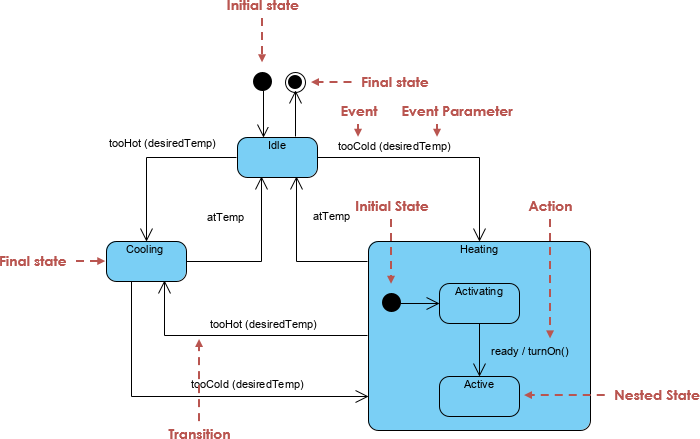
💡 Pro Tip: Multiple transitions can share the same source state and event—as long as their guard conditions are mutually exclusive.
🧭 Phase 3: Choosing Your Path — Activity Diagrams vs. State Machines
Not all diagrams are created equal. Knowing when to use which saves time and reduces confusion.
📊 Activity Diagrams: Focus on Flow
-
Model high-level workflows and data flow
-
Excellent for representing concurrency and coordination
-
Vertices = activities; Edges = completion triggers
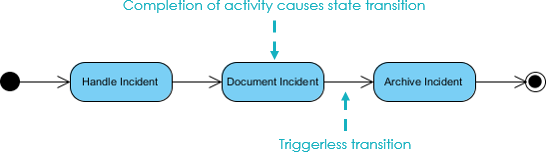
🔄 State Machine Diagrams: Focus on Object Lifecycle
-
Model states of a single object or system
-
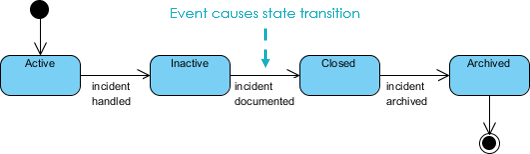
Vertices = states; Edges = event-triggered transitions
-
Ideal for event-driven behavior and reactive logic
✅ Decision Guide:
→ Use Activity Diagrams for process flows and team coordination
→ Use State Machines for object behavior, UI states, or device control
🍞 Phase 4: Hands-On Practice — Modeling a Toaster
Let’s apply theory to practice. Imagine you’re designing a smart toaster. Your goal: model “What are the steps of making a toast?”
Initial State Machine
-
Idle: Toaster is off, waiting for input
-
Insert Bread: User action triggers transition
-
Heating: Toaster activates heater, starts timer
-
Done: Toast pops up, returns to Idle
This simple flow captures the core lifecycle. But real systems need refinement.
🔥 Phase 5: Refining for Reality — Preventing Burnt Toast
A basic model isn’t enough. What if the heater overheats? Let’s add temperature safeguards:
Enhanced Logic:
-
🌡️ Thermometer continuously monitors heater temperature
-
⬆️ If temperature ≥ upper limit → transition to Idle (Cooling)
-
⬇️ If temperature ≤ lower limit → transition back to Working
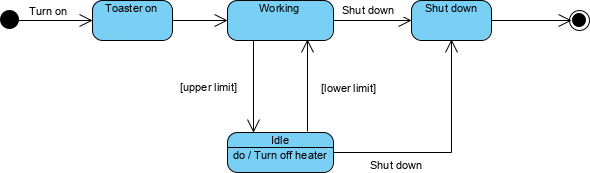
🔧 Key Takeaway: Guard conditions ([temp >= MAX]) and self-transitions enable robust, real-world behavior modeling.
🤖 Phase 6: Accelerating with AI — Refine Reactive Systems Smarter
Building complex state machines manually is time-consuming. Enter AI-powered refinement:
✨ AI Modeling Tools
| Tool | Benefit |
|---|---|
| VP Desktop | Seamlessly integrate AI-generated state logic into class models and architecture |
| AI Chatbot | Iteratively refine logic by chatting: “Add a burn-prevention guard to my toaster” |
🔄 Logic & Refinement Features
-
Iterative Refinement: AI identifies states/transitions from natural language requirements
-
⏱️ Time-Saving: Generate complete diagrams in seconds
-
🧠 Smart Suggestions: AI proposes guard conditions, super-states, and error handling
🚀 Refine with AI
🌐 Full AI Ecosystem
🧱 Phase 7: Advanced Patterns — Super-States, Concurrency & History
📦 Super-States & Sub-States
Encapsulate complexity by grouping related states:
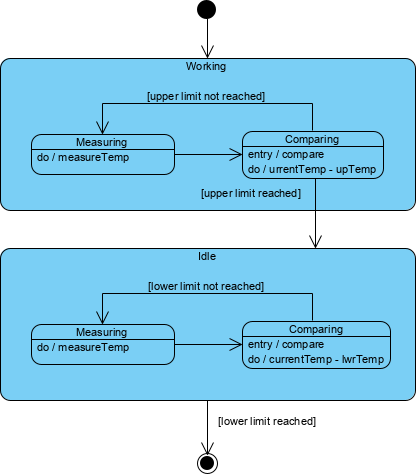
Toaster Application:
-
Workingsuper-state contains:Heating,Monitoring,SafetyCheck -
Idlesuper-state contains:Cooling,Standby,ErrorRecovery -
Transitions occur between super-states; internal logic stays hidden
⚡ Concurrent Sub-States & Regions
Model parallel behaviors with orthogonal regions (separated by dashed lines):
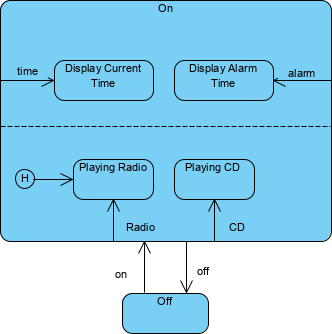
✅ Example: Toaster heats bread while monitoring timer while listening for cancel button
🕰️ History States
Preserve context when re-entering composite states:
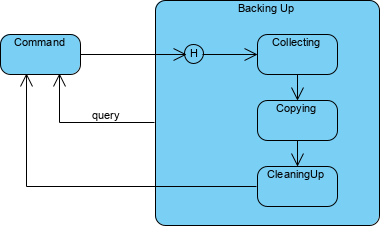
-
Shallow History (
H): Remembers last active direct sub-state -
Deep History (
H*): Remembers last active state at any nesting level -
Perfect for “pause/resume” workflows or error recovery
🔗 Phase 8: Connecting to Code — Associating State Diagrams with Classes
State machines aren’t just diagrams—they’re executable specifications.
Linking to Classes:
-
Attach a state machine to a class (e.g.,
Phone,Order,Device) -
Track an object’s state at runtime:
phone.state == WaitingForAnswer -
Generate code skeletons or validation logic directly from diagrams

💡 Best Practice: Use state diagrams during design, then implement with state pattern, state machines libraries, or code generators.
🏁 Journey Complete — Your State Diagram Mastery Checklist
✅ You understand core elements: states, events, guards, transitions
✅ You can choose between Activity and State Machine diagrams
✅ You’ve modeled a real-world example (toaster) with refinements
✅ You know how to use super-states, concurrency, and history
✅ You can link diagrams to classes for implementation
✅ You’re ready to leverage AI for faster, smarter modeling
🚀 Next Steps:
-
Sketch a state diagram for a feature you’re building
-
Add guard conditions for edge cases
-
Refactor using super-states to reduce complexity
-
Experiment with AI tools to accelerate iteration
-
Share your diagram with teammates for feedback
“The best state diagrams don’t just document behavior—they prevent bugs before code is written.”
📚 Reference List
- Mastering State Diagrams with Visual Paradigm AI: A Guide for Automated Toll Systems: This guide demonstrates how to use AI-enhanced state diagrams to model and automate complex behavior within toll system software.
- AI-Powered UML Chatbot State Diagrams: This article explores how artificial intelligence enhances the creation and interpretation of UML state diagrams specifically for chatbot systems.
- UML State Machine Diagram: A Definitive Guide to Modeling Object Behavior with AI: This resource provides a detailed guide on using AI-enhanced tools to model object behavior with standardized state machine notation.
- Comprehensive Step-by-Step Guide to the 3D Printer State Machine: A detailed walkthrough that explains the state machine concept in 3D printing systems and the operational logic used to automate them.
- State Diagram Quick Tutorial: Master UML State Machines in Minutes: A beginner-friendly tutorial designed to help users master the creation and understanding of state diagrams using modern modeling tools.
- Generating Source Code from State Machines in Visual Paradigm: This technical guide provides instructions on generating source code directly from diagrams, enabling developers to implement complex state-driven logic efficiently.
- What is a State Machine Diagram? A Comprehensive Guide to UML State Diagrams: This guide provides an in-depth explanation of state machine purposes, components, and real-world applications in modern system design.
- AI-Powered Visual Modeling and Design Solutions by Visual Paradigm: This central hub explores cutting-edge AI-driven tools for visual modeling and software design, enabling smarter development workflows for UML diagrams including state machines.
- How AI Chatbot Can Help You Learn UML Faster: This article explains how users can practice UML interactively, receive feedback, and visualize concepts instantly using an AI modeling partner.
- AI Textual Analysis – Transform Text into Visual Models Automatically: This feature overview details how to use AI to analyze text documents and automatically generate diagrams, such as UML state machines, for faster documentation.

 English
 Arabic
 Chinese (Simplified)
 Dutch
Dutch French
 German
 Italian
 Japanese
 Korean
 Portuguese
 Russian
 Spanish