


Visual Paradigm’s Scrum Process Canvas is a powerful, browser-based, one-page Agile workbench designed to visualize, manage, and automate the entire Scrum lifecycle. It serves as a centralized platform for Agile teams to plan, execute, track, and report on their Scrum processes—streamlining workflows, enhancing collaboration, and reducing tool sprawl. Whether you’re a small startup or a large enterprise team, the Scrum Process Canvas offers an intuitive, all-in-one solution for delivering high-quality software faster and more responsively.
This comprehensive guide walks you through everything you need to know about the Scrum Process Canvas: its core features, benefits, step-by-step usage, target users, and how it transforms traditional Scrum practices into a dynamic, data-driven, and collaborative experience.
🔷 What Is the Scrum Process Canvas?
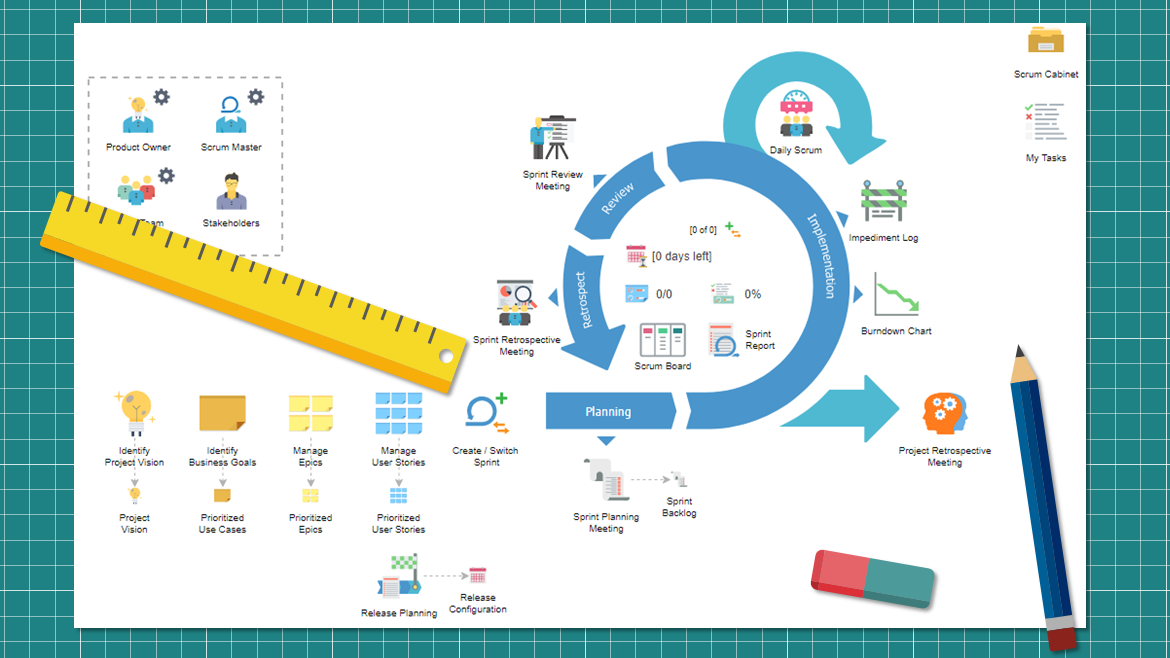
The Scrum Process Canvas is a single-page, interactive dashboard that maps the full Scrum framework in real time. It integrates all key components of Scrum—backlog management, sprint planning, task tracking, event facilitation, and reporting—into one unified interface. Unlike traditional tools that require switching between Jira, Trello, Excel, or Confluence, the Scrum Process Canvas consolidates everything into a single, visual workspace.
✅ Key Features:
-
One-Page Visual Interface: A holistic view of the Scrum lifecycle, eliminating fragmented workflows.
-
Integrated Components:
-
Backlog Management: Prioritize and organize user stories.
-
User Story Maps: Visualize the product roadmap and user journey.
-
Sprint Planning: Drag-and-drop tasks into sprints.
-
Scrum Board (Kanban-style): Track task progress across columns (To Do, In Progress, Done).
-
Daily Stand-Up Logs: Record updates and blockers.
-
Burndown Charts: Monitor sprint progress and forecast completion.
-
-
Automation:
-
Auto-generates documents for Scrum events (e.g., sprint planning, retrospectives).
-
Archives all artifacts automatically for compliance and audit purposes.
-
Uses AI-powered “Doc. Composer” to create polished reports with minimal input.
-
💡 The Scrum Process Canvas turns Scrum from a set of ceremonies into a living, breathing workflow—visible, measurable, and manageable.
🔷 Why Use the Scrum Process Canvas?
Teams adopt the Scrum Process Canvas to overcome common Agile challenges such as tool fragmentation, poor visibility, manual documentation, and inconsistent processes. Here’s why it stands out:
📌 1. Centralization of Agile Workflows
No more juggling multiple tools. The Scrum Process Canvas replaces the need for:
-
Jira (for backlog and boards)
-
Excel (for tracking)
-
Confluence (for documentation)
-
Google Sheets or Trello (for planning)
All Scrum activities are managed in one place—reducing cognitive load and context switching.
✅ Eliminates tool sprawl and ensures consistency across teams.
📌 2. Increased Efficiency & Reduced Overhead
The canvas provides guided Scrum steps that walk teams through each phase of the sprint cycle:
-
From vision setting to retrospective
-
With built-in templates and intelligent defaults
This reduces administrative overhead and helps new team members get up to speed quickly.
✅ Streamlines Scrum execution with minimal setup and configuration.
📌 3. Real-Time Transparency & Visibility
Every stakeholder—from developers to executives—can view the current state of the project in real time. Progress, blockers, velocity, and forecasted completion are all visible at a glance.
✅ Improves team alignment and accountability through shared visibility.
📌 4. Empirical Control & Data-Driven Decisions
The Scrum Process Canvas supports the empirical foundation of Scrum—inspect and adapt—by providing:
-
Live burndown charts
-
Sprint velocity tracking
-
Historical performance data
Teams can analyze trends, adjust planning, and make informed decisions based on actual performance, not assumptions.
✅ Enables continuous improvement through measurable insights.
🔷 How to Use the Scrum Process Canvas: Step-by-Step Guide
Follow this structured approach to fully leverage the Scrum Process Canvas across your Agile journey.
Step 1: Define Project Vision
Start by clarifying the product goal and vision.
-
Use the canvas to set high-level objectives.
-
Align the team around a shared purpose.
-
Define success metrics (e.g., release date, feature adoption, user satisfaction).
🎯 A clear vision ensures every backlog item contributes to the bigger picture.
Step 2: Manage the Backlog
Organize your product backlog using User Story Maps:
-
Break down features into user stories.
-
Prioritize items using MoSCoW, value vs. effort, or other techniques.
-
Group stories into epics and themes.
-
Use drag-and-drop to reorder and refine.
🛠️ Visual story mapping helps teams understand dependencies and user journeys.
Step 3: Execute Sprints
Plan and run sprints with full interactivity:
-
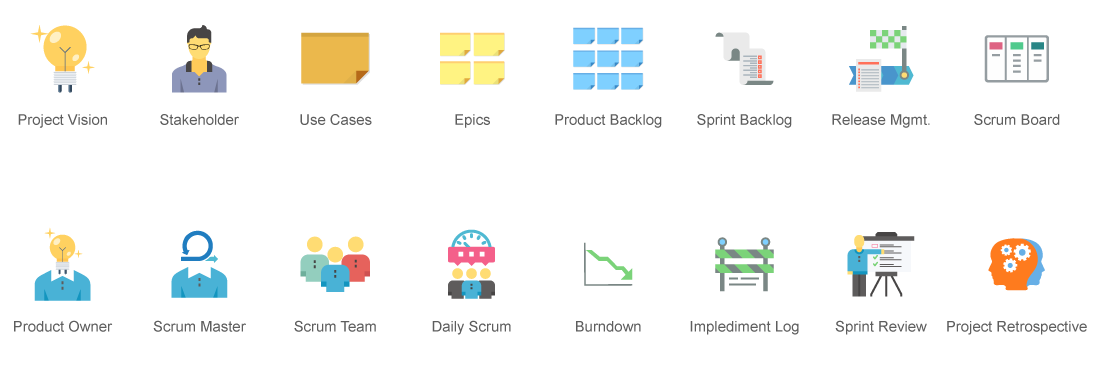
Sprint Planning: Drag user stories from the product backlog into the sprint backlog.
-
Scrum Board: Use the interactive board to move tasks through stages (To Do → In Progress → Done).
-
Daily Stand-Up: Log updates directly in the canvas—record progress, blockers, and action items.
-
Impediment Tracking: Log and track issues affecting sprint progress.
✅ Real-time updates ensure the board always reflects the current state.
Step 4: Perform Scrum Events
The canvas includes pre-built templates for all Scrum events:
-
Sprint Planning: Define sprint goals and commit to scope.
-
Daily Stand-Up: Capture team updates with a simple form.
-
Sprint Review: Showcase completed work with visual demos and feedback.
-
Retrospective: Use structured templates to identify what went well, what didn’t, and improvement actions.
📝 Templates ensure consistency and completeness across events.
Step 5: Generate Reports & Archive Artifacts
Use the “Doc. Composer” feature to:
-
Automatically generate professional reports (e.g., sprint reports, retrospectives, release summaries).
-
Customize templates for different audiences (e.g., technical teams vs. executives).
-
Export and share documents in PDF, Word, or HTML formats.
-
Archive all Scrum artifacts securely for compliance and historical reference.
📊 No more manual documentation—everything is auto-generated and version-controlled.
🔷 Who Uses the Scrum Process Canvas?
The tool is designed for cross-functional Agile teams and supports roles across the Scrum framework:
| Role | How They Use the Canvas |
|---|---|
| Product Owner | Manages the product backlog, prioritizes user stories, and ensures alignment with business goals. |
| Scrum Master | Facilitates Scrum events, tracks impediments, ensures process adherence, and promotes team health. |
| Development Team | Updates task status on the board, logs daily progress, and collaborates in real time. |
| Stakeholders & Executives | Access real-time dashboards, view burndown charts, and receive automated reports to monitor progress and ROI. |
🌐 Ideal for remote, hybrid, and co-located teams—anywhere collaboration is key.
🔷 Benefits Summary
| Benefit | How It’s Achieved |
|---|---|
| Reduced Tool Overhead | One platform replaces multiple tools |
| Faster Onboarding | Guided workflows and templates |
| Improved Transparency | Real-time board and live reporting |
| Automated Documentation | Doc. Composer generates reports instantly |
| Enhanced Collaboration | Real-time editing and commenting |
| Better Decision-Making | Data-driven insights from burndown and velocity charts |
🔷 Best Practices for Success
-
Start with a Clear Vision – Define your product goal before diving into backlog items.
-
Keep the Backlog Trimmed – Regularly groom the backlog to avoid clutter.
-
Use Templates Consistently – Leverage built-in templates for events to ensure standardization.
-
Review the Canvas Daily – Encourage daily stand-up participation and board updates.
-
Leverage Doc. Composer – Generate reports after every sprint to capture lessons learned.
-
Invite Stakeholders – Share the canvas with key stakeholders to foster trust and feedback.
🔷 Conclusion
Visual Paradigm’s Scrum Process Canvas is more than just a Scrum board—it’s a complete Agile workbench that brings clarity, automation, and collaboration to the heart of your development process. By unifying backlog management, sprint execution, event facilitation, and reporting into a single, intuitive interface, it empowers teams to focus on delivering value—rather than managing tools.
Whether you’re scaling Agile across departments or helping a new team adopt Scrum, the Scrum Process Canvas provides the structure, visibility, and intelligence needed to succeed in today’s fast-paced software landscape.
🚀 Transform your Scrum practice from reactive to proactive—with one canvas, endless possibilities.
🔗 Reference List
- Scrum Process Canvas – Visual Paradigm: A comprehensive overview of the Scrum Process Canvas, including its features, benefits, and use cases in Agile project management.
- How to Use Scrum Board for Agile Development – Visual Paradigm: A practical guide on leveraging the Scrum board within Visual Paradigm for effective task tracking and sprint execution.
- What Is Scrum? – Visual Paradigm: An in-depth explanation of Scrum principles, roles, events, and artifacts, serving as foundational knowledge for using the Process Canvas.
- Comprehensive Guide to Visual Paradigm’s Scrum Process Canvas – Archimetric: A detailed analysis of the Scrum Process Canvas as a unified Agile solution, highlighting its integration capabilities and efficiency gains.
- Customized Scrum Process Canvas – Visual Paradigm: Describes how teams can tailor the canvas to their specific workflows, including custom fields, templates, and reporting options.
- Agile Development with Visual Paradigm – Visual Paradigm: Explores how Visual Paradigm supports end-to-end Agile development, with a focus on the Scrum Process Canvas as a central hub.
- Doc. Composer – Automated Documentation in Scrum – Visual Paradigm: Details the AI-powered Doc. Composer feature that automates report generation and artifact archiving.
- What Are Scrum’s Three Pillars? – Visual Paradigm: Explains the foundational pillars of Scrum—transparency, inspection, and adaptation—and how the Process Canvas supports them.
- Video: Scrum Process Canvas Overview – YouTube: A visual walkthrough demonstrating the setup and use of the Scrum Process Canvas in real time.
✅ Always verify information with official sources, as AI-generated content may contain inaccuracies.
⚠️ Note: While AI can assist in summarizing and generating content, always cross-check critical details with the official documentation and video tutorials provided by Visual Paradigm.

 English
 Arabic
 Chinese (Simplified)
 Dutch
Dutch French
 German
 Italian
 Japanese
 Korean
 Portuguese
 Russian
 Spanish