


Enterprise architecture modeling requires precision, clarity, and a deep understanding of stakeholder needs. The ArchiMate modeling language serves as a standard for describing, analyzing, and visualizing business architecture, business processes, organizational structure, information flow, and IT infrastructure. However, simply knowing the syntax is not enough. The effectiveness of your architecture documentation depends heavily on how you construct and present viewpoints.
Viewpoints are a fundamental concept in ArchiMate. They define the perspective from which an architecture description is viewed. They determine which elements and relationships are visible, how they are organized, and what level of detail is presented. When viewed correctly, they bridge the gap between complex technical models and business decision-making. When implemented poorly, they create confusion, obscure critical insights, and stall progress.
This guide explores the most frequent errors made during the creation and utilization of ArchiMate viewpoints. By identifying these pitfalls, you can refine your modeling practices and ensure your architecture descriptions remain actionable and valuable.
🧠 Why Viewpoints Matter in Enterprise Architecture
An architecture model is essentially a database of interconnected elements. Without a viewpoint, this database is opaque. A viewpoint acts as a filter and a lens. It allows different stakeholders to see the parts of the model that are relevant to them.
Consider a situation where a Chief Technology Officer needs to understand infrastructure costs, while a Business Process Owner needs to see workflow efficiency. A single, monolithic view cannot serve both purposes effectively. Viewpoints allow for segmentation.
Key benefits of proper viewpoint usage include:
- Reduced Cognitive Load: Stakeholders are not overwhelmed by irrelevant data.
- Improved Communication: Visualizations match the mental models of the audience.
- Consistency: Standardized views ensure everyone speaks the same language.
- Scalability: Large models remain manageable when split into logical perspectives.
Despite these benefits, many architects struggle with the implementation of viewpoints. The following sections detail specific mistakes that undermine the potential of the ArchiMate framework.
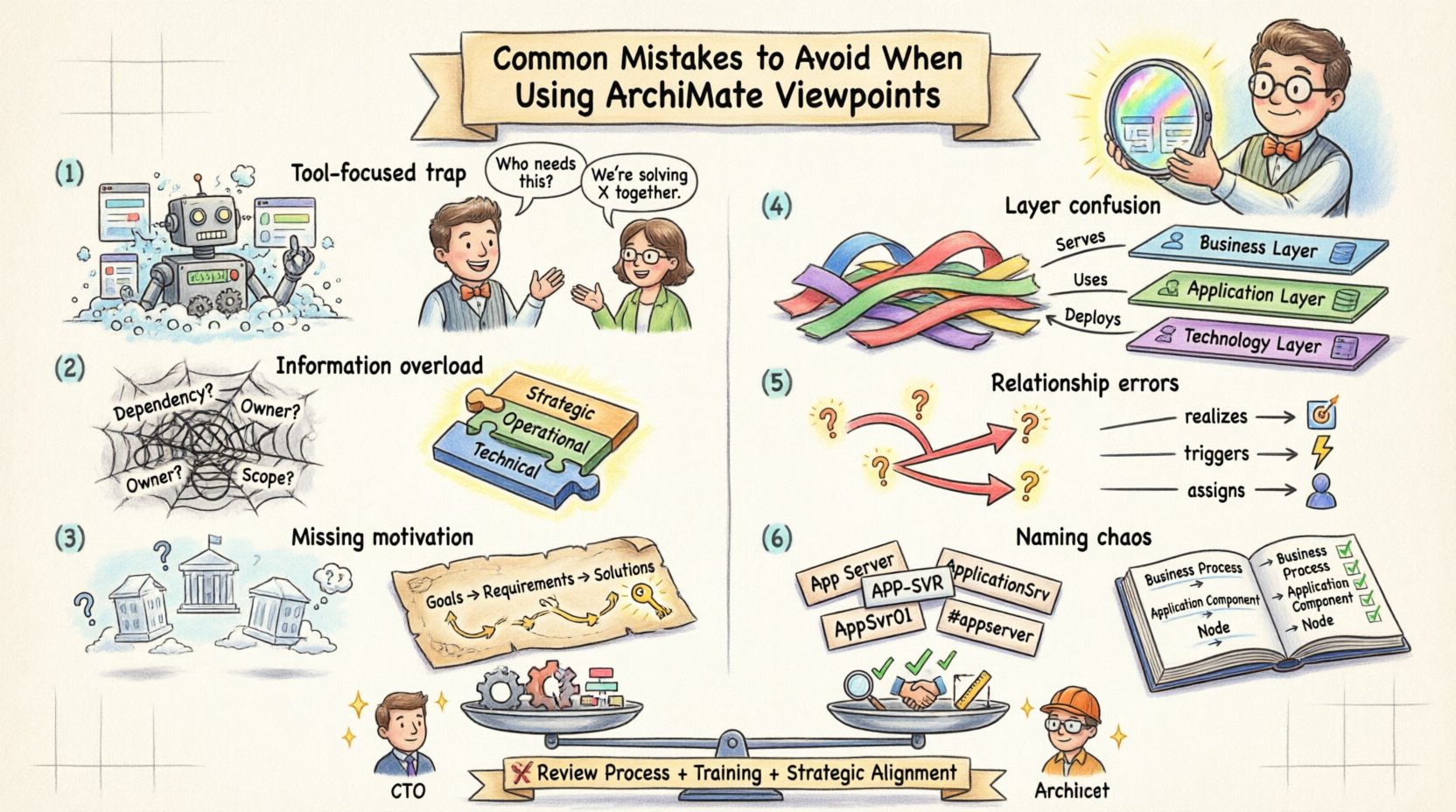
👁️ Mistake 1: Designing for the Tool Instead of the Audience
One of the most pervasive errors occurs when the architect designs the view to demonstrate the capabilities of the modeling software, rather than to solve a business problem. This often results in diagrams that look technically impressive but fail to convey meaning.
When you prioritize the tool’s features, you tend to include every possible element type available in the palette. This leads to cluttered diagrams that confuse rather than clarify.
Signs of Tool-Centric Design
- Using every relationship type available, even when none are relevant to the specific question.
- Overloading the canvas with layers (Business, Application, Technology) without clear justification.
- Creating views that require complex zooming or panning to understand basic flows.
- Focusing on technical correctness over narrative flow.
The Fix: Audience First
Before opening your modeling environment, identify the specific questions the stakeholder needs answered. Ask:
- Who is viewing this?
- What decision will they make based on this?
- What information do they already possess?
If the audience is non-technical, limit the use of technical constructs like interfaces or data objects unless they directly impact the business outcome. The goal is communication, not certification of the model.
📉 Mistake 2: Overloading a Single View with Too Much Information
There is a temptation to create a “master view” that contains the entire scope of the architecture. This approach violates the principle of separation of concerns. An architecture model is too large to be understood in a single glance.
When a single view attempts to show the entire enterprise structure, from high-level strategy down to specific database tables, it becomes unusable. The viewer cannot distinguish signal from noise.
Consequences of Overcrowding
- Visual Clutter: Lines cross over each other, making flow difficult to trace.
- Context Loss: The specific purpose of the diagram is lost in the general complexity.
- Performance Issues: Rendering large models in browsers or viewers can become slow and frustrating.
- Stakeholder Disengagement: Users may stop looking at the diagram entirely if it is too dense.
The Fix: Strategic Segmentation
Adopt a layered approach to your viewpoint design. Split your architecture into logical domains:
- Strategic Viewpoints: Focus on goals, principles, and drivers. Ignore implementation details.
- Operational Viewpoints: Focus on processes, actors, and workflow. Minimize technical infrastructure.
- Technical Viewpoints: Focus on infrastructure, networks, and software components. Abstract business logic.
Ensure that each viewpoint has a clear scope. If a concept is not within the scope of the current view, do not include it, even if it exists in the underlying model.
🧩 Mistake 3: Ignoring the Motivation Layer
Many architecture projects focus heavily on the behavior, structure, and implementation layers while neglecting the motivation layer. This layer includes elements like goals, requirements, principles, and assessments.
Without the motivation layer, the architecture lacks context. You might show what the system does and how it is built, but you fail to explain why it exists.
Why Motivation Matters
Stakeholders need to understand the business value behind architectural decisions. If a new technology is proposed, the motivation layer explains the driver behind the change. If a process is removed, it should be linked to a goal that is no longer relevant.
Common Errors in Motivation Modeling
- Disconnecting goals from the capabilities that support them.
- Listing requirements without linking them to specific solutions.
- Using generic labels like “Improve Efficiency” without defining measurable metrics.
The Fix: Traceability
Ensure that every structural element in a view can be traced back to a business driver. Use the ArchiMate motivation relationships to connect:
- Goal to Assessment (How well is the goal met?)
- Requirement to Goal (Why is this requirement needed?)
- Principle to Goal (What rule guides this decision?)
When creating a viewpoint, ensure that the motivation layer is visible if the audience needs to understand the rationale behind the architecture.
🔄 Mistake 4: Inconsistent Layering of Business, Application, and Technology
ArchiMate defines three core layers: Business, Application, and Technology. A common mistake is mixing these layers indiscriminately in a single view without clear justification or visual distinction.
While relationships between layers are valid, a view that constantly jumps between layers without a clear narrative can confuse the reader. For example, drawing a direct relationship from a Business Actor to a Server without an intermediate Application layer obscures the software that mediates the interaction.
Best Practices for Layering
- Use Color Coding: Assign distinct colors to each layer to maintain visual separation.
- Respect Abstraction: Do not link a Business Process directly to a Database Table. Use an Application Component or Process as the bridge.
- Contextual Links: If showing cross-layer relationships, ensure they are critical to the view’s purpose.
When to Mix Layers
There are valid reasons to mix layers, such as in a System Interaction View or a Service-Oriented View. However, these should be intentional and documented. If you mix layers, ensure you explicitly state that the view is intended to show end-to-end functionality.
🧩 Mistake 5: Neglecting Relationship Semantics
ArchiMate offers a rich set of relationship types. Some are structural (assignment, realization), while others are behavioral (flow, triggering, access). A frequent error is using the wrong relationship type or using relationships that imply causality where none exists.
For instance, using an Access relationship when a Assignment relationship is intended changes the meaning of the diagram. An access relationship implies data flow, while an assignment implies responsibility.
Common Relationship Errors
- Overuse of Aggregation: Using aggregation to link unrelated business objects.
- Missing Triggers: Showing a process followed by another process without a flow relationship to indicate sequence.
- Incorrect Realization: Claiming a component realizes a process when it actually supports it.
The Fix: Strict Adherence to Semantics
Review the ArchiMate specification regarding relationship semantics. Ensure that every line drawn on the diagram has a valid meaning. If you are unsure, check the directionality of the relationship. Does the arrow point from the supplier to the consumer? Does the relationship type match the physical or logical connection being described?
🏷️ Mistake 6: Failing to Maintain Naming Conventions
Consistency in naming is crucial for the long-term usability of an architecture repository. If one architect names a process “Customer Onboarding” and another names the same process “New Client Registration,” automated analysis and search become unreliable.
This issue is often exacerbated when multiple architects work on the same model without a centralized governance process.
Risks of Inconsistent Naming
- Search Failures: Stakeholders cannot find existing assets.
- Redundancy: Duplicate elements are created because the system does not recognize them as the same.
- Reporting Errors: Dashboards may show inflated counts of processes or applications.
The Fix: A Standardized Dictionary
Establish a naming convention standard before beginning work. This standard should cover:
- Capitalization: Use Title Case or Sentence Case consistently.
- Terminology: Define preferred terms for common concepts (e.g., use “Process” instead of “Activity” for high-level flows).
- Prefixes/Suffixes: Use codes to indicate layer or domain (e.g., APP-001 for Application).
Enforce this standard through regular audits and peer reviews.
📊 Comparison of Good vs. Bad Practices
The table below summarizes the key distinctions between common errors and recommended approaches.
| Category | ❌ Common Mistake | ✅ Recommended Practice |
|---|---|---|
| Scope | One diagram shows the entire enterprise. | Multiple diagrams, each focused on a specific domain or question. |
| Audience | Designed for the modeling tool features. | Designed for the stakeholder’s decision-making needs. |
| Layers | Mixing layers without visual distinction. | Clear color coding and separation of Business, Application, and Technology. |
| Motivation | Focus only on structure and behavior. | Include goals, drivers, and principles to provide context. |
| Naming | Inconsistent terms across the repository. | Strict adherence to a centralized naming dictionary. |
| Relationships | Generic lines between elements. | Precise use of ArchiMate relationship semantics. |
🔄 Establishing a Review Process for Architectural Views
Preventing these mistakes requires a structured review process. You cannot rely solely on individual discipline; you need a system of checks and balances.
Implement a Peer Review cycle where another architect examines the viewpoint before it is published. This reviewer should check for:
- Adherence to naming standards.
- Correctness of relationship types.
- Alignment with the intended stakeholder audience.
- Completeness of the motivation layer (if applicable).
Additionally, use automated consistency checks provided by your modeling environment. These tools can often flag orphaned elements, missing relationships, or naming conflicts that a human might miss.
🎓 Training and Knowledge Sharing for Consistency
Even with the best guidelines, human error is inevitable. Investing in training ensures that all team members understand the ArchiMate specification and the specific conventions of your organization.
Knowledge sharing sessions can be held monthly to discuss recent modeling challenges. For example, if a new type of business process was introduced, demonstrate how it should be modeled in a viewpoint. This continuous learning approach helps prevent the propagation of bad habits.
🎯 Keeping Viewpoints Aligned with Strategic Goals
Finally, ensure that your viewpoints remain relevant over time. Architecture is not static. Strategies change, and the models must evolve to reflect that reality.
Regularly review your viewpoints to ensure they still answer the right questions. If a specific stakeholder group is no longer using a particular view, consider archiving it. If a new strategic goal is introduced, create a new viewpoint that highlights the impact of that goal on the architecture.
Final Thoughts on Architectural Clarity
Creating effective ArchiMate viewpoints is a balance between technical accuracy and communicative clarity. The mistakes outlined above are common, but they are also avoidable. By focusing on the audience, maintaining strict standards, and respecting the semantics of the language, you can produce architecture descriptions that drive value.
Remember that the model is a means to an end. It exists to support decision-making. If a viewpoint does not support a decision, it is not serving its purpose. Continuously evaluate your models against the needs of your organization. With discipline and attention to detail, your enterprise architecture will become a reliable asset for the business.

 English
 Arabic
 Chinese (Simplified)
 Dutch
Dutch French
 German
 Italian
 Japanese
 Korean
 Portuguese
 Russian
 Spanish