


Enterprise architecture can feel overwhelming. The diagrams are complex, the terminology is dense, and the connections between different parts of an organization are intricate. To make sense of this complexity, professionals rely on a specific standard known as ArchiMate. Within this standard, one concept often causes confusion: the Viewpoint. Understanding what a Viewpoint is, how it differs from a View, and when to use each is essential for creating meaningful architecture descriptions. This guide explores ArchiMate Viewpoints in depth, breaking down the theory and practice without unnecessary jargon.
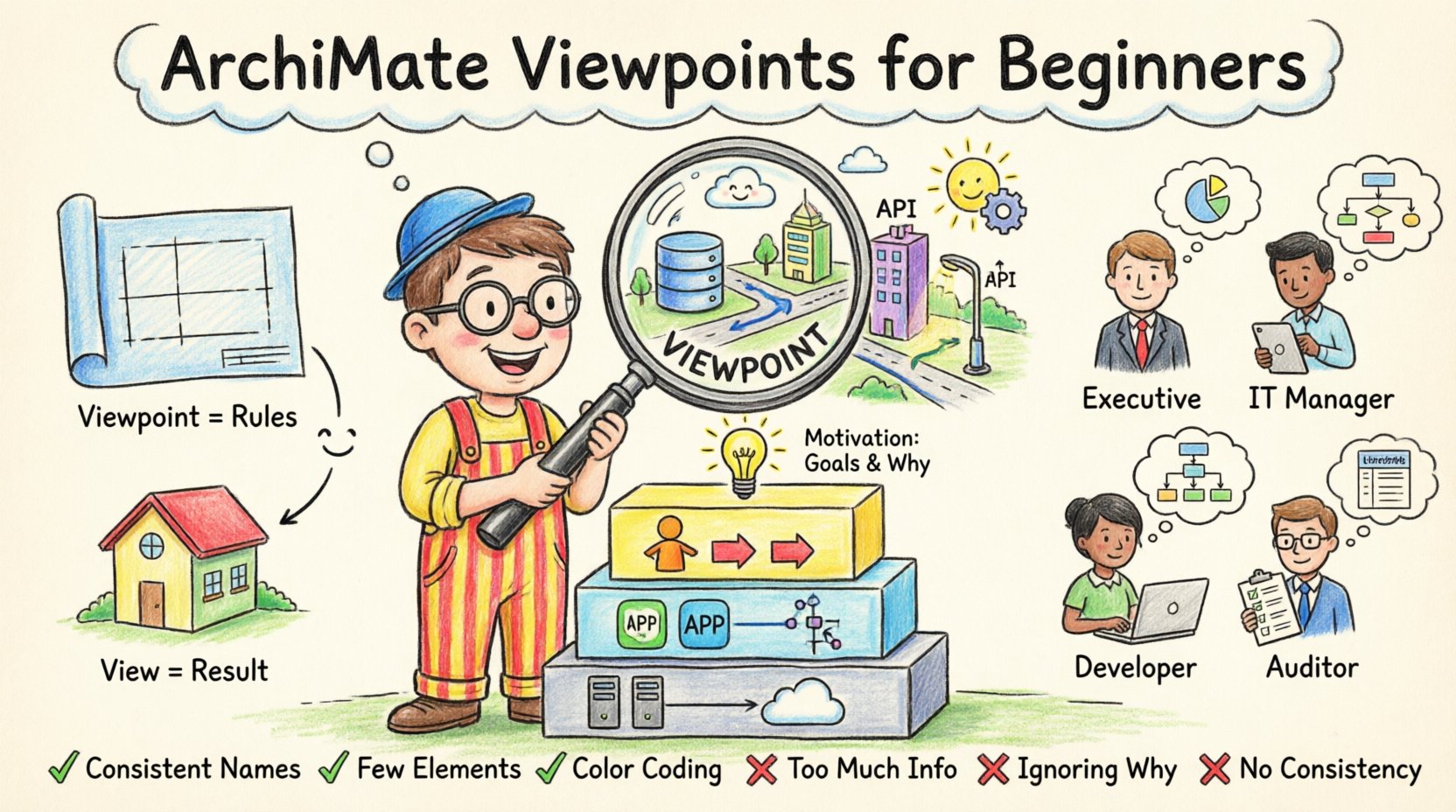
What is an ArchiMate Viewpoint? 🧭
In the context of Enterprise Architecture (EA), information overload is a genuine risk. Stakeholders have different needs. A Chief Technology Officer requires a different level of detail than a business analyst. A Viewpoint acts as a lens. It defines the conventions for constructing a specific View. It tells the architect what to include, what to exclude, and how to represent the information visually.
Think of a Viewpoint as a template or a set of rules. It does not contain the actual data. Instead, it defines the structure for the data. When you apply a Viewpoint to your architecture model, you generate a View. This distinction is critical for maintaining consistency across large-scale projects.
Key Characteristics of a Viewpoint
- Target Audience: It identifies who the View is intended for. This could be developers, managers, or investors.
- Concerns: It focuses on specific questions or problems the audience cares about. For example, security, cost, or performance.
- Notation: It specifies which ArchiMate elements and relationships are allowed in the diagram.
- Abstraction Level: It determines how much detail is shown. High-level views show strategies, while low-level views show specific interfaces.
View vs. Viewpoint: The Critical Distinction 🔍
Confusion often arises between these two terms. While they are related, they serve different functions in the architecture lifecycle. Confusing them can lead to disorganized documentation and unclear communication.
A Viewpoint is the specification. It is the definition. It exists before the diagram is drawn. It answers the question: What rules should I follow to create this diagram?
A View is the result. It is the actual diagram or document produced. It answers the question: What does the architecture look like for this specific purpose?
Consider the relationship like a blueprint and a house. The Viewpoint is the blueprint template used to draw the floor plan. The View is the actual floor plan you hold in your hands. You can use the same Viewpoint (the template) to create multiple Views (different floor plans for different floors or phases).
Comparison Table: Viewpoint vs. View
| Feature | Viewpoint | View |
|---|---|---|
| Nature | Definition / Template | Instance / Artifact |
| Existence | Exists as a standard or guideline | Exists as a diagram or document |
| Content | Lists allowed elements and rules | Contains specific data and models |
| Reusability | High (used across many projects) | Low (specific to one context) |
| Question Answered | How should I represent this? | What is the current state? |
The Three Core Layers 🏗️
ArchiMate structures information into layers. A Viewpoint typically focuses on one or more of these layers to address specific concerns. Understanding these layers is fundamental to defining effective Viewpoints.
1. Business Layer
This layer represents the human and organizational aspects of the enterprise. It includes processes, roles, and organizational units. A Viewpoint focused on this layer might be used by a business analyst to map out how work gets done.
- Key Elements: Business Process, Business Actor, Business Role, Business Object.
- Common Concerns: Efficiency, workflow, resource allocation, organizational structure.
2. Application Layer
This layer describes the software systems that support the business. It focuses on functionality and services provided by applications. This is often the bridge between business needs and technical implementation.
- Key Elements: Application Component, Application Service, Application Interface, Application Function.
- Common Concerns: System integration, data flow, software dependencies, functionality gaps.
3. Technology Layer
This layer covers the physical infrastructure. It includes hardware, networks, and deployment nodes. While often overlooked, this layer is critical for understanding the constraints of deployment.
- Key Elements: Technology Node, Device, Network, Distribution Node.
- Common Concerns: Infrastructure capacity, network topology, hardware costs, physical location.
The Motivation Layer 🎯
One of the most important additions in recent versions of the standard is the Motivation Layer. It captures the reasons behind the architecture. Why are we doing this? What drives the decision?
A Viewpoint focusing on Motivation is vital for governance and alignment. It connects business strategy to execution.
- Key Elements: Goal, Principle, Requirement, Assessment, Driver.
- Why it Matters: It prevents “architecture for architecture’s sake.” It ensures every technical decision traces back to a business need.
- Example: A Viewpoint might show how a new security Requirement forces a change in the Technology Layer.
Mapping Stakeholders to Viewpoints 👥
Not everyone needs to see the same diagram. Creating a Viewpoint requires knowing who will read it. This process is called Stakeholder Mapping. Different roles have different mental models and information needs.
Identifying Your Stakeholders
Before designing a Viewpoint, list the people who will consume the information. Common roles include:
- Executive Management: They need high-level strategy and financial impact. They do not need to see server details.
- IT Managers: They need to understand integration points and resource requirements.
- Developers: They need specific interface definitions and data flow details.
- Auditors: They need compliance checks and security controls documented.
Aligning Concerns
Once stakeholders are identified, list their concerns. A Viewpoint is essentially a solution to a set of concerns. If a stakeholder is worried about security, the Viewpoint must highlight security mechanisms. If they are worried about cost, the Viewpoint must highlight resource usage.
Do not create a Viewpoint that answers questions nobody is asking. This creates noise and reduces the value of the architecture description.
Standard Viewpoint Patterns 📊
While custom Viewpoints are necessary, the standard defines several common patterns. Using these established patterns ensures that your diagrams are understood by anyone familiar with ArchiMate.
1. Business Viewpoint
This Viewpoint focuses solely on the Business Layer. It is useful for process improvement initiatives. It typically excludes Application and Technology elements to keep the diagram clean.
2. Technology Viewpoint
This Viewpoint focuses on the Technology Layer. It is used for infrastructure planning. It might show how applications are deployed onto physical nodes.
3. Implementation and Migration Viewpoint
This is one of the most complex Viewpoints. It deals with change over time. It maps the current state to the target state. It includes specific elements like Project, Phase, and Work Package.
- Goal: To plan the journey from “As Is” to “To Be”.
- Key Elements: Project, Phase, Work Package, Implementation Event.
- Usage: Essential for program management and release planning.
4. Requirements Viewpoint
This Viewpoint links business needs to architecture capabilities. It highlights gaps where the current architecture fails to meet a specific requirement.
5. Communication Viewpoint
This Viewpoint is designed for a specific audience. It might simplify the notation or use specific labels to make the diagram accessible to non-technical stakeholders.
How to Define a Custom Viewpoint 🛠️
Sometimes, standard Viewpoints are not enough. You may need to define a custom Viewpoint for a specific project. Follow this structured approach to ensure clarity and consistency.
Step 1: Define the Scope
What part of the architecture does this cover? Is it limited to the Business Layer? Does it include the Motivation Layer? Clearly state the boundaries.
Step 2: Select the Notation
Which elements are allowed? Which relationships are permitted? For example, a Viewpoint might allow “serves” relationships but forbid “access” relationships to simplify the diagram.
Step 3: Determine the Abstraction Level
Will the diagram show specific instances (e.g., “Server A”) or generic types (e.g., “Web Server”)? This decision impacts the longevity of the Viewpoint.
Step 4: Document the Rules
Write down the conventions. How should colors be used? How should text be formatted? Consistency is key for readability.
Step 5: Validate with Stakeholders
Before using the Viewpoint, show it to the intended audience. Ask if it answers their questions. If they say no, refine the Viewpoint.
Common Mistakes to Avoid ❌
Even experienced architects make errors when defining Viewpoints. Avoiding these pitfalls saves time and improves communication.
1. Too Much Information
A Viewpoint that tries to answer every question for every stakeholder becomes useless. It becomes a wall of text and lines. Keep it focused. If you need more detail, create a different Viewpoint.
2. Ignoring the Motivation Layer
Many Viewpoints focus only on structure. They ignore the “why.” This makes it hard to justify changes. Always consider including goals and requirements where relevant.
3. Mixing Layers Without Purpose
While cross-layer views are possible, they can become confusing. If you mix Business and Technology elements, ensure there is a clear logical link. Do not mix them just because you can.
4. Static Documentation
Viewpoints should evolve. As the organization changes, the Viewpoints may need to change. Do not treat them as permanent rules. Review them periodically.
5. Focusing on Syntax Over Semantics
ArchiMate has strict syntax rules. However, the meaning (semantics) is what matters. A diagram that follows syntax but is confusing to read is a failure. Prioritize clarity.
Best Practices for Clarity ✅
To ensure your architecture descriptions are effective, adhere to these guidelines.
- Use Consistent Naming: Ensure that elements are named the same way across all Viewpoints. “User” should not be “Actor” in one diagram and “Role” in another.
- Limit Element Count: Try to keep diagrams under 30 elements if possible. If a Viewpoint requires more, split it into multiple diagrams.
- Use Color Strategically: Use color to indicate status (e.g., red for deprecated, green for active). Do not use color just for decoration.
- Provide Context: Every View should have a title, a date, and a version. This helps with version control.
- Link to the Model: Where possible, link the Viewpoint to the underlying data model. This allows for traceability.
Maintaining Architecture Descriptions 🔄
Creating Viewpoints is not a one-time task. The enterprise environment is dynamic. New systems are added, and old ones are retired. Viewpoints must reflect these changes.
Review Cycles
Schedule regular reviews of your Viewpoints. Are they still relevant? Do they still answer the stakeholders’ questions? If the answer is no, update the Viewpoint definition.
Change Management
When the architecture changes, update the Views. Ensure that the Viewpoint definition remains stable even if the content changes. The Viewpoint is the rule; the View is the data.
Conclusion 🏁
ArchiMate Viewpoints provide the structure needed to manage complexity. They allow architects to tailor information to specific needs, ensuring that the right people see the right data at the right time. By understanding the difference between View and Viewpoint, mapping stakeholders correctly, and adhering to best practices, you can create architecture descriptions that drive value.
Focus on the concerns of your audience. Keep the diagrams clear. Respect the layers. And remember that the goal is communication, not just drawing lines. With a solid understanding of Viewpoints, you can navigate the intricacies of enterprise architecture with confidence and precision.

 English
 Arabic
 Chinese (Simplified)
 Dutch
Dutch French
 German
 Italian
 Japanese
 Korean
 Portuguese
 Russian
 Spanish