


Standardize, Simplify, and Communicate Your Software Architecture Effectively
1. Introduction
In today’s complex software landscape, clear communication about system architecture is critical for project success. Whether you’re presenting to executives, collaborating with developers, or onboarding new team members, the way you visualize and document your architecture matters.
Enter the C4 Model—a hierarchical, abstraction-friendly framework designed to help software teams tell the story of their systems at the right level of detail for the right audience. Developed by Simon Brown, the C4 Model has become a de facto standard for architecture documentation because it balances simplicity with rigor.
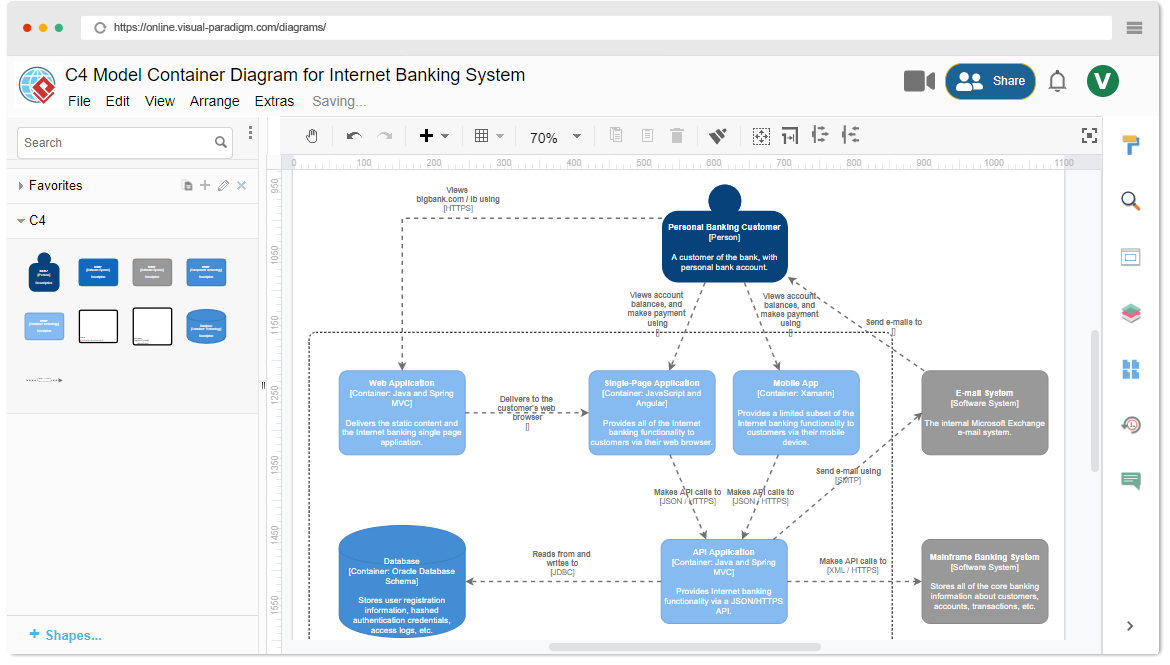
This guide walks you through everything you need to know: from foundational concepts and practical examples to advanced tooling with Visual Paradigm. By the end, you’ll be equipped to create clear, stakeholder-aligned architecture diagrams that drive better decisions and smoother delivery.
2. What Is the C4 Model?
Definition & Origins
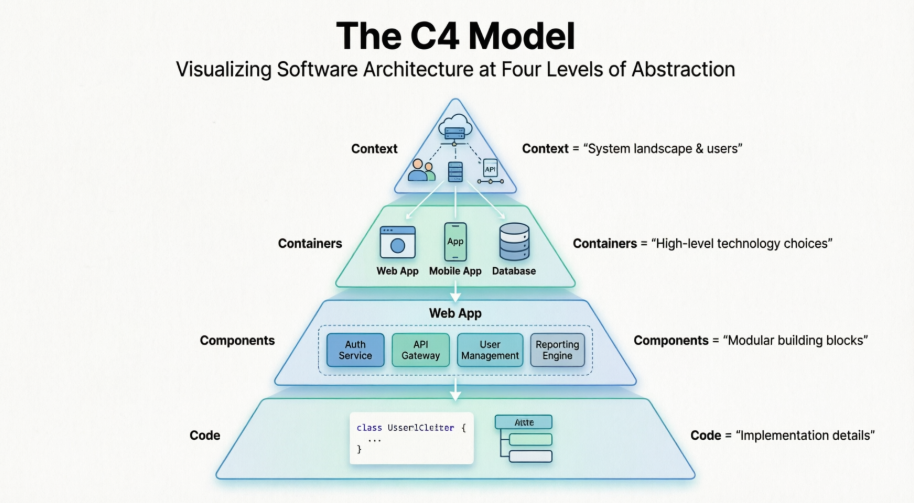
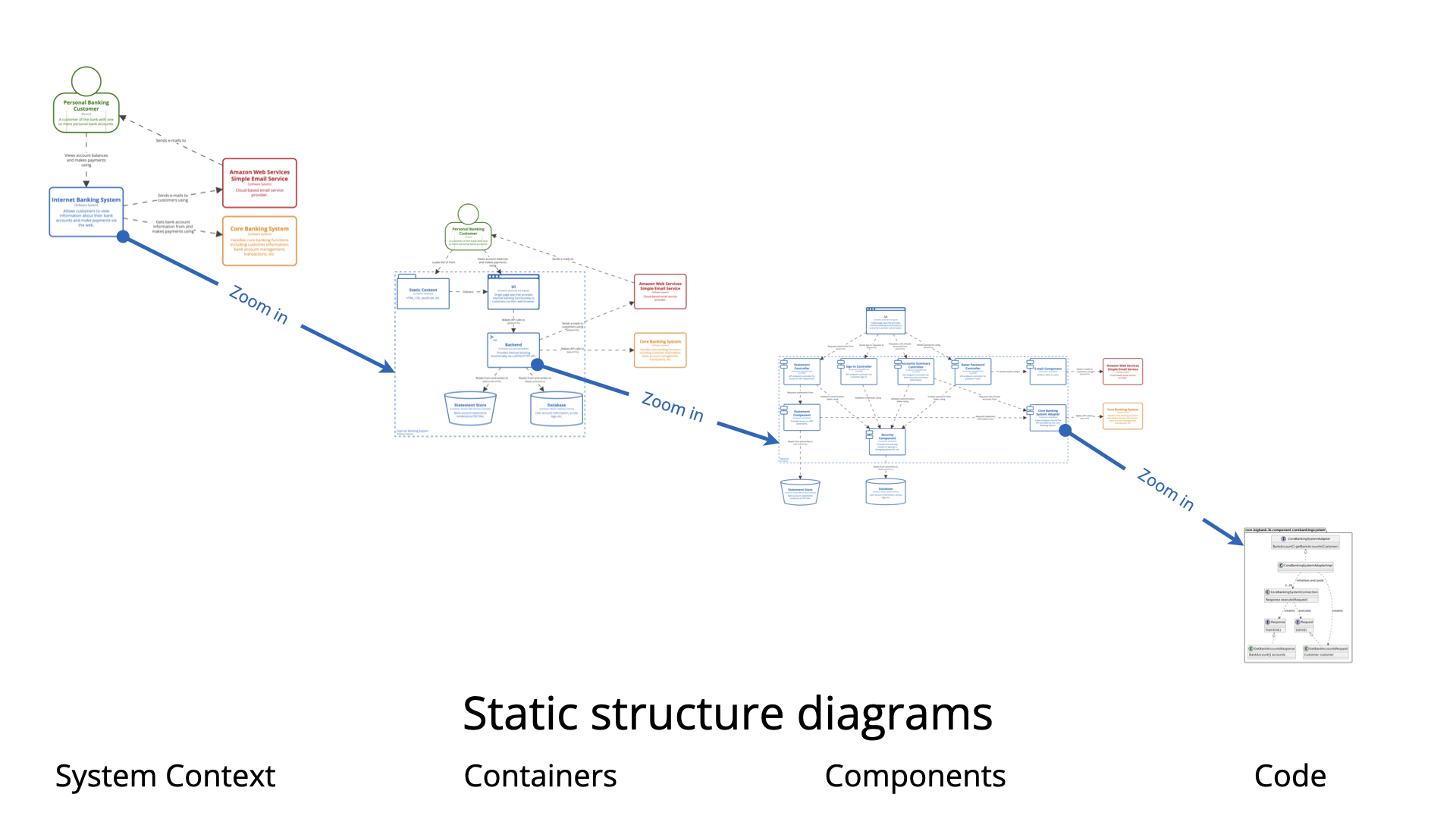
The C4 Model is a lightweight, hierarchical diagramming framework for visualizing software architecture. The “C4” stands for the four core levels of abstraction:
-
Context (Level 1)
-
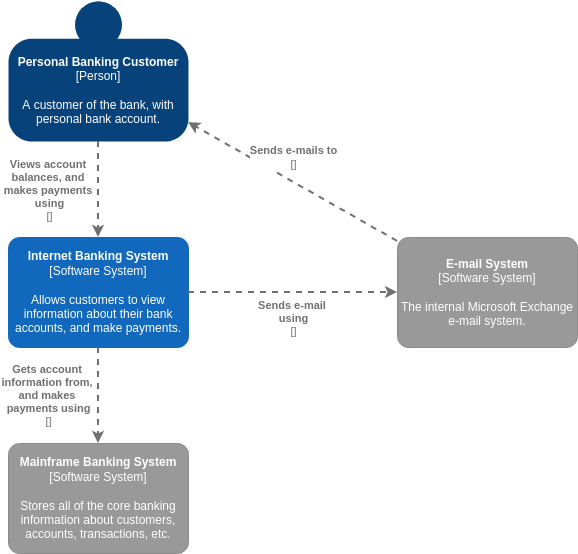
Containers (Level 2)
-
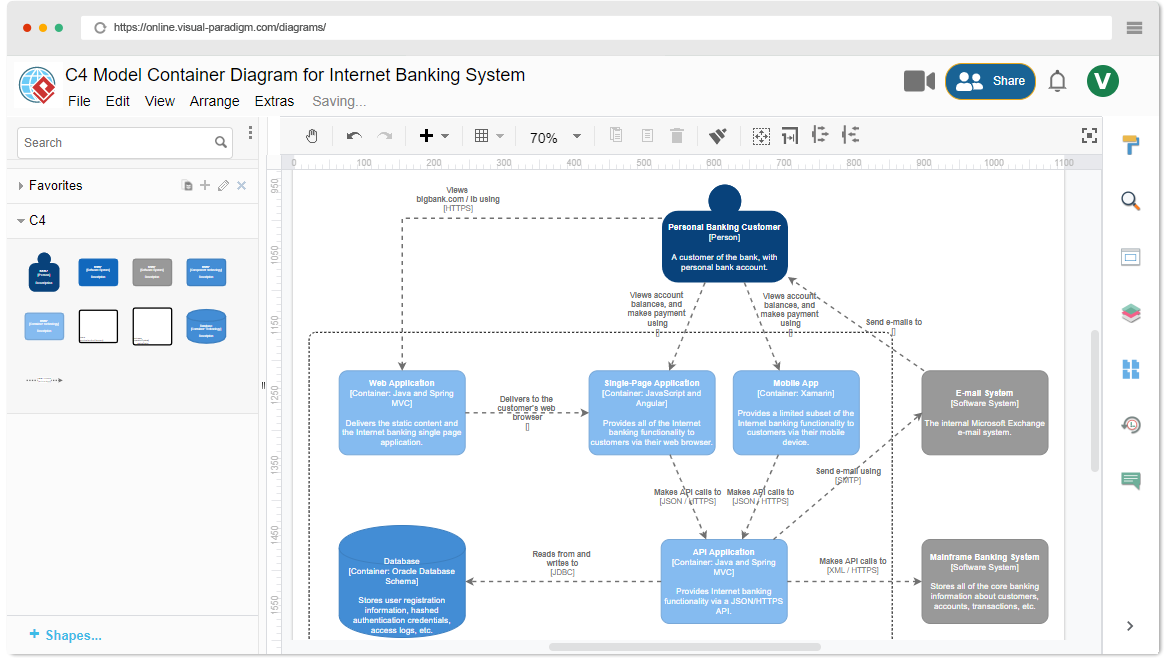
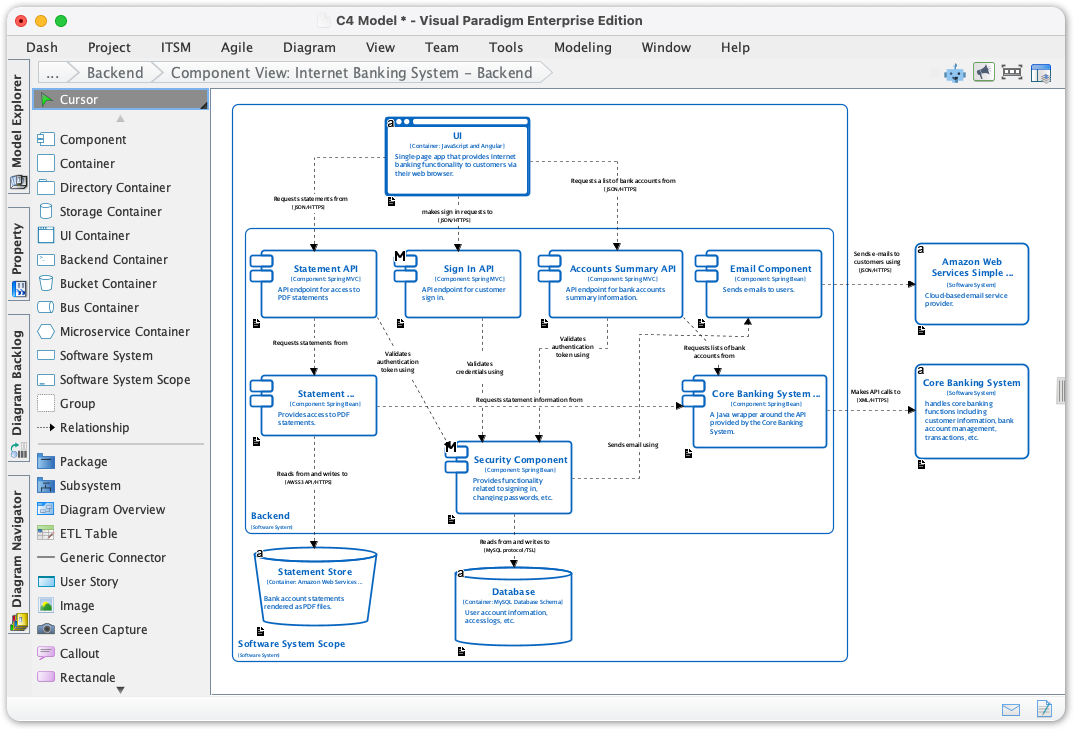
Components (Level 3)
-
Code (Level 4)
Developed by software architect Simon Brown, the model addresses a common pain point: architecture diagrams that are either too high-level to be useful or too detailed to be understood by non-technical stakeholders.
Core Philosophy
-
Audience-first design: Different stakeholders need different views.
-
Progressive disclosure: Start broad, then zoom in as needed.
-
Notation-agnostic: Focus on concepts, not rigid symbols.
-
Living documentation: Diagrams should evolve with the code.
3. Software Architecture Fundamentals
What Is Software Architecture?
Software architecture is the fundamental organization of a system embodied in:
-
Its components and their relationships
-
The principles guiding its design and evolution
-
The interaction between software, hardware, and people
Good architecture enables scalability, maintainability, security, and clear communication across teams.
Key Concepts in the C4 Model
| Concept | Description | Example |
|---|---|---|
| Person | A human actor who interacts with the system | Customer, Admin, Support Agent |
| Software System | The highest-level container delivering value to users | “Big Bank Plc Online Banking” |
| Container | A deployable/runtime unit (application, data store) | Web App, Mobile App, Database, Microservice |
| Component | A modular building block within a container | Authentication Module, Payment Processor |
| Code | Classes, functions, or modules (optional/autogenerated) | UserController.java, paymentService.ts |
The Four Core Levels Explained
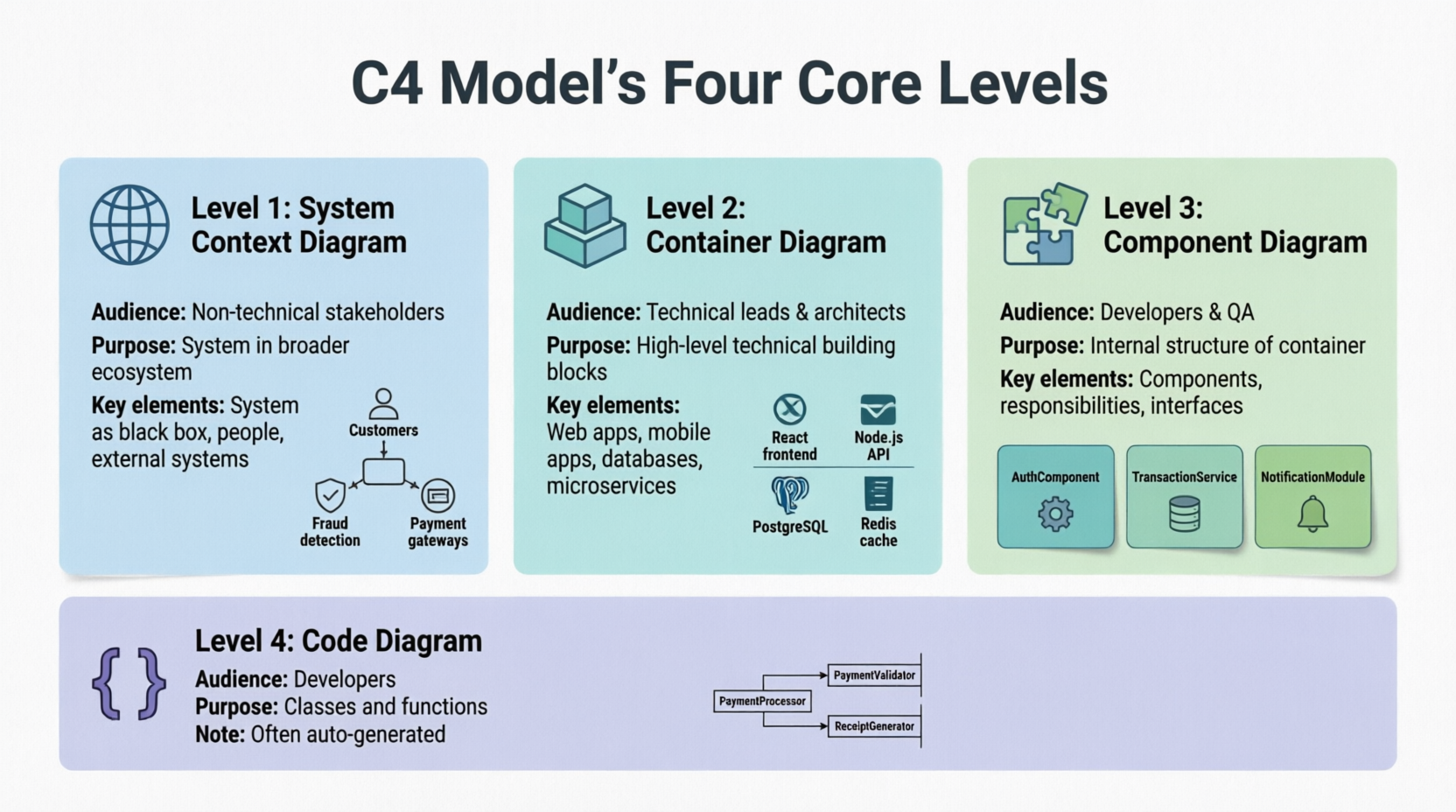
🌐 Level 1: System Context Diagram
-
Audience: Non-technical stakeholders, product owners, executives
-
Purpose: Show how your system fits into the broader ecosystem
-
Key elements: Your system (as a black box), people, external systems
-
Example: An online banking system interacting with customers, fraud detection services, and payment gateways
📦 Level 2: Container Diagram
-
Audience: Technical leads, architects, DevOps engineers
-
Purpose: Reveal high-level technical building blocks and their interactions
-
Key elements: Web apps, mobile apps, databases, microservices, message queues
-
Example: Breaking the banking system into React frontend, Node.js API, PostgreSQL database, and Redis cache
🧩 Level 3: Component Diagram
-
Audience: Developers, QA engineers, technical writers
-
Purpose: Detail the internal structure of a single container
-
Key elements: Components, their responsibilities, interfaces, and dependencies
-
Example: Inside the API container:
AuthComponent,TransactionService,NotificationModule
💻 Level 4: Code Diagram (Optional)
-
Audience: Developers working on specific modules
-
Purpose: Show classes, functions, or key algorithms
-
Note: Often autogenerated from source code via tools like Structurizr or IDE plugins
-
Example: UML class diagram for the
PaymentProcessorcomponent
Supporting Diagram Types
Beyond the core four, the C4 Model includes two supplemental views:
| Diagram Type | Purpose |
|---|---|
| System Landscape | Shows multiple software systems and their relationships across an organization |
| Dynamic Diagram | Illustrates runtime behavior: sequences, workflows, or user journeys across components |
| Deployment Diagram | Maps containers to infrastructure: servers, Kubernetes clusters, cloud regions |
4. Use Cases & Practical Applications
When to Use the C4 Model
✅ Onboarding new team members
✅ Communicating architecture to non-technical stakeholders
✅ Documenting microservices or distributed systems
✅ Planning system migrations or refactoring
✅ Aligning cross-functional teams (Dev, Ops, Security, Product)
✅ Creating living architecture documentation
Real-World Examples
Example 1: E-Commerce Platform
-
Context: Customers, Payment Gateway, Inventory System, Shipping Provider ↔ “ShopEasy Platform”
-
Containers: React SPA, Node.js API, PostgreSQL, Redis, Elasticsearch
-
Components (within API):
CartService,OrderProcessor,RecommendationEngine -
Code:
calculateDiscount()function inPricingModule
Example 2: Healthcare Data Platform
-
Landscape: EHR System, Analytics Engine, Patient Portal, Regulatory Reporting
-
Dynamic: Patient data flow from intake → storage → analysis → dashboard
-
Deployment: Containers mapped to AWS regions with HIPAA-compliant infrastructure
5. Guidelines & Best Practices
General Principles
-
Start with your audience: Define who will read the diagram before you draw it.
-
One diagram, one purpose: Avoid overcrowding; keep focus sharp.
-
Use consistent naming: “User Database” vs. “DB_User” creates confusion.
-
Label relationships clearly: “reads from”, “sends events to”, “authenticates via”.
-
Keep it living: Update diagrams as code changes; treat them as documentation, not art.
Level-Specific Tips
System Context
-
Limit to 5–10 external dependencies max
-
Use business-friendly language (avoid technical jargon)
-
Highlight value flows, not just data flows
Containers
-
Show technology choices (e.g., “React 18”, “PostgreSQL 15”)
-
Indicate communication protocols (REST, gRPC, Kafka)
-
Group related containers visually
Components
-
Focus on one container per diagram
-
Show interfaces/APIs between components
-
Use color or borders to denote bounded contexts
Code Level
-
Only include when necessary for complex logic
-
Prefer autogenerated diagrams to avoid drift
-
Link to source code repositories for deeper exploration
Common Pitfalls to Avoid
❌ Mixing abstraction levels in one diagram
❌ Overusing colors or custom shapes (reduces portability)
❌ Creating diagrams that aren’t version-controlled
❌ Documenting only the “happy path” (include error flows where relevant)
❌ Letting diagrams become outdated (assign ownership for updates)
6. Tips & Tricks for Effective C4 Diagrams
🎯 Audience Tailoring
| Stakeholder | Recommended Levels | Focus Areas |
|---|---|---|
| Executives | Context, Landscape | Business value, system boundaries, key integrations |
| Product Managers | Context, Containers | User journeys, feature ownership, dependencies |
| Architects | All levels | Technology choices, scalability, security boundaries |
| Developers | Components, Code | Interfaces, contracts, implementation details |
| DevOps/SRE | Containers, Deployment | Infrastructure mapping, observability points |
🛠️ Efficiency Boosters
-
Template first: Start from a C4 template rather than a blank canvas
-
Drill-down navigation: Use sub-diagrams to link Context → Containers → Components
-
Automate where possible: Generate Code-level diagrams from source; use AI for initial drafts
-
Version control your diagrams: Store
.c4or PlantUML files in Git alongside code -
Embed diagrams in docs: Use tools that export to Confluence, Notion, or static sites
🔄 Keeping Diagrams Current
-
Integrate diagram updates into your Definition of Done
-
Assign a “diagram owner” per major component
-
Use tools with code-diagram synchronization (e.g., Structurizr, C4-PlantUML)
-
Review architecture diagrams in sprint retrospectives or architecture guilds
7. Tooling: Creating C4 Diagrams with Visual Paradigm
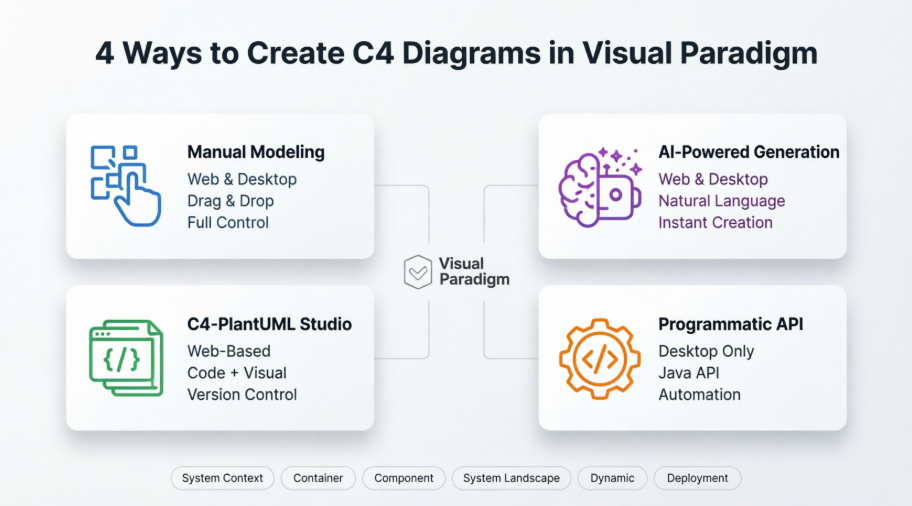
Visual Paradigm offers a comprehensive, AI-enhanced suite for creating, managing, and sharing C4 Model diagrams across teams.
🎨 Supported Diagram Types
Visual Paradigm supports all six C4 diagram types:
-
System Context
-
Containers
-
Components
-
System Landscape
-
Dynamic
-
Deployment
🤖 AI-Powered Workflow
AI C4 Diagram Generator transforms natural language into professional diagrams:
"Create a C4 model for a food delivery app with users, restaurants,
delivery drivers, payment processing, and real-time tracking."
→ Instantly generates a full suite of standards-compliant diagrams.
Key AI Features:
-
Stakeholder-specific output (executive summary vs. engineer deep-dive)
-
Automatic mapping to C4 levels and relationships
-
One-click generation of all six diagram types
🧰 Core Modeling Features
Native C4 Support
-
Dedicated shapes for Person, Software System, Container, Component
-
Pre-styled connectors with relationship labels
-
Custom attributes for metadata (technology, owner, SLA)
Hierarchical Exploration
-
Sub-diagrams: Drill from Context → Container → Component with one click
-
Referenced diagrams: Link related views across projects for traceability
Productivity Tools
-
Sweeper: Intelligently rearrange elements to make space
-
Inline editing: Update labels and properties directly on the canvas
-
Resource-centric interface: Drag-and-drop with smart snapping and alignment
🌐 Collaboration & Sharing
Visual Paradigm Online
-
Real-time co-editing for remote teams
-
Commenting and review workflows
-
Cloud-based access from any device
Publishing Options
-
Project Publisher: Export to interactive HTML site with navigation
-
Report Composer: Generate PDF, Word, or PowerPoint documentation
-
Embeddable exports: PNG, SVG, or Mermaid/PlantUML code for wikis
🔄 Integration & Extensibility
-
C4-PlantUML Studio: Convert text descriptions to PlantUML code
-
AI Chatbot: Refine diagrams via conversational feedback
-
API access: Automate diagram generation in CI/CD pipelines
-
Import/Export: Support for Structurizr, JSON, and standard formats
🚀 Getting Started in Minutes
-
Describe your system in plain language
-
Select target audience (General Readers / Engineers)
-
Generate your C4 suite with one click
-
Refine using drag-and-drop or AI chat
-
Share via link, export, or embed
💡 Pro Tip: Start with a System Context diagram to align stakeholders, then progressively drill down. Use AI for the first draft, then refine manually for precision.
8. Conclusion
The C4 Model isn’t just another diagramming technique—it’s a communication framework that bridges the gap between vision and implementation. By providing the right level of abstraction for the right audience, it reduces ambiguity, accelerates onboarding, and creates living documentation that evolves with your system.
When paired with powerful tooling like Visual Paradigm, the C4 Model becomes even more impactful:
-
AI generation eliminates the blank-canvas problem
-
Hierarchical navigation makes complex systems explorable
-
Collaboration features keep teams aligned across time zones
-
Publishing options turn diagrams into shareable knowledge
Your Next Steps
-
Pick one system you’re working on today
-
Sketch a System Context diagram (even on paper)
-
Identify your primary audience and tailor the detail level
-
Try Visual Paradigm’s AI generator for a fast starting point
-
Integrate diagram updates into your team’s workflow
“Architecture is the decisions that you wish you could get right early in a project, but that you are more likely to get right as you go.” — Simon Brown
The C4 Model helps you make those decisions visible, discussable, and improvable. Start small, iterate often, and let your diagrams tell the story of your software—one clear layer at a time.
Ready to transform your architecture documentation? Explore Visual Paradigm’s C4 Model tools at visual-paradigm.com and generate your first AI-powered diagram in seconds. 🚀
Reference
- C4 Model – Introduction: The official C4 model website introduces a hierarchical approach to software architecture diagramming, helping teams create “maps of your code” at various abstraction levels—System Context, Container, Component, and Code diagrams—to improve communication, onboarding, and risk identification.
- Visualising Software Architecture with the C4 Model: A Singapore Government resource explaining how the C4 Model provides standardized design artefacts for clear architecture communication across technical and non-technical stakeholders, with practical best practices for integration into delivery workflows.
- The C4 Model: Visualizing Software Architecture with AI-Powered Tools: Explores how the C4 model’s hierarchical levels enable clear architecture communication, enhanced by Visual Paradigm’s AI tools that convert text descriptions into professional, standards-compliant C4 diagrams with stakeholder-specific customization.
- C4 Diagram Tool Solution: Presents Visual Paradigm’s dual-platform approach (Desktop for architects, Online for agile teams) for C4 modeling, featuring AI-powered generation, PlantUML integration, real-time collaboration, and export options for professional architecture documentation.
- Container diagram – C4 Model: Explains the Container diagram level of the C4 model, which zooms into a software system to show applications, data stores, technology choices, and communication patterns between containers for technical audiences including architects, developers, and operations staff.
- C4 Component Diagram – Visual Paradigm Chatbot: Describes how Visual Paradigm’s AI chatbot can instantly generate C4 Component Diagrams from natural language descriptions, enabling iterative refinement of internal container architecture with consistent C4 notation. Includes examples for Logistics, Online Exam, and E-Commerce systems.
- Comprehensive Guide to the C4 Model for Software Architecture Documentation – Archimetric: An in-depth guide covering the four core C4 levels (Context, Container, Component, Code), key concepts like hierarchical structure and container scoping, plus Visual Paradigm’s AI-powered ecosystem for automated C4 diagram creation with practical examples for Internet Banking and E-Commerce platforms.
- C4 Diagram Tool Features: Overview of Visual Paradigm’s comprehensive C4 modeling capabilities, including AI-powered diagram generation for all six C4 types, symbol libraries, sub-diagram support, and team collaboration features for architecture documentation.
- Generate the Complete C4 Model Instantly with Visual Paradigm’s AI Tool: Announcement of Visual Paradigm Desktop’s AI Diagram Generator that automatically creates all six C4 diagram types (System Context, Containers, Components, Landscape, Dynamic, Deployment) from simple topic descriptions, reducing documentation time and ensuring consistency.
- The C4 model for visualising software architecture: Detailed overview of the C4 model’s four hierarchical abstractions (software systems, containers, components, code) and supporting diagrams (system landscape, dynamic, deployment), created by Simon Brown as a notation and tooling-independent approach. Includes an embedded video presentation from Agile on the Beach 2019.
- Full C4 Model Support Added to Visual Paradigm Desktop: Release notes announcing native support for all six C4 Model diagrams in Visual Paradigm Desktop, with dedicated shapes, templates, and workflows to enforce C4 standards and streamline architecture communication across stakeholder groups.
- C4 Model Templates : Collection of professional, pre-made C4 Model templates for Internet Banking System and other scenarios, enabling quick start with System Context, Container, Component, Deployment, Dynamic, and System Landscape diagrams in a cloud-based editor.
- C4 Model Tool Features: Highlights Visual Paradigm Online’s easy-to-use C4 Model software with drag-and-drop tools, rich symbol library, real-time collaboration, multi-format export (PNG, JPG, SVG, PDF), and integration with Microsoft Office for creating and sharing professional architecture diagrams.
Related posts:
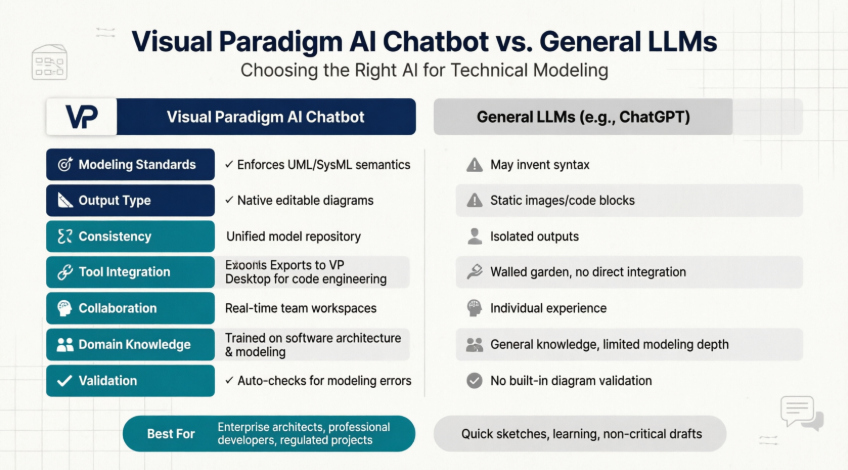 The Complete Guide to AI-Powered UML Diagram Generation
![How to Model Constraints in UML? [With Examples]](https://www.archimetric.com/wp-content/uploads/2026/04/uml-constraint-example.png "How to Model Constraints in UML? [With Examples]") How to Model Constraints in UML? [With Examples]
How to Model Constraints in UML? [With Examples]
 A Comprehensive Case Study on Building C4 Diagrams with Visual Paradigm’s Multi-Method Approach
 From Static Diagrams to Living Knowledge: A Case Study on Visual Paradigm’s Unified AI-Driven Documentation Ecosystem

 English
 Arabic
 Chinese (Simplified)
 Dutch
Dutch French
 German
 Italian
 Japanese
 Korean
 Portuguese
 Russian
 Spanish