


Introduction
In today’s fast-paced software development landscape, the ability to rapidly translate ideas into clear, standardized system models is more valuable than ever. Traditional UML modeling, while powerful, often requires significant manual effort—dragging shapes, drawing connectors, and maintaining consistency across complex diagrams. Enter Visual Paradigm AI: a transformative platform that merges decades of professional software engineering expertise with the power of modern generative AI. This guide explores how Visual Paradigm AI empowers engineers, architects, and product teams to generate, refine, and validate professional UML diagrams using nothing more than natural language. Whether you’re prototyping a new feature, documenting enterprise architecture, or teaching software design principles, Visual Paradigm AI streamlines the entire modeling lifecycle—making professional-grade system design accessible, intelligent, and efficient.
What is Visual Paradigm AI?
Visual Paradigm AI is a modeling platform that deeply integrates generative AI with a professional software engineering toolset. It fundamentally transforms the traditional, manual process of drawing boxes and connecting lines, enabling engineers and system analysts to automatically generate, modify, and analyze standard UML diagrams in seconds using natural language prompts.
Visual Paradigm offers two core AI-powered UML pathways, each designed for different workflow scenarios:
Two Core AI UML Pathways
1. Desktop Application: AI Diagram Generation (Integrated Workflow)
Ideal for professional developers who need to incorporate diagrams into large-scale software project management and code engineering workflows.
-
How it works: In the desktop application, navigate to Tools -> AI Diagram Generation, select your desired UML type (such as Class, Sequence, or Component Diagram), and input your architecture description. The diagram renders directly onto your canvas.
-
Latest Support: Recent updates have added comprehensive support for AI-generated Component Diagrams, Package Diagrams, and Composite Structure Diagrams.
-
Seamless Integration: Generated diagrams are native model objects—not just static images. You can immediately perform reverse engineering, generate source code, or align with database schemas.
2. Web-Based AI Tools: AI Chatbot & Wizard (Conversational & Guided)
Perfect for rapid prototyping, educational purposes, or users who want to create diagrams quickly without installing software.
-
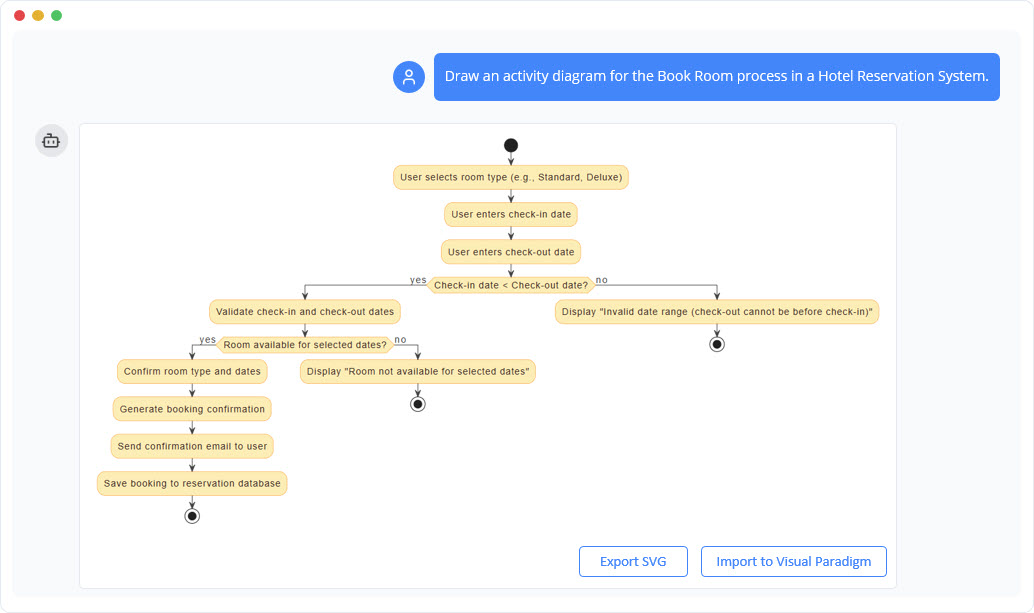
Conversational AI Chatbot: Interact just like you would with ChatGPT. For example, type “Help me create an activity diagram for a bank account opening process,” and the AI will generate the diagram. You can then issue follow-up commands like “Rename ‘Submit Revised Documents’ to ‘Submit Updated Documents’” or “Add an ‘Issue ATM Card’ action after ‘Specify Account’.” The diagram updates dynamically in real-time. When satisfied, click “Import to Visual Paradigm” to bring the diagram into your project.
-
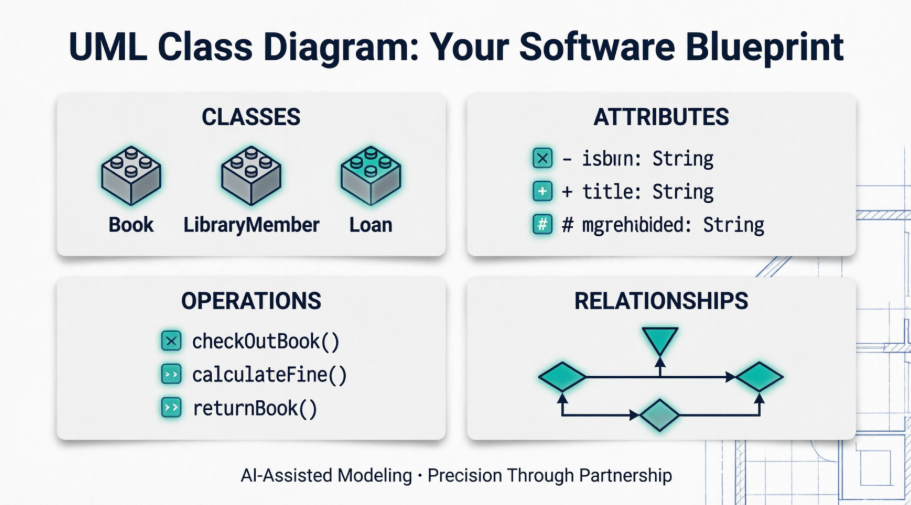
AI-Assisted UML Class Diagram Generator: This tool provides a structured 10-step wizard. It guides you through defining system scope, identifying classes, specifying attributes and methods, and finally generating the diagram along with an AI-powered architecture analysis report to help optimize your design and ensure compliance with UML industry standards.
Core Advantages & Feature Highlights
-
No Syntax Learning Required: You don’t need to know PlantUML or Mermaid code. The AI handles all underlying logic, presenting a form-based, visual interactive experience.
-
Intelligent Relationship Inference: When creating diagrams like Use Case Diagrams, the AI automatically analyzes context and adds advanced dependency relationships such as <> or <>.
-
Full Lifecycle Support: Beyond drawing, the AI can produce architecture summaries, detect potential design flaws, and offer refactoring suggestions.
Core UML Engine & Traditional Features
Visual Paradigm provides comprehensive, enterprise-grade support for system architecture:
-
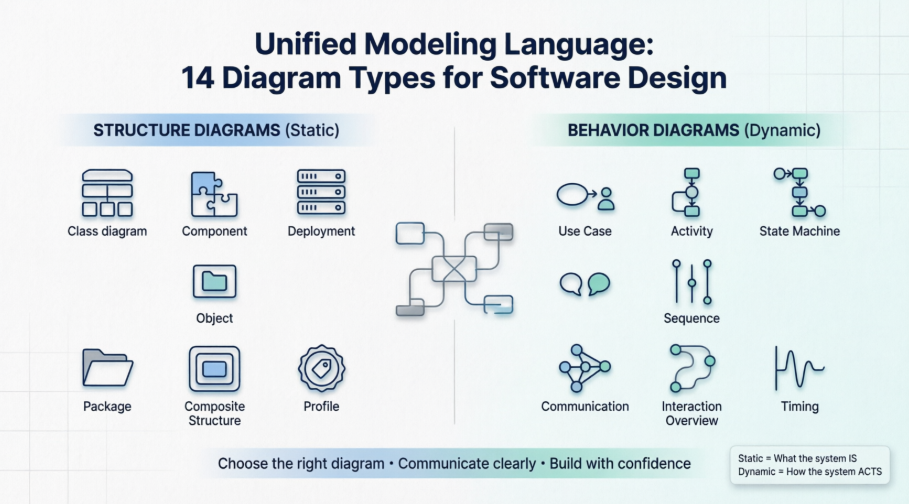
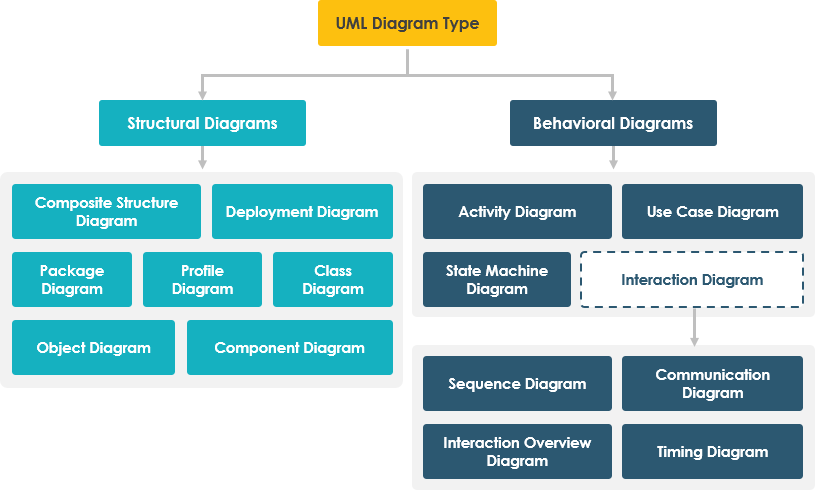
All 14 UML Diagram Types: Full support for Class, Use Case, Sequence, Activity, State Machine, Component, Deployment diagrams, and more.
-
Code Engineering: Seamless bidirectional integration via forward engineering (generating code from diagrams) and reverse engineering (generating diagrams from source code).
-
Enterprise Tools: Bridges software blueprints with BPMN (Business Process Model and Notation), Agile management, and SysML modeling.
AI-Powered UML Capabilities
The platform infuses generative AI across both its cloud interfaces and native desktop applications to optimize modeling workflows.
Instant Text-to-Diagram Generation
Describe system requirements in plain language to instantly map out entities, interactions, and relationships.
-
Supported AI Blueprints: Generate custom Class, Use Case, Sequence, Activity, Deployment, Component, State Machine, and Package diagrams from a textual prompt.
-
UML Profile Customization: Leverage tools like OpenDocs to generate specialized profile diagrams with tailored stereotypes, tagged values, and constraints.
Conversational Model Refinement
An AI Modeling Chatbot enables interactive editing through natural conversation instead of clicking and dragging.
-
Structural Edits: Tell the chatbot to “rename the employee class to staff,” and it will automatically adjust all connected references, attributes, and methods across the model.
-
Relationship Modifiers: Command the AI to move architectural elements out of a specific gateway or establish new connectors dynamically.
-
Smart Enrichment: The engine analyzes layout logic to auto-inject necessary «extend» or «include» behaviors to Use Cases.
Structured Guided Wizards
For complex structural designs, the platform features tools like the AI-Assisted UML Class Diagram Generator. It guides users through an intuitive staging engine:
-
Scope Definition: Analyze natural language prompts to isolate core software requirements.
-
Entity Isolation: Extract and approve core system classes.
-
Member Extraction: Identify relevant class attributes, methods, getters, and setters.
-
Relationship Mapping: Auto-detect dependencies and associations.
-
Quality Check & Validation: Run algorithmic reviews against standard UML rules to catch architectural errors before rendering.
Workflow Interoperability & Portability
Once your layout is generated using AI, you can easily shift it directly into standard production workflows:
-
Seamless Project Import: Instantly pull AI-generated diagrams directly into active Visual Paradigm Desktop environments for manual tuning.
-
Versatile Formats: Export structured data into raw PlantUML (.puml) script, scalable SVG images, or local JSON files for git-based version control.
Getting Started: Practical Tips
To maximize your efficiency with Visual Paradigm AI, consider these best practices:
-
Be Specific in Prompts: Clearly describe actors, use cases, class responsibilities, and relationships. The more context you provide, the more accurate the initial output.
-
Iterate with the Chatbot: Treat diagram creation as a conversation. Start broad, then refine details through follow-up instructions.
-
Leverage the Wizard for Complex Structures: When designing intricate class hierarchies or system boundaries, the guided wizard ensures no critical element is overlooked.
-
Validate Before Export: Use the built-in AI analysis report to catch design inconsistencies early, saving time during implementation.
-
Choose the Right Interface: Use the desktop app for deep integration with codebases and large projects; opt for the web tools for quick sketches, collaboration, or learning.
Conclusion
Visual Paradigm AI represents a significant leap forward in software modeling, transforming UML from a manual documentation task into an intelligent, interactive design partner. By harnessing generative AI, it lowers the barrier to entry for professional system modeling while simultaneously empowering experienced architects to work faster and smarter. Whether you’re generating a quick class diagram from a user story, refining a complex sequence diagram through conversation, or validating an enterprise architecture against industry standards, Visual Paradigm AI provides the tools to bring clarity, consistency, and confidence to your software design process. As AI continues to evolve, platforms like Visual Paradigm are paving the way for a future where the gap between idea and implementation is bridged not by tedious manual effort, but by intelligent, collaborative automation. The question is no longer whether to adopt AI-powered modeling—but what you’ll build first.
References
- Create Class Diagrams Automatically Using AI: Video tutorial demonstrating how to generate UML class diagrams using AI prompts in Visual Paradigm.
- Visual Paradigm AI Chatbot: Official feature page for the conversational AI chatbot that enables natural language editing of UML models.
- AI-Assisted UML Class Diagram Generator: Dedicated tool page for the guided, step-by-step AI wizard for creating class diagrams.
- Visual Paradigm AI: Main product homepage introducing Visual Paradigm’s AI-integrated modeling platform.
- Comprehensive Guide to Visual Paradigm’s AI-Powered UML and Modeling Ecosystem: External guide covering the full scope of Visual Paradigm’s AI modeling capabilities.
- Comprehensive Guide to AI UML Diagram Generation: Internal guide hosted on Visual Paradigm’s chat platform for AI diagram generation.
- AI Component Diagram Generator: New AI UML Tool Feature: Release notes announcing the new AI-powered Component Diagram generator.
- Generate UML Class Diagrams with AI: Article explaining how to use AI to create class diagrams from natural language descriptions.
- YouTube Tutorial: AI UML Modeling: Video walkthrough of AI-assisted UML modeling features.
- Package Diagram AI Generator Update: Announcement of AI support for generating Package Diagrams.
- AI Component Diagram Update: Detailed update on AI Component Diagram capabilities.
- Composite Structure Diagram Tutorial: Video guide on creating Composite Structure Diagrams with AI assistance.
- AI-Assisted UML Class Diagram Generator Tool: Direct link to the web-based AI class diagram generator tool.
- Use Case Diagram Refinement Tool: AI tool for enhancing and validating Use Case Diagrams.
- UML Toolset Features: Overview of Visual Paradigm’s comprehensive UML modeling capabilities.
- AI Profile Diagram Generation with OpenDocs: Update on AI support for specialized UML profile diagrams.
- AI Modeling Chatbot: Web interface for the conversational AI modeling assistant.
- AI Deployment Diagram Example: Smart City Traffic: Practical example of generating a Deployment Diagram for a smart city use case.
- AI Class Diagram Generator Desktop Integration: Release notes for desktop AI Class Diagram features.
- Text-to-Diagram Basics Guide: Beginner’s guide to generating diagrams from text prompts.
- Visual Paradigm for Software Developers: Resource highlighting Visual Paradigm’s value for development teams.
- Import AI Activity Diagram to Desktop: Guide on importing AI-generated Activity Diagrams into the desktop application.
- Complete Guide to UML AI-Powered Modeling: External comprehensive resource on AI-enhanced UML modeling practices.
- AI Diagram Generation Features: Official feature overview of AI-powered diagram creation.



 English
 Arabic
 Chinese (Simplified)
 Dutch
Dutch French
 German
 Italian
 Japanese
 Korean
 Portuguese
 Russian
 Spanish