


Introduction
In today’s fast-paced business and technology environments, the ability to communicate complex ideas clearly and quickly is a critical competitive advantage. Yet, many professionals—project managers, business analysts, product owners, and even executives—struggle to translate abstract concepts, workflows, or strategic frameworks into visual formats that stakeholders can instantly understand. Traditional diagramming tools often require specialized training, familiarity with technical notations like UML or ArchiMate, and significant time investment to produce polished outputs.
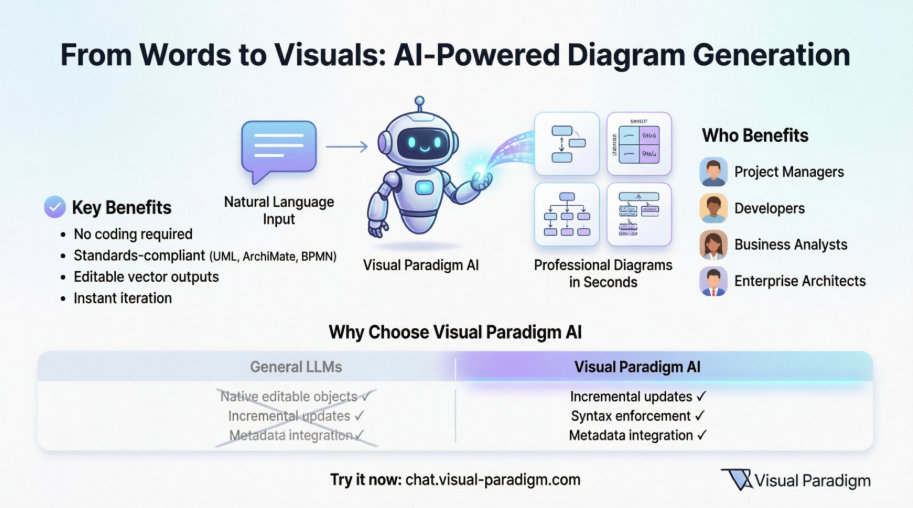
Enter the Visual Paradigm AI Chatbot: a conversational modeling assistant designed to eliminate these barriers. By allowing users to describe what they want to visualize in plain, natural language, this AI-powered tool generates professional, standards-compliant diagrams in seconds. This case study explores how the Visual Paradigm AI Chatbot transforms the diagram creation process, making visual modeling accessible to non-technical users while delivering the precision and flexibility that experienced modelers demand. Through real-world scenarios, technical comparisons, and practical implementation guidance, we demonstrate how this innovative solution bridges the gap between ideas and architecture—empowering teams to communicate, collaborate, and innovate more effectively.
What Is the Visual Paradigm AI Chatbot?
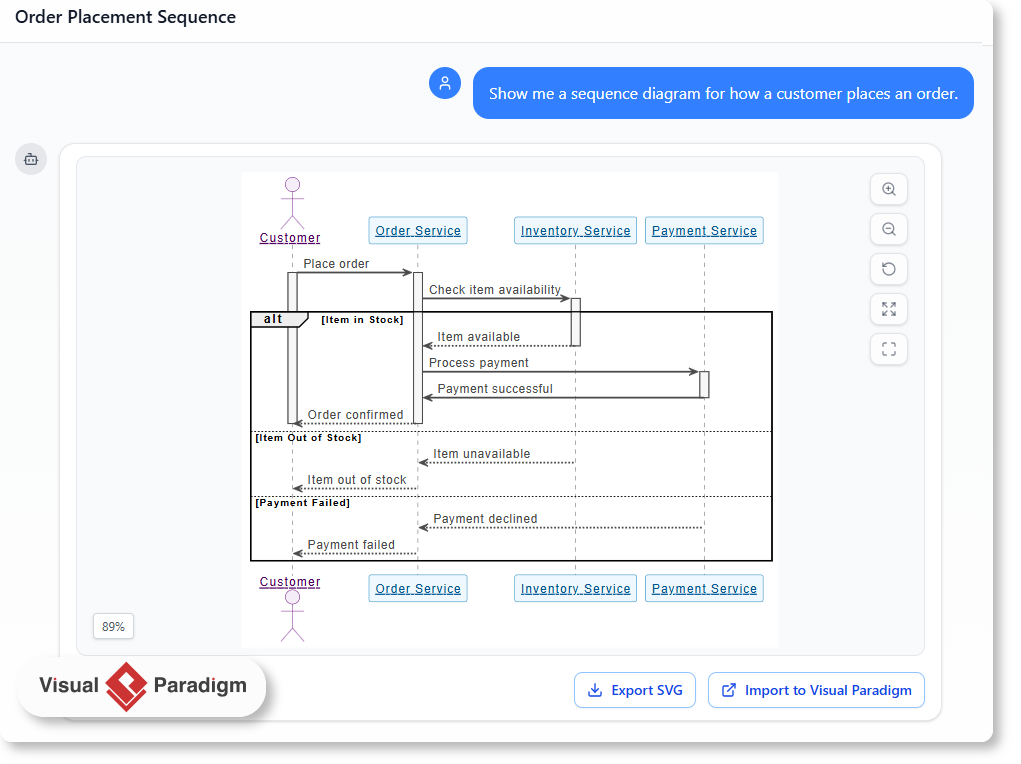
Imagine you’re a project manager trying to explain your team’s workflow to a stakeholder. You don’t have time to draw a sequence diagram or explain the flow in technical terms. Instead, you say: “Show me a sequence diagram for how a customer places an order.”
The visual paradigm AI chatbot listens, understands, and creates a clear, accurate diagram in seconds. No design skills required. No guesswork. Just natural language.
This is what the visual paradigm ai chatbot does—turns plain descriptions into professional diagrams. Whether it’s a use case, a deployment setup, or a SWOT analysis, you describe the situation, and the tool builds the diagram for you.
It’s not magic. It’s smart, trained AI built specifically for visual modeling.
Why Use a Visual Paradigm AI Chatbot?
Traditional diagramming tools require users to learn syntax, rules, and formatting. The visual paradigm ai chatbot removes those barriers.
You don’t need to know UML or ArchiMate. You just need to describe what you see or want to show.
-
Natural language diagram generation means you can say things like “Generate a C4 system context for a school app” or “Draw a state diagram for a user login flow” and get a clean, correct diagram.
-
The ai chatbot for modeling understands context, relationships, and common patterns across different domains—software, business, architecture.
-
It supports ai-powered diagramming in standards like UML, SysML, C4, ArchiMate, and business frameworks like SWOT or Ansoff Matrix.
This isn’t just a chatbot. It’s an assistant that helps you think through your system, your process, or your strategy—without the friction of manual creation.
When Is the Visual Paradigm AI Chatbot Helpful?
Think about real-world scenarios where someone needs to explain a system or idea to others.
-
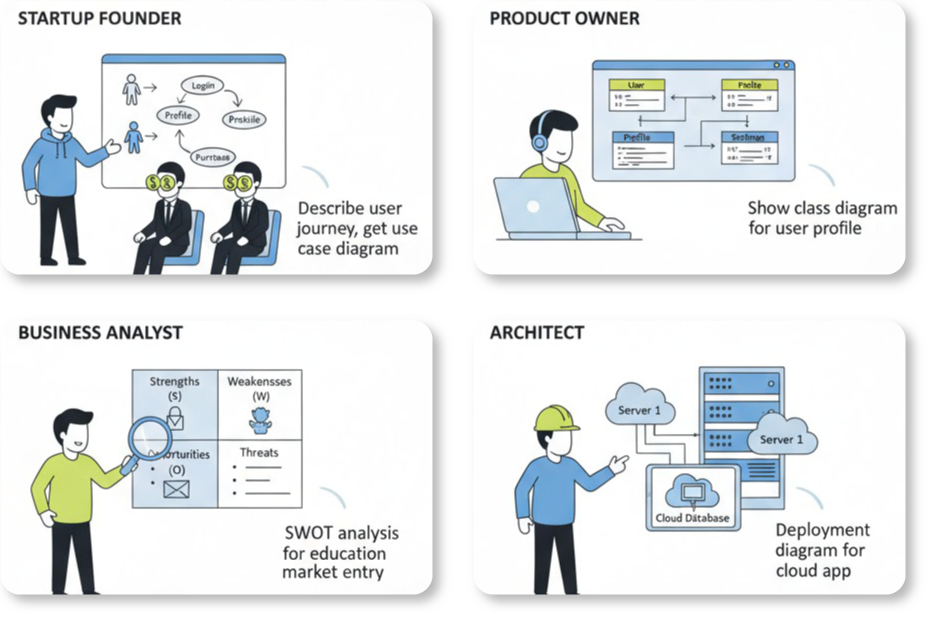
A startup founder wants to show investors how their app works. They can describe the user journey and get a use case diagram in seconds.
-
A product owner needs to explain how a feature is used. They say, “Show me a class diagram for the user profile module” and get a clear visual.
-
A business analyst needs to assess risks. They describe: “Create a SWOT analysis for our new entry into the education market.” The tool produces a structured SWOT with clear categories.
-
An architect is reviewing a deployment setup. They ask: “Generate a deployment diagram for a cloud-based app with three servers.” The response includes labeled nodes and connections.
These are real problems people face. The visual paradigm ai chatbot handles them by turning text into diagrams—accurately and quickly.
How to Use the AI Chatbot: A Real-World Example
Let’s walk through a simple scenario.
Situation: A marketing team wants to evaluate their new product launch. They need to assess internal strengths and external risks.
Instead of drawing a SWOT by hand, they open the visual paradigm ai chatbot and type:
“Create a SWOT analysis for a new smart home device launch. Include market competition and customer trust as key factors.”
The chatbot responds with a clear SWOT diagram.
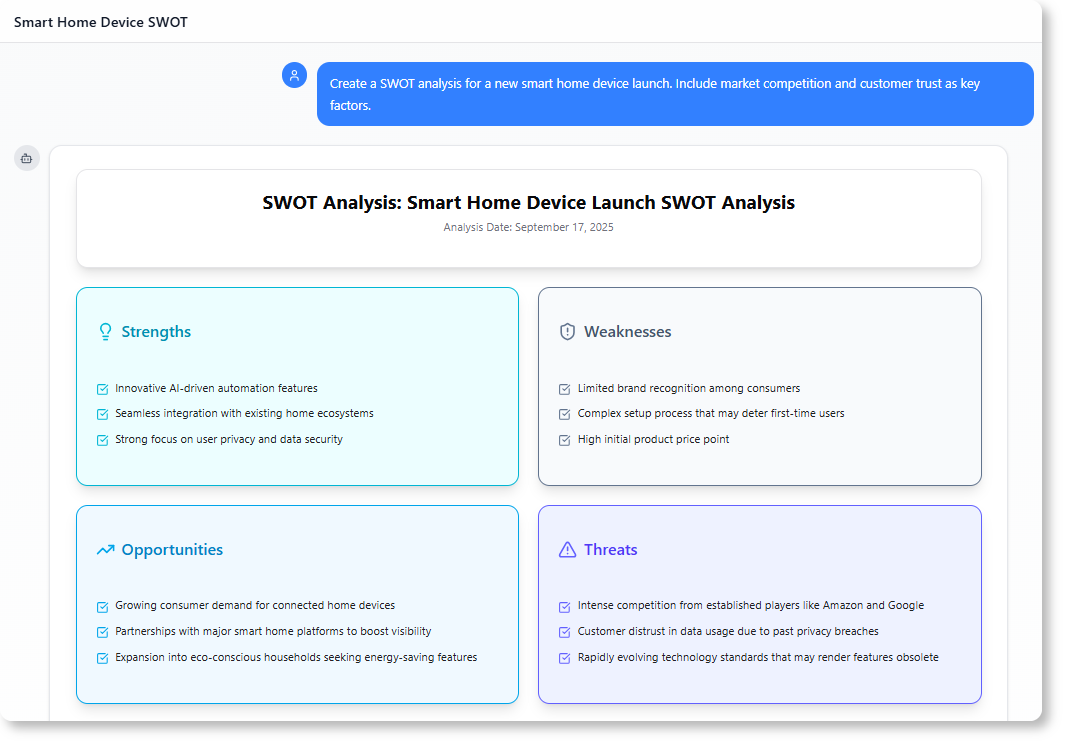
The team reviews it, shares it with leadership, and uses it to refine their strategy. No design work. No design meetings.
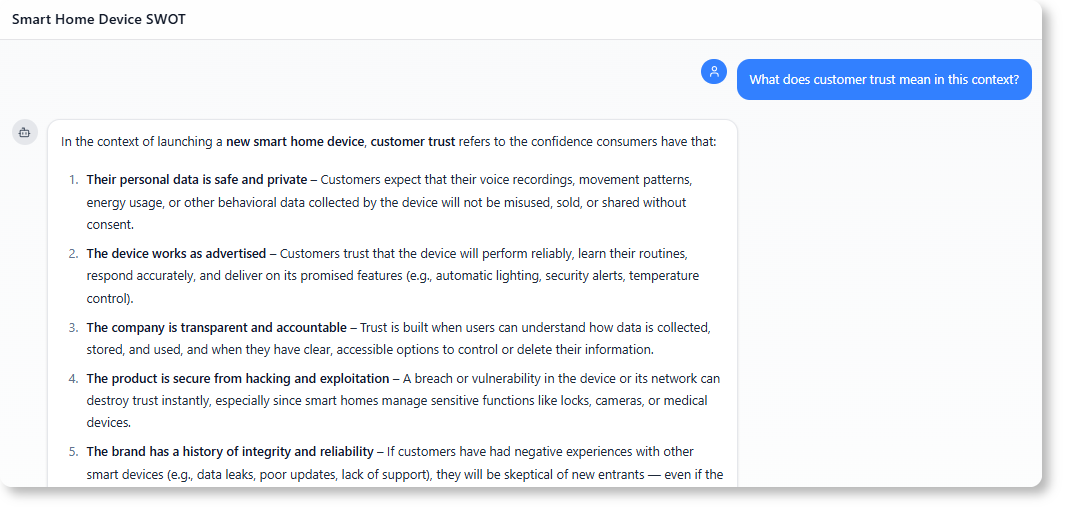
The tool also suggests follow-up questions like:
-
“What does customer trust mean in this context?”
-
“Can we add a PESTLE analysis to this?”
This helps guide deeper thinking—without forcing the user to jump into technical details.
What Makes the Visual Paradigm AI Chatbot Different?
Many tools offer AI features, but few are built for real modeling needs.
The visual paradigm ai chatbot stands out because:
-
It uses ai chatbot for software modeling with deep training in modeling standards.
-
It supports generate diagrams from text across UML, SysML, C4, and business frameworks.
-
It doesn’t just create diagrams—it helps explore them. You can ask, “Explain how this deployment configuration works?” and get a clear answer.
-
It remembers your chat history and lets you share sessions via URL—ideal for team reviews or client presentations.
Unlike generic AI tools, this chatbot knows the difference between a use case and a sequence diagram. It understands business models and software flows. It’s built to support professionals who need to communicate complex ideas clearly.
For more advanced diagramming capabilities, check out the Knowledge Page.
Common Questions About the AI Chatbot
1. Can I generate diagrams for any type of project?
Yes. The visual paradigm ai chatbot supports a wide range of modeling types, including:
-
UML use case, class, sequence, state, activity diagrams
-
C4 system context and deployment diagrams
-
ArchiMate with 20+ viewpoints
-
Business frameworks: SWOT, PEST, Eisenhower Matrix, Ansoff Matrix
You can describe any system or idea and get a relevant diagram.
2. Does the chatbot understand business terms?
Yes. It’s trained on both technical and business modeling language. Whether you say “a customer places an order” or “we’re entering a new market with high risk”, the chatbot interprets the meaning and builds appropriate diagrams.
3. Can I use this to explain complex systems to non-technical people?
Absolutely. The chatbot turns complex systems into clear visuals that anyone can understand. This makes it perfect for client meetings, internal reviews, or team onboarding.
4. Can I export or share the diagrams?
Sure, the diagrams can be exported as format like png or svg format. You can also directly share the chat history with others to share your working process.
Platform Integration: Desktop vs. Online Access
We’re thrilled about the new AI Chatbot, but we know our product structure can sometimes cause confusion. The AI Chatbot is technically a feature of Visual Paradigm Online (VP Online).
The Integrated Advantage
When you own a Visual Paradigm Desktop license with active maintenance, you’re granted access to several powerful VP Online features. In particular, if you have the Professional or Enterprise Edition license, you can use the AI Chatbot inside the desktop environment.
-
Unified Account: You maintain one account, and your workspace is shared across both platforms. No data transfer is needed.
-
Dual Access: Use the chatbot directly inside your Desktop application or from any web browser via Visual Paradigm Online.
Ready to Experience the AI Chatbot?
Try It Now (No Sign-Up Required)
Want a quick demo? Click the link below to start using the AI Chatbot instantly with limited functionality. Experience the power of diagram generation and analysis immediately.
Try the AI Chatbot Instantly
Get Full Access & Seamless Integration
Full access includes persistent chat history and the ability to import generated diagrams directly into VP Desktop for advanced modeling.
For Existing Visual Paradigm Desktop (Professional/Enterprise) Users:
Since you already hold a qualifying license, you do not need to purchase Visual Paradigm Online.
-
Sign up for a FREE Visual Paradigm Online account.
-
Log in with your new VP Online credentials from within your Desktop application.
For Users Who Don’t Yet Own a Desktop License:
To unlock the full integration features (including diagram import), you will first need a Visual Paradigm Desktop Professional Edition license (or Enterprise for ArchiMate).
Once you purchase your Desktop license, simply follow the steps above for existing users: Sign up for your FREE VP Online account and log in through the Desktop application.
Note on Desktop Import: The import feature for generated diagrams (UML, ArchiMate, etc.) requires a Professional Edition license or higher. Importing ArchiMate diagrams specifically requires the Enterprise Edition license.
Technical Advantages Over General-Purpose LLMs
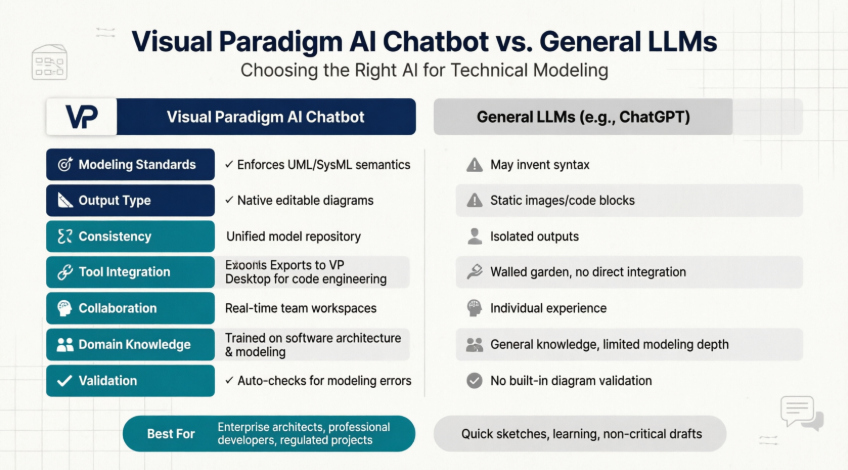
Using a general LLM (like ChatGPT or Claude) for diagram generation usually relies on a “Diagram-as-Text” approach. The LLM writes raw code (such as Mermaid.js or PlantUML), which must be copied and pasted into an external viewer. A specialized tool like Visual Paradigm AI provides distinct technical advantages:
1. Native Graphical Objects vs. Static Text Blocks
-
General LLMs: Output raw markdown code. The resulting diagram is rendered as a static image. If you want to reposition a single box or fix an overlapping line, you cannot click and drag it; you must manually rewrite or patch the underlying text code.
-
Visual Paradigm AI: Generates native vector shapes directly onto an interactive canvas. The AI constructs the initial layout, but you retain immediate drag-and-drop control to resize, color, or re-route components visually.
2. Layout Destruction During Iteration
-
General LLMs: General LLMs lack persistent layout context. When you ask a general LLM to make a minor edit (e.g., “Add a ‘Notification’ service”), the model usually regenerates the entire code block from scratch. This shifts the entire visual layout, scrambling your existing boxes and breaking your visual familiarity with the architecture.
-
Visual Paradigm AI: Performs incremental updates. It injects new elements precisely into the existing graph layout while leaving the rest of your established diagram design untouched.
3. Syntax Hallucinations and Standard Enforcements
-
General LLMs: General models act as creative generalists. They frequently invent invalid syntax, mix arrow notation styles, or place illegal relationships together (such as mixing up UML composition and aggregation rules). They exhibit high technical error rates when processing complex modeling requests.
-
Visual Paradigm AI: Is embedded with an active standards engine (UML 2.5+, ArchiMate, BPMN). It programmatically prevents non-compliant connection logic and restricts the generation to strict, industry-valid notations.
4. Lack of Underlying Metadata
-
General LLMs: A rendered Mermaid diagram contains zero underlying logic. The shapes do not share an integrated database.
-
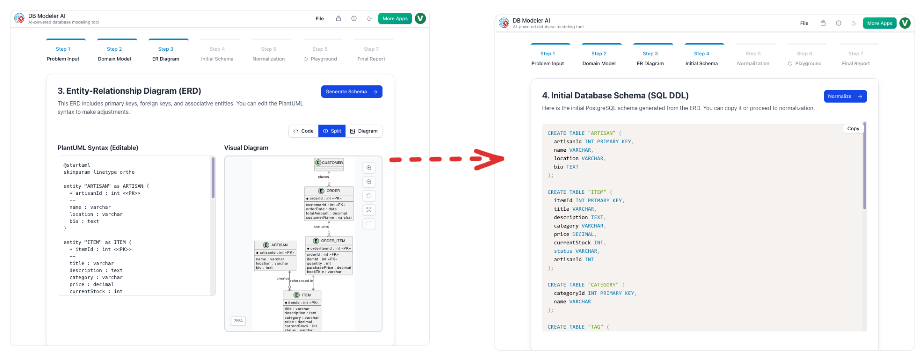
Visual Paradigm AI: Every node generated by the AI is a structured database object. If the AI creates a class element on a Sequence diagram, that identical object can be instantly mapped into a Class diagram or a Database Entity-Relationship model across the Visual Paradigm Workspace.
| Capability Feature | General LLM (e.g., ChatGPT + Mermaid) | Visual Paradigm AI Chatbot |
|---|---|---|
| Output Format | Text-based markdown code strings | Native editable GUI canvas objects |
| Minor Adjustments | Code regeneration; destroys old layouts | Incremental additions; preserves design |
| Notation Accuracy | High risk of hallucinated or broken syntax | Strictly governed by UML/BPMN rule engines |
| Refinement | Text code edits only | Hybrid (Chat commands + Mouse drag-and-drop) |
| Enterprise Use | Isolated, single-use sketch view | Linked data model with versioning & team repos |
Ready to Try Natural Language Diagram Generation?
The visual paradigm ai chatbot makes modeling accessible. You don’t need modeling experience. You don’t need to memorize standards. You just describe what you want to show.
Whether you’re a developer, a product manager, or a business analyst, you can now generate diagrams from text in seconds.
Start your journey with the visual paradigm ai chatbot at https://chat.visual-paradigm.com/. Try asking it to generate a diagram for your next meeting, project, or idea. You’ll see how simple descriptions can lead to clear, professional visuals.
For a full view of Visual Paradigm’s modeling tools, including desktop and enterprise solutions, go to https://www.visual-paradigm.com/.
Conclusion
The Visual Paradigm AI Chatbot represents a paradigm shift in how teams create, share, and refine visual models. By removing the technical barriers traditionally associated with diagramming—syntax memorization, manual layout adjustments, and notation compliance—it empowers professionals across disciplines to focus on what matters most: communicating ideas clearly and making better decisions faster.
This case study has demonstrated that the tool’s value extends far beyond simple diagram generation. It serves as an intelligent thought partner that helps users explore systems, validate assumptions, and iterate on strategies through conversational interaction. Whether generating a quick SWOT analysis for a marketing pitch or building a complex C4 architecture model for engineering review, the AI Chatbot adapts to the user’s needs while maintaining professional-grade output quality.
Critically, the solution bridges the gap between accessibility and power. Non-technical stakeholders can participate meaningfully in visual modeling discussions, while experienced architects and developers benefit from standards enforcement, incremental editing, and seamless integration with enterprise-grade modeling workflows. The ability to export, share, and import diagrams across cloud and desktop environments ensures that visual artifacts created through natural language can evolve into production-ready documentation.
As organizations continue to navigate increasing complexity in software development, business strategy, and system architecture, tools that democratize visual communication will become indispensable. The Visual Paradigm AI Chatbot doesn’t just save time—it transforms how teams think, collaborate, and innovate. By turning words into visuals with intelligence and precision, it enables everyone to become a more effective communicator and a more strategic contributor.
References
- AI Chatbot Feature Page: Official feature overview of the AI-powered conversational modeling assistant that transforms natural language into standards-compliant diagrams.
- AI Chatbot Access Portal: Direct access point to the conversational AI chatbot for instant diagram generation and interactive modeling assistance.
- Visual Paradigm Pipeline: AI Modeling Ecosystem Bridge: Technical guide explaining how the AI Chatbot integrates with the broader Visual Paradigm modeling ecosystem and workflow pipeline.
- AI Chatbot: Turn Ideas into Diagrams Instantly: Blog post showcasing practical use cases and workflows for converting natural language descriptions into professional diagrams.
- What Makes Visual Paradigm’s AI Chatbot Different: Comparative analysis highlighting the technical advantages of Visual Paradigm’s specialized AI modeling assistant over general-purpose LLM diagram tools.
- How to Turn Requirements into Diagrams with an AI Chatbot: Step-by-step tutorial on leveraging the AI Chatbot to transform business and technical requirements into visual models.
- AI Toolbox: Try the Chatbot Instantly: No-signup demo environment for experiencing the Visual Paradigm AI Chatbot’s diagram generation capabilities with limited functionality.
- Visual Paradigm AI Chatbot Tool Page: Dedicated landing page for the AI Chatbot tool with feature highlights and access instructions.
![How to Model Constraints in UML? [With Examples]](https://www.archimetric.com/wp-content/uploads/2026/04/uml-constraint-example.png "How to Model Constraints in UML? [With Examples]")

 English
 Arabic
 Chinese (Simplified)
 Dutch
Dutch French
 German
 Italian
 Japanese
 Korean
 Portuguese
 Russian
 Spanish