


Introduction
In the realm of software engineering and systems design, effective communication of requirements is paramount. UML (Unified Modeling Language) Use Case diagrams serve as a foundational tool for capturing the functional requirements of a system, illustrating how external actors interact with the system to achieve specific goals.
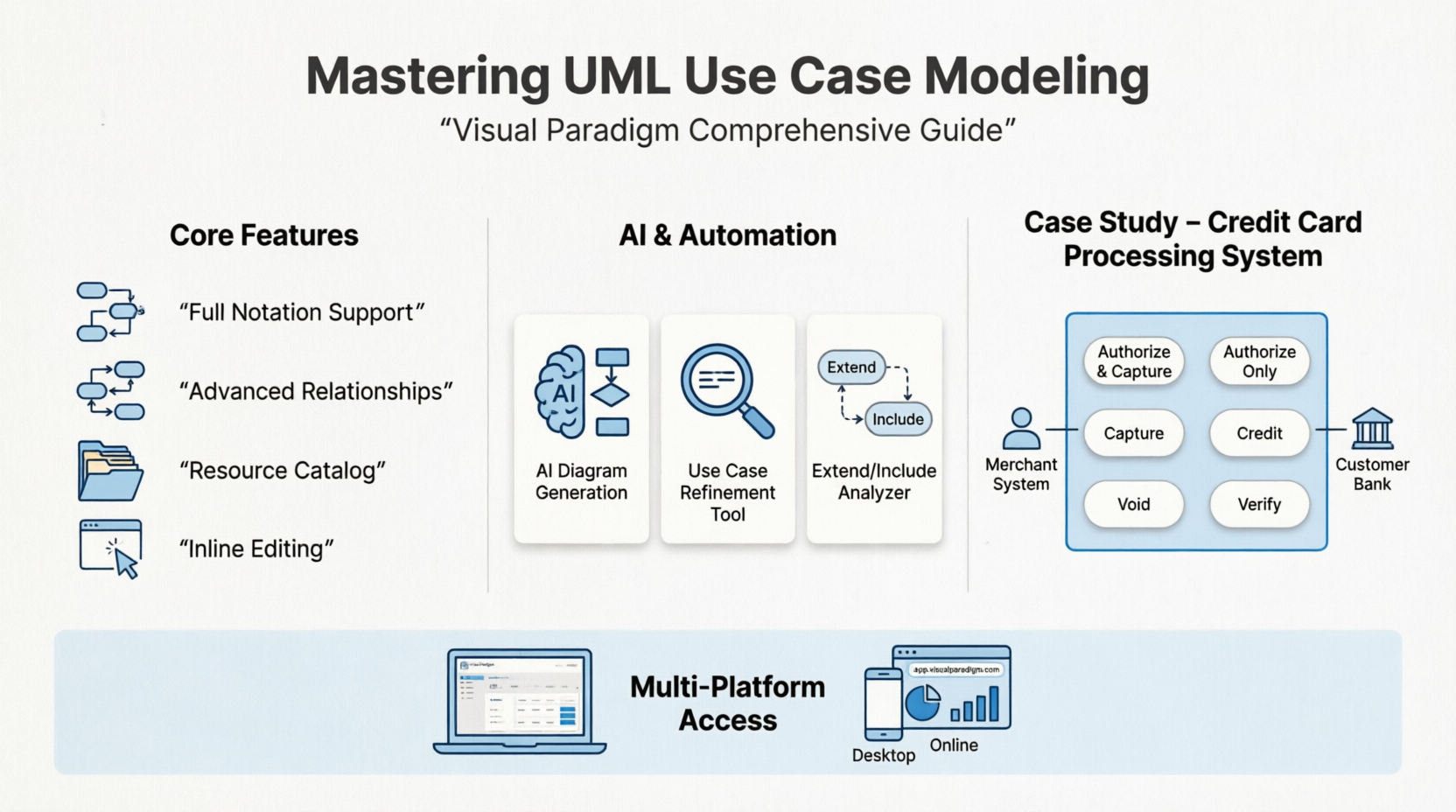
Visual Paradigm fully supports comprehensive UML Use Case diagramming across both its robust desktop software and its cloud-based web application. The platform treats a use case as an extensive data model rather than just an oval shape, linking visual elements directly to requirements, workflows, and specifications. This article explores the extensive feature set of Visual Paradigm for use case modeling and presents a detailed case study of a Credit Card Processing System to demonstrate these capabilities in a real-world scenario.
Visual Paradigm’s Comprehensive Use Case Ecosystem
Visual Paradigm offers a rich suite of tools designed to streamline the process of capturing, modeling, and documenting system behaviors.
Core Diagramming Features
-
Full Notation Support: Implements all standard OMG UML specifications including Actors, Use Cases, System Boundaries, and Association links.
-
Advanced Relationships: Easily maps complex behaviors with native
<include>,<extend>(with extension points), and Generalization relationships. -
Resource Catalog Tool: An award-winning interface feature that lets you drag a connector out of a shape to instantly create and connect a new element.
-
Inline Editing: Allows you to rename shapes and customize extensions directly inside the canvas layout.
-
Custom Notation Graphic Overrides: Swap standard stick figures and oval vectors with customized images to better present to stakeholder groups.
Advanced Modeling & Specification Tools
-
Flow of Events Editor: Document detailed steps behind use cases using an editor supporting if-then-else conditions, loops, and nested steps.
-
Use Case Note System: Built-in scratchpad for logging client requests, which can then automatically convert notes into active scenario steps.
-
Testing Integration: Define step-specific testing procedures and expected outcomes right inside the Use Case Details matrix.
-
Sub-Diagram & Class Linking: Associate deep-dive behavioral diagrams (like Sequence or Activity diagrams) to an individual use case to illustrate inner system logic.
Next-Gen AI & Automation Feature Additions
-
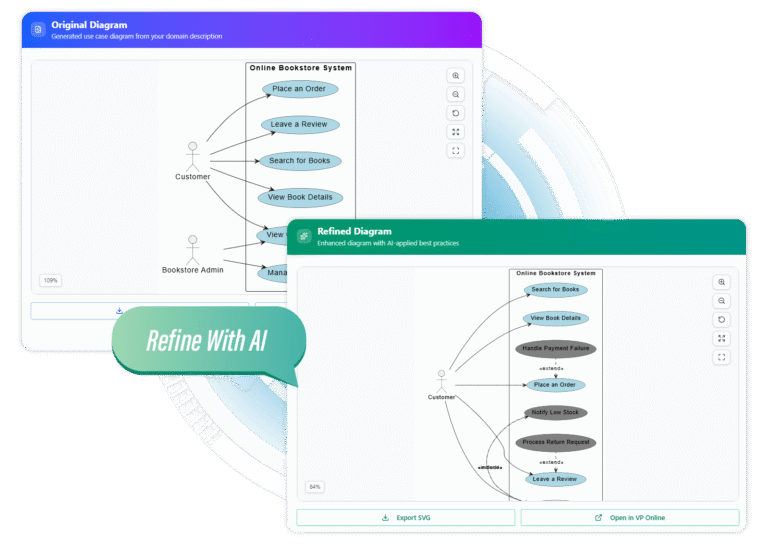
AI Diagram Generation: Describe your domain textually to generate functional structural blueprints via the Visual Paradigm AI Tools suite.
-
AI Use Case Diagram Refinement Tool: Automatically evaluates your base models to uncover hidden logic, adding precise include/extend paths via artificial intelligence guidance.
-
Extend and Include Analyzer: A dedicated analytical feature tool built to simplify and de-clutter large, enterprise-scale use case models.
Multi-Platform Access Ecosystem
-
Visual Paradigm Desktop: Heavy-duty modeler that integrates with engineering frameworks, generates complete requirement specification documents, and syncs via team servers.
-
Visual Paradigm Online (VP Online): Web-browser designer offering a completely free tier option for personal, non-commercial use with cloud-workspace sharing.
Case Study: Credit Card Processing System
To demonstrate the practical application of these tools, let us examine a UML use case diagram example for a system that processes credit cards.
System Overview
The Credit Card Processing System (also known as a Credit Card Payment Gateway) is the subject, i.e., the system under design or consideration.
-
Primary Actor: The Merchant’s Credit Card Processing System. The merchant submits credit card transaction requests to the payment gateway on behalf of a customer.
-
Secondary Actor: The Bank that issued the customer’s credit card. This actor approves or rejects the transaction. If approved, funds are transferred to the merchant’s bank account.
Key Use Cases
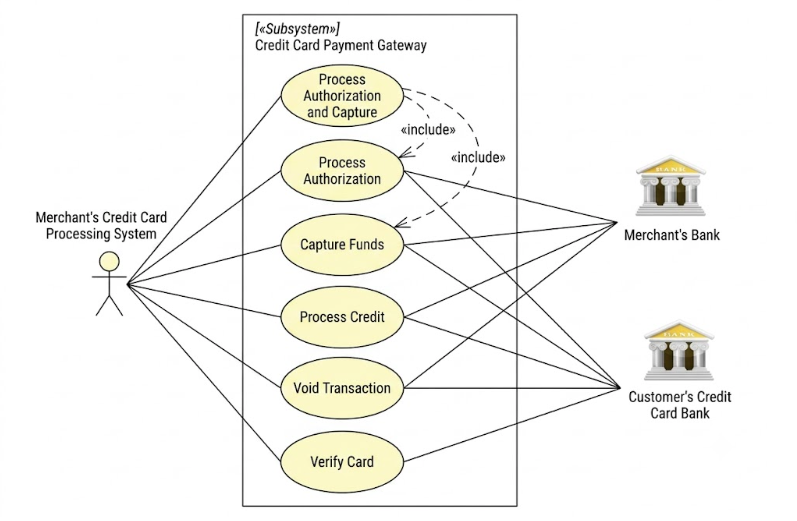
Authorize and Capture is the most common type of credit card transaction. The requested amount of money must first be authorized by the Customer’s Credit Card Bank. If approved, it is further submitted for settlement, during which the approved funds are deposited into the Merchant’s Bank account.
Authorize Only is used in cases where only authorization is requested, and the transaction is not immediately sent for settlement. Usually, if no further action is taken within a set number of days, the authorization expires. Merchants submit this request to verify the availability of funds if an item is out of stock, or if they wish to review orders before shipping.
Capture describes scenarios where a merchant needs to complete a previously authorized transaction. This applies to transactions submitted through the payment gateway or those requested outside the system, such as via voice authorization.
(Please refer to the generated UML Use Case Diagram for the Credit Card Processing System displayed above.)
UML use case diagram example for a credit cards processing system.
Credit describes situations where a customer should receive a refund. This applies to transactions that were successfully processed and settled through the system, or for transactions not originally submitted through the payment gateway.
Void describes cases where it is necessary to cancel one or several related transactions that have not yet been settled. If possible, the transactions will not be sent for settlement. If the Void transaction fails, it indicates the original transaction is likely already settled.
Verify describes zero or small amount verification transactions, which may also include the verification of client data such as an address.
For further reading, excellent resources, documentation, white papers, and guides related to credit card processing can be found at Authorize.Net – Payment Gateway to Accept Online Payments.
PlantUML Code for the Diagram
Below is the PlantUML code representation of the Credit Card Processing System use case diagram:
@startuml
left to right direction

actor "Merchant's Credit Card\nProcessing System" as MerchantSystem <<Module>>

rectangle "Credit Card Payment Gateway" <<Subsystem>> {
usecase "Process Authorization\nand Capture" as UC1
usecase "Process Authorization" as UC2
usecase "Capture Funds" as UC3
usecase "Process Credit" as UC4
usecase "Void Transaction" as UC5
usecase "Verify Card" as UC6
}

actor "Merchant's Bank" as MerchantBank
actor "Customer's Credit Card Bank" as CustomerBank

MerchantSystem -- UC1
MerchantSystem -- UC2
MerchantSystem -- UC3
MerchantSystem -- UC4
MerchantSystem -- UC5
MerchantSystem -- UC6

UC1 ..> UC2 : <<include>>
UC1 ..> UC3 : <<include>>

UC2 -- MerchantBank
UC2 -- CustomerBank

UC3 -- MerchantBank
UC3 -- CustomerBank

UC4 -- MerchantBank
UC4 -- CustomerBank

UC5 -- MerchantBank
UC5 -- CustomerBank

UC6 -- MerchantBank
UC6 -- CustomerBank
@endum
Conclusion
Modeling complex system interactions requires more than just drawing shapes; it demands a robust environment that connects visual models to underlying requirements and business logic. Visual Paradigm excels in this area by offering a comprehensive ecosystem that bridges the gap between high-level use case diagrams and detailed system specifications. From its core UML notation support and advanced flow-of-events editors to its cutting-edge AI refinement tools, the platform empowers product managers, system analysts, and developers to capture requirements with precision. The Credit Card Processing System case study illustrates how effectively these tools can be utilized to map out intricate transactional workflows, ensuring that all stakeholders have a clear, unified understanding of the system’s functional requirements.
References
- UML Use Case Diagram Tool: Comprehensive guide and tool features for creating UML use case diagrams in Visual Paradigm.
- Free Use Case Diagram Tool Online: Information on VP Online’s free tier for creating and sharing use case diagrams in the cloud.
- What is Use Case Specification?: Detailed explanation of use case specifications and how to document them effectively.
- Use Case Tool: Traditional Chinese version of the Visual Paradigm use case modeling tool documentation.
- Top 5 UML Tools: Why Visual Paradigm Stands Out: A blog post comparing top UML tools and highlighting the unique advantages of Visual Paradigm.
- How to Write Use Cases: Step-by-step guide on writing effective use cases and documenting system behaviors.
- Identify User Requirements with Use Case Diagrams: Guide on using use case diagrams within SysML to identify and capture user requirements.
- Writing Effective Use Cases: Tutorial focused on best practices for writing clear and effective use case descriptions.
- Drawing Use Case Diagrams: User guide documentation on the technical steps for drawing use case diagrams in the software.
- Use Case Modeling: Overview of use case modeling concepts and how Visual Paradigm supports the entire modeling lifecycle.
- Use Case Modeling Guide: Additional resources and guides dedicated to mastering use case modeling techniques.
- Visual Paradigm Use Case Tutorial: Video tutorial demonstrating how to create and manage use case diagrams in Visual Paradigm.
- Produce Use Case Specifications: Documentation on generating detailed use case specification documents from the models.
- Documenting Use Cases: Guide on using the Use Case Details matrix to document testing procedures and expected outcomes.
- Use Case Modeling Tutorials: A collection of video and text tutorials covering various aspects of use case modeling.
- Use Case Diagram Tutorial: A comprehensive blog tutorial explaining the fundamentals of creating use case diagrams.
- AI Use Case Diagram Refinement Tool: Feature page detailing the AI-powered tool for refining and optimizing use case diagrams.
- AI Use Case Diagram Features: Video demonstration of the AI features available for use case diagram refinement and analysis.
- Visual Paradigm Online Tutorial: Video guide on how to use the web-based Visual Paradigm Online platform for diagramming.
- Extend and Include Use Case Analyzer: Feature overview of the analytical tool designed to simplify complex include and extend relationships.
- Use Case Diagram Software Features: Detailed list of features available in the VP Online use case diagram software.
- Getting Started with Visual Paradigm: Official user guide documentation to help new users get started with the Visual Paradigm platform.

 English
 Arabic
 Chinese (Simplified)
 Dutch
Dutch French
 German
 Italian
 Japanese
 Korean
 Portuguese
 Russian
 Spanish