


Introduction
In the modern digital landscape, website security is not merely an afterthought but a foundational requirement. Regulatory frameworks and security standards mandate the strict separation of administrative interfaces from common user functions to prevent unauthorized access and mitigate potential security breaches. Designing such secure systems requires a clear understanding of user roles, permissions, and system interactions.
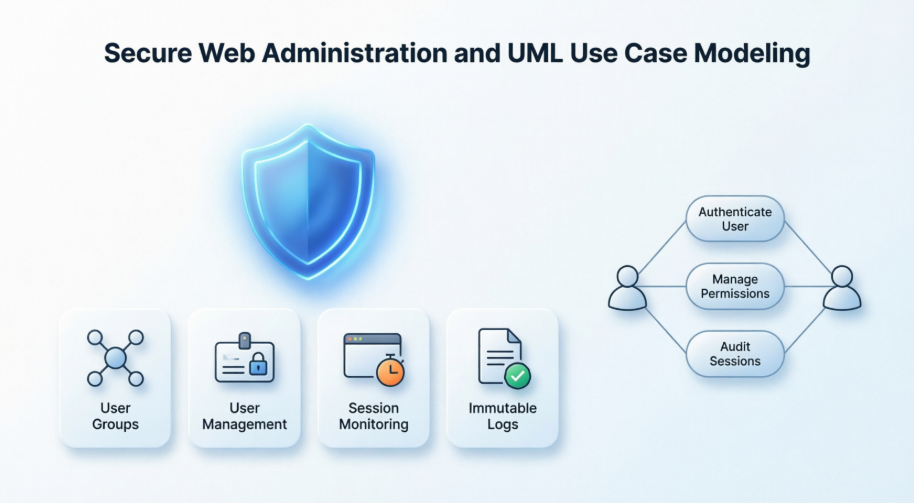
This case study explores the architectural design of a secure web administration interface, leveraging UML Use Case modeling to map out complex administrative functionalities. By examining the segregation of duties between Website Administrators and Help Desk staff, and detailing the management of user groups, sessions, and logs, we demonstrate how robust modeling tools can translate stringent security policies into actionable, visual system blueprints.
Background and Security Requirements
Website security requirements mandate the separation of administrative interfaces from common functions provided to users. This segregation is required by compliance frameworks such as the Sarbanes-Oxley Act (SOX) in the US and is strongly recommended by ISO 17799. To achieve this, a system must have separate applications for administrators and for common users.
It is recommended by the OWASP Guide to Building Secure Web Applications and Web Services, 2.0, that website administration applications should not be accessible from the public internet without going through dedicated management networks. Access should be restricted to strongly authenticated Virtual Private Networks (VPNs) or trusted network operations centers.
Furthermore, except for full administrators, a subset of administrative interfaces must be available to Help Desk staff. This ensures they have the necessary tools to assist customers experiencing issues while using the customer-oriented website, without granting them full system control.
Top-Level Administrative Architecture
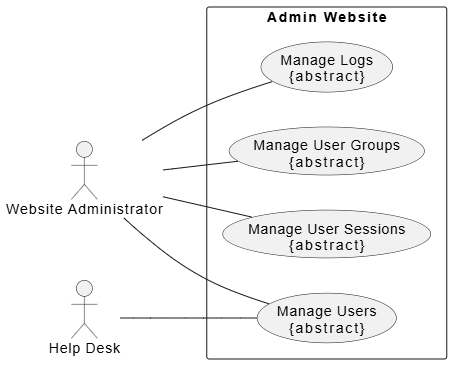
The top-level use case diagram outlines the primary administrative functions that an administration website could provide. The two primary actors using these administrative interfaces are the Website Administrator and the Help Desk. The Help Desk actor utilizes a strict subset of the functions available to the Website Administrator. All top-level use cases shown are abstract, as each represents a comprehensive group or “package” of administrative functionality.
In PlantUML:
@startuml
left to right direction

skinparam packageStyle rectangle

actor "Website Administrator" as WA
actor "Help Desk" as HD

rectangle "Admin Website" {
usecase "Manage User Groups\n{abstract}" as UC1
usecase "Manage Users\n{abstract}" as UC2
usecase "Manage User Sessions\n{abstract}" as UC3
usecase "Manage Logs\n{abstract}" as UC4
}

WA -- UC1
WA -- UC2
WA -- UC3
WA -- UC4

HD -- UC2

@enduml
Detailed Use Case Breakdown
Manage User Groups
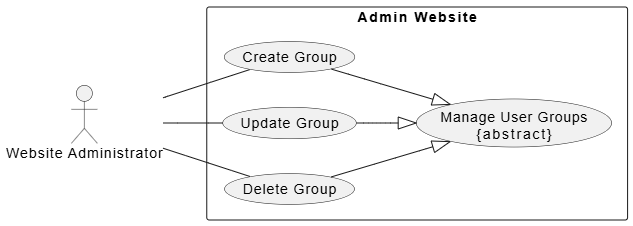
The Manage User Groups abstract use case is specialized by Create Group, Update Group, and Delete Group use cases. This functionality allows the website administrator to create different user groups—for example, assigning varying privileges or subscription options. Later, these user groups can be modified to adjust permissions or deleted entirely when no longer needed.
PlantUML Code:
@startuml
left to right direction

skinparam packageStyle rectangle

actor "Website Administrator" as WA

rectangle "Admin Website" {
usecase "Manage User Groups\n{abstract}" as AbstractUC
usecase "Create Group" as UC1
usecase "Update Group" as UC2
usecase "Delete Group" as UC3
}

' Generalization relationships
UC1 --|> AbstractUC
UC2 --|> AbstractUC
UC3 --|> AbstractUC

' Actor associations
WA -- UC1
WA -- UC2
WA -- UC3

@enduml
Manage Users
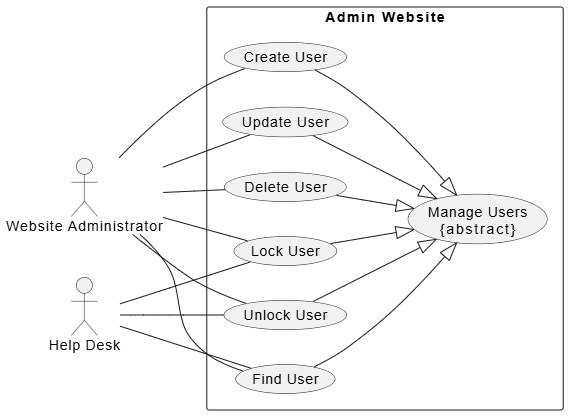
User management use cases are available to both the Website Administrator and the Help Desk. This module provides a standard user CRUD (Create, Retrieve/Find, Update, Delete) functionality set.
Two additional use cases, Lock User and Unlock User, are specific to website security. For instance, if a predefined number of unsuccessful login attempts occur within a specific timeframe using an incorrect password, the user account should be locked temporarily to prevent brute-force password guessing attacks. While this locking and unlocking is typically automated by intrusion detection or website authentication subsystems, manual functionality is essential. For example, a user might call support and explicitly request to lock their account due to a suspected compromise.
PlantUML Code:
@startuml
left to right direction

skinparam packageStyle rectangle

actor "Website Administrator" as WA
actor "Help Desk" as HD

rectangle "Admin Website" {
usecase "Manage Users\n{abstract}" as AbstractUC
usecase "Create User" as UC1
usecase "Update User" as UC2
usecase "Delete User" as UC3
usecase "Find User" as UC4
usecase "Lock User" as UC5
usecase "Unlock User" as UC6
}

' Generalization relationships
UC1 --|> AbstractUC
UC2 --|> AbstractUC
UC3 --|> AbstractUC
UC4 --|> AbstractUC
UC5 --|> AbstractUC
UC6 --|> AbstractUC

' Actor associations
WA -- UC1
WA -- UC2
WA -- UC3
WA -- UC4
WA -- UC5
WA -- UC6

HD -- UC4
HD -- UC5
HD -- UC6

@enduml
Manage User Sessions
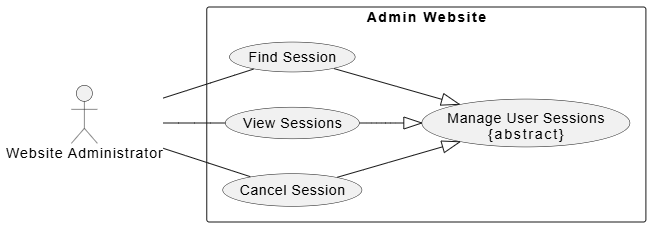
A user session is created either for each new incoming request that is not yet part of an existing session, or immediately after a user is authenticated. The Website Administrator must have the ability to monitor how many sessions have been created, view statistical data regarding session usage, locate specific sessions, check the status of active sessions, and cancel (delete) sessions if a security threat is detected.
PlantUML Code:
@startuml

left to right direction

skinparam packageStyle rectangle

actor "Website Administrator" as WA

rectangle "Admin Website" {

  usecase "Manage User Sessions\n{abstract}" as AbstractUC

  usecase "Find Session" as UC1

  usecase "View Sessions" as UC2

  usecase "Cancel Session" as UC3

}

' Generalization relationships

UC1 --|> AbstractUC

UC2 --|> AbstractUC

UC3 --|> AbstractUC

' Actor associations

WA -- UC1

WA -- UC2

WA -- UC3

@enduml
Manage Logs
The list of administrative functions included in log management depends on the specific security requirements supported by the website. It is a standard security requirement, as outlined in the OWASP Guide 2.0, that new log records can only be appended, while older log records must never be rewritten or deleted. This can be implemented by writing logs to a write-once/read-many (WORM) device, such as a CD-R or immutable cloud storage.
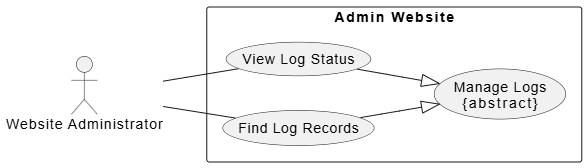
The Website Administrator must be able to monitor the status of the logging system. This status includes verifying that logging is fully functional (e.g., ensuring there is sufficient disk space and database connections are stable) and confirming that older log files are being moved to permanent storage on schedule for archiving. Additionally, administrators must be able to search and view log records related to specific users or exceptional security situations.
PlantUML Code:
@startuml
left to right direction

skinparam packageStyle rectangle

actor "Website Administrator" as WA

rectangle "Admin Website" {
usecase "Manage Logs\n{abstract}" as AbstractUC
usecase "View Log Status" as UC1
usecase "Find Log Records" as UC2
}

' Generalization relationships
UC1 --|> AbstractUC
UC2 --|> AbstractUC

' Actor associations
WA -- UC1
WA -- UC2

@enduml
Implementing the Model with Visual Paradigm
To effectively translate these security requirements and administrative workflows into actionable development blueprints, organizations rely on robust modeling tools. Visual Paradigm fully supports comprehensive UML Use Case diagramming across both its robust desktop software and its cloud-based web application. The platform treats a use case as an extensive data model rather than just an oval shape, linking visual elements directly to requirements, workflows, and specifications.
Core Diagramming Features
-
Full Notation Support: Implements all standard OMG UML specifications including Actors, Use Cases, System Boundaries, and Association links.
-
Advanced Relationships: Easily maps complex behaviors with native include, extend (with extension points), and Generalization relationships.
-
Resource Catalog Tool: An award-winning interface feature that lets you drag a connector out of a shape to instantly create and connect a new element.
-
Inline Editing: Allows you to rename shapes and customize extensions directly inside the canvas layout.
-
Custom Notation Graphic Overrides: Swap standard stick figures and oval vectors with customized images to better present to stakeholder groups.
Advanced Modeling & Specification Tools
-
Flow of Events Editor: Document detailed steps behind use cases using an editor supporting if-then-else conditions, loops, and nested steps.
-
Use Case Note System: Built-in scratchpad for logging client requests, which can then automatically convert notes into active scenario steps.
-
Testing Integration: Define step-specific testing procedures and expected outcomes right inside the Use Case Details matrix.
-
Sub-Diagram & Class Linking: Associate deep-dive behavioral diagrams (like Sequence or Activity diagrams) to an individual use case to illustrate inner system logic.
Next-Gen AI & Automation Feature Additions
-
AI Diagram Generation: Describe your domain textually to generate functional structural blueprints via the Visual Paradigm AI Tools suite.
-
AI Use Case Diagram Refinement Tool: Automatically evaluates your base models to uncover hidden logic, adding precise include/extend paths via artificial intelligence guidance.
-
Extend and Include Analyzer: A dedicated analytical feature tool built to simplify and de-clutter large, enterprise-scale use case models.
Multi-Platform Access Ecosystem
-
Visual Paradigm Desktop: Heavy-duty modeler that integrates with engineering frameworks, generates complete requirement specification documents, and syncs via team servers.
-
Visual Paradigm Online (VP Online): Web-browser designer offering a completely free tier option for personal, non-commercial use with cloud-workspace sharing.
Conclusion
The design of a secure web administration interface is a complex endeavor that requires strict adherence to regulatory standards and security best practices. By separating administrative functions from common user interfaces and clearly defining the roles of Website Administrators and Help Desk staff, organizations can significantly reduce their attack surface. The use case models presented in this case study illustrate how abstract security requirements—such as log immutability, session management, and brute-force protection—can be translated into concrete system functionalities. Furthermore, leveraging advanced modeling platforms ensures that these designs are not only visually clear but also deeply integrated with requirements, testing, and system logic. Ultimately, this structured approach to use case modeling bridges the gap between high-level security policies and the successful, secure deployment of enterprise web applications.
References
- UML Use Case Tool: A comprehensive software solution for creating professional UML use case diagrams.
- Free Use Case Diagram Tool: A web-based platform offering free use case diagramming capabilities for personal use.
- What is Use Case Specification?: A guide explaining the fundamentals and importance of use case specifications in software engineering.
- UML Use Case Tool (Traditional Chinese): The Traditional Chinese version of the UML use case modeling tool overview.
- Top 5 UML Tools: Why Visual Paradigm Stands Out: A blog post comparing leading UML tools and highlighting the unique advantages of Visual Paradigm.
- How to Write Use Cases: A practical guide on drafting effective and comprehensive use case narratives.
- Identify User Requirements with Use Case Diagrams: Techniques for capturing and identifying user requirements using SysML and UML use case diagrams.
- Writing Effective Use Cases: A tutorial focused on best practices for writing clear and actionable use cases.
- Drawing Use Case Diagrams: User guide documentation detailing the step-by-step process of drawing use case diagrams.
- Use Case Modeling: An overview of use case modeling features and capabilities within the Visual Paradigm environment.
- Use Case Modeling Features: Detailed exploration of use case modeling functionalities and system design integration.
- Use Case Diagram Tutorial Video: A video tutorial demonstrating how to create and interpret use case diagrams.
- Producing Use Case Specifications: Documentation on generating and managing detailed use case specification documents.
- Documenting Use Cases: A guide to documenting use cases, including the Use Case Details matrix for testing integration.
- Use Case Modeling Tutorials: A collection of tutorials and resources dedicated to mastering use case modeling.
- Use Case Diagram Tutorial: A comprehensive blog tutorial covering the basics and advanced concepts of use case diagrams.
- AI Use Case Diagram Refinement Tool: Introduction to the AI-powered feature that automatically refines and optimizes use case models.
- Visual Paradigm AI Features Overview: A video showcase of the artificial intelligence capabilities integrated into Visual Paradigm.
- Visual Paradigm Online Tutorial: A video guide on navigating and utilizing the web-based Visual Paradigm Online platform.
- Extend and Include Use Case Analyzer: A tool designed to analyze and simplify complex include and extend relationships in large models.
- Use Case Diagram Software Features: A detailed breakdown of the features available in the online use case diagram software.
- Getting Started Guide: The official getting started documentation for new users of the Visual Paradigm platform.

 English
 Arabic
 Chinese (Simplified)
 Dutch
Dutch French
 German
 Italian
 Japanese
 Korean
 Portuguese
 Russian
 Spanish