


Introduction
In the fast-paced world of Agile development, there has long been a tension between the need for rapid delivery and the necessity of clear, maintainable system documentation. For Product Managers, Architects, and Development Teams, UML diagrams have traditionally been viewed as a necessary evil—valuable for understanding complex systems but often too time-consuming to create and too difficult to keep up-to-date in sprint-based workflows. The result? Outdated wikis, tribal knowledge silos, and costly misunderstandings during handoffs.
But what if creating and maintaining architectural diagrams could be as dynamic and responsive as your Agile ceremonies? What if your documentation could evolve automatically alongside your code, and if you could query your system’s design using natural language?
This guide explores how Visual Paradigm’s AI ecosystem—comprising VP Chatbot, OpenDocs, VPasCode, and its integrated Desktop and Online platforms—transforms UML modeling from a static administrative task into a living, collaborative asset. By leveraging Artificial Intelligence, teams can generate accurate diagrams from requirements, synchronize models with code in real-time, and produce up-to-the-minute documentation without the traditional overhead.
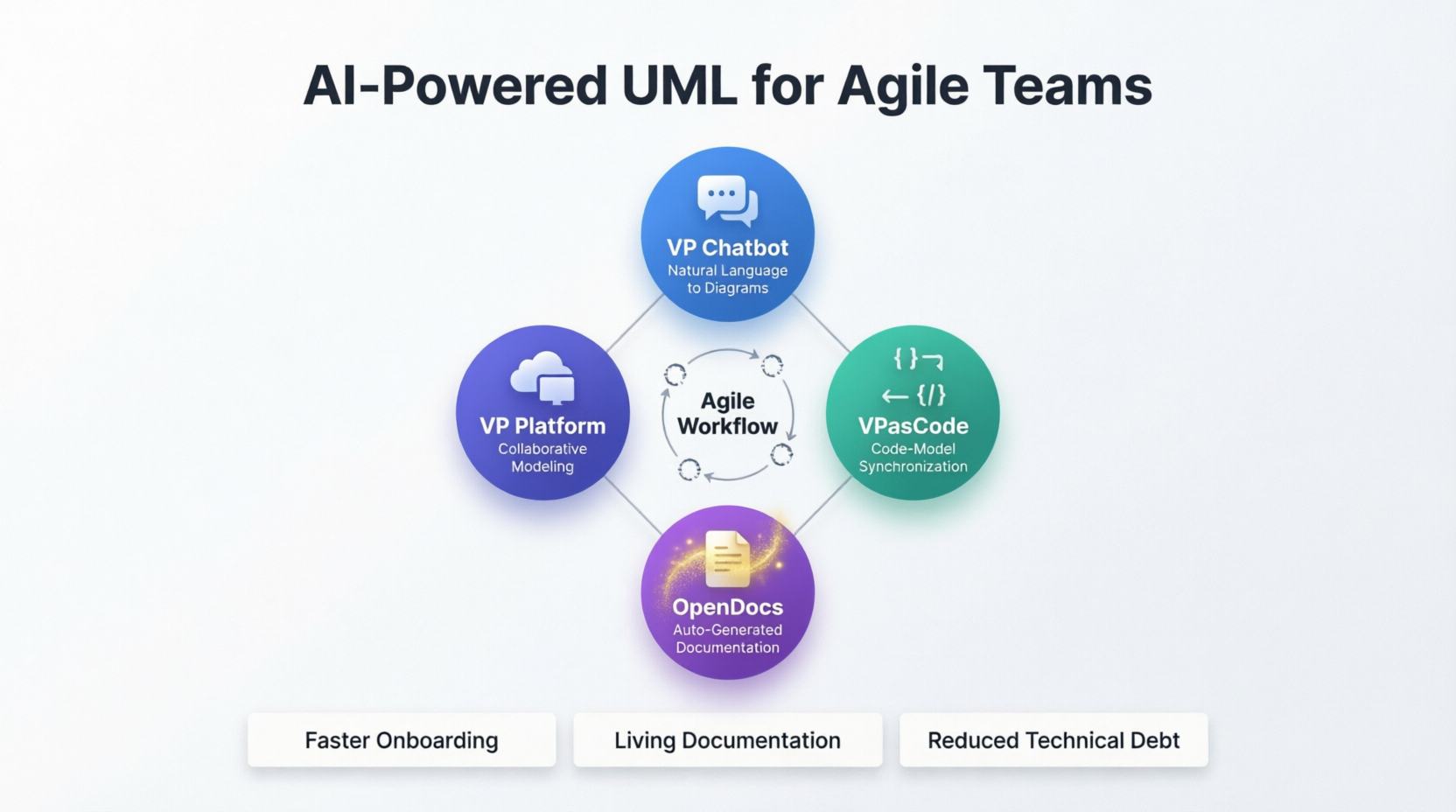
Whether you are looking to streamline onboarding, clarify complex microservices architectures, or simply ensure that your technical documentation reflects the current state of your product, this comprehensive guide provides the strategies, workflows, and best practices needed to integrate AI-powered modeling into your Agile toolkit. It’s time to stop choosing between speed and clarity—and start achieving both.
1. Understanding the Challenge
Why Traditional UML Struggles in Agile
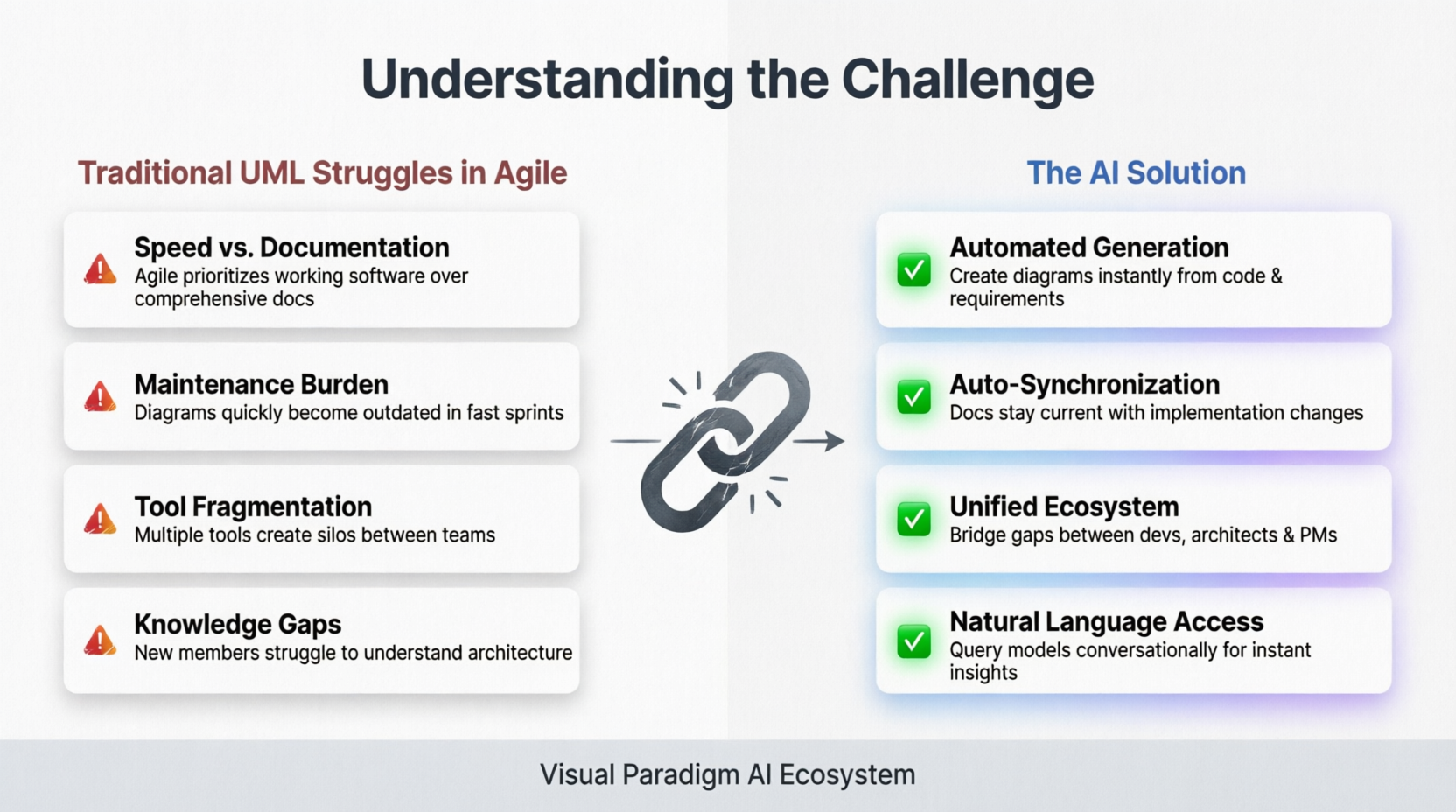
- Speed vs. Documentation: Agile teams prioritize working software over comprehensive documentation
- Maintenance Burden: UML diagrams quickly become outdated in fast-moving sprints
- Tool Fragmentation: Multiple tools create silos between developers, architects, and PMs
- Knowledge Gaps: New team members struggle to understand system architecture
The AI Solution
Visual Paradigm’s AI ecosystem addresses these challenges by:
- Automating diagram generation from code and requirements
- Keeping documentation synchronized with implementation
- Enabling natural language interaction with models
- Supporting collaborative, real-time updates
2. Visual Paradigm AI Ecosystem Overview
Core Components
VP Chatbot (AI Assistant)
- Natural language interface for creating and modifying diagrams
- Answers questions about your models
- Generates UML from text descriptions
- Provides modeling best practices guidance
OpenDocs
- AI-powered documentation generator
- Automatically creates documentation from diagrams
- Maintains living documentation that stays current
- Supports multiple output formats (HTML, PDF, Word)
VPasCode
- Bi-directional code engineering
- Generates code from UML diagrams
- Reverse engineers diagrams from existing codebases
- Keeps models and code synchronized
Desktop Version
- Full-featured modeling environment
- Advanced diagramming capabilities
- Offline work capability
- Enterprise-grade features
Online Platform
- Cloud-based collaboration
- Real-time team editing
- Easy sharing and stakeholder review
- Accessible from anywhere
3. Setting Up Your Environment
Step 1: Choose Your Deployment Model
For Agile Teams, I Recommend:
- Hybrid Approach: Desktop for power users (architects, senior devs), Online for collaboration
- Start with Online platform for ease of adoption
- Add Desktop licenses for team members who need advanced features
Step 2: Team Onboarding
- Create Organization Account on Visual Paradigm Online
- Set Up Project Structure:
- Create separate projects per product/feature area
- Define user roles (Admin, Editor, Viewer)
- Install Desktop Applications where needed
- Configure VPasCode integration with your version control (Git)
Step 3: AI Configuration
- Enable VP Chatbot in your workspace
- Set up OpenDocs templates matching your organization’s standards
- Configure VPasCode for your tech stack (Java, C#, Python, etc.)
4. AI-Powered UML Creation Workflow
Sprint Planning Phase
Use Case: Creating Initial Architecture Diagrams
Traditional Approach: Hours of manual diagramming
AI-Enhanced Approach:
Step 1: Describe requirements to VP Chatbot
"You're building a microservices e-commerce platform with
user authentication, product catalog, shopping cart, and
payment processing. Create a component diagram."

Step 2: Review and refine generated diagram
- Chatbot creates initial Component Diagram
- You adjust via natural language: "Add a caching layer
  between Product Catalog and database"
- Iterate until satisfied

Step 3: Generate supporting diagrams
- Ask Chatbot: "Create sequence diagram for checkout process"
- Request: "Show class diagram for User entity"
Practical Example Commands for VP Chatbot:
• "Create a use case diagram for user registration"
• "Generate activity diagram for order fulfillment workflow"
• "Show me a state machine diagram for payment status"
• "What's the best way to model our API gateway?"
• "Convert this text description to a sequence diagram: [paste requirements]"
Development Phase
Use Case: Keeping Diagrams Current with Code Changes
VPasCode Workflow:
- Initial Setup:
- Import existing codebase into VPasCode - Generate baseline UML diagrams automatically - Review and organize generated models - Ongoing Synchronization:
- Developers commit code changes to Git - VPasCode detects changes and updates diagrams - Team reviews updated models in sprint review - Manual adjustments made as needed - Bidirectional Updates:
- Architect modifies class diagram in VP
- VPasCode generates updated code skeleton
- Developers implement business logic
- Cycle continues
Sprint Review & Retrospective
Use Case: Generating Documentation Automatically
OpenDocs Workflow:
- Select Models to Document:
- Choose relevant diagrams from current sprint
- Include architecture decisions and rationale
- Generate Documentation:
- OpenDocs analyzes selected diagrams - Creates structured documentation with: * Diagram images * Element descriptions * Relationships explained * Design decisions noted - Customize Output:
- Add sprint-specific context
- Include links to user stories/tickets
- Export to preferred format (Confluence, Wiki, PDF)
5. Agile Integration Strategies
Strategy 1: Just-Enough Modeling
Principle: Create only the diagrams that provide value
Implementation:
- Use VP Chatbot to quickly prototype diagrams during refinement
- Delete or archive diagrams that aren’t referenced within 2 sprints
- Focus on:
- System architecture (Component/Deployment diagrams)
- Complex workflows (Activity/Sequence diagrams)
- Critical business rules (State Machine diagrams)
Strategy 2: Living Documentation
Principle: Documentation evolves with the product
Implementation:
- Schedule automated OpenDocs generation at end of each sprint
- Store documentation alongside code in repository
- Link documentation to user stories in your project management tool
- Review documentation accuracy during retrospectives
Strategy 3: Collaborative Modeling Sessions
Principle: Make modeling a team activity
Implementation:
- Use Visual Paradigm Online for real-time collaboration
- Conduct 30-minute modeling sessions during:
- Sprint planning (high-level architecture)
- Refinement (detailed design for upcoming stories)
- Spike resolution (exploring technical approaches)
- Record decisions in diagram notes/comments
Strategy 4: AI-Assisted Knowledge Transfer
Principle: Reduce onboarding time with AI
Implementation:
- New team members ask VP Chatbot questions:
• "How does the authentication flow work?" • "What are the dependencies of the Payment service?" • "Show me the data model for Orders" - Chatbot references actual diagrams and explains relationships
- Faster ramp-up compared to reading stale documentation
6. Best Practices by Role
For Product Managers (Like You, Alex)
Your Focus: Ensuring diagrams reflect business requirements and user value
Recommended Practices:
- Use VP Chatbot for Quick Visualization
- Convert user stories to use case diagrams
- Validate workflow understanding with activity diagrams
- Communicate requirements visually to stakeholders
- Leverage OpenDocs for Stakeholder Communication
- Generate executive-friendly documentation
- Create visual artifacts for roadmap presentations
- Maintain traceability from requirements to design
- Collaborate with Technical Team
- Review generated diagrams for business logic accuracy
- Provide feedback via comments in Visual Paradigm Online
- Ensure diagrams align with product vision
Example Workflow:
User Story: "As a customer, I want to save items to a wishlist"

1. Ask VP Chatbot: "Create use case diagram for wishlist feature"
2. Review generated diagram, add business rules
3. Request sequence diagram: "Show interaction between
   Wishlist UI, backend service, and database"
4. Share with dev team for technical validation
5. Include in sprint planning materials
For Architects/Tech Leads
Your Focus: System integrity, scalability, and technical debt management
Recommended Practices:
- Maintain Architecture Repository
- Use Desktop version for complex modeling
- Establish naming conventions and modeling standards
- Create reusable patterns/templates
- Leverage VPasCode for Code-Model Alignment
- Regular synchronization checks
- Identify architectural drift early
- Enforce design patterns through model constraints
- Guide Team Modeling Efforts
- Review team-generated diagrams
- Provide feedback through VP Chatbot examples
- Mentor junior developers on modeling best practices
For Developers
Your Focus: Implementing features while keeping models current
Recommended Practices:
- Start with Existing Models
- Check Visual Paradigm before writing code
- Understand context through generated diagrams
- Ask VP Chatbot clarifying questions
- Update Models as You Code
- Let VPasCode handle routine updates
- Manually adjust diagrams for significant design changes
- Add comments explaining non-obvious decisions
- Use Diagrams for Code Reviews
- Reference relevant diagrams in PR descriptions
- Update diagrams if review reveals design issues
- Ensure new code aligns with architectural models
For QA/Testers
Your Focus: Ensuring test coverage aligns with design
Recommended Practices:
- Derive Test Cases from Diagrams
- Use activity diagrams to identify test paths
- Leverage state machines for edge case identification
- Reference sequence diagrams for integration testing
- Validate Implementation Against Design
- Compare actual behavior with modeled workflows
- Report discrepancies as bugs or documentation issues
- Help keep models accurate through testing insights
7. Common Use Cases
Use Case 1: Greenfield Project
Scenario: Starting a new product from scratch
Approach:
Week 1: Vision & High-Level Architecture
• Use VP Chatbot to generate initial context diagram
• Create component diagram for major system boundaries
• Document key design decisions

Week 2-3: Detailed Design for MVP
• Generate class diagrams for core domain entities
• Model critical workflows with sequence diagrams
• Set up VPasCode for initial code scaffolding

Ongoing: Iterative Refinement
• Update diagrams each sprint based on learnings
• Use OpenDocs to maintain living documentation
• Leverage AI for rapid exploration of alternatives
Use Case 2: Brownfield/Legacy System
Scenario: Modernizing or documenting existing system
Approach:
Phase 1: Discovery
• Use VPasCode to reverse engineer existing codebase
• Generate baseline diagrams automatically
• Identify gaps and inconsistencies

Phase 2: Validation & Cleanup
• Review generated diagrams with team
• Correct errors and add missing context
• Document tribal knowledge using VP Chatbot Q&A

Phase 3: Ongoing Improvement
• Establish modeling standards going forward
• Integrate diagram updates into development workflow
• Use AI to answer questions about legacy components
Use Case 3: Microservices Architecture
Scenario: Managing complex distributed system
Approach:
Key Diagrams:
• Deployment Diagram: Service topology and infrastructure
• Component Diagram: Service boundaries and APIs
• Sequence Diagrams: Cross-service interactions
• State Machines: Individual service lifecycles

AI Assistance:
• Ask Chatbot: "Show all services that depend on User Auth"
• Generate impact analysis for proposed changes
• Automatically document API contracts from models
• Track service dependencies and coupling metrics
Use Case 4: Regulatory Compliance
Scenario: Need auditable design documentation
Approach:
• Use OpenDocs to generate formal documentation packages
• Maintain version history of all diagrams
• Link requirements to design elements for traceability
• Export audit-ready documentation on demand
• Use VP Chatbot to quickly answer auditor questions
8. Troubleshooting & Tips
Common Challenges & Solutions
Challenge 1: Team Resistance to Modeling
Solution:
- Start small: One diagram type, one team
- Demonstrate ROI: Show time saved in onboarding/debugging
- Make it easy: Use VP Chatbot for low-friction creation
- Celebrate wins: Share success stories in retrospectives
Challenge 2: Diagrams Becoming Outdated
Solution:
- Automate with VPasCode synchronization
- Assign diagram ownership per component/service
- Review diagrams during sprint ceremonies
- Archive unused diagrams regularly
Challenge 3: AI Generates Incorrect Models
Solution:
- Provide more specific prompts to VP Chatbot
- Review and validate all AI-generated content
- Train the AI by correcting outputs (feedback loop)
- Use AI as starting point, not final answer
Challenge 4: Tool Overhead Slows Development
Solution:
- Time-box modeling activities (max 30 min per session)
- Focus on high-value diagrams only
- Automate repetitive tasks with VPasCode
- Measure and optimize modeling ROI
Pro Tips
- Prompt Engineering for VP Chatbot:
Bad: "Make a diagram" Good: "Create a sequence diagram showing the login flow including OAuth2 authentication, session creation, and error handling for invalid credentials" - Naming Conventions:
- Establish team standards early
- Use consistent prefixes for diagram types
- Include version/date in exported documentation
- Integration with Existing Tools:
- Link Visual Paradigm to Jira/Azure DevOps
- Embed diagrams in Confluence/Notion docs
- Export to formats your stakeholders prefer
- Performance Optimization:
- Keep individual diagrams focused (not too complex)
- Use views/filters for large models
- Archive historical diagrams separately
- Security Considerations:
- Review what data goes into cloud-based AI
- Use on-premise Desktop version for sensitive projects
- Control access permissions carefully
Recommended Implementation Roadmap
Month 1: Foundation
- Set up Visual Paradigm Online account
- Train core team (2-3 champions)
- Create first pilot project
- Establish basic modeling standards
Month 2: Expansion
- Onboard full team
- Integrate VPasCode with codebase
- Start using VP Chatbot for daily questions
- Generate first OpenDocs documentation
Month 3: Optimization
- Review and refine processes
- Measure time savings and quality improvements
- Expand to additional projects
- Develop custom templates
Month 4+: Maturity
- Full integration into Agile ceremonies
- Automated documentation pipeline
- AI-assisted knowledge base established
- Continuous improvement cycle running
Conclusion
Integrating Visual Paradigm’s AI ecosystem into your Agile workflow transforms UML from a burdensome documentation exercise into a valuable, living asset that accelerates development, improves communication, and preserves institutional knowledge.
Key Success Factors:
- Start small and demonstrate value quickly
- Leverage AI to reduce friction and overhead
- Make modeling collaborative and inclusive
- Automate maintenance wherever possible
- Continuously measure and optimize ROI
As a Product Manager with your background in HCI and experience balancing user needs with technical constraints, you’re well-positioned to champion this approach. Focus on how AI-enhanced modeling improves stakeholder communication, reduces ambiguity in requirements, and accelerates team velocity.
Additional Resources
- Visual Paradigm Official Documentation: https://www.visual-paradigm.com/guide/
- VP Chatbot Tutorial: Available in-platform under Help
- Agile Modeling Principles: www.agilemodeling.com
- Community Forum: Connect with other VP users for tips and tricks
Would you like me to elaborate on any specific section, create sample prompts for VP Chatbot tailored to your domain, or develop a customized implementation plan for your team at Acme Cloud?
References
- Visual Paradigm Features: Overview of Visual Paradigm’s comprehensive modeling capabilities, including AI-assisted diagramming, code engineering, and enterprise architecture support.
- Visual Paradigm UML Tool: Detailed information on Visual Paradigm’s support for UML 2.x specifications and its role in system architecture and code engineering.
- Visual Paradigm: A Comprehensive UML Modeling Solution: Blog post discussing the breadth of Visual Paradigm’s modeling solutions, including reverse engineering and IDE integration.
- Overview of the 14 UML Diagram Types: Guide explaining the structural and behavioral diagrams supported by Visual Paradigm.
- Visual Paradigm User Guide: UML Diagrams: Technical documentation on creating and managing various UML diagram types within the tool.
- Generate UML Class Diagrams with AI: Article detailing how Visual Paradigm’s AI ecosystem can generate class diagrams from text prompts.
- Visualize Your Infrastructure with AI: Guide on using AI to create and manage UML deployment diagrams for infrastructure visualization.
- Visual Paradigm Standard Edition: Information on the Standard Edition features, including code engineering and round-trip engineering capabilities.
- Visual Paradigm User Guide: Code Engineering: Documentation on forward and reverse engineering features, including supported languages and IDE plugins.
- Eclipse UML to Java Tutorial: Step-by-step tutorial on integrating Visual Paradigm with Eclipse for Java code generation.
- Unlock Your Creative Potential with Visual Paradigm Community Edition: Guide to the free Community Edition, highlighting its core UML and ERD features for non-commercial use.
- Visual Paradigm Gallery: Showcase of diagrams and models created with Visual Paradigm, demonstrating its versatility.
- Capture Requirements with Use Cases: Solution overview on using use case diagrams and textual analysis for requirements gathering.
- Use Case Driven Agile Approach: Methodology guide on integrating use case modeling into agile development workflows.
- Unlock the Power of SysML Modeling: Guide on using Systems Modeling Language (SysML) within Visual Paradigm for complex system specifications.
- UML Class Diagram Tutorial: Comprehensive tutorial on creating and interpreting UML class diagrams.
- Enhanced AI Composite Structure Diagram Generation: Release notes on AI enhancements for generating composite structure diagrams.
- Visual Paradigm Free UML Modeling Tiers: Case study on the capabilities and limitations of Visual Paradigm’s free tiers.
- BPMN and UML Integration: Information on integrating Business Process Model and Notation (BPMN) with UML for business modeling.
- Free Web-Based UML Software: Overview of Visual Paradigm Online, the web-based tier for collaborative UML diagramming.
- Generating State Charts: Technical documentation on generating state machine diagrams from use case flows.
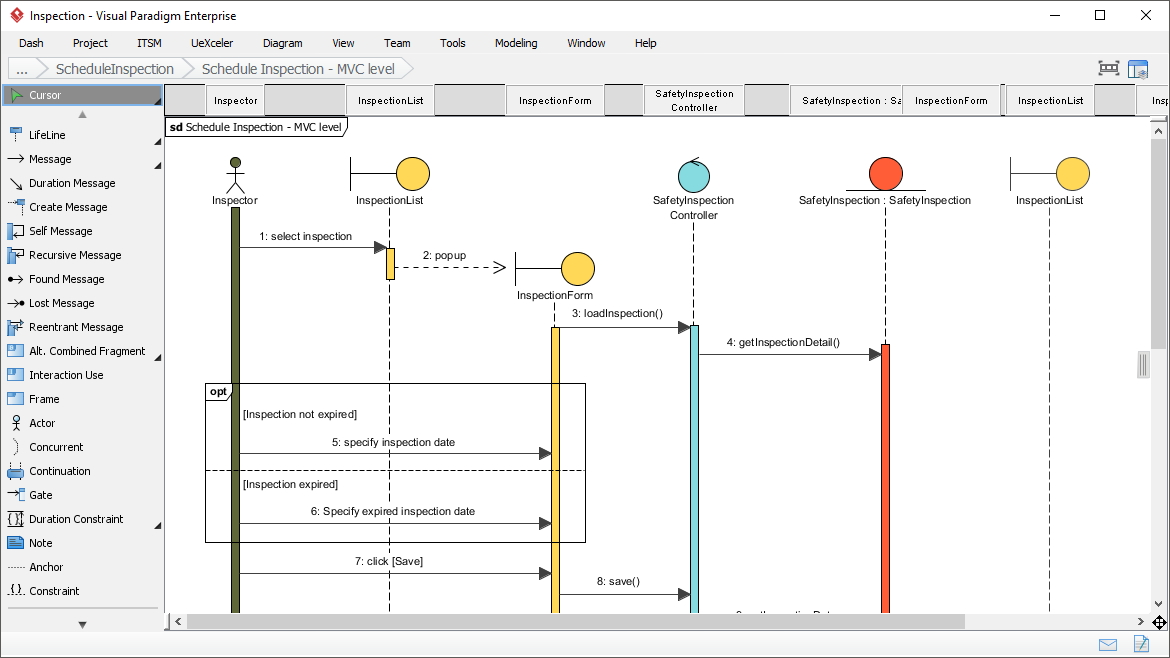

![How to Model Constraints in UML? [With Examples]](https://www.archimetric.com/wp-content/uploads/2026/04/uml-constraint-example.png "How to Model Constraints in UML? [With Examples]")

 English
 Arabic
 Chinese (Simplified)
 Dutch
Dutch French
 German
 Italian
 Japanese
 Korean
 Portuguese
 Russian
 Spanish