


Introduction
In the rapidly evolving landscape of modern software engineering, enterprise architecture, and technical communication, documentation has become both a critical asset and a persistent bottleneck. Traditional approaches to system documentation rely heavily on standalone diagramming tools that create isolated artifacts—static images disconnected from their source systems, quickly outdated as architectures evolve, and labor-intensive to maintain across multiple repositories. This fragmentation leads to knowledge silos, version control nightmares, and significant manual overhead that detracts from core development activities.
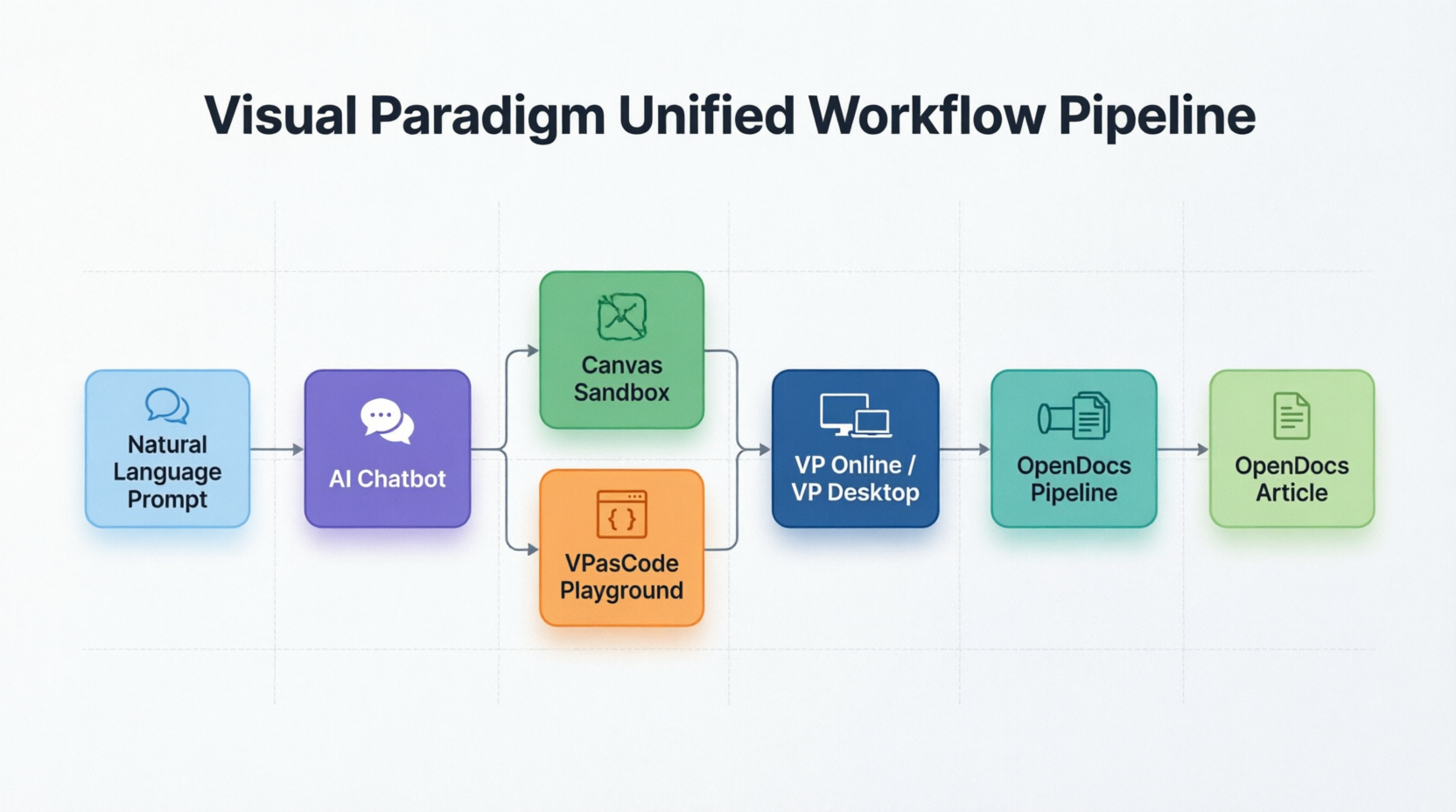
Visual Paradigm has addressed these systemic challenges by introducing a comprehensive, AI-driven product ecosystem that fundamentally reimagines how organizations create, manage, and distribute technical documentation. By seamlessly integrating Visual Paradigm Desktop, Visual Paradigm Online, an intelligent AI Chatbot, Visual Paradigm VPasCode (Diagram-as-Code), OpenDocs, and the OpenDocs Pipeline, this unified platform transforms documentation from a reactive, tool-centric burden into a proactive, workflow-centric knowledge management system. This case study examines how this integrated ecosystem resolves traditional documentation friction points and enables organizations to maintain living, version-controlled technical knowledge bases that evolve alongside their systems.
1. Anatomy of the Ecosystem: Key Core Components
The Visual Paradigm ecosystem represents a carefully balanced integration of manual visual modeling capabilities, text-based automation frameworks, and collaborative knowledge storage mechanisms. Each component serves a distinct purpose while maintaining seamless interoperability with the broader platform.
Visual Paradigm Desktop & Online
Visual Paradigm Desktop functions as an installed, enterprise-grade modeling application specifically engineered for heavy-duty systems engineering tasks. It excels in complex code generation scenarios and supports sophisticated architectural frameworks including TOGAF (The Open Group Architecture Framework) and SysML (Systems Modeling Language). This desktop environment provides the depth and precision required for large-scale enterprise architecture initiatives where detailed modeling fidelity is non-negotiable.
Visual Paradigm Online, in contrast, offers a zero-configuration, browser-based productivity suite optimized for lightweight diagramming requirements. It serves teams needing rapid prototyping capabilities, data visualization charts, graphic design elements, and swift web-based collaboration without the overhead of local software installation. The online platform democratizes access to professional diagramming capabilities across distributed teams.
The AI Chatbot & Embedded AI
At the heart of the ecosystem’s automation capabilities lies a sophisticated Conversational Logic Engine. This cloud-based artificial intelligence system possesses deep understanding of native software modeling standards including UML (Unified Modeling Language), SysML, BPMN (Business Process Model and Notation), C4 model architectures, and ArchiMate frameworks. Users can provide clear, conversational English prompts, and the AI instantly translates these natural language descriptions into structurally sound visual blueprints that adhere to industry-standard conventions.
Beyond initial diagram generation, the embedded AI provides Interactive Explanations functionality. It can reverse-engineer existing charts to break down complex visual relationships, automatically draft use-case summaries from diagram structures, and generate comprehensive technical reports directly from canvas content. This bidirectional intelligence ensures that visual assets remain intelligible and well-documented throughout their lifecycle.
VPasCode (Diagram-as-Code)
VPasCode introduces a browser-based Diagram-as-Code (DaC) playground that enables developers to maintain and author architecture schemas through text syntax rather than graphical manipulation. This approach aligns with modern DevOps practices where infrastructure and architecture definitions are treated as version-controllable code.
The platform demonstrates Multi-Engine Compatibility by integrating standard styling and rendering frameworks including PlantUML, Mermaid.js, and Graphviz. This flexibility allows teams to leverage their existing text-based diagramming preferences while benefiting from Visual Paradigm’s enhanced rendering and integration capabilities. The text-based layout approach completely bypasses the tedious manual mouse dragging and grid-snapping traditionally associated with diagram creation.
OpenDocs & The Pipeline
OpenDocs serves as an AI-driven wiki and technical knowledge hub. It uniquely organizes system text documents alongside active, re-editable visual assets within a tree-structured library hierarchy. Unlike traditional wikis that embed static image files, OpenDocs maintains living connections to source diagrams, ensuring documentation remains synchronized with actual system designs.
The Pipeline functions as a cloud-based, bidirectional transit network responsible for asset delivery across the ecosystem. It handles the complex task of pushing live diagrams directly from the Chatbot, VP Online, or Desktop environments straight into OpenDocs document layouts. This automated delivery mechanism eliminates manual export-import cycles and establishes version-controlled artifact tracking throughout the documentation lifecycle.
2. How They Work Together: The Unified Workflow Pipeline
The transformative value of the Visual Paradigm platform emerges from its interconnected workflow architecture. Rather than generating standalone pictures that require manual copying and pasting into isolated text documents, assets flow through an automated chain that maintains traceability and synchronization.
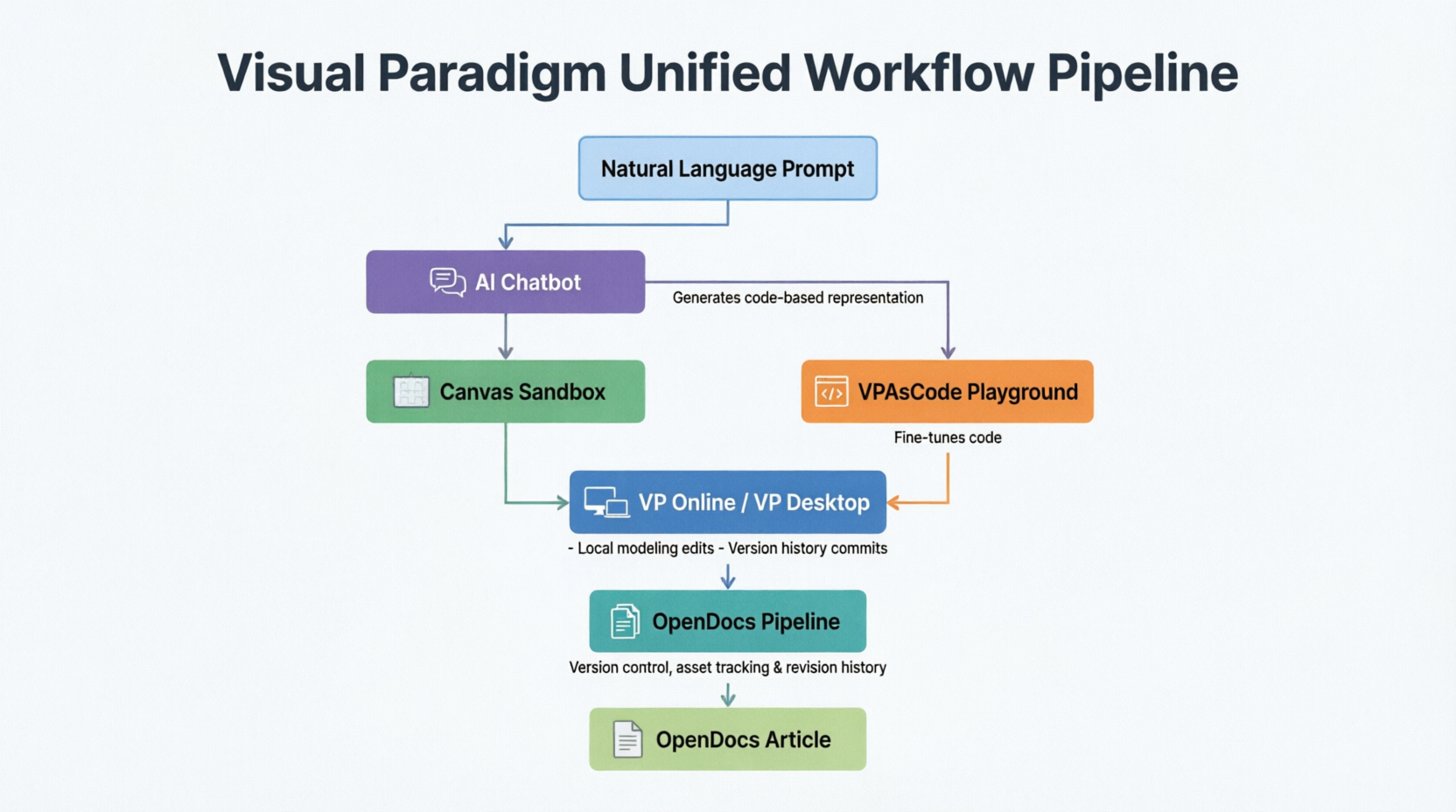
Figure 1: The Unified Workflow Pipeline showing the automated flow from natural language prompts through AI generation, code refinement, desktop editing, pipeline delivery, and final OpenDocs integration
The workflow unfolds through five distinct phases:
Phase 1 – Drafting Phase: A software engineer initiates the process by prompting the cloud-based AI Chatbot to map out a system process or architectural pattern. The AI analyzes the request against its knowledge of modeling standards and constructs a structurally accurate diagram instantly, eliminating the blank-canvas paralysis that often delays documentation efforts.
Phase 2 – Refinement via VPasCode: The AI passes the generated structure directly to the VPasCode canvas, where developers can modify the architectural flow by tweaking text strings rather than dragging physical shapes. This code-based refinement enables precise adjustments, facilitates peer review through diff comparisons, and maintains version history compatible with standard source control systems.
Phase 3 – Enterprise Synthesis: Solution architects open the refined asset inside Visual Paradigm Desktop through project synchronization hosted on VP Online. Within this enterprise environment, they verify code engineering pipelines, cross-reference corporate framework compliance, apply advanced modeling patterns, and ensure alignment with organizational architecture standards.
Phase 4 – The Delivery Pipeline: Once finalized, the team selects “Send to OpenDocs Pipeline” from the export menu. This action registers the diagram as an active, version-controlled cloud artifact within the ecosystem. The Pipeline captures metadata, establishes revision tracking, and prepares the asset for seamless integration into documentation repositories.
Phase 5 – Living Documentation: Inside OpenDocs, technical authors pull the diagram directly into articles using inline placeholders rather than static image embeddings. When architects push changes or commit new versions from Desktop environments, OpenDocs automatically triggers update notifications. Authors can then refresh documents to reflect the latest design versions with a single click, ensuring documentation accuracy without manual intervention.
3. Key Real-World Usage Cases
System Architecture Blueprinting (Software Engineering)
Scenario: A development team must build and document a secure microservices architecture for a financial services platform handling sensitive transaction data.
The Workflow: The tech lead begins by prompting the AI Chatbot to produce a system-wide UML deployment model that illustrates service boundaries, communication protocols, and security layers. The AI generates a comprehensive diagram showing API gateways, authentication services, payment processors, and database clusters with appropriate connection types and cardinality notations.
The team then transitions to VPasCode to append specific security routes, encryption requirements, and access control policies directly via text syntax. Developers add annotations specifying TLS configurations, OAuth2 flows, and audit logging requirements using familiar code-like syntax that integrates naturally with their development workflow.
The Pipeline: Using the OpenDocs Pipeline, the team injects the finalized blueprint into onboarding documentation housed within OpenDocs. Engineering teams accessing these documents can read contextual explanations while simultaneously inspecting live microservice dependencies. When security requirements change or new services are added, architects update the source diagram, and all linked documentation receives automatic update notifications.
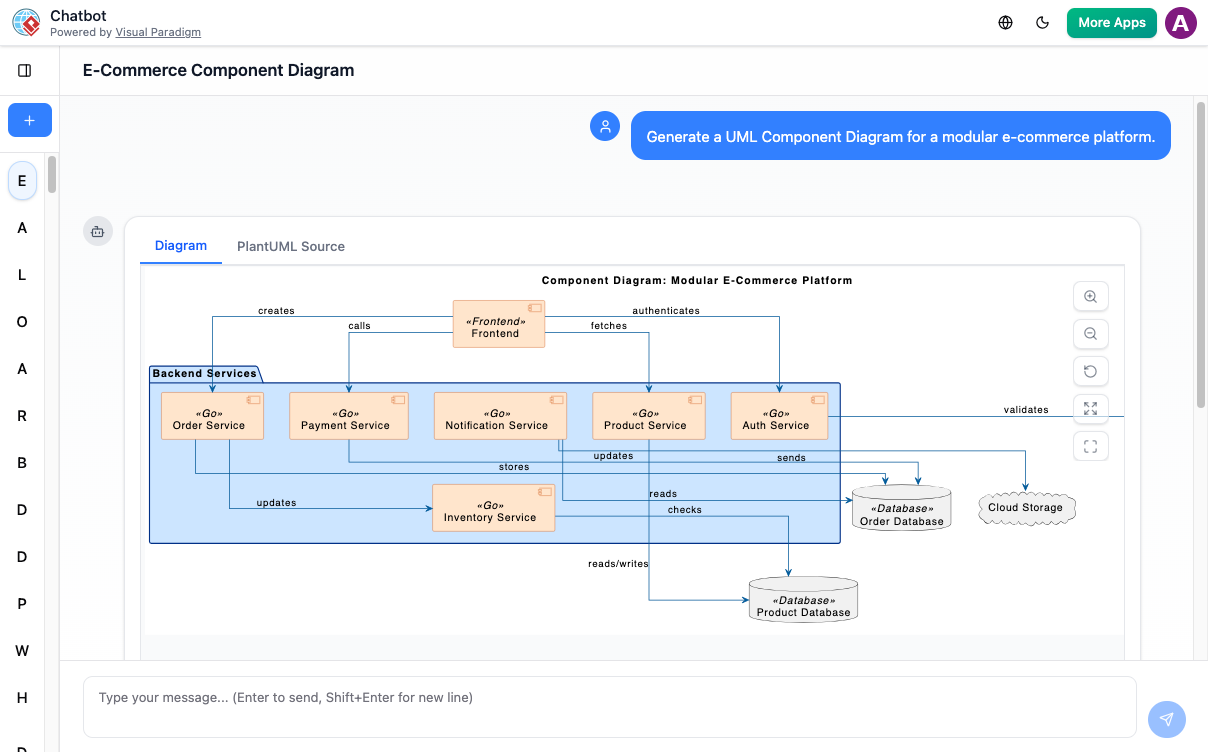
Figure 2: Example of a microservices architecture diagram generated through the AI Chatbot and refined in VPasCode, showing service boundaries and security layers
Automated Technical Onboarding (DevOps & IT)
Scenario: An organization struggles with historically slow documentation processes for database migrations, API lifecycles, and infrastructure changes, resulting in inconsistent onboarding experiences for new engineering recruits.
The Workflow: Senior developers input raw SQL schemas, API route definitions, and infrastructure configuration files into the AI Chatbot. The system analyzes these textual inputs and outputs clean, organized Entity-Relationship Diagrams (ERDs) showing table relationships, foreign key constraints, and index strategies. Simultaneously, it generates Data Flow Diagrams (DFDs) illustrating how information moves through API endpoints, middleware layers, and storage systems.
The embedded AI Breakdown Structure Tool within OpenDocs systematically decomposes complex product features into navigable step-by-step guides. New recruits can explore system components hierarchically, drilling down from high-level architecture overviews to specific implementation details without losing context.
The Pipeline: Generated artifacts are committed to the cloud repository with full version history. As database schemas evolve through migration scripts or API contracts change through version updates, the Pipeline ensures documentation reflects current states. The automated synchronization eliminates the common scenario where onboarding materials reference deprecated endpoints or obsolete table structures.
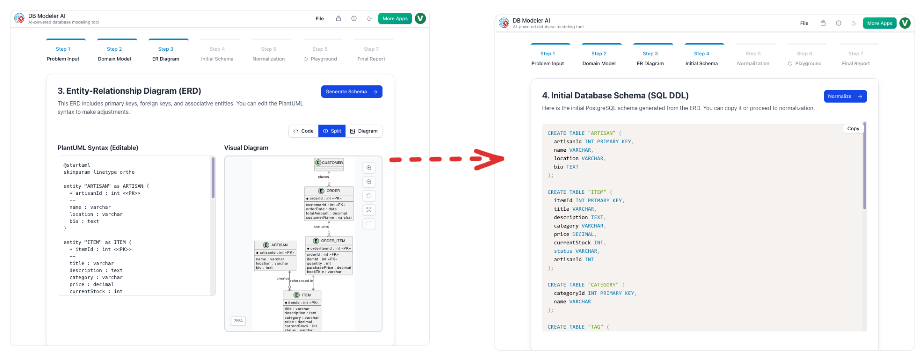
Figure 3: Entity-Relationship Diagram automatically generated from SQL schema input, demonstrating the AI’s ability to translate code into visual representations
4. Operational Comparison Matrix
The following matrix illustrates how each component serves distinct operational needs while contributing to the unified ecosystem:
| Feature Dimension | Visual Paradigm Desktop | VP Online / AI Chatbot | VPasCode | OpenDocs / Pipeline |
|---|---|---|---|---|
| Primary Interface | Native OS Desktop Application | Web Browser Workspace | Text Code Editor | Web Wiki / Workspace Tree |
| Core Input Method | Mouse Drag-and-Drop & Code Generation | Conversational English Prompts | PlantUML, Mermaid, & Graphviz Syntax | Rich Text & Living Artifact Embedding |
| Target Deliverable | Heavy-duty modeling, ORM code engineering | Fast prototyping, conceptual workflow layouts | Version-controlled technical system visuals | Centralized, searchable knowledge management |
| Collaboration Model | Individual expert work with team synchronization | Real-time multi-user editing | Code-review style collaboration | Document-centric team authoring |
| Version Control | Local file management with optional cloud sync | Automatic cloud versioning | Git-compatible text versioning | Integrated artifact version tracking |
| Learning Curve | Steep – requires modeling expertise | Minimal – natural language interface | Moderate – requires syntax familiarity | Low – familiar wiki interface |
This differentiation allows organizations to match tools to specific roles and tasks while maintaining ecosystem coherence. Software architects leverage Desktop capabilities for complex modeling, business analysts utilize the AI Chatbot for rapid stakeholder communication, developers prefer VPasCode for version-controlled architecture definitions, and technical writers depend on OpenDocs for centralized knowledge management.
5. Audience Alignment: For Who and When to Use It
Software Engineers & Solution Architects
When to use: During initial system discovery phases, API design sprints, architectural decision records, sprint planning sessions, and whenever architecture models must be tracked alongside codebase repositories in source control systems.
Platform Focus: These professionals benefit most from the AI Chatbot for rapid ideation and initial concept validation, VPasCode for maintaining architecture-as-code alongside application code, and VP Desktop for detailed code engineering, reverse engineering legacy systems, and generating implementation scaffolding from models.
Key Benefits: Reduced time spent on manual diagram creation, ability to maintain architecture definitions in version control, seamless transition from conceptual models to implementable code structures, and automatic documentation synchronization that eliminates stale architecture diagrams.
Technical Writers & Documentation Managers
When to use: When compiling internal knowledge bases, creating user manuals, developing deployment runbooks, maintaining API documentation portals, or establishing standard documentation templates across engineering organizations.
Platform Focus: OpenDocs serves as the central authoring environment, while the Pipeline eliminates manual file management overhead and protects against the pervasive problem of outdated graphics in technical documentation. The embedded AI assists with generating explanatory text from diagrams and maintaining consistent terminology.
Key Benefits: Elimination of manual screenshot capture and image embedding workflows, automatic notification when source diagrams change, ability to embed live interactive diagrams rather than static images, and centralized search across both text and visual content.
Business Analysts & Product Managers
When to use: When transforming high-level stakeholder requirements into clear business process flows, mapping customer journey touchpoints, documenting regulatory compliance workflows, or communicating product roadmaps to executive leadership.
Platform Focus: The AI Chatbot and VP Online enable quick sketching of BPMN flows, swimlane diagrams, and flowcharts without requiring manual drawing expertise or extensive training in modeling notation standards. The conversational interface allows business stakeholders to describe processes in natural language and receive professionally formatted visualizations.
Key Benefits: Rapid translation of verbal requirements into visual formats, reduced dependency on specialized modeling resources, improved stakeholder communication through standardized notation, and easy iteration based on feedback without redrawing entire diagrams.
Figure 4: BPMN workflow diagram created through AI Chatbot from natural language business process description, demonstrating accessibility for non-technical stakeholders
6. Implementation Considerations and Best Practices
Successful adoption of the Visual Paradigm ecosystem requires strategic planning around several key dimensions:
Migration Strategy: Organizations transitioning from fragmented toolsets should begin by identifying high-value documentation workflows that suffer most from current friction points. Pilot projects focusing on API documentation or onboarding materials typically demonstrate quick wins that build organizational momentum.
Training Investment: While the AI Chatbot reduces barriers to entry, teams benefit from structured training on modeling standards (UML, BPMN, ArchiMate) to ensure generated diagrams meet professional quality standards. VPasCode adoption requires familiarity with text-based diagramming syntax, though the learning curve is significantly gentler than mastering complex desktop modeling interfaces.
Governance Framework: Establishing clear guidelines for diagram naming conventions, version control practices, and OpenDocs organizational structures prevents the ecosystem from becoming as fragmented as the tools it replaces. Designating documentation owners for critical system components ensures accountability for maintaining diagram accuracy.
Integration Planning: Organizations should evaluate existing documentation platforms, issue tracking systems, and CI/CD pipelines to identify integration opportunities. The OpenDocs Pipeline’s API capabilities enable custom workflows that trigger documentation updates from code commits, deployment events, or ticket status changes.
Conclusion
The Visual Paradigm AI and Modeling Ecosystem represents a paradigm shift in how organizations approach technical documentation and knowledge management. By unifying desktop-grade modeling capabilities, cloud-based collaboration tools, AI-powered automation, text-based diagramming, and living documentation platforms into a cohesive pipeline, Visual Paradigm has addressed the fundamental disconnect between system design and system documentation that plagues modern software development.
The ecosystem’s true innovation lies not in any single component but in the seamless interoperability between them. The automated flow from natural language prompts through AI generation, code-based refinement, enterprise modeling, pipeline delivery, and living documentation creates a continuous knowledge loop that evolves alongside the systems it describes. This eliminates the historical tension between development velocity and documentation accuracy, enabling teams to maintain comprehensive, up-to-date technical knowledge bases without sacrificing development momentum.
For software engineers, the platform transforms architecture documentation from an afterthought into an integral part of the development workflow. For technical writers, it eliminates the manual drudgery of keeping visuals synchronized with changing systems. For business stakeholders, it democratizes access to professional modeling capabilities through intuitive conversational interfaces. Across all roles, the ecosystem reduces cognitive load, minimizes context switching, and ensures that organizational knowledge remains accessible, accurate, and actionable.
As software systems grow increasingly complex and distributed, the ability to maintain coherent, current documentation becomes not merely a convenience but a competitive necessity. Organizations that adopt integrated ecosystems like Visual Paradigm position themselves to scale their technical knowledge management alongside their engineering capabilities, turning documentation from a cost center into a strategic asset that accelerates onboarding, improves system reliability, and preserves institutional knowledge across team transitions.
The future of technical documentation is not static PDFs or disconnected wiki pages—it is living, breathing knowledge systems that evolve automatically with the technologies they describe. Visual Paradigm’s unified ecosystem provides a concrete pathway toward that future, demonstrating that with the right architectural approach, comprehensive documentation and agile development are not competing priorities but complementary forces that strengthen each other.
References
- Visual Paradigm’s Pipeline: Hands-on Review of Visual Paradigm’s Desktop to OpenDocs Integration: Comprehensive guide detailing the integration workflow between Visual Paradigm Desktop and OpenDocs, including practical examples of the Pipeline functionality and real-world implementation scenarios.
- Visual Paradigm Online: Browser-based diagramming and productivity suite offering zero-configuration access to professional modeling tools, collaborative editing capabilities, and cloud-based asset management for distributed teams.
- Comprehensive Guide to VPasCode by Visual Paradigm: Detailed documentation covering the Diagram-as-Code functionality, supported syntax frameworks including PlantUML, Mermaid.js, and Graphviz, and best practices for text-based architecture modeling.
Related posts:
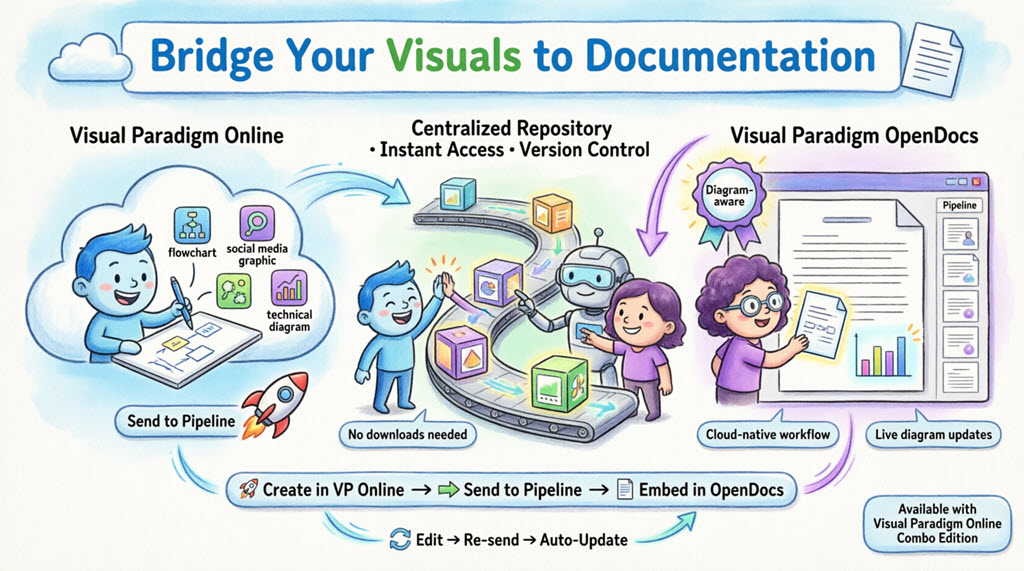 🚀 My Journey to Seamless Documentation: Sending Visual Paradigm Creations Directly to OpenDocs
 Visual Paradigm OpenDocs: The Complete Developer’s Guide to AI-Powered Technical Documentation
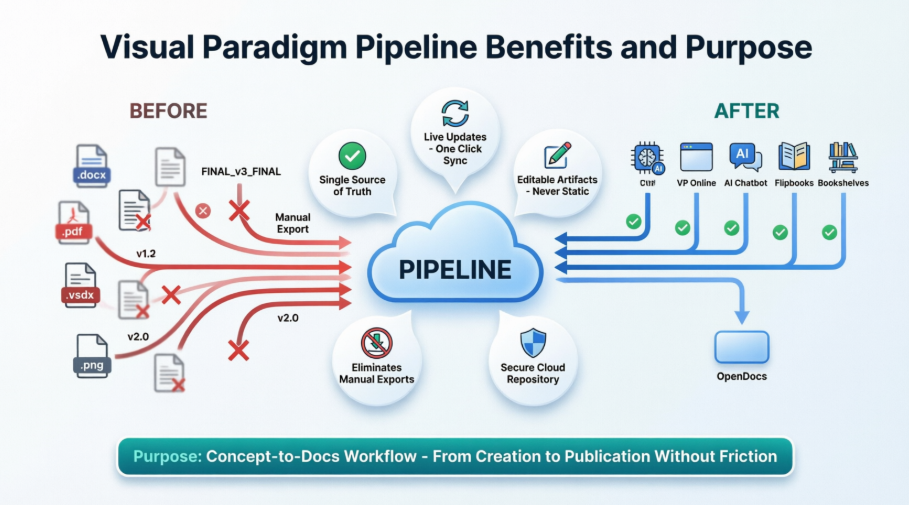 Solving the Documentation Chaos: How Visual Paradigm’s Pipeline Creates a Frictionless Concept-to-Docs Workflow
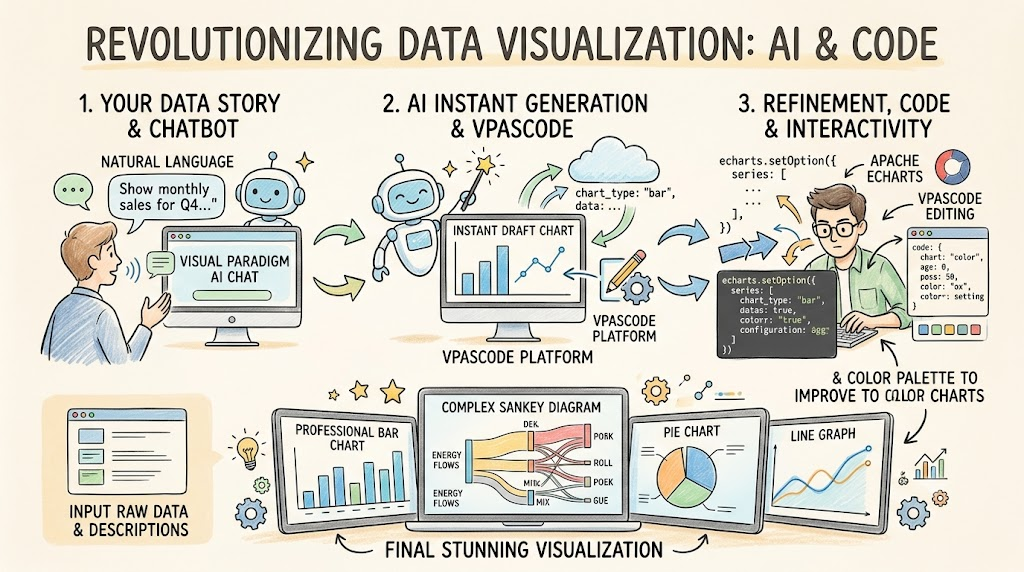 From Zero to Data Visualization Mastery: A Beginner’s Guide to AI-Powered Chart Creation with VPasCode and ECharts

 English
 Arabic
 Chinese (Simplified)
 Dutch
Dutch French
 German
 Italian
 Japanese
 Korean
 Portuguese
 Russian
 Spanish