


As a Product Manager with over seven years of experience navigating complex product landscapes, I’ve found that clarity in process definition is just as critical as clarity in user interface design. Whether you are mapping out a new onboarding flow for Acme Cloud or refining internal operational workflows, understanding the logic that drives these processes is essential.
One of the most powerful tools in this arsenal is BPMN (Business Process Model and Notation). Specifically, Gateways are the control mechanisms that dictate how a process flows, splits, merges, or reacts to events. While they may look like simple diamond shapes on a diagram, their behavior defines the efficiency and accuracy of your business logic.
This guide breaks down the core concepts of BPMN Gateways, offering a practical, user-experience-focused perspective on when and how to use each type effectively.
Understanding BPMN Gateways
Gateways are depicted as diamond shapes and act as decision-making points. They can either split a process flow into multiple paths or merge multiple paths back into one. Think of them as the traffic controllers of your process model, ensuring that tokens (or process instances) move in the right direction based on specific rules
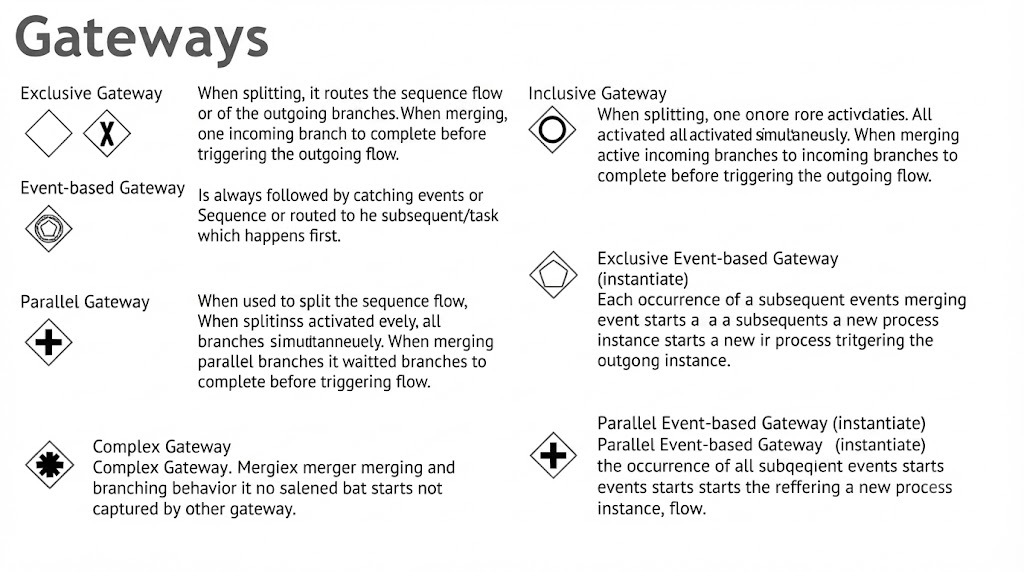
1. Exclusive Gateway (XOR)
The most common gateway, representing a “choice.” This is the digital equivalent of a fork in the road where you can only take one path.
-
Splitting: Routes the flow to exactly one outgoing branch based on a specific condition. If multiple conditions are true, the first one defined in the model usually takes precedence.
-
Merging: Acts as a passive funnel; it waits for one incoming branch to complete before allowing the process to continue. It does not synchronize; it simply passes the token through.
-
Real-World Example: Consider a loan application process. The flow goes to either “Approved” or “Rejected,” but never both. An Exclusive Gateway ensures that only one outcome is processed per application instance.
2. Parallel Gateway (AND)
Used for concurrency, this gateway is essential when tasks need to happen simultaneously rather than sequentially.
-
Splitting: All outgoing branches are activated simultaneously. When a token reaches this gateway, it is duplicated for every outgoing path.
-
Merging: Waits for all incoming branches to complete (synchronization) before triggering the outgoing flow. This is crucial for ensuring that no step is skipped before moving forward.
-
Real-World Example: After a purchase is made on an e-commerce platform, you might want to simultaneously send an email confirmation to the customer and update the CRM database. A Parallel Gateway ensures both actions are triggered at the same time, and the process only moves to “Order Fulfillment” once both the email has been sent and the database has been updated.
3. Inclusive Gateway (OR)
A flexible gateway for complex decision-making where multiple paths might be valid at the same time.
-
Splitting: One or more branches can be activated based on conditions that evaluate to “true.” Unlike the Exclusive Gateway, it doesn’t stop at the first true condition; it evaluates all of them.
-
Merging: Waits for all currently active incoming branches to complete before proceeding. This requires the gateway to keep track of which paths were actually taken during the split phase.
-
Real-World Example: Imagine a customer survey setup where a user can choose to be contacted via “Email,” “Phone,” or “Post.” Depending on their preferences, they might select one, two, or all three methods. An Inclusive Gateway allows the system to trigger exactly the communication channels the user selected, rather than forcing a single choice or requiring all three.
4. Event-Based Gateway
Unlike the others, this is controlled by external events rather than internal data conditions. It is reactive rather than proactive.
-
Function: It is always followed by catching events (like a message arrival) or receive tasks. You cannot place standard tasks immediately after an Event-Based Gateway.
-
Behavior: The sequence flow is routed to whichever event happens first. Once one event occurs, the other potential paths are typically discarded or canceled, depending on the configuration.
-
Real-World Example: In an order processing system, the flow might wait for either a “Payment Received” message OR a “Cancel Order” message from an external payment provider. Whichever message arrives first determines the next step: either proceed to shipping or initiate a cancellation workflow.
5. Complex Gateway
Reserved for logic that cannot be handled by the other standard gateways. This is rarely used in simple models but is vital for highly specialized scenarios.
-
Use Case: Ideal for scenarios involving complex, multi-variable boolean logic that doesn’t fit the standard XOR, AND, or OR patterns. For example, “Proceed if at least three of these five conditions are met,” or specific synchronization rules that require custom expressions.
-
Note: Because of its complexity, it should be used sparingly and well-documented to ensure maintainability.
Specialized Event-Based Gateways (Instantiate)
These are used specifically at the start of a process instance to determine which event triggers the start. They are crucial for systems that need to listen for multiple possible starting signals.
-
Exclusive Event-based Gateway (Instantiate): Each individual occurrence of a subsequent event triggers the creation of a new process instance. For example, a support ticket system might create a new ticket instance whether the request comes via email, web form, or phone call. Each channel starts its own independent process.
-
Parallel Event-based Gateway (Instantiate): Requires the occurrence of all subsequent events before the process instance is officially instantiated. This is useful in scenarios where multiple confirmations are required before a process can legally or logically begin, such as requiring both a signed contract and a deposit payment before starting a project kickoff.
Quick Reference Summary Table
To help you quickly decide which gateway fits your needs, here is a summary of their primary functions and synchronization logic:
| Gateway Type | Primary Function | Synchronization Logic |
|---|---|---|
| Exclusive | Choice (1 of many) | Wait for 1 path |
| Parallel | Concurrency | Wait for ALL paths |
| Inclusive | Combinations (1+ of many) | Wait for ALL active paths |
| Event-based | Reactive based on timing | Wait for the FIRST event |
Conclusion
Mastering BPMN Gateways is less about memorizing symbols and more about understanding the logical flow of your business processes. As Product Managers, we often bridge the gap between technical implementation and business strategy. Using the right gateway ensures that our process models are not just visually accurate, but logically sound.
Whether you are designing a simple approval workflow or a complex, event-driven microservices architecture, choosing the correct gateway—be it the decisive Exclusive, the concurrent Parallel, the flexible Inclusive, or the reactive Event-based—will streamline communication with stakeholders and developers alike. By applying these concepts, you can create clearer, more efficient, and more robust process models that drive better product outcomes.
References
- Visual Paradigm Features: Visual Paradigm provides a fully comprehensive, standards-compliant BPMN 2.0 modeling platform tailored for business analysts and developers alike, blending traditional diagramming with advanced automation and simulation.
- BP Modeling Solution: Offers smart connection rules, flexible swimlane editing, and resource-centric modeling to optimize operational workflows and prevent invalid sequence paths.
- AI BPMN Generator Guide: Explains how the AI BPMN Diagram Generator automatically translates plain-English process narratives into fully interactive, standard-compliant BPMN 2.0 layouts.
- BPMN Made Easy: Highlights tools for simplifying BPMN modeling, including process animation and gap analysis for non-technical stakeholders.
- BPMN Tutorial 1: Provides foundational tutorials on BPMN notations, including events, specialized task types, gateways, and data objects.
- BPMN Tutorial PDF: A downloadable PDF version of the foundational BPMN tutorial for offline reference.
- BPMN Activity Types Explained: Detailed guide on different BPMN activity types, helping users choose between Service, User, Manual, and Script tasks.
- Visual Paradigm YouTube Demo: Video demonstration of Visual Paradigm’s features, including swimlane editing and process drill-down capabilities.
- SysML Modeling Guide: Discusses resource-centric modeling where elements are created as reusable model components rather than static shapes.
- BPMN Swimlanes Tutorial: Focuses on partitioning processes using interactive horizontal or vertical pools and lanes.
- BPMN Diagram Tools Overview: Reiterates the comprehensive feature set for BPMN diagramming, including full notation support and AI integration.
- Visual Paradigm Blog: Discusses Visual Paradigm as an all-in-one software solution, emphasizing its role in software development and process modeling.
- Business Process Modeling Guide: Covers best practices for business process modeling, including As-Is and To-Be gap analysis.
- BPMN Features List: Lists key features such as process simulation, animation, and matrix transformation for RACI/CRUD outputs.




 English
 Arabic
 Chinese (Simplified)
 Dutch
Dutch French
 German
 Italian
 Japanese
 Korean
 Portuguese
 Russian
 Spanish