


Introduction
In the dynamic world of business process management, rigidity is the enemy of efficiency. Rarely does a real-world workflow proceed in a straight, linear line from start to finish without deviation or repetition. Whether it’s waiting for multiple approvals, reworking a design until it meets standards, or processing hundreds of individual orders, processes are inherently iterative.
For product managers, business analysts, and process architects, accurately modeling these repetitions is crucial. If your BPMN (Business Process Model and Notation) diagram assumes every task happens exactly once, you’re likely building a model that fails in production. This guide dives deep into two powerful BPMN constructs—Loop Activities and Multi-Instance Activities—using a practical procurement case study. We’ll explore how to implement them correctly, avoid common pitfalls like infinite loops, and choose between sequential and parallel execution to optimize your workflows.
1. Core Concept: Why Use Loops?
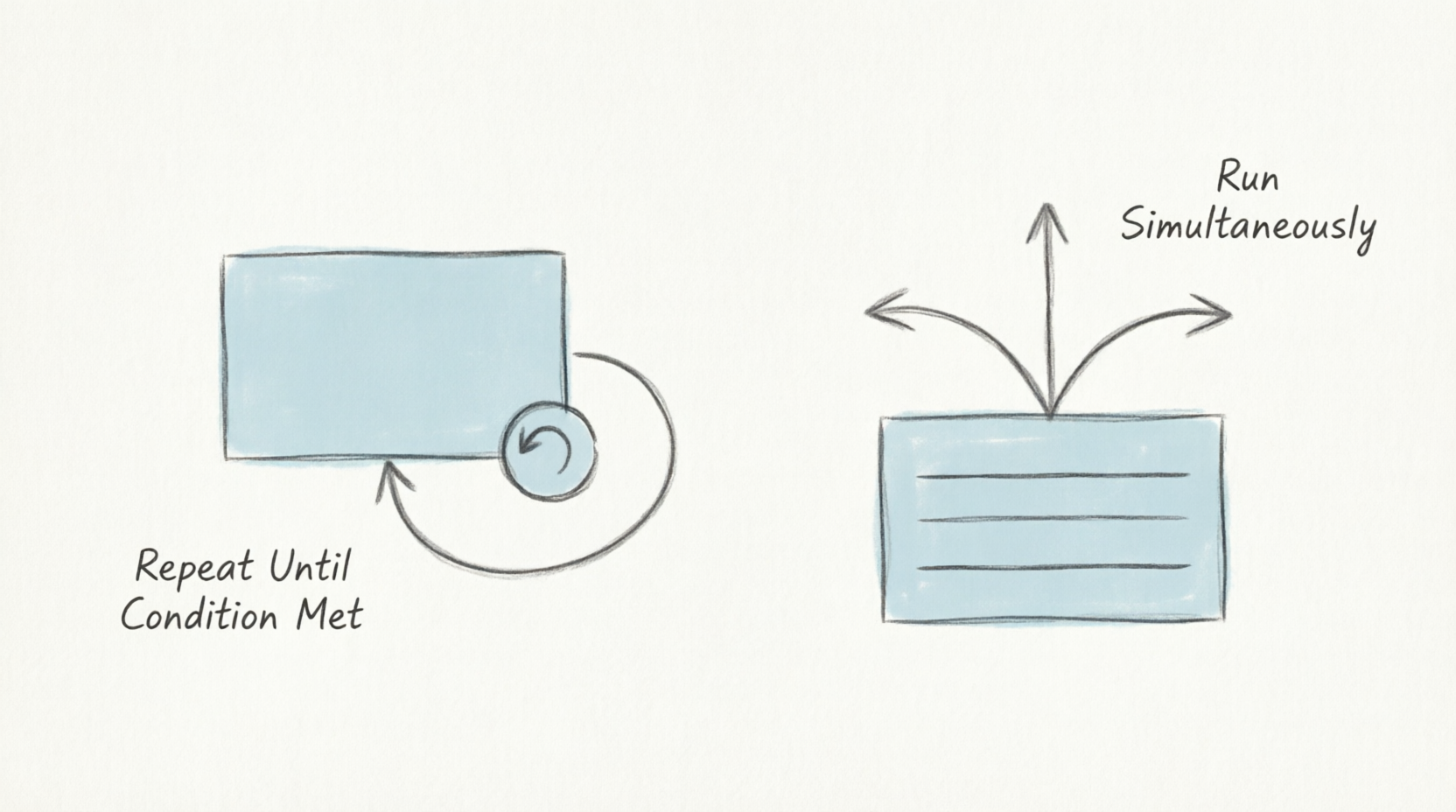
A loop activity allows a process modeler to indicate that a specific task or sub-process will be executed multiple times. Without a defined termination point, a loop would repeat endlessly, which is usually not the intended behavior. Therefore, loops are always governed by a condition (to stop or continue) or a count (to run a specific number of times).
Understanding when to use a loop versus a standard sequence flow is the first step toward creating robust, automated-ready diagrams. Loops are essential for handling scenarios where:
-
Data validation fails and requires re-entry.
-
Multiple stakeholders must provide input sequentially.
-
A service call returns an error and needs retry logic.
2. Case Study: The Procurement Process
Let’s use the procurement example from the provided reference to understand how this works in practice. Imagine a company purchasing new business cards for employees. This seemingly simple task involves complex repetition logic.
Phase 1: Handling “Identify Demand” (Simple Loop)
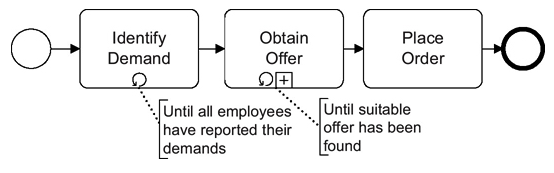
First, the company must identify the demand for all employees. Because employees might report their needs at different times, the “Identify Demand” task must repeat.
-
The Symbol: A small, circular arrow at the bottom of the activity box.
-
The Condition: An exit condition is applied (e.g., “Until all employees have reported their demands”). The activity will keep looping back on itself until this specific condition is met.
This simple loop ensures that the process doesn’t move forward prematurely. It acts as a gatekeeper, collecting all necessary inputs before triggering the next phase.
Phase 2: Handling “Obtain Offer” (Expanded Sub-Process Loop)
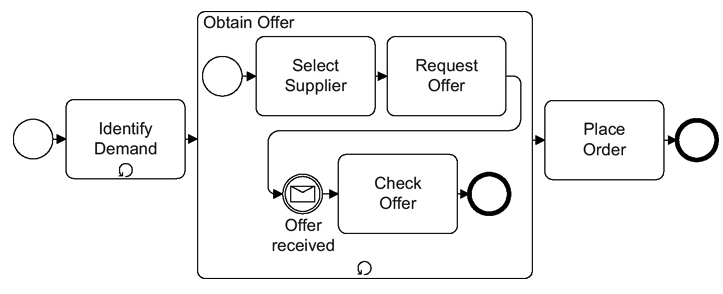
Once demands are collected, the company needs to get an offer. If the offer is unsatisfactory, they must obtain another one. This is a more complex task that may involve selecting a supplier, requesting an offer, and checking the offer.
To model this, we use an Expanded Sub-Process:
-
The “Obtain Offer” box acts as a container for a smaller, internal process.
-
This sub-process itself is marked with a loop symbol, indicating the entire sequence within the box can repeat.
-
Exit Condition: The loop continues as long as the offer is deemed unsatisfactory. Once a suitable offer is found, the loop exits, and the process moves to “Place Order.”
Using a sub-process here keeps the main diagram clean while allowing for detailed modeling of the negotiation and selection logic inside the loop.
3. Key Concepts for Implementation
Loop Termination Conditions
When designing automated processes, loops must be defined in a language the process engine can understand, such as XPath. There are two ways to define when a loop ends:
-
Exit Condition (Until): The loop repeats until the condition becomes true. (e.g., “Loop until a suitable offer is found”).
-
Continuation Condition (While): The loop repeats as long as the condition remains true. Once the condition fails (becomes false), the loop terminates.
Choosing the right logical operator is critical for preventing off-by-one errors or infinite loops in your automation scripts.
Timing of Evaluation
A critical decision for the modeler is when the condition is checked:
-
Before the loop starts: If the condition is checked first, it is possible the loop may not execute at all if the condition is already met (e.g., if there is no demand, “Identify Demand” is skipped). This is often referred to as a “pre-test” loop.
-
After each loop cycle: If the condition is checked after the task is performed, the loop is guaranteed to run at least once. This is a “post-test” loop and is useful when you need to perform an action before evaluating its success.
4. Multi-Instance Activities (An Advanced Perspective)
While the example above focuses on sequential loops (one repetition after another), BPMN also supports Multi-Instance Activities. This distinction is vital for performance optimization.
-
Sequential Multi-Instance: A task runs repeatedly, but one instance at a time (e.g., a manager approving requests one by one). This is useful when resources are limited or when order matters.
-
Parallel Multi-Instance: A task runs multiple times simultaneously (e.g., requesting quotes from five different vendors at the same time to save time). This significantly reduces process duration but requires more system resources.
These are typically denoted by parallel vertical lines (for parallel) or horizontal lines (for sequential) inside the activity marker. Choosing between these two can mean the difference between a process that takes days versus one that takes hours.
Summary Checklist for Modelers
When adding a loop to your BPMN diagram, always ask:
-
Is it a simple task or a sub-process? (Use a box with a loop marker).
-
What is the exit criteria? (Ensure it is clearly defined as an annotation or formal script).
-
When should the check occur? (Before or after the task execution?).
-
Is this happening sequentially or in parallel? (If multiple items are processed simultaneously, use Multi-Instance markers).
By properly utilizing these loop structures, you ensure that your business processes are robust, automated, and capable of handling complex, real-world scenarios.
Conclusion
Modeling repetition in BPMN is less about drawing arrows and more about understanding the logic of your business rules. Whether you’re using a simple loop to gather employee data or a parallel multi-instance activity to speed up vendor selection, the goal is clarity and accuracy.
As you refine your process models, remember that every loop introduces complexity. Always validate your termination conditions and consider the performance implications of parallel versus sequential execution. With these tools in your toolkit, you can create BPMN diagrams that not only look professional but also serve as reliable blueprints for automation and operational excellence.
References
- Visual Paradigm Features: Visual Paradigm provides a fully comprehensive, standards-compliant BPMN 2.0 modeling platform tailored for business analysts and developers alike, blending traditional diagramming with advanced automation and simulation.
- BP Modeling Solution: Offers smart connection rules, flexible swimlane editing, and resource-centric modeling to optimize operational workflows and prevent invalid sequence paths.
- AI BPMN Generator Guide: Explains how the AI BPMN Diagram Generator automatically translates plain-English process narratives into fully interactive, standard-compliant BPMN 2.0 layouts.
- BPMN Made Easy: Highlights tools for simplifying BPMN modeling, including process animation and gap analysis for non-technical stakeholders.
- BPMN Tutorial 1: Provides foundational tutorials on BPMN notations, including events, specialized task types, gateways, and data objects.
- BPMN Tutorial PDF: A downloadable PDF version of the foundational BPMN tutorial for offline reference.
- BPMN Activity Types Explained: Detailed guide on different BPMN activity types, helping users choose between Service, User, Manual, and Script tasks.
- Visual Paradigm YouTube Demo: Video demonstration of Visual Paradigm’s features, including swimlane editing and process drill-down capabilities.
- SysML Modeling Guide: Discusses resource-centric modeling where elements are created as reusable model components rather than static shapes.
- BPMN Swimlanes Tutorial: Focuses on partitioning processes using interactive horizontal or vertical pools and lanes.
- BPMN Diagram Tools Overview: Reiterates the comprehensive feature set for BPMN diagramming, including full notation support and AI integration.
- Visual Paradigm Blog: Discusses Visual Paradigm as an all-in-one software solution, emphasizing its role in software development and process modeling.
- Business Process Modeling Guide: Covers best practices for business process modeling, including As-Is and To-Be gap analysis.
- BPMN Features List: Lists key features such as process simulation, animation, and matrix transformation for RACI/CRUD outputs.
- Visual-Diff Feature: Explains the version comparison tool that tracks operational revisions by visually comparing different workflow versions.
- REST API Design Solution: Highlights Agile integration features, synchronizing workflow components into user stories and development backlogs.
Related posts:
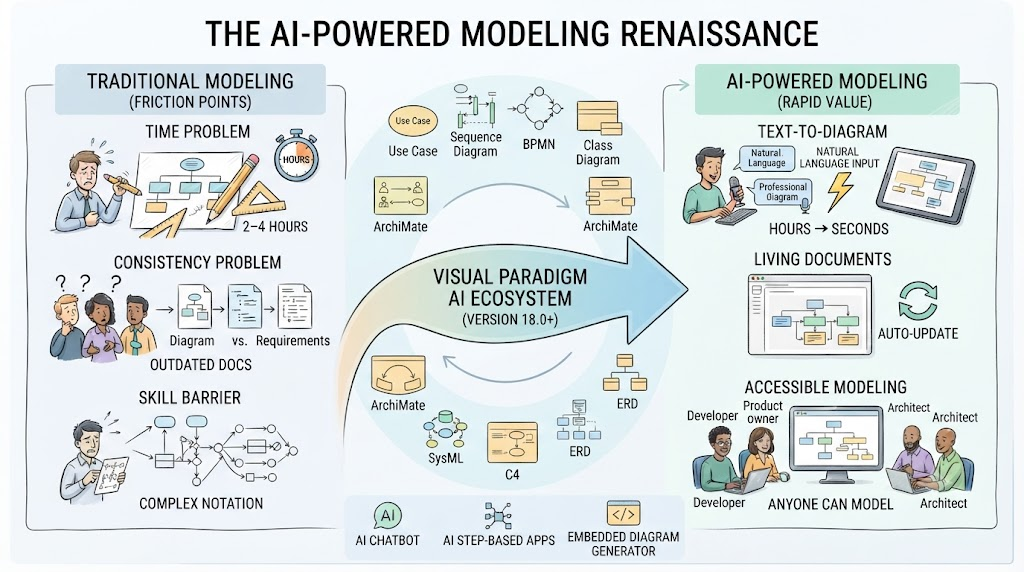 AI-Powered Modeling in Agile: How BPMN and UML Are Making a Comeback
 Step-by-Step Guide: Mapping Employee Onboarding Workflows with AI
 Orchestrating, Collaborating, Choreographing: A Beginner’s Guide to BPMN 2.0 Diagram Types
🛒 From Cart to Confirmation: A Beginner’s Complete Guide to BPMN Using Visual Paradigm Online’s Free Web-Shop Workflow
Orchestrating, Collaborating, Choreographing: A Beginner’s Guide to BPMN 2.0 Diagram Types
🛒 From Cart to Confirmation: A Beginner’s Complete Guide to BPMN Using Visual Paradigm Online’s Free Web-Shop Workflow

 English
 Arabic
 Chinese (Simplified)
 Dutch
Dutch French
 German
 Italian
 Japanese
 Korean
 Portuguese
 Russian
 Spanish