


As a Product Manager with over seven years of experience bridging the gap between business stakeholders and engineering teams, I have always viewed process modeling as a necessary evil. We need it to define scope, identify bottlenecks, and ensure compliance, but traditional tools often feel like rigid drawing boards that lack intelligence. Recently, I took Visual Paradigm’s BPMN 2.0 suite for a spin to see if it could truly serve as a “one-stop-shop” for both high-level business analysis and technical software design. Here is my comprehensive review of how this platform handles the complex world of business process modeling.
The Core Foundation: Mastering BPMN 2.0
Visual Paradigm positions itself not just as a diagramming tool, but as a full-featured modeling environment. For those unfamiliar, BPMN 2.0 (Business Process Model and Notation) is the industry standard for mapping out business processes. Visual Paradigm supports the full spectrum of these elements, ensuring that your diagrams are not just pretty pictures, but standardized artifacts that developers and analysts can universally understand.
The platform covers all essential Flow Objects, including:
-
Events: Start, Intermediate, and End events to mark the lifecycle of a process.
-
Activities: Tasks and Sub-processes that represent the actual work being done.
-
Gateways: Exclusive, Inclusive, and Parallel gateways to manage decision points and branching logic.
It also handles Connecting Objects like sequence flows, message flows, and associations, alongside Swimlanes (Pools and Lanes) for organizing participants. Furthermore, it supports Artifacts such as data objects, inputs/outputs, and data stores, which are crucial for understanding the information flow alongside the activity flow.
Swimlanes: The Heart of Responsibility Mapping
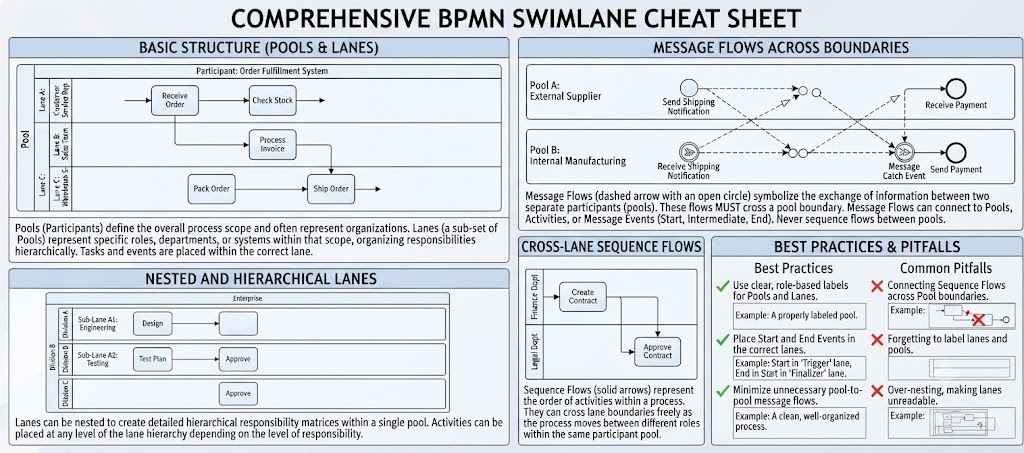
One of the most powerful features I explored was the handling of Swimlanes. In any complex project, knowing “who does what” is half the battle. Swimlanes transform a simple flowchart into a structured diagram that clarifies responsibilities and organizational boundaries.
Understanding Pools and Lanes
The structure relies on two primary elements:
-
Pools: These represent major participants or separate organizations (e.g., “Customer,” “Supplier,” or “Finance Department”). A pool acts as a boundary, isolating activities within it from others.
-
Lanes: These are sub-partitions within a pool, used to categorize activities by role, department, or system (e.g., “Manager,” “Sales Clerk,” or “ERP System”).
A critical distinction in BPMN is the Message Flow, represented by a dashed arrow. This indicates the exchange of information between two different pools, symbolizing the crossing of organizational or system boundaries. In contrast, Sequence Flows (solid arrows) represent the order of activities within a single pool.
| Element | Visual Representation | Purpose |
|---|---|---|
| Pool | Large rectangular box | Represents an organization or participant. |
| Lane | Sub-partition within a pool | Represents a role, department, or system. |
| Message Flow | Dashed arrow | Represents communication between different pools. |
| Sequence Flow | Solid arrow | Represents the order of activities within a pool. |
Why Swimlanes Matter
From a product management perspective, swimlanes offer four key functions:
-
Defining Responsibility: Assigning tasks to specific lanes makes ownership immediately apparent.
-
Visualizing Handoffs: They highlight where processes move from one person or department to another—often where inefficiencies and errors hide.
-
Clarifying Scope: They clearly define what is internal to an organization versus what is an external interaction.
-
Hierarchical Organization: Lanes can be nested, allowing for complex organizational structures to be mapped accurately.
Practical Example: Order Processing
To illustrate, consider an Order Fulfillment Process:
| Pool: Customer | Activities: “Place Order,” “Receive Confirmation,” “Receive Goods” |
|---|---|
| Pool: Company | |
| Lane: Sales Dept | Activities: “Validate Order,” “Update CRM” |
| Lane: Warehouse | Activities: “Pick Items,” “Pack Goods,” “Ship” |
| Lane: Finance | Activities: “Generate Invoice,” “Process Payment” |
In this scenario, the Customer is a separate pool because they are outside the internal company structure. The Company pool is subdivided into Sales, Warehouse, and Finance lanes. Message flows would connect the Customer pool to the Sales lane (to place the order) and the Warehouse lane (to receive the goods). This visual clarity helps identify bottlenecks, such as excessive back-and-forth between Sales and Finance before an order reaches the Warehouse.
Beyond Basic Diagramming: Advanced Analytical Features
Where Visual Paradigm truly distinguishes itself is in its advanced modeling features that go beyond static notation.
Process Simulation & Animation
Instead of just drawing a process, you can evaluate it. The simulation feature allows you to visualize the flow of the process in motion, helping to verify logic before implementation. More importantly, it enables you to evaluate costs and identify bottlenecks quantitatively. This is invaluable for Lean/Six Sigma initiatives where data-driven process improvement is key.
AI-Powered Modeling
For those moments when you have a narrative but no diagram, the AI-powered modeling feature is a game-changer. You can generate BPMN diagrams from plain-English descriptions. This accelerates the transition from concept to visual model, allowing stakeholders to iterate on the logic rather than getting bogged down in the mechanics of drawing shapes.
Traceability & Integration
As a PM, I often struggle with keeping requirements aligned with process models. Visual Paradigm addresses this with deep traceability. You can map processes to other artifacts like UML Use Cases, ERD entities, or wireframes. The “Model Transitor” engine facilitates moving from high-level BPMN workflows to granular software requirements, ensuring that the business process directly informs the technical build.
Matrix Generation
One of my favorite productivity boosters is the automatic generation of RACI (Responsible, Accountable, Consulted, Informed) and CRUD (Create, Read, Update, Delete) charts based on your BPMN process model. This eliminates the manual, error-prone task of cross-referencing diagrams with responsibility matrices, ensuring consistency across documentation.
Process Management & Collaboration
Drill-Down Capability
Complex processes can become unwieldy. Visual Paradigm allows you to collapse or expand sub-processes, enabling you to manage complexity by hiding or revealing lower-level details as needed. This hierarchical view is essential for presenting high-level overviews to executives while retaining the ability to drill down into technical specifics for engineering teams.
Collaboration Tools
Integrated with cloud-based tools like PostMania, the platform supports annotating and discussing diagrams with remote team members. This fosters collaboration and ensures that feedback is contextualized directly within the model. Additionally, the powerful report designer allows for generating custom documentation directly from your models, streamlining the creation of stakeholder-facing deliverables.
A Note on Licensing
It is important to note that while Visual Paradigm provides robust BPMN support, feature availability can vary depending on your specific edition (e.g., Modeler, Enterprise, vs. Community editions). If you encounter “read-only” issues in a specific diagram type, it typically indicates that the feature is restricted in your current license level. Before committing, ensure that the edition you choose supports the advanced features like simulation and AI generation if those are critical to your workflow.
Conclusion
Visual Paradigm’s BPMN 2.0 suite is more than just a drawing tool; it is a comprehensive environment for business process analysis and software design integration. Its strength lies in combining strict adherence to BPMN standards with intelligent features like AI generation, simulation, and automated matrix creation. For Product Managers, Business Analysts, and Systems Architects looking to bridge the gap between business strategy and technical execution, Visual Paradigm offers a powerful, albeit potentially complex, solution. Whether you are conducting gap analysis, designing system integrations, or simply trying to clarify roles in a cross-functional project, this platform provides the depth and flexibility needed to turn chaotic processes into clear, actionable models.
References
- Visual Paradigm Features: Visual Paradigm provides a fully comprehensive, standards-compliant BPMN 2.0 modeling platform tailored for business analysts and developers alike, blending traditional diagramming with advanced automation and simulation.
- BP Modeling Solution: Offers smart connection rules, flexible swimlane editing, and resource-centric modeling to optimize operational workflows and prevent invalid sequence paths.
- AI BPMN Generator Guide: Explains how the AI BPMN Diagram Generator automatically translates plain-English process narratives into fully interactive, standard-compliant BPMN 2.0 layouts.
- BPMN Made Easy: Highlights tools for simplifying BPMN modeling, including process animation and gap analysis for non-technical stakeholders.
- BPMN Tutorial 1: Provides foundational tutorials on BPMN notations, including events, specialized task types, gateways, and data objects.
- BPMN Tutorial PDF: A downloadable PDF version of the foundational BPMN tutorial for offline reference.
- BPMN Activity Types Explained: Detailed guide on different BPMN activity types, helping users choose between Service, User, Manual, and Script tasks.
- Visual Paradigm YouTube Demo: Video demonstration of Visual Paradigm’s features, including swimlane editing and process drill-down capabilities.
- SysML Modeling Guide: Discusses resource-centric modeling where elements are created as reusable model components rather than static shapes.
- BPMN Swimlanes Tutorial: Focuses on partitioning processes using interactive horizontal or vertical pools and lanes.
- BPMN Diagram Tools Overview: Reiterates the comprehensive feature set for BPMN diagramming, including full notation support and AI integration.
- Visual Paradigm Blog: Discusses Visual Paradigm as an all-in-one software solution, emphasizing its role in software development and process modeling.
- Business Process Modeling Guide: Covers best practices for business process modeling, including As-Is and To-Be gap analysis.
- BPMN Features List: Lists key features such as process simulation, animation, and matrix transformation for RACI/CRUD outputs.




 English
 Arabic
 Chinese (Simplified)
 Dutch
Dutch French
 German
 Italian
 Japanese
 Korean
 Portuguese
 Russian
 Spanish