


Introduction
In the complex world of enterprise architecture and business process management, we often get so caught up in mapping out internal workflows that we forget the most critical part of modern business: interaction. How does your system talk to a supplier? How does a customer’s request trigger a response from a third-party logistics provider?
This is where BPMN Choreography Diagrams come into play. Unlike standard process diagrams that focus on the “how” of internal tasks, choreography diagrams focus on the “what” of external message exchanges. They define the contract between independent parties.
Having spent considerable time modeling complex B2B integrations, I’ve found that Visual Paradigm offers one of the most intuitive implementations of BPMN 2.0 Choreography standards. This guide shares my experience using the tool to model these multi-party interactions, focusing specifically on Choreography Tasks and Choreography Sub-processes.
Understanding the Core Concept
Before diving into the tool, it is essential to understand what makes a choreography different. A standard BPMN process defines the flow of activities within a single organization (or pool). A choreography, however, exists between pools. It doesn’t belong to any single participant; instead, it shows the sequence of messages passing between them.
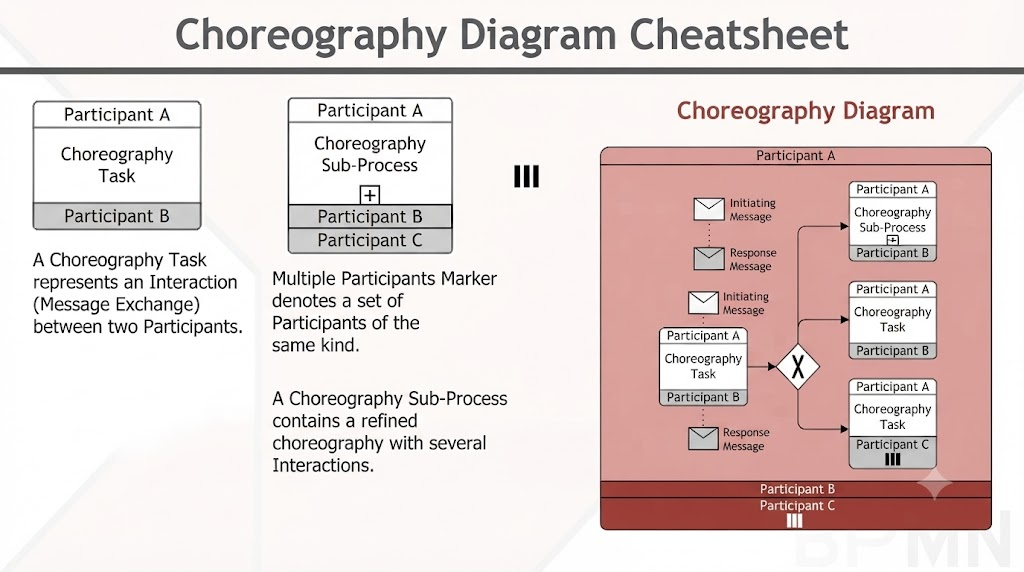
Think of it as the script for a play involving multiple actors. The script doesn’t detail what each actor does backstage (their internal processes); it only details the lines they speak to each other (the messages) and the order in which they speak them.
The Choreography Task: The Atomic Unit of Interaction
The fundamental building block of any choreography diagram is the Choreography Task. This represents a single, atomic interaction between two or more participants. Visually, it is distinct because it is formed by multiple “bands.” Each band displays the name of a participant, and the center band displays the name of the task itself.
Setting Up Participants and Initiators
One of the first challenges I faced when starting with choreographies was defining who starts the conversation. In Visual Paradigm, this is handled elegantly through the specification window.
-
Accessing Specifications: Right-click on the choreography task in your business process diagram and select Open Specification… from the popup menu.
-
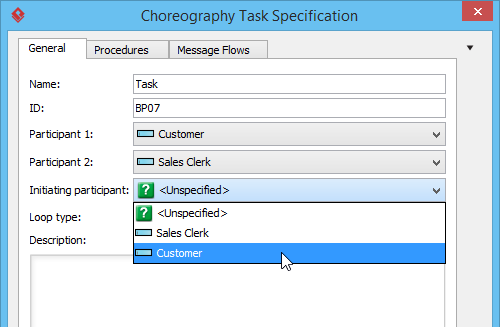
Defining Actors: In the specification window, you will see options to choose the pools for Participant 1 and Participant 2. These are the entities exchanging messages.
-
Setting the Initiator: Crucially, you must define who kicks off the interaction. Select the pool that starts the interaction from the drop-down menu labeled Initiating participant.
 |
|---|
| Selecting initiating pool |
-
Finalizing: Click OK to confirm your edits. The diagram will update to reflect the chosen participants and the initiating band will often be visually distinguished to show who sends the first message.
 |
|---|
| Choreography task |
This level of clarity is vital. In a real-world scenario, such as a procurement process, knowing whether the Buyer or the Supplier initiates the “Request for Quote” changes the entire technical implementation of the API or service contract.
Handling Complexity with Choreography Sub-processes
As your business interactions grow more complex, a single task isn’t enough. You might have a negotiation phase that involves multiple back-and-forth messages, counter-offers, and approvals. Modeling this as a single task would obscure the detail. This is where the Choreography Sub-process shines.
A choreography sub-process is a compound activity. It acts as a container for a detailed flow of other activities, allowing you to keep your high-level diagram clean while still having the ability to drill down into the specifics.
Configuring Sub-process Interactions
Setting up a sub-process is similar to a task but requires managing potentially more participants.
-
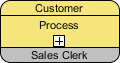
Open Specifications: Right-click on the choreography sub-process (identified by a “+” sign at the bottom) and select Open Specification….
-
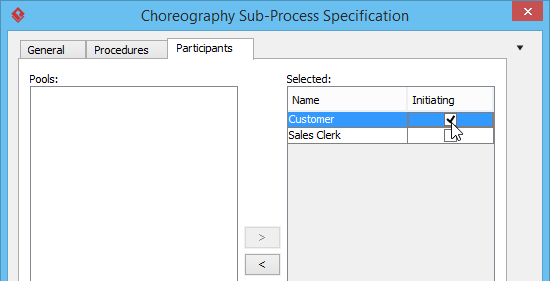
Navigate to Participants: Open the Participants tab within the specification window.
-
Assign Pools: Select all the pools involved in this complex interaction and click the > button to assign them to the sub-process.
-
Define the Starter: Just like with a simple task, check the box or select the dropdown for the initiating pool to establish who triggers this sequence of interactions.
 |
|---|
| Select initiating participant |
-
Confirm: Click OK to save. Your diagram now shows a high-level block that can be expanded to reveal the intricate message flows within.
 |
|---|
| Choreography sub-process |
Why Use Choreography Diagrams?
From my experience, these diagrams are not just academic exercises; they solve real business problems.
-
B2B Integration: When integrating with external partners, you need a clear “contract” of messages. Choreography diagrams provide this blueprint without exposing your internal proprietary logic.
-
Service Contracts: For web services, defining exactly what input is expected and what output is returned is critical. Choreography maps this perfectly.
-
Compliance: In regulated industries, proving that a specific sequence of approvals occurred between departments (e.g., Finance to Legal) is easier when the interaction sequence is explicitly modeled.
Comparison: Process vs. Choreography
To help decide when to use which, here is a quick comparison based on my workflow:
| Feature | BPMN Process Diagram | BPMN Choreography Diagram |
|---|---|---|
| Focus | Internal tasks and logic flow. | External message exchanges. |
| Perspective | Single organization/system. | Collaborative, multi-party. |
| Detail | Focuses on “how” work is done. | Focuses on “what” is exchanged. |
Conclusion
Modeling interactions between independent parties is one of the hardest parts of business process design. Traditional process diagrams often fall short because they force you to pick a “main” perspective, leaving the other parties as black boxes.
BPMN Choreography diagrams, supported robustly in Visual Paradigm, offer a neutral ground. By focusing on the exchange of messages rather than internal tasks, they provide a clear, unambiguous view of how different entities collaborate. Whether you are defining a simple two-party quote request or a complex multi-party supply chain negotiation, the tools for setting participants, defining initiators, and nesting sub-processes make the modeling process both accurate and manageable.
For anyone looking to bridge the gap between business requirements and technical integration specs, mastering these choreography elements is a worthwhile investment.
References
- BPMN Choreography Documentation: Detailed user guide on creating and configuring choreography tasks and sub-processes in Visual Paradigm.
- Business Workflow Gallery: Examples and templates for various business workflow diagrams including choreographies.
- Business Process Modeling Tutorials: Step-by-step tutorials for getting started with BPMN tools.
- BPMN Diagram Features: Overview of the comprehensive BPMN 2.0 modeling engine and its capabilities.
- Comprehensive Guide to BPMN: An external guide detailing BPMN standards and Visual Paradigm’s implementation.
- Swimlanes and Organization Guide: Instructions on structuring workflows using pools and lanes.
- BPMN Diagram Tools Overview: Further details on process drill-down and sub-process management.
- BP Modeling Solutions: Information on advanced features like simulation, gap analysis, and matrix transformations.
- Orchestration vs. Choreography vs. Collaboration: A conceptual guide explaining the differences between these BPMN diagram types.
- Choreography Support Details: Specific documentation on choreography notations and participant bands.
- Business Process Modeling Tutorials: Additional resources for learning BPMN operations and exports.
- Understanding BPMN Choreography: A knowledge base article diving deeper into choreography concepts.
- BPMN Choreography Video Tutorial: A video demonstration of creating choreography diagrams.
- AI BPMN Generator Guide: Guide on using AI to generate BPMN diagrams from natural language descriptions.
Related posts:
 Visual Paradigm Online PowerPoint Web Viewer: Convert PPT to HTML5 with Animations & Transitions
 Complete Guide to Visual Paradigm Online Office Suite
 VPasCode Feature Review Guide: The Ultimate Diagram-as-Code Solution for Modern Teams
Mastering Business Process Modeling: A Practical Guide to BPMN 2.0
VPasCode Feature Review Guide: The Ultimate Diagram-as-Code Solution for Modern Teams
Mastering Business Process Modeling: A Practical Guide to BPMN 2.0

 English
 Arabic
 Chinese (Simplified)
 Dutch
Dutch French
 German
 Italian
 Japanese
 Korean
 Portuguese
 Russian
 Spanish