


Introduction
In the world of business process automation, success is not just about making things work when conditions are perfect; it is about gracefully handling failure when they are not. Imagine a traveler booking a dream vacation: they secure a flight and a hotel room simultaneously. But what happens if the flight books successfully, but the hotel reservation fails due to a system error? Or worse, what if both book successfully, but a subsequent validation check flags the transaction as fraudulent?
Without a robust mechanism to “undo” completed actions, businesses risk financial discrepancies, customer dissatisfaction, and data inconsistency. This is where Business Process Model and Notation (BPMN) shines, particularly through its advanced concept of Compensation.
This guide breaks down a real-world Travel Booking Process designed for absolute beginners. We will explore how modern corporate systems use Sub-processes, Parallel Gateways, and Compensation Handlers to ensure that every transaction is either fully completed or fully rolled back, leaving no loose ends. By the end of this article, you will understand not just how these diagrams work, but why they are critical for building resilient business applications.
1. Executive Summary
Modern business processes must be resilient. When a customer books a travel package consisting of a flight and a hotel, both actions must succeed. If one fails, or if the user cancels the order later, the system cannot leave the transaction half-done.
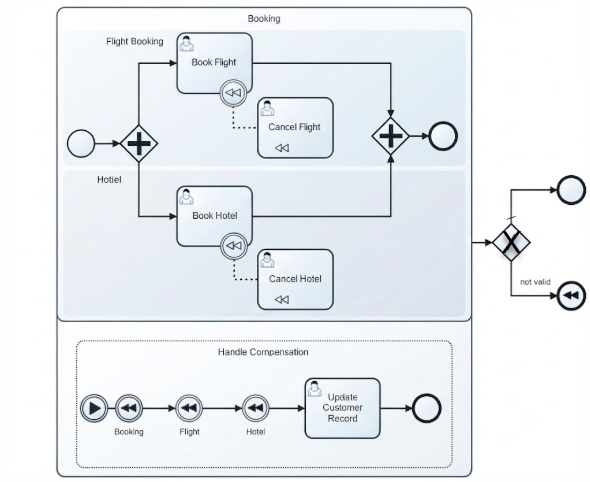
This case study analyzes a Travel Booking Process that uses advanced BPMN concepts—specifically Sub-processes, Parallel Gateways, and Compensation Handlers—to ensure data consistency. It demonstrates how to model the “Happy Path” (successful booking) alongside the “Exception Path” (cancellation and rollback), ensuring that financial and inventory records remain accurate regardless of outcome.
2. Key BPMN Concepts Explained
Before diving into the workflow, let’s define the visual symbols used in the diagram. Understanding these building blocks is essential for reading any BPMN chart.
Pools and Sub-processes
-
Booking (Large Rounded Rectangle): This is an Embedded Sub-process. It groups related activities together into a single logical unit. Think of it as a “black box” transaction: from the outside, it looks like one step, but inside, it contains multiple complex actions. It acts as a single, combined transaction that must either succeed fully or fail fully.
Gateways (Decision Points)
-
Parallel Gateway (Diamond with a + sign): This splits the path into multiple streams that happen at the same time (concurrently). Later, it merges them back together, waiting until all parallel paths have finished before proceeding.
-
Exclusive Gateway (Diamond with an X sign): This represents a decision point. The process will follow exactly one path based on a specific condition (e.g., “Is Valid?” Yes/No).
Tasks and Compensation
-
User Task (Box with a person icon): A task that requires human intervention, such as a customer service agent reviewing a file or a traveler clicking a confirmation button.
-
Boundary Compensation Event (Circle with a rewinding
<<symbol attached to a task): A trigger attached to a specific task. If the overall process fails later, this trigger activates a predefined rollback activity. It essentially says, “If we need to undo this later, here is how.” -
Compensation Activity (Box with a
<<symbol inside): The specific “undo” action (e.g., “Cancel Flight”) associated with a previously completed task. -
Event Sub-process (Dotted Rectangle at the bottom): A specialized subprocess inside the main process that remains inactive until triggered by a specific event—in this case, a global compensation request.
3. Step-by-Step Process Breakdown
The workflow is divided into three distinct phases: executing the booking, validating the result, and handling any necessary rollbacks.
Phase 1: The Core Booking Sub-process
This phase handles the actual reservation of services.
-
Start: The process begins at the far-left circle outside the main box, initiating the booking request.
-
Entering the Sub-process: The flow enters the “Booking” sub-process container.
-
Parallel Execution: The flow hits a Parallel Gateway (+). This duplicates the process token into two simultaneous paths:
-
Path A: A user performs the Book Flight task.
-
Path B: A user performs the Book Hotel task.
-
-
The Safeguard: Attached to both “Book Flight” and “Book Hotel” are boundary compensation circles (
<<). If these booking tasks finish successfully, the system “remembers” how to undo them using the connected Cancel Flight and Cancel Hotel tasks. These handlers are dormant for now but are ready to activate if needed. -
Synchronization: Both booking tasks flow into a closing Parallel Gateway (+). The process pauses here until both the flight and hotel are successfully secured. This ensures we don’t proceed with partial data.
-
Sub-process Completion: Once both tasks are done, the flow exits the “Booking” container via the end event circle.
Phase 2: Validation and Decision Making
Once the booking sub-process finishes, the system must verify the integrity of the transaction.
The flow moves to an Exclusive Gateway (X), which evaluates the booking details:
-
Valid Path (Top Branch): If the booking details pass system validation (e.g., payment cleared, no fraud detected), the process moves to the top path and finishes successfully at the standard End Event. The customer receives their confirmation.
-
Not Valid Path (Bottom Branch): If the transaction is flagged as “not valid,” the process follows the lower path. It triggers a Compensation End Event (represented by a filled black
<<icon inside a circle). This signal tells the system: “Something went wrong; we need to undo what we just did.”
Phase 3: Rolling Back (Handle Compensation)
When the “not valid” path triggers the compensation event, the system automatically activates the Handle Compensation event sub-process located at the bottom of the diagram.
-
Catching the Event: The Booking (
<<) start event catches the failure signal. This wakes up the dormant compensation handlers defined in Phase 1. -
Undoing the Hotel and Flight: The process triggers the compensation handlers. It runs the Cancel Hotel and Cancel Flight tasks. Note that these often execute in reverse order of creation to ensure dependencies are respected, cleanly refunding money and releasing reservations.
-
System Cleanup: After undoing the bookings, a user performs the Update Customer Record task to log the cancellation reason and ensure the customer’s profile reflects the failed transaction.
-
Final Terminate: The compensation process ends cleanly, ensuring no orphaned bookings are left in the database. The system returns to a neutral state, ready for a new attempt if desired.
4. Key Takeaways for Beginners
-
Happy Path vs. Exception Path: BPMN allows you to design the ideal scenario (booking everything successfully) while cleanly mapping out what happens when things go wrong. Never assume the “Happy Path” is the only path.
-
The “Undo” Philosophy: In digital transactions, you cannot simply “delete” a processed credit card charge or a flight seat reservation. You must execute a counter-action (a compensation) to reverse it. Compensation is the business equivalent of a database transaction rollback.
-
Visual Documentation: Diagrams like this bridge the gap between business managers who understand customer needs and software engineers who build the automation rules. They provide a shared language for discussing complex logic.
-
Parallelism Requires Synchronization: When doing two things at once (like booking a flight and hotel), you must wait for both to finish before moving forward. The Parallel Gateway ensures this synchronization.
Conclusion
Designing a resilient business process is about more than just connecting steps; it is about anticipating failure and planning for recovery. The Travel Booking Process outlined in this case study demonstrates how BPMN provides the tools to manage complexity without sacrificing clarity.
By leveraging Embedded Sub-processes to group related tasks, Parallel Gateways to handle concurrent actions, and Compensation Handlers to manage rollbacks, organizations can ensure data integrity and customer trust. For beginners, mastering these concepts is the first step toward designing enterprise-grade workflows that are not only efficient but also robust enough to handle the unpredictable nature of real-world business.
As you continue your journey into process modeling, remember: a good process doesn’t just work when things go right—it works even when things go wrong.
Reference
-
AI BPMN Diagram Generator: Professional BPD Tool: An official guide detailing how Visual Paradigm’s AI feature can generate BPMN 2.0 compliant diagrams from plain-English text descriptions, acting as a powerful tool for business analysts and architects .
-
Mastering Business Process Modeling: A Complete Guide to BPMN and AI-Powered Diagram Generation: A comprehensive guide that bridges foundational BPMN concepts with AI-powered diagram generation, covering the use of natural language to create professional BPDs .
-
Introduction to BPMN using Visual Paradigm: A tutorial providing an overview of key BPMN elements like flow objects, connecting objects, and swimlanes, along with best practices for modeling .
-
Chapter 6 Elevate Your BPMN Diagrams with Visual Paradigm: An in-depth chapter exploring advanced BPMN features in Visual Paradigm, such as process drill-down, as-is and to-be modeling, and integration with UML and ERD .
-
How does the BPMN Animation Works?: A support document explaining the BPMN animation tool, which identifies and animates paths in a diagram to make process flows more dynamic and easier to understand .
-
Drawing BPMN Business Process Diagram: A user guide on the basics of creating a BPMN diagram in Visual Paradigm, including steps for assigning IDs to model elements for better documentation .
-
BPMN data object, data input, data output and data store: A guide on using data objects, data inputs, data outputs, and data stores within BPMN diagrams to model the flow of information in a business process .
-
包括的なBPMN図チュートリアル (Comprehensive BPMN Diagram Tutorial): A Japanese-language tutorial that explains the purpose of BPMN diagrams, their key concepts, and how to create them using Visual Paradigm Online .
-
Visual Paradigm:軟體開發的終極一站式軟體 (Visual Paradigm: The Ultimate All-in-One Software for Software Development): A blog post highlighting Visual Paradigm’s BPMN tool features, such as process drill-down and cross-standard integration .
-
Generador de diagramas AI BPMN: Herramienta profesional BPD (AI BPMN Diagram Generator: Professional BPD Tool): A Spanish-language guide on using Visual Paradigm’s AI BPMN Generator to create professional business process diagrams from text descriptions .

 English
 Arabic
 Chinese (Simplified)
 Dutch
Dutch French
 German
 Italian
 Japanese
 Korean
 Portuguese
 Russian
 Spanish