


Introduction: The Death of “UML vs. Agile”
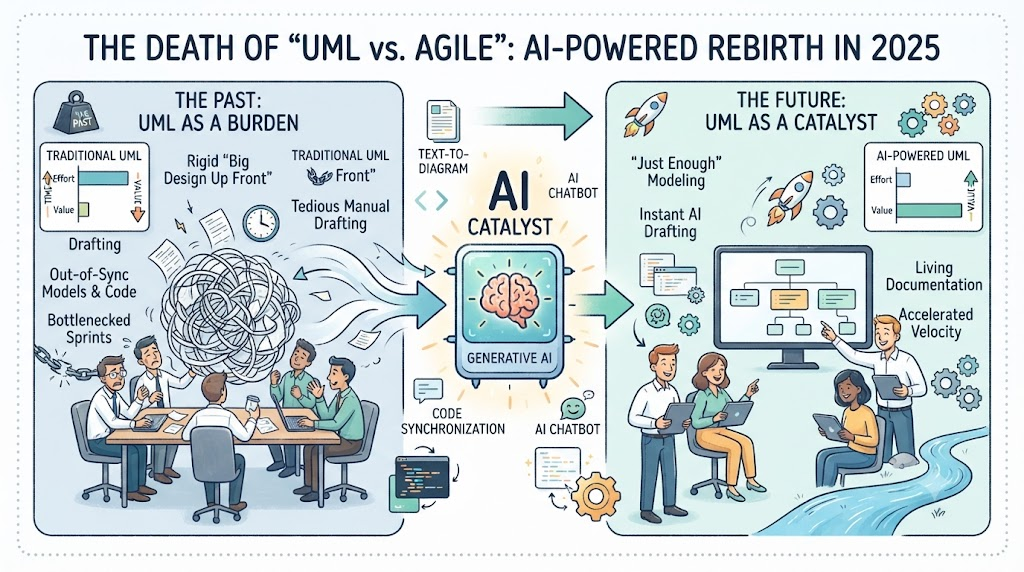
For years, Unified Modeling Language (UML) carried a reputation that made Agile practitioners wince: rigid, time-consuming, and inherently “Waterfall.” The critique was valid. Heavy upfront documentation often fell by the wayside in fast-paced development, leading to architectural drift, knowledge silos, and misaligned teams.
But the narrative is changing. In 2025, UML isn’t dead—it’s being reborn. The catalyst? Artificial Intelligence.
By combining the iterative, value-driven principles of Agile with the transformative power of generative AI, UML modeling is no longer a bottleneck. It has become a catalyst for speed, clarity, and collaboration. This guide explores how AI-powered UML—particularly within Visual Paradigm’s comprehensive ecosystem—is turning static diagrams into living, breathing assets that keep pace with your sprints.
1. Understanding Agile vs. Scrum: The Foundation
Before diving into tooling, it’s essential to clarify a common source of confusion: Agile and Scrum are not the same thing.
| Aspect | Agile (The Philosophy) | Scrum (The Framework) |
|---|---|---|
| Nature | A broad mindset and set of values | A specific, lightweight framework |
| Focus | Iterative development, customer collaboration, responding to change | Defined roles, artifacts, and events |
| Answering | The “what” and “why” | The “how” |
| Analogy | The philosophy of “eating healthy” | A specific diet plan like the “Mediterranean Diet” |
Agile emphasizes delivering working software frequently and embracing change over rigid planning. Scrum provides the structure to achieve this through roles (Scrum Master, Product Owner, Developers), artifacts (Product Backlog, Sprint Backlog, Increment), and events (Sprint, Daily Standup, Sprint Review, Sprint Retrospective).
Understanding this distinction is critical because AI-powered UML can support both. It enables the philosophical agility of responding to change while fitting seamlessly into Scrum’s iterative framework.
2. Why UML Modeling Was Seen as Anti-Agile
The historical conflict between UML and Agile stemmed from misuse rather than inherent incompatibility.
The Problem: Big Design Up Front (BDUF)
In traditional Waterfall approaches, teams spent weeks—sometimes months—creating detailed UML models before writing a single line of code. This introduced a “waterfall-by-stealth” phase where diagrams became obsolete the moment implementation began.
Core Criticisms of Traditional UML:
| Criticism | Why It Hurt Agile |
|---|---|
| Time-intensive | Maintaining models during sprints became a burden |
| Outdated quickly | Models fell out of sync with evolving code |
| Slow feedback loops | Design changes required tedious manual edits |
| Over-documentation | Focused on completeness over delivering value |
The manual effort required to maintain synchronization between models and code became a bottleneck that Agile teams could rarely afford. The result? Many teams abandoned modeling altogether—throwing the baby out with the bathwater.
The Core Conflict: Sketchers vs. Blueprinters
Martin Fowler’s UML Distilled captured a fundamental tension: the divide between blueprinters and sketchers.
| Perspective | Approach | Priority |
|---|---|---|
| Blueprinters | UML as a precise, formal language mapped directly to code | Precision and completeness |
| Sketchers | UML as a lightweight, conceptual tool for communication | Speed and clarity |
The creators of UML designed a rigid, highly structured meta-model intended for rigorous blueprinting. But practitioners overwhelmingly chose sketching—and the tools couldn’t keep up. Human text-to-code velocity easily outpaced the manual friction of drag-and-drop diagramming.
3. How AI Changes the Equation: From Burden to Catalyst
Artificial Intelligence fundamentally alters the cost-benefit equation of visual modeling. Where once drawing a diagram took hours, now it takes seconds—without sacrificing quality.
Key AI Capabilities That Make UML Agile
Text-to-Diagram Generation
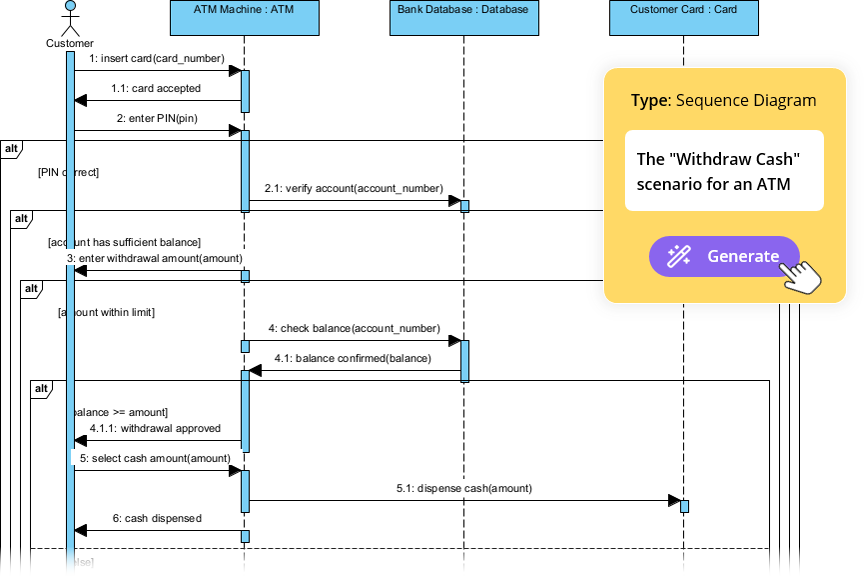
The most transformative feature: natural language processing (NLP) that understands entities, concepts, and relationships within your text input.
How it works:
-
You describe your system in plain English
-
AI processes the text against modeling standards (like UML rules)
-
AI generates a fully editable, native diagram with professional layout
Example: A prompt like “An online library system that handles user login, book searching, borrowing, returns, and overdue notifications” instantly generates a complete Use Case Diagram with actors and relationships.
AI-Assisted Class Diagram Generation
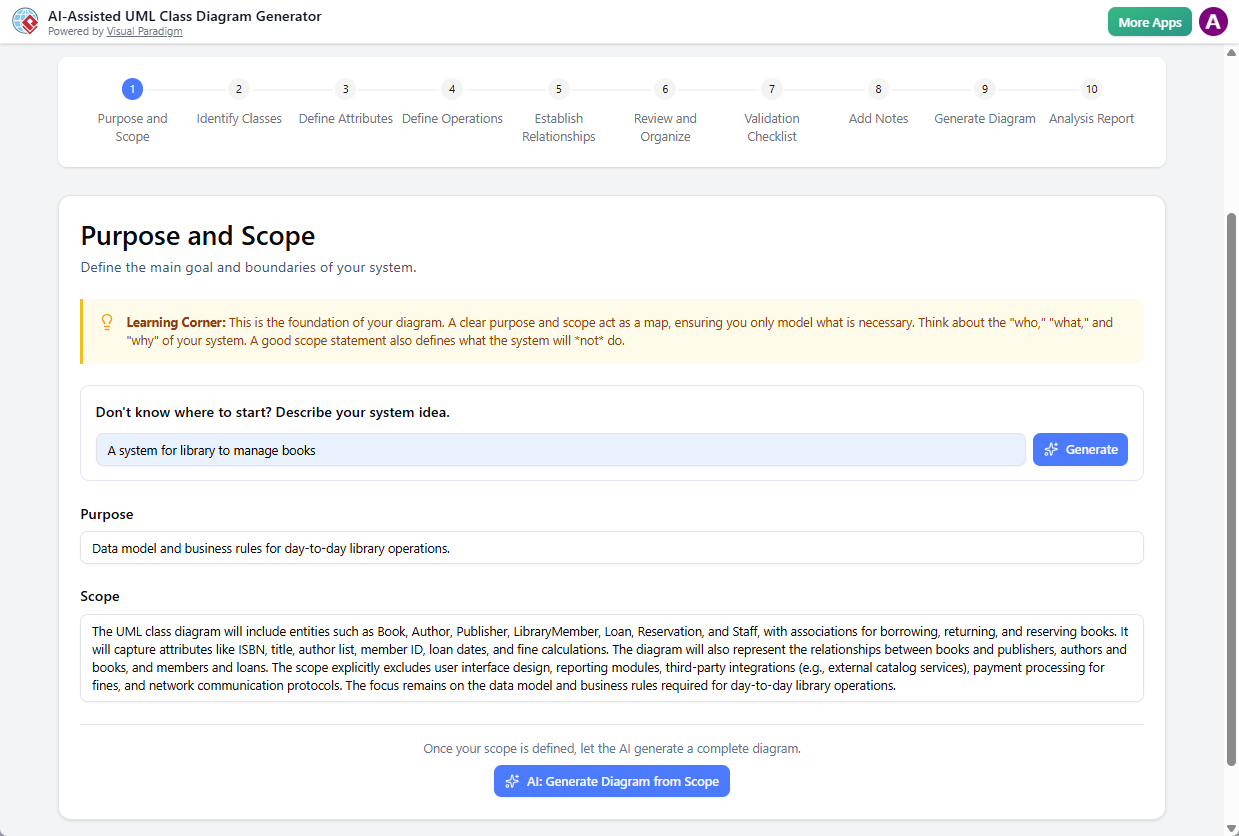
Guided wizard + AI suggestions:
-
Auto-detects entities and relationships from requirements
-
Recommends associations, multiplicities, and inheritance
-
Validates against UML 2.x standards
-
Exports to PlantUML, JSON, or code stubs
Contextual AI Chatbot Assistant
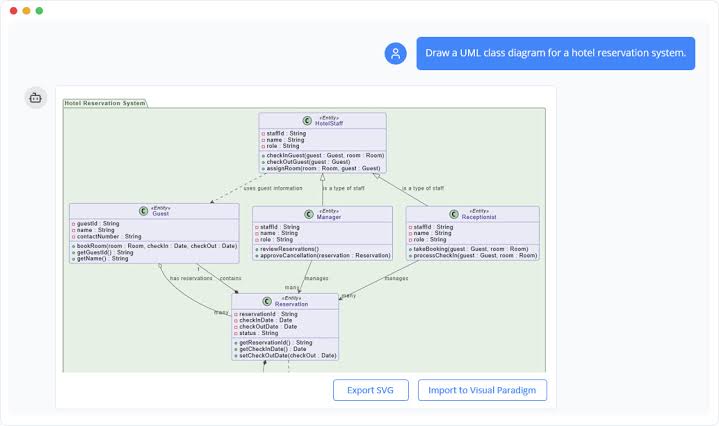
The AI doesn’t stop at generation—it becomes an interactive design partner:
| Capability | Example |
|---|---|
| Design refinement | “Add rate limiting to the login process” |
| Relationship analysis | “Show how the order service interacts with inventory” |
| Educational support | “Explain the difference between association and aggregation” |
| Diagram explanation | “Summarize this sequence diagram in plain English” |
Code ↔ Diagram Synchronization
AI bridges the gap between source code and diagrams through round-trip engineering:
-
Forward Engineering: Generate code skeletons from UML models
-
Reverse Engineering: Reconstruct UML diagrams from existing code
-
Bi-directional Sync: Changes in code update models; changes in models update code
The Result: From Static to Living Documentation
AI transitions visual modeling from a static documentation burden into an interactive, agile design partner. According to the 2024 IcePanel State of Software Architecture Report, 60% of enterprise architects believe AI will fundamentally change how documentation is created and maintained.
4. Visual Paradigm: A Complete Platform for AI-Powered Agile Modeling
Visual Paradigm (VP) has emerged as an industry leader in AI-powered visual modeling, especially with the release of Visual Paradigm 18.0.
Core AI Features in Visual Paradigm
1. Generative AI Core
-
Natural Language to UML for 10+ diagram types (Class, Sequence, Activity, Use Case, Component, Deployment, BPMN, SysML, ArchiMate, C4)
-
Code-to-Diagram: Upload codebases (Java, Python, C#) → AI reverse-engineers UML models
-
Support for enterprise standards like TOGAF and ArchiMate
2. VP AI Assistant
-
Contextual questioning and follow-up capabilities
-
Diagram summarization for stakeholder communication
-
Intelligent suggestions for missing relationships and design patterns
3. Integrated Agile Project Management
-
Built-in Agile boards (Scrum/Kanban), backlog management, and sprint tracking
-
Direct linking between User Stories on the board and corresponding UML diagrams
-
Real-time collaboration features
4. Round-Trip Engineering
-
Bi-directional code engineering for Java, C#, Python, and more
-
Change the UML → code skeleton updates automatically
-
Change the code → UML reflects the changes
5. OpenDocs and Pipeline Integration
-
OpenDocs: AI-powered knowledge base with embedded, searchable diagrams
-
Pipeline: Cloud-based repository that connects all five execution environments
-
One-click embedding of live, updatable diagrams into documentation
Visual Paradigm vs. Generic AI Diagram Tools
| Feature | Visual Paradigm (AI Ecosystem) | Generic AI Tools |
|---|---|---|
| UML Standards Compliance | Full UML 2.x, BPMN, ArchiMate, SysML | Basic shapes, limited semantics |
| Enterprise-Grade Features | Code generation, validation, governance | No compliance or architecture support |
| AI Integration Depth | Chatbot, model validation, code sync | Basic text-to-diagram only |
| Ecosystem & Workflow | Complete suite: modeling, docs, collaboration | Standalone diagramming |
| Use Case Fit | Complex systems, regulated industries, Agile teams | Quick prototypes, whiteboard sketches |
5. Key Concepts for AI-Powered Agile Modeling
Just-Enough Modeling
The Agile principle of creating only the documentation necessary to facilitate understanding—not exhaustive upfront design.
Example: Instead of modeling the entire enterprise architecture upfront, a team uses AI to generate a single Sequence Diagram for the “Checkout” user story right before Sprint Planning.
Living Documentation
Models that evolve with the codebase, never becoming obsolete.
Example: A developer adds a new validateToken() method to the AuthService class. Visual Paradigm’s AI detects this commit and automatically updates the Class Diagram overnight.
Model-Driven Agile
Using models as the foundation for development tasks and code generation.
Example: The Product Owner writes a user story. AI generates a draft Activity Diagram. The team refines it, and VP automatically generates boilerplate code and Jira sub-tasks from the diagram nodes.
The 20% Rule
A pragmatic constraint: never blueprint an entire system. Use AI to generate behavioral models only for the top 20% most complex, high-risk business rules or integration touchpoints.
6. Practical Examples: AI-Powered UML in Action
Example 1: E-Commerce Platform – Forward Engineering a New Microservice
| Step | Action | AI Contribution |
|---|---|---|
| 1 | Model class diagram for “DiscountService” | AI generates classes, attributes, methods |
| 2 | Forward engineering | 80% boilerplate code generated automatically |
| 3 | Developer focus | Implements business logic, not boilerplate |
| 4 | New sprint | Add new rule type in model; forward again → only new concrete class generated |
Result: Setup time reduced from hours to minutes; consistent structure across services.
Example 2: Mobile Banking App – Reverse Engineering Legacy Code
| Challenge | Solution | Outcome |
|---|---|---|
| Old monolithic JAR with scattered authentication logic | Reverse engineering → reconstruct class and sequence diagrams | New team quickly understands legacy coupling |
| Complex interdependencies | Identify extractable AuthService component | Plan strangler refactoring approach |
Example 3: Healthcare Telemedicine – State Machine to Code
| Step | Action |
|---|---|
| 1 | Model state machine for “ConsultationSession” (states: Scheduled, InProgress, Paused, Completed, Cancelled) |
| 2 | Forward engineer → Java enum, state pattern classes, transition handlers |
| 3 | Developer implements domain-specific actions (e.g., notifyParticipants()) |
Result: Robust, maintainable state logic; new “Recording” state can be added by updating the model.
Example 4: Financial Services – 70% Design Time Reduction
A Tier-1 financial institution with 150+ developers adopted Visual Paradigm AI for lightweight, AI-enhanced UML modeling.
| Metric | Before | After |
|---|---|---|
| Time to onboard new developer | 5 weeks | 1.5 weeks |
| Time to design new feature | 3 days | 45 minutes |
| Design miscommunications | 12/month | 2/month |
| Compliance audit prep time | 3 weeks | 1 week |
Key quote from the CIO: “Visual Paradigm’s AI didn’t just speed up modeling—it turned architecture into a living, collaborative asset.”
7. Guidelines: Tooling with Visual Paradigm
Step 1: Choose Your Starting Point
Visual Paradigm offers multiple entry points for AI-powered modeling:
| Source Platform | Best For | Lifecycle |
|---|---|---|
| AI Chatbot | Rapid brainstorming, text-to-diagram generation | Static snapshots; immediate export |
| Online Editor | Browser-based editing, styling tweaks | Manual tracking; isolated revisions |
| Desktop App | Enterprise architecture, validated engineering models | Automatic revisions; semantic consistency |
| Web Apps (C4 Wizards) | Complex framework modeling, C4 architecture | Structural architecture; guided design |
| OpenDocs | Final documentation assembly, publishing workflows | Live link insertion; global registry |
Step 2: Generate Your Diagram with AI
For AI Chatbot:
-
Navigate to the AI Chatbot via your workspace or
chat.visual-paradigm.com -
Prompt the AI: “Generate a sequence diagram for our microservices authentication flow”
-
Review and refine the output
-
Export to Pipeline with optional metadata comment
For Desktop Application:
-
Go to Tools > AI Diagram
-
Select the target diagram type (Use Case, Class, Sequence, etc.)
-
Enter your system description in plain language
-
Click OK → AI generates a structured, laid-out diagram
Pro Tip: For effective results, be detailed in your description. Include:
-
Actors and their goals
-
Key entities and their relationships
-
Main flows and alternative paths
Step 3: Refine with AI Assistance
The AI-generated diagram typically accounts for 80% of the effort; you supply the final 20% of detail and refinement:
-
Drag elements to adjust layout
-
Add specific data types to attributes
-
Assign methods to classes
-
Change relationships (association → generalization or aggregation)
-
Ask the AI: “Add error handling to this flow” or “Explain this sequence diagram”
Step 4: Connect to Your Agile Workflow
Link User Stories to Models:
Visual Paradigm’s integrated Agile boards allow you to link User Stories directly to their corresponding UML diagrams. This ensures traceability and keeps modeling aligned with sprint goals.
Automate Code Generation:
-
Right-click class/component → Generate Code
-
Choose language/template (Java Spring, .NET, Python Flask, etc.)
-
Customize generation rules
-
Developer focus shifts from boilerplate to business logic
Step 5: Maintain Living Documentation with Pipeline and OpenDocs
Workflow:
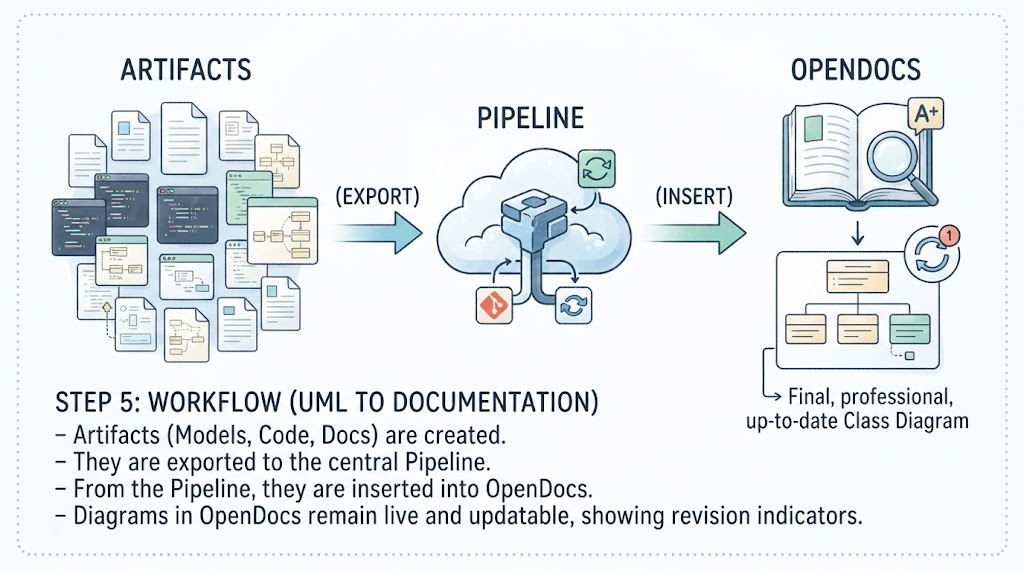
[Artifacts] ──(Export)──> [Pipeline] ──(Insert)──> [OpenDocs]
Step-by-Step:
-
Generate diagram in any Visual Paradigm environment
-
Send to Pipeline: Click Export > Send to OpenDocs Pipeline
-
Add comment for version identification
-
Open document in OpenDocs → Insert > Pipeline
-
Select your diagram from the asset list
-
Diagram embeds as a live, updatable artifact (not a static image)
Managing Updates:
-
A floating Revision Indicator (🔄) appears when newer Pipeline versions exist
-
Click to view timestamps, commit notes, and source platform
-
Swap versions to update your master document instantly
-
Previous versions remain accessible for audit trails
Step 6: Apply the Lean Modeling Framework
To scale AI-powered modeling without adding overhead, follow this high-ROI framework:
| Phase | Action | AI Role |
|---|---|---|
| Sprint Planning | Feed business requirements into textual analysis engine | Parse nouns/verbs; scaffold baseline business entities |
| Design & Refinement | Generate behavioral models only for complex business rules | Create Sequence/Activity diagrams in seconds |
| Development | Forward engineer refined sketches | Generate clean, language-specific boilerplate |
| Governance | Use AI’s real-time model validation | Flag missing associations, broken multiplicities, anti-patterns |
Step 7: Leverage Automated Reporting
Visual Paradigm’s AI-powered reporting transforms fragmented model elements into cohesive, professional narratives:
| Report Type | Contents | Audience |
|---|---|---|
| Executive Summary | High-level narrative of system goals | Stakeholders, sponsors |
| Developer’s Guide | PlantUML reports, code-generation outputs | Engineering team |
| QA Audit Trail | Test cases linked to Activity Diagrams | QA team, auditors |
One-Click SDD Generation: The AI Use Case Modeling Studio can produce a complete Software Design Document (SDD) as PDF or Markdown with a single button.
8. Use Case Modeling: A Complete Example
To illustrate the end-to-end workflow, let’s walk through a typical use case elaboration using Visual Paradigm AI.
Step 1: Define the Use Case
The Product Owner writes a user story: “User authenticates via OAuth2”
Step 2: AI Generates Draft Diagrams
The Product Owner prompts the AI: “Generate a Sequence Diagram for this OAuth2 story”
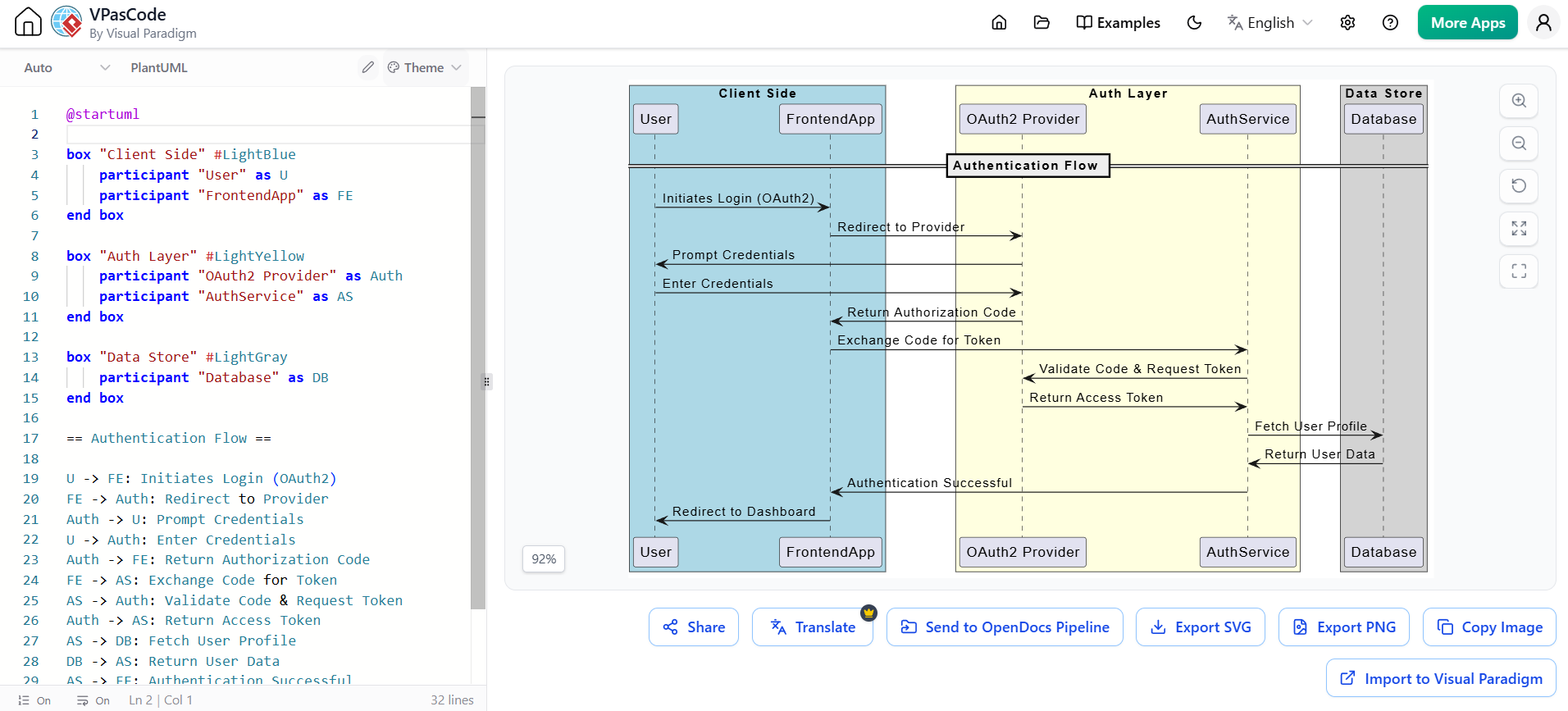
@startuml
skinparam participantPadding 10
skinparam boxPadding 10

box "Client Side" #LightBlue
    participant "User" as U
    participant "FrontendApp" as FE
end box

box "Auth Layer" #LightYellow
    participant "OAuth2 Provider" as Auth
    participant "AuthService" as AS
end box

box "Data Store" #LightGray
    participant "Database" as DB
end box

== Authentication Flow ==

U -> FE: Initiates Login (OAuth2)
FE -> Auth: Redirect to Provider
Auth -> U: Prompt Credentials
U -> Auth: Enter Credentials
Auth -> FE: Return Authorization Code
FE -> AS: Exchange Code for Token
AS -> Auth: Validate Code & Request Token
Auth -> AS: Return Access Token
AS -> DB: Fetch User Profile
DB -> AS: Return User Data
AS -> FE: Authentication Successful
FE -> U: Redirect to Dashboard

@enduml
The AI:
-
Parses the NLP input
-
Creates a draft Sequence Diagram with appropriate lifelines and messages
-
Ensures proper UML notation and layout
Step 3: Team Refinement
During backlog refinement, the Development Team:
-
Reviews and refines the diagram
-
Adds Token validation and Database check steps
-
The AI suggests missing elements: “You forgot an ‘alt’ fragment for failed login”
Step 4: Code Generation
The refined diagram is forward-engineered:
-
VP generates code skeleton for the authentication service
-
Team implements business logic and writes unit tests
-
Models evolve alongside implementation
Step 5: Living Documentation
As code is committed to Git:
-
AI detects code changes
-
Automatically updates UML diagrams
-
Diagrams always reflect the current system state
-
Pipeline makes updates available in OpenDocs documentation
Step 6: Sprint Review
-
Team demonstrates working software with live UML model
-
Stakeholders see both functionality and architecture
-
User Story marked as “Done”
9. Why This Matters: The Strategic Advantage
The integration of Generative AI into software modeling does more than speed up drawing—it fundamentally alters the economics of design.
Measurable Benefits
| Metric | Typical Improvement |
|---|---|
| Manual diagramming time | Reduced by up to 70% |
| Design-to-code handoff | Accelerated by eliminating boilerplate |
| Documentation accuracy | Significantly improved via auto-sync |
| Team alignment | Enhanced through shared, living models |
| Onboarding speed | New developers ramp up faster with visual clarity |
| Audit preparation | Streamlined with automated reporting |
When to Use Visual Paradigm’s AI Ecosystem
-
Working on complex, regulated, or enterprise-scale systems
-
Need to communicate architecture across teams (devs, architects, stakeholders)
-
Want to accelerate onboarding and reduce design ambiguity
-
Using Agile but want structure without slowing down
Conclusion: The Intelligent Future of Software Design
The perceived dichotomy between Agile delivery speed and architectural rigor is a thing of the past. By understanding the distinct roles of the Agile philosophy and the Scrum framework, teams can leverage AI-powered tooling to their advantage.
AI-powered UML modeling—particularly within Visual Paradigm’s all-in-one ecosystem:
-
Eliminates the historical friction of traditional diagramming
-
Empowers teams to practice “just-enough” modeling
-
Ensures living documentation through intelligent round-trip engineering
-
Fosters seamless, real-time collaboration between product owners, architects, and developers
The most agile teams in 2025 aren’t those that skip modeling—they’re those that model intelligently.
Embracing this AI-driven, model-centric approach does more than improve documentation. It makes your entire Agile delivery pipeline smarter, more transparent, and highly resilient to change. UML’s future isn’t in static documentation—it’s in dynamic, AI-powered design.
Quick Reference: Visual Paradigm AI Ecosystem
| Component | Purpose |
|---|---|
| AI Diagram Generation | Text-to-diagram from natural language |
| AI Chatbot | Conversational design assistant |
| Agile Boards | Integrated Scrum/Kanban project management |
| Round-Trip Engineering | Bi-directional code-model synchronization |
| Pipeline | Cloud-based artifact repository |
| OpenDocs | AI-powered knowledge management platform |
| Reporting Engine | Automated SDD and stakeholder documentation |
| C4 Modeling Tools | Lightweight, developer-friendly system context diagrams |
Reference
-
AI-Powered Use Case Modeling: Accelerating Agile Discovery with Visual Paradigm: Explores how AI-powered use case modeling transforms Agile requirements discovery, turning natural language descriptions into professional diagrams in seconds .
-
Agile Architecture Evolved: Supercharging UML Modeling with AI and Visual Paradigm: Explains the foundational differences between Agile and Scrum, demonstrating how AI-powered features are redefining model-driven development .
-
UML in the Age of AI: How Visual Paradigm’s Ecosystem Is Reviving Visual Modeling: Comprehensive exploration of UML’s modern relevance and how Visual Paradigm’s AI ecosystem is transforming static documentation into dynamic, intelligent design engines .
-
Visual Paradigm Pipeline: The Bridge for AI Modeling & Knowledge Management: Details how the Pipeline serves as a cloud-based centralized repository connecting Visual Paradigm Desktop, AI Chatbot, and OpenDocs for seamless artifact transfer .
-
From Code to Clarity: A Beginner’s Guide to Seamless Diagramming with VPasCode and OpenDocs: Tutorial on using VPasCode with PlantUML/Mermaid and OpenDocs Pipeline integration for text-based diagramming and documentation .
-
AI Diagram Generation Guide: Instantly Create System Models with Visual Paradigm’s AI: Step-by-step guide on generating UML, BPMN, and other diagrams from plain language descriptions using Visual Paradigm’s AI Diagram feature .
-
Agile Code Engineering: Covers forward, reverse, and round-trip engineering techniques that maintain consistency between UML models and source code in Agile environments .
-
The Future of Collaborative Modeling: AI as Your Team’s Co-Designer: Discusses how Visual Paradigm Online’s AI Chatbot enables asynchronous collaboration by converting natural language into professional, shareable diagrams .
-
Comprehensive Reporting and Documentation: Explains AI-powered reporting tools that transform model elements into professional narratives, including executive summaries and audit trails .
-
Agile Project Management Software & AI Tool: Overview of Visual Paradigm’s AI agile tools, including Agilien for Jira backlog generation and the User Story 3Cs Editor .
Related posts:
 Visual Paradigm Online PowerPoint Web Viewer: Convert PPT to HTML5 with Animations & Transitions
 Complete Guide to Visual Paradigm Online Office Suite
 VPasCode Feature Review Guide: The Ultimate Diagram-as-Code Solution for Modern Teams
Mastering Business Process Modeling: A Practical Guide to BPMN 2.0
VPasCode Feature Review Guide: The Ultimate Diagram-as-Code Solution for Modern Teams
Mastering Business Process Modeling: A Practical Guide to BPMN 2.0

 English
 Arabic
 Chinese (Simplified)
 Dutch
Dutch French
 German
 Italian
 Japanese
 Korean
 Portuguese
 Russian
 Spanish